What Is Laser Power? A Guide for Laser Engravers Buyers (2026)
As an Amazon Associate we earn from qualifying purchases. Links on this page are affiliate links.
Laser Power Explained For Buyers
Laser power is the rate at which a laser diode or tube delivers energy to a material. You will see this spec listed in watts. It determines how fast the machine can cut or engrave. Higher wattage means more energy hits the target per second. This allows for deeper cuts and faster processing times.
The values you will encounter range widely. Entry-level units often start at 5W or 6W. These are suitable for shallow engraving on wood or leather. They struggle with thick materials. Moving up, 7W and 9W units offer slightly more speed. A 10W laser is a common baseline for hobbyists who want to cut thin plywood.
Mid-range power levels include 20W, 30W, and 40W. These machines handle thicker wood and acrylics with ease. You will find 45W and 50W units in serious home workshops. They cut through dense materials quickly. For professional use, look at 60W, 90W, and 100W models. These industrial-grade tools slice through thick stock in seconds.
Understanding laser power explained helps you match the tool to your projects. If you only engrave photos on small items, lower wattage suffices. If you cut layers of basswood for models, you need more power. The spec tells you the machine’s capability. It does not indicate beam quality or focus precision. However, it is the primary factor in throughput speed.
When comparing options, check the rated output. Some listings may show input power, which is misleading. Always look for the actual laser output in watts. This number defines what the machine can physically do. Choose based on the thickest material you plan to process regularly. Higher power gives you flexibility but costs more upfront. Balance your needs with the available budget.
Laser Power Options Compared
5W
Five watts delivers modest energy, suitable for shallow engraving on soft materials. It works well for light marking on wood, leather, or paper. The low power limits cutting depth, making it impractical for thick substrates. Users seeking precision over speed may find this adequate for hobby projects. The xTool F2 15W Diode & 5W IR Laser Engraver uses a 5W IR module specifically for metal marking. This lower power setting reduces the risk of burning delicate surfaces. It is a practical choice for beginners who need to learn machine handling without aggressive material removal. Trade-offs include slower processing times and limited material compatibility compared to higher wattage units.
7W
Seven watts provides a noticeable boost in cutting ability while maintaining precision. It is effective for engraving on harder woods and metals. The ACMER S2 7W Laser Engraver exemplifies this tier, targeting hobbyists who need fine detail. This power level strikes a balance between speed and control. You can cut thin acrylics and woods more efficiently than with lower wattage. It is suitable for small batch personalization and light commercial work. The increased energy allows for cleaner edges on softer materials. Trade-offs include limited performance on thick substrates. It is not designed for heavy-duty industrial cutting. This option suits users who need more power than entry-level units but do not require high-speed production capabilities.
10W
Ten watts is a standard power level for home DIYers needing safe, precise engraving. The xTool M2 10W Enclosed Laser Engraver fits users who prioritize safety and precision. It handles wood, leather, and paper effectively. This power level offers a good balance of speed and control for detailed work. You can achieve clean cuts on thin materials and deep engravings on softer substrates. The enclosed design of many 10W units enhances safety for home use. It is suitable for crafting, personalization, and light commercial tasks. Trade-offs include limited ability to cut thick or dense materials. It is not designed for high-volume production. This option is practical for users who value versatility and safety over raw cutting power.
30W
Thirty watts delivers high power for fast cutting and deep engraving. The Longer Laser B1 30W Engraver fits users needing a large workspace. It handles thick woods and acrylics efficiently. This power level is ideal for large DIY cutting projects. You can process materials quickly with minimal charring. The increased energy allows for consistent results on dense substrates. It is a practical choice for users who need speed and precision. Trade-offs include higher cost and energy consumption. It requires proper ventilation and safety measures. This option is best for users who need a powerful tool for diverse projects. It handles most common DIY projects with ease.
40W
Forty watts provides strong cutting power for thick materials and high-speed processing. The xTool S1 40W Enclosed Laser Cutter is designed for safe home use. It handles wood, metal, and acrylic with ease. This power level is ideal for users who prioritize performance. You can cut through thick substrates quickly and cleanly. The increased energy allows for versatile material compatibility. It is a practical choice for small businesses and advanced hobbyists. Trade-offs include higher cost and energy consumption. It requires proper ventilation and safety measures. This option is best for users who need a powerful tool for diverse projects. It handles most common DIY projects with ease.
50W
Fifty watts delivers significant power for fast metal marking and color engraving. The GWEIKE G2 Max 50W Fiber Engraver suits professionals needing fast, precise metal marking in a compact form. It is ideal for small-batch industrial work. This power level is specialized for metals rather than wood or acrylic. You can achieve high-contrast marks and color engraving on stainless steel and titanium. The fiber laser source offers longevity and low maintenance. Trade-offs include high cost and limited material versatility compared to diode lasers. It is not suitable for cutting organic materials. This option is best for users focused on metal fabrication and industrial marking applications.
Is High Laser Power Worth It
Who needs it
You need higher wattage if you cut thick materials regularly. Machines ranging from 30W to 100W handle deeper cuts in wood, acrylic, and metal coatings. A 50W or 60W unit offers a strong balance for hobbyists who want speed and depth. If you work with dense hardwoods or thick acrylic sheets, lower power options like 5W or 10W will struggle significantly. They may only engrave the surface or fail to cut through entirely. For small business owners producing signage or custom gifts, time is money. Higher power reduces engraving time and increases throughput. You will appreciate the ability to process multiple layers or thicker substrates in a single pass. This spec is critical for anyone prioritizing production speed and material versatility over fine, shallow details.
Who can skip it
You can ignore high wattage if you only do shallow engraving on thin materials. A 5W, 6W, or 10W machine is sufficient for paper, thin wood veneers, and leather. These lower power settings provide better control for intricate designs and fine lines. High power can burn edges or char materials unnecessarily for light tasks. If your projects involve delicate artwork or detailed photo engravings on soft surfaces, less power yields cleaner results. You should prioritize precision and software ease over raw energy output. Focus on spot size and resolution specs instead. High wattage adds cost and complexity without benefit for light marking. Stick to lower power if you value detail and control. This approach keeps the machine simpler and more affordable for casual use.
Laser Power Glossary
Laser Power
The rate of energy delivery, measured in watts. Higher wattage increases cutting speed and depth. It determines how much energy hits the material each second.
Wattage
The unit of measurement for laser power. A 5W laser delivers less energy than a 50W unit. This spec dictates the machine's overall capability and speed.
Cutting Depth
How thick a material the laser can slice through. Higher power allows for deeper cuts. Low wattage limits depth, making it unsuitable for thick substrates.
Engraving Speed
How fast the laser marks the surface. More power often means faster processing. It reduces the time needed to complete detailed designs on various materials.
Laser Type
The technology used to generate the beam, such as diode or CO2. This choice affects material compatibility and safety. It determines which materials can be processed effectively.
Compatible Material
The substances the laser can safely process. Wood, acrylic, and leather are common targets. Each material absorbs energy differently, affecting the final engraving or cut quality.
Platen Size
The working area where you place your material. Larger platens accommodate bigger projects. Check this spec to ensure your designs fit within the machine's workspace.
Quick picks
| # | Product | Best for | Price |
|---|---|---|---|
| 1 | xTool M2 10W Enclosed Laser Engraver | Home DIYers needing safe, precise engraving | Check price of xTool M2 10W Enclosed Laser Engraver on Amazon |
| 2 | xTool F2 15W Diode & 5W IR Laser Engraver | Dual-laser metal and wood engraving | Check price of xTool F2 15W Diode & 5W IR Laser Engraver on Amazon |
| 3 | ACMER S2 7W Laser Engraver | fine detail engraving and small batch work | Check price of ACMER S2 7W Laser Engraver on Amazon |
| 4 | Longer Laser B1 30W Engraver | Large workspace DIY cutting projects | Check price of Longer Laser B1 30W Engraver on Amazon |
| 5 | xTool S1 40W Enclosed Laser Cutter | High-power cutting and safe home use | Check price of xTool S1 40W Enclosed Laser Cutter on Amazon |
| 6 | GWEIKE G2 Max 50W Fiber Engraver | fast metal marking and color engraving | Check price of GWEIKE G2 Max 50W Fiber Engraver on Amazon |
Our 6 picks

xTool M2 10W Enclosed Laser Engraver
Best for: Home DIYers needing safe, precise engraving
- Laser Power
- 10W (what this guide is about)
- Laser Type
- Diode
- Software Compatibility
- xTool Studio
- Form Factor
- Fully enclosed Class 1
- Compatible Material
- Wood, Leather, Paper, Fabric
- Features
- Enclosure, Camera
View on Amazon: xTool M2 10W Enclosed Laser Engraver Affiliate link
The xTool M2 is a Class 1 enclosed laser engraver with 10W diode power. It features built-in dual cameras for real-time preview and Place & Go accuracy. You get xTool Studio software with templates and AI generation. The unit supports wood, leather, paper, and fabric. It is designed for DIY makers and home crafters who need safety and precision in a compact footprint.
Pros
- 10W (10000mW) diode laser output
- Class 1 enclosed safety design
- Built-in dual cameras for workspace preview
- xTool Studio software with AI image generator
- Place & Go motion control accuracy
Cons
- 10W power is lower than 20W or 30W options for thicker materials
- CMYK inkjet and IR modules are sold separately
- No remote control or Bluetooth connectivity listed
Good fit if
- You want a safe, enclosed machine for home use
- You value camera-assisted precision for small projects
- You engrave wood, leather, or paper
Skip if
- You need to cut thick wood quickly
- You require built-in full-color printing
- You prefer open-frame desktop engravers
Verdict: The xTool M2 10W Diode Laser Engraver fits home crafters who prioritize safety and precision over raw speed. Its enclosed Class 1 design and dual cameras make it ideal for detailed work on wood, leather, and paper.
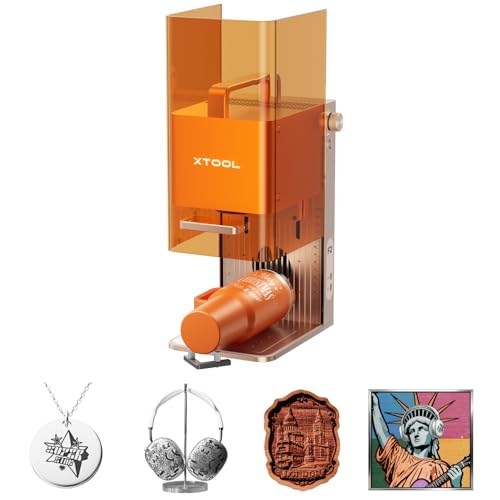
xTool F2 15W Diode & 5W IR Laser Engraver
Best for: Dual-laser metal and wood engraving
- Laser Power
- 5W (what this guide is about)
- Laser Type
- Diode, IR
- Engraving Speed
- Up to 6000mm/s
- Form Factor
- Fully enclosed
- Compatible Material
- Metal
- Features
- Camera
View on Amazon: xTool F2 15W Diode & 5W IR Laser Engraver Affiliate link
The xTool F2 combines a 15W diode laser and a 5W IR laser for versatile engraving. It features a built-in 50MP camera for precise alignment and reaches speeds up to 6000mm/s. This fully enclosed unit weighs 10 pounds and includes a base plate and material kit. It suits users needing fast, accurate marking on metal and wood in a portable, ready-to-use package.
Pros
- Dual 15W diode and 5W IR lasers for metal and wood
- Built-in 50MP camera for 0.1 mm alignment accuracy
- Fast engraving speeds up to 6000mm/s
- Fully enclosed and leak-proof design for indoor safety
Cons
- Class 4 laser classification requires strict safety precautions
- 10-pound weight limits true portability for some users
- No mention of app control or remote operation
Good fit if
- You need to engrave color on metal using IR laser
- You want a fully enclosed machine for safe indoor use
- You require high-speed processing for batch jobs
Skip if
- You need a Class 1 enclosed laser for unattended operation
- You want a machine that arrives without assembly
- You prefer a lighter unit for frequent travel
Verdict: The xTool F2 5W IR 15W Diode offers dual-laser versatility and high speed for precise metal and wood work. It fits users who need a safe, enclosed design for indoor commercial or hobbyist use.

ACMER S2 7W Laser Engraver
Best for: fine detail engraving and small batch work
- Laser Power
- 7W (what this guide is about)
- Working Area
- 300 × 300 mm
- Engraving Speed
- 10,000 mm/min
- Software Compatibility
- Acmerstudio, LightBurn, LaserGRBL
- Cutting Capacity
- 13 mm wood, 6 mm black acrylic
- Compatible Material
- Wood, Metal, Acrylic, Leather
View on Amazon: ACMER S2 7W Laser Engraver Affiliate link
The ACMER S2 delivers a true 7W laser output for detailed engraving and moderate cutting. It features a 300 × 300 mm working area and speeds up to 10,000 mm/min. The system includes safety shields and goggles. It supports Acmerstudio, LightBurn, and LaserGRBL. This machine suits beginners who need fine 0.01 mm precision for small projects and gifts.
Pros
- True 7W laser output for wood and acrylic
- 0.08 × 0.08 mm spot for 0.01 mm precision
- 300 × 300 mm working area
- Compatible with LightBurn and LaserGRBL
- Includes anti-UV shield and safety goggles
Cons
- 7W power limits single-pass cutting thickness
- Requires manual material repositioning for larger items
- No built-in camera for real-time preview
Good fit if
- You need fine detail engraving on small items
- You want to use LightBurn software
- You are starting with wood and acrylic projects
Skip if
- You need to cut thick wood in one pass
- You require a large working area over 300 mm
- You want a fully enclosed Class 1 machine
Verdict: The ACMER S2 7W Laser Engraver fits hobbyists who prioritize fine detail and software flexibility over high-speed cutting power. It is a practical entry point for small-scale personalization.

Longer Laser B1 30W Engraver
Best for: Large workspace DIY cutting projects
- Laser Power
- 30W (what this guide is about)
- Working Area
- 450 x 440 mm
- Engraving Speed
- Up to 600 mm/s
- Software Compatibility
- LightBurn
- Cutting Capacity
- 25mm basswood, 50mm acrylic
- Compatible Material
- Wood, Metal, Acrylic, Leather, Glass, Paper
View on Amazon: Longer Laser B1 30W Engraver Affiliate link
The Longer Laser B1 30W delivers up to 36W of optical power. It features a 450 x 440 mm working area and reaches speeds of 600 mm/s. The unit includes an auto air assist pump controlled by LightBurn software. It cuts 25mm basswood and 50mm acrylic. This machine suits DIY users needing high-speed throughput and a large workspace for bigger projects.
Pros
- Up to 36W laser output power
- 450 x 440 mm large working area
- 600 mm/s engraving speed
- Built-in auto air assist pump
- LightBurn software compatibility
Cons
- Lower power than 40W or 50W competitors
- No integrated camera system listed
- Limited to 30W size option in data
Good fit if
- You need a large 450 x 440 mm workspace
- You prioritize high cutting speed up to 600 mm/s
- You use LightBurn software for control
Skip if
- You require fiber laser power for deep metal engraving
- You need a built-in camera for positioning
- You want to cut materials thicker than 25mm wood
Verdict: The Longer Laser B1 30W Engraver fits users who need a large 450 x 440 mm workspace and fast 600 mm/s speeds. It is a practical tool for DIYers handling large wood or acrylic projects.

xTool S1 40W Enclosed Laser Cutter
Best for: High-power cutting and safe home use
- Laser Power
- 40W (what this guide is about)
- Working Area
- 23.93" x 15.16"
- Engraving Speed
- 600mm/s
- Software Compatibility
- xTool Creative Space (XCS)
- Form Factor
- Enclosed
- Cutting Capacity
- 18mm cherry wood
View on Amazon: xTool S1 40W Enclosed Laser Cutter Affiliate link
The xTool S1 is a 40W enclosed laser engraver with a 23.93" x 15.16" working area. It reaches speeds of 600mm/s and cuts up to 18mm cherry wood. The Class 1 design includes flame sensors and an emergency stop. It supports rotary axes for tumblers. This machine suits users needing high power and safety in a compact footprint.
Pros
- 40W laser power for fast cutting
- 600mm/s engraving speed
- Class 1 enclosed safety design
- Large 23.93" x 15.16" bed
Cons
- Heavier build due to aluminum frame
- Limited to 40W power output
- No mention of wireless connectivity
Good fit if
- You need high power for thick materials
- You want safety features for home use
- You engrave large items or multiple pieces
Skip if
- You require fiber laser for metal
- You need open-frame portability
- You prefer lower power for delicate work
Verdict: The xTool S1 40W Laser Engraver delivers strong cutting power and speed in a safe, enclosed unit. It fits buyers who prioritize performance and safety for large or thick projects.

GWEIKE G2 Max 50W Fiber Engraver
Best for: fast metal marking and color engraving
- Laser Power
- 50W (what this guide is about)
- Laser Type
- Fiber (1064nm)
- Working Area
- 150 x 150 mm
- Engraving Speed
- 15,000 mm/s
- Software Compatibility
- GLaser, LightBurn
- Compatible Material
- Metal, Leather, Jewelry
View on Amazon: GWEIKE G2 Max 50W Fiber Engraver Affiliate link
The GWEIKE G2 Max is a 50W fiber laser engraver designed for high-speed metal marking and deep engraving. It features a 150x150mm working area and reaches speeds up to 15000 mm/s. The machine supports color engraving on stainless steel and titanium. It connects via Wi-Fi or USB and works with LightBurn software. This unit is portable with a detachable design for flexible use.
Pros
- 50W (50000mW) fiber laser output
- Engraving speed up to 15000 mm/s
- Supports color engraving on metals
- Compatible with LightBurn software
- Portable detachable design
Cons
- Small 150x150mm working area
- Class 4 safety rating requires strict precautions
- Limited to fiber laser applications
Good fit if
- You need high-speed metal engraving
- You require color marking on stainless steel
- You want portable laser marking flexibility
Skip if
- You need to cut thick materials
- You require a large working area
- You prefer enclosed Class 1 safety
Verdict: GWEIKE G2 Max 50W Fiber Engraver suits professionals needing fast, precise metal marking in a compact form. It is ideal for small-batch industrial work.
Specifications side by side
| Spec | xTool M2 10W Enclosed Laser Engraver | xTool F2 15W Diode & 5W IR Laser Engraver | ACMER S2 7W Laser Engraver | Longer Laser B1 30W Engraver | xTool S1 40W Enclosed Laser Cutter | GWEIKE G2 Max 50W Fiber Engraver |
|---|---|---|---|---|---|---|
| Laser Type | Diode | Diode, IR | not stated | not stated | not stated | Fiber (1064nm) |
| Laser Power | 10W (10000mW) | 15W Diode, 5W IR | 7W | Up to 36W | 40W (40,000mW) | 50W |
| Working Area | not stated | not stated | 300 × 300 mm | 450 x 440 mm | 23.93" x 15.16" | 150 x 150 mm |
| Engraving Speed | not stated | Up to 6000mm/s | 10,000 mm/min | Up to 600 mm/s | 600mm/s | 15,000 mm/s |
| Software Compatibility | xTool Studio | not stated | Acmerstudio, LightBurn, LaserGRBL | LightBurn | xTool Creative Space (XCS) | GLaser, LightBurn |
| Form Factor | Fully enclosed Class 1 | Fully enclosed | not stated | not stated | Enclosed | not stated |
| Cutting Capacity | not stated | not stated | 13 mm wood, 6 mm black acrylic | 25mm basswood, 50mm acrylic | 18mm cherry wood | not stated |
| Compatible Material | Wood, Leather, Paper, Fabric | Metal | Wood, Metal, Acrylic, Leather | Wood, Metal, Acrylic, Leather, Glass, Paper | Wood, Metal, Acrylic | Metal, Leather, Jewelry |
| Features | Enclosure, Camera | Camera | not stated | Air Assist | Rotary Axis | not stated |
| Target Audience | DIY | not stated | DIY | DIY | not stated | not stated |
| Size | 10W | xTool F2 Basic | 7W | 30W | 40W | not stated |
| Application | not stated | not stated | not stated | not stated | Tumblers | not stated |
| Dimensions | not stated | 6.89 × 9.33 × 0.1 inches | not stated | 29.3 × 5.31 × 22.4 inches | not stated | 17.2 × 10.1 × 21.2 inches |
| Weight | not stated | 10 pounds | not stated | not stated | not stated | not stated |
| Length | not stated | not stated | not stated | not stated | 19.6 inches | not stated |
| Width | not stated | not stated | not stated | not stated | 19.6 inches | not stated |
| Color | M2 Basic | Orange | Black, Orange | Basic(Blue) | Black Rotary | G2 Max 50W (150*150) |
| Model | MLM-K610-001 | MXF-K005-002 | S2-ZZ-001 | 1-B1 | MXD-K101-001 | GWEIKE G2 Pro/Max |
Frequently asked questions
Does higher laser power mean faster cutting?
Yes, higher wattage increases the energy delivered per second, allowing deeper and quicker cuts. For example, the Longer Laser B1 30W Engraver offers fast 600 mm/s speeds suitable for large DIY projects. The xTool S1 40W Enclosed Laser Cutter also delivers strong cutting power for thick materials.
Can a 5W laser engrave metal?
Standard diode lasers at 5W cannot cut or deeply engrave bare metal. However, the xTool F2 15W Diode & 5W IR Laser Engraver includes a separate 5W IR module specifically for metal marking. This dual-laser setup allows for precise metal work alongside wood engraving.
Is 10W enough for home DIY projects?
A 10W laser is ideal for home crafters who prioritize safety and precision over raw speed. The xTool M2 10W Enclosed Laser Engraver fits this need with its enclosed Class 1 design. It handles detailed work on wood, leather, and paper effectively for small-scale personalization.
What is the difference between diode and fiber lasers?
Diode lasers are versatile for wood, acrylic, and leather, while fiber lasers are specialized for metal. The GWEIKE G2 Max 50W Fiber Engraver suits professionals needing fast, precise metal marking. In contrast, diode models like the ACMER S2 7W are better for fine detail on organic materials.
Do I need an enclosure for safety?
Enclosures contain laser light and fumes, making the machine safer for indoor use. The xTool M2 10W and xTool S1 40W both feature enclosed designs for safe home use. The xTool F2 15W also offers an enclosed option for users prioritizing safety during dual-laser operations.
Which laser power is best for acrylic?
Higher power levels cut acrylic more cleanly and quickly. The Longer Laser B1 30W Engraver handles large wood or acrylic projects with a spacious workspace. The xTool S1 40W Enclosed Laser Cutter provides strong power for thick acrylic cuts, ensuring precise results for commercial or hobbyist use.