Best Laser Engravers with LightBurn in 2026: 15 Picks Ranked by Specs
As an Amazon Associate we earn from qualifying purchases. Links on this page are affiliate links.
Finding the best laser engravers with LightBurn requires matching software features to your material needs. We compared 15 models ranked by their published specifications. The Longer 30W Laser Engraver with Camera leads with its 850mm x 450mm workspace. This expansive area supports large-format DIY cutting tasks effectively. Each pick relies strictly on data like laser power and bed size. You can use these specs to choose the right machine for your workshop. This guide helps you decide which engraver fits your specific project requirements.
Quick picks
The best fit for you
- You need a large workspace for DIY cutting Longer 30W Laser Engraver with Camera It offers an 850mm x 450mm bed with 30W power and camera alignment.
- You want a compact desktop CO2 setup with cooling OMTech K40+ 45W CO2 Laser Engraver It includes a 45W CO2 laser and a water chiller for efficient desktop use.
- You need high-speed marking on metal and jewelry Monport 20W Fiber Laser Engraver It features 20W fiber power and 10,000mm/s galvanometer speeds for precise metal work.
Our 15 picks

Longer 30W Laser Engraver with Camera
Best for: Large-format DIY cutting and camera alignment
- Software Compatibility
- LightBurn (what this guide is about)
- Laser Power
- Up to 36W
- Working Area
- 850mm x 450mm (33.46" x 17.71")
- Engraving Speed
- Up to 36,000mm/min
- Cutting Capacity
- 25mm basswood, 50mm acrylic
- Compatible Material
- Wood
This laser engraver delivers up to 36W of output power and includes an expanded 850mm by 450mm working area. Built for LightBurn, it features automated air assist and a high-resolution camera for precise design positioning directly inside the software. With working speeds up to 36,000mm/min, it cuts through materials like 25mm basswood and 50mm acrylic. It suits DIY makers handling oversized projects.
Pros
- Expanded 850mm x 450mm working area with included extension kit
- LightBurn-controlled automatic air-assist system
- High-resolution 500W camera for visual alignment and positioning
- Engraving speeds reaching up to 36,000mm/min
- Cuts up to 25mm basswood and 50mm acrylic
Cons
- Expanded frame requires substantial clear bench space
- Open-frame build lacks a fully sealed enclosure
Good fit if
- You need a wide 850mm x 450mm area for oversized workpieces
- You want integrated camera positioning inside LightBurn
- You cut thick stock like 25mm wood or 50mm acrylic
Skip if
- You lack the table room required for an extended frame
- You prefer a fully enclosed desktop laser system
Verdict: Longer 30W Laser Engraver with Extension Kit delivers an expansive 850mm x 450mm workspace alongside seamless LightBurn camera and air-assist integration. It gives you fast cutting speeds and wide-format capability for detailed DIY crafting.

OMTech K40+ 45W CO2 Laser Engraver
Best for: desktop CO2 cutting with included chiller
- Software Compatibility
- LightBurn (what this guide is about)
- Laser Type
- CO2
- Laser Power
- 45W
- Working Area
- 12"x8"
- Cutting Capacity
- 0.4" (10mm) acrylic, 0.31" (8mm) wood
- Features
- Water Chiller
This desktop CO2 setup pairs a 45W laser tube with an included CW-3000 water chiller and native LightBurn compatibility. You get a 12 by 8-inch working area, a removable honeycomb bed, and a built-in 45-degree air assist. It cuts up to 0.4 inches of acrylic and 0.31 inches of wood. It suits crafters and small shops needing dedicated cooling and software flexibility for desktop CO2 cutting.
Pros
- Native support for LightBurn and LaserGRBL control software
- Includes a dedicated CW-3000 water chiller
- Cuts acrylic up to 0.4 inches and wood up to 0.31 inches
- Equipped with built-in 45-degree air assist and exhaust fan
Cons
- Compact 12 by 8-inch working area limits project dimensions
- Ships in two separate packages that may arrive at different times
Good fit if
- You want an entry-level CO2 cutter bundled with an external water chiller
- You intend to run your workflow through LightBurn or LaserGRBL
- You work primarily on smaller stock within a 12 by 8-inch footprint
Skip if
- You need a larger working area than 12 by 8 inches for oversized materials
- You require high laser power above 45W for thicker, faster cuts
Verdict: OMTech K40+ 45W CO2 Engraver with Chiller provides a complete desktop CO2 setup with dedicated active cooling and ready LightBurn operation. It is an efficient, compact pick for small-scale wood and acrylic jobs.

OMTech 90W CO2 Laser Engraver with LightBurn
Best for: Large LightBurn projects needing 4-way pass-through capacity
- Software Compatibility
- LightBurn (what this guide is about)
- Laser Type
- CO2
- Laser Power
- 90W
- Working Area
- 20" x 28"
- Engraving Speed
- Up to 600 mm/s
- Dimensions
- 57.1 × 34.3 × 27.6 inches
View on Amazon: OMTech 90W CO2 Laser Engraver with LightBurn
This 90W CO2 laser engraver comes ready for LightBurn and offers a spacious 20" x 28" honeycomb bed. It reaches speeds up to 600 mm/s and engraves up to 0.4 inches deep into non-metallic materials. Four-way pass-through doors accommodate long workpieces, while an integrated air assist system clears debris. It suits creators who need a powerful mid-format cutter for larger non-metal sheet goods.
Pros
- Large 20" x 28" working area with honeycomb bed
- Four-way pass-through doors for oversized stock
- Engraving speeds reach up to 600 mm/s
- Engraves up to 0.4 inches deep on non-metals
- Includes water cooling pump and integrated air assist
Cons
- Substantial machine weight at 227 pounds
- Large footprint measuring 57.1 by 34.3 inches
- Uses an included water pump rather than a dedicated standalone chiller
Good fit if
- You run LightBurn to cut and engrave large non-metallic materials
- You need 4-way pass-through slots for handling long boards or sheets
- You have a dedicated workspace floor that can support a 227-pound machine
Skip if
- You need a compact desktop laser that fits on a standard desk
- You primarily intend to engrave bare metal surfaces
Verdict: OMTech Maker 90W CO2 Laser Engraver delivers strong 90W cutting power and 4-way material pass-through for extensive LightBurn-driven projects. Its wide bed and 600 mm/s speed make it a dependable workhorse if you have the dedicated floor space.

Monport 20W Fiber Laser Engraver
Best for: High-speed metal marking in LightBurn
- Software Compatibility
- LightBurn (what this guide is about)
- Laser Type
- Fiber
- Laser Power
- 20W
- Working Area
- 110 x 110 mm
- Engraving Speed
- Up to 10000mm/s
- Compatible Material
- Metal
The Monport 20W Fiber Laser Engraver is a compact metal-marking machine that works directly with LightBurn and BSLcad software. Powered by a 20W fiber laser source, it reaches galvanometer speeds up to 10000mm/s with a marking accuracy of 0.01mm. The 110 x 110 mm working area is tuned specifically for detailed 2.5D relief, deep metal engraving, and marking metals like brass, titanium, and stainless steel.
Pros
- Marking speeds reach up to 10000mm/s with 0.01mm precision
- Direct compatibility with LightBurn and included BSLcad software
- Fiber laser source rated for up to 100,000 hours of operation
- Equipped with red dot pointer and silicon reflector galvanometer
Cons
- Work area is limited to 110 x 110 mm
- 20W output requires more passes for deep metal cutting than higher-wattage models
Good fit if
- You want high-speed metal marking inside a LightBurn workflow.
- You engrave small metal items within a 110 x 110 mm work area.
- You need 0.01mm accuracy for detailed 2.5D or deep metal engraving.
Skip if
- You need a large bed size for oversized projects.
- You require high wattage for rapid metal sheet cutting.
Verdict: Monport 20W Fiber Laser Engraver combines 10000mm/s galvanometer speeds with LightBurn compatibility for precise, detailed metal marking.

VEVOR 100W 24 x 35 in CO2 Laser Engraver
Best for: Large-format cutting and thick non-metallic materials
- Software Compatibility
- LightBurn (what this guide is about)
- Laser Type
- CO2
- Laser Power
- 100W
- Working Area
- 24 x 35 in (600 x 900 mm)
- Engraving Speed
- Up to 19.7 ips
- Cutting Capacity
- Up to 0.59 in
This heavy-duty 100W CO2 laser engraver delivers a 24 by 35-inch working bed and cuts non-metallic materials up to 0.59 inches thick in a single pass. It runs at speeds up to 19.7 inches per second and fully supports LightBurn alongside CorelDRAW and AutoCAD. Front and back pass-through doors accommodate oversized stock, making it a capable machine if you manage large production runs on acrylic, wood, and leather.
Pros
- High 100W CO2 output cuts materials up to 0.59 inches thick
- Spacious 24 x 35-inch honeycomb bed with pass-through doors
- Works with LightBurn, CorelDRAW, and AutoCAD on Windows, macOS, and Linux
- Integrated air assist and red-dot positioning pointer
Cons
- Heavy machine weighing 551 pounds
- Large physical footprint measuring 64.6 by 39.4 inches
- Limited to non-metallic materials
Good fit if
- You need a large 24 x 35-inch working area for sheet goods
- You run LightBurn across Windows, macOS, or Linux platforms
- You require 100W of power to cut stock up to 0.59 inches thick
Skip if
- You have limited floor space or cannot support a 551-pound unit
- You need a dedicated machine for engraving bare metals
- You want a lightweight, desktop-portable engraver
Verdict: VEVOR 100W CO2 Laser Engraver 24 x 35 delivers substantial laser power and a large pass-through bed for high-volume non-metallic cutting in LightBurn. Its 551-pound build requires dedicated workshop space.

OMTech 50W Fiber Laser Engraver with Rotary Axis
Best for: metal and jewelry marking
- Software Compatibility
- LightBurn (what this guide is about)
- Laser Type
- Fiber
- Laser Power
- 50W
- Working Area
- 5.9" x 5.9"
- Engraving Speed
- Up to 10,000 mm/s
- Compatible Material
- Metal, Jewelry, Aluminum
View on Amazon: OMTech 50W Fiber Laser Engraver with Rotary Axis
This OMTech 50W fiber laser marks metal, jewelry, and aluminum with high precision. It features a 5.9 x 5.9 inch work area and engraving speeds up to 10,000 mm/s. The unit includes a rotary axis for cylindrical items and works with LightBurn software. Its compact all-metal body and 0.01 mm spot diameter make it suitable for detailed industrial or hobbyist marking tasks.
Pros
- 50W fiber laser power for metal marking
- Includes rotary axis for cylindrical objects
- Engraving speed up to 10,000 mm/s
- LightBurn and EzCad2 software compatibility
- 0.01 mm spot diameter for precision
Cons
- Small 5.9 x 5.9 inch work area
- Not suitable for wood or acrylic engraving
- Limited to metal and jewelry materials
Good fit if
- You need to mark metal or jewelry items
- You require a rotary axis for cylinders
- You prefer LightBurn software control
Skip if
- You need to engrave wood or plastic
- You require a large work area
- You want a CO2 laser system
Verdict: OMTech 50W Fiber Laser with Rotary is a precise tool for metal marking. It fits users who need high speed and a rotary axis for small, detailed work on metals.

OMTech 30W Fiber Laser Engraver
Best for: precise metal and jewelry marking
- Software Compatibility
- LightBurn (what this guide is about)
- Laser Type
- Fiber
- Laser Power
- 30W
- Working Area
- 175 x 175mm (6.9 x 6.9 in.)
- Engraving Speed
- Up to 10,000 mm/s
- Compatible Material
- Metal, Jewelry, Aluminum, Silver, Gold
This OMTech fiber laser engraver uses a 30W solid-state source to mark metals and jewelry with high precision. It features a 175 x 175mm working area and reaches speeds up to 10,000 mm/s. The system supports LightBurn and EzCad2 software. It includes a red dot pointer for calibration and a 4-pin port for rotary axes. This unit weighs 65 pounds and is designed for detailed industrial or commercial marking tasks.
Pros
- 30W fiber laser source with over 100,000 hours service life
- Engraving speed up to 10,000 mm/s
- Compatible with LightBurn and EzCad2 software
- Includes 4-pin port for rotary axis connection
Cons
- Small 6.9 x 6.9 inch working area
- Heavy 65-pound build limits portability
- Rotary axis not included
Good fit if
- You need to engrave precious metals and jewelry
- You require high-speed marking for small parts
- You want LightBurn compatibility for galvo systems
Skip if
- You need to engrave large non-metal surfaces
- You require a larger working area than 175mm
- You prefer a lightweight desktop machine
Verdict: OMTech 30W Fiber Laser Engraver suits jewelers and small businesses needing fast, precise metal marking. It delivers high speed and software flexibility in a compact, heavy frame.

ComMarker 30W Fiber Laser Engraver
Best for: small metal and plastic marking
- Software Compatibility
- LightBurn (what this guide is about)
- Laser Type
- Fiber (1064nm)
- Laser Power
- 30W
- Working Area
- 150mm x 150mm
- Engraving Speed
- 15,000mm/s
- Compatible Material
- Metal, Jewelry, Plastic
The ComMarker B6 is a 30W fiber laser engraver designed for portability. It features a 150mm x 150mm working area and an auto-focus screen. This unit supports LightBurn software and reaches engraving speeds up to 15,000mm/s. It is ideal for marking metals and non-transparent plastics on a desktop. You get a compact 13kg build that fits tight spaces while delivering precise fiber laser results.
Pros
- 30W JPT M7 fiber laser source
- Auto-focus touch screen
- LightBurn software compatibility
- 15,000mm/s engraving speed
- Compact 13kg portable design
Cons
- Small 150mm x 150mm working area
- No rotary axis included
- Limited to non-transparent plastics and metals
Good fit if
- You need a portable unit for desktop use
- You primarily mark metals and jewelry
- You prefer auto-focus convenience
Skip if
- You require large format engraving
- You need to mark transparent plastics
- You want a rotary attachment included
Verdict: The ComMarker B6 30W Portable Fiber is a compact, high-speed fiber engraver for small metal and plastic marking tasks. It suits users who need portability and LightBurn support for detailed work.

OMTech 60W CO2 Laser with Chiller & LightBurn
Best for: large nonmetallic projects with high power
- Software Compatibility
- LightBurn (what this guide is about)
- Laser Type
- CO2
- Laser Power
- 60W
- Working Area
- 28x20 Inch (500x700 mm)
- Engraving Speed
- up to 23.6 ips (600 mm/s)
- Compatible Material
- Wood, Glass
View on Amazon: OMTech 60W CO2 Laser with Chiller & LightBurn
The OMTech 60W CO2 laser engraver offers a 28x20 inch work area and 60W power. It includes LightBurn software and a water chiller for consistent performance. Engraving depth reaches 0.4 inches at speeds up to 23.6 ips. The motorized workbed and pass-through doors handle large projects. This machine suits users needing commercial-grade power and a large footprint.
Pros
- 60W CO2 laser tube for deep engraving
- 28x20 inch large work area
- Includes LightBurn software
- Motorized autolift workbed
- Water chiller included
Cons
- Heavy 223-pound build
- Large physical footprint
- Limited to nonmetallic materials
Good fit if
- You need a large 28x20 inch work area
- You require 60W power for deep cuts
- You want LightBurn software included
Skip if
- You have limited floor space
- You need to engrave metals
- You prefer a lightweight desktop unit
Verdict: OMTech 60W CO2 28x20 Engraver fits users who need high power and a large workspace for nonmetallic materials. It is ideal for those who can accommodate its size and weight.

Creality Falcon2 Pro 60W Enclosed Laser Cutter
Best for: workshops needing switchable 40W power in an enclosure
- Software Compatibility
- LightBurn (what this guide is about)
- Laser Power
- 60W (switchable 60W/40W/22W)
- Form Factor
- Fully Enclosed (Class 1)
- Compatible Material
- Wood, Metal, Acrylic, Leather
- Features
- Enclosure, Camera
- Dimensions
- 26 × 22.4 × 13 inches
View on Amazon: Creality Falcon2 Pro 60W Enclosed Laser Cutter
Creality Falcon2 Pro gives you a Class 1 fully enclosed workstation designed for LightBurn workflows. Its primary feature is selectable laser power, letting you toggle between 60W, 40W, and 22W modes, alongside a secondary 1.6W beam for fine detail. With built-in air assist, an HD alignment camera, and integrated exhaust management, this machine suits workshops needing flexible cutting power without sacrificing enclosed safety.
Pros
- Switchable power output between 60W, 40W, and 22W modes
- Class 1 fully enclosed design with protective viewing window
- Built-in HD camera for live positioning and batch alignment
- Secondary 1.6W laser module for fine engraving and setup
Cons
- Large desktop footprint measuring 26 by 22.4 inches
- Enclosed frame restricts jobs to the internal work area
Good fit if
- You want switchable power levels including a dedicated 40W mode
- You need a Class 1 enclosed chassis for cleaner smoke containment
- You use LightBurn with an overhead camera for job positioning
Skip if
- You have limited bench space to house a 26-inch chassis
- You require an open-frame setup to engrave oversized sheets
Verdict: Creality Falcon2 Pro Enclosed Laser Cutter provides multi-level power adjustments and clean Class 1 enclosure safety. It combines camera-assisted positioning with direct LightBurn compatibility for flexible cutting and engraving.

ComMarker B4 30W Fiber Laser Engraver
Best for: detailed jewelry and bare metal marking
- Software Compatibility
- LightBurn (what this guide is about)
- Laser Type
- Fiber (1064 nm)
- Laser Power
- 30W
- Working Area
- 110 x 110 mm, 200 x 200 mm
- Engraving Speed
- 0-15000 mm/s
- Compatible Material
- Jewelry, Silver, Gold
The ComMarker B4 30W Fiber Laser Engraver is a 1064 nm galvanometer marking machine built for bare metals, jewelry, and select plastics. It operates with LightBurn on Windows and macOS, as well as EzCad2. Running at speeds up to 15,000 mm/s with a fine 0.01 mm line width, it ships with both 110 x 110 mm and 200 x 200 mm lenses for varied work sizes.
Pros
- Marking speeds reaching up to 15,000 mm/s
- Comes with two lenses: 110 x 110 mm and 200 x 200 mm
- Compatible with LightBurn on macOS and Windows, plus EzCad2
- Fine 0.01 mm minimum line width for detailed metal engraving
- 2-in-1 desktop and handheld configuration
Cons
- Rotary roller accessories are not included in the package
- Engraving depth is limited to 0.3 to 0.5 mm per pass
- Not suited for cutting wood or engraving transparent plastics
Good fit if
- You want high-speed marking on gold, silver, brass, or stainless steel.
- You need LightBurn compatibility alongside interchangeable field lenses.
- You require fine 0.01 mm line precision for small jewelry and tags.
Skip if
- You primarily cut through organic materials like wood, leather, or acrylic.
- You need a rotary attachment bundled directly in the box.
Verdict: ComMarker B4 30W Fiber Laser Engraver delivers galvanometer speeds up to 15,000 mm/s and two interchangeable lenses, making it a precise LightBurn option for fine jewelry and metal marking.
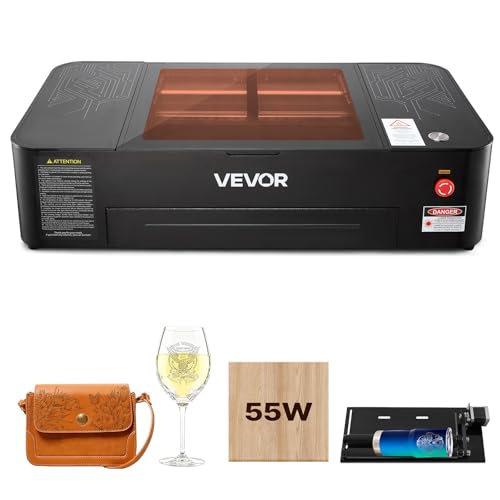
VEVOR 55W CO2 Laser Engraver 20x12
Best for: Large desktop wood and acrylic projects
- Software Compatibility
- LightBurn (what this guide is about)
- Laser Type
- CO2
- Laser Power
- 55W
- Working Area
- 20 x 12 in
- Engraving Speed
- Up to 500 mm/s
- Cutting Capacity
- ≤ 7 mm acrylic, ≤ 5 mm wood
This VEVOR 55W CO2 laser engraver offers a 20 x 12 inch working area for desktop use. It supports LightBurn software and includes a 5 MP camera for auto focus. The machine reaches speeds up to 500 mm/s and cuts up to 7 mm acrylic. It features Wi-Fi connectivity and a rotary axis. You should choose this if you need a versatile desktop cutter for wood and acrylic.
Pros
- 55W CO2 laser for wood and acrylic
- 20 x 12 inch large work area
- 5 MP camera with auto focus
- LightBurn and RDWorks software support
- Rotary axis included for cylindrical objects
Cons
- Not suitable for bare metal engraving
- Heavy build at 121 pounds
- Requires water pump cooling system
Good fit if
- You need a large desktop work area
- You engrave wood or acrylic frequently
- You want auto focus precision
Skip if
- You engrave bare metals
- You need a portable machine
- You prefer air cooling only
Verdict: VEVOR 55W CO2 Laser Engraver 20x12 fits users who need a spacious desktop cutter for wood and acrylic with auto focus. It is a solid choice for batch production of signs and tags.

Monport 30W Raycus Fiber Laser Engraver
Best for: high-speed metal engraving in LightBurn
- Software Compatibility
- LightBurn (what this guide is about)
- Laser Type
- Fiber (Raycus)
- Laser Power
- 30W
- Working Area
- 5.9" x 5.9"
- Engraving Speed
- 10000mm/s
- Compatible Material
- Metal, Silver, Gold
If you need high-speed metal marking inside LightBurn, the Monport 30W Fiber Laser Engraver delivers up to 10,000 mm/s marking speeds across a 5.9" x 5.9" workspace. It uses a 30W Raycus fiber laser source rated for up to 100,000 hours, capable of engraving brass, silver, gold, and stainless steel. A red dot locator and manual focus wheel with a height ruler streamline setup, making it a dedicated desktop tool for small metal goods.
Pros
- Marking speeds up to 10,000 mm/s
- 30W Raycus fiber source rated for up to 100,000 hours
- Dual cooling fans and integrated power supply
- Workspace grid with removable positioning bars
Cons
- Compact 5.9" x 5.9" working area
- Requires manual focus height adjustment
- Rotary axis is not included
Good fit if
- You engrave small metal items, jewelry, or serial plates.
- You require galvanometer marking speeds up to 10,000 mm/s.
- You run your workflow through LightBurn software.
Skip if
- You need a work surface larger than 5.9" x 5.9".
- You want motorized autofocus instead of a manual focus wheel.
Verdict: Monport 30W Fiber Laser Engraver pairs a fast 10,000 mm/s Raycus source with LightBurn compatibility for rapid small-scale metal marking.

OMTech K40+ CO2 Laser Engraver with Chiller
Best for: compact desktop nonmetallic engraving with liquid cooling
- Software Compatibility
- LightBurn (what this guide is about)
- Laser Type
- CO2
- Laser Power
- 40W
- Working Area
- 8"x12" (200x300 mm)
- Engraving Speed
- 350 mm/s
- Features
- Water Chiller
This desktop CO2 engraver comes bundled with a dedicated water chiller and native LightBurn compatibility. It provides a compact 8 by 12 inch working bed and runs at speeds up to 350 mm/s. Cutting depth reaches up to 1/8 inch on nonmetallic materials like wood, glass, acrylic, and leather. It suits makers who need a benchtop CO2 unit equipped for continuous cooling and versatile material engraving.
Pros
- Includes dedicated water chiller and LightBurn software
- Engraving speeds reach up to 350 mm/s (13.8 ips)
- Comes with both a flat bed and a clamp-style workbed
- Detachable base and 1.2-inch adjustable laser head accommodate larger objects
- Built-in air assist and exhaust fan for smoke removal
Cons
- Working area is limited to 8 x 12 inches (200 x 300 mm)
- Warranty on the laser tube and power supply lasts only 6 months
Good fit if
- You need an enclosed CO2 machine with an included water chiller
- You work mostly on smaller nonmetallic pieces up to 8 by 12 inches
- You want dual workbed options for flat and clamped or curved materials
Skip if
- You require a large-format cutting area beyond 8 by 12 inches
- You need to cut nonmetallic materials thicker than 1/8 inch regularly
Verdict: OMTech K40+ 45W CO2 Engraver with Chiller delivers a turnkey LightBurn desktop setup with active liquid cooling. It is a capable choice for small-format nonmetallic cutting and engraving tasks.

VEVOR 45W Desktop CO2 Laser Engraver
Best for: engraving glassware and small cylindrical crafts
- Software Compatibility
- LightBurn (what this guide is about)
- Laser Type
- CO2
- Laser Power
- 45W (45,000 mW)
- Working Area
- 12 x 8 in
- Engraving Speed
- Up to 300 mm/s
- Cutting Capacity
- ≤ 3 mm wood, ≤ 5 mm acrylic
The VEVOR 45W Desktop CO2 Laser Engraver with Rotary provides a 12 x 8-inch bed and 45W of CO2 laser output for working on materials such as glass, acrylic, and wood. It connects to LightBurn across Windows, macOS, and Linux systems. With an included rotary axis and built-in air assist, it suits makers who need to engrave cylindrical glassware, drinkware, and smaller flat craft items at speeds reaching 300 mm/s.
Pros
- 45W CO2 tube processes non-metals including glass, acrylic, and wood
- Includes a rotary axis for cylindrical engraving projects
- LightBurn compatible with Windows, macOS, and Linux support
- Built-in air assist, red-dot positioning, and pull-out waste tray
Cons
- Compact 12 x 8-inch working area limits the size of flat stock
- Manual knob and scale focusing instead of automated z-axis focus
- Cannot engrave bare metals without specialized coatings
Good fit if
- You want to engrave glass and cylindrical objects using an included rotary axis.
- You use LightBurn on Windows, macOS, or Linux for small-scale projects.
- You need a desktop 45W CO2 machine for materials up to 5 mm acrylic or 3 mm wood.
Skip if
- You require a working bed larger than 12 x 8 inches for oversized sheets.
- You plan to engrave or cut bare, uncoated metals.
- You want motorized autofocus instead of manual knob adjustment.
Verdict: VEVOR 45W Desktop CO2 Laser Engraver with Rotary delivers capable 45W CO2 output and rotary support in a compact footprint tailored for smaller glass and non-metal designs. Its native LightBurn support and Class 1 enclosure make it a practical desktop choice for precision etching.
Specifications side by side
| Spec | Longer 30W Laser Engraver with Camera | OMTech K40+ 45W CO2 Laser Engraver | OMTech 90W CO2 Laser Engraver with LightBurn | Monport 20W Fiber Laser Engraver | VEVOR 100W 24 x 35 in CO2 Laser Engraver | OMTech 50W Fiber Laser Engraver with Rotary Axis | OMTech 30W Fiber Laser Engraver | ComMarker 30W Fiber Laser Engraver | OMTech 60W CO2 Laser with Chiller & LightBurn | Creality Falcon2 Pro 60W Enclosed Laser Cutter | ComMarker B4 30W Fiber Laser Engraver | VEVOR 55W CO2 Laser Engraver 20x12 | Monport 30W Raycus Fiber Laser Engraver | OMTech K40+ CO2 Laser Engraver with Chiller | VEVOR 45W Desktop CO2 Laser Engraver |
|---|---|---|---|---|---|---|---|---|---|---|---|---|---|---|---|
| Laser Type | not specified | CO2 | CO2 | Fiber | CO2 | Fiber | Fiber | Fiber (1064nm) | CO2 | not specified | Fiber (1064 nm) | CO2 | Fiber (Raycus) | CO2 | CO2 |
| Laser Power | Up to 36W | 45W | 90W | 20W | 100W | 50W | 30W | 30W | 60W | 60W (switchable 60W/40W/22W) | 30W | 55W | 30W | 40W | 45W (45,000 mW) |
| Working Area | 850mm x 450mm (33.46" x 17.71") | 12"x8" | 20" x 28" | 110 x 110 mm | 24 x 35 in (600 x 900 mm) | 5.9" x 5.9" | 175 x 175mm (6.9 x 6.9 in.) | 150mm x 150mm | 28x20 Inch (500x700 mm) | not specified | 110 x 110 mm, 200 x 200 mm | 20 x 12 in | 5.9" x 5.9" | 8"x12" (200x300 mm) | 12 x 8 in |
| Engraving Speed | Up to 36,000mm/min | not specified | Up to 600 mm/s | Up to 10000mm/s | Up to 19.7 ips | Up to 10,000 mm/s | Up to 10,000 mm/s | 15,000mm/s | up to 23.6 ips (600 mm/s) | not specified | 0-15000 mm/s | Up to 500 mm/s | 10000mm/s | 350 mm/s | Up to 300 mm/s |
| Software Compatibility | LightBurn | LightBurn, LaserGRBL | LightBurn | LightBurn, BSLcad | LightBurn, CorelDRAW, AutoCAD | LightBurn, EzCad2 | LightBurn, EzCad2 | Lightburn, EzCad2 | LightBurn | LightBurn, LaserGRBL | LightBurn, EzCad2 | LightBurn, RDWorks | LightBurn | LightBurn | LightBurn, GRBL, CorelDraw, AutoCAD |
| Form Factor | not specified | not specified | not specified | not specified | not specified | not specified | not specified | not specified | not specified | Fully Enclosed (Class 1) | not specified | not specified | not specified | not specified | not specified |
| Cutting Capacity | 25mm basswood, 50mm acrylic | 0.4" (10mm) acrylic, 0.31" (8mm) wood | not specified | not specified | Up to 0.59 in | not specified | not specified | not specified | not specified | not specified | not specified | ≤ 7 mm acrylic, ≤ 5 mm wood | not specified | not specified | ≤ 3 mm wood, ≤ 5 mm acrylic |
| Compatible Material | Wood | not specified | not specified | Metal | Wood, Acrylic, Fabric | Metal, Jewelry, Aluminum | Metal, Jewelry, Aluminum, Silver, Gold | Metal, Jewelry, Plastic | Wood, Glass | Wood, Metal, Acrylic, Leather | Jewelry, Silver, Gold | Wood, Acrylic, Glass | Metal, Silver, Gold | not specified | Wood, Acrylic, Glass |
| Features | Air Assist, Camera | Water Chiller | not specified | not specified | Air Assist | Rotary Axis | not specified | Auto Focus | Air Assist, Water Chiller | Enclosure, Camera | not specified | Rotary Axis, Camera | Rotary Axis | Water Chiller | Air Assist, Rotary Axis |
| Target Audience | DIY | not specified | not specified | not specified | not specified | not specified | not specified | not specified | not specified | not specified | not specified | not specified | not specified | not specified | not specified |
| Application | not specified | not specified | not specified | not specified | not specified | not specified | not specified | not specified | not specified | not specified | Tumblers | not specified | not specified | not specified | not specified |
| Dimensions | not specified | 31.9 × 19.7 × 9.8 inches | 57.1 × 34.3 × 27.6 inches | not specified | 64.6 × 39.4 × 39.4 inches | not specified | not specified | 12 × 28 × 10 inches | 48.8 × 34.3 × 26.4 inches | 26 × 22.4 × 13 inches | 3.94 × 3.94 × 3.94 inches | 40.4 × 22.8 × 10.2 inches | 27.6 × 19.7 × 11.8 inches | not specified | 31.9 × 20.5 × 10.2 inches |
| Weight | not specified | 53.8 pounds | 227 pounds | not specified | 551 pounds | not specified | 65 pounds | not specified | 223 pounds | not specified | not specified | 121 pounds | not specified | not specified | 64 pounds |
| Size | 30W | 45W with LB&Chiller | with LightBurn | 20W+Lightburn | Working Area: 24" x 35" | Galvo 50W with Rotary Axis | Galvo 30W with Lightburn | not specified | with LB&Chiller | not specified | not specified | Working Area: 20" x 12" | not specified | not specified | not specified |
| Color | Extension Set(A Blue) | Blue | with LightBurn | Grey | Orange | not specified | Blue-White | B6 30w | Black, Red | Falcon2 Pro 60W | B4R-30W+rotary | Black | 30w+lb+d80 | not specified | Orange+black |
| Model | B1 | K40+ 45W | RYGEL-USB0705U2 | XYF30 | KH9060 | not specified | RYGEL-FMM3RW2U1 | B6 | SH-G570 | Falcon2 Pro 60W | B4-30W rotary | SH-530 | YX1060 | SH-G350 | SH-3020 |
Is LightBurn Worth the Upgrade?
LightBurn simplifies daily operation by offering direct compatibility with these machines. You get features like camera alignment for precise positioning and rotary axis support for cylindrical items. The software handles galvo speeds up to 15,000 mm/s for rapid metal marking. It also manages large-format beds and 4-way pass-throughs for extensive projects. This integration removes manual configuration steps, allowing you to focus on material selection and design execution rather than driver issues.
Worth it if
- You need camera-assisted alignment for complex cuts
- You require rotary axis support for tumblers or jewelry
- You want unified control for large-format CO2 or high-speed fiber systems
Skip it if
- You only perform basic text engraving on small items
- You prefer proprietary software with built-in templates
- You work exclusively with materials that do not benefit from advanced vector control
If you need standard paper printing rather than surface engraving, review the best laser printers for documents.
How we picked LightBurn engravers
We selected these 15 laser engravers by checking Amazon listings for explicit LightBurn software compatibility in the title or feature list. This ensures every machine on this list supports the interface you need. We only include one size or variant per product family to keep the comparison clear and focused on your specific requirements.
The ranking prioritizes products currently in stock. We then order them by overall rating weighted by rating count, followed by how many of our key specs each model meets. All details come from published specifications. We do not test products or quote reviews. Prices and stock levels update daily on the page.
Choosing the right laser engraver
-
Match laser type to material
Select your laser type based on the materials you plan to process. Fiber lasers are designed for marking metal and plastic, as seen with the Monport 20W and OMTech 50W models. These machines use galvanometer speeds up to 15,000 mm/s for precise detailing. CO2 lasers handle non-metallics like wood, acrylic, and glass. The VEVOR 100W and OMTech 90W CO2 units offer high power for cutting thicker materials. Ensure your primary material aligns with the laser technology to avoid ineffective engraving or damage.
-
Check workspace dimensions
Verify the working area size before purchasing. Larger beds accommodate bigger projects but require more floor space. The Longer 30W model provides an expansive 850mm x 450mm workspace ideal for large-format DIY cutting. In contrast, the ComMarker B4 offers a tiny 3.94-inch square area, suitable only for small jewelry items. The VEVOR 100W features a 24 x 35-inch bed for extensive non-metallic cutting. Measure your available workspace to ensure the machine fits comfortably in your workshop or desk area.
-
Evaluate laser power needs
Laser wattage determines cutting speed and material thickness capability. Higher power handles thicker materials faster. The VEVOR 100W CO2 unit provides substantial power for high-volume cutting. The OMTech 90W CO2 engraver delivers strong cutting power for large projects. For metal marking, even 20W fiber lasers, like the Monport model, offer sufficient energy for detailed work. Lower wattage options, such as the 30W fiber engravers, are efficient for surface marking. Choose power levels that match your typical material thickness and production volume requirements.
-
Consider form factor and weight
Assess the physical footprint and weight of the machine. Large CO2 units like the VEVOR 100W weigh 551 pounds and need dedicated workshop space. The OMTech 90W weighs 227 pounds and requires significant floor area. Desktop models like the VEVOR 45W weigh 64 pounds and fit on sturdy surfaces. Portable fiber lasers, such as the ComMarker B6, are compact and lightweight. Ensure your workspace can support the weight and dimensions of the selected engraver to prevent stability issues during operation.
-
Verify software compatibility
Confirm that the machine supports LightBurn software explicitly. All listed models feature direct LightBurn compatibility, ensuring seamless integration with your workflow. This support enables features like camera alignment for precise positioning and rotary axis support for cylindrical items. LightBurn handles galvo speeds up to 15,000 mm/s for rapid metal marking. Verify the specific model listing includes LightBurn support, as some variants may differ. This compatibility simplifies operation and provides access to advanced design tools for both engraving and cutting tasks.
Frequently asked questions
Which laser engraver is best for large DIY projects with LightBurn?
The Longer 30W Laser Engraver with Camera is the top choice for large-format DIY cutting. It features an expansive 850mm x 450mm workspace that accommodates bigger designs. The integrated camera allows for precise alignment within LightBurn, while air assist helps maintain clean cuts on wood materials.
What is the best budget-friendly CO2 laser with LightBurn support?
The OMTech K40+ 45W CO2 Laser Engraver is the best budget option. It includes a dedicated water chiller for active cooling, which is essential for sustained CO2 operation. This compact desktop unit is ready for LightBurn and handles small-scale wood and acrylic jobs efficiently.
Which machine is best for high-speed metal marking with LightBurn?
The Monport 20W Fiber Laser Engraver is ideal for high-speed metal marking. It achieves galvanometer speeds of 10,000mm/s for rapid, detailed work. LightBurn compatibility ensures smooth operation, making it a precise tool for engraving metals and jewelry without the bulk of larger CO2 systems.
Is there a heavy-duty CO2 laser for thick non-metallic materials?
The VEVOR 100W CO2 Laser Engraver offers substantial power for thick non-metallic materials. It features a large 24 x 35 inch pass-through bed for high-volume cutting. This 551-pound machine requires dedicated workshop space but delivers strong performance for extensive LightBurn-driven projects on wood and acrylic.
Which laser engraver supports rotary axis for cylindrical items in LightBurn?
The OMTech 50W Fiber Laser Engraver with Rotary Axis is designed for this task. It includes a rotary attachment for marking small, detailed work on metals and jewelry. The high-speed galvo system works seamlessly with LightBurn, providing precision for cylindrical objects like tumblers or pens.
What is the best enclosed laser cutter for safety with LightBurn?
The Creality Falcon2 Pro 60W Enclosed Laser Cutter provides Class 1 enclosure safety. It allows you to switch between power levels for different materials like wood, acrylic, and leather. The camera-assisted positioning works directly with LightBurn, offering a flexible and secure option for workshop environments.
Which laser is best for precise jewelry marking with LightBurn?
The ComMarker B6 30W Portable Fiber Laser Engraver is excellent for small metal and plastic marking. Its compact form factor suits users needing portability. The auto-focus feature and LightBurn support make it a precise tool for detailed jewelry work, ensuring consistent results on small items.
How does LightBurn handle galvo speeds on fiber lasers?
LightBurn supports high galvo speeds for efficient metal marking. For example, the ComMarker B4 30W Fiber Laser Engraver reaches speeds up to 15,000 mm/s. This software flexibility allows for rapid engraving on metals like silver and gold, making it a practical choice for small businesses.