AlgoLaser Laser Engravers: 14 Picks Ranked by Specs
As an Amazon Associate we earn from qualifying purchases. Links on this page are affiliate links.
Finding the best AlgoLaser laser engravers requires comparing specific technical data across their diverse lineup. This guide ranks 14 products based strictly on the specifications published on their listings. The range includes portable desktop units, enclosed safety models, high-power cutting machines, and rotary accessories for cylindrical work.
Our top pick is the AlgoLaser 10W Engraver with Rotary Roller, which leads for tumbler engraving and versatile DIY crafting. Each selection reflects the hardware capabilities and feature sets available in the current catalog.
Quick picks
Our 14 picks

AlgoLaser 10W Engraver with Rotary Roller
Best for: tumbler engraving and versatile DIY crafting
- Laser Power
- 10W (10000mW)
- Engraving Speed
- Up to 12000mm/min
- Software Compatibility
- AlgoOS, LightBurn, LaserGRBL
- Form Factor
- Class 1
- Compatible Material
- Wood, Metal, Glass
- Features
- Rotary Axis, Touchscreen
This 10W desktop laser engraver gives you a complete setup for flat and cylindrical materials right out of the box. Powered by a 10,000mW laser module reaching speeds up to 12,000 mm/min, it includes a rotary roller and riser base for mugs and tumblers. You can run projects independently via the 3.5-inch touchscreen and AlgoOS, or connect via Wi-Fi, USB, and TF card to LightBurn or LaserGRBL.
Pros
- Includes rotary roller attachment and riser base for cylindrical objects
- Standalone operation via 3.5-inch touchscreen and AlgoOS
- 10W optical output with speeds up to 12,000 mm/min
- Multiple connection methods including Wi-Fi, USB, TF card, and app control
Cons
- Requires DIY kit assembly before initial use
- Demands significant workspace with its 25.3-by-23.7-inch footprint
Good fit if
- You want to engrave tumblers, cups, or thick materials without buying separate accessories.
- You prefer operating your engraver offline using a built-in touchscreen interface.
- You need broad software support covering LightBurn, LaserGRBL, and mobile apps.
Skip if
- You have limited workspace to accommodate a 25.3-by-23.7-inch frame.
- You prefer a fully pre-assembled engraver that runs directly out of the box.
Verdict: AlgoLaser 10W Engraver with Rotary Roller delivers a capable 10,000mW laser setup equipped for both flat and cylindrical work straight from the box. Its integrated touchscreen and broad software compatibility make it an adaptable choice for varied crafting jobs.

AlgoLaser 400x400mm 8W Touchscreen Engraver
Best for: Standalone engraving projects on a standard workspace
- Laser Type
- Diode
- Laser Power
- 8W
- Working Area
- 400×400mm
- Engraving Speed
- 15,000mm/min
- Software Compatibility
- AlgoOS, LightBurn, LaserGRBL, AlgoLaser
- Features
- Touchscreen
The AlgoLaser 8W 400x400mm Laser Engraver pairs an 8-watt diode laser module with a standard 400 by 400 millimeter working bed. It reaches engraving speeds up to 15,000 mm/min. With a built-in 3.5-inch touchscreen running AlgoOS, you can set up jobs without a computer, or connect via Wi-Fi, USB, or SD card to LightBurn and LaserGRBL. It suits hobbyists wanting standalone controls on a standard desktop footprint.
Pros
- Generous 400 by 400 mm engraving area
- Built-in 3.5-inch touchscreen with AlgoOS enables computer-free operation
- Engraving speeds reach up to 15,000 mm/min
- Integrated flip-down focus column simplifies height adjustments
Cons
- 8W output offers less cutting capability than 10W or 40W alternatives
- Open-frame construction lacks an integrated protective enclosure
Good fit if
- You want to operate an engraver directly via touchscreen without a dedicated computer connection.
- You need a spacious 400 by 400 millimeter workspace for signs, decor, or light batch work.
- You want fast mechanical setup with 95 percent factory pre-assembly.
Skip if
- You require higher optical power, such as 10W or 40W, for cutting thicker materials.
- You want a fully enclosed laser system for built-in beam and smoke containment.
Verdict: AlgoLaser 8W 400x400mm Laser Engraver provides a practical balance of standalone touchscreen functionality and standard-sized desktop workspace. It is a dependable choice for users who prioritize computer-free job execution and straightforward manual focusing.
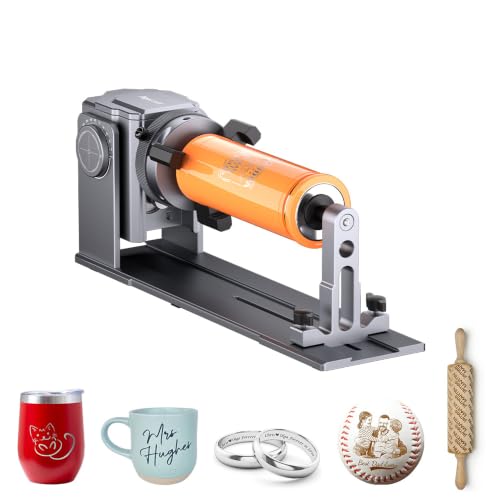
AlgoLaser 4-in-1 Rotary Roller Chuck
Best for: engraving cylindrical, spherical, and ring-shaped objects
- Compatible Material
- Silver
- Features
- Rotary Axis
- Dimensions
- 15.2 × 5.71 × 6.69 inches
- Weight
- 4.96 pounds
The AlgoLaser 4-in-1 Rotary Roller Chuck is an add-on rotary axis designed for engraving curved and cylindrical objects. It offers four distinct setups—jaw, roller, sphere, and ring—driven by a high-torque stepper motor with non-slip rollers. Measuring 15.2 by 5.71 by 6.69 inches and weighing 4.96 pounds, it connects to your compatible AlgoLaser or third-party laser machine to handle items like cups, bottles, and spheres.
Pros
- Four engraving configurations: jaw, roller, sphere, and ring modes
- High-torque stepper motor paired with non-slip rollers
- Compatible with AlgoLaser and most standard laser engraving machines
- Compact 15.2 by 5.71 by 6.69-inch footprint weighing 4.96 pounds
Cons
- Rotary accessory only; requires a separate laser engraver to function
- Limited to cylindrical, curved, or round items rather than flat sheet stock
Good fit if
- You already own a compatible laser engraver and want to engrave tumblers, cups, or balls
- You need versatile clamping modes to hold rings, spheres, and irregular shapes
Skip if
- You need a standalone laser engraving machine with an included laser module
- You exclusively engrave and cut flat workpieces
Verdict: AlgoLaser 4-in-1 Rotary Roller Chuck expands your existing laser setup with four dedicated holding modes for cylindrical, ring, and spherical workpieces.

AlgoLaser 4-in-1 ARC Rotary Roller & Chuck
Best for: engraving tumblers, rings, and spherical objects
- Features
- Rotary Axis
- Application
- Tumblers
- Dimensions
- 14 × 5.6 × 6.6 inches
This 4-in-1 Y-axis rotary attachment expands your engraving setup for cylindrical and irregular items like tumblers, rings, and spheres. Measuring 14 by 5.6 by 6.6 inches, it combines a jaw chuck, standard roller, sphere fixture, and ring mount. It uses a high-torque stepper motor, anti-slip rollers, and pre-installed wiring for plug-and-play setup. If you need to engrave drinkware or curved items on compatible AlgoLaser machines, this unit handles those shapes directly.
Pros
- Four functional modes: jaw chuck, roller, sphere engraving, and ring engraving
- High-torque stepper motor paired with anti-slip rollers for stable rotation
- Pre-installed wiring for plug-and-play installation
- Adjustable jaw chuck with 180-degree adjustment and movable support
Cons
- Not compatible with AlgoLaser PIXI models
- Requires a separate laser engraver to function
Good fit if
- You want to engrave tumblers, mugs, rings, and spherical items.
- You own a compatible AlgoLaser or standard third-party laser frame.
- You need both a roller and a chuck mechanism in one attachment.
Skip if
- You own an AlgoLaser PIXI machine.
- You need a standalone laser engraving machine rather than an add-on rotary axis.
Verdict: AlgoLaser 4-in-1 Rotary Roller Chuck delivers versatile multi-mode handling for cylindrical items, making it an ideal hardware addition for dedicated tumbler and curved-surface engraving.
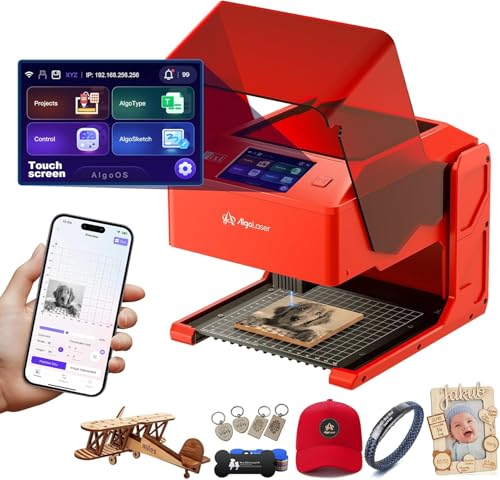
AlgoLaser Pixi 10W Portable Engraver
Best for: standalone desktop engraving with Class 1 safety
- Laser Power
- 10W
- Software Compatibility
- AlgoOS
- Form Factor
- Class 1
- Compatible Material
- Wood, Acrylic, Leather
- Features
- Touchscreen
- Dimensions
- 10.5 × 8.5 × 7.7 inches
The AlgoLaser Pixi 10W Portable Laser Engraver combines a 10W laser diode with a fully enclosed Class 1 desktop chassis. It features a built-in 3.5-inch touchscreen running AlgoOS, allowing you to create, edit, and engrave designs without a connected computer. Weighing just 4.41 pounds with zero assembly required, it fits creators, educators, and small businesses seeking a safe, self-contained engraving setup for wood, acrylic, and leather.
Pros
- 10W laser diode enclosed within a certified Class 1 safety housing
- Integrated 3.5-inch touchscreen running AlgoOS for computer-free operation
- Auto-pause safety door stops operation immediately if the lid is opened
- Pre-assembled, lightweight build weighing 4.41 pounds with USB-C and Wi-Fi
Cons
- Compact 10.5 x 8.5 x 7.7 inch chassis restricts work on oversized items
- Reverse engraving on transparent materials requires colored backers
Good fit if
- You want a standalone engraver that operates via touchscreen without needing a computer.
- You require an enclosed Class 1 machine with an auto-pause safety lid for home or school use.
- You need a portable, pre-assembled 10W unit you can easily move between workspaces.
Skip if
- You regularly cut or engrave large workpieces that exceed compact enclosure dimensions.
- You need higher optical output than 10W for high-volume, deep-cut production.
Verdict: AlgoLaser Pixi 10W Portable Laser Engraver combines a capable 10W diode, an enclosed Class 1 safety frame, and an onboard touchscreen for computer-free projects. It is a solid, self-contained unit when tabletop safety and portable operation are your primary priorities.

AlgoLaser Pixi 1064nm Infrared Engraver
Best for: fine metal marking and jewelry personalization
- Laser Type
- 1064nm Infrared
- Software Compatibility
- AlgoOS
- Compatible Material
- Metal, Jewelry, Aluminum
- Features
- Touchscreen
- Weight
- 7.24 pounds
This desktop unit uses a 1064nm infrared laser specifically intended for fine surface marking on metals and select dark plastics. Unlike standard diode models, it focuses on jewelry, metal tags, and custom gifts. It features a built-in 3.5-inch touchscreen running AlgoOS for standalone control without a tethered PC. Weighing 7.24 pounds, it suits small workshops and craft spaces focused on detailed metal engraving rather than cutting.
Pros
- Dedicated 1064nm infrared laser for metals and dark plastics
- Built-in 3.5-inch touchscreen with AlgoOS for standalone control
- Compact desktop footprint with a 7.24-pound total weight
- App control compatibility alongside the touchscreen
Cons
- Not designed for wood cutting or deep engraving tasks
- Reflective metals may require slower speeds or marking spray
- Limited material compatibility compared to general diode lasers
Good fit if
- You prioritize fine surface marking on jewelry, pet tags, and metal cards
- You want standalone desktop operation using a touchscreen and mobile app
- You have a small workspace that benefits from a 7.24-pound compact machine
Skip if
- You plan to cut wood, acrylic, or other thick materials
- You need deep engraving rather than fine surface marking
- You work primarily on general non-metal crafts like untreated leather or clear items
Verdict: AlgoLaser Pixi 1064nm Infrared Engraver provides a dedicated infrared marking solution for metals and plastics in a portable, touchscreen-driven desktop package. It excels at fine surface detailing on jewelry and tags rather than heavy cutting tasks.
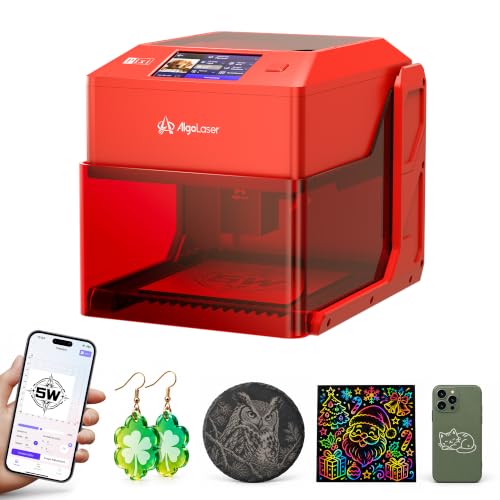
AlgoLaser Pixi 5W Compact Laser Engraver
Best for: computer-free engraving on small craft items
- Laser Power
- 5W
- Working Area
- 100 x 100 mm
- Software Compatibility
- AlgoOS, LightBurn, LaserGRBL
- Features
- Touchscreen
- Target Audience
- Beginners
- Dimensions
- 10.2 × 8.27 × 7.48 inches
The AlgoLaser Pixi 5W Laser Engraver pairs a 5W diode module with a compact 100 x 100 mm working area. You can engrave without a computer using the built-in 3.5-inch touchscreen with AlgoOS, or connect via LightBurn and LaserGRBL. Weighing 6.61 pounds and arriving fully assembled, it suits craft hobbyists who need a portable desktop machine for small wood, leather, and dark acrylic projects.
Pros
- Standalone operation using the 3.5-inch touchscreen and AlgoOS
- Fine 0.03 x 0.07 mm laser spot for detailed lettering
- Removable base with six height settings up to 134 mm
- Arrives fully assembled with a 6.61-pound footprint
Cons
- Small 100 x 100 mm working area limits design dimensions
- 5W output is limited to light cutting rather than heavy stock
Good fit if
- You want to engrave small blanks without hooking up a computer
- You need a lightweight, portable unit for a craft table or stall
- You work mainly on small objects like tags, bookmarks, and ornaments
Skip if
- You need a larger work envelope than 100 x 100 mm
- You require high optical wattage to cut thick materials
Verdict: AlgoLaser Pixi 5W Laser Engraver delivers portable, computer-free engraving with a fine focal spot in an assembled, compact chassis. It is an ideal desktop tool for small-scale DIY crafts and light personal inscriptions.

AlgoLaser Pixi 3W Portable Engraver
Best for: standalone desktop crafting on small materials
- Laser Power
- 3W
- Software Compatibility
- AlgoOS, LightBurn, LaserGRBL
- Compatible Material
- Wood, Leather, Glass
- Features
- Touchscreen
- Target Audience
- DIY, Beginners
- Form Factor
- Portable
The AlgoLaser Pixi 3W is an enclosed desktop laser engraver designed for standalone use. It features a 3W laser module, an integrated 3.5-inch touchscreen running AlgoOS, and a Class 1 safety cover with auto-stop protection. Weighing 6.7 pounds with a 10.4 by 8.4-inch footprint, it requires no assembly and connects over Wi-Fi, USB-C, or SD card. This unit suits you if you want a compact machine for small craft projects.
Pros
- Integrated 3.5-inch touchscreen with AlgoOS allows PC-free engraving
- Class 1 safety enclosure includes auto-stop lid protection and password security
- Arrives fully assembled and weighs 6.7 pounds for easy relocation
- Supports USB-C, Wi-Fi, and SD card connections alongside LightBurn and LaserGRBL
Cons
- 3W laser output is lower than 5W and 10W alternatives
- Compact 10.4 by 8.4-inch chassis limits the maximum workpiece size
Good fit if
- You want an enclosed Class 1 engraver that works immediately with no assembly.
- You prefer to engrave directly from an onboard touchscreen without a computer connected.
- You work on smaller DIY craft pieces made from wood, leather, or acrylic.
Skip if
- You require 5W or 10W of optical power for faster engraving or cutting thicker stock.
- You need an open-frame or large-format workspace for oversized materials.
Verdict: AlgoLaser Pixi 3W Portable Laser Engraver provides a self-contained, PC-free engraving setup that operates directly out of the box. Its 3W module is tailored for light craft detailing rather than heavy cutting tasks.

AlgoLaser Alpha MK2 40W Laser Engraver
Best for: thick single-pass cutting with dedicated air assist
- Laser Power
- 40,000mW (40W)
- Engraving Speed
- 25,000 mm/min
- Software Compatibility
- AlgoLaser App, LightBurn, LaserGRBL
- Form Factor
- Semi-enclosed
- Cutting Capacity
- Up to 25 mm solid wood
- Compatible Material
- Wood, Metal, Acrylic
The AlgoLaser Alpha MK2 40W Laser Engraver is a semi-enclosed machine designed for heavy-duty cutting and fast engraving. It provides a 40,000mW laser module capable of slicing through 25 mm solid wood in a single pass. A dual air assist system combines a smart air pump with internal smoke exhaust to manage fumes and reduce scorching. It suits you if you require production speeds up to 25,000 mm/min.
Pros
- 40,000mW laser module cuts up to 25 mm solid wood in a single pass
- Dual air circulation system with smart pump and internal exhaust
- Engraving speeds reach up to 25,000 mm/min
- 3.5-inch touchscreen with AlgoOS and 32 GB of internal memory
Cons
- Semi-enclosed frame rather than a fully sealed enclosure
- Rotary roller accessory is not included
Good fit if
- You cut thick materials like solid wood up to 25 mm in a single pass.
- You want a dual air assist setup with an active pump and internal exhaust.
- You prefer offline operation using a touchscreen and 32 GB of local storage.
Skip if
- You require a fully enclosed chassis for complete fume containment.
- You need a rotary tool included in the box for round objects.
Verdict: AlgoLaser Alpha MK2 40W Laser Engraver combines high-power 40W cutting with an integrated dual air assist system to minimize burn marks and smoke buildup. Its 25,000 mm/min speed and standalone touchscreen make it a capable tool for thick wood cutting.

AlgoLaser Pixi 10W Portable Laser Engraver
Best for: standalone craft and DIY desktop engraving
- Laser Power
- 10W
- Engraving Speed
- 100–300 mm/s
- Software Compatibility
- AlgoOS
- Form Factor
- Fully enclosed Class 1
- Compatible Material
- Wood, Metal, Leather
- Features
- Touchscreen
This compact 10W machine features a fully enclosed Class 1 build and weighs just 6.7 pounds. With its built-in 3.5-inch touchscreen running AlgoOS, you can design and engrave without connecting a computer. It operates at speeds between 100 and 300 mm/s and handles over 300 materials, including wood, leather, and coated metal. It suits DIY enthusiasts who want an all-in-one standalone setup for small-scale projects.
Pros
- Standalone operation using the 3.5-inch AlgoOS touchscreen
- Fully enclosed Class 1 safety design with auto-pause lid
- Lightweight 6.7-pound build measuring 10.4 by 8.4 inches
- Supports over 300 materials with 10W optical output
- USB-C and IP-based Wi-Fi connectivity options
Cons
- Maximum travel speed is capped at 300 mm/s
- Requires external ventilation hookup for fume-heavy jobs
Good fit if
- You want to engrave small craft items without hooking up a PC or laptop
- You need a fully enclosed Class 1 engraver for safe indoor use
- You prioritize portability and lightweight equipment for your workbench
Skip if
- You require an open-frame platform for engraving oversized workpieces
- You need production speeds higher than 300 mm/s
Verdict: AlgoLaser Pixi 10W Portable Laser Engraver delivers a truly standalone DIY engraving experience with its onboard touchscreen and fully enclosed Class 1 chassis.

AlgoLaser 4-in-1 Laser Rotary Roller Chuck
Best for: engraving tumblers, spheres, and rings on lasers
- Features
- Rotary Axis
- Dimensions
- 13 × 3.7 × 4.9 inches
- Weight
- 4.5 pounds
This 4-in-1 rotary attachment expands your engraving setup for curved and cylindrical items. Measuring 13 by 3.7 by 4.9 inches and weighing 4.5 pounds, it switches between roller, jaw chuck, ring, and sphere modes. It offers 180-degree angle adjustments to accommodate irregular shapes and works with machines like the DIY KIT MK2 and Alpha MK2. It suits you if you need to engrave tumblers, rings, bottles, or spheres.
Pros
- Supports four modes: roller, jaw chuck, ring, and sphere
- Offers 180-degree angle adjustment for irregular shapes
- Compatible with DIY KIT MK2, Alpha MK2, and most laser engravers
- Compact 4.5-pound silver build measuring 13 by 3.7 by 4.9 inches
Cons
- Requires a separate compatible laser engraver to operate
- Functions only as an accessory rather than a standalone tool
Good fit if
- You want to engrave curved items like bottles, tumblers, spheres, and rings.
- You own an AlgoLaser DIY KIT MK2, Alpha MK2, or compatible machine.
- You need 180-degree angle adjustments for irregular objects.
Skip if
- You do not already own a compatible laser engraver.
- You only engrave flat surfaces and standard sheet materials.
Verdict: AlgoLaser 4-in-1 Laser Rotary Roller Chuck adds versatile cylindrical holding modes and 180-degree positioning to your existing laser setup. It is a practical upgrade for working with round, tapered, or spherical objects.
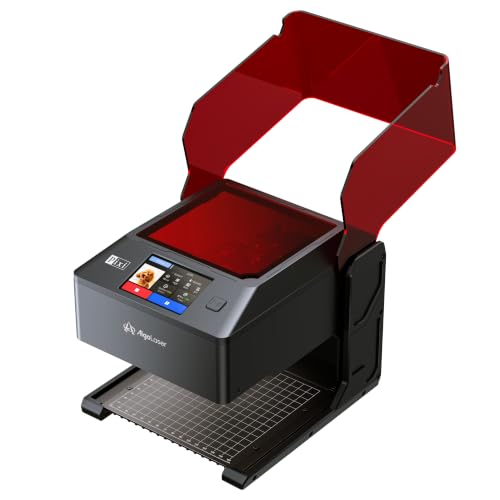
AlgoLaser Pixi 3W Enclosed Laser Engraver
Best for: beginner craft engraving in classrooms and homes
- Laser Power
- 3W
- Software Compatibility
- AlgoOS
- Form Factor
- Fully Enclosed (Class 1)
- Features
- Touchscreen
- Target Audience
- Beginners
- Dimensions
- 1 × 1 × 1 inches
The AlgoLaser Pixi 3W Enclosed Laser Engraver is a compact, Class 1 safety-rated desktop machine designed for detailed, light-duty crafting. Featuring a 3W laser module and a built-in 3.5-inch touchscreen running AlgoOS, it operates fully offline without requiring an external computer. You can engrave materials like wood, leather, paper, and bamboo using standalone controls, a mobile app, or a USB-C connection, making it suitable for safe home or classroom personalization.
Pros
- Fully enclosed Class 1 design with an auto-pause lid and password lock
- 3.5-inch touchscreen with AlgoOS allows computer-free operation
- Multiple connection methods including WiFi, USB-C, and mobile app
- Equipped with a built-in rear exhaust fan for fume management
Cons
- 3W laser power is limited to light-duty engraving rather than heavy cutting
- Rotary attachment for cylindrical items is sold separately
Good fit if
- You want an enclosed, safety-focused engraver suitable for a home studio or classroom.
- You prefer running projects offline directly from an onboard touchscreen interface.
- You work primarily with paper, leather, cardboard, bamboo, and thin craft materials.
Skip if
- You require higher optical wattage to cut through thick timber or dense stock.
- You need an included rotary attachment in the box for immediate tumbler engraving.
Verdict: AlgoLaser Pixi 3W Enclosed Laser Engraver provides a secure, fully enclosed setup for standalone desktop personalization without needing a tethered computer.

AlgoLaser Pixi 10W Enclosed Laser Engraver
Best for: standalone desktop crafting in home workspaces
- Laser Type
- Diode
- Laser Power
- 10W
- Software Compatibility
- AlgoOS, LightBurn, LaserGRBL
- Form Factor
- Fully Enclosed (Class 1)
- Compatible Material
- Wood, Leather, Glass
- Features
- Touchscreen
The AlgoLaser Pixi 10W Enclosed Laser Engraver is a compact desktop diode machine built for standalone or computer-linked jobs. It features a 10W diode laser with a fine 0.03mm spot and an enclosed Class 1 safety frame with auto-stop lid protection. With its built-in 3.5-inch touchscreen running AlgoOS, you can design and engrave without a PC, or connect via Wi-Fi, USB-C, or SD card to use LightBurn.
Pros
- Enclosed Class 1 safety casing with auto-stopping protective lid
- 3.5-inch touchscreen with standalone AlgoOS for PC-free operation
- 10W diode laser with 0.03mm spot size and 0.01mm accuracy
- Arrives fully assembled and weighs 6.7 pounds
Cons
- Compact 10.4 by 8.4-inch exterior footprint limits maximum piece size
- Compatible rotary accessories are not included in the standard package
Good fit if
- You want an enclosed Class 1 laser that pauses when the lid opens.
- You prefer running everyday engraving tasks directly from a built-in touchscreen.
- You need a lightweight, pre-assembled engraver for small home worktables.
Skip if
- You need an open-frame platform to engrave oversized sheet materials.
- You require more than 10W of optical output power for heavy cutting jobs.
Verdict: AlgoLaser Pixi 10W Enclosed Laser Engraver combines Class 1 enclosure safety with portable standalone controls, making it a solid choice for small craft projects without an attached computer.

AlgoLaser 10W Laser Engraver with Rotary Roller
Best for: engraving drinkware and flat projects standalone
- Laser Power
- 10W (10000mW)
- Engraving Speed
- Up to 12000mm/min
- Software Compatibility
- LightBurn, LaserGRBL, AlgoOS
- Form Factor
- Open-frame
- Features
- Rotary Axis
- Dimensions
- 25.6 × 9.8 × 5.9 inches
View on Amazon: AlgoLaser 10W Laser Engraver with Rotary Roller
This open-frame 10W diode laser delivers engraving speeds up to 12000mm/min and comes bundled with a rotary roller and riser kit. It features a built-in 3.5-inch touchscreen running AlgoOS, allowing you to preview and run jobs without a computer. With support for LightBurn, LaserGRBL, WiFi, and TF card operation, it suits creators who want to engrave flat surfaces or cylindrical objects like tumblers and bottles right away.
Pros
- Includes a rotary roller and riser kit for cylindrical engraving on tumblers and bottles
- 3.5-inch touchscreen with AlgoOS enables standalone operation without a connected PC
- 10W laser module provides up to 12000mm/min engraving speed
- Supports LightBurn and LaserGRBL via WiFi, USB, TF card, and mobile app
Cons
- Open-frame build lacks an enclosed housing or built-in ventilation
- Engraving speed tops out at 12000mm/min
Good fit if
- You plan to engrave drinkware and cylindrical items using an out-of-the-box rotary setup.
- You want the option to operate your engraver directly via touchscreen without a computer.
- You need 10W output for engraving wood, leather, glass, and coated metals.
Skip if
- You require a fully enclosed workspace for fume containment and laser shielding.
- You need higher optical wattage for cutting through thicker materials in single passes.
Verdict: AlgoLaser 10W Laser Engraver with Rotary Roller provides a practical, computer-free workflow paired with dedicated hardware for handling both flat and cylindrical items.
Specifications side by side
| Spec | AlgoLaser 10W Engraver with Rotary Roller | AlgoLaser 400x400mm 8W Touchscreen Engraver | AlgoLaser 4-in-1 Rotary Roller Chuck | AlgoLaser 4-in-1 ARC Rotary Roller & Chuck | AlgoLaser Pixi 10W Portable Engraver | AlgoLaser Pixi 1064nm Infrared Engraver | AlgoLaser Pixi 5W Compact Laser Engraver | AlgoLaser Pixi 3W Portable Engraver | AlgoLaser Alpha MK2 40W Laser Engraver | AlgoLaser Pixi 10W Portable Laser Engraver | AlgoLaser 4-in-1 Laser Rotary Roller Chuck | AlgoLaser Pixi 3W Enclosed Laser Engraver | AlgoLaser Pixi 10W Enclosed Laser Engraver | AlgoLaser 10W Laser Engraver with Rotary Roller |
|---|---|---|---|---|---|---|---|---|---|---|---|---|---|---|
| Laser Type | not specified | Diode | not specified | not specified | not specified | 1064nm Infrared | not specified | not specified | not specified | not specified | not specified | not specified | Diode | not specified |
| Laser Power | 10W (10000mW) | 8W | not specified | not specified | 10W | not specified | 5W | 3W | 40,000mW (40W) | 10W | not specified | 3W | 10W | 10W (10000mW) |
| Working Area | not specified | 400×400mm | not specified | not specified | not specified | not specified | 100 x 100 mm | not specified | not specified | not specified | not specified | not specified | not specified | not specified |
| Engraving Speed | Up to 12000mm/min | 15,000mm/min | not specified | not specified | not specified | not specified | not specified | not specified | 25,000 mm/min | 100–300 mm/s | not specified | not specified | not specified | Up to 12000mm/min |
| Software Compatibility | AlgoOS, LightBurn, LaserGRBL | AlgoOS, LightBurn, LaserGRBL, AlgoLaser | not specified | not specified | AlgoOS | AlgoOS | AlgoOS, LightBurn, LaserGRBL | AlgoOS, LightBurn, LaserGRBL | AlgoLaser App, LightBurn, LaserGRBL | AlgoOS | not specified | AlgoOS | AlgoOS, LightBurn, LaserGRBL | LightBurn, LaserGRBL, AlgoOS |
| Form Factor | Class 1 | not specified | not specified | not specified | Class 1 | not specified | not specified | not specified | Semi-enclosed | Fully enclosed Class 1 | not specified | Fully Enclosed (Class 1) | Fully Enclosed (Class 1) | Open-frame |
| Cutting Capacity | not specified | not specified | not specified | not specified | not specified | not specified | not specified | not specified | Up to 25 mm solid wood | not specified | not specified | not specified | not specified | not specified |
| Compatible Material | Wood, Metal, Glass | not specified | Silver | not specified | Wood, Acrylic, Leather | Metal, Jewelry, Aluminum | not specified | Wood, Leather, Glass | Wood, Metal, Acrylic | Wood, Metal, Leather | not specified | not specified | Wood, Leather, Glass | not specified |
| Features | Rotary Axis, Touchscreen | Touchscreen | Rotary Axis | Rotary Axis | Touchscreen | Touchscreen | Touchscreen | Touchscreen | Air Assist, Touchscreen | Touchscreen | Rotary Axis | Touchscreen | Touchscreen | Rotary Axis |
| Target Audience | Beginners | not specified | not specified | not specified | not specified | not specified | Beginners | DIY, Beginners | not specified | DIY, Beginners | not specified | Beginners | DIY, Beginners, Small Business | not specified |
| Size | DIY KIT MK2 10W with Rotary Roller | not specified | not specified | not specified | 10W | not specified | not specified | not specified | Alpha MK2 40W with Air Assist | not specified | not specified | not specified | not specified | not specified |
| Application | Tumblers | not specified | not specified | Tumblers | not specified | not specified | not specified | not specified | not specified | not specified | not specified | not specified | not specified | not specified |
| Dimensions | 25.3 × 23.7 × 7.17 inches | 20.7 × 10 × 5 inches | 15.2 × 5.71 × 6.69 inches | 14 × 5.6 × 6.6 inches | 10.5 × 8.5 × 7.7 inches | not specified | 10.2 × 8.27 × 7.48 inches | 10.4 × 8.4 × 7.7 inches | 28 × 9 × 8.5 inches | 10.4 × 8.4 × 7.7 inches | 13 × 3.7 × 4.9 inches | 1 × 1 × 1 inches | 10.4 × 8.4 × 7.7 inches | 25.6 × 9.8 × 5.9 inches |
| Weight | 14.3 pounds | 8.59 pounds | 4.96 pounds | not specified | 4.41 pounds | 7.24 pounds | 6.61 pounds | 6.7 pounds | not specified | 6.7 pounds | 4.5 pounds | not specified | 6.7 pounds | not specified |
| Color | Size-2 | GRAY-8W | Silver | gray | Passion Red | Red 1064 | Red 5 | Red-1 | Size 5 | Classic Red | Silver | BLACK-3W | Red-3 | Black |
| Model | Algolaser Laser Engraver | DIY KIT MK3 | Alpha MK2 | Algolaser ARC Rotary Roller | Pixi-Red-10W | Pixi | Pixi red | Pixi | Alpha MK2 | not specified | ARC1.0 | PIXI | Pixi | DIY KIT MK2 |
AlgoLaser Picks Ranked by Specs
The lineup splits into two clear groups. Portable Pixi units offer standalone touchscreen operation in enclosed Class 1 frames. The 10W Pixi provides high power for wood and metal. The 1064nm Infrared model targets fine jewelry marking. The 3W and 5W versions suit small craft projects. These compact machines fit easily on any desktop.
The second group covers larger DIY kits and rotary accessories. The 10W Engraver with Rotary Roller handles tumblers and flat items. The 40W Alpha MK2 delivers thick single-pass cutting with air assist. Rotary chucks expand capabilities for cylindrical objects. This group suits users needing versatile, heavy-duty hardware for varied materials.
Where AlgoLaser Fits
AlgoLaser’s range spans from the compact 3W Pixi, weighing 6.7 pounds, to the larger DIY MK2 kit at 14.3 pounds. Most portable models share a similar footprint around 8 to 10 inches wide. High-power options like the 40W Alpha MK2 require more desk space. The lineup includes dedicated infrared units for metal and standard diode lasers for wood and acrylic. You will find integrated rotary chucks for tumblers and spheres. However, the list contains no large-format industrial machines or models with wireless connectivity. There are also no listings for external air assist units separate from the 40W model.
If you need paper document reproduction rather than material fabrication, review specifications for the best laser printers with copier.
How to Choose the Right One
-
Select Laser Power
Laser power determines what materials you can process and how fast. The 3W Pixi handles light craft detailing and small personal inscriptions but cannot cut thick items. The 10W models, including the portable Pixi and the DIY MK2 kit, offer a capable balance for wood, leather, and acrylic engraving. For users who need to cut through thicker wood in a single pass, the 40W Alpha MK2 provides the necessary intensity. Match your primary material thickness to the wattage to avoid incomplete cuts or excessive burn marks.
-
Check Enclosure Safety
Safety and workspace cleanliness depend on the machine's enclosure. The Pixi series features a fully enclosed Class 1 chassis, which contains laser light and fumes, making it suitable for classrooms or shared home offices. Open-frame options like the DIY MK2 kit require you to manage ventilation and eye protection manually. If you plan to engrave materials that produce strong odors or smoke, such as certain plastics or treated woods, the enclosed design offers a safer and cleaner operating environment without needing a tethered computer.
-
Add Rotary Accessories
Rotary axes expand your capabilities to cylindrical objects. The 4-in-1 Rotary Roller Chuck supports tumblers, rings, and spheres with multiple holding modes. The AlgoLaser ARC Rotary Roller also handles curved surfaces and drinkware effectively. These accessories attach to compatible engravers to enable uniform wrapping of logos or text around curved surfaces. If your projects involve drinkware or jewelry, adding a rotary axis is essential. Ensure your base machine has the necessary mounting points to support the specific rotary accessory you choose.
-
Consider Infrared Options
Standard diode lasers struggle with bare metals. The 1064nm Infrared Pixi uses a different wavelength to mark metals and certain plastics without assistance. This model excels at fine surface detailing on jewelry and tags rather than heavy cutting. If your workflow involves personalized metal tags, stainless steel tumblers, or electronic components, this infrared option is the correct choice. It operates standalone with a touchscreen, allowing you to create precise, permanent marks on reflective surfaces that visible light lasers cannot process effectively.
-
Evaluate Air Assist
Air assist systems improve cut quality and protect the lens. The 40W Alpha MK2 includes a dedicated dual air assist system that blows air onto the cut line. This minimizes burn marks, reduces smoke buildup, and helps clear debris from the kerf. If you plan to cut thick wood or acrylic frequently, this feature is valuable for maintaining clean edges and extending lens life. Machines without integrated air assist may require you to add external blower systems to achieve similar results during heavy cutting tasks.
Frequently asked questions
Which AlgoLaser engraver is best for tumbler projects?
The AlgoLaser 10W Engraver with Rotary Roller is the top pick for this task. It includes an integrated rotary axis that handles cylindrical work directly from the box. You can also use the dedicated 4-in-1 ARC Rotary Roller Chuck for specialized tumblers. These accessories allow for versatile engraving on curved surfaces without needing extra adapters.
Does AlgoLaser offer standalone engravers without a computer?
Yes, most portable Pixi models feature onboard touchscreens for computer-free operation. The Pixi 10W, Pixi 5W, and Pixi 3W all include this standalone functionality. The 400x400mm 8W Engraver also offers touchscreen controls for direct job execution. This allows you to run projects directly from the device interface.
What is the best AlgoLaser for metal marking?
The Pixi 1064nm Infrared Engraver is designed specifically for fine metal marking. It uses an infrared wavelength ideal for jewelry and tags rather than heavy cutting. The Pixi 10W is also compatible with metal, offering a broader material range including wood and leather. Choose the infrared model for dedicated precision work on metals.
Which model provides the highest cutting power?
The Alpha MK2 40W Laser Engraver delivers the highest power in this lineup. It features a 40W laser module and a dual air assist system to reduce burn marks. This setup supports thick single-pass cutting on wood and acrylic. Its speed reaches 25,000 mm/min, making it the most capable tool for thicker materials.
Are there enclosed safety models available?
Several Pixi models come with fully enclosed Class 1 safety frames. The Pixi 10W and Pixi 3W Enclosed versions provide this secure setup for home or classroom use. The enclosure contains the laser beam while the onboard touchscreen allows standalone operation. This design prioritizes safety for desktop environments without requiring external housing.
What is the smallest AlgoLaser engraver?
The Pixi 3W Portable Engraver is a compact option weighing 6.7 pounds. Its dimensions are approximately 8.4 by 7.7 by 10.4 inches. The Pixi 5W is similarly sized at 6.61 pounds. These portable units fit easily on standard desks. They are tailored for light craft detailing and small personal inscriptions on various materials.