Best Laser Engravers for Glass in 2026: 15 Picks Ranked by Specs
As an Amazon Associate we earn from qualifying purchases. Links on this page are affiliate links.
Finding the best laser engravers for glass requires matching power and precision to your specific project needs. We compared 15 options ranked by published specifications. The Carverall K15 Pro 10W Laser Engraver leads this list because its 10W output and 0.01 mm precision handle fine detail work without requiring a large footprint. These picks focus on specs like spot size, working area, and material compatibility. Use this guide to decide which machine fits your workspace and engraving goals.
Quick picks
The best fit for you
- You want the best overall compact model for glass Carverall K15 Pro 10W Laser Engraver It offers 10W power and 0.01 mm precision in a small footprint.
- You need high-speed 3D inner glass engraving xTool F2 Ultra 5W UV Laser Engraver This UV laser delivers micro-level precision for clean surface and inner work.
- You want to engrave cylindrical glassware like tumblers xTool RA2 Pro 4-in-1 Rotary Axis The rotary axis setup is designed specifically for curved glass drinkware.
- You need enclosed safety for desktop glass marking BlazeX 5W Enclosed Laser Engraver It provides 0.01mm accuracy inside a protective Class 1 housing.
Our 15 picks

Carverall K15 Pro 10W Laser Engraver
Best for: compact desktop glass and craft engraving
- Compatible Material
- Wood, Metal, Acrylic, Glass (what this guide is about)
- Laser Type
- Diode
- Laser Power
- 10W (10000mW)
- Working Area
- 11.8×7.9-inch
- Engraving Speed
- 15,000mm/min
- Software Compatibility
- CutLabX, LightBurn, LaserGRBL
The Carverall K15 Pro 10W Laser Engraver pairs a 10W diode module with 0.01 mm precision for detailed marking on glass, coated metals, and wood. Its 11.8-by-7.9-inch work area operates at speeds up to 15,000 mm/min. Supporting CutLabX, LightBurn, and LaserGRBL, this lightweight machine includes heightening columns and offline TF-card controls, giving you a capable desktop tool for small-format craft and gift production.
Pros
- 10W optical diode power with 0.01 mm engraving precision
- Engraving speeds reaching up to 15,000 mm/min
- Works with CutLabX, LightBurn, LaserGRBL, and offline TF cards
- Includes four heightening columns for taller items
- Quick 3-minute assembly with six screws
Cons
- Working area is limited to 11.8 by 7.9 inches
- Rotary roller for cylindrical glass must be purchased separately
Good fit if
- You need 0.01 mm detail on glass, acrylic, coated metal, or wood.
- You want a compact machine that fits easily on a small desk.
- You prefer the option to run repeat batch jobs offline using a TF card.
Skip if
- You need to engrave workpieces larger than the 11.8-by-7.9-inch workspace.
- You require an out-of-the-box rotary tool included for tumblers and drinkware.
Verdict: Carverall K15 Pro 10W Laser Engraver delivers fine 0.01 mm precision and solid 10W power in an accessible, desk-friendly format. It is a practical fit for high-detail glass marking where a large-format bed is not required.

Creality Falcon 5W Laser Engraver
Best for: large-format precision glass etching on a budget
- Compatible Material
- Wood, Acrylic, Leather, Glass (what this guide is about)
- Laser Power
- 5W
- Working Area
- 400 x 415 mm
- Engraving Speed
- Up to 10,000 mm/min
- Dimensions
- 17.3 × 9.33 × 24.8 inches
This desktop laser engraver pairs a 5W output laser with a generous 400 x 415 mm work area. Its compressed laser spot measures 0.06 x 0.06 mm, giving you the precision needed for fine detail on glass and other compatible surfaces. With operating speeds up to 10,000 mm/min, it suits crafters who want a large format setup without paying for higher wattage they might not need.
Pros
- Large 400 x 415 mm working area
- Ultra-fine 0.06 x 0.06 mm laser compression spot
- Engraving speeds reaching up to 10,000 mm/min
- Built-in protective cover filters 97% of UV rays
- Active stop feature halts operation if motion is detected
Cons
- 5W output laser offers lower power than 10W alternatives
- Rotary roller for cylindrical items requires an extra purchase
- Risers needed for taller objects are not included
Good fit if
- You need a spacious 400 x 415 mm layout for larger workpieces
- You prioritize fine detail with a 0.06 x 0.06 mm focus spot
- You want built-in safety protections like an active motion stop
Skip if
- You require a higher-wattage 10W laser for faster cutting passes
- You expect rotary tools or height risers to come included in the box
Verdict: Creality Falcon 5W Laser Engraver delivers a spacious 400 x 415 mm working area and high precision for intricate surface etching. It is an effective entry-level tool if you need large-format capability with a focused 5W diode.

Creality Falcon 10W Laser Engraver
Best for: Large flat glass marking projects
- Compatible Material
- Wood, Metal, Acrylic, Leather, Glass, Paper (what this guide is about)
- Laser Power
- 10W
- Working Area
- 17" x 16"
- Engraving Speed
- Up to 10000mm/m
- Software Compatibility
- LightBurn, LaserGRBL
- Cutting Capacity
- 5mm basswood, 3mm black acrylic
This desktop open-frame diode machine delivers a 10W optical output and handles glass marking alongside materials like wood and metal. Its 0.06 x 0.06 mm laser spot provides tight precision for line work, while the 17 by 16 inch workspace accommodates broad flat panels. With speeds reaching 10,000 mm/min and compatibility with LaserGRBL and LightBurn, you get a capable setup for running detailed designs across wider workpieces.
Pros
- Fine 0.06 x 0.06 mm laser focus spot for detailed engraving
- Generous 17 x 16 inch working area
- Engraving speeds reaching up to 10,000 mm/min
- Multiple connectivity options including Wi-Fi, USB, and SD card
- Anti-UV filter acrylic module blocks 97% of UV rays
Cons
- Open-frame construction lacks a full protective enclosure
- Rotary roller accessory not included in this basic configuration
- Assembly required before first operation
Good fit if
- You want a large 17 x 16 inch work area for engraving larger glass items
- You need flexible data transfer methods including Wi-Fi and SD card
- You plan to run standard software such as LightBurn or LaserGRBL
Skip if
- You require a fully enclosed laser setup right out of the box
- You need an included rotary attachment for cylindrical glassware
Verdict: Creality Falcon 10W Laser Engraver combines a fine 0.06 mm spot focus with an expansive 17 by 16 inch work area for detailed glass marking. It offers dependable 10W output and versatile connectivity for broad DIY projects.

BlazeX 5W Enclosed Laser Engraver
Best for: enclosed desktop glass engraving
- Compatible Material
- Wood, Metal, Leather, Glass (what this guide is about)
- Laser Power
- 5W
- Software Compatibility
- LightBurn, LaserGRBL, CutLabX
- Form Factor
- Class 1
- Features
- Enclosure
- Target Audience
- Beginners
The BlazeX 5W Enclosed Laser Engraver provides a desktop setup for marking glass, wood, and coated metal. You get a 5W laser module with 0.01mm precision inside a Class 1 safety enclosure that filters laser radiation. Built-in sensors shut off the beam if you tilt the unit or lift the lid. With its included honeycomb bed, exhaust fan, and cross-platform software support, it serves you well for enclosed, detailed hobby projects.
Pros
- High-precision 0.01mm accuracy with a 5W laser module
- Class 1 enclosed chassis with tilt and lid-open automatic safety stops
- Bundled with a honeycomb bed, tool kit, and 13 material test pieces
- Compatible with LightBurn, LaserGRBL, and CutLabX on Windows, macOS, iOS, and Android
Cons
- 5W output offers slower processing than higher-wattage alternatives
- Rotary roller and risers for cylindrical glass are optional add-ons
Good fit if
- You want an enclosed Class 1 laser with built-in filtration and safety sensors.
- You need fine 0.01mm detail for flat glass and small desktop projects.
- You prefer a bundle that includes a honeycomb bed and starter materials.
Skip if
- You need higher output wattage to engrave or cut at higher speeds.
- You want an included rotary attachment for cylindrical glassware out of the box.
Verdict: BlazeX 5W Enclosed Laser Engraver delivers 0.01mm accuracy inside a protective Class 1 housing, making it a reliable option for low-power desktop glass marking.

ATOMSTACK A10 Pro V2 10W Laser Engraver
Best for: flat glass engraving with standard software workflows
- Compatible Material
- Wood, Metal, Acrylic, Leather, Glass (what this guide is about)
- Laser Power
- 10W
- Working Area
- 410 x 380 mm
- Engraving Speed
- Up to 400 mm/s
- Software Compatibility
- ATOMSTACK App/PC, LightBurn, LaserGRBL
- Dimensions
- 10 × 10 × 10 inches
The ATOMSTACK A10 Pro V2 10W Engraver gives you a 10W laser module paired with a 410 x 380 mm working area for processing flat glass, wood, and metal sheets. It runs at speeds up to 400 mm/s using a built-in screw rod mechanism. You can connect it via USB or Type-C and control it through Lightburn, LaserGRBL, or dedicated ATOMSTACK software, making it a capable choice for general glass engraving projects.
Pros
- 10W laser power with working speeds up to 400 mm/s
- 410 x 380 mm working area accommodates medium workpieces
- Works with Lightburn, LaserGRBL, and ATOMSTACK app or PC software
- Includes magnetic protective laser cover and safety glasses
Cons
- Open-frame build lacks a fully sealed protective enclosure
- Rotary tool is not included in this base configuration for curved glassware
- Requires mechanical assembly before first use
Good fit if
- You want a 10W diode laser for flat glass and sheet materials.
- You prefer running jobs through Lightburn or LaserGRBL via USB or Type-C.
- You need a standard 410 x 380 mm bed size on your workbench.
Skip if
- You need an enclosed desktop system for built-in fume management.
- You want to engrave round glass tumblers right out of the box without extra accessories.
Verdict: ATOMSTACK A10 Pro V2 10W Engraver offers a balanced 410 x 380 mm work area and 400 mm/s speed for flat glass engraving. Its multi-software support makes it adaptable to different desktop workflows.

xTool F2 Ultra 5W UV Laser Engraver
Best for: High-speed 3D inner and surface glass engraving
- Compatible Material
- Acrylic, Glass, Plastic (what this guide is about)
- Laser Power
- 5W (5000 mW)
- Engraving Speed
- 15,000 mm/s
- Form Factor
- Fully Enclosed
- Dimensions
- 11.6 × 16.9 × 20.5 inches
- Weight
- 49.6 pounds
The xTool F2 Ultra 5W UV Laser Engraver is a fully enclosed unit built for delicate materials like glass and crystal. It features a 5W UV cold laser source with a spot size under 10 micrometers, allowing both surface marking and 3D subsurface engraving without pre-coatings. Reaching speeds up to 15,000 mm/s with dual 48MP cameras, it suits high-precision batch customization in a desktop footprint.
Pros
- High engraving speed reaching up to 15,000 mm/s
- Sub-10 micrometer UV spot size supports 3D inner glass engraving
- Dual 48MP cameras provide auto-focus and graphic alignment
- Processes clear glass directly without pre-coating or polishing
Cons
- Substantial overall weight at 49.6 pounds
- Laser output power is limited to 5W
Good fit if
- You want to engrave 3D designs inside glass and crystal items.
- You need rapid production speeds up to 15,000 mm/s with dual camera alignment.
- You prefer an enclosed machine that works on glass without special sprays.
Skip if
- You need a lightweight machine that weighs significantly less than 49.6 pounds.
- You require more than 5W of laser output power for heavy cutting tasks.
Verdict: xTool F2 Ultra 5W UV Laser Engraver delivers micro-level precision and high speeds for clean surface and 3D inner glass engraving. Its fully enclosed casing and dual 48MP camera system streamline detailed glassware projects.

xTool RA2 Pro 4-in-1 Rotary Axis
Best for: Engraving cylindrical and stemmed glassware
- Compatible Material
- Glass (what this guide is about)
- Software Compatibility
- Laserbox Basic, LaserGRBL, LightBurn
- Features
- Rotary Axis
- Application
- Tumblers
- Dimensions
- 7.4 × 3.7 × 18 inches
If you plan to engrave curved glass items, this 4-in-1 rotary attachment adapts your setup for cylindrical and irregular shapes. It includes roller, chuck, sphere, and ring modules to handle drinkware like wine glasses and tumblers. With vector speeds up to 360°/s and a 0.45° minimum step angle, it provides smooth rotational control. It connects to xTool models and most laser engravers supporting LaserGRBL or LightBurn.
Pros
- Four modular setups: roller rotary, chuck rotary, sphere module, and ring stud
- Vector engraving speeds reaching up to 360°/s
- Precision stepper motor with a 0.45° minimum angle
- Works with LightBurn, LaserGRBL, and Laserbox Basic
Cons
- Requires a separate laser engraver and riser to function
- Not a standalone glass engraving machine
Good fit if
- You already own a compatible laser engraver and want to engrave wine glasses, goblets, or tumblers
- You need both roller and chuck clamping options for varied drinkware diameters
- You use LaserGRBL or LightBurn to control your rotary axis
Skip if
- You are looking for an all-in-one standalone laser machine rather than an accessory
- You only engrave flat sheet glass and do not need a Y-axis rotary
Verdict: xTool RA2 Pro 4-in-1 Laser Rotary expands compatible laser engravers with versatile chuck and roller setups designed specifically for curved glass drinkware.

ATOMSTACK Swift 7W Laser Engraver
Best for: Fast glass etching on a compact workspace
- Compatible Material
- Wood, Metal, Acrylic, Leather, Glass (what this guide is about)
- Laser Power
- 7W
- Working Area
- 300 x 300 mm
- Engraving Speed
- 400 mm/s
- Software Compatibility
- ATOMSTACK app, LightBurn, LaserGRBL
- Dimensions
- 9.65 × 4.72 × 19.5 inches
This desktop unit features a 7W laser module and a 300 x 300 mm working area, making it suitable for glass, wood, and metal engraving. It operates at speeds up to 400 mm/s and utilizes a built-in screw rod for precise movement. Compatibility with LightBurn, LaserGRBL, and proprietary ATOMSTACK software lets you work across multiple platforms depending on your preferred workflow.
Pros
- Engraving speed reaches up to 400 mm/s
- 0.06 mm high accuracy with built-in screw rod
- Works with LightBurn, LaserGRBL, and ATOMSTACK software
- Includes removable magnetic laser shield and safety glasses
Cons
- Working area is limited to 300 x 300 mm
- 7W laser power is lower than 10W alternatives
- Open-frame design requires operating in a ventilated space
Good fit if
- You want engraving speeds up to 400 mm/s on a 300 x 300 mm bed
- You plan to use LightBurn or LaserGRBL via Type-C or USB
- You need a machine rated for glass alongside wood and metal
Skip if
- You need a working surface larger than 300 x 300 mm
- You prefer an enclosed engraver instead of an open frame
- You require higher optical output like 10W or more
Verdict: ATOMSTACK Swift 7W Laser Engraver delivers fast 400 mm/s speeds and precise screw-rod movement for glass and mixed-material projects. It provides solid software versatility within a compact 300 x 300 mm format.

Longer Ray5 10W Laser Engraver with Touchscreen
Best for: standalone offline engraving on flat surfaces
- Compatible Material
- Wood, Metal, Acrylic, Glass (what this guide is about)
- Laser Power
- 10W
- Working Area
- 400x400mm
- Engraving Speed
- 10,000mm/min
- Software Compatibility
- LaserGRBL, LightBurn
- Cutting Capacity
- 0.8" (20mm) wood, 1.2" (30mm) acrylic
View on Amazon: Longer Ray5 10W Laser Engraver with Touchscreen
The Longer Ray5 10W is a desktop laser engraver featuring a 400x400mm working area and an ultra-fine 0.06x0.06mm laser spot. Built to etch materials including glass, wood, and acrylic, it operates at speeds up to 10,000mm/min using a 240MHz ESP32 processor. You can run projects tethered through USB or completely offline using the built-in 3.5-inch touchscreen, Wi-Fi, and TF card.
Pros
- Spacious 400x400mm working area for flat projects
- Fine 0.06x0.06mm laser spot with 0.01mm positioning precision
- Integrated 3.5-inch touchscreen for standalone and offline control
- Multiple connection options including Wi-Fi, TF card, USB, and mobile app
Cons
- Maximum engraving speed is capped at 10,000mm/min
- No rotary accessory listed in the package for cylindrical glassware
Good fit if
- You want to run engraving jobs offline using a dedicated 3.5-inch touchscreen.
- You need a 400x400mm working area for larger flat glass or mixed-material sheets.
- You plan to use LightBurn or LaserGRBL software across USB or Wi-Fi connections.
Skip if
- You need a rotary attachment included in the box for round glassware.
- You require engraving speeds beyond 10,000mm/min.
Verdict: Longer Ray5 10W with Touchscreen delivers dependable 0.01mm precision and a 0.06x0.06mm focal spot across a spacious 400x400mm workspace. Its built-in screen and wireless options make it an effective pick if you want to engrave glass and wood without staying wired to a computer.
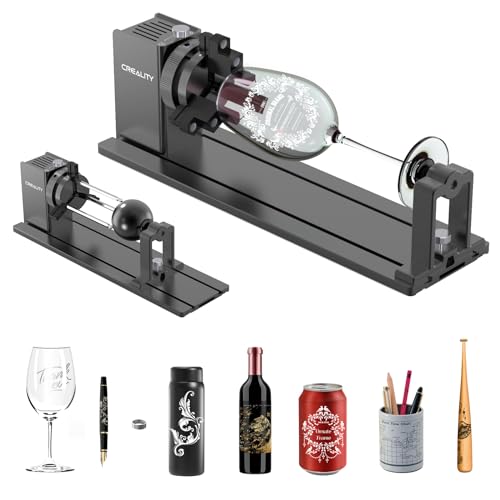
Creality Falcon Rotary Roller Pro
Best for: Engraving cylindrical glass tumblers on Falcon units
- Compatible Material
- Glass (what this guide is about)
- Features
- Rotary Axis
- Application
- Tumblers
- Dimensions
- 14 × 4.2 × 5.9 inches
This is a rotary axis attachment for the Creality Falcon series. It uses high-strength aluminum alloy and high-density plastic jaws. The kit supports cylindrical objects from 1 to 110 mm in diameter. It also handles spheres and rings. The unit connects directly to the Y-axis motor. It enables precise engraving on tumblers and glass items. It requires software adjustment after connection.
Pros
- Three-in-one jaw system for irregular shapes
- Supports diameters from 1 to 110 mm
- Aluminum alloy construction
- Direct Y-axis motor connection
Cons
- Limited to Falcon and Falcon 2 series
- Requires software parameter adjustment
- Potential compatibility errors with non-Creality boards
Good fit if
- You own a Creality Falcon engraver
- You need to engrave cylindrical glass tumblers
- You want to mark spheres or rings
Skip if
- You use a different brand of laser engraver
- You only engrave flat glass sheets
- You need a plug-and-play setup without software tweaks
Verdict: Creality Laser Rotary Roller Pro is a specialized add-on for Falcon users. It fits those who need to rotate glass tumblers or spheres for detailed work.

Carverall A1 Pro 5W Enclosed Laser Engraver
Best for: accurate camera alignment on small glass crafts
- Compatible Material
- Wood, Metal, Leather, Glass, Paper (what this guide is about)
- Laser Power
- 5W (verified 5.12–5.35W)
- Working Area
- 3.94×3.94-inch
- Engraving Speed
- 12,000mm/min
- Software Compatibility
- CutLabX, LightBurn, LaserGRBL
- Form Factor
- fully enclosed Class 1
The Carverall A1 Pro 5W Enclosed Laser Engraver pairs a compact Class 1 safety enclosure with an integrated HD camera for visual design positioning. It engraves glass, coated metals, and acrylic across a 3.94×3.94-inch work area at speeds up to 12,000mm/min. With a removable base supporting objects up to 10.63 inches tall, it suits you if you want precise alignment for small glass pieces and drinkware accessories without guesswork.
Pros
- Built-in HD camera allows drag-and-drop visual design alignment on your workpiece
- Fully enclosed Class 1 design with tilt detection and auto-shutoff when opened
- Accommodates items up to 10.63 inches tall across three height adjustments
- Includes built-in air assist and exhaust fan
Cons
- Small 3.94×3.94-inch work area limits overall project size
- 5W laser output offers lower cutting and marking power than 10W units
- Rotary roller attachment for tumblers and bottles is not included standard
Good fit if
- You need camera-based positioning to place graphics precisely onto small glass items
- You want a fully enclosed desktop engraver with built-in safety shutoffs
- You work with taller vertical objects up to 10.63 inches using a removable base
Skip if
- You need to engrave flat glass sheets larger than 3.94×3.94 inches
- You require higher laser wattage for faster speeds and deeper cuts
Verdict: Carverall A1 Pro 5W Enclosed Laser Engraver provides precise visual alignment through its integrated HD camera and enclosed Class 1 build. It offers strong clearance for tall items despite its compact 3.94×3.94-inch engraving bed.

Longer RAY5 10W Laser Engraver with Bed
Best for: large glass engravings and thick material cutting
- Compatible Material
- Wood, Metal, Acrylic, Leather, Glass, Paper (what this guide is about)
- Laser Power
- 10W
- Working Area
- 400 x 400mm
- Engraving Speed
- up to 10,000 mm/min
- Cutting Capacity
- 20mm wood, 30mm acrylic
- Target Audience
- DIY
The Longer RAY5 10W is a DIY laser engraver designed for precision work on materials like glass. It features a 400 x 400mm working area and dual-beam technology for speeds up to 10,000 mm/min. The package includes an air pump and a honeycomb table to improve cut quality. It targets hobbyists who need a large workspace and strong power for cutting wood and acrylic.
Pros
- 10W laser power handles cutting up to 20mm wood and 30mm acrylic
- 400 x 400mm working area accommodates large glass projects
- Includes adjustable air pump and honeycomb worktable for cleaner cuts
- Dual-beam technology enables engraving speeds up to 10,000 mm/min
Cons
- No mention of software or app control for design management
- No rotary attachment included for cylindrical glass items
- Heavy build with large dimensions limits portability
Good fit if
- You need a large 400 x 400mm area for big glass pieces
- You want high cutting capacity for thick wood or acrylic
- You prefer a DIY setup with included safety and cooling gear
Skip if
- You require a compact machine for small desktop spaces
- You need automated software integration for complex designs
- You want to engrave cylindrical objects without buying extra parts
Verdict: The Longer RAY5 10W Laser Engraver fits DIY enthusiasts who prioritize a large workspace and high power for cutting thick materials. It is a solid choice for stationary projects on glass, wood, and acrylic.

ATOMSTACK Swift 7W Laser Engraver
Best for: fast, detailed engraving on mid-sized glass projects
- Compatible Material
- Wood, Metal, Acrylic, Leather, Glass (what this guide is about)
- Laser Power
- 7W
- Working Area
- 300 x 300 mm
- Engraving Speed
- Up to 400 mm/s (24,000 mm/min)
- Software Compatibility
- ATOMSTACK app, LightBurn, LaserGRBL
- Target Audience
- DIY
The ATOMSTACK Swift 7W Laser Engraver is a compact desktop machine built with a 7W laser output and a compressed 0.06 x 0.08 mm focal spot. Operating at speeds up to 400 mm/s across a 300 x 300 mm working area, it handles detailed work on glass and other surfaces. It suits DIY users who want precise, high-speed line tracing with flexible control via mobile app, LightBurn, or LaserGRBL.
Pros
- Compressed laser spot of 0.06 x 0.08 mm for fine details
- Engraving speeds reaching up to 400 mm/s (24,000 mm/min)
- Works with LightBurn, LaserGRBL, and the ATOMSTACK mobile app
- Magnetic removable laser protective cover and included safety glasses
Cons
- Working area is limited to 300 x 300 mm
- 7W optical output is lower than 10W alternatives
- Assembly is required before first use
Good fit if
- You need a tight 0.06 x 0.08 mm laser spot for intricate detail work on glass.
- You want engraving speeds up to 400 mm/s to reduce project processing times.
- You prefer controlling jobs through a mobile app or standard PC software via USB/Type-C.
Skip if
- You require an engraving workspace larger than 300 x 300 mm.
- You need higher laser wattage for deep cutting rather than surface engraving.
Verdict: ATOMSTACK Swift 7W Laser Engraver delivers fine detail with its 0.06 x 0.08 mm laser spot and rapid 400 mm/s travel speeds. It is a capable choice for mid-sized glass engraving projects where precision matters more than sheer cutting power.

AlgoLaser Pixi 10W Portable
Best for: portable standalone glass engraving
- Compatible Material
- Wood, Metal, Glass (what this guide is about)
- Laser Power
- 10W
- Working Area
- 8.5 x 10.5 inches
- Software Compatibility
- AlgoOS, LightBurn, LaserGRBL
- Form Factor
- Fully Enclosed (Class 1)
- Features
- Touchscreen
The AlgoLaser Pixi 10W is a portable laser engraver with 10W output. It works on wood, metal, and glass. The device features a 3.5-inch touchscreen and AlgoOS system. You can draw or upload designs directly on the screen. It requires no computer or complicated setup. The unit is compact, measuring 10.5 by 8.5 by 7.7 inches. It suits beginners who want simple, standalone operation.
Pros
- 10W laser power for glass engraving
- 3.5-inch touchscreen for direct design input
- Portable form factor fits small spaces
- No computer or assembly required
Cons
- Smaller build area than desktop models
- No visible rotary attachment for cylindrical items
- Limited to USB-C, WiFi, and accessory ports
Good fit if
- You want a standalone unit without a PC
- You need a portable device for small projects
- You engrave flat glass or wood items
Skip if
- You require high-volume production speed
- You need to engrave curved surfaces
- You prefer a large working area
Verdict: AlgoLaser Pixi 10W Portable is a compact, standalone engraver for users who prioritize portability and simple touchscreen control over large workspaces.

Longer Ray5 10W Laser Engraver
Best for: offline glass engraving projects
- Compatible Material
- Wood, Metal, Glass (what this guide is about)
- Laser Power
- 10W
- Working Area
- 14.7 "x14.7" (400*400mm)
- Engraving Speed
- 10,000mm per minute
- Cutting Capacity
- 0.8 inches/20mm wood, 1.2"/30mm acrylic
- Features
- Offline Controller
The Longer RAY5 offers a 10W laser and a 400x400mm working area. It features a 3.5-inch touchscreen and supports offline operation via TF card. This allows you to engrave glass without a constant internet connection. The machine reaches speeds of 10,000mm per minute. It is designed for DIY users who need reliable, standalone control for their projects.
Pros
- 10W laser power for cutting wood and acrylic
- 3.5-inch touchscreen for direct operation
- Offline control support via TF card
- 400x400mm spacious working area
Cons
- No mention of rotary accessory support
- Requires assembly before first use
- Limited to 10W power output
Good fit if
- You need offline engraving capabilities
- You prefer a touchscreen interface
- You work with 400x400mm materials
Skip if
- You require rotary engraving for cylinders
- You need remote mobile app control
- You want a pre-assembled unit
Verdict: Longer RAY5 10W with Offline Control suits users who value standalone operation and a large workspace. It is a solid option for DIYers who want to engrave glass without relying on a continuous internet connection.
Specifications side by side
| Spec | Carverall K15 Pro 10W Laser Engraver | Creality Falcon 5W Laser Engraver | Creality Falcon 10W Laser Engraver | BlazeX 5W Enclosed Laser Engraver | ATOMSTACK A10 Pro V2 10W Laser Engraver | xTool F2 Ultra 5W UV Laser Engraver | xTool RA2 Pro 4-in-1 Rotary Axis | ATOMSTACK Swift 7W Laser Engraver | Longer Ray5 10W Laser Engraver with Touchscreen | Creality Falcon Rotary Roller Pro | Carverall A1 Pro 5W Enclosed Laser Engraver | Longer RAY5 10W Laser Engraver with Bed | ATOMSTACK Swift 7W Laser Engraver | AlgoLaser Pixi 10W Portable | Longer Ray5 10W Laser Engraver |
|---|---|---|---|---|---|---|---|---|---|---|---|---|---|---|---|
| Laser Type | Diode | not specified | not specified | not specified | not specified | not specified | not specified | not specified | not specified | not specified | not specified | not specified | not specified | not specified | not specified |
| Laser Power | 10W (10000mW) | 5W | 10W | 5W | 10W | 5W (5000 mW) | not specified | 7W | 10W | not specified | 5W (verified 5.12–5.35W) | 10W | 7W | 10W | 10W |
| Working Area | 11.8×7.9-inch | 400 x 415 mm | 17" x 16" | not specified | 410 x 380 mm | not specified | not specified | 300 x 300 mm | 400x400mm | not specified | 3.94×3.94-inch | 400 x 400mm | 300 x 300 mm | 8.5 x 10.5 inches | 14.7 "x14.7" (400*400mm) |
| Engraving Speed | 15,000mm/min | Up to 10,000 mm/min | Up to 10000mm/m | not specified | Up to 400 mm/s | 15,000 mm/s | not specified | 400 mm/s | 10,000mm/min | not specified | 12,000mm/min | up to 10,000 mm/min | Up to 400 mm/s (24,000 mm/min) | not specified | 10,000mm per minute |
| Software Compatibility | CutLabX, LightBurn, LaserGRBL | not specified | LightBurn, LaserGRBL | LightBurn, LaserGRBL, CutLabX | ATOMSTACK App/PC, LightBurn, LaserGRBL | not specified | Laserbox Basic, LaserGRBL, LightBurn | ATOMSTACK app, LightBurn, LaserGRBL | LaserGRBL, LightBurn | not specified | CutLabX, LightBurn, LaserGRBL | not specified | ATOMSTACK app, LightBurn, LaserGRBL | AlgoOS, LightBurn, LaserGRBL | not specified |
| Form Factor | not specified | not specified | not specified | Class 1 | not specified | Fully Enclosed | not specified | not specified | not specified | not specified | fully enclosed Class 1 | not specified | not specified | Fully Enclosed (Class 1) | not specified |
| Cutting Capacity | 12mm plywood, 8mm acrylic | not specified | 5mm basswood, 3mm black acrylic | not specified | not specified | not specified | not specified | not specified | 0.8" (20mm) wood, 1.2" (30mm) acrylic | not specified | 4mm plywood and 3mm acrylic | 20mm wood, 30mm acrylic | not specified | not specified | 0.8 inches/20mm wood, 1.2"/30mm acrylic |
| Compatible Material | Wood, Metal, Acrylic, Glass | Wood, Acrylic, Leather, Glass | Wood, Metal, Acrylic, Leather, Glass, Paper | Wood, Metal, Leather, Glass | Wood, Metal, Acrylic, Leather, Glass | Acrylic, Glass, Plastic | Glass | Wood, Metal, Acrylic, Leather, Glass | Wood, Metal, Acrylic, Glass | Glass | Wood, Metal, Leather, Glass, Paper | Wood, Metal, Acrylic, Leather, Glass, Paper | Wood, Metal, Acrylic, Leather, Glass | Wood, Metal, Glass | Wood, Metal, Glass |
| Features | not specified | not specified | not specified | Enclosure | not specified | not specified | Rotary Axis | not specified | Touchscreen | Rotary Axis | Camera | not specified | not specified | Touchscreen | Offline Controller |
| Target Audience | DIY | not specified | DIY | Beginners | not specified | not specified | not specified | not specified | DIY | not specified | Beginners | DIY | DIY | not specified | DIY |
| Size | 10W | Falcon-5W | Falcon-10W Basic | 5W | A10 PRO V2 | xTool F2 Ultra UV | RA2 Pro for xTool | Swift 7W blue | 10W | Laser Rotary Roller Pro | not specified | 10W | Swift 7W | 10W | 400x400mm |
| Application | not specified | not specified | not specified | not specified | not specified | not specified | Tumblers | not specified | not specified | Tumblers | not specified | not specified | not specified | not specified | not specified |
| Weight | 5.91 pounds | not specified | 7.05 pounds | not specified | not specified | 49.6 pounds | not specified | not specified | not specified | not specified | not specified | not specified | not specified | not specified | not specified |
| Dimensions | not specified | 17.3 × 9.33 × 24.8 inches | 22.4 × 24.9 × 7.79 inches | 4.3 × 1.2 × 4.7 inches | 10 × 10 × 10 inches | 11.6 × 16.9 × 20.5 inches | 7.4 × 3.7 × 18 inches | 9.65 × 4.72 × 19.5 inches | 25.4 × 17.1 × 12.8 inches | 14 × 4.2 × 5.9 inches | 12.8 × 11 × 10.9 inches | 29.3 × 5.31 × 22.4 inches | 20.1 × 10.2 × 5.51 inches | 10.5 × 8.5 × 7.7 inches | 23.6 × 12.2 × 5.9 inches |
| Color | Gray | Falcon-5W | Falcon-10W Basic | 5W Standard | Black | not specified | Black | Blue, 7w | 10w | Creality Laser Rotary Roller Pro | 5w | RAY5+17.3"Honeycomb Bed | Swift 7W Blue | Deep Black | Black |
| Model | K15 PRO | CR-Laser Falcon | CR-Laser Falcon 10W | M3 | A10 Pro V2 | MXF-K007-002 | not specified | Swift | 10W | AMUS-HYZ-LE-AC-Rotary Roller2 | A1 PRO 5W | RAY5 | K2 | Pixi-Black-10W | 20240624 |
Is Glass Engraving Capability Worth It?
Targeting glass compatibility ensures the machine laser module and motion system can mark smooth, hard surfaces effectively. On these listings, glass-capable hardware spans 5W to 10W diode units and 5W UV lasers. Fine spot sizes down to 0.06 mm and 0.01 mm motion precision allow controlled surface etching without demanding high wattage. Most compatible models also engrave wood, acrylic, leather, and metal. Choosing a glass-capable engraver lets you mark drinkware, flat sheets, and craft blanks using the same setup you use for common organic materials.
Worth it if
- You plan to mark drinkware, glass panes, or craft blanks alongside wood, leather, acrylic, and metal.
- You require fine focal spots down to 0.06 mm or 0.01 mm precision for detailed surface etching.
Skip it if
- You exclusively engrave opaque materials such as wood, leather, or paper and never handle glassware.
- You prioritize deep material cutting capacity over the low-power 5W to 10W precision used for surface etching.
If you need a printer, see our guide to the best lexmark laser printers for your office needs.
How We Picked These Models
To build this guide of 15 machines for 2026, we selected listings where published specifications or feature lists explicitly state compatibility with glass. Only one variant per product family is included. All specifications come directly from the published product listings, and products are not physically handled.
The selections are ordered with products in stock first, then by Amazon sales rank, placing better-selling products first. We also compare key published specifications, including laser wattage, working dimensions, and movement precision, to help you match a tool to your glass projects.
How to Choose the Right Glass Engraver
-
Match Laser Power to Application
Glass engraving relies on thermal surface fracturing rather than deep cutting. Models on this list feature power outputs ranging from 5W to 10W. If your work focuses strictly on delicate surface etching, a 5W diode provides gentle, controllable thermal transfer. Choosing a 10W unit like the Carverall K15 Pro provides extra processing speed and wider capability if you also engrave wood, acrylic, or coated metals. Check the published wattage to ensure it suits your primary materials without overpowering delicate glass pieces.
-
Check Focal Spot Precision
Glass can chip or craze if the optical beam spreads too wide. Compare the advertised precision and focal spot dimensions on the spec sheet. A fine spot size, such as the 0.06 by 0.06 mm focal point on the Longer Ray5 10W, concentrates energy into a tiny target area. This tight focus produces clean, sharp line definition and smooth micro-fractures instead of uneven, splintered edges. If your projects involve intricate line art, small text, or detailed monograms, prioritize machines listing tight 0.01 mm motion precision.
-
Consider Enclosed Desktop Housings
Open-frame machines offer expansive beds, but enclosed models offer distinct safety advantages for desktop use. Glass etching can scatter microscopic silica dust and create bright laser reflections against clear surfaces. An enclosed unit like the BlazeX 5W Enclosed Laser Engraver features a protective Class 1 housing that contains debris and shields eyes from reflected light. If you plan to engrave glass indoors, in a home office, or in a shared family workshop, verify whether the engraver includes a full enclosure or requires an aftermarket safety tent.
-
Evaluate Visual Camera Alignment
Positioning designs on transparent or translucent glass blanks can be challenging with manual framing alone. Built-in camera systems solve this by capturing a live preview of the work bed directly within your control software. The Carverall A1 Pro 5W uses an integrated HD camera to let you drag and drop designs onto the exact surface of small glass blanks. If you frequently etch small items like glass coasters, perfume bottles, or compact awards, check for onboard camera hardware to eliminate alignment errors and reduce wasted blanks.
-
Check Offline Control Options
Operating an engraver while tethered to a laptop creates risks if the computer sleeps, updates, or disconnects mid-project. If you prefer to run jobs independently, examine whether the machine supports offline control via onboard touchscreens, memory cards, or local wireless connections. The Longer Ray5 10W with Touchscreen provides a dedicated display interface directly on the chassis. This feature allows you to select files, frame your glass workpiece, and monitor progress without tying up your computer or maintaining an active USB cable link during long etching cycles.
-
Verify Rotary Axis Compatibility
Flat laser beds only accommodate planar glass sheets, coasters, or flat-sided decorative pieces. If you want to customize curved drinkware such as tumblers, pint glasses, or stemmed wine glasses, check the listing for rotary tool support. Specialized accessories like the xTool RA2 Pro 4-in-1 Rotary Axis provide roller and chuck mechanisms that rotate cylindrical glassware beneath the laser head. Ensure the base machine offers sufficient vertical clearance and compatible motor connections before assuming an open or enclosed engraver can handle curved glassware.
Frequently asked questions
What laser power is best for engraving glass?
Glass engraving typically requires 5W to 10W of laser power. Higher wattage, such as 10W, provides stronger thermal fracturing for deeper marks. Lower power, like 5W, is suitable for delicate surface etching. UV lasers also offer high precision for clean glass work.
Can I engrave cylindrical glassware like tumblers?
Standard flatbed engravers cannot mark curved surfaces directly. You need a rotary axis attachment, such as the xTool RA2 Pro or Creality Falcon Rotary Roller Pro. These accessories hold cylindrical items and rotate them while the laser etches the design evenly around the circumference.
Which laser engraver is safest for home use?
Enclosed models with Class 1 ratings are the safest option. The BlazeX 5W Enclosed Laser Engraver and Carverall A1 Pro 5W provide protective housing to contain laser light. These units are designed for desktop environments, reducing exposure risks compared to open-frame machines.
Do I need a computer to operate these engravers?
Some models support standalone offline operation. The Longer Ray5 10W with Touchscreen includes a built-in screen and wireless options for file transfer. This allows you to engrave glass and wood without staying connected to a computer, offering greater flexibility for your workflow.
What is the largest working area available?
The Creality Falcon 5W offers a spacious 400 x 415 mm working area. This large format is ideal for flat glass panels or multiple small items. It provides ample space for intricate surface etching projects without requiring frequent repositioning of the workpiece.
How precise is the laser spot size for glass?
Fine spot sizes ensure clean, detailed glass marks. The Carverall K15 Pro achieves 0.01 mm precision, while the Creality Falcon 10W offers a 0.06 mm spot focus. Smaller spots allow for sharper text and intricate designs on smooth glass surfaces.
Is a UV laser better than a diode laser for glass?
UV lasers provide micro-level precision for clean surface and inner glass engraving. The xTool F2 Ultra 5W UV Laser Engraver is optimized for this task. Diode lasers are also compatible but may require different settings for similar results on hard surfaces.