Best Laser Engravers for Paper: 15 Spec-Based Picks
As an Amazon Associate we earn from qualifying purchases. Links on this page are affiliate links.
Finding the best laser engravers for paper requires matching laser power, precision, and work area to your crafting needs. We evaluated 15 models strictly using the specifications published on their product listings. The xTool M2 20W Enclosed Laser Engraver leads our list because its Class 1 safety enclosure and dual-camera alignment provide clean, secure, and accurate positioning on delicate sheets.
This guide helps you compare specs like wattage, bed size, and optical focus to decide which machine fits your paper crafting setup.
Quick picks
The best fit for you
- You want the safest desktop option for paper xTool M2 20W Enclosed Laser Engraver The xTool M2 includes a Class 1 safety enclosure and dual-camera alignment for precise work.
- You need to engrave large paper sheets Creality Falcon 10W Laser Engraver The Creality Falcon 10W offers a spacious 17 by 16-inch work area for large formats.
- You prefer a portable unit for travel LaserPecker LP1 Plus Portable Engraver The LaserPecker LP1 Plus weighs 2.2 pounds and features auto-focus for easy portable setup.
- You want a budget-friendly pre-assembled model WIZMAKER Wand 7W Compact Laser Engraver The WIZMAKER Wand 7W provides pre-assembled convenience and 0.1 mm accuracy for beginners.
Our 15 picks

xTool M2 20W Enclosed Laser Engraver
Best for: safe, precise desktop paper and craft engraving
- Compatible Material
- Wood, Leather, Paper, Fabric (what this guide is about)
- Laser Type
- Diode
- Laser Power
- 20W (20000mW)
- Software Compatibility
- xTool Studio
- Form Factor
- Class 1 Enclosed
- Features
- Enclosure, Camera
The xTool M2 is a 20W diode laser engraver built into a fully enclosed Class 1 housing. For working with paper, cardstock, and fabric, it provides built-in dual cameras with real-time preview to help you position delicate designs precisely without wasting stock. Driven by xTool Studio software, it suits crafters and home makers looking for strong cutting power and built-in enclosure safety in a desktop format.
Pros
- 20W (20,000mW) diode laser output
- Fully enclosed Class 1 laser safety design
- Built-in dual cameras for real-time workspace preview
- Operates with beginner-friendly xTool Studio software
Cons
- CMYK inkjet module is not included and must be purchased separately
- RA3 Lite rotary tool is not included in the basic package
Good fit if
- You want an enclosed Class 1 desktop machine for paper and cardstock crafting
- You rely on dual cameras for exact design alignment on your materials
- You need 20W of diode laser power to cut and engrave multiple materials
Skip if
- You expect out-of-the-box full-color inkjet printing without buying extra add-ons
- You already have a dedicated rotary tool setup included with your purchase
Verdict: xTool M2 20W Enclosed Laser Engraver combines a Class 1 safety enclosure with dual-camera alignment for precise, reliable paper and craft projects.

Carverall 6W Desktop Laser Engraver
Best for: A4 paper crafting and detailed desktop engraving
- Compatible Material
- Wood, Metal, Acrylic, Leather, Paper (what this guide is about)
- Laser Type
- Diode
- Laser Power
- 6W (6000mW)
- Working Area
- 11.8×7.9 inches (A4)
- Engraving Speed
- 15,000mm/min
- Software Compatibility
- CutLabX, LightBurn, LaserGRBL
If you need a dedicated diode engraver for paper and lightweight materials, the Carverall 6W Desktop Laser Engraver gives you an 11.8×7.9-inch A4 working area with 0.01mm precision. Operating at speeds up to 15,000mm/min, it cuts paper cleanly and marks fine details. It supports LightBurn, LaserGRBL, and mobile app control alongside offline TF card operation, making it a balanced choice for small desktop craft spaces.
Pros
- Engraving speeds reach up to 15,000mm/min with 0.01mm precision
- 11.8×7.9-inch bed aligns with standard A4 paper dimensions
- Supports LightBurn, LaserGRBL, CutLabX, and standalone TF card use
- Integrated tilt protection shuts the laser off automatically if tipped
Cons
- Working area is restricted to 11.8×7.9 inches
- Air pump and honeycomb plate require separate purchases
Good fit if
- You work primarily with paper, cardstock, and items that fit standard A4 sheets.
- You prefer flexible control using mobile apps, desktop software, or offline TF cards.
- You want fast engraving speeds up to 15,000mm/min for desktop hobby projects.
Skip if
- You need to cut or engrave sheets larger than 11.8×7.9 inches.
- You require an integrated air assist pump straight out of the box.
Verdict: Carverall 6W Desktop Laser Engraver delivers rapid 15,000mm/min speeds and 0.01mm detail across an A4 workspace. It provides dependable control options and straightforward safety features for detailed paper crafting.

Creality Falcon 10W Laser Engraver
Best for: large-format, high-precision paper crafting
- Compatible Material
- Wood, Metal, Acrylic, Leather, Glass, Paper (what this guide is about)
- Laser Power
- 10W
- Working Area
- 17" x 16"
- Engraving Speed
- Up to 10000mm/m
- Software Compatibility
- LightBurn, LaserGRBL
- Cutting Capacity
- 5mm basswood, 3mm black acrylic
The Creality Falcon 10W Laser Engraver gives you an open-frame desktop cutter with a 17 by 16-inch working area. Its 10W laser features a 0.06 by 0.06 mm focus spot, delivering 0.004-inch cutting accuracy across delicate materials like paper. With operational speeds up to 10000 mm/min and support for Wi-Fi, USB, and SD card transfers, this machine suits DIY hobbyists who need fine detail and dependable workspace dimensions.
Pros
- 17" x 16" working area
- Fine 0.06 x 0.06 mm laser spot focus
- Engraving speeds up to 10000 mm/min
- Supports Wi-Fi, USB, and SD card connections
- Integrated filter acrylic blocks 97% of UV rays
Cons
- Open-frame construction lacks a full enclosure
- Requires 10 to 20 minutes of assembly
- Basic package does not include an air assist pump
Good fit if
- You need a spacious 17" x 16" workspace for paper projects.
- You want a tight 0.06 x 0.06 mm spot focus for clean, intricate cuts.
- You prefer flexible operation via Wi-Fi, SD card, or USB connection.
Skip if
- You prefer a fully enclosed Class 1 desktop machine.
- You want a factory pre-assembled unit ready out of the box.
Verdict: Creality Falcon 10W Laser Engraver delivers a spacious 17 by 16-inch work area and a fine 0.06 mm focus spot for precise paper cutting. It is an effective, versatile choice if you want open-frame flexibility with multiple connectivity options.
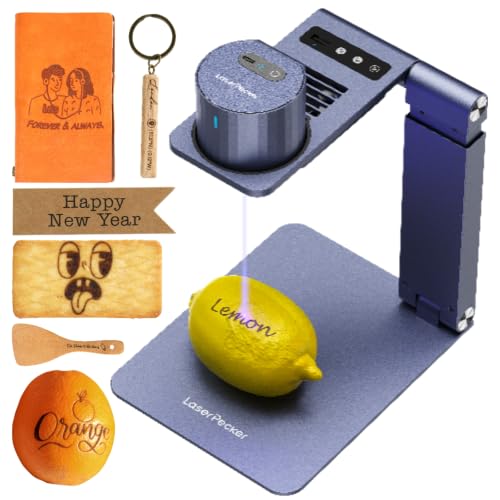
LaserPecker LP1 Plus Portable Engraver
Best for: portable paper engraving with automated focusing
- Compatible Material
- Wood, Leather, Paper (what this guide is about)
- Software Compatibility
- cross-platform app
- Features
- Auto Focus
- Target Audience
- DIY
- Dimensions
- 1 × 1 × 1 inches
- Weight
- 2.2 pounds
The LaserPecker Mini Laser Engraver with Auto-Focus Stand is an ultra-portable DIY tool compatible with paper, wood, leather, and acrylic. Weighing just 2.2 pounds, you can run it from an external power bank for outdoor setups. It features an automated focus stand to calibrate your focal distance without manual measuring. If you need a flexible, app-controlled unit for small paper-marking jobs, this setup fits your workflow.
Pros
- Auto-focus stand automates focal height alignment
- Operates via power bank for portable and outdoor projects
- Weighs just 2.2 pounds for easy transport
- Adjustable stand supports 360-degree engraving angles
Cons
- Protective enclosure is an optional accessory rather than an included item
- Laser optical output wattage is not stated in the official specifications
Good fit if
- You want an auto-focus stand to remove the guesswork of setting focal height on paper.
- You need a 2.2-pound engraver that can run off a portable power bank away from an outlet.
- You prefer importing doodles and photos directly through a cross-platform mobile app.
Skip if
- You need an enclosed Class 1 laser machine included standard for your workspace.
- You require verified high-wattage laser output for cutting through dense stock.
Verdict: LaserPecker Mini Laser Engraver with Auto-Focus Stand provides an ultra-lightweight, 2.2-pound marking solution that handles paper projects easily from a power bank. Its dedicated auto-focus mechanism makes setup quick and precise for DIY crafting on the go.

WIZMAKER Wand 12W Diode Laser Engraver
Best for: paper crafting and small-shop diode cutting
- Compatible Material
- Wood, Acrylic, Leather, Paper (what this guide is about)
- Laser Type
- Diode
- Laser Power
- 12W
- Working Area
- 300 x 300 mm
- Engraving Speed
- Up to 10,000 mm/min
- Software Compatibility
- AtomStack, LightBurn, LaserGRBL
The WIZMAKER Wand 12W Diode Laser Engraver is an open desktop machine built for paper, leather, and craft projects. It delivers a 12W diode output across a 300 x 300 mm work area, with speeds reaching up to 10,000 mm/min and 0.1 mm positioning accuracy. If you need a flexible cutter running via Wi-Fi or USB using LightBurn or LaserGRBL, this unit fits DIY makers and small craft setups.
Pros
- 12W diode laser with speeds up to 10,000 mm/min
- 300 x 300 mm work area with 0.1 mm positioning accuracy
- Supports Wi-Fi, hotspot, and USB connections across desktop and mobile
- Built-in flame monitoring and tilt detection safety features
Cons
- Class 4 open design lacks an integrated protective enclosure
- Work area is capped at 300 x 300 mm
Good fit if
- You want a 12W diode laser to engrave and cut paper, cardstock, or thin materials within 300 x 300 mm.
- You prefer flexible connectivity including Wi-Fi and mobile support alongside LightBurn or LaserGRBL.
Skip if
- You require an enclosed Class 1 machine for shared indoor spaces.
- You need a work surface larger than 300 x 300 mm for wide material sheets.
Verdict: WIZMAKER Wand 12W Diode Laser Engraver balances a 12W diode module with varied wireless and USB connectivity for detailed paper and craft projects. Its 300 x 300 mm layout and active safety sensors provide capable desktop cutting without complex setup.

Carverall A1 Pro 5W Enclosed Laser Engraver
Best for: small-scale paper crafts and desktop workspaces
- Compatible Material
- Wood, Metal, Leather, Glass, Paper (what this guide is about)
- Laser Power
- 5W (verified 5.12–5.35W)
- Working Area
- 3.94×3.94-inch
- Engraving Speed
- 12,000mm/min
- Software Compatibility
- CutLabX, LightBurn, LaserGRBL
- Form Factor
- fully enclosed Class 1
The Carverall A1 Pro is a compact, fully enclosed desktop laser engraver featuring a 5W diode laser. It provides a 3.94×3.94-inch work area and reaches speeds up to 12,000mm/min. A built-in HD camera helps you align designs directly onto paper crafts, bookmarks, or cards without manual measuring. With its Class 1 safety enclosure, integrated air assist, and support for LightBurn and CutLabX, it suits desktop hobbyists processing small paper projects.
Pros
- Fully enclosed Class 1 design with automatic tilt and open-lid shutoffs
- Built-in HD camera for precise visual design positioning
- Integrated air assist and exhaust fan for cleaner cuts and smoke management
- Engraving speed up to 12,000mm/min with 0.01mm precision
Cons
- Compact 3.94×3.94-inch work area restricts project sheet dimensions
- 5W diode output cuts slower through thicker materials than higher-wattage units
Good fit if
- You need a fully enclosed Class 1 machine for safe desktop crafting.
- You work primarily on small paper goods, cards, and bookmarks under 4 inches square.
- You want visual alignment through an integrated camera and offline TF card controls.
Skip if
- You need to cut or engrave standard letter or larger paper sizes in one pass.
- You require high-wattage output for thick stock or high-volume cutting jobs.
Verdict: Carverall A1 Pro Enclosed Desktop Engraver delivers camera-assisted alignment and Class 1 safety in a compact desktop footprint. It is a solid choice if your paper crafts and detail work fit within its 3.94×3.94-inch field.

Longer RAY5 10W Laser Engraver with Bed
Best for: Large paper projects needing scorch-free cuts
- Compatible Material
- Wood, Metal, Acrylic, Leather, Glass, Paper (what this guide is about)
- Laser Power
- 10W
- Working Area
- 400 x 400mm
- Engraving Speed
- up to 10,000 mm/min
- Cutting Capacity
- 20mm wood, 30mm acrylic
- Target Audience
- DIY
This 10W diode laser engraver features a 400 x 400 mm workspace and reaches speeds up to 10,000 mm/min. Because it includes an adjustable air pump and a 17.3-inch honeycomb worktable with an aluminum backing panel, it helps suppress smoke and protect delicate media like paper from scorch marks. It suits makers who want an open-frame platform equipped for clean cuts right out of the box.
Pros
- Includes adjustable air assist pump delivering 10 to 30 L/min
- Comes with 17.3 x 17.3-inch honeycomb worktable and aluminum panel
- Generous 400 x 400 mm working area
- Motion and thermal protection systems automatically stop operation
Cons
- Open-frame construction requires safety glasses during use
- Large footprint measures 29.3 inches long and 22.4 inches high
Good fit if
- You want included air assist and a honeycomb table to minimize scorching on paper
- You need a large 400 x 400 mm working bed for batch jobs or wide sheets
- You value built-in flame detection and tilt shutoff sensors
Skip if
- You prefer a fully enclosed Class 1 laser engraver
- You have limited workspace and need a compact or portable desktop unit
Verdict: Longer RAY5 10W Laser Engraver with Bed offers an expansive 400 x 400 mm work area paired with essential air assist and a honeycomb plate to ensure clean, burn-free results on paper.

WIZMAKER Wand 7W Compact Laser Engraver
Best for: beginners wanting pre-assembled portable paper engraving
- Compatible Material
- Wood, Leather, Paper (what this guide is about)
- Laser Power
- 7W (7000mW)
- Engraving Speed
- Up to 10,000 mm/min
- Software Compatibility
- AtomStack, LightBurn, LaserGRBL
- Target Audience
- DIY, Small Business
- Form Factor
- Portable
The WIZMAKER Wand is a pre-assembled portable engraver equipped with a 7W laser module. If you work with paper, cardboard, or fabric, its 0.1 mm positioning accuracy and engraving speeds up to 10,000 mm/min handle detailed outlines cleanly. It supports Wi-Fi, hotspot, and USB connections across Windows, Mac, Android, and iOS. This unit suits beginners and hobbyists who want a ready-to-run setup compatible with LightBurn and LaserGRBL software.
Pros
- Fully pre-assembled portable design
- Engraving speed up to 10,000 mm/min with 0.1 mm positioning accuracy
- Broad software and OS support including LightBurn, LaserGRBL, iOS, and Android
- Integrated flame monitoring and tilt detection safety sensors
Cons
- Class 4 open laser design lacks an integrated protective enclosure
- Air assist, honeycomb panel, and rotary tools are optional add-ons
Good fit if
- You want a fully assembled machine ready for paper, cardboard, and light craft projects.
- You plan to run jobs from mobile devices, Wi-Fi, or desktop software like LightBurn.
- You need a compact machine with built-in tilt and flame safety shutoffs.
Skip if
- You require an enclosed Class 1 laser system for workspace safety.
- You need included hardware accessories such as air assist or a honeycomb bed out of the box.
Verdict: WIZMAKER Wand 7W Compact Laser Engraver delivers pre-assembled convenience, 7W output, and broad software support for crafting on paper and light materials. It offers reliable 0.1 mm accuracy without complicated setup steps.

Longer Laser B1 30W Engraver
Best for: high-speed, large-format paper cutting and mixed crafts
- Compatible Material
- Wood, Metal, Acrylic, Leather, Glass, Paper (what this guide is about)
- Laser Power
- Up to 36W
- Working Area
- 450 x 440 mm
- Engraving Speed
- Up to 600 mm/s
- Software Compatibility
- LightBurn
- Cutting Capacity
- 25mm basswood, 50mm acrylic
The Longer Laser B1 30W is a high-output open-frame laser engraver and cutter designed for heavy-duty crafting. For delicate materials like paper alongside denser stocks, its 450 x 440 mm working bed provides extensive room for full-sheet designs. With operational speeds reaching up to 600 mm/s (36,000 mm/min) and included automatic air assist controlled via LightBurn, you get swift processing and cleaner cut edges across all your papercraft and mixed-media projects.
Pros
- Large 450 x 440 mm working area
- Fast working speed up to 600 mm/s (36,000 mm/min)
- Includes LightBurn-controlled automatic air assist pump
- High output power rated up to 36W
- Eight built-in safety protections including flame and motion sensors
Cons
- Open-frame construction lacks a full protective enclosure
- Large physical footprint measuring 29.3 inches long
Good fit if
- You cut high volumes of paper or cardstock and need speeds up to 600 mm/s
- You work with large-format paper stock across a 450 x 440 mm bed
- You want automatic software-controlled air assist out of the box
Skip if
- You need a compact, portable engraver for tight desktop spaces
- You prefer an enclosed Class 1 laser for working without an open beam
Verdict: Longer Laser B1 30W Laser Engraver offers expansive bed dimensions, 600 mm/s working speed, and automatic air assist for fast, large-scale paper cutting and mixed-material crafting.

Longer Laser B1 48W Engraver
Best for: large-format paper cutting and high-speed batch production
- Compatible Material
- Wood, Metal, Acrylic, Leather, Glass, Paper (what this guide is about)
- Laser Power
- 48000mW (40000mW output)
- Working Area
- 450 x 440 mm
- Engraving Speed
- 36,000 mm/min
- Software Compatibility
- LightBurn, LaserBurn App
- Cutting Capacity
- 40mm basswood, 50mm acrylic
This high-power diode engraver pairs a 40,000mW output with a fast maximum speed of 36,000 mm/min. For paper projects, the large 450 x 440 mm working area allows you to process large sheets or batch multiple cutouts in one run. An automated air-assist pump connects with software to keep cuts clean. It suits users who need high throughput and expansive bed space.
Pros
- Large 450 x 440 mm working area
- Fast operational speed up to 36,000 mm/min
- Automated air-assist pump controllable via LightBurn
- Eight built-in safety features including flame detection and emergency stop
- Mobile control via the LaserBurn app over Wi-Fi
Cons
- Large footprint measuring 28.6 by 26.3 inches requires ample desk space
- High 40W laser output is far beyond basic paper engraving requirements
Good fit if
- You need a large 450 x 440 mm working bed to handle wide sheets of paper or cardstock
- You want automated air assist to help manage scorching during rapid cutting runs
- You plan to cut dense materials like 40mm basswood or 50mm acrylic alongside paper
Skip if
- You have limited workspace and cannot accommodate a machine over 28 inches long
- You only need a low-power, entry-level diode specifically for delicate paper crafts
Verdict: Longer Laser B1 40W Engraver delivers exceptional speed and a spacious 450 x 440 mm work area for high-volume paper projects. Its heavy-duty output also provides plenty of headroom if your crafting expands into dense hardwoods and thick acrylic.

Creality Falcon 5W Laser Engraver
Best for: paper crafts and entry-level diode engraving
- Compatible Material
- Wood, Metal, Acrylic, Leather, Paper (what this guide is about)
- Laser Power
- 5W
- Software Compatibility
- LaserGRBL, LightBurn
- Cutting Capacity
- 4mm wood
- Dimensions
- 23 × 10 × 7 inches
The Creality Falcon 5W Laser Engraver provides a 5W optical output powered by a 72W machine frame. Built with 8 mm steel rails and an anodized aluminum structure, it includes a slide-down focusing facilitator and continuous blue light framing. It works on paper, leather, acrylic, and wood, cutting wood up to 4mm in a single pass. It suits you if you need a standard diode setup compatible with LightBurn and LaserGRBL.
Pros
- Slide-down focusing facilitator with continuous blue light area preview
- Compatible with both LightBurn and LaserGRBL software
- Laser head includes an anti-UV acrylic shield and washable cotton filter
- Rigid frame constructed with 8 mm steel rails and anodized aluminum
Cons
- 5W output is slower for dense cutting compared to higher-wattage models
- Open-frame build lacks a fully sealed enclosure
- No integrated air assist pump listed in the specifications
Good fit if
- You want an open-frame diode unit compatible with LightBurn and LaserGRBL.
- You prioritize simple mechanical focusing using a built-in slide facilitator.
- You work primarily with paper, leather, fabric, or thin sheet materials.
Skip if
- You need higher laser output than 5W for high-speed cutting passes.
- You require an enclosed Class 1 safety housing for your workspace.
Verdict: Creality Falcon 5W Laser Engraver provides reliable alignment tools and dual software support for crafting on paper and other light materials. It offers a straightforward 5W diode platform for detailed desktop engraving projects.

Carverall K15 Pro 10W Enclosed Engraver
Best for: compact, enclosed desktop paper engraving and cutting
- Compatible Material
- Wood, Acrylic, Leather, Glass, Paper, Plastic (what this guide is about)
- Laser Power
- 10W (10000mW)
- Working Area
- 300 x 200 mm (11.8×7.9-inch)
- Engraving Speed
- 15,000mm/min
- Software Compatibility
- CutLabX, mobile APP
- Form Factor
- Class 1 Fully Enclosed
The Carverall 10W Enclosed Laser Engraver is a desktop machine built with a Class 1 fully enclosed design. For paper projects, it delivers a 0.01 mm precision level and runs at speeds up to 15,000 mm/min across a 300 x 200 mm bed. It suits you if you want a self-contained setup with Wi-Fi, app control, and built-in safety shutoffs like lid-open pausing and tilt detection.
Pros
- Class 1 fully enclosed housing with lid-open pause and tilt protection
- Engraving speeds up to 15,000 mm/min with 0.01 mm precision
- Supports Wi-Fi, USB, and TF card offline operation
- Works with CutLabX, mobile apps, LightBurn, and LaserGRBL
Cons
- Working area is limited to 300 x 200 mm (11.8 x 7.9 inches)
- Expansion accessories like the air pump and camera are not included in the base package
Good fit if
- You want an enclosed Class 1 laser with safety interlocks for indoor paper crafting.
- You prefer running jobs wirelessly using Wi-Fi, a smartphone app, or a TF card.
- You work on smaller paper designs that fit inside an 11.8 x 7.9-inch working area.
Skip if
- You need to cut large paper or poster sheets that exceed 300 x 200 mm.
- You want an air pump or camera included directly in the box.
Verdict: Carverall 10W Enclosed Laser Engraver provides a secure, enclosed workspace and high-speed processing for detailed paper and craft projects. Its multi-connection support and 0.01 mm accuracy make it a practical desktop tool for small-format work.

WAINLUXPRO 3W Compact Laser Engraver
Best for: offline small-format paper crafting
- Compatible Material
- Wood, Leather, Paper, Plastic (what this guide is about)
- Laser Power
- 3000mW
- Working Area
- 80x80mm (3.15x3.15 in)
- Software Compatibility
- CutlabX
- Features
- Offline Controller
- Target Audience
- DIY
The WAINLUXPRO 3W Compact Laser Engraver delivers 3000mW of power across an 80x80mm working area, making it suitable for detailed markings on paper, leather, and wood. You can run jobs completely untethered using an SD card and offline controls, or connect via WiFi and USB using CutlabX, LaserGRBL, or LightBurn. Its Class 1 enclosure, 0.01mm precision, and automatic tilt shutoff provide controlled operation for small tabletop projects.
Pros
- Supports standalone offline engraving using an SD card
- Class 1 safety enclosure with tilt and lid-open automatic shutoff
- High 0.01mm precision for fine detail on paper and light materials
- Compatible with CutlabX, LaserGRBL, and LightBurn software
Cons
- Working area is limited to 80x80mm (3.15x3.15 inches)
- 3000mW laser output power limits depth and speed on thicker media
Good fit if
- You want to run engraving jobs via SD card without an active computer connection
- You need an enclosed Class 1 desktop machine with built-in safety sensors
- You primarily engrave small designs that fit within a 3.15x3.15-inch boundary
Skip if
- You need to engrave or cut large-format paper stock beyond 80x80mm
- You require higher wattage for rapid cutting through thick boards
Verdict: WAINLUXPRO 3W Compact Laser Engraver provides reliable offline SD card operation and Class 1 safety protections for intricate, small-scale paper engraving.

VEVOR 20W Enclosed Laser Engraver with Camera
Best for: enclosed high-speed paper cutting and batch crafting
- Compatible Material
- Wood, Metal, Leather, Glass, Paper (what this guide is about)
- Laser Type
- Diode (455 nm)
- Laser Power
- 20W (20000mW)
- Working Area
- 15.7 x 15.7 in
- Engraving Speed
- 30,000 mm/min
- Software Compatibility
- LaserGRBL, LightBurn, CutLabX
View on Amazon: VEVOR 20W Enclosed Laser Engraver with Camera
The VEVOR 20W Enclosed Laser Engraver provides a 15.7 x 15.7-inch work area inside a Class 1 protective enclosure with an integrated camera. Operating at speeds up to 30,000 mm/min with a 0.12 x 0.15 mm laser spot, it delivers fast, detailed cuts and marks on paper, cardstock, and wood. This setup suits you if you need high-speed batch paper cutting alongside safety features like smoke filtering and an emergency stop.
Pros
- Class 1 enclosed design filters light and blocks smoke
- Fast engraving speeds reaching up to 30,000 mm/min
- Built-in camera and auto-positioning for accurate alignment
- Generous 15.7 x 15.7 in working area
Cons
- Wi-Fi connectivity is limited strictly to the CutLabX mobile app
- LaserGRBL software support is restricted to low-speed operations
- Substantial desktop footprint weighing 33.7 pounds
Good fit if
- You want a fully enclosed Class 1 laser with smoke and light filtering for indoor paper crafting.
- You need a 15.7 x 15.7-inch workspace to process multiple paper projects in a single run.
- You value camera-assisted positioning to accurately align designs on paper stock.
Skip if
- You require wireless control through LightBurn rather than the CutLabX app.
- You need a lightweight, portable engraver that is easy to stow away.
- You plan to run maximum-speed jobs using LaserGRBL on Windows.
Verdict: VEVOR 20W Enclosed Laser Engraver with Camera delivers fast, precise paper cutting within a safe Class 1 housing. Its built-in camera and 15.7 x 15.7-inch work area make it a capable choice for enclosed desktop crafting.

SCULPFUN C1 3W Portable Laser Engraver
Best for: detailed paper engraving on a compact desk
- Compatible Material
- Leather, Paper (what this guide is about)
- Laser Type
- Diode
- Laser Power
- 3W (3000mW)
- Working Area
- 150 * 130mm
- Software Compatibility
- LightBurn, LaserGRBL
- Target Audience
- DIY, Beginners
The SCULPFUN C1 is a portable desktop diode engraver designed for small, detailed tasks. It features a 3W laser with a 0.04mm ultra-fine focal spot and a 150 by 130mm working area. Weighing 2.31 pounds, it arrives pre-assembled and supports LightBurn and LaserGRBL on Windows and macOS. If you engrave delicate materials like paper or leather without needing cutting power, this compact machine fits your workspace easily.
Pros
- 0.04mm ultra-fine laser focal spot
- Lightweight 2.31-pound pre-assembled build
- Integrated X-axis and Y-axis limit switches
- Compatible with LightBurn and LaserGRBL
Cons
- Not recommended for laser cutting
- Does not support smartphone control
- Limited 150 by 130mm working area
Good fit if
- You need a fine 0.04mm spot for intricate detail on paper or leather.
- You want a fully assembled machine that weighs under 3 pounds.
- You run your laser projects through a Windows or macOS computer.
Skip if
- You need a machine capable of cutting through stock.
- You want to control your engraver directly from a smartphone.
- You require a working area larger than 150 by 130mm.
Verdict: SCULPFUN C1 3W Portable Laser Engraver provides tight 0.04mm precision and plug-and-play desktop operation for lightweight paper projects. It delivers dependable fine marking as long as you do not need cutting functionality or phone connectivity.
Specifications side by side
| Spec | xTool M2 20W Enclosed Laser Engraver | Carverall 6W Desktop Laser Engraver | Creality Falcon 10W Laser Engraver | LaserPecker LP1 Plus Portable Engraver | WIZMAKER Wand 12W Diode Laser Engraver | Carverall A1 Pro 5W Enclosed Laser Engraver | Longer RAY5 10W Laser Engraver with Bed | WIZMAKER Wand 7W Compact Laser Engraver | Longer Laser B1 30W Engraver | Longer Laser B1 48W Engraver | Creality Falcon 5W Laser Engraver | Carverall K15 Pro 10W Enclosed Engraver | WAINLUXPRO 3W Compact Laser Engraver | VEVOR 20W Enclosed Laser Engraver with Camera | SCULPFUN C1 3W Portable Laser Engraver |
|---|---|---|---|---|---|---|---|---|---|---|---|---|---|---|---|
| Laser Type | Diode | Diode | not specified | not specified | Diode | not specified | not specified | not specified | not specified | not specified | not specified | not specified | not specified | Diode (455 nm) | Diode |
| Laser Power | 20W (20000mW) | 6W (6000mW) | 10W | not specified | 12W | 5W (verified 5.12–5.35W) | 10W | 7W (7000mW) | Up to 36W | 48000mW (40000mW output) | 5W | 10W (10000mW) | 3000mW | 20W (20000mW) | 3W (3000mW) |
| Working Area | not specified | 11.8×7.9 inches (A4) | 17" x 16" | not specified | 300 x 300 mm | 3.94×3.94-inch | 400 x 400mm | not specified | 450 x 440 mm | 450 x 440 mm | not specified | 300 x 200 mm (11.8×7.9-inch) | 80x80mm (3.15x3.15 in) | 15.7 x 15.7 in | 150 * 130mm |
| Engraving Speed | not specified | 15,000mm/min | Up to 10000mm/m | not specified | Up to 10,000 mm/min | 12,000mm/min | up to 10,000 mm/min | Up to 10,000 mm/min | Up to 600 mm/s | 36,000 mm/min | not specified | 15,000mm/min | not specified | 30,000 mm/min | not specified |
| Software Compatibility | xTool Studio | CutLabX, LightBurn, LaserGRBL | LightBurn, LaserGRBL | cross-platform app | AtomStack, LightBurn, LaserGRBL | CutLabX, LightBurn, LaserGRBL | not specified | AtomStack, LightBurn, LaserGRBL | LightBurn | LightBurn, LaserBurn App | LaserGRBL, LightBurn | CutLabX, mobile APP | CutlabX | LaserGRBL, LightBurn, CutLabX | LightBurn, LaserGRBL |
| Form Factor | Class 1 Enclosed | Class 1 | not specified | not specified | not specified | fully enclosed Class 1 | not specified | not specified | not specified | not specified | not specified | Class 1 Fully Enclosed | not specified | Enclosed (Class 1) | not specified |
| Cutting Capacity | not specified | 8mm plywood, 5mm black acrylic | 5mm basswood, 3mm black acrylic | not specified | Wood up to 8mm | 4mm plywood and 3mm acrylic | 20mm wood, 30mm acrylic | not specified | 25mm basswood, 50mm acrylic | 40mm basswood, 50mm acrylic | 4mm wood | not specified | not specified | 0.3 in basswood | not specified |
| Compatible Material | Wood, Leather, Paper, Fabric | Wood, Metal, Acrylic, Leather, Paper | Wood, Metal, Acrylic, Leather, Glass, Paper | Wood, Leather, Paper | Wood, Acrylic, Leather, Paper | Wood, Metal, Leather, Glass, Paper | Wood, Metal, Acrylic, Leather, Glass, Paper | Wood, Leather, Paper | Wood, Metal, Acrylic, Leather, Glass, Paper | Wood, Metal, Acrylic, Leather, Glass, Paper | Wood, Metal, Acrylic, Leather, Paper | Wood, Acrylic, Leather, Glass, Paper, Plastic | Wood, Leather, Paper, Plastic | Wood, Metal, Leather, Glass, Paper | Leather, Paper |
| Features | Enclosure, Camera | not specified | not specified | Auto Focus | not specified | Camera | not specified | not specified | Air Assist | Air Assist | not specified | Enclosure | Offline Controller | Enclosure, Camera | not specified |
| Target Audience | DIY | DIY, Beginners, Small Business | DIY | DIY | DIY, Small Business | Beginners | DIY | DIY, Small Business | DIY | DIY | not specified | not specified | DIY | not specified | DIY, Beginners |
| Size | 20W | 6W | Falcon-10W Basic | LP1 Plus Suit | WAND12W | not specified | 10W | not specified | 30W | B1-40 | not specified | 10W | K10-3W-US-NEW | not specified | not specified |
| Dimensions | not specified | 1 × 1 × 1 inches | 22.4 × 24.9 × 7.79 inches | 1 × 1 × 1 inches | 3.94 × 1.97 × 3.94 inches | 12.8 × 11 × 10.9 inches | 29.3 × 5.31 × 22.4 inches | 5 × 5 × 5 inches | 29.3 × 5.31 × 22.4 inches | 28.6 × 26.3 × 9.4 inches | 23 × 10 × 7 inches | 18.6 × 10.8 × 5.16 inches | 8.86 × 8.03 × 7.36 inches | 24.1 × 25 × 9.84 inches | 13 × 11.8 × 7.09 inches |
| Weight | not specified | not specified | 7.05 pounds | 2.2 pounds | 2 pounds | not specified | not specified | not specified | not specified | not specified | not specified | not specified | 6.42 pounds | 33.7 pounds | 2.31 pounds |
| Color | M2 Basic | Gray | Falcon-10W Basic | 1 | Navy Blue | 5w | RAY5+17.3"Honeycomb Bed | 7000mW | Basic(Blue) | Dark blue,Black | Falcon-5W Basic | Silver | White + Orange | Grey | Blue |
| Model | MLM-K610-001 | k15pro6w | CR-Laser Falcon 10W | LP1 Plus | WM-LE002 | A1 PRO 5W | RAY5 | WM-LE001 | 1-B1 | RAY5-B1 40W | 1005010023 | K15 Pro | K10-W | L8 | xxl-C1 |
Is Paper Compatibility Worth Prioritizing?
Choosing an engraver rated for paper ensures the machine supports delicate sheet stock alongside denser materials like wood and leather. Listed diode models range from compact 3W markers up to 30W cutters. In daily use, paper compatibility allows you to produce intricate cardstock cuts, stencils, and decorative stationery without burning through thin media. Because nearly every model on this list handles paper in addition to wood, acrylic, or leather, this spec matters most if delicate sheet goods make up the majority of your daily workflow.
Worth it if
- You produce custom stationery, cardstock packaging, or layered paper art as your primary work.
- You intend to use lower-power diode machines from 3W to 7W specifically for detailed sheet scoring.
Skip it if
- You focus strictly on heavy-duty cutting through thick hardwood planks or dense acrylic slabs.
- You only engrave coated metals and glass without any need for flexible sheet crafting.
You can also check the best epson laser printers if you need a printer for your workspace.
How We Picked These Engravers
To select the 15 models for this guide, we identified laser engravers that explicitly list paper as a compatible material in their published titles or feature specifications. Only one variant from each product family is included. All details come directly from published manufacturer data, and we do not physically test the machines.
The results are ordered with products in stock first, then by Amazon sales rank (better-selling products first). Availability updates continuously on the page. We focus on verifiable hardware specifications like laser power, enclosures, and workspace size so you can evaluate the right tool for your paper crafting needs.
How to Choose a Paper Laser Engraver
-
Choose Enclosure or Open Frame
Enclosed machines contain fumes and direct beam reflections, making them practical for shared rooms or craft spaces without dedicated ventilation booths. Open-frame models lack top hoods, allowing you to feed longer or thicker cardstock through the frame without perimeter restrictions. Review the form factor and feature lists for enclosure callouts. If you work indoors near living areas, models like the Carverall K15 Pro 10W Enclosed Engraver provide protective walls that block stray light and direct exhaust during delicate sheet scoring.
-
Match Bed Size to Materials
Measure your raw material sizes before evaluating engraver frame dimensions. Small desktop models accommodate greeting cards, bookmarks, and stickers, but they require pre-trimming larger stock down to size. If you regularly handle standard poster boards or cut multiple stationery batches in a single run, check the published width and length specifications. The Creality Falcon 10W Laser Engraver offers a 17 by 16-inch work area, giving you ample room to cut full-sized poster sheets without manual pre-cutting.
-
Look for Camera Alignment
Aligning cuts on pre-printed stationery or delicate card blanks is difficult with standard manual framing. Models with integrated camera features show an overhead preview of the bed directly inside your control software. This allows you to drag designs onto exact sheet locations, reducing wasted paper stock from misaligned borders. When comparing feature lists, look for integrated overhead cameras. The VEVOR 20W Enclosed Laser Engraver with Camera includes visual alignment to simplify graphic placement across intricate scrapbooking tasks.
-
Verify Air Assist Availability
Thin paper fibers ignite and scorch quickly under concentrated laser heat. Air assist systems direct a continuous stream of pressurized gas right at the focal point, clearing away smoke and cooling edges before charring forms. If your projects involve clean white cardstock or intricate paper lace cuts, check whether air assist is listed under standard features. A model like the Longer Laser B1 30W Engraver includes air assist to keep delicate paper cut lines crisp and scorch-free.
-
Check Machine Weight and Footprint
Consider where you plan to use and store the engraver. If you take tools to craft markets or need to clear desk space after each project, look closely at the weight specification and form factor. Heavier units exceeding thirty pounds need a dedicated, permanent workbench. In contrast, lightweight units designed with a portable form factor pack away easily into closets or storage bins. The SCULPFUN C1 3W Portable Laser Engraver weighs just 2.31 pounds, making it easy to store between sessions.
Frequently asked questions
Which laser engraver is safest for home use with paper?
The xTool M2 20W Enclosed Laser Engraver is rated as Best overall for safe, precise desktop paper and craft engraving. It features a Class 1 safety enclosure that contains the beam and fumes. This design allows you to work in shared spaces without needing a dedicated ventilation booth.
What is the best portable laser engraver for paper crafting?
The LaserPecker LP1 Plus Portable Engraver is the Best premium choice for portable paper engraving with automated focusing. Weighing just 2.2 pounds, it is ultra-lightweight and can even run from a power bank. Its dedicated auto-focus mechanism makes setup quick and precise for DIY crafting on the go.
Which model has the largest work area for paper?
The Creality Falcon 10W Laser Engraver offers a spacious 17 by 16-inch work area, making it ideal for large-format, high-precision paper crafting. It delivers a fine 0.06 mm focus spot for precise paper cutting. This open-frame flexibility is effective if you need to handle larger sheets of material.
Is there a budget-friendly option for beginners engraving paper?
The WIZMAKER Wand 7W Compact Laser Engraver is the Best budget pick for beginners wanting pre-assembled portable paper engraving. It delivers 7W output and broad software support for crafting on paper and light materials. It offers reliable 0.1 mm accuracy without complicated setup steps, making it easy to start.
Which engraver provides the highest speed for paper cutting?
The Longer Laser B1 48W Engraver is designed for large-format paper cutting and high-speed batch production. It delivers exceptional speed and a spacious 450 x 440 mm work area for high-volume paper projects. Its heavy-duty output provides plenty of headroom if your crafting expands into denser materials later.
Do any models offer camera assistance for paper alignment?
Several models include camera features for precise alignment. The xTool M2 20W uses dual-camera alignment for reliable paper projects. The Carverall A1 Pro 5W Enclosed Laser Engraver delivers camera-assisted alignment in a compact desktop footprint. The VEVOR 20W Enclosed Laser Engraver with Camera also provides this feature for batch crafting.
Which engraver is best for small-scale desktop paper crafts?
The Carverall A1 Pro 5W Enclosed Laser Engraver is Best desktop for small-scale paper crafts and desktop workspaces. It fits within a 3.94×3.94-inch field, making it solid for detail work. It combines camera-assisted alignment with Class 1 safety in a compact form factor suitable for limited desk space.
Can I use an offline controller for paper engraving projects?
Yes, the WAINLUXPRO 3W Compact Laser Engraver is the Best offline controller option for small-format paper crafting. It provides reliable offline SD card operation, allowing you to engrave without a computer connection. It also includes Class 1 safety protections for intricate, small-scale paper engraving tasks.