15 Best Laser Engravers for DIY, Compared
As an Amazon Associate we earn from qualifying purchases. Links on this page are affiliate links.
Finding the best laser engravers for DIY requires looking at published specs rather than marketing claims. We compared 15 models based strictly on the data listed on each product page. The xTool M2 20W Enclosed Laser Engraver leads the list because its 20W power and Class 1 enclosure provide safe, reliable home crafting. You will see how features like camera systems, work area size, and connectivity options differ across these machines. This guide helps you decide which machine fits your specific workspace and project needs.
Quick picks
The best fit for you
- You want the best overall safe home DIY setup xTool M2 20W Enclosed Laser Engraver It features a 20W laser and a Class 1 enclosure for safe indoor use.
- You need a compact machine for small desktop projects Carverall 6W Desktop Laser Engraver This 6W model is designed for space-efficient A4-sized engraving tasks.
- You require a large work area for big crafts Creality Falcon 10W Laser Engraver The 17-by-16-inch bed handles large-format DIY cutting and engraving.
- You want to engrave without keeping a computer connected Longer Ray5 10W Laser Engraver with Touchscreen It includes a touchscreen for standalone operation without an active computer link.
- You need a portable tool for small materials LaserPecker LP1 Plus Portable Engraver This ultra-compact unit supports power banks and features automated focusing for portability.
Our 15 picks

xTool M2 20W Enclosed Laser Engraver
Best for: safe home DIY cutting and engraving
- Target Audience
- DIY (what this guide is about)
- Laser Type
- Diode
- Laser Power
- 20W (20000mW)
- Software Compatibility
- xTool Studio
- Form Factor
- Class 1 Enclosed
- Compatible Material
- Wood, Leather, Paper, Fabric
The xTool M2 is an enclosed diode laser engraver built for DIY makers and home crafters. It pairs a 20W optical output with a Class 1 enclosed housing and real-time monitoring for safe indoor operation. Built-in dual cameras provide a live workspace preview to align jobs accurately on wood, leather, or paper. Controlled through xTool Studio software, it gives you a complete, fully shielded desktop cutting and engraving workstation.
Pros
- 20W (20000mW) diode laser output for cutting and engraving
- Class 1 fully enclosed design with real-time monitoring
- Built-in dual cameras provide live workspace previews
- Includes xTool Studio software with customizable templates
Cons
- CMYK inkjet module is not included and requires a separate purchase
- RA3 Lite rotary tool and 3W IR laser are sold separately
Good fit if
- You want a fully enclosed Class 1 setup for safe home crafting.
- You need 20W diode power to engrave and cut materials like wood, leather, and fabric.
- You rely on camera-assisted positioning to accurately align your designs.
Skip if
- You need full-color inkjet printing or rotary engraving included out of the box.
- You require an infrared laser for fine metal and plastic engraving without buying an add-on.
Verdict: xTool M2 20W Enclosed Laser Engraver delivers dependable 20W cutting power, built-in dual cameras, and a safe Class 1 enclosure for home crafting. It serves as an all-in-one DIY workstation that can expand with optional modules when your project needs grow.

Carverall 6W Desktop Laser Engraver
Best for: compact A4 DIY desktop engraving projects
- Target Audience
- DIY, Beginners, Small Business (what this guide is about)
- Laser Type
- Diode
- Laser Power
- 6W (6000mW)
- Working Area
- 11.8×7.9 inches (A4)
- Engraving Speed
- 15,000mm/min
- Software Compatibility
- CutLabX, LightBurn, LaserGRBL
This compact diode machine provides a 6W laser output and an 11.8×7.9-inch A4 working area, reaching engraving speeds up to 15,000mm/min. It cuts up to 8mm plywood and 5mm black acrylic using multiple passes. With support for mobile app control via CutLabX alongside LightBurn and LaserGRBL, it suits your DIY hobby projects when you want quick assembly and simple offline card operation without taking over your entire workspace.
Pros
- Operates at speeds up to 15,000mm/min with 0.01mm precision
- Supports CutLabX app, LightBurn, LaserGRBL, and offline TF card use
- Includes tilt protection and a one-touch focus pin
- Fast 6-screw setup with no belt or wiring assembly
Cons
- Working area is limited to A4 size (11.8×7.9 inches)
- Cutting 8mm plywood or 5mm acrylic requires multiple passes
- Infrared head for bare metal marking is an optional add-on
Good fit if
- You want an A4-sized desktop footprint for small DIY craft projects
- You need offline TF card engraving or mobile app control
- You prefer simple mechanical setup using just six screws
Skip if
- You need a large working area beyond 11.8×7.9 inches
- You require single-pass cutting for thick dense wood
- You want built-in rotary or air assist hardware included in the box
Verdict: Carverall K15 Pro 6W Laser Engraver is a space-efficient diode tool with fast setup and versatile software support for desktop DIY engraving.

Creality Falcon 10W Laser Engraver
Best for: large-format DIY cutting and engraving
- Target Audience
- DIY (what this guide is about)
- Laser Power
- 10W
- Working Area
- 17" x 16"
- Engraving Speed
- Up to 10000mm/m
- Software Compatibility
- LightBurn, LaserGRBL
- Cutting Capacity
- 5mm basswood, 3mm black acrylic
The Creality Falcon 10W Laser Engraver provides a 17-by-16-inch work area and 10W optical output power for DIY projects. It features a 0.06-by-0.06-millimeter laser spot, moves at speeds up to 10,000 millimeters per minute, and cuts up to 5-millimeter basswood in one pass. With connectivity via Wi-Fi, USB, and SD card, it suits makers who want flexible file transfer and standard cutting power on wood, acrylic, and leather.
Pros
- 10W laser output cuts up to 5mm basswood or 3mm acrylic in a single pass
- Generous 17 x 16-inch working area with fine 0.06 x 0.06mm spot focus
- Multiple connectivity options including Wi-Fi, USB cable, and SD card
- Compatible with both LightBurn and LaserGRBL across Windows, Mac, and Linux
Cons
- Basic configuration excludes an air assist pump and rotary roller
- Open-frame construction lacks a full safety enclosure
- Requires 10 to 20 minutes of initial frame assembly
Good fit if
- You want a large 17 x 16-inch bed for wider DIY crafting projects.
- You prefer running jobs offline via an SD card or over Wi-Fi.
- You need 10W optical output to cut 5mm basswood in one pass.
Skip if
- You need a fully enclosed laser engraver for shared living areas.
- You require an air assist pump included right out of the box.
Verdict: Creality Falcon 10W Laser Engraver delivers a spacious 17-by-16-inch work area and dependable 10W cutting capability for general DIY crafting. Its multiple connectivity choices and fine 0.06mm focal spot make it a practical open-frame choice.

Artilume 12W Desktop Laser Engraver
Best for: balanced DIY engraving across large workpieces
- Target Audience
- DIY (what this guide is about)
- Laser Power
- 12W
- Engraving Speed
- 10,000 mm/min
- Software Compatibility
- LightBurn, LaserGRBL, Laser APP
- Dimensions
- 22.4 × 21.4 × 5.98 inches
The Artilume 12W Laser Engraver is an open-frame diode machine designed for DIY makers. It features a 400x400 mm work area, a 450nm 12W laser module, and a maximum engraving speed of 10,000 mm/min. With support for LightBurn, LaserGRBL, and smartphone app control over WiFi, it suits hobbyists who want a balanced power output for etching wood, leather, coated metal, and acrylic.
Pros
- 400x400 mm working area accommodates designs up to A3 size
- 12W diode laser module with a 40x140 micrometer focus spot
- Supports LightBurn, LaserGRBL, and mobile app control over WiFi
- 10,000 mm/min engraving speed driven by a 32-bit ESP32 board
Cons
- Open frame requires external safety precautions and ventilation
- No integrated air assist system listed in the specifications
Good fit if
- You need a mid-power 12W laser for mixed cutting and engraving projects
- You want wireless control via a smartphone app alongside LightBurn support
- You work on larger pieces up to 400x400 mm without repositioning
Skip if
- You prefer a fully enclosed laser engraver for desktop safety
- You require higher cutting power than a 12W diode provides
Verdict: Artilume 12W Laser Engraver delivers a spacious 400x400 mm working bed and balanced 12W optical power for general DIY crafting. Its ESP32-based motherboard and versatile software options make it a practical mid-tier choice.
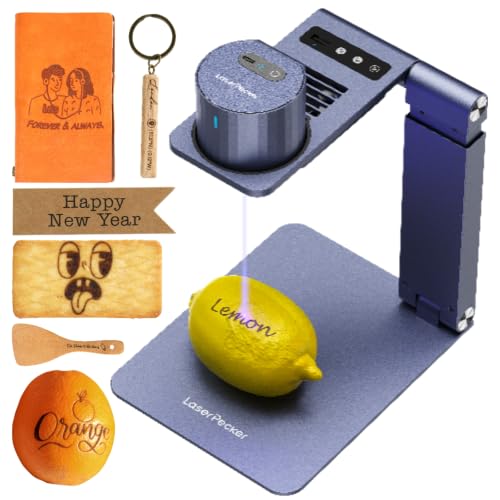
LaserPecker LP1 Plus Portable Engraver
Best for: portable DIY engraving on small materials
- Target Audience
- DIY (what this guide is about)
- Software Compatibility
- cross-platform app
- Compatible Material
- Wood, Leather, Paper
- Features
- Auto Focus
- Dimensions
- 1 × 1 × 1 inches
- Weight
- 2.2 pounds
This pocket-sized machine weighs 2.2 pounds and is built for portable DIY tasks. It features an auto-focus stand, an adjustable base that supports 360-degree engraving, and compatibility with standard power banks for outdoor use. You control it through a cross-platform mobile app to personalize materials like wood, leather, paper, and acrylic. It suits you if you want a compact, highly mobile tool for small craft items.
Pros
- Equipped with an auto-focus stand
- Weighs 2.2 pounds for portable setups
- Can run outdoors using an external power bank
- Adjustable stand allows 360-degree engraving angles
- Magnetic base helps secure small workpieces
Cons
- Protective enclosure is not included as a standard feature
- Compact pocket-sized design limits work on larger DIY items
Good fit if
- You want an ultra-portable engraver you can power from a power bank outdoors
- You prefer automated focusing over manual focal adjustments
- You personalize small everyday objects made of wood, leather, or paper
Skip if
- You need a factory-enclosed unit out of the box
- You plan to engrave wide or large-format DIY sheet materials
Verdict: LaserPecker LP1 Plus Mini Engraver gives DIY crafters an ultra-compact, power-bank-compatible setup with automated focusing. It is an ideal portable choice if you focus purely on small wood, paper, and leather goods.

Ortur Laser Master 2 10W Engraver
Best for: DIY cutting and engraving on wood and acrylic
- Target Audience
- DIY (what this guide is about)
- Laser Power
- 10W (10000mW)
- Working Area
- 390 x 410mm
- Software Compatibility
- LaserGRBL, LightBurn
- Cutting Capacity
- 20mm wood, 30mm acrylic
- Compatible Material
- Metal
The Ortur Laser Master 2 10W Engraver provides a 10W optical output with a 390 x 410mm working area. Its 0.05 x 0.1mm compressed laser point cuts up to 20mm wood and 30mm acrylic. It connects to LaserGRBL and LightBurn over USB. If you need a capable open-frame diode machine for mid-sized DIY projects, cutting thick materials, and modular assembly, this unit gives you solid cutting power and built-in safety sensors.
Pros
- 10W optical output cuts up to 20mm wood and 30mm acrylic
- Spacious 390 x 410mm working area
- Dual-fan 235g module with built-in air-assist interface
- Built-in G-sensor stops the laser automatically if tilted or displaced
Cons
- Class 4 open-frame construction requires strict workspace eye and fume precautions
- Mac operating systems are limited to LightBurn software support
- Air pump is not included for the integrated air-assist interface
Good fit if
- You need to cut materials up to 20mm wood or 30mm acrylic
- You want an open-frame platform with a 390 x 410mm work area
- You plan to run projects via LightBurn or LaserGRBL
Skip if
- You need a fully enclosed Class 1 laser for shared indoor spaces
- You want a fully assembled unit ready to operate out of the box
Verdict: Ortur Laser Master 2 10W Engraver pairs a 390 x 410mm workspace with strong 10W cutting capabilities for DIY makers. It is a dependable open-frame choice if you want modular hardware and standard control software support.

WECREAT Vision 20W Enclosed Laser Engraver
Best for: DIYers needing safe, enclosed thick material cutting
- Target Audience
- DIY, Beginners (what this guide is about)
- Laser Type
- Diode
- Laser Power
- 20W (20,000mW)
- Engraving Speed
- 600mm/s
- Software Compatibility
- Proprietary software, Lightburn
- Form Factor
- Fully enclosed (FDA Class 1)
The WECREAT Vision 20W is a fully enclosed diode laser engraver with 20,000mW output power. It reaches engraving speeds of 600mm/s and cuts 10mm wood or 8mm acrylic. The auto-lifting bed handles materials up to 140mm thick without risers. A built-in HD camera aids positioning. It supports Lightburn and proprietary software for DIY users.
Pros
- 20W (20,000mW) laser output for fast cutting
- Fully enclosed Class 1 safety design
- Auto-lifting bed for materials up to 140mm
- Built-in HD camera for precise alignment
- Compatible with Lightburn software
Cons
- Proprietary software required for full feature access
- No rotary accessory included in basic pack
- Limited to desktop form factor
Good fit if
- You need a safe, enclosed unit for indoor use
- You engrave thick materials without wanting risers
- You prefer Lightburn software compatibility
Skip if
- You require a portable or pocket-sized device
- You only need basic engraving under 5mm
- You want a compact unit under 20 inches wide
Verdict: The WECREAT Vision 20W Diode Laser suits DIYers who prioritize safety and thick material handling. Its enclosed design and auto-lifting bed make it ideal for stable home workshops.

Longer Ray5 10W Laser Engraver with Touchscreen
Best for: DIY makers wanting offline touchscreen control
- Target Audience
- DIY (what this guide is about)
- Laser Power
- 10W
- Working Area
- 400x400mm
- Engraving Speed
- 10,000mm/min
- Software Compatibility
- LaserGRBL, LightBurn
- Cutting Capacity
- 0.8" (20mm) wood, 1.2" (30mm) acrylic
View on Amazon: Longer Ray5 10W Laser Engraver with Touchscreen
The Longer Ray5 10W Laser Engraver provides a 400x400mm working area paired with a 10W optical output module and a 3.5-inch built-in touchscreen. Its 0.06x0.06mm laser spot reaches engraving speeds up to 10,000mm/min and cuts wood up to 20mm thick. With support for WiFi, TF cards, USB, and LightBurn, it suits DIY hobbyists who want offline controls and broad material compatibility without tethering to a computer.
Pros
- Built-in 3.5-inch touchscreen enables standalone offline operation
- Spacious 400x400mm working area accommodates larger workpieces
- Fine 0.06x0.06mm laser spot with 0.01mm engraving precision
- Multiple connection methods including WiFi, TF card, USB, and mobile app
Cons
- Maximum engraving speed is capped at 10,000mm/min
- Open-frame design lacks an integrated full safety enclosure
Good fit if
- You want to run projects offline using a dedicated touchscreen or memory card.
- You need a standard 400x400mm workspace for cutting wood up to 20mm thick.
- You prefer working with popular software like LightBurn or LaserGRBL.
Skip if
- You require a fully enclosed Class 1 workspace for indoor operation.
- You need engraving speeds faster than 10,000mm/min for high-volume jobs.
Verdict: Longer Ray5 10W Laser Engraver balances a focused 10W diode with convenient touchscreen controls and a practical 400x400mm bed. It is a solid choice for DIY crafters who value standalone operation without an active computer link.

WIZMAKER Wand 12W Diode Laser Engraver
Best for: DIY creators needing large workspace and 8mm wood cutting
- Target Audience
- DIY, Small Business (what this guide is about)
- Laser Type
- Diode
- Laser Power
- 12W
- Working Area
- 300 x 300 mm
- Engraving Speed
- Up to 10,000 mm/min
- Software Compatibility
- AtomStack, LightBurn, LaserGRBL
The WIZMAKER Wand 12W is a diode laser engraver with a 300 x 300 mm work area. It offers 12W of laser power and engraving speeds up to 10,000 mm/min. The machine supports wood cutting up to 8 mm thick. It connects via Wi-Fi or USB to Windows, macOS, Android, and iOS devices. This unit suits DIY creators needing precision and moderate cutting capacity.
Pros
- 12W diode laser power for detailed engraving
- 300 x 300 mm working area
- Engraving speeds up to 10,000 mm/min
- Cuts wood up to 8 mm thick
- Compatible with LightBurn and LaserGRBL software
Cons
- Class 4 laser requires strict safety precautions
- No built-in camera for previewing designs
- Heavier build than pocket-sized alternatives
Good fit if
- You need a large 300 x 300 mm workspace
- You want to cut wood up to 8 mm thick
- You prefer connecting via Wi-Fi or USB
Skip if
- You require a Class 1 enclosed safety system
- You need to engrave on clear acrylic
- You want a pocket-sized portable device
Verdict: The WIZMAKER Wand 12W Laser Engraver fits DIY users who need a spacious 300 x 300 mm area for larger projects. It delivers strong 12W power for cutting thicker wood and offers flexible connectivity options for your workflow.

Longer RAY5 10W Laser Engraver with Bed
Best for: Large format DIY projects with speed
- Target Audience
- DIY (what this guide is about)
- Laser Power
- 10W
- Working Area
- 400 x 400mm
- Engraving Speed
- up to 10,000 mm/min
- Cutting Capacity
- 20mm wood, 30mm acrylic
- Compatible Material
- Wood, Metal, Acrylic, Leather, Glass, Paper
The Longer RAY5 10W is a DIY laser engraver featuring a 400 x 400mm working area and speeds up to 10,000 mm/min. It includes an air pump and a 17.3-inch honeycomb worktable for cleaner cuts. This machine suits users who need a large workspace and fast processing for wood, acrylic, leather, and metal. The dual-beam technology helps deliver precision across various materials.
Pros
- 400 x 400mm large working area
- Engraving speeds up to 10,000 mm/min
- Includes adjustable air pump for cleaner cuts
- Honeycomb worktable reduces scorching and smoke
Cons
- No built-in camera or auto-focus system
- Requires separate assembly of the worktable
- No enclosed safety housing included
Good fit if
- You need a large 400 x 400mm workspace
- You want fast engraving speeds for efficiency
- You prefer an open-frame design for easy access
Skip if
- You require a built-in camera for alignment
- You need a fully enclosed Class 1 safety unit
- You prefer a compact desktop footprint under 300mm
Verdict: The Longer RAY5 10W Laser Engraver fits DIYers who prioritize a large 400 x 400mm workspace and high-speed output over enclosed safety features or integrated cameras.

ATOMSTACK Swift 7W Laser Engraver
Best for: detailed DIY engraving on compact materials
- Target Audience
- DIY (what this guide is about)
- Laser Power
- 7W
- Working Area
- 300 x 300 mm
- Engraving Speed
- Up to 400 mm/s (24,000 mm/min)
- Software Compatibility
- ATOMSTACK app, LightBurn, LaserGRBL
- Compatible Material
- Wood, Metal, Acrylic, Leather, Glass
The ATOMSTACK Swift 7W is an open-frame laser engraver designed for DIY makers. It features a 7W diode output with a tight 0.06 x 0.08 mm focal spot, set over a 300 x 300 mm working area. Operating at speeds up to 400 mm/s, it gives you precision control across wood, leather, glass, and metal using standard design software or mobile apps.
Pros
- Engraving speeds reach up to 400 mm/s (24,000 mm/min)
- Compressed 0.06 x 0.08 mm laser spot for fine details
- Works with LightBurn, LaserGRBL, and ATOMSTACK mobile app
- Includes magnetic eye cover and protective safety glasses
Cons
- 7W laser power is lower than 10W or 20W alternatives
- Open-frame design lacks an integrated exhaust enclosure
- Working area is restricted to 300 x 300 mm
Good fit if
- You focus primarily on detailed surface engraving rather than heavy cutting.
- You want cross-platform compatibility across PC software and smartphone apps.
- You need a compact 300 x 300 mm workspace for benchtop DIY projects.
Skip if
- You regularly cut thick stock that benefits from higher wattage output.
- You require a fully enclosed Class 1 laser cabinet for your workspace.
Verdict: ATOMSTACK Swift 7W Laser Engraver delivers fine 0.06 x 0.08 mm detailing and quick 400 mm/s speeds across a 300 x 300 mm bed. It is a capable, spec-focused option for hobbyists seeking reliable surface engraving across multiple materials.

AlgoLaser Pixi 5W Touchscreen Laser Engraver
Best for: beginners needing portable, safe engraving
- Target Audience
- DIY, Beginners, Small Business (what this guide is about)
- Laser Power
- 5W
- Software Compatibility
- AlgoOS, APP
- Form Factor
- Class 1
- Compatible Material
- Wood, Leather
- Features
- Touchscreen
View on Amazon: AlgoLaser Pixi 5W Touchscreen Laser Engraver
The AlgoLaser Pixi is a compact, Class 1 laser engraver with 5W output. It features a 3.5-inch touchscreen and runs AlgoOS for standalone operation. You do not need a computer to use it. The unit measures 10.5 by 8.5 by 7.7 inches. It connects via USB-C or WiFi. This model suits beginners and small business owners who want simple, portable engraving on wood and leather.
Pros
- 5W laser power for wood and leather
- 3.5-inch smart touchscreen for standalone use
- Class 1 safety enclosure with auto-pause
- No assembly required for immediate use
- Works with AlgoOS and mobile apps
Cons
- 5W power limits cutting thickness
- Small work area compared to desktop models
- No air assist mentioned in specifications
Good fit if
- You want a plug-and-play setup without a computer
- You need a portable unit for small projects
- You prioritize safety with a Class 1 enclosure
Skip if
- You need to cut thick materials requiring higher wattage
- You require a large bed for big projects
- You prefer desktop machines with open frames
Verdict: The AlgoLaser Pixi 5W Portable Engraver is a safe, standalone tool for beginners. It fits users who value simplicity and portability over raw power.

ACMER S2 12W Laser Engraver
Best for: large workspace DIY projects
- Target Audience
- DIY (what this guide is about)
- Laser Power
- 12W (12,000mW)
- Working Area
- 300 x 300 mm
- Engraving Speed
- 10,000 mm/min
- Software Compatibility
- ACMER Studio, LightBurn, LaserGRBL
- Cutting Capacity
- 15mm paulownia wood, 12mm acrylic
The ACMER S2 is a 12W diode laser engraver with a 300 x 300 mm working area. It reaches engraving speeds of 10,000 mm/min and offers 0.01 mm precision. The system includes a 72W power supply and supports materials like wood, metal, and acrylic. You can use it with ACMER Studio, LightBurn, or LaserGRBL software. It suits DIY users who need a large workspace and high cutting capacity for paulownia wood up to 15mm.
Pros
- 12W laser power for 15mm paulownia wood cutting
- 300 x 300 mm large working area
- 0.01 mm engraving precision
- Compatible with LightBurn and LaserGRBL
Cons
- No built-in camera for real-time positioning
- No enclosed safety housing included
- No automatic focus mechanism
Good fit if
- You need a large 300 x 300 mm workspace
- You require 12W power for thicker materials
- You prefer using LightBurn software
Skip if
- You want a fully enclosed Class 1 machine
- You need automatic focus adjustment
- You require a built-in camera system
Verdict: The ACMER S2 12W Laser Engraver fits DIY users who prioritize a large 300 x 300 mm workspace and 12W cutting power over enclosed safety features.

Longer Ray5 10W Laser Engraver
Best for: Offline DIY projects needing large area
- Target Audience
- DIY (what this guide is about)
- Laser Power
- 10W
- Working Area
- 14.7 "x14.7" (400*400mm)
- Engraving Speed
- 10,000mm per minute
- Cutting Capacity
- 0.8 inches/20mm wood, 1.2"/30mm acrylic
- Compatible Material
- Wood, Metal, Glass
The Longer RAY5 10W laser engraver offers a 400x400mm working area and 10,000mm/min engraving speed. It features dual-beam technology and a 32-bit motherboard for stable operation. You can control it via Wi-Fi, USB, or a 3.5-inch touchscreen. The offline controller allows use without a constant internet connection. It cuts up to 20mm wood and 30mm acrylic. This machine suits DIY users who value precision and independent operation.
Pros
- 10W laser power for efficient cutting
- 400x400mm spacious working area
- 10,000mm/min maximum engraving speed
- 3.5-inch touchscreen for direct control
- Offline operation support via TF card
Cons
- Requires assembly before first use
- No built-in camera for real-time monitoring
- 10W power is lower than 20W competitors
Good fit if
- You need offline control without constant Wi-Fi
- You want a 400x400mm working area
- You prioritize high engraving speed
Skip if
- You require a Class 1 enclosed safety housing
- You need built-in dual cameras
- You prefer a compact pocket-sized device
Verdict: The Longer RAY5 10W Offline Laser Engraver fits DIY users who need a large work area and reliable offline operation. It delivers fast engraving speeds and strong cutting power for wood and acrylic projects.

Woxcker 20W Enclosed Laser Engraver
Best for: enclosed high-power DIY cutting and engraving
- Target Audience
- DIY, Small Business (what this guide is about)
- Laser Power
- 20W (20000mW)
- Working Area
- 300×300mm
- Engraving Speed
- up to 20,000mm/min
- Software Compatibility
- LightBurn, LaserGRBL, CutLabX
- Form Factor
- Class 1, 360° fully enclosed
This fully enclosed machine delivers 20W of laser power over a 300×300mm working area. Operating at speeds up to 20,000mm/min with a 0.01mm square focus, it handles dense materials like oak and plywood as well as detailed metal engraving. It suits your DIY projects if you need strong cutting capability alongside built-in safety features like flame detection, 15° tilt shutoff, and smoke containment.
Pros
- High 20W optical output with speeds up to 20,000mm/min
- Class 1, 360° fully enclosed chassis contains fumes and operating noise
- Fine 0.01mm square focus spot for high-precision details
- Supports Wi-Fi, USB, app, and TF card connectivity
- Safety features include flame detection, 15° tilt shutoff, and emergency stop
Cons
- Working area is limited to 300×300mm
- Chassis footprint occupies 21.5 by 18.5 inches of desk space
- Enclosed design restricts passthrough for extra-long materials
Good fit if
- You want a fully enclosed 20W laser for working safely in home spaces
- You cut denser materials such as oak or plywood and need high output
- You need flexible control options including LightBurn, LaserGRBL, and Wi-Fi
Skip if
- You require a workspace larger than the fixed 300×300mm area
- You prefer an open-frame machine that accommodates oversized stock
Verdict: Woxcker 20W Enclosed Laser Engraver pairs substantial cutting power with an enclosed Class 1 safety design for indoor DIY crafting. Its 0.01mm focus and high-speed operation deliver sharp, reliable results on dense woods and metals.
Specifications side by side
| Spec | xTool M2 20W Enclosed Laser Engraver | Carverall 6W Desktop Laser Engraver | Creality Falcon 10W Laser Engraver | Artilume 12W Desktop Laser Engraver | LaserPecker LP1 Plus Portable Engraver | Ortur Laser Master 2 10W Engraver | WECREAT Vision 20W Enclosed Laser Engraver | Longer Ray5 10W Laser Engraver with Touchscreen | WIZMAKER Wand 12W Diode Laser Engraver | Longer RAY5 10W Laser Engraver with Bed | ATOMSTACK Swift 7W Laser Engraver | AlgoLaser Pixi 5W Touchscreen Laser Engraver | ACMER S2 12W Laser Engraver | Longer Ray5 10W Laser Engraver | Woxcker 20W Enclosed Laser Engraver |
|---|---|---|---|---|---|---|---|---|---|---|---|---|---|---|---|
| Laser Type | Diode | Diode | not specified | not specified | not specified | not specified | Diode | not specified | Diode | not specified | not specified | not specified | not specified | not specified | not specified |
| Laser Power | 20W (20000mW) | 6W (6000mW) | 10W | 12W | not specified | 10W (10000mW) | 20W (20,000mW) | 10W | 12W | 10W | 7W | 5W | 12W (12,000mW) | 10W | 20W (20000mW) |
| Working Area | not specified | 11.8×7.9 inches (A4) | 17" x 16" | not specified | not specified | 390 x 410mm | not specified | 400x400mm | 300 x 300 mm | 400 x 400mm | 300 x 300 mm | not specified | 300 x 300 mm | 14.7 "x14.7" (400*400mm) | 300×300mm |
| Engraving Speed | not specified | 15,000mm/min | Up to 10000mm/m | 10,000 mm/min | not specified | not specified | 600mm/s | 10,000mm/min | Up to 10,000 mm/min | up to 10,000 mm/min | Up to 400 mm/s (24,000 mm/min) | not specified | 10,000 mm/min | 10,000mm per minute | up to 20,000mm/min |
| Software Compatibility | xTool Studio | CutLabX, LightBurn, LaserGRBL | LightBurn, LaserGRBL | LightBurn, LaserGRBL, Laser APP | cross-platform app | LaserGRBL, LightBurn | Proprietary software, Lightburn | LaserGRBL, LightBurn | AtomStack, LightBurn, LaserGRBL | not specified | ATOMSTACK app, LightBurn, LaserGRBL | AlgoOS, APP | ACMER Studio, LightBurn, LaserGRBL | not specified | LightBurn, LaserGRBL, CutLabX |
| Form Factor | Class 1 Enclosed | Class 1 | not specified | not specified | not specified | not specified | Fully enclosed (FDA Class 1) | not specified | not specified | not specified | not specified | Class 1 | not specified | not specified | Class 1, 360° fully enclosed |
| Cutting Capacity | not specified | 8mm plywood, 5mm black acrylic | 5mm basswood, 3mm black acrylic | not specified | not specified | 20mm wood, 30mm acrylic | 10mm wood, 8mm opaque black acrylic | 0.8" (20mm) wood, 1.2" (30mm) acrylic | Wood up to 8mm | 20mm wood, 30mm acrylic | not specified | not specified | 15mm paulownia wood, 12mm acrylic | 0.8 inches/20mm wood, 1.2"/30mm acrylic | not specified |
| Compatible Material | Wood, Leather, Paper, Fabric | Wood, Metal, Acrylic, Leather, Paper | Wood, Metal, Acrylic, Leather, Glass, Paper | not specified | Wood, Leather, Paper | Metal | Wood, Metal, Acrylic, Leather | Wood, Metal, Acrylic, Glass | Wood, Acrylic, Leather, Paper | Wood, Metal, Acrylic, Leather, Glass, Paper | Wood, Metal, Acrylic, Leather, Glass | Wood, Leather | Wood, Metal, Acrylic, Leather | Wood, Metal, Glass | Wood, Metal, Acrylic, Leather |
| Features | Enclosure, Camera | not specified | not specified | not specified | Auto Focus | not specified | Camera | Touchscreen | not specified | not specified | not specified | Touchscreen | not specified | Offline Controller | not specified |
| Target Audience | DIY | DIY, Beginners, Small Business | DIY | DIY | DIY | DIY | DIY, Beginners | DIY | DIY, Small Business | DIY | DIY | DIY, Beginners, Small Business | DIY | DIY | DIY, Small Business |
| Size | 20W | 6W | Falcon-10W Basic | 12W | LP1 Plus Suit | 10W | 20W | 10W | WAND12W | 10W | Swift 7W | not specified | 12000mW | 400x400mm | 300mm 20W |
| Dimensions | not specified | 1 × 1 × 1 inches | 22.4 × 24.9 × 7.79 inches | 22.4 × 21.4 × 5.98 inches | 1 × 1 × 1 inches | 22.4 × 21.7 × 6.9 inches | 24.2 × 21 × 10 inches | 25.4 × 17.1 × 12.8 inches | 3.94 × 1.97 × 3.94 inches | 29.3 × 5.31 × 22.4 inches | 20.1 × 10.2 × 5.51 inches | 10.5 × 8.5 × 7.7 inches | 2 × 2 × 2 inches | 23.6 × 12.2 × 5.9 inches | 21.5 × 18.5 × 8.5 inches |
| Weight | not specified | not specified | 7.05 pounds | not specified | 2.2 pounds | not specified | not specified | not specified | 2 pounds | not specified | not specified | not specified | not specified | not specified | 16 pounds |
| Color | M2 Basic | Gray | Falcon-10W Basic | BLACK | 1 | Black | Basic Pack | 10w | Navy Blue | RAY5+17.3"Honeycomb Bed | Swift 7W Blue | Power Red | Red | Black | Black |
| Model | MLM-K610-001 | k15pro6w | CR-Laser Falcon 10W | A4 | LP1 Plus | Laser Master 2 | LC2321 | 10W | WM-LE002 | RAY5 | K2 | Pixi 2025 | S2 | 20240624 | L2 MAX |
Is the DIY target audience worth your attention?
DIY-focused models prioritize versatility and safety for home workshops. The xTool M2 20W Enclosed Laser Engraver offers a Class 1 enclosure for safe indoor crafting. The Carverall 6W Desktop Laser Engraver fits compact A4 desktop projects. You get options like the Creality Falcon 10W for larger workpieces or the LaserPecker LP1 Plus for portability. These machines support wood, leather, and acrylic. They balance power with manageable footprints for hobbyists who need reliable, multi-material tools without industrial complexity.
Worth it if
- You want a safe, enclosed machine for home use
- You need a compact setup for small desktop projects
- You require versatile material support for general crafting
Skip it if
- You only need industrial-grade high-speed production
- You prefer standalone offline controllers without computer links
- You have ample space for large-format open-frame units
If you need precise hole drilling alongside surface engraving, compare the best drill presses for DIY by their published specifications.
How We Selected DIY Engravers
We identified products by checking Amazon listings for the DIY target audience. You will only see one size or variant from each product family. All details come from published specifications and feature lists. We did not physically handle any items. The list shows 15 machines ranked by availability first, then by overall rating weighted by count, and finally by how many of our criteria the specs meet. We focused on laser power, work area size, and material compatibility. These specs determine which tool fits your workspace and cutting needs. Prices and stock status are shown live on the page and are refreshed daily. This text explains only the selection method based on the data provided.
Key Specs to Compare for DIY
-
Check laser power output
Laser power dictates cutting depth and speed. Higher wattage allows you to slice through thicker materials like dense wood or acrylic. The xTool M2 20W Enclosed Laser Engraver provides 20W for robust cutting tasks. If you only need surface engraving on thin items, the Carverall 6W Desktop Laser Engraver offers 6W, which is sufficient for lighter work. Match the wattage to your heaviest material thickness to ensure clean cuts without excessive burning.
-
Verify compatible materials
Not all lasers handle every surface. Diode lasers typically work well on wood, leather, paper, and fabric. Some models also mark metal or engrave glass. The Creality Falcon 10W Laser Engraver supports wood, metal, acrylic, leather, glass, and paper. The LaserPecker LP1 Plus Portable Engraver focuses on wood, leather, and paper. Check the specification list to ensure the machine handles the specific materials you plan to use for your projects.
-
Assess work area size
The working bed dimensions determine the maximum size of your projects. Larger beds accommodate bigger wood panels or acrylic sheets. The Creality Falcon 10W Laser Engraver offers a spacious 17-by-16-inch area. The Artilume 12W Desktop Laser Engraver provides a 400x400 mm bed for balanced large-format work. For small crafts, the LaserPecker LP1 Plus Portable Engraver is ultra-compact. Measure your typical project sizes before choosing a machine to avoid fitting issues.
-
Look for safety enclosures
Enclosed designs contain laser light and debris, making them safer for home use. The xTool M2 20W Enclosed Laser Engraver features a Class 1 enclosure for safe indoor crafting. The WECREAT Vision 20W Enclosed Laser Engraver also prioritizes safety with an enclosed design. Open-frame models like the Creality Falcon 10W Laser Engraver require more caution and ventilation. If you work in a shared space, an enclosure is a practical choice for protecting your eyes and surroundings.
-
Consider control features
Control interfaces affect how you operate the machine. Some units require a connected computer, while others offer standalone controls. The Longer Ray5 10W Laser Engraver with Touchscreen allows offline operation via its built-in display. The AlgoLaser Pixi 5W Touchscreen Laser Engraver is designed for beginners who value simple, standalone operation. The LaserPecker LP1 Plus Portable Engraver includes auto-focus for easier setup. Choose a control method that matches your technical comfort level and workflow preferences.
Frequently asked questions
Which laser engraver is safest for home DIY use?
The xTool M2 20W Enclosed Laser Engraver is the best choice for safe home crafting. It features a Class 1 enclosure that contains laser light and debris. The WECREAT Vision 20W and Woxcker 20W also offer enclosed designs. These units provide a secure environment for indoor workshops.
What is the best laser engraver for beginners?
The AlgoLaser Pixi 5W is ideal for beginners needing portable and safe engraving. It includes a touchscreen for standalone operation without complex setup. The Carverall 6W Desktop Laser Engraver is another budget-friendly option. It supports versatile software and offers fast setup for new users starting their DIY journey.
Which model has the largest work area for DIY projects?
The Longer RAY5 10W Laser Engraver with Bed provides a large 400 x 400mm workspace. This size suits DIYers prioritizing large format projects. The Artilume 12W and Longer Ray5 10W with Touchscreen also feature spacious 400x400mm beds. These models allow you to engrave larger wood or acrylic pieces efficiently.
Can I use a laser engraver for cutting thick wood?
Yes, higher wattage models handle thicker materials better. The xTool M2 20W and WECREAT Vision 20W offer 20W power for robust cutting. The Woxcker 20W Enclosed Laser Engraver also delivers substantial cutting power. The WIZMAKER Wand 12W can cut 8mm wood. These specs ensure clean cuts in dense woods and acrylics.
Is there a portable laser engraver for DIY crafters?
The LaserPecker LP1 Plus Portable Engraver is designed for portability. It is ultra-compact and power-bank-compatible for on-the-go use. The AlgoLaser Pixi 5W is also a portable, standalone tool. These units focus on small materials like wood, leather, and paper, making them easy to transport for small DIY projects.
Which laser engraver works without a computer connected?
The Longer Ray5 10W Laser Engraver with Touchscreen allows offline operation. You can use its touchscreen controls without an active computer link. The Longer RAY5 10W Offline Laser Engraver also supports reliable offline use. These models let you start projects independently, which is convenient for standalone DIY workflows.
What is the best laser engraver for detailed small projects?
The ATOMSTACK Swift 7W Laser Engraver delivers fine detailing with a 0.06 x 0.08 mm spot size. It achieves quick speeds of 400 mm/s across a 300 x 300 mm bed. This spec-focused option is capable for hobbyists seeking reliable surface engraving on compact materials like metal, glass, and acrylic.