15 Best Diode Laser Engravers, Compared
As an Amazon Associate we earn from qualifying purchases. Links on this page are affiliate links.
Choosing the best diode laser engravers can be tricky when you compare so many options. We analyzed 15 models based strictly on the specifications published on their listings. The ACMER S2 20W Diode Laser Engraver leads the pack because its 20W power handles small desktop engraving and light cutting with ease. This guide breaks down key specs like wattage, build size, and features to help you decide which machine fits your workspace and material needs.
Quick picks
The best fit for you
- You want the best overall small desktop engraver ACMER S2 20W Diode Laser Engraver Its 20W diode laser and air assist deliver precise detail work on common materials.
- You need portable metal color marking for business xTool F2 15W Diode & 5W IR Laser Engraver The integrated 5W IR laser enables color marking on metal in a compact unit.
- You require high precision metal color engraving xTool F2 Ultra 60W MOPA and 40W Diode Laser The dual 60W MOPA and 40W diode system ensures industrial-grade precision on metals.
- You need safe batch engraving at home WECREAT Vision 20W Enclosed Laser Engraver The enclosed desktop design with air assist provides safety for routine batch projects.
- You want to cut thick materials safely Creality Falcon2 Pro S 40W Enclosed Laser Cutter The 40W diode laser and integrated enclosure handle thick wood and acrylic cutting.
Our 15 picks

ACMER S2 20W Diode Laser Engraver
Best for: small desktop engraving and light cutting
- Laser Type
- Diode (what this guide is about)
- Laser Power
- 20W
- Working Area
- 300 × 285mm
- Engraving Speed
- 10,000mm/min
- Software Compatibility
- Acmer Studio
- Compatible Material
- Wood, Acrylic, Leather
The Acmer S2 is a 20W diode laser engraver with a 300 x 285mm working area. It includes a 25L/min air assist pump to reduce burn marks. The unit supports engraving speeds up to 10,000mm/min and offers 0.01mm accuracy. It runs on Acmer Studio software and accepts standard image formats. This machine suits users who want a portable, lightweight desktop engraver for wood, acrylic, and leather.
Pros
- True 20W (20000mW) diode laser module
- 25L/min air assist pump included
- 0.01mm engraving accuracy with 0.09 x 0.1mm spot size
- 300 x 285mm working area
- Supports 10,000mm/min engraving speed
Cons
- Smaller working area than many competitors
- Proprietary Acmer Studio software required for full optimization
- Requires user assembly
Good fit if
- You need a lightweight desktop engraver for small projects
- You want a machine with built-in air assist
- You work with materials like wood, acrylic, or leather
Skip if
- You require a large working area over 300mm
- You need IR or fiber laser capabilities
- You prefer widely supported third-party software ecosystems
Verdict: The Acmer S2 20W Diode Laser is a capable entry-level machine for small-scale engraving tasks. It fits users who prioritize portability and precise detail work on common materials.

xTool F2 15W Diode & 5W IR Laser Engraver
Best for: Small business owners needing metal color marking
- Laser Type
- Diode (what this guide is about)
- Laser Power
- 15W Diode, 5W IR
- Engraving Speed
- Up to 6000mm/s
- Form Factor
- Fully enclosed
- Compatible Material
- Metal
- Features
- Camera
The xTool F2 combines a 15W diode laser with a 5W IR module for marking metal and engraving wood. It reaches speeds up to 6000mm/s and includes a built-in 50MP camera for precise alignment. The fully enclosed design ensures safe indoor use. Weighing 10 pounds, it remains portable for trade shows or small workshops. This dual-laser setup handles both deep color marking and thick material cutting.
Pros
- 15W diode laser for cutting and 3D embossing
- 5W IR laser for vivid color marking on metal
- Built-in 50MP camera for 0.1 mm alignment accuracy
- Ultra-fast engraving speeds up to 6000mm/s
Cons
- Smaller 15W diode output compared to 40W competitors
- No mention of smartphone app control in specifications
- IR laser limited to 5W power output
Good fit if
- You need to engrave metal with color markings
- You require a fully enclosed machine for indoor safety
- You want high-speed processing for batch orders
Skip if
- You need a high-power diode laser over 20W
- You require a large working area for big projects
- You prefer an open-frame desktop engraver
Verdict: The xTool F2 15W Diode & 5W IR suits makers who need metal marking and speed in a portable, enclosed unit. It fits small business owners needing quick, precise jobs.

xTool F2 Ultra 60W MOPA and 40W Diode Laser
Best for: high-precision metal color engraving
- Laser Type
- Diode (what this guide is about)
- Laser Power
- 60W MOPA, 40W Diode
- Working Area
- 8.7" x 8.7"
- Engraving Speed
- Up to 15,000 mm/s
- Cutting Capacity
- 23 mm wood, 20 mm acrylic
- Dimensions
- 16.9 × 11.6 × 20.5 inches
The xTool F2 Ultra combines a 60W MOPA fiber laser with a 40W diode laser. It offers a working area of 8.7 by 8.7 inches, expandable with an auto conveyor. Engraving speeds reach 15,000 mm/s. Dual 48MP AI cameras improve positioning accuracy to 0.2mm. This machine suits users needing precise metal color engraving and deep wood cutting in one desktop unit.
Pros
- 60W MOPA fiber laser for color metal engraving
- 40W diode laser for wood and acrylic
- Dual 48MP AI cameras for 0.2mm accuracy
- High engraving speed up to 15,000 mm/s
Cons
- Large physical footprint at 16.9 by 11.6 inches
- Tall profile at 20.5 inches high
- Limited desktop working area of 8.7 by 8.7 inches
Good fit if
- You need precise color engraving on metals
- You require deep cutting in wood and acrylic
- You want high-speed production capabilities
Skip if
- You have limited desk space
- You only engrave on non-metal materials
- You need a compact portable design
Verdict: The xTool F2 Ultra 60W MOPA & 40W Diode fits professionals who demand industrial-grade precision on metals and wood. Its dual-laser system and AI cameras deliver consistent results for high-volume desktop work.

LaserPecker LP2 Plus Portable 10W
Best for: fast portable engraving on small items
- Laser Type
- Diode (what this guide is about)
- Laser Power
- 10W
- Engraving Speed
- 4000 mm/s
- Cutting Capacity
- Up to 6mm basswood
- Compatible Material
- Wood, Metal, Acrylic, Leather
- Form Factor
- Portable
The LaserPecker LP2 Plus is a portable 10W diode laser engraver designed for speed and precision. It features a 4000mm/s engraving speed and an F-theta lens for 4K detail. The unit weighs 3.39kg and includes dual red-dot focus for quick alignment. It cuts up to 6mm basswood in one pass. This compact machine suits users who need fast batch work and mobility for various surfaces.
Pros
- 10W diode laser with F-theta lens
- 4000mm/s engraving speed
- Dual red-dot focus alignment
- Cuts up to 6mm basswood
- Weighs 3.39kg for portability
Cons
- 10W power is lower than 20W+ competitors
- No air assist mentioned in specs
- Small build limits large material handling
Good fit if
- You need high-speed engraving for batch orders
- You require a lightweight portable unit
- You value precise 4K detail on small items
Skip if
- You need to cut thick materials over 6mm
- You require high-power cutting for dense woods
- You prefer a stationary desktop setup
Verdict: LaserPecker LP2 Plus 10W Portable Diode delivers fast, precise engraving for mobile creators. It fits users prioritizing speed and portability over raw cutting power.

Creality Falcon2 Pro S 40W Enclosed Laser Cutter
Best for: Thick material cutting and safety
- Laser Type
- Diode (what this guide is about)
- Laser Power
- 40W
- Engraving Speed
- 600mm/s
- Form Factor
- Fully Enclosed
- Cutting Capacity
- 20mm basswood, 30mm black acrylic
- Compatible Material
- Wood, Acrylic
View on Amazon: Creality Falcon2 Pro S 40W Enclosed Laser Cutter
The Creality Falcon2 Pro S 40W is a fully enclosed desktop diode laser with 40W optical output. It features Z-axis auto focus and a built-in camera for precise positioning. The machine reaches 600mm/s engraving speed and cuts up to 20mm basswood or 30mm black acrylic. Its Class 1 certified enclosure includes flame detection and safety locks. This unit suits professionals needing batch production capabilities in a contained workspace.
Pros
- 40W optical output for deep cutting
- Z-axis auto focus with built-in camera
- Fully enclosed Class 1 safety design
- 600mm/s high-speed engraving
- Cuts 20mm basswood in one pass
Cons
- Heavy at 50.5 pounds
- Large footprint measuring 26 inches long
- No mention of mobile app support
Good fit if
- You need to cut thick wood or acrylic quickly
- You want a contained workspace for safety
- You require auto focus for varied material heights
Skip if
- You need a portable machine for travel
- You want to engrave on metal without IR
- You have limited desktop space
Verdict: Creality Falcon2 Pro S 40W Desktop delivers high power and safety for serious makers. It fits users who need reliable batch production of thick materials in a secure environment.

ACMER S2 Pro 36W Diode Laser Engraver
Best for: high-power cutting and stable batch engraving
- Laser Type
- Diode (what this guide is about)
- Laser Power
- 36W
- Working Area
- 400 * 400mm
- Engraving Speed
- 24,000mm/min
- Software Compatibility
- Acmer Studio, LaserGRBL
- Features
- Air Assist
The ACMER S2 Pro is a 36W diode laser engraver built with dual linear rails and a 400 x 400 mm work bed. It delivers speeds up to 24,000 mm/min using a 0.08 x 0.1 mm focal spot. A built-in 30L/min air assist pump clears debris automatically. You get WiFi, USB, and TF card connectivity for offline production jobs.
Pros
- 36W optical output power with a 0.08 x 0.1 mm laser spot
- Dual linear rails for stable movement at up to 24,000 mm/min
- Integrated 30L/min automatic air assist pump
- Supports WiFi, USB, and TF card offline operation
Cons
- Software compatibility lists only Acmer Studio and LaserGRBL
- Lacks a built-in camera for material positioning and alignment
Good fit if
- You need 36W diode power for deep cutting and fast batch engraving.
- You want an integrated 30L/min air assist pump without buying separate hardware.
- You run jobs away from a computer via TF card or WiFi.
Skip if
- You rely on LightBurn software for your primary engraving workflow.
- You need an integrated camera to preview and align graphics on materials.
Verdict: ACMER S2 Pro 36W Laser Engraver suits makers and small workshop owners who require high diode wattage and dual-rail stability for repetitive cutting tasks. It provides high power output alongside an integrated 30L/min air pump and flexible wireless options.

WECREAT Vision 20W Enclosed Laser Engraver
Best for: Safe home batch engraving
- Laser Type
- Diode (what this guide is about)
- Laser Power
- 20W (20,000mW)
- Engraving Speed
- 600mm/s
- Software Compatibility
- LightBurn, WeCreat proprietary software
- Form Factor
- Fully enclosed (Class 1)
- Cutting Capacity
- 10mm wood, 8mm opaque black acrylic
The WECREAT Vision 20W is a fully enclosed diode laser engraver with a 20,000mW output. It reaches engraving speeds of 600mm/s and cuts up to 10mm wood. The unit includes an auto-lifting bed, air assist, and rotary attachment. You get a Class 1 safety rating with a built-in camera. This desktop machine suits users who need precise batch engraving and material versatility without manual riser adjustments.
Pros
- 20W (20,000mW) diode laser power
- Auto-lifting bed handles 1mm to 140mm materials
- 600mm/s engraving speed
- Fully enclosed Class 1 safety design
- Includes rotary and air assist
Cons
- Smaller 21x24 inch workspace than higher-end models
- Proprietary software required for full feature access
- Heavier desktop footprint at 21 inches wide
Good fit if
- You need a Class 1 enclosed unit for home use
- You want auto-lifting for varied material heights
- You require rotary engraving for cylindrical items
Skip if
- You need to cut thick metals
- You prefer a large open-frame workspace
- You want a portable handheld design
Verdict: The WECREAT Vision 20W Diode Laser fits users who prioritize safety and speed in a desktop enclosure. It handles batch engraving well but lacks the workspace of larger industrial units.

WIZMAKER Wand 12W Diode Laser Engraver
Best for: Precision engraving on wood and leather
- Laser Type
- Diode (what this guide is about)
- Laser Power
- 12W
- Working Area
- 300 x 300 mm
- Engraving Speed
- Up to 10,000 mm/min
- Software Compatibility
- AtomStack, LightBurn, LaserGRBL
- Cutting Capacity
- Wood up to 8mm
The WIZMAKER Wand 12W is a desktop diode laser with a 300 x 300 mm work area and 12W output. It reaches engraving speeds up to 10,000 mm/min and cuts wood up to 8 mm thick. You can control it via Wi-Fi, hotspot, or USB on Windows, macOS, Android, or iOS. It supports LightBurn and LaserGRBL. This machine suits DIY creators and small businesses needing precision on wood, leather, and paper.
Pros
- 12W diode laser power
- 300 x 300 mm work area
- Engraving speeds up to 10,000 mm/min
- Cuts wood up to 8 mm
- Multi-device connectivity via Wi-Fi or USB
Cons
- Requires manual setup and configuration
- No built-in camera for preview
- Limited to 12W power output
Good fit if
- You need a large 300 x 300 mm work area
- You want fast engraving speeds up to 10,000 mm/min
- You use Windows, macOS, Android, or iOS devices
Skip if
- You require automatic camera alignment
- You need to cut materials thicker than 8 mm wood
- You prefer a compact unit under 300 mm width
Verdict: The WIZMAKER Wand 12W Diode Engraver fits makers who need a spacious 300 x 300 mm area and fast 10,000 mm/min speeds for wood and leather projects.

Carverall Dual Laser Desktop Engraver
Best for: Small metal and wood engraving projects
- Laser Type
- Diode (what this guide is about)
- Laser Power
- 7W Diode, 1.2W IR
- Working Area
- 3.94 x 3.94 inches
- Software Compatibility
- CutLabX, LightBurn, LaserGRBL
- Form Factor
- Fully enclosed Class 1
- Cutting Capacity
- 3mm or less beech plywood
The Carverall A1 Pro combines a 7W blue diode laser and a 1.2W infrared module in one Class 1 enclosed unit. It features a 3.94 x 3.94-inch work area and an upgraded HD camera for precise alignment. This dual-laser system handles wood, leather, and bare metals like stainless steel. It supports offline batch jobs via TF card and includes software for beginners and advanced users.
Pros
- Dual 7W diode and 1.2W IR lasers for wood and metal
- Class 1 fully enclosed safety design with auto-shutoff
- Upgraded HD camera eliminates manual calibration
- Compatible with LightBurn and LaserGRBL software
Cons
- Small 3.94 x 3.94-inch working area
- Limited cutting capacity of 3mm beech plywood
- Manual head swapping between laser types
Good fit if
- You need to engrave bare metals like stainless steel
- You want a safe, enclosed desktop machine for indoor use
- You create small items like jewelry or pet tags
Skip if
- You require a large working area for big projects
- You need to cut materials thicker than 3mm
- You prefer automatic laser head switching
Verdict: Carverall A1 Pro 7W Diode & IR is a compact dual-laser solution for makers who need to mark metal and engrave wood in a small footprint. It fits hobbyists making jewelry or small gifts who value safety and precision over size.

LaserPecker LP4 Dual Laser Engraver
Best for: Portable dual-laser engraving on small items
- Laser Type
- Diode (what this guide is about)
- Laser Power
- 10W, 2W
- Working Area
- 160 × 120 mm
- Engraving Speed
- Up to 4000 mm/s
- Software Compatibility
- LaserPecker Design Space, LightBurn
- Cutting Capacity
- 8mm wood, 5mm dark opaque acrylic
The LaserPecker LP4 is a portable dual-laser engraver featuring a 10W diode and a 2W IR source. It offers a 160 by 120 mm working area and reaches engraving speeds up to 2000 mm/s. The device includes an HD LED touchscreen for direct control and supports LightBurn software. This setup allows for high-precision work on materials like wood, metal, and acrylic, making it suitable for users who need portability and dual-laser versatility.
Pros
- Dual 10W diode and 2W IR laser sources
- Engraving speed up to 2000 mm/s
- Built-in HD LED touchscreen for control
- Compatible with LightBurn software
Cons
- Smaller 160 by 120 mm working area
- Limited cutting capacity for thick materials
- Proprietary LaserPecker Design Space app required for full features
Good fit if
- You need to engrave metal and dark acrylic
- You value portable, compact desktop designs
- You want fast engraving speeds for small projects
Skip if
- You require a large working area over 160 mm
- You need to cut thick wood or acrylic
- You prefer open-source software without proprietary apps
Verdict: LaserPecker LP4 10W Diode + IR suits users who need a compact, high-speed machine for detailed work on diverse materials. Its dual-laser setup and touchscreen make it ideal for small-scale professional or hobbyist projects.

LaserPecker LP5 Dual Fiber and Diode Engraver
Best for: portable metal marking and cylindrical engraving
- Laser Type
- Diode (what this guide is about)
- Laser Power
- 20W Fiber + 20W Diode
- Working Area
- 160x300mm
- Engraving Speed
- Up to 10,000mm/s
- Cutting Capacity
- 20mm wood, 0.5mm metal
- Dimensions
- 7.8 × 11.3 × 14.4 inches
View on Amazon: LaserPecker LP5 Dual Fiber and Diode Engraver
The LaserPecker LP5 combines a 20W fiber laser and a 20W diode laser for versatile material processing. It achieves engraving speeds up to 10,000mm/s, allowing for rapid production. The system includes a slide extension for a 160x300mm workspace and a rotary module for cylindrical items. You can control it via a mobile app. This compact unit handles wood up to 20mm and metal up to 0.5mm thickness.
Pros
- Dual 20W fiber and diode laser sources
- Engraving speed reaches 10,000mm/s
- Includes rotary module for tumblers and rings
- Mobile app control for on-site use
Cons
- Limited cutting capacity of 0.5mm for metal
- Smaller working area compared to desktop units
- Handheld design may reduce stability for fine detail
Good fit if
- You need to engrave metal items quickly
- You want to process cylindrical objects like mugs
- You require a portable system for mobile work
Skip if
- You primarily engrave large flat boards
- You need to cut thick wood over 20mm
- You prefer a fixed desktop workstation
Verdict: The LaserPecker LP5 Dual 20W Laser suits makers who need portable metal marking and cylindrical engraving. It fits users who prioritize speed and versatility over large-format cutting.

Laser TREE 40W Diode Laser Module
Best for: DIY builders needing high power for thick cuts
- Laser Type
- Diode (what this guide is about)
- Laser Power
- 40W+ (40,000 mW)
- Cutting Capacity
- 30 mm pinewood, 15 mm acrylic
- Compatible Material
- Wood, Metal, Acrylic, Leather
- Features
- Air Assist
- Dimensions
- 5.68 × 2.4 × 2.4 inches
This is a 40W+ diode laser module designed for machine upgrades. It delivers up to 44000mW optical power. You can cut 30mm pinewood and 15mm acrylic in one pass. It includes built-in air assist and dual fan cooling. The unit features a red cross positioning cursor. It works with TTL and PWM controls for DIY machines.
Pros
- 40W+ output with 44000mW optical power
- Cuts 30mm pinewood and 15mm acrylic
- Built-in air assist for cleaner cuts
- Dual fan cooling design for stability
- Red cross positioning cursor for accuracy
Cons
- Requires adapter board for installation
- No enclosure or safety housing included
- Class 4 laser requires strict handling
Good fit if
- You need a high-power upgrade for a DIY CNC or laser frame
- You want to cut thick wood and acrylic in single passes
- You prefer built-in air assist to reduce burn marks
Skip if
- You need a complete, ready-to-use desktop engraver
- You lack experience with DIY machine assembly
- You require a safe, enclosed workspace for operation
Verdict: Laser TREE 40W Diode Module is a powerful upgrade for builders who need to cut thick materials. It fits users who can handle Class 4 lasers and assemble their own machine frames.

Longer RAY5 Mini 5.5W Diode Engraver
Best for: small desk setups and quick engraving
- Laser Type
- Diode (what this guide is about)
- Laser Power
- 5.5W
- Working Area
- 5.12"x5.12" (130 * 130mm)
- Engraving Speed
- Up to 12000mm/min
- Software Compatibility
- LaserGRBL, LightBurn
- Compatible Material
- Wood, Acrylic, Leather
The Longer RAY5 Mini is a compact diode laser engraver with a 5.12 x 5.12 inch working area. It features a 5.5W laser and speeds up to 12000 mm/min. The unit ships pre-assembled for immediate use. You can control it via WiFi using LaserGRBL, LightBurn, or a mobile app. Its small footprint suits tight desks.
Pros
- 5.5W diode laser output
- 12000 mm/min engraving speed
- WiFi and app control
- Pre-assembled design
- 0.08mm compressed spot size
Cons
- Small 5.12 x 5.12 inch working area
- 5.5W power is lower than many competitors
- No physical display panel mentioned
Good fit if
- You need a small footprint for a desk
- You want pre-assembled convenience
- You prefer app-based control
Skip if
- You require a large working area
- You need high-power cutting
- You prefer physical controls
Verdict: The Longer RAY5 Mini 5.5W Diode Engraver fits users with limited space who value quick setup and app control. It is not suitable for large projects or heavy cutting tasks.

Creality Falcon2 Pro S 40W Enclosed Laser
Best for: Thick material cutting and safe desktop operation
- Laser Type
- Diode (what this guide is about)
- Laser Power
- 40W (switchable to 22W)
- Engraving Speed
- Over 600 mm/s
- Software Compatibility
- Falcon Design Space, LightBurn
- Form Factor
- Enclosed (Class 1)
- Cutting Capacity
- 20 mm wood, 20 mm dark acrylic
The Creality Falcon2 Pro S 40W is a desktop diode laser engraver with a Class 1 enclosed design. It features a switchable 40W or 22W laser module, reaching speeds over 600 mm/s. The machine includes a built-in HD camera, auto-focus, and an exhaust system. It cuts up to 20 mm wood or acrylic in one pass. This unit suits users needing high power and safety certifications for dense material processing.
Pros
- Switchable 40W and 22W dual-mode laser output
- Class 1 enclosed metal frame with auto-stop safety
- Built-in HD camera with intelligent pattern extraction
- Engraving speed exceeds 600 mm/s
- Cuts 20 mm wood and dark acrylic in a single pass
Cons
- Requires LightBurn software to utilize the built-in camera features
- Large footprint at 24.4 inches in length
- Heavier and bulkier than portable diode alternatives
Good fit if
- You need to cut thick wood or acrylic in a single pass
- You require a Class 1 safety rating for office or home use
- You want auto-focus and a built-in camera for batch processing
Skip if
- You need a portable unit for travel or small spaces
- You only engrave on small surfaces and need a compact footprint
- You prefer a machine that works with the included app without third-party software
Verdict: The Creality Falcon2 Pro S 40W Diode Engraver delivers high-speed cutting and robust safety features for users processing thick materials. It fits professionals and serious hobbyists who prioritize enclosure safety and cutting power over portability.
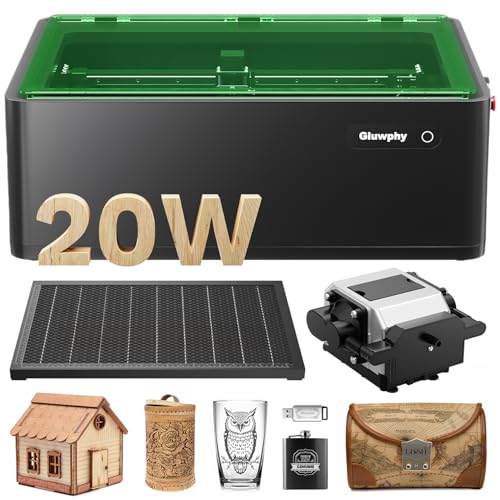
Gluwphy AIM 20 20W Enclosed Laser
Best for: beginners needing a safe enclosed workspace
- Laser Type
- Diode (what this guide is about)
- Laser Power
- 20000mW (20W)
- Engraving Speed
- 400 mm/second
- Software Compatibility
- LightBurn
- Form Factor
- Enclosed (Class 1)
- Cutting Capacity
- 10mm (wood, acrylic)
The Gluwphy AIM 20 is an enclosed diode laser engraver designed for beginners. It features a 20W laser module capable of cutting wood and acrylic up to 10mm thick. The unit includes an air assist system and a Class 1 safety enclosure with a HEPA filter. You get precise auto-focus and software compatibility with LightBurn. This model prioritizes safety and ease of use over raw speed or large work areas.
Pros
- Class 1 enclosed safety design with HEPA filter
- 20W power cuts wood and acrylic up to 10mm
- Auto-focus system saves setup time
- Compatible with LightBurn software
Cons
- Smaller work area compared to open-frame desktop models
- Heavier build at 39.7 pounds
- Lower engraving speed of 400 mm/s than high-end competitors
Good fit if
- You need a safe, enclosed unit for home use
- You are a beginner wanting auto-focus
- You require air assist for cleaner cuts
Skip if
- You need to cut materials thicker than 10mm
- You require a large open-frame work area
- You need ultra-high speed engraving above 400 mm/s
Verdict: The Gluwphy AIM 20W Enclosed Diode Engraver fits beginners who prioritize safety and ease of use. It is a practical choice for small projects where enclosure and air assist are necessary.
Specifications side by side
| Spec | ACMER S2 20W Diode Laser Engraver | xTool F2 15W Diode & 5W IR Laser Engraver | xTool F2 Ultra 60W MOPA and 40W Diode Laser | LaserPecker LP2 Plus Portable 10W | Creality Falcon2 Pro S 40W Enclosed Laser Cutter | ACMER S2 Pro 36W Diode Laser Engraver | WECREAT Vision 20W Enclosed Laser Engraver | WIZMAKER Wand 12W Diode Laser Engraver | Carverall Dual Laser Desktop Engraver | LaserPecker LP4 Dual Laser Engraver | LaserPecker LP5 Dual Fiber and Diode Engraver | Laser TREE 40W Diode Laser Module | Longer RAY5 Mini 5.5W Diode Engraver | Creality Falcon2 Pro S 40W Enclosed Laser | Gluwphy AIM 20 20W Enclosed Laser |
|---|---|---|---|---|---|---|---|---|---|---|---|---|---|---|---|
| Laser Type | Diode | Diode, IR | MOPA Fiber & Diode | Diode | Diode | Diode | Diode | Diode | Diode (455nm), Infrared (1064nm) | Diode, IR | Fiber + Diode | Diode | Diode | Diode | Diode |
| Laser Power | 20W | 15W Diode, 5W IR | 60W MOPA, 40W Diode | 10W | 40W | 36W | 20W (20,000mW) | 12W | 7W Diode, 1.2W IR | 10W, 2W | 20W Fiber + 20W Diode | 40W+ (40,000 mW) | 5.5W | 40W (switchable to 22W) | 20000mW (20W) |
| Working Area | 300 × 285mm | not specified | 8.7" x 8.7" | not specified | not specified | 400 * 400mm | not specified | 300 x 300 mm | 3.94 x 3.94 inches | 160 × 120 mm | 160x300mm | not specified | 5.12"x5.12" (130 * 130mm) | not specified | not specified |
| Engraving Speed | 10,000mm/min | Up to 6000mm/s | Up to 15,000 mm/s | 4000 mm/s | 600mm/s | 24,000mm/min | 600mm/s | Up to 10,000 mm/min | not specified | Up to 4000 mm/s | Up to 10,000mm/s | not specified | Up to 12000mm/min | Over 600 mm/s | 400 mm/second |
| Software Compatibility | Acmer Studio | not specified | not specified | not specified | not specified | Acmer Studio, LaserGRBL | LightBurn, WeCreat proprietary software | AtomStack, LightBurn, LaserGRBL | CutLabX, LightBurn, LaserGRBL | LaserPecker Design Space, LightBurn | not specified | not specified | LaserGRBL, LightBurn | Falcon Design Space, LightBurn | LightBurn |
| Form Factor | not specified | Fully enclosed | not specified | not specified | Fully Enclosed | not specified | Fully enclosed (Class 1) | not specified | Fully enclosed Class 1 | not specified | not specified | not specified | not specified | Enclosed (Class 1) | Enclosed (Class 1) |
| Cutting Capacity | not specified | not specified | 23 mm wood, 20 mm acrylic | Up to 6mm basswood | 20mm basswood, 30mm black acrylic | not specified | 10mm wood, 8mm opaque black acrylic | Wood up to 8mm | 3mm or less beech plywood | 8mm wood, 5mm dark opaque acrylic | 20mm wood, 0.5mm metal | 30 mm pinewood, 15 mm acrylic | not specified | 20 mm wood, 20 mm dark acrylic | 10mm (wood, acrylic) |
| Compatible Material | Wood, Acrylic, Leather | Metal | not specified | Wood, Metal, Acrylic, Leather | Wood, Acrylic | not specified | Wood, Metal, Acrylic | Wood, Acrylic, Leather, Paper | Wood, Metal, Acrylic, Leather, Jewelry | Wood, Metal, Leather, Jewelry | not specified | Wood, Metal, Acrylic, Leather | Wood, Acrylic, Leather | Wood, Metal, Acrylic, Leather | Wood, Metal, Acrylic |
| Features | Air Assist | Camera | not specified | not specified | Air Assist, Camera, Auto Focus | Air Assist | Enclosure, Air Assist, Camera | not specified | Camera | not specified | not specified | Air Assist | not specified | Enclosure, Air Assist, Camera | Enclosure, Air Assist |
| Target Audience | DIY | not specified | not specified | not specified | not specified | DIY | not specified | DIY, Small Business | not specified | not specified | not specified | not specified | DIY | not specified | Beginners |
| Size | S2 20W | xTool F2 Basic | Dual Laser (60W MOPA & 40W Diode) | LP2 Plus Basic | Falcon2 Pro S 40W with Integrated Enclosure | S2 PRO 36W | 20W | WAND12W | not specified | LP4 | LP5 Ultimate | 40W+ Laser Output | 130 * 130mm | Pro S 40W | 20W |
| Length | 11.8 inches | not specified | not specified | not specified | not specified | not specified | not specified | not specified | not specified | not specified | not specified | not specified | not specified | not specified | not specified |
| Width | 11.2 inches | not specified | not specified | not specified | not specified | not specified | not specified | not specified | not specified | not specified | not specified | not specified | not specified | not specified | not specified |
| Dimensions | not specified | 6.89 × 9.33 × 0.1 inches | 16.9 × 11.6 × 20.5 inches | 11.2 × 7.01 × 11.4 inches | 26 × 22 × 12.9 inches | not specified | 24 × 21 × 10 inches | 3.94 × 1.97 × 3.94 inches | 10 × 12 × 9 inches | 11.2 × 13.2 × 15 inches | 7.8 × 11.3 × 14.4 inches | 5.68 × 2.4 × 2.4 inches | 13.7 × 10 × 3.36 inches | 24.4 × 21.7 × 16.9 inches | 26.4 × 19.7 × 9.37 inches |
| Weight | not specified | 10 pounds | not specified | not specified | 50.5 pounds | not specified | not specified | 2 pounds | not specified | not specified | not specified | not specified | not specified | not specified | 39.7 pounds |
| Color | Pack-020 | Orange | Dual Laser (60w Mopa & 40w Diode) | LP2 Plus (Basic) | Falcon2 Pro S 40W | Pack-036 | Rotary Pack | Navy Blue | 7w | Space Gray | LP5-Ultimate | 40w+ Laser Output | Black mini | Pro S 40W Laser | Black |
| Model | not specified | MXF-K005-002 | MXF-K003-002 | LP2 Plus | Falcon2 pro 40W | not specified | LC2320 | WM-LE002 | A1 PRO 7W | LaserPecker 4 | LP5 | LT-K40 1 | RAY5 mini | Creality Falcon2 Pro S 40W | AIM 20 |
Is a Diode Laser Worth It for Your Projects?
Diode lasers emit visible light, making them ideal for organic materials like wood, leather, and acrylic. Listings show power ranges from 5.5W to 40W. Lower wattage units suit small desktop engraving and quick jobs. Higher power models handle thick material cutting and batch production. Some diode machines include air assist for cleaner edges. They generally lack the metal marking capability of IR or fiber lasers, unless paired with a secondary module. You get precision and speed on non-metals.
Worth it if
- You need precise engraving on wood, leather, or acrylic
- You prioritize a compact desktop footprint for small projects
- You want high-speed cutting on non-metal materials
Skip it if
- You primarily need to mark bare metals without attachments
- You require industrial-grade depth on thick hardwoods
- You need color marking on stainless steel without extra hardware
If you also need printing, see best lexmark laser printers ranked by specs for a quick comparison of those machines.
How We Selected Diode Models
We scanned Amazon listings for machines labeled with Diode Laser Type. We verified each entry against the published title and feature list to confirm the technology. We included only one size variant per product family to avoid redundancy. All data comes directly from the manufacturer specifications on the listing pages. We do not handle or test these units ourselves. The information reflects what the sellers state about their products. We rely solely on these published details for our comparisons.
We ordered the final list by availability first. Next, we used the overall rating weighted by the number of ratings. Finally, we applied our guide criteria to the specs. This method ensures you see the most relevant diode engravers first. We exclude prices and stock levels from this text as they change daily. You can find live pricing on the page itself. Our goal is to help you compare specifications accurately.
Key Specs for Choosing Diode Engravers
-
Check Laser Power Levels
Laser power determines what materials you can cut. The ACMER S2 Pro offers 36W for large area engraving with high speed. The LaserPecker LP5 provides 20W for portable metal marking and cylindrical engraving tasks. Lower power units like the Longer RAY5 Mini at 5.5W suit small desk setups and quick engraving jobs. Higher wattage allows for thicker material cutting, while lower wattage focuses on detail work. Match the power to your specific material thickness needs.
-
Verify Compatible Materials
Ensure the machine supports your target materials. The xTool F2 includes a 5W IR laser for metal color marking, which standard diodes cannot do. The WECREAT Vision handles wood, metal, and acrylic safely in an enclosure. The Aufero AL2 is suitable for detailed engraving on glass and coated metals. The WIZMAKER Wand works well on wood, acrylic, leather, and paper. Check the compatible material list to avoid purchasing a unit that cannot process your primary substrates.
-
Assess Form Factor Needs
Decide between portable and desktop units based on your workspace. The LaserPecker LP2 Plus is a compact, high-speed option for users who prioritize mobility and rotary engraving capabilities. The Carverall Dual Laser is a compact dual-laser solution for makers needing to mark metal and engrave wood in a small footprint. Desktop units like the Creality Falcon2 Pro S offer stability for serious makers. Choose based on whether you need to move the machine or keep it stationary.
-
Look for Air Assist Features
Air assist improves cut quality and lens longevity by blowing away debris. The ACMER S2 20W Diode Laser includes this feature for precise detail work on common materials. The Creality Falcon2 Pro S 40W also features air assist for robust safety and high-speed cutting. The WECREAT Vision includes air assist for safe home batch engraving. This feature helps prevent flare-ups and keeps the focus point clear. Verify if the model you are considering includes built-in air assist technology.
-
Consider Integrated Cameras
Cameras aid in precise positioning and alignment. The xTool F2 includes a camera for small business owners needing quick, precise jobs. The Carverall Dual Laser features a camera for small metal and wood engraving projects. The Creality Falcon2 Pro S 40W includes a camera for thick material cutting and safe desktop operation. The WECREAT Vision also has a camera for safe home batch engraving. This feature simplifies setup and ensures accurate placement on your workpiece.
Frequently asked questions
Can diode lasers engrave metal?
Standard diode lasers cannot mark bare metal, but many modern units include additional IR lasers for this purpose. The xTool F2 features a 5W IR laser for color marking on metal. The Carverall Dual Laser also combines a diode with an IR source for metal engraving. The LaserPecker LP4 includes an IR laser for detailed metal work.
What is the difference between diode and MOPA lasers?
MOPA lasers offer adjustable pulse frequency, allowing for precise color engraving on stainless steel and anodized metals. The xTool F2 Ultra uses a 60W MOPA laser for high-precision metal color engraving. Standard diode lasers, like the ACMER S2, are better suited for organic materials like wood and leather. MOPA units generally provide more control for professional metal marking tasks.
Do I need air assist for cutting wood?
Air assist is highly recommended for cutting wood to prevent flare-ups and keep the lens clean. The ACMER S2 20W includes an air assist feature for precise detail work. The ACMER S2 Pro 36W also features built-in air assist for large area engraving. The WECREAT Vision 20W includes air assist to support safe home batch engraving.
Which diode laser is best for portable use?
Portable diode lasers are compact and lightweight, designed for mobility. The LaserPecker LP2 Plus is a portable 10W unit suitable for cylindrical objects. The LaserPecker LP4 is a portable dual-laser engraver ideal for small items. The xTool F2 is a portable, enclosed unit that suits small business owners needing quick, precise jobs on the go.
Are enclosed diode lasers safer for home use?
Enclosed diode lasers provide a secure environment for batch production and thick material cutting. The Creality Falcon2 Pro S 40W includes an integrated enclosure for safety. The WECREAT Vision 20W is an enclosed desktop unit that prioritizes safety during home batch engraving. Enclosures protect users from laser exposure and contain smoke and debris.
What is the largest working area among these models?
The WIZMAKER Wand 12W offers a spacious 300 x 300 mm area for wood and leather projects. The Creality Falcon2 Pro S 40W has a width of 22 inches and length of 26 inches. The Aufero AL2 10W measures 22.9 inches in width and length. These larger footprints support bigger projects compared to compact portable units.
Can I engrave cylindrical objects with these machines?
Some diode lasers support rotary engraving for cylindrical items like tumblers or pipes. The LaserPecker LP2 Plus includes SpinTrack capabilities for cylindrical engraving. The WECREAT Vision 20W is available with a rotary pack for curved surfaces. The LaserPecker LP5 also supports portable cylindrical engraving for versatile marking tasks.
Do these engravers have auto-focus features?
Auto-focus features simplify setup by automatically adjusting the laser distance to the material. The Creality Falcon2 Pro S 40W includes an auto-focus system for reliable performance. The Carverall Dual Laser features a camera system to assist with positioning. Auto-focus reduces manual calibration time and improves accuracy for detailed projects.