15 Best 40W Laser Engravers, Compared
As an Amazon Associate we earn from qualifying purchases. Links on this page are affiliate links.
Choosing the best 40W laser engravers requires looking at published specifications rather than marketing claims. We compared 15 models to find the most capable machines for your workshop. The xTool S1 40W Enclosed Laser Cutter leads this list because its 600mm/s engraving speed and enclosed chassis balance cutting power with safety. Each pick is based strictly on the specs listed on the product pages. This guide helps you decide which machine fits your material needs and workspace constraints.
Quick picks
The best fit for you
- You want the best overall enclosed desktop cutter xTool S1 40W Enclosed Laser Cutter The xTool S1 offers 600mm/s engraving speed and a fully enclosed chassis for safety.
- You need automated focusing inside a safety enclosure Creality Falcon2 Pro S 40W Enclosed Laser Cutter The Creality Falcon2 Pro S includes auto-focus and a full safety enclosure.
- You require large-format standalone cutting without a PC Aliencell X1 40W Enclosed Laser Engraver The Aliencell X1 provides a large working envelope and standalone touchscreen control.
- You want to engrave cylindrical objects like tumblers xTool S1 40W Enclosed Laser Cutter The xTool S1 includes a rotary axis for tumblers and other round items.
Our 15 picks

xTool S1 40W Enclosed Laser Cutter
Best for: enclosed desktop cutting and rotary projects
- Laser Power
- 40W (what this guide is about)
- Working Area
- 23.93" x 15.16"
- Engraving Speed
- 600mm/s
- Software Compatibility
- xTool Creative Space (XCS)
- Form Factor
- Enclosed
- Cutting Capacity
- 18mm cherry wood
The xTool S1 40W Enclosed Laser Cutter is a fully enclosed diode machine designed for safe desktop operation. It features a 23.93" x 15.16" working bed, working speeds up to 600mm/s, and a cutting capacity of 18mm cherry wood in a single pass. Equipped with auto-focus, flame detection, and curved surface capability, it suits users who want an enclosed system for batch engraving and cylindrical items like tumblers.
Pros
- Fully enclosed Class 1 safety design with 5 flame sensors and lid-open shutoff
- Generous 23.93" x 15.16" working area with passthrough support up to 118 inches
- Cuts up to 18mm cherry wood in a single pass with 40W output
- Supports 3D engraving on curved surfaces with pin-point positioning
Cons
- Only lists compatibility with proprietary xTool Creative Space (XCS) software
- Requires substantial bench space to accommodate the enclosed 19.6" x 19.6" footprint
Good fit if
- You want an enclosed laser with built-in eye protection and active flame sensors.
- You engrave curved objects like tumblers or large materials requiring passthrough.
- You need 40W optical output to cut through dense hardwoods up to 18mm thick.
Skip if
- You rely on third-party control software instead of xTool Creative Space.
- You have tight workspace constraints that require a compact, open-frame design.
Verdict: xTool S1 40W Enclosed Laser Cutter balances strong cutting capacity and rapid 600mm/s engraving inside a fully enclosed, sensor-monitored chassis.

Longer Ray5 40W Laser Engraver
Best for: standalone high-power cutting and detailed color engraving
- Laser Power
- 40W (what this guide is about)
- Working Area
- 385 x 385 mm
- Engraving Speed
- 24,000 mm/min
- Software Compatibility
- LaserGRBL, LightBurn
- Cutting Capacity
- 20 mm pine wood, 15 mm acrylic
- Compatible Material
- Wood, Metal, Acrylic, Leather, Glass
The Longer Ray5 40W Laser Engraver pairs a 40-watt optical module with a 385 by 385 mm work surface. It cuts up to 20 mm pine wood in a single pass and engraves at speeds up to 24,000 mm/min. You can run jobs via Wi-Fi, USB, TF card, or the 3.5-inch touchscreen. It suits makers who need heavy-duty cutting capacity alongside detailed engraving without relying on a dedicated PC connection.
Pros
- Cuts up to 20 mm pine and 15 mm acrylic in a single pass
- Engraving speeds reach up to 24,000 mm/min
- Integrated 3.5-inch touchscreen for standalone and offline control
- Fine 0.1 x 0.15 mm laser spot with 0.01 mm engraving precision
Cons
- Working area of 385 x 385 mm is slightly smaller than standard 400 x 400 mm beds
- Requires multiple passes for wood thicker than 20 mm or acrylic thicker than 15 mm
Good fit if
- You want to cut dense materials like 20 mm pine or 15 mm acrylic in one pass.
- You need standalone operation using a touchscreen, Wi-Fi, or TF card without a continuous PC link.
- You value fine detail with a 0.01 mm precision rating and 256-color metal marking.
Skip if
- You need a work bed larger than 385 x 385 mm for oversized sheet materials.
- You require fully pre-assembled industrial machinery out of the box.
Verdict: Longer Ray5 40W Laser Engraver delivers substantial cutting power and fast 24,000 mm/min speeds in a compact frame. Its integrated touchscreen and flexible connectivity make it a capable centerpiece for demanding workshop tasks.

xTool F2 Ultra 60W MOPA and 40W Diode Laser
Best for: mixed metal and organic high-speed batch engraving
- Laser Power
- 40W (what this guide is about)
- Laser Type
- MOPA Fiber & Diode
- Working Area
- 8.7" x 8.7"
- Engraving Speed
- Up to 15,000 mm/s
- Cutting Capacity
- 23 mm wood, 20 mm acrylic
- Dimensions
- 16.9 × 11.6 × 20.5 inches
This dual-source engraver pairs a 40W diode laser with a 60W MOPA fiber laser in one desktop frame. You get galvanometer speeds reaching up to 15,000 mm/s, deep cutting capability up to 23 mm in wood, and color marking on metals. With dual 48MP AI cameras for 0.2 mm positioning accuracy, it suits production work requiring both high-speed metal processing and heavy organic cutting.
Pros
- Dual 60W MOPA fiber and 40W diode laser sources
- Engraving speeds reaching up to 15,000 mm/s
- Cuts up to 23 mm wood, 20 mm acrylic, and 2 mm metal
- Dual 48MP AI cameras provide 0.2 mm positioning accuracy
- Engraves over 100 colors on compatible metals
Cons
- Base working area is limited to 8.7" x 8.7" without add-ons
- Class 4 laser classification requires strict open-beam safety protocols
Good fit if
- You need both high-speed metal marking and heavy organic material cutting in one unit
- You want galvanometer engraving speeds up to 15,000 mm/s for fast batch runs
- You require color engraving, thin welding, or deep 3D embossing on metals
Skip if
- You primarily work on large wood sheets exceeding the standard 8.7" x 8.7" area
- You do not work with metals and only need a basic diode laser
Verdict: xTool F2 Ultra 60W MOPA & 40W Diode Engraver combines rapid 15,000 mm/s galvo speeds with dual-laser versatility for heavy-duty metal and organic fabrication.

Creality Falcon2 Pro S 40W Enclosed Laser Cutter
Best for: makers needing automated focusing inside a safety enclosure
- Laser Power
- 40W (what this guide is about)
- Laser Type
- Diode
- Engraving Speed
- 600mm/s
- Form Factor
- Fully Enclosed
- Cutting Capacity
- 20mm basswood, 30mm black acrylic
- Compatible Material
- Wood, Acrylic
View on Amazon: Creality Falcon2 Pro S 40W Enclosed Laser Cutter
The Creality Falcon2 Pro S delivers 40W of optical diode power inside a fully enclosed Class 1 desktop chassis. It features motorized Z-axis auto focus alongside a built-in overhead camera for visual alignment and batch positioning. Operating at speeds up to 600 mm/s, it cuts through 20 mm basswood or 30 mm black acrylic in a single pass. You get an integrated debris drawer and extensive safety sensors in a ready-to-assemble unit.
Pros
- Motorized Z-axis auto focus with one-key control
- Built-in center camera for material preview and batch positioning
- Class 1 fully enclosed metal frame with flame detector and safety lock
- 600 mm/s maximum processing speed and 40W optical output
- Integrated slide-out debris drawer simplifies waste cleanup
Cons
- Heavy desktop footprint weighing 50.5 pounds
- Requires initial assembly out of the box
- Rotary attachment not included in this configuration
Good fit if
- You want automatic Z-axis focal adjustment without manual measuring tools.
- You need a Class 1 enclosed machine with built-in smoke and noise containment.
- You cut thick materials such as 20 mm basswood or 30 mm black acrylic.
Skip if
- You need a lightweight, open-frame engraver that is easy to move between desks.
- You need an included rotary chuck or roller set straight out of the box.
Verdict: Creality Falcon2 Pro S 40W Enclosed Laser pairs powerful 40W cutting performance with automated Z-axis focusing and full safety enclosure. It gives you a clean, highly automated desktop setup for heavy cutting and batch engraving.

Aliencell X1 40W Enclosed Laser Engraver
Best for: Large-format standalone cutting and PC-free batch production
- Laser Power
- 40W (what this guide is about)
- Working Area
- 26" x 21"
- Engraving Speed
- 600mm/s
- Form Factor
- Fully Enclosed (Class 1)
- Features
- Enclosure, Air Assist
- Dimensions
- 31 × 8.4 × 35.6 inches
The Aliencell X1 is a 40W diode laser cutter built into a fully enclosed Class 1 chassis. It stands out with a spacious 26" × 21" bed, 600mm/s maximum engraving speed, and 20,000 mm/s² acceleration. A standalone 6.86-inch Linux touchscreen and dual 8MP cameras allow you to position designs and run batch jobs without keeping a computer connected. It suits makers who need a large, contained workstation.
Pros
- Large 26" × 21" working area
- Dual 8MP cameras with cross-laser positioning
- Standalone 6.86-inch touchscreen for PC-free offline operation
- High 20,000 mm/s² acceleration and 600mm/s engraving speed
- Class 1 fully enclosed safety design with 10 flame sensors
Cons
- Large machine footprint requires dedicated workspace
- No rotary attachment included in the standard package
Good fit if
- You want to operate your laser engraver offline without a tethered PC
- You need a large 26" × 21" bed for oversized materials or batch runs
- You require a fully enclosed Class 1 laser with built-in flame sensors
Skip if
- You have tight desk space that cannot fit a unit over 35 inches long
- You need an open-frame diode engraver for unlimited pass-through lengths
Verdict: Aliencell X1 40W Enclosed Laser Engraver delivers a generous working envelope, standalone touchscreen control, and full safety enclosure. It is a capable choice for creators needing production-scale cutting and engraving without relying on a connected PC.
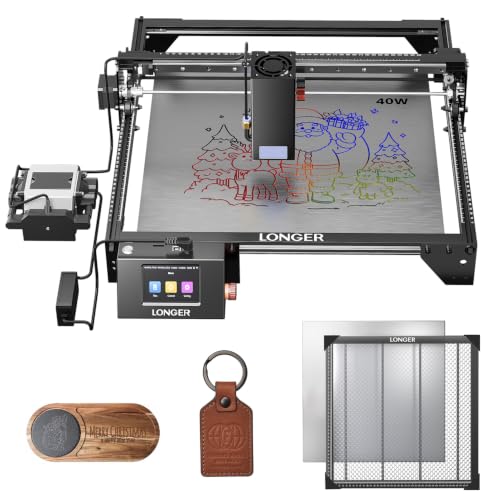
Longer RAY5 40W Laser Engraver with Honeycomb Table
Best for: bundled accessories and flexible offline cutting
- Laser Power
- 40W (what this guide is about)
- Engraving Speed
- 24,000 mm/min
- Software Compatibility
- LaserBurn, LaserGRBL, LightBurn
- Cutting Capacity
- 0.78" (20mm) wood, 1.18" (30mm) acrylic
- Compatible Material
- Wood, Metal, Acrylic, Leather, Glass, Paper
- Target Audience
- DIY
View on Amazon: Longer RAY5 40W Laser Engraver with Honeycomb Table
The Longer Ray5 40W combines a 40W optical output diode module with an included 17.3 by 17.3-inch honeycomb working table. It operates at speeds up to 24,000 mm/min and cuts through 20mm wood or 30mm black acrylic in a single pass. With USB, TF card, Wi-Fi, and app controls, it suits DIY makers who need powerful cutting and flexible offline operation.
Pros
- Includes a 17.3 x 17.3-inch iron and aluminum honeycomb working table
- Cuts up to 20mm wood and 30mm acrylic in a single pass
- Engraving speeds reach up to 24,000 mm/min
- Offers four connection modes including Wi-Fi, TF card, USB, and app
Cons
- Open-frame construction lacks an integrated protective enclosure
- LightBurn software compatibility requires a paid third-party license
Good fit if
- You want an included honeycomb table designed for smoke venting and heat dissipation.
- You need to cut materials up to 20mm wood or 30mm acrylic in one pass.
- You plan to run jobs offline via TF card, Wi-Fi, or a mobile app.
Skip if
- You require an enclosed laser machine out of the box for direct smoke management.
- You only engrave thin materials and do not need 40W of optical cutting power.
Verdict: Longer Ray5 40W with Honeycomb Table delivers high-power 40W cutting and rapid 24,000 mm/min speeds alongside essential venting hardware. It is a capable open-frame option for creators who want flexible connectivity and deep single-pass cutting.

LONGER Ray5 40W Laser Engraver
Best for: fast cutting and multi-machine batch production
- Laser Power
- 40W (what this guide is about)
- Working Area
- 385 × 385 mm
- Engraving Speed
- 24,000 mm/min
- Cutting Capacity
- 30mm black acrylic, 20mm wood
- Features
- Air Assist, Touchscreen
- Weight
- 16.6 pounds
The LONGER Ray5 40W Laser Engraver is a desktop cutter built for high-speed workshop tasks. It delivers a 40W laser output with an engraving speed reaching up to 24,000 mm/min across a 385x385mm working area. You can cut up to 20mm wood and 30mm black acrylic in a single pass. This machine suits you if you need multi-machine control and deep cutting in a 16.6-pound package.
Pros
- High engraving speed of up to 24,000 mm/min with a 0.08x0.1mm focal spot
- Cuts up to 20mm wood and 30mm black acrylic in one pass
- Includes a built-in air assist kit and upgraded 32-bit motherboard
- Supports multi-machine simultaneous control from a single device
Cons
- Working area of 385x385mm is slightly smaller than common 400x400mm platforms
- Does not include an enclosed chassis
Good fit if
- You need fast engraving speeds up to 24,000 mm/min on flat stock.
- You cut dense materials like 20mm wood or 30mm black acrylic.
- You manage several engraving units at once from a single station.
Skip if
- You require a working area exceeding 385x385mm without an extension.
- You want a fully enclosed machine with integrated exhaust filtration.
Verdict: LONGER Ray5 40W Laser Engraver pairs a 24,000 mm/min movement speed with 20mm wood cutting capability in a compact 385x385mm format. It provides solid 40W diode performance for multi-unit production setups.

Longer B1 40W Laser Cutter
Best for: Thick material cutting and large projects
- Laser Power
- 40W (what this guide is about)
- Working Area
- 450 x 440 mm (expandable to 450x850mm)
- Engraving Speed
- 36,000 mm/min
- Cutting Capacity
- 40mm basswood, 50mm acrylic
- Features
- Air Assist, Camera
The Longer B1 40W laser engraver delivers up to 48W of output power. It cuts 40mm basswood and 50mm acrylic with ease. The standard working area is 450 x 440 mm, but you can expand it to 450 x 850 mm with the Y-axis extension. It reaches speeds of 36,000 mm/min. The included camera kit allows for real-time monitoring and color engraving on stainless steel.
Pros
- Up to 48W output power for deep cutting
- Expandable work area up to 450 x 850 mm
- High speed of 36,000 mm/min
- Built-in camera for real-time monitoring
- Capable of color engraving on stainless steel
Cons
- Requires assembly for the Y-axis extension
- No mention of Wi-Fi or app control
- Large footprint when fully expanded
Good fit if
- You need to cut thick materials like 50mm acrylic
- You want to monitor your work via camera
- You require a large or expandable work area
Skip if
- You need a compact desktop machine without expansion
- You require built-in Wi-Fi connectivity
- You only engrave small items under 450mm
Verdict: The Longer B1 40W Laser Engraver fits makers who need high power and a large, expandable workspace. It is ideal for cutting thick materials and monitoring projects via its camera system.

Longer RAY5 40W Bundle with Rotary and Air Assist
Best for: Engraving cylindrical objects and thick materials out of the box
- Laser Power
- 40W (what this guide is about)
- Working Area
- 385 × 385 mm
- Engraving Speed
- 24,000 mm/min
- Software Compatibility
- LaserGRBL, LightBurn, LaserBurn
- Cutting Capacity
- Up to 20mm wood, 30mm acrylic
- Features
- Air Assist
View on Amazon: Longer RAY5 40W Bundle with Rotary and Air Assist
This desktop bundle combines a 40W diode output with a 385 × 385 mm work area and an engraving speed reaching 24,000 mm/min. It cuts up to 20mm wood and 30mm black acrylic in a single pass. Included extras like the 4-in-1 rotary tool, stackable riser blocks, and an adjustable air assist pump make it a practical pick if you want an open-frame diode setup ready for curved and tall objects.
Pros
- Cuts up to 20mm wood and 30mm black acrylic in a single pass
- Comes with an adjustable 10–30 L/min air assist pump and 4-in-1 rotary tool
- Fast 24,000 mm/min maximum engraving speed with a 0.08 × 0.1mm spot size
- Includes 16 stackable 60mm riser blocks for working on taller items
- Multiple connections via USB, Wi-Fi, TF card, and offline app control
Cons
- Working area of 385 × 385 mm is slightly smaller than standard 400 × 400 mm beds
- Open desktop frame requires external eye protection and workspace safety precautions
- No integrated enclosure or exhaust fan included
Good fit if
- You want a complete kit with rotary tools and air assist included out of the box
- You plan to engrave cylindrical items, tumblers, or taller materials using risers
- You need 40W diode power to cut thicker woods and acrylics in fewer passes
Skip if
- You need a factory-enclosed laser machine with built-in fume extraction
- You require a larger cutting surface than 385 × 385 mm for oversized sheet materials
Verdict: Longer RAY5 40W Bundle with Rotary and Air Assist delivers heavy-cutting diode power alongside essential accessories like risers and rotary tooling. It is a solid choice if you need a versatile desktop station ready for both flat and cylindrical projects.

Aliencell X1 Lite 40W Enclosed Engraver
Best for: Large format batch production
- Laser Power
- 40W (what this guide is about)
- Working Area
- 26 x 21 in
- Engraving Speed
- 600mm/s
- Software Compatibility
- LightBurn, Aliencell Space
- Form Factor
- Fully enclosed
- Compatible Material
- Wood, Metal, Leather
The Aliencell X1 Lite is a 40W diode laser engraver with a 26" × 21" working area. It reaches 600mm/s speed with 20kHz frequency for sharp results. The fully enclosed Class 1 design includes built-in flame sensors and UL94-V0 fire-resistant materials. It supports Lightburn and Aliencell Space software. This machine suits users needing a large, safe workspace for batch production.
Pros
- 26" × 21" large working area
- Fully enclosed Class 1 safety design
- 600mm/s engraving speed with 20kHz frequency
- Supports Lightburn and Aliencell Space software
- Built-in auto-focus and crosshair positioning
Cons
- Heavier build at 65 pounds
- Larger footprint requires more desk space
- No rotary accessory included in base model
Good fit if
- You need a large 26" × 21" engraving surface
- You require Class 1 enclosed safety for home use
- You want Lightburn software compatibility
Skip if
- You have limited desk space
- You prefer a lightweight portable unit
- You need a rotary attachment included
Verdict: The Aliencell X1 Lite 40W Enclosed Engraver fits users who need a large, safe workspace for batch production. Its enclosed design and large bed make it ideal for home workshops.

TOOCAA L2 40W Enclosed Laser Cutter
Best for: enclosed safety and rotary tumbler projects
- Laser Power
- 40W (what this guide is about)
- Working Area
- 16.34" x 15.55"
- Engraving Speed
- 40,000 mm/min
- Software Compatibility
- TOOCAA Studio, LightBurn, LaserGRBL
- Form Factor
- Fully Enclosed (Class 1)
- Cutting Capacity
- 18 mm (Pinewood)
This fully enclosed Class 1 laser cutter delivers 40W of optical output over a 16.34-inch by 15.55-inch work area. It reaches engraving speeds up to 40,000 mm/min and cuts through 18mm pinewood in a single pass. Featuring an integrated fume extractor, HD camera, and a 5-in-1 rotary roller set, it suits makers and small shops that need a turnkey, enclosed setup for flat stock and cylindrical items.
Pros
- Class 1 fully enclosed design with safety interlock and 99% laser filtering lid
- Fast 40,000 mm/min engraving speed with 0.01 mm precision
- Cuts up to 18 mm pinewood in a single pass
- Includes 5-in-1 rotary roller set, fume extractor, camera, and air assist
- Built-in nitrogen gas spring lid assist and USB child safety lock
Cons
- Footprint spans 25.5 by 24.5 inches, requiring dedicated bench space
- Riser base for taller objects is not included standard
Good fit if
- You want an enclosed Class 1 laser with built-in safety interlocks and fume extraction
- You plan to engrave tumblers, rings, and cylinders right out of the box
- You use LightBurn, LaserGRBL, or the native TOOCAA Studio software
Skip if
- You need a working area larger than 16.34 by 15.55 inches
- You have tight desk space that cannot fit a 25.5-inch wide chassis
- You prefer an open-frame diode machine for easier passthrough of oversized sheets
Verdict: TOOCAA L2 40W Enclosed Laser Engraver provides a secure Class 1 workspace paired with rapid cutting speeds and an included rotary kit. It is a dependable choice if you prioritize built-in safety and ready-to-run tumbler engraving.

Laser TREE 40W Diode Laser Module
Best for: upgrading K40 style DIY machines
- Laser Power
- 40W (what this guide is about)
- Laser Type
- Diode
- Cutting Capacity
- 30 mm pinewood, 15 mm acrylic
- Compatible Material
- Wood, Metal, Acrylic, Leather
- Features
- Air Assist
- Dimensions
- 5.68 × 2.4 × 2.4 inches
This is a 40W+ diode laser module with up to 44000mW optical power. It cuts 30mm pinewood and 15mm acrylic in one pass. Built-in air assist and dual fans improve cut quality and stability. It includes a red cross positioning cursor and dovetail guide for accuracy. You need a TTL or PWM controlled machine to use it. It fits DIY upgrades or new builds.
Pros
- 40W+ output up to 44000mW
- Cuts 30mm pinewood and 15mm acrylic
- Built-in air assist
- Red cross positioning cursor
Cons
- Requires TTL or PWM control
- No enclosure listed
- Sold as a module only
Good fit if
- You need to upgrade an existing K40-style machine
- You want high cutting depth for wood
- You prefer built-in air assist
Skip if
- You need a complete ready-to-use machine
- Your controller does not support TTL or PWM
- You require an enclosed safety unit
Verdict: Laser TREE 40W Diode Module offers strong 44000mW cutting power for wood and acrylic. It is a practical upgrade for DIY builders who need precise air-assisted cuts without buying a new frame.

Creality Falcon2 Pro S 40W Enclosed Laser
Best for: Enclosed, multi-power diode cutting and engraving
- Laser Power
- 40W (what this guide is about)
- Laser Type
- Diode
- Engraving Speed
- Over 600 mm/s
- Software Compatibility
- Falcon Design Space, LightBurn
- Form Factor
- Enclosed (Class 1)
- Cutting Capacity
- 20 mm wood, 20 mm dark acrylic
This desktop diode machine combines high power with a fully enclosed Class 1 safety design. It features a switchable 40W and 22W dual-power laser module, cutting up to 20 mm wood or dark acrylic, and operates at speeds exceeding 600 mm/s. With an integrated HD camera, auto-focus system, and built-in honeycomb bed, you get a clean, contained workspace suitable for detailed engraving and heavy cutting alike.
Pros
- Switchable dual-power output between 40W and 22W
- Certified Class 1 enclosed design with auto-stop safety sensors
- Engraving and cutting speeds exceeding 600 mm/s
- Integrated HD camera and auto-focus laser module
- Built-in honeycomb bed and smoke exhaust system
Cons
- Batch processing via camera requires LightBurn software
- Large desktop footprint measuring 24.4 by 21.7 inches
- Fixed enclosed workspace prevents engraving oversized materials
Good fit if
- You need a certified Class 1 enclosed machine that automatically shuts off when opened
- You want the flexibility to switch between 40W cutting and 22W fine engraving
- You prefer an integrated camera for positioning designs directly onto materials
Skip if
- You regularly work on materials larger than the enclosure's physical dimensions
- You have minimal desk space for its 24.4 by 21.7 inch frame
- You prefer an open-frame diode engraver for easier pass-through access
Verdict: Creality Falcon2 Pro S 40W Enclosed Laser Engraver offers a safe, self-contained desktop system with switchable dual-power modes and automated focusing. It provides reliable cutting strength and fine detail work without requiring separate safety glasses during operation.

TOOCAA 40W Enclosed Laser Engraver
Best for: safe indoor cutting and tumbler engraving
- Laser Power
- 40W (what this guide is about)
- Working Area
- 16.34" x 15.55"
- Engraving Speed
- 40,000 mm/min
- Software Compatibility
- TOOCAA Studio, LightBurn, LaserGRBL
- Form Factor
- Fully Enclosed (Class 1)
- Cutting Capacity
- 12 mm pinewood
This fully enclosed 40W diode laser provides Class 1 safety, a 16.34-by-15.55-inch work area, and speeds up to 40,000 mm/min. It can cut 12 mm pinewood in a single pass and includes a smart camera, air assist, and a 5-in-1 rotary roller. Built-in interlocks, flame detection, and a USB child lock make it well-suited for makers and studios needing a protective, fully covered workspace.
Pros
- Class 1 fully enclosed build with safety interlock lid and laser-filtering cover
- High-speed operation reaching up to 40,000 mm/min with 0.01 mm precision
- Comes with a smart camera, air assist, and 5-in-1 rotary roller set
- One-pass cutting capacity up to 12 mm pinewood
Cons
- Large footprint measuring 25.5 by 24.5 inches on your workbench
- Fixed working height limits workpieces unless elevated or reconfigured
Good fit if
- You need a certified Class 1 enclosed machine for a shared studio or home workshop
- You frequently engrave tumblers using an included rotary roller
- You want built-in safety features like flame detection, tilt detection, and a USB lock
Skip if
- You work on oversized materials exceeding the 16.34-by-15.55-inch bed
- You have limited bench space that cannot fit a 25.5-by-24.5-inch enclosure
Verdict: TOOCAA 40W Enclosed Laser Cutter and Engraver brings serious cutting power into a secure, Class 1 enclosed platform complete with rotary accessories and camera alignment.
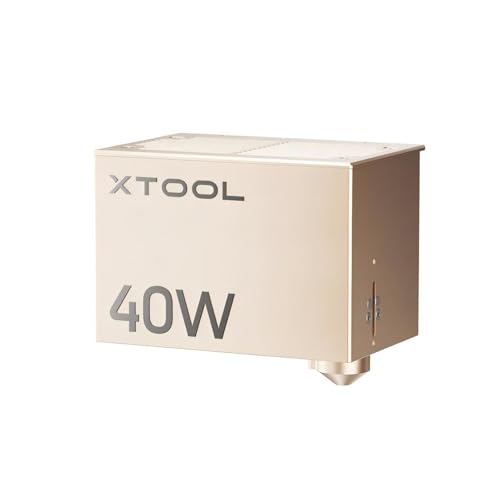
xTool S1 40W Diode Laser Module
Best for: xTool S1 owners upgrading cutting power
- Laser Power
- 40W (what this guide is about)
- Laser Type
- Diode
- Engraving Speed
- 600mm/s
- Cutting Capacity
- 18mm cherry wood, 15mm acrylic
- Dimensions
- 12.2 × 7.48 × 13 inches
If you own an xTool S1 machine, this 40W diode laser module lets you upgrade your cutting power without buying a separate engraver. It delivers 40W of output power and operates at speeds up to 600mm/s. In a single pass, it cuts through materials such as 18mm cherry wood, 15mm dark opaque acrylic, and 0.1mm stainless steel. It is built strictly as a swap-in module for existing S1 setups.
Pros
- Cuts 18mm cherry wood and 15mm dark opaque acrylic in one pass
- Reaches engraving speeds up to 600mm/s
- Capable of cutting 0.1mm stainless steel
- Swaps directly onto the xTool S1 without buying a second machine
Cons
- Only compatible with the xTool S1 engraver
- Not a standalone machine and requires a base unit to operate
Good fit if
- You already own an xTool S1 and need higher laser wattage.
- You regularly cut thick stock like 18mm wood or 15mm acrylic.
Skip if
- You need a complete standalone laser engraving machine.
- You operate a laser frame from a different brand or model line.
Verdict: xTool S1 40W Diode Laser Module provides existing xTool S1 owners with a direct 40W power upgrade capable of single-pass cuts up to 18mm wood at speeds up to 600mm/s.
Specifications side by side
| Spec | xTool S1 40W Enclosed Laser Cutter | Longer Ray5 40W Laser Engraver | xTool F2 Ultra 60W MOPA and 40W Diode Laser | Creality Falcon2 Pro S 40W Enclosed Laser Cutter | Aliencell X1 40W Enclosed Laser Engraver | Longer RAY5 40W Laser Engraver with Honeycomb Table | LONGER Ray5 40W Laser Engraver | Longer B1 40W Laser Cutter | Longer RAY5 40W Bundle with Rotary and Air Assist | Aliencell X1 Lite 40W Enclosed Engraver | TOOCAA L2 40W Enclosed Laser Cutter | Laser TREE 40W Diode Laser Module | Creality Falcon2 Pro S 40W Enclosed Laser | TOOCAA 40W Enclosed Laser Engraver | xTool S1 40W Diode Laser Module |
|---|---|---|---|---|---|---|---|---|---|---|---|---|---|---|---|
| Laser Type | not specified | not specified | MOPA Fiber & Diode | Diode | not specified | not specified | not specified | not specified | not specified | not specified | not specified | Diode | Diode | not specified | Diode |
| Laser Power | 40W (40,000mW) | 40W | 60W MOPA, 40W Diode | 40W | 40W | 40W | 40W | 40W (up to 48W output) | 40W | 40W | 40W | 40W+ (40,000 mW) | 40W (switchable to 22W) | 40W | 40W (40000mW) |
| Working Area | 23.93" x 15.16" | 385 x 385 mm | 8.7" x 8.7" | not specified | 26" x 21" | not specified | 385 × 385 mm | 450 x 440 mm (expandable to 450x850mm) | 385 × 385 mm | 26 x 21 in | 16.34" x 15.55" | not specified | not specified | 16.34" x 15.55" | not specified |
| Engraving Speed | 600mm/s | 24,000 mm/min | Up to 15,000 mm/s | 600mm/s | 600mm/s | 24,000 mm/min | 24,000 mm/min | 36,000 mm/min | 24,000 mm/min | 600mm/s | 40,000 mm/min | not specified | Over 600 mm/s | 40,000 mm/min | 600mm/s |
| Software Compatibility | xTool Creative Space (XCS) | LaserGRBL, LightBurn | not specified | not specified | not specified | LaserBurn, LaserGRBL, LightBurn | not specified | not specified | LaserGRBL, LightBurn, LaserBurn | LightBurn, Aliencell Space | TOOCAA Studio, LightBurn, LaserGRBL | not specified | Falcon Design Space, LightBurn | TOOCAA Studio, LightBurn, LaserGRBL | not specified |
| Form Factor | Enclosed | not specified | not specified | Fully Enclosed | Fully Enclosed (Class 1) | not specified | not specified | not specified | not specified | Fully enclosed | Fully Enclosed (Class 1) | not specified | Enclosed (Class 1) | Fully Enclosed (Class 1) | not specified |
| Cutting Capacity | 18mm cherry wood | 20 mm pine wood, 15 mm acrylic | 23 mm wood, 20 mm acrylic | 20mm basswood, 30mm black acrylic | not specified | 0.78" (20mm) wood, 1.18" (30mm) acrylic | 30mm black acrylic, 20mm wood | 40mm basswood, 50mm acrylic | Up to 20mm wood, 30mm acrylic | not specified | 18 mm (Pinewood) | 30 mm pinewood, 15 mm acrylic | 20 mm wood, 20 mm dark acrylic | 12 mm pinewood | 18mm cherry wood, 15mm acrylic |
| Compatible Material | Wood, Metal, Acrylic | Wood, Metal, Acrylic, Leather, Glass | not specified | Wood, Acrylic | not specified | Wood, Metal, Acrylic, Leather, Glass, Paper | Acrylic | not specified | not specified | Wood, Metal, Leather | Wood, Metal, Acrylic | Wood, Metal, Acrylic, Leather | Wood, Metal, Acrylic, Leather | Wood, Metal, Acrylic | Wood |
| Features | Rotary Axis | Touchscreen | not specified | Air Assist, Camera, Auto Focus | Enclosure, Air Assist | not specified | Air Assist, Touchscreen | Air Assist, Camera | Air Assist | Air Assist | Air Assist, Rotary Axis, Camera | Air Assist | Enclosure, Air Assist, Camera | Enclosure, Air Assist, Rotary Axis, Camera | not specified |
| Target Audience | not specified | DIY | not specified | not specified | not specified | DIY | not specified | not specified | DIY | not specified | not specified | not specified | not specified | not specified | not specified |
| Configuration | not specified | not specified | not specified | not specified | not specified | not specified | not specified | not specified | not specified | not specified | 5-in-1 | not specified | not specified | 5-in-1 | not specified |
| Size | 40W | 385×385mm | Dual Laser (60W MOPA & 40W Diode) | Falcon2 Pro S 40W with Integrated Enclosure | 40W | 40W | 385x385mm | 40W | 385 * 385 mm | 40W | L2 | 40W+ Laser Output | Pro S 40W | 40-w | 40W Diode |
| Application | Tumblers | not specified | not specified | not specified | not specified | not specified | not specified | not specified | not specified | not specified | Tumblers | not specified | not specified | Tumblers | not specified |
| Length | 19.6 inches | not specified | not specified | not specified | not specified | not specified | not specified | not specified | not specified | not specified | not specified | not specified | not specified | not specified | not specified |
| Width | 19.6 inches | not specified | not specified | not specified | not specified | not specified | not specified | not specified | not specified | not specified | not specified | not specified | not specified | not specified | not specified |
| Dimensions | not specified | 24.2 × 17 × 5.2 inches | 16.9 × 11.6 × 20.5 inches | 26 × 22 × 12.9 inches | 31 × 8.4 × 35.6 inches | not specified | not specified | not specified | not specified | 31 × 35 × 8.4 inches | 24.5 × 25.5 × 11.5 inches | 5.68 × 2.4 × 2.4 inches | 24.4 × 21.7 × 16.9 inches | 24.5 × 25.5 × 11.5 inches | 12.2 × 7.48 × 13 inches |
| Weight | not specified | not specified | not specified | 50.5 pounds | not specified | not specified | 16.6 pounds | not specified | not specified | 65 pounds | not specified | not specified | not specified | not specified | not specified |
| Color | Black Rotary | black | Dual Laser (60w Mopa & 40w Diode) | Falcon2 Pro S 40W | X1-white | not specified | Gloss Black | Extension Set(A Blue) | Black bundle | X1 Lite-white | Silver | 40w+ Laser Output | Pro S 40W Laser | Silver | gold |
| Model | MXD-K101-001 | Ray5 40W | MXF-K003-002 | Falcon2 pro 40W | X1-2418-A0 | not specified | not specified | not specified | RAY5 | XL-2418-A0 | L2 | LT-K40 1 | Creality Falcon2 Pro S 40W | L2 | P5010330 |
Is 40W laser power worth it?
A 40W optical output provides the energy necessary to cut dense materials in fewer passes. Listings in this category specify single-pass cutting capabilities up to 18mm or 20mm in wood, alongside broad compatibility with acrylic, leather, and coated metal. That power level supports faster travel speeds, reaching up to 600 mm/s or 24,000 mm/min during operations. If your daily production focuses on cutting through rigid sheet stock rather than light surface etching, 40W significantly decreases your job run times.
Worth it if
- You need to cut wood up to 18mm or 20mm thick in single passes.
- You process sheet materials like acrylic, wood, and leather at speeds up to 600 mm/s or 24,000 mm/min.
- You produce batch work that requires fast cutting throughput rather than light surface marking.
Skip it if
- You only engrave paper or delicate surfaces where high optical power can cause overburn.
- You do shallow surface marking on thin items that do not require deep cutting capability.
For those interested in other equipment, see our list of best lexmark laser printers ranked by specs.
How We Chose 40W Laser Engravers
To find the 15 picks for this guide, we locate Amazon listings that state a 40W laser power rating in their title or feature list. We do not physically handle the hardware. We rely strictly on published manufacturer specifications, including work area size, laser type, and accessories like air assist. We also display only one variant per product family.
You will see in-stock products first, followed by Amazon sales rank so better-selling models appear higher on the list. Live availability updates on the page throughout the day. This helps you compare reliable 40W cutting and engraving equipment based entirely on verified data.
How to Choose the Right 40W Laser
-
Select the Laser Source Type
Check whether the product uses a diode beam, a CO2 tube, or a hybrid dual-source setup. Diode modules handle basic wood, leather, and dark acrylics effectively. CO2 options, like the Cloudray 40W CO2 Laser Tube, provide dedicated replacement power for gas tube systems. Dual setups like the xTool F2 Ultra pair a 40W diode with a 60W MOPA laser, expanding support to fast metal marking. Match the listed laser source directly to the primary materials you plan to process.
-
Confirm Machine Versus Replacement Parts
Check the listing configuration carefully before buying. Some 40W products are complete desktop workstations, while others are add-on modules or replacement hardware. For instance, the xTool S1 40W Diode Laser Module is an upgrade part designed specifically for an existing unit rather than a full system. Similarly, bare glass tubes require compatible chassis, cooling, and high-voltage power supplies. Make sure the specifications state a standalone machine if you do not already own the base hardware.
-
Check Work Bed Dimensions
Review the bed dimensions to ensure your target materials fit onto the work surface. A standard bed like 385 by 385 mm accommodates everyday craft blanks, signage, and decorative panels. If you produce larger sheets or batch multiple designs at once, seek higher bed specifications. The Longer Laser B1 provides an expanded 450 by 440 mm workspace. Ensure the physical cutting envelope aligns with your raw stock sizes so you avoid pre-cutting raw material down to size.
-
Review Alignment Camera Support
Look for built-in camera monitoring if your workflow requires rapid job positioning. Models such as the Creality Falcon2 Pro incorporate an integrated camera to assist visual layout before firing the beam. An overhead camera transfers real-time workspace views to your software canvas, allowing precise placement of designs over irregular blanks, scraps, or pre-cut pieces. If you frequently execute low-tolerance jobs or multi-item batches, selecting a machine with a built-in camera minimizes manual measurement errors.
-
Verify Rotary Tool Compatibility
Inspect the feature list for rotary hardware if you plan to mark rounded drinkware. Flat work beds cannot handle cylindrical items without dedicated rollers or chucks. Models like the TOOCAA L2 include rotary axis hardware tailored for tumbler and cup engraving. Confirm whether the package bundles the rotary attachment or merely supports one as an optional purchase. Choosing a model with pre-packaged rotary accessories ensures proper driver connections and immediate out-of-the-box support for curved goods.
-
Compare Maximum Movement Speeds
Examine the maximum feed rates to gauge production run times. Standard gantry diode engravers reach speeds around 400 to 600 mm/s, which translates to roughly 24,000 mm/min. However, specialized galvanometer systems, such as the xTool F2 Ultra, reach speeds up to 15,000 mm/s for vector marking and raster engraving. Higher movement speeds cut down processing times significantly during detailed engraving jobs. If you prioritize rapid turnarounds on intricate vector art, prioritize models with higher velocity specs.
Frequently asked questions
Which 40W laser engraver is best for safety?
The xTool S1 40W Enclosed Laser Cutter is the top choice for safety. It features a fully enclosed chassis monitored by sensors. This design contains laser light and fumes. You get a secure workspace without needing separate protective barriers. The enclosure allows you to operate the machine confidently in home environments.
Can I engrave tumblers with a 40W machine?
Yes, several models support rotary projects. The xTool S1 40W and TOOCAA L2 40W include rotary axis features. These tools allow you to engrave cylindrical objects like tumblers. You can rotate items for even coverage on curved surfaces. Check the attributes to confirm rotary compatibility before purchasing.
Do I need a PC to run these engravers?
No, some models work standalone. The Aliencell X1 40W includes a touchscreen for control. You can run jobs without connecting to a computer. This feature supports batch production in workshop settings. It reduces dependency on external devices and simplifies the workflow for independent creators.
What is the largest work area available?
The Aliencell X1 40W offers a large format. It provides a generous working envelope for big projects. The unit measures 31 inches wide and 35.6 inches long. This size suits creators needing production-scale cutting. Larger beds allow you to process multiple items or oversized materials in one setup.
Which 40W laser has automated focusing?
The Creality Falcon2 Pro S 40W features auto focus. It includes an automated Z-axis focusing system. This technology adjusts the lens distance quickly. You get consistent focus across uneven surfaces. The machine also includes a camera for alignment, streamlining your setup process.
Are there dual-laser options in this category?
The xTool F2 Ultra combines two laser sources. It features a 60W MOPA and a 40W Diode. This dual-laser setup handles mixed materials efficiently. You can switch between galvo speeds and diode power. It supports rapid batch engraving on both metal and organic materials.
Does the 40W power cut thick wood?
Yes, 40W power cuts dense wood. The xTool S1 40W module cuts up to 18mm wood. The Longer Ray5 40W cuts up to 20mm. These capabilities allow single-pass cuts in many materials. You avoid multiple passes for thicker sheets, saving time and improving edge quality.