Best Laser Engravers Under $1500 in 2026: 12 Picks Ranked by Specs
As an Amazon Associate we earn from qualifying purchases. Links on this page are affiliate links.
You need the best laser engravers under $1500 to handle specific material tasks without overspending. Our top pick, the Monport 20W Fiber Laser Engraver, leads because it delivers industrial-grade metal marking at speeds up to 10,000 mm/s. We compared 12 products based strictly on the specifications published on their listings. This guide helps you decide which machine fits your workspace and material needs by focusing on laser type, power, and compatible software rather than price or marketing claims.
Quick picks
The best fit for you
- You need high-speed precision metal marking Monport 20W Fiber Laser Engraver It offers 20W fiber power and speeds up to 10,000 mm/s for accurate metal work.
- You want to cut thick wood safely Creality Falcon2 Pro S 40W Enclosed Laser Cutter The 40W diode laser cuts deeply while the enclosed Class 1 design contains the beam.
- You require a large bed for big projects Aliencell X1 Lite 40W Enclosed Engraver This 40W model provides a 26 by 21 inch bed with Class 1 safety.
- You need a portable unit for small items GWEIKE G2 Pro 30W Portable Fiber Laser The 30W fiber laser fits in a compact form factor for detailed portable marking.
Our 12 picks

Monport 20W Fiber Laser Engraver
Best for: high-speed precision metal marking and deep engraving
- Laser Type
- Fiber
- Laser Power
- 20W
- Working Area
- 110 x 110 mm
- Engraving Speed
- Up to 10000mm/s
- Software Compatibility
- LightBurn, BSLcad
- Compatible Material
- Metal
This is a dedicated 20W fiber laser marking machine designed specifically for metal engraving. It delivers marking speeds up to 10,000 mm/s with an accuracy of 0.01 mm over a compact 110 x 110 mm working area. It supports deep metal engraving, 2.5D engraving, and thin metal sheet cutting. You will find it works directly with LightBurn or the included free software, making it a fast setup for metalwork.
Pros
- High-speed galvanometer system reaching up to 10000 mm/s
- Engraves all metals including gold, silver, brass, copper, and titanium
- Fine 0.01 mm carving accuracy using customized F-theta field mirror
- Compatible with LightBurn and includes free software on a USB drive
- Laser source rated for up to 100,000 hours of lifespan
Cons
- Small working area limited to 110 x 110 mm (4.3 x 4.3 inches)
- Rotary attachment is not included with this base configuration
Good fit if
- You need ultra-fast marking speeds specifically on bare metals like steel, gold, and brass
- You want deep metal engraving or 2.5D relief carving on small parts
- You prefer running your fiber laser directly through LightBurn
Skip if
- You require a large working bed beyond 110 x 110 mm
- You primarily cut thick organic materials like wood or acrylic rather than metal
Verdict: Monport 20W Fiber Laser Engraver provides industrial-grade metal marking at speeds up to 10,000 mm/s. It is an ideal pick if your focus is fine, accurate engraving on metal parts within a compact workspace.
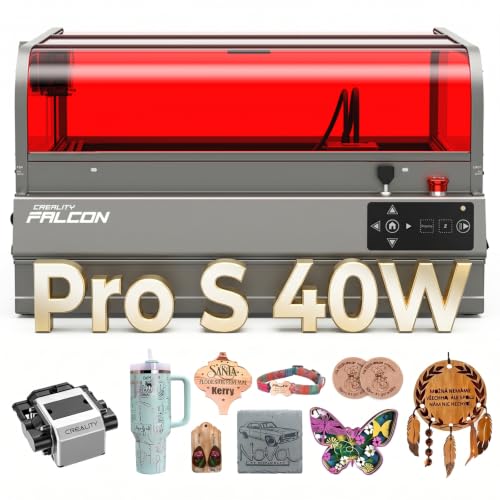
Creality Falcon2 Pro S 40W Enclosed Laser Cutter
Best for: thick wood cutting inside a fully enclosed workspace
- Laser Type
- Diode
- Laser Power
- 40W
- Engraving Speed
- 600mm/s
- Form Factor
- Fully Enclosed
- Cutting Capacity
- 20mm basswood, 30mm black acrylic
- Compatible Material
- Wood, Acrylic
View on Amazon: Creality Falcon2 Pro S 40W Enclosed Laser Cutter
This desktop diode laser pairs a powerful 40W optical output with a fully enclosed Class 1 safety design. Operating at speeds up to 600mm/s, it handles deep cuts, including 20mm basswood and 30mm black acrylic. The integrated top camera and motorized Z-axis auto-focus simplify alignment for batch production. You will find it well suited if you need strong cutting capability alongside built-in smoke containment.
Pros
- High 40W diode output capable of cutting 20mm basswood in one pass
- Fully enclosed Class 1 safety frame with smoke and noise isolation
- Integrated camera and motorized Z-axis auto-focus for easy alignment
- Operating speeds up to 600mm/s for rapid batch processing
- Built-in debris drawer catches residue to streamline cleanup
Cons
- Heavy 50.5-pound frame requires a sturdy, dedicated table
- Large footprint measures 26 inches long by 22 inches wide
- Requires a direct USB computer connection to utilize camera preview
Good fit if
- You need 40W optical power to cut through thick wood or acrylic
- You work in shared spaces that require an enclosed Class 1 setup
- You run batch projects and want camera positioning to save time
Skip if
- You need a lightweight, portable laser you can easily relocate
- You lack a workspace that can support a 50.5-pound machine
Verdict: Creality Falcon2 Pro S 40W Enclosed Laser Cutter combines 40W diode cutting power with an enclosed Class 1 design, auto-focus, and camera positioning. It is a capable choice for studios needing deep material penetration and tidy, contained operation.

Aliencell X1 20W 26x21" Bed Laser
Best for: Large projects needing standalone control
- Laser Power
- 20W
- Working Area
- 26" × 21"
- Engraving Speed
- 600mm/s
- Software Compatibility
- Aliencell Space
- Dimensions
- 31 × 8.4 × 35.6 inches
The Aliencell X1 20W offers a large 26 x 21 inch bed for bigger projects. It reaches 600mm/s with 20kHZ frequency for fast, clean cuts. A 6.86-inch touchscreen allows offline control without a PC. AI vision and dual 8MP cameras help with precise positioning and material simulation. This system suits users who want a standalone machine with a wide working area.
Pros
- 26 x 21 inch working area
- 600mm/s engraving speed
- 6.86-inch standalone touchscreen
- Dual 8MP cameras for vision
- 20kHZ high frequency operation
Cons
- 20W laser power is lower than 40W competitors
- Proprietary Aliencell Space software only
- Linux-based OS limits third-party app use
Good fit if
- You need a large 26 x 21 inch bed
- You prefer standalone operation without a PC
- You want AI vision for precise positioning
Skip if
- You require higher than 20W power
- You rely on LightBurn software
- You need cloud-based remote control
Verdict: Aliencell X1 20W 26x21 Laser fits users who prioritize a large bed and standalone touchscreen control over maximum laser power or third-party software compatibility.

Creality Falcon2 Pro S 40W Enclosed Laser Engraver
Best for: heavy cutting in an enclosed desktop setup
- Laser Power
- 40W (40000mW)
- Working Area
- 355 x 390 mm
- Form Factor
- Enclosed (Class 1)
- Cutting Capacity
- 20mm basswood, 30mm black acrylic
- Compatible Material
- Wood, Metal
- Features
- Enclosure, Air Assist, Camera
View on Amazon: Creality Falcon2 Pro S 40W Enclosed Laser Engraver
The Creality Falcon2 Pro S 40W is a desktop laser cutter featuring a Class 1 full enclosure, built-in camera, and integrated air assist. It delivers 40,000mW of laser power across a 355 x 390 mm workspace, cutting up to 20mm basswood and 30mm black acrylic. With one-click autofocus and support for LightBurn and LaserGRBL, it fits makers who need substantial cutting capacity in a self-contained setup.
Pros
- 40W optical output cuts up to 20mm basswood and 30mm black acrylic
- Class 1 safety enclosure with 360-degree visibility
- One-click smart auto-focus and built-in camera
- Supports LightBurn, LaserGRBL, and Falcon Design Space on Windows and Mac
Cons
- Working area of 355 x 390 mm is smaller than typical 400 x 400 mm beds
- Tall 30.3-inch machine height requires significant vertical clearance
Good fit if
- You need 40W of diode power to cut thick wood or acrylic sheets.
- You want an enclosed Class 1 laser with built-in air assist and auto-focus.
- You plan to operate your machine using LightBurn or LaserGRBL.
Skip if
- You need a work area larger than 355 x 390 mm for wide stock.
- You have limited benchtop height to accommodate the 30.3-inch enclosure.
Verdict: Creality Falcon2 Pro S 40W Enclosed Laser Engraver pairs 40,000mW of cutting power with a Class 1 protective enclosure and automated focus. It is built for workshop users seeking high-power diode cutting without exposing open beams to the room.

Aliencell X1 Lite 40W Enclosed Engraver
Best for: Large format Class 1 safety engraving
- Laser Power
- 40W
- Working Area
- 26" × 21"
- Engraving Speed
- 600mm/s
- Software Compatibility
- Aliencell Space, Lightburn
- Form Factor
- Fully enclosed (Class 1)
- Dimensions
- 31 × 35 × 8.4 inches
The Aliencell X1 Lite 40W is a fully enclosed Class 1 laser engraver with a 26 by 21 inch working area. It delivers 600mm/s engraving speed and 20,000 mm/s² acceleration. The unit supports Lightburn and Aliencell Space software. It includes auto-focus and flame sensors. This machine suits users who need a large bed and high safety standards for batch production.
Pros
- 40W laser power for efficient cutting
- 26 by 21 inch large working area
- 600mm/s high engraving speed
- Fully enclosed Class 1 safety design
- Lightburn software compatibility
Cons
- Heavy 65 pound build
- Large footprint requires significant desk space
- No rotary attachment included in base model
Good fit if
- You need a large 26 by 21 inch bed for wide materials
- You prioritize Class 1 enclosed safety for home use
- You require Lightburn software support for professional workflows
Skip if
- You have limited desk space and need a compact unit
- You only engrave small items and need a smaller bed
- You require a rotary attachment for cylindrical objects
Verdict: The Aliencell X1 Lite 40W fits users who need a large 26 by 21 inch bed and Class 1 safety. It offers fast 600mm/s speeds and Lightburn support for serious hobbyists and small businesses.

GWEIKE G2 Pro 30W Portable Fiber Laser
Best for: portable high-speed metal marking
- Laser Type
- Fiber (1064nm)
- Laser Power
- 30W
- Working Area
- 110 x 110 mm
- Engraving Speed
- Up to 15,000 mm/s
- Software Compatibility
- LightBurn
- Form Factor
- Portable & Handheld
The GWEIKE G2 Pro is a 30W fiber laser engraved with a 1064nm wavelength. It features a portable, handheld form factor with a 110 x 110 mm working area. Engraving speeds reach 15,000 mm/s. It supports WiFi and USB connectivity. LightBurn software is compatible. This unit suits users needing deep metal marking and high-speed precision in a compact design.
Pros
- 30W fiber laser for deep metal engraving
- Portable handheld design for flexible use
- Up to 15,000 mm/s engraving speed
- Dual red light preview system
- LightBurn software compatibility
Cons
- Small 110 x 110 mm working area
- Limited to fiber laser wavelengths
- Requires assembly and setup
Good fit if
- You need high-speed metal marking
- You require a portable engraving solution
- You use LightBurn software
Skip if
- You need to engrave large surfaces
- You require CO2 laser capabilities
- You prefer a fixed desktop unit
Verdict: GWEIKE G2 Pro 30W Portable Fiber Engraver fits professionals needing portable, high-speed metal marking. Its compact size and speed suit detailed work on small items.

ACMER P3 Enclosed 48W/24W Laser Engraver
Best for: enclosed high-power cutting with switchable diode modes
- Laser Type
- Diode
- Laser Power
- Switchable 24W & 48W
- Engraving Speed
- 800mm/s
- Software Compatibility
- LaserGRBL, LightBurn
- Form Factor
- Closed-box (Class 1)
- Dimensions
- 1 × 1 × 1 inches
The ACMER P3 is an enclosed Class 1 diode laser machine featuring switchable 24W and 48W optical power modes. It pairs an 800mm/s maximum speed on a CoreXY motion system with a 0.08mm spot size for detail down to 0.01mm. With an included 30L/min air pump, built-in visual camera, and software compatibility for LightBurn and LaserGRBL, this model suits you if you need versatile cutting power and desktop safety.
Pros
- Switchable 24W and 48W dual diode laser output
- Engraving speed up to 800mm/s driven by a CoreXY system
- SGS Class 1 enclosure with flame, tilt, and over-temperature detection
- Includes a 30L/min air pump, honeycomb plate, and waste drawer
Cons
- Diode laser module only, without an infrared laser source
- Fully enclosed chassis restricts workpieces to internal cabinet space
Good fit if
- You want the flexibility of switching between 24W and 48W diode power on a single machine.
- You prioritize an enclosed Class 1 setup with active safety sensors and smoke reduction.
- You want high motion speeds up to 800mm/s supported by an integrated positioning camera.
Skip if
- You require an infrared or fiber laser source for specialized bare metal processing.
- You work on oversized materials that require an open-frame design.
Verdict: ACMER P3 Enclosed 48W/24W Laser Engraver provides switchable 24W and 48W power levels paired with a fast 800mm/s CoreXY system inside a Class 1 enclosure. It gives you flexible cutting and engraving capability in a self-contained unit.

Creality Falcon2 Pro S 40W
Best for: dual-power cutting and enclosed Class 1 safety
- Laser Power
- 40W (22W / 40W dual mode)
- Engraving Speed
- 600mm/s
- Software Compatibility
- Falcon Design Space
- Form Factor
- Class 1
- Compatible Material
- Wood, Metal, Leather
- Features
- Air Assist, Camera, Auto Focus
The Creality Falcon2 Pro S 40W is an enclosed Class 1 desktop laser cutter and engraver. It features a switchable 22W and 40W dual-power laser module, operating speeds up to 600mm/s, and motorized auto-focus. You get integrated air assist, a built-in honeycomb plate, and an alignment camera for layout setup. It suits makers who want heavy-duty cutting capacity alongside lower-wattage precision for fine engraving.
Pros
- Switchable 22W precise mode and 40W high-speed cutting mode
- Class 1 enclosed build with fire, airflow, and lens sensors
- Built-in honeycomb plate and automated Z-button focusing
- Includes positioning camera and integrated air assist
Cons
- Positioning camera functions only when connected to a computer
- Heavy 59.5-pound frame requires dedicated workbench space
- Primary workflow designed around Falcon Design Space software
Good fit if
- You want switchable wattage to handle both fine engraving and thick material cutting.
- You require an enclosed Class 1 laser with triple safety switches and hazard sensors.
- You prefer the convenience of automated focusing and a built-in honeycomb base.
Skip if
- You plan to use camera positioning without tethering to a computer.
- You need a lightweight, portable machine rather than a 59.5-pound desktop unit.
Verdict: Creality Falcon2 Pro S 40W delivers flexible dual-power operation and Class 1 enclosed safety for versatile cutting and engraving. Its automated focusing, camera alignment, and integrated air assist make it a capable workstation pick.

WECREAT Lumos Dual 10W Diode and 3W IR Engraver
Best for: high-speed tumbler and metal micro-engraving
- Laser Type
- Diode, IR
- Laser Power
- 10W Diode, 3W IR
- Engraving Speed
- Up to 4000mm/s
- Form Factor
- Class 1
- Cutting Capacity
- 8mm wood, 6mm acrylic
- Features
- Rotary Axis
View on Amazon: WECREAT Lumos Dual 10W Diode and 3W IR Engraver
The WECREAT Lumos Dual pairs a 10W diode laser with a 3W infrared laser using Galvo technology. It reaches engraving speeds up to 4000mm/s and achieves a motion precision of 0.00199mm. The 10W diode cuts up to 8mm wood and 6mm acrylic, while the 3W IR marks metals and supports color engraving. It suits you if you want a Class 1 dual-laser setup tailored for tumblers, metal engraving, and light cutting.
Pros
- Galvo system capable of engraving speeds up to 4000mm/s
- Dual-source design with 10W diode and 3W infrared lasers
- Fine motion precision of 0.00199mm for micro-engraving
- Cuts up to 8mm wood and 6mm acrylic
- Certified Class 1 laser form factor
Cons
- Diode cutting capability is limited to 10W output
- Infrared laser power tops out at 3W
- Working bed dimensions are not listed in the specifications
Good fit if
- You need high-speed engraving up to 4000mm/s on metal items like tags and tumblers.
- You want both a 10W diode for cutting wood and acrylic and a 3W IR laser for metal marking in one machine.
- You require fine micro-engraving detail with precision down to 0.00199mm.
Skip if
- You need higher cutting power than a 10W diode provides for thick materials.
- You require an infrared laser with more than 3W of power for deeper metal marking.
Verdict: WECREAT Lumos Dual 10W Diode and 3W IR Engraver delivers high-speed galvo marking alongside a 10W diode cutter in an enclosed Class 1 setup. It is a capable dual-wavelength tool when your work centers on tumblers, fine detail, and metal marking.

AtomStack Kraft 20W Diode & 1.2W IR Enclosed Engraver
Best for: jewelry making and mixed metal-and-wood projects
- Laser Type
- Diode, IR
- Laser Power
- 20 W Diode, 1.2 W IR
- Working Area
- 50x32 cm (19.69 x 12.60 in)
- Software Compatibility
- AtomStack Studio, LightBurn
- Form Factor
- Enclosed (Class 1)
- Cutting Capacity
- Up to 10 mm (0.39 in)
View on Amazon: AtomStack Kraft 20W Diode & 1.2W IR Enclosed Engraver
You get a fully enclosed Class 1 machine featuring both a 20W diode laser and a 1.2W infrared laser. You can switch between beams or run both at once, letting you cut up to 10 mm materials and engrave metals without swapping modules. With a 50x32 cm bed, an integrated 16 MP camera, and offline operation support, it suits small workshops targeting mixed-material projects.
Pros
- Dual 20W diode and 1.2W infrared lasers switchable at the press of a button
- Class 1 enclosed build with an automatic extinguisher and door detection
- 16 MP camera with 0.5 mm positioning accuracy
- Large 50x32 cm (19.69 x 12.60 in) working area
- Includes air assist, autofocus button, and offline operation capability
Cons
- 1.2W IR laser provides low wattage compared to dedicated fiber units
- Diode single-pass cutting is limited to 10 mm depth
- Large 31 by 24-inch footprint demands dedicated bench space
Good fit if
- You want to engrave metal jewelry and cut organic materials in one setup
- You require an enclosed Class 1 laser with safety shutoffs for home use
- You prefer running jobs offline or using LightBurn across various operating systems
Skip if
- You need high-wattage fiber power for deep, rapid metal engraving
- You require a compact machine for a small, tight desk setup
- You need to cut materials thicker than 10 mm in a single pass
Verdict: AtomStack Kraft 20W Diode & 1.2W IR Enclosed Engraver combines organic cutting and metal marking in a safe, fully enclosed format. It is a solid, versatile choice for creators producing jewelry and mixed-media crafts.

TEN-HIGH 1300x900mm Aluminum Honeycomb Table
Best for: large CO2 laser cutting projects
- Laser Type
- CO2
- Compatible Material
- Aluminum
View on Amazon: TEN-HIGH 1300x900mm Aluminum Honeycomb Table
This is a TEN-HIGH honeycomb work table designed for CO2 laser engravers and CNC routers. It measures 1300 x 900mm with a 22mm thickness. The surface uses galvanized steel with an aluminum frame. The honeycomb holes allow smoke to exhaust effectively. This helps prevent wood from blackening during cutting. It fits machines that support this specific size range.
Pros
- 1300 x 900mm large working surface
- 22mm thickness for structural stability
- Honeycomb design improves airflow and smoke exhaust
- Galvanized steel body resists rust
- Aluminum frame adds durability
Cons
- Requires a compatible machine with matching bed size
- No integrated air assist system
- Sold as a standalone table accessory
Good fit if
- You need a large, flat surface for wide CO2 laser projects
- You want to reduce smoke residue on wooden materials
- You are upgrading an existing CNC or laser setup
Skip if
- You need a complete laser engraver machine
- Your current machine bed is smaller than 1300x900mm
- You require a portable or compact work surface
Verdict: TEN-HIGH 1300x900mm Aluminum Honeycomb Table is a sturdy, large-format surface for users who need to process wide materials with CO2 lasers. It suits those prioritizing smoke management and surface durability over all-in-one convenience.

TEN-HIGH 80W CO2 Laser Tube
Best for: Replacing CO2 tubes in compatible machines
- Laser Type
- CO2
- Laser Power
- 80W
- Compatible Material
- Glass
This TEN-HIGH component replaces standard tubes in compatible engravers. It delivers 80 to 90 watts of power in a 1250mm length. The design features pre-connected wires for straightforward installation. Nanogold coating technology extends service life by 20%. You need this part to upgrade or repair a CO2 laser machine that fits these specific dimensions.
Pros
- 80 to 90W power output
- 1250mm length and 80mm diameter
- Pre-connected wiring for easy setup
- Nanogold coating for longer life
Cons
- Requires specific machine dimensions
- Replacement part only
- Not a complete engraver
Good fit if
- You need to replace a damaged CO2 tube
- Your machine accepts 80mm diameter tubes
- You want stable power for heavy workloads
Skip if
- You are buying a complete laser engraver
- Your machine uses a different tube size
- You need a diode or fiber laser
Verdict: TEN-HIGH 80W CO2 Glass Laser Tube is a direct replacement part for machines requiring 80 to 90W power. It fits users who need to upgrade their existing CO2 engraver's tube capacity.
Specifications side by side
| Spec | Monport 20W Fiber Laser Engraver | Creality Falcon2 Pro S 40W Enclosed Laser Cutter | Aliencell X1 20W 26x21" Bed Laser | Creality Falcon2 Pro S 40W Enclosed Laser Engraver | Aliencell X1 Lite 40W Enclosed Engraver | GWEIKE G2 Pro 30W Portable Fiber Laser | ACMER P3 Enclosed 48W/24W Laser Engraver | Creality Falcon2 Pro S 40W | WECREAT Lumos Dual 10W Diode and 3W IR Engraver | AtomStack Kraft 20W Diode & 1.2W IR Enclosed Engraver | TEN-HIGH 1300x900mm Aluminum Honeycomb Table | TEN-HIGH 80W CO2 Laser Tube |
|---|---|---|---|---|---|---|---|---|---|---|---|---|
| Laser Type | Fiber | Diode | not specified | not specified | not specified | Fiber (1064nm) | Diode | not specified | Diode, IR | Diode, IR | not specified | CO2 |
| Laser Power | 20W | 40W | 20W | 40W (40000mW) | 40W | 30W | Switchable 24W & 48W | 40W (22W / 40W dual mode) | 10W Diode, 3W IR | 20 W Diode, 1.2 W IR | not specified | 80W |
| Working Area | 110 x 110 mm | not specified | 26" × 21" | 355 x 390 mm | 26" × 21" | 110 x 110 mm | not specified | not specified | not specified | 50x32 cm (19.69 x 12.60 in) | not specified | not specified |
| Engraving Speed | Up to 10000mm/s | 600mm/s | 600mm/s | not specified | 600mm/s | Up to 15,000 mm/s | 800mm/s | 600mm/s | Up to 4000mm/s | not specified | not specified | not specified |
| Software Compatibility | LightBurn, BSLcad | not specified | Aliencell Space | not specified | Aliencell Space, Lightburn | LightBurn | LaserGRBL, LightBurn | Falcon Design Space | not specified | AtomStack Studio, LightBurn | not specified | not specified |
| Form Factor | not specified | Fully Enclosed | not specified | Enclosed (Class 1) | Fully enclosed (Class 1) | Portable & Handheld | Closed-box (Class 1) | Class 1 | Class 1 | Enclosed (Class 1) | not specified | not specified |
| Cutting Capacity | not specified | 20mm basswood, 30mm black acrylic | not specified | 20mm basswood, 30mm black acrylic | not specified | not specified | not specified | not specified | 8mm wood, 6mm acrylic | Up to 10 mm (0.39 in) | not specified | not specified |
| Compatible Material | Metal | Wood, Acrylic | not specified | Wood, Metal | not specified | not specified | not specified | Wood, Metal, Leather | not specified | Wood, Leather, Jewelry | Aluminum | Glass |
| Features | not specified | Air Assist, Camera, Auto Focus | not specified | Enclosure, Air Assist, Camera | not specified | not specified | not specified | Air Assist, Camera, Auto Focus | Rotary Axis | Enclosure | not specified | not specified |
| Target Audience | not specified | not specified | not specified | not specified | not specified | not specified | not specified | not specified | not specified | Beginners, Small Business | not specified | not specified |
| Size | 20W+Lightburn | Falcon2 Pro S 40W with Integrated Enclosure | 20W | not specified | 40W | not specified | not specified | 26.1*22.4*12.9 inch | 3W IR & 10W Doide | not specified | 1300x900 | 80~90W L1250mm D80mm |
| Application | not specified | not specified | not specified | not specified | not specified | not specified | not specified | not specified | Tumblers | not specified | not specified | not specified |
| Dimensions | not specified | 26 × 22 × 12.9 inches | 31 × 8.4 × 35.6 inches | 25.4 × 11.2 × 30.3 inches | 31 × 35 × 8.4 inches | 17.2 × 10.1 × 21.2 inches | 1 × 1 × 1 inches | 20 × 20 × 10 inches | not specified | 31 × 24 × 10 inches | not specified | not specified |
| Weight | not specified | 50.5 pounds | not specified | not specified | 65 pounds | not specified | not specified | 59.5 pounds | not specified | not specified | not specified | not specified |
| Color | Grey | Falcon2 Pro S 40W | X1-white | Falcon2 Pro S 40W | X1 Lite-white | G2 Pro(110*110) | black | Pro S 40W | Rotary Bundle | Black | not specified | not specified |
| Model | XYF30 | Falcon2 pro 40W | X1-2418-A0 | Creality Falcon2 Pro 40W | XL-2418-A0 | GWEIKE G2 Pro(110*110) | P3 48W&24W-0082050004-FX | Falcon2 Pro | LG2403 | Kraft | not specified | not specified |
Trade-Offs to Consider Under $1500
When shopping Under $1500, the machines share enclosed desktop or portable form factors. Laser power across these units reaches a maximum of 48W for diodes and 20W for fiber sources. You must choose between cutting organic materials like wood and acrylic or high-speed marking on metal, as no single laser type optimizes both. High-speed galvanometer models also keep marking dimensions compact, such as 110 by 110 millimeters. Heavy desktop builds can weigh up to 59.5 pounds.
- Laser power: Output tops out at 48W for diode cutters and 20W for fiber marking units.
- Working area size: Fast galvo fiber units restrict work fields to compact dimensions like 110 by 110 millimeters.
- Compatible material: Configurations target either organic sheets like wood and acrylic or metals, rather than handling every surface equally.
If you balance workshop projects with home renovations, you can compare specifications for best bathtubs under 1500.
How We Picked These Engravers
This guide features 12 laser engravers for 2026, selected from listings that match Under $1500. We show only one variant per product family to keep your choices clear. We do not physically handle or test these machines. Instead, we compare published technical specifications and feature lists so you can evaluate the hardware directly.
We order products in stock first, then by Amazon sales rank, with better-selling products first. Stock information updates at least daily on the page. Because an engraver must qualify for Under $1500, models move in or out of this guide as listings change over time.
How to Choose the Right Laser Engraver
-
Select Optical Output Power
Laser power directly dictates how fast you engrave and how thick you can cut. Lower ratings around 10W or 20W suit lighter cutting in wood, leather, or paper. If your workflow involves dense materials or single-pass wood cutting, look for 40W diode models like the Creality Falcon2 Pro S 40W. Higher output reduces the number of passes required on thick boards. When comparing specs, focus strictly on optical laser wattage rather than overall machine power draw to ensure cutting efficiency.
-
Evaluate Dual-Source Laser Wavelengths
A standard blue diode laser processes organic sheets like wood, paper, and acrylic. However, bare metals typically need infrared (IR) or fiber beams. Some versatile units include secondary IR modules alongside a diode. The AtomStack Kraft 20W Diode & 1.2W IR Enclosed Engraver combines both sources in one machine. This allows you to cut organic boards and engrave jewelry or metal without switching hardware. Check the listed laser type to ensure the beam wavelength reacts properly with your specific materials.
-
Check Positioning Features and Cameras
Precise placement prevents ruined workpieces and reduces setup time. Integrated cameras let you view the entire bed on your computer screen so you can drop designs directly onto odd-shaped blanks. Several enclosed units include built-in alignment cameras, and some models also add auto-focus sensors. The TOOCAA NOVA 20W Enclosed Laser Engraver includes a 5MP camera for exact layout positioning. Review the feature list for camera support and automatic focusing if you plan to batch-mark small items or irregular gifts.
-
Plan for Curved Objects
Flat laser beds cannot handle cylindrical stock like tumblers, cups, or rings without extra hardware. If round items are central to your projects, verify whether the package includes a rotary attachment or supports one as an add-on. The WECREAT Vision 20W Enclosed Laser Engraver includes a rotary kit and provides 140mm of vertical clearance to fit larger drinkware. Check the product attributes for rotary axis inclusion, bundled accessories, and vertical height clearance before purchasing.
-
Verify Software and File Support
Your operating workflow depends on how the machine interfaces with software. Many makers rely on industry-standard programs like LightBurn, while others prefer proprietary manufacturer software with beginner-friendly templates. The Monport 20W Fiber Laser Engraver lists explicit compatibility with LightBurn, which offers deep control over engraving passes, frequency, and speed parameters. Check the software compatibility specs to ensure the hardware connects smoothly with your existing computer operating system and preferred vector design workflow.
-
Consider Portability Versus Workspace Size
Form factor influences where you can operate your engraver. Large desktop enclosures require dedicated workbench space and permanent venting setups, often weighing 50 pounds or more. In contrast, compact portable designs allow you to move the tool to craft fairs or customer job sites. The xTool F2 15W Diode & 5W IR Laser Engraver weighs just 10 pounds and features a portable profile. Check the physical dimensions and unit weight to confirm the machine fits your intended work environment.
Frequently asked questions
Which laser engraver is best for metal marking under $1500?
The Monport 20W Fiber Laser Engraver is the top choice for metal. It uses a fiber source to deliver speeds up to 10,000 mm/s. This model works with LightBurn software for precise control. It is designed for fine, accurate engraving on metal parts within a compact workspace.
Can I cut thick wood with an enclosed laser engraver?
Yes, the Creality Falcon2 Pro S 40W Enclosed Laser Cutter handles thick wood well. It provides 40W of diode cutting power inside a Class 1 enclosure. The unit includes auto-focus and camera positioning for accurate cuts. It is ideal for studios needing deep material penetration and tidy operation.
What is the largest working area available in this list?
The Aliencell X1 Lite 40W Enclosed Engraver offers a large 26 by 21 inch bed. It provides Class 1 safety and supports Lightburn software. This model fits users who need a large format for serious hobbyist or small business projects. It reaches speeds of 600mm/s for efficient processing.
Is there a portable fiber laser for metal marking?
The GWEIKE G2 Pro 30W Portable Fiber Laser Engraver is designed for portability. It delivers high-speed metal marking in a compact size. The unit measures 17.2 inches in length and 10.1 inches in width. It suits professionals needing detailed work on small items that require mobility.
Which machine supports dual power modes for cutting and engraving?
The ACMER P3 Enclosed Laser Engraver features switchable 24W and 48W power levels. It uses a fast 800mm/s CoreXY system inside a Class 1 enclosure. This setup gives you flexible cutting and engraving capability. It is a self-contained unit that adapts to different material thicknesses.
Can I engrave tumblers and jewelry with one machine?
The WECREAT Lumos Dual 10W Diode and 3W IR Engraver handles both tasks. It combines a 10W diode cutter with a 3W IR source for metal marking. The unit includes a rotary axis for tumblers. It operates in an enclosed Class 1 setup for safe, high-speed galvo marking.
What is the best option for jewelry making?
The AtomStack Kraft 20W Diode & 1.2W IR Enclosed Engraver is ideal for jewelry. It combines organic cutting with metal marking in a fully enclosed format. The machine is suitable for beginners and small businesses. It handles wood, leather, and jewelry materials safely within a compact desktop footprint.
Do I need a honeycomb table for CO2 laser cutting?
The TEN-HIGH 1300x900mm Aluminum Honeycomb Table supports large CO2 laser projects. It provides a sturdy surface for processing wide materials. This accessory suits users prioritizing smoke management and durability. It is a standalone component rather than an all-in-one engraving machine.