15 Best 5W Laser Engravers, Compared
As an Amazon Associate we earn from qualifying purchases. Links on this page are affiliate links.
Choosing the best 5W laser engravers requires looking at how each machine handles your specific materials and workspace. We compared 15 models ranked by their published specifications to help you find the right tool. The xTool F2 15W Diode & 5W IR Laser Engraver leads because it pairs a 5W infrared laser with a 15W diode laser in one portable unit. These picks focus on laser power, working area size, and unique features like cameras or offline controls. Use this guide to decide which engraver fits your project scale and material needs.
Quick picks
The best fit for you
- You need a portable dual-laser system for marking xTool F2 15W Diode & 5W IR Laser Engraver The xTool F2 combines a 5W IR laser with a 15W diode laser in a portable chassis.
- You want to engrave large workpieces without a computer Longer Ray5 5W Laser Engraver The Longer Ray5 offers a 400x400mm area and independent operation via its 3.5-inch touchscreen.
- You require fine detail on delicate materials like glass xTool F2 Ultra 5W UV Laser Engraver The xTool F2 Ultra uses a cold UV beam with a sub-10μm spot for clean marking.
- You prefer a safe enclosed desktop for beginners BlazeX 5W Enclosed Laser Engraver The BlazeX M3 provides a Class 1 enclosure for safe indoor use on wood and metal.
Our 15 picks

xTool F2 15W Diode & 5W IR Laser Engraver
Best for: portable dual-laser marking and fast customization
- Laser Power
- 5W (what this guide is about)
- Laser Type
- Diode, IR
- Engraving Speed
- Up to 6000mm/s
- Form Factor
- Fully enclosed
- Compatible Material
- Metal
- Features
- Camera
The xTool F2 is a fully enclosed desktop engraver equipped with both a 5W infrared laser and a 15W diode laser. It reaches engraving speeds up to 6000 mm/s and includes an integrated 50MP camera for workspace visualization and 0.1 mm alignment accuracy. If you need portable hardware for on-site metal marking and fast batch jobs, its pre-assembled 10-pound build gives you high-speed dual-beam capability straight out of the box.
Pros
- Dual-laser setup with 5W infrared and 15W diode modules
- Engraving speeds reaching up to 6000 mm/s with 0.00199-inch motion accuracy
- Built-in 50MP camera providing up to 0.1 mm alignment accuracy
- Pre-assembled, portable 10-pound enclosed chassis with integrated fan
Cons
- Fume purifier and slide extension are optional accessories sold separately
- Class 4 laser rating despite the enclosed body design
Good fit if
- You need both a 5W infrared laser for metal and a 15W diode laser for cutting and embossing.
- You want camera-assisted placement with 0.1 mm alignment accuracy at speeds up to 6000 mm/s.
- You plan to transport your machine to craft fairs or pop-up shops in an enclosed 10-pound package.
Skip if
- You only require a basic, single-diode laser for occasional non-metal engraving.
- You prefer an open-frame gantry machine with a large native workspace area.
Verdict: xTool F2 Dual Laser Engraver pairs a 5W infrared laser with a 15W diode laser in an enclosed chassis operating up to 6000 mm/s. It gives you precise camera-guided alignment and multi-material versatility without requiring initial assembly.

Longer Ray5 5W Laser Engraver
Best for: offline engraving on large workpieces
- Laser Power
- 5W (what this guide is about)
- Working Area
- 400 × 400 mm
- Engraving Speed
- 24,000 mm/min
- Software Compatibility
- LaserGRBL, LightBurn
- Compatible Material
- Wood, Metal, Acrylic, Leather, Glass
- Features
- Touchscreen
The Longer Ray5 5W Laser Engraver provides a 400×400mm working area paired with a 5000mW diode laser module. It features an integrated 3.5-inch touchscreen, an ESP32 chipset running up to 24,000mm/min, and a 0.08×0.08mm laser spot. Supporting Wi-Fi, TF card offline use, and LightBurn or LaserGRBL software, it suits you if you want a spacious desktop engraver that can run jobs without a continuous computer connection.
Pros
- Spacious 400×400mm working area
- 3.5-inch touchscreen for standalone and offline control
- Engraving speeds up to 24,000mm/min powered by an ESP32 chipset
- Supports Wi-Fi, TF card, USB, and mobile app connectivity
Cons
- 0.08×0.08mm spot size is broader than tighter 0.04mm alternatives
- Requires assembly using the included tool set before initial use
Good fit if
- You want to run engraving jobs offline using a 3.5-inch touchscreen or TF card.
- You need a standard 400×400mm work area for larger materials like wood and acrylic.
- You plan to engrave at speeds reaching up to 24,000mm/min.
Skip if
- You require a pre-assembled, fully enclosed machine instead of an open frame.
- You want a smaller focal spot than 0.08×0.08mm for ultra-fine lines.
Verdict: Longer Ray5 5W Laser Engraver balances a full 400×400mm working area with independent offline operation via its 3.5-inch touchscreen. It is a practical option if you want reliable multi-material engraving up to 24,000mm/min without keeping a computer connected.

Creality Falcon 5W Laser Engraver
Best for: large-format 5W engraving on flat materials
- Laser Power
- 5W (what this guide is about)
- Working Area
- 400 x 415 mm
- Engraving Speed
- Up to 10,000 mm/min
- Compatible Material
- Wood, Acrylic, Leather, Glass
- Dimensions
- 17.3 × 9.33 × 24.8 inches
The Creality Falcon 5W Laser Engraver provides a 5W optical output paired with a 400 by 415 mm working area. It runs at speeds up to 10,000 mm/min driven by a 32-bit chip, using a 0.06 by 0.06 mm compressed spot for fine detail. If you want a large work area for engraving flat materials like wood, acrylic, and leather, this unit delivers core desktop capability.
Pros
- Spacious 400 x 415 mm working area for larger workpieces
- Fine 0.06 x 0.06 mm compressed laser spot for tight detail
- Engraving speeds reach up to 10,000 mm/min via a 32-bit control board
- Active motion-sensing stop feature and 97% UV-filtering laser cover
Cons
- Rotary roller and risers are not included and require extra purchases
- Open-frame Class 4 configuration lacks a full protective enclosure
Good fit if
- You need a large 400 x 415 mm bed for flat sheet engraving.
- You work primarily with materials like wood, acrylic, glass, and leather.
- You want built-in safety shutoffs for unexpected machine shifts.
Skip if
- You require an enclosed laser engraver for enclosed workshop safety.
- You need to engrave cylindrical or tall objects straight out of the box.
Verdict: Creality Falcon 5W Laser Engraver combines a generous 400 x 415 mm workspace with a fine 0.06 x 0.06 mm focal spot for precise, wide-format diode engraving.

Twotrees TTS-55 Pro 5.5W Engraver
Best for: high-speed desktop engraving and light craft cutting
- Laser Power
- 5W (what this guide is about)
- Working Area
- 300 x 300 mm
- Engraving Speed
- 30,000 mm/min
- Software Compatibility
- LaserGRBL, LightBurn
- Cutting Capacity
- 5 mm plywood, 3 mm acrylic
- Compatible Material
- Wood, Metal, Acrylic, Glass
The Twotrees 5.5W Laser Engraver is an open-frame diode machine designed for light cutting and detailed engraving. It features a 5500 mW laser module, a 300 x 300 mm working area, and operating speeds up to 30,000 mm/min driven by a 32-bit controller. With its built-in air-assist nozzle and Wi-Fi connectivity, it suits you if you need a compact benchtop tool for projects in wood, acrylic, and leather.
Pros
- Engraving speeds up to 30,000 mm/min powered by a 32-bit dual-core board
- Pre-installed metal air-assist nozzle for cleaner cutting edges
- Flexible connectivity supporting Wi-Fi, TF card offline engraving, and USB
- Cuts up to 5 mm plywood and 3 mm acrylic
Cons
- Working area of 300 x 300 mm limits the size of single-piece jobs
- Asymmetrical 0.08 x 0.46 mm focal spot is wider along one axis
Good fit if
- You want wireless control via Wi-Fi or offline engraving using a TF card.
- You need a compact 300 x 300 mm workspace with built-in air-assist nozzle hardware.
- You work with thin materials like 5 mm plywood, 3 mm acrylic, or 0.7 mm leather.
Skip if
- You need a larger bed area exceeding 300 x 300 mm for oversized projects.
- You require a square laser focal spot for identical line widths in every direction.
Verdict: Twotrees 5.5W Laser Engraver delivers fast 30,000 mm/min motion, versatile Wi-Fi connectivity, and integrated air-assist hardware in a space-saving 300 x 300 mm footprint. It is a capable choice for creators prioritizing speed and benchtop convenience over wide-format bed sizes.

Longer Ray5 5.5W Portable Laser Engraver
Best for: fast small-batch portable engraving
- Laser Power
- 5W (what this guide is about)
- Laser Type
- Diode
- Working Area
- 130×130mm
- Engraving Speed
- Up to 12000mm/min
- Software Compatibility
- LightBurn, LaserGRBL
- Form Factor
- Portable
The LONGER Ray5 is a portable 5.5W diode laser engraver with a 130×130mm work area. It reaches engraving speeds up to 12000mm/min and maintains a 0.01mm accuracy. You can control it via WiFi, USB, or a mobile app. It supports LightBurn and LaserGRBL software on Windows, macOS, and Linux. This machine suits users needing fast small-batch production in a compact footprint.
Pros
- 5.5W diode laser for deeper engraving
- 12000mm/min engraving speed
- 130×130mm portable work area
- WiFi and app control support
Cons
- 130×130mm work area is smaller than many competitors
- Requires separate purchase for accessories like rotary rollers
- No built-in camera mentioned in specifications
Good fit if
- You need high-speed engraving for small items
- You want portable desktop engraving
- You use LightBurn or LaserGRBL software
Skip if
- You require a large work area over 130mm
- You need a built-in camera for alignment
- You want a pre-assembled unit with all accessories
Verdict: The LONGER Ray5 5.5W Portable Engraver fits users who prioritize speed and portability for small projects. It delivers precise 0.01mm accuracy and fast 12000mm/min engraving within a compact 130×130mm frame.

BlazeX 5W Enclosed Laser Engraver
Best for: enclosed indoor desktop engraving with included accessories
- Laser Power
- 5W (what this guide is about)
- Software Compatibility
- LightBurn, LaserGRBL, CutLabX
- Form Factor
- Class 1
- Compatible Material
- Wood, Metal, Leather, Glass
- Features
- Enclosure
- Target Audience
- Beginners
The BlazeX 5W Enclosed Laser Engraver delivers a 5W laser module with 0.01mm precision inside a Class 1 safety enclosure. It includes a dedicated honeycomb bed, an exhaust fan, auto-stop sensors for tilt and lid opening, and cross-platform software support covering LightBurn, LaserGRBL, and CutLabX. If you need a fully enclosed desktop setup ready for wood, leather, glass, and coated metal without buying separate safety gear, this machine provides an integrated workspace.
Pros
- Class 1 enclosed design with built-in exhaust fan and lid-open auto-stop sensor
- Comes standard with a honeycomb bed and 13 material starter pieces
- 0.01mm precision for detailed engraving on wood, leather, glass, and coated metal
- Compatible with LightBurn, LaserGRBL, and CutLabX on Windows, macOS, iOS, and Android
Cons
- Air assist, risers, and rotary roller require separate accessory purchases
- 5W diode output requires slower speeds or multiple passes for cutting tasks
Good fit if
- You want an enclosed, Class 1 safety-rated engraver for an indoor desktop or studio
- You work across multiple operating systems, including mobile devices on iOS or Android
- You prefer a bundle that already includes a honeycomb working bed
Skip if
- You plan to cut thicker boards and need a higher-wattage 10W laser
- You need air assist or cylindrical rotary tools included directly in the box
Verdict: BlazeX 5W Enclosed Laser Engraver pairs a 5W diode and 0.01mm precision with a certified Class 1 enclosure and included honeycomb bed. It gives you a clean, safe desktop workstation for fine engraving on wood, leather, and coated metal.

ATOMSTACK A5 5W Laser Engraver
Best for: beginners needing a fast full-size engraver
- Laser Power
- 5W (what this guide is about)
- Working Area
- 400 x 400 mm
- Engraving Speed
- 400 mm/s
- Software Compatibility
- Lightburn, LaserGRBL, ATOMSTACK app
- Compatible Material
- Metal, Acrylic, Leather
- Target Audience
- Beginners
The ATOMSTACK A5 5W Laser Engraver is a desktop engraving machine designed for beginners. It pairs a 5W laser module with a 400 x 400 mm working area and supports engraving speeds up to 400 mm/s. You can connect via Type-C or USB cables and run Lightburn, LaserGRBL, or native ATOMSTACK software. This setup suits you if you need ample space for engraving leather, acrylic, and metal materials.
Pros
- Generous 400 x 400 mm working area
- Engraving speeds reaching up to 400 mm/s
- Broad software support including Lightburn, LaserGRBL, and mobile app
- Includes a removable magnetic protective cover and safety glasses
Cons
- Relies entirely on wired Type-C or USB connections
- Requires eye protection rather than offering an integrated enclosure
Good fit if
- You want a 400 x 400 mm workspace for handling larger items.
- You plan to control jobs using Lightburn, LaserGRBL, or the ATOMSTACK app.
- You need an entry-level 5W machine to engrave leather, acrylic, or metal.
Skip if
- You require a fully enclosed laser machine for indoor workspace containment.
- You need higher laser output than 5W for thick cutting tasks.
Verdict: ATOMSTACK A5 5W Laser Engraver delivers a spacious 400 x 400 mm workbed and 400 mm/s speeds for beginner projects. It is a capable choice if you want broad software support and standard wired connectivity.

xTool F2 Ultra 5W UV Laser Engraver
Best for: fine glass, crystal, and delicate material engraving
- Laser Power
- 5W (what this guide is about)
- Engraving Speed
- 15,000 mm/s
- Form Factor
- Fully Enclosed
- Compatible Material
- Acrylic, Glass, Plastic
- Dimensions
- 11.6 × 16.9 × 20.5 inches
- Weight
- 49.6 pounds
The xTool F2 Ultra is a fully enclosed 5W UV laser engraver built for high-detail marking on delicate surfaces. Operating at speeds up to 15,000 mm/s with a sub-10μm spot size, it processes glass, acrylic, ceramics, and plastics without charring or burning. Equipped with dual 48MP cameras for auto-focus and alignment, it suits you if you need extreme precision and 3D subsurface glass engraving.
Pros
- High engraving speed of up to 15,000 mm/s
- Ultrafine UV spot size smaller than 10μm
- Dual 48MP cameras for auto-focus and visual alignment
- Supports internal 3D engraving in glass and crystal
- Cold UV light source prevents burning and yellowing
Cons
- Heavier unit at 49.6 pounds
- Conveyor and rotary attachments are not included in the standard kit
- Class 4 laser designation requires proper operating precautions
Good fit if
- You need to engrave heat-sensitive or transparent items like glass, acrylic, and ceramics.
- You want high-speed production capability reaching up to 15,000 mm/s.
- You plan to produce 3D designs inside crystal or glass blocks.
Skip if
- You need a lightweight machine that is easy to move frequently by yourself.
- You only engrave flat, non-sensitive items like standard wood and leather.
Verdict: xTool F2 Ultra 5W UV Laser Engraver stands out for its high 15,000 mm/s speed, sub-10μm spot, and specialized cold UV beam designed for clean marking on glass and heat-sensitive materials.

Longer RAY5 5W 400x400mm Engraver
Best for: Large DIY projects needing clean cuts
- Laser Power
- 5W (what this guide is about)
- Working Area
- 400 × 400mm
- Engraving Speed
- 10,000mm/min
- Software Compatibility
- LaserGRBL
- Compatible Material
- Wood, Metal, Glass
- Features
- Air Assist, Rotary Axis
The LONGER Ray5 5W laser engraver features a 5000mW diode laser and a spacious 400 × 400mm working area. It includes a built-in air assist kit with adjustable airflow to reduce smoke and prevent overburning. The unit reaches speeds of 10,000mm/min and supports USB, WiFi, and app connections. It suits DIY users who need a large engraving surface and clean cuts on wood and metal.
Pros
- Includes adjustable air assist kit to reduce smoke
- Large 400 × 400mm working area
- High engraving speed up to 10,000mm/min
- Supports USB, TF card, and WiFi connections
Cons
- Smaller working area than larger 5W models
- Requires external software like LaserGRBL
- No built-in camera for real-time monitoring
Good fit if
- You need a large 400 × 400mm engraving area
- You want to cut materials up to 6mm thick cleanly
- You prefer offline operation via USB or TF card
Skip if
- You require a built-in camera for alignment
- You need to engrave curved objects without a rotary
- You want a machine with built-in software
Verdict: LONGER Ray5 5W with Air Assist delivers a large 400 × 400mm area and clean cuts for DIY users who prioritize workspace size and smoke management over built-in cameras.

Longer Ray5 Mini 5.5W Laser Engraver
Best for: Detailed small-batch engraving on limited desk space
- Laser Power
- 5W (what this guide is about)
- Laser Type
- Diode
- Working Area
- 130×130mm
- Engraving Speed
- 12,000mm/min
- Software Compatibility
- LightBurn, LaserGRBL
- Compatible Material
- Wood, Leather
The Longer Ray5 Mini is a pre-assembled diode laser engraver built for tight workspaces. It pairs a 5.5W laser with a fine 0.04 x 0.04 mm laser spot and speeds up to 12,000 mm/min. Operating across a 130 x 130 mm working area, it supports USB, Wi-Fi, and offline control via a mobile app. This machine suits you if you want to engrave detailed small gifts, leather, or coasters on a standard desk.
Pros
- Fine 0.04 x 0.04 mm laser spot with 0.01 mm repeat accuracy
- Engraving speeds reaching up to 12,000 mm/min
- Multiple connectivity options including Wi-Fi, USB, mobile app, and PC-free offline mode
- Ships pre-assembled with a compact 11.5 x 11.3-inch footprint
Cons
- Compact 130 x 130 mm working area limits project dimensions
- Open-frame build requires using included safety glasses rather than a built-in cover
- Upgrades like air assist and honeycomb bed are sold separately
Good fit if
- You have limited workspace and need a compact, pre-assembled machine ready to plug in.
- You focus on smaller goods like coasters, patches, and keychains.
- You want untethered operation via Wi-Fi or offline controls without keeping a computer connected.
Skip if
- You plan to engrave or cut materials larger than 130 x 130 mm.
- You want an enclosed design directly out of the box.
Verdict: Longer Ray5 Mini 5.5W Laser Engraver delivers sharp detail and versatile offline operation within a space-saving, pre-assembled frame. It is a practical pick when your projects are small and desktop space is limited.

ATOMSTACK Swift 3.5W Compact Laser Engraver
Best for: Small detailed engraving projects
- Laser Power
- 5W (what this guide is about)
- Laser Type
- Diode
- Software Compatibility
- AtomStack software
- Compatible Material
- Wood
- Target Audience
- DIY
- Dimensions
- 13 × 14 × 7 inches
The ATOMSTACK Swift is a pre-assembled 3.5W diode laser engraver designed for quick desktop use. It features a 135×145 mm working area and 0.04×0.04 mm precision. The unit requires zero assembly and connects via Wi-Fi, hotspot, or USB. It supports Windows, Mac, iOS, and Android. The reinforced aluminum frame ensures stability during operation.
Pros
- Zero assembly required for immediate use
- 0.04×0.04 mm ultra-fine precision
- Reinforced 20×20mm aluminum frame
- Compatible with 300+ materials
- Flexible connectivity options
Cons
- Smaller 135×145 mm working area
- Cannot engrave on any type of metal
- Lower 3.5W laser power output
Good fit if
- You need a machine that requires no assembly
- You want high precision for small detailed projects
- You value a compact desktop footprint
Skip if
- You need to engrave on metal surfaces
- You require a larger working area
- You prefer higher laser power for cutting
Verdict: ATOMSTACK Swift 3.5W Desktop Engraver suits beginners who want a hassle-free start with high precision on small items. It is ideal for personalization tasks on wood, leather, and cardboard.

Carverall A1 Pro 5W Enclosed Laser Engraver
Best for: small paper crafts and detailed miniatures
- Laser Power
- 5W (what this guide is about)
- Working Area
- 3.94×3.94-inch
- Engraving Speed
- 12,000mm/min
- Software Compatibility
- CutLabX, LightBurn, LaserGRBL
- Form Factor
- fully enclosed Class 1
- Cutting Capacity
- 4mm plywood and 3mm acrylic
The Carverall A1 Pro is a fully enclosed Class 1 desktop laser engraver featuring a verified 5W output and a compact 3.94×3.94-inch working area. It integrates an HD camera for material placement, built-in air assist, and an exhaust fan. Capable of speeds up to 12,000mm/min, it cuts 4mm plywood and handles detailed items. It suits crafters who need a clean, safe desktop setup for paper and small goods.
Pros
- Fully enclosed Class 1 housing with lid shutoff and tilt sensor
- Built-in HD camera for visual design placement
- Integrated air assist and exhaust fan
- Pre-installed TF card and smart memory for offline batch jobs
Cons
- Compact working area limited to 3.94×3.94 inches
- No-focus presets are restricted to materials under 3mm
Good fit if
- You work primarily on small paper crafts, bookmarks, or tags
- You want an enclosed, zero-assembly desktop machine with built-in safety shutoffs
- You prefer placing designs using an integrated overhead camera
Skip if
- You require a working area wider than 3.94 inches
- You need to cut materials thicker than 4mm plywood
Verdict: Carverall A1 Pro 5W Enclosed Laser Engraver provides a secure, fully enclosed footprint paired with camera-guided accuracy. It is a practical choice for detailed paper cutting and compact desktop projects.

Longer Ray5 5W Laser Engraver
Best for: offline control and direct touchscreen operation
- Laser Power
- 5W (what this guide is about)
- Working Area
- 15.74"x15.74"
- Compatible Material
- Wood, Acrylic, Glass
- Features
- Touchscreen, Offline Controller
- Target Audience
- DIY
The LONGER Ray5 5W laser engraver features a 15.74-inch by 15.74-inch working area and a 3.5-inch color touch screen. It uses a 240MHz ESP32 chipset for faster processing than 8-bit alternatives. The machine includes offline controller capabilities, allowing operation without a connected computer. It is designed for DIY users who need reliable performance and direct machine control for various materials.
Pros
- 3.5-inch color touchscreen for direct control
- 240MHz ESP32 chipset for faster processing
- Offline controller functionality for standalone use
- 15.74 x 15.74 inch working area
Cons
- Smaller working area than many competitors
- No mention of app control in specifications
- No remote control included in features
Good fit if
- You want to control the machine without a computer
- You prefer a physical touchscreen interface
- You need reliable standalone operation for DIY projects
Skip if
- You require a larger working area
- You need app-based control for remote management
- You want a machine with a built-in camera
Verdict: The LONGER Ray5 5W with Touchscreen suits users who value direct, offline control via a touchscreen. It is a solid choice for DIYers who do not need app integration or a large workspace.

AlgoLaser Pixi 5W with Touchscreen
Best for: Beginners wanting portable, screen-based engraving
- Laser Power
- 5W (what this guide is about)
- Software Compatibility
- AlgoOS
- Form Factor
- Class 1
- Compatible Material
- Wood, Leather
- Features
- Touchscreen
- Dimensions
- 10.5 × 8.5 × 7.7 inches
The AlgoLaser Pixi is a Class 1, 5W laser engraver designed for portability and ease of use. It features a 3.5-inch touchscreen and runs on the AlgoOS system, allowing you to engrave without a computer. The unit measures 10.5 x 8.5 x 7.7 inches and weighs 4.41 pounds. It includes a safety door that auto-pauses the laser. This machine suits beginners who want a plug-and-play experience for small projects on wood and leather.
Pros
- Class 1 laser safety rating
- Built-in 3.5-inch touchscreen
- No assembly required
- Portable form factor
Cons
- Limited to wood and leather materials
- No mention of air assist
- No mention of smartphone app control
Good fit if
- You want a portable engraver
- You prefer touchscreen operation
- You need Class 1 safety
Skip if
- You require large working area
- You need metal engraving
- You prefer desktop-only units
Verdict: AlgoLaser Pixi 5W Portable Engraver fits users who need a compact, safe, and computer-free solution for small wood and leather projects.
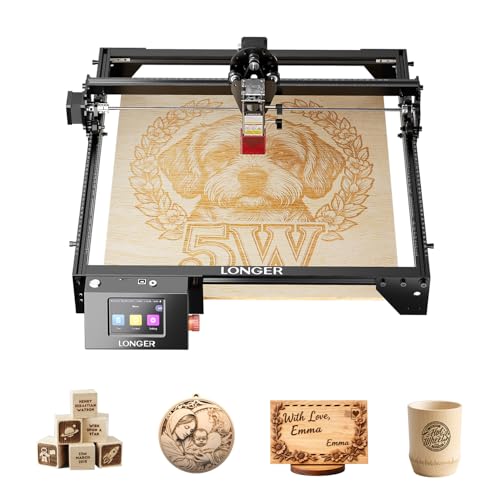
Longer Ray5 5W Laser Engraver
Best for: Large workspace engraving and offline use
- Laser Power
- 5W (what this guide is about)
- Working Area
- 400x401mm
- Engraving Speed
- 10000 mm/min
- Dimensions
- 24 × 12.5 × 5.9 inches
The LONGER Ray5 5W offers a 400x401mm working area and engraving speeds up to 10000 mm/min. It features a 0.08x0.08 mm laser dot for precision. The unit includes a 3.5-inch touch screen and offline engraving via TF card. A 32-bit ESP32 chipset supports Wi-Fi connectivity. This machine suits users who want a large workspace and fast processing for various DIY projects.
Pros
- 400x401mm working area
- 10000 mm/min engraving speed
- 3.5-inch color touch screen
- Offline engraving via TF card
- 32-bit ESP32 chipset
Cons
- 0.08mm laser dot is larger than 0.01mm alternatives
- No built-in camera included
- No air assist kit included
Good fit if
- You need a large 400x401mm workspace
- You want offline engraving without a computer
- You prefer Wi-Fi connectivity for control
Skip if
- You require ultra-fine 0.01mm detail
- You need a built-in camera
- You want an included air assist kit
Verdict: The LONGER Ray5 5W Laser Engraver fits users who prioritize a large 400x401mm workspace and fast 10000 mm/min speeds. It is ideal for those who want offline operation via TF card and Wi-Fi control without needing a connected computer.
Specifications side by side
| Spec | xTool F2 15W Diode & 5W IR Laser Engraver | Longer Ray5 5W Laser Engraver | Creality Falcon 5W Laser Engraver | Twotrees TTS-55 Pro 5.5W Engraver | Longer Ray5 5.5W Portable Laser Engraver | BlazeX 5W Enclosed Laser Engraver | ATOMSTACK A5 5W Laser Engraver | xTool F2 Ultra 5W UV Laser Engraver | Longer RAY5 5W 400x400mm Engraver | Longer Ray5 Mini 5.5W Laser Engraver | ATOMSTACK Swift 3.5W Compact Laser Engraver | Carverall A1 Pro 5W Enclosed Laser Engraver | Longer Ray5 5W Laser Engraver | AlgoLaser Pixi 5W with Touchscreen | Longer Ray5 5W Laser Engraver |
|---|---|---|---|---|---|---|---|---|---|---|---|---|---|---|---|
| Laser Type | Diode, IR | not specified | not specified | not specified | Diode | not specified | not specified | not specified | not specified | Diode | Diode | not specified | not specified | not specified | not specified |
| Laser Power | 15W Diode, 5W IR | 5W | 5W | 5500 mW (5.5W) | 5.5W | 5W | 5W | 5W (5000 mW) | 5000mW | 5.5W | 3.5W | 5W (verified 5.12–5.35W) | 5W | 5W | 5W |
| Working Area | not specified | 400 × 400 mm | 400 x 415 mm | 300 x 300 mm | 130×130mm | not specified | 400 x 400 mm | not specified | 400 × 400mm | 130×130mm | not specified | 3.94×3.94-inch | 15.74"x15.74" | not specified | 400x401mm |
| Engraving Speed | Up to 6000mm/s | 24,000 mm/min | Up to 10,000 mm/min | 30,000 mm/min | Up to 12000mm/min | not specified | 400 mm/s | 15,000 mm/s | 10,000mm/min | 12,000mm/min | not specified | 12,000mm/min | not specified | not specified | 10000 mm/min |
| Software Compatibility | not specified | LaserGRBL, LightBurn | not specified | LaserGRBL, LightBurn | LightBurn, LaserGRBL | LightBurn, LaserGRBL, CutLabX | Lightburn, LaserGRBL, ATOMSTACK app | not specified | LaserGRBL | LightBurn, LaserGRBL | AtomStack software | CutLabX, LightBurn, LaserGRBL | not specified | AlgoOS | not specified |
| Form Factor | Fully enclosed | not specified | not specified | not specified | not specified | Class 1 | not specified | Fully Enclosed | not specified | not specified | not specified | fully enclosed Class 1 | not specified | Class 1 | not specified |
| Cutting Capacity | not specified | not specified | not specified | 5 mm plywood, 3 mm acrylic | not specified | not specified | not specified | not specified | not specified | not specified | not specified | 4mm plywood and 3mm acrylic | not specified | not specified | not specified |
| Compatible Material | Metal | Wood, Metal, Acrylic, Leather, Glass | Wood, Acrylic, Leather, Glass | Wood, Metal, Acrylic, Glass | not specified | Wood, Metal, Leather, Glass | Metal, Acrylic, Leather | Acrylic, Glass, Plastic | Wood, Metal, Glass | Wood, Leather | Wood | Wood, Metal, Leather, Glass, Paper | Wood, Acrylic, Glass | Wood, Leather | not specified |
| Features | Camera | Touchscreen | not specified | not specified | not specified | Enclosure | not specified | not specified | Air Assist, Rotary Axis | not specified | not specified | Camera | Touchscreen, Offline Controller | Touchscreen | not specified |
| Target Audience | not specified | DIY | not specified | DIY | not specified | Beginners | Beginners | not specified | DIY | DIY | DIY | Beginners | DIY | not specified | not specified |
| Size | xTool F2 Basic | 400×401mm | Falcon-5W | not specified | 130×130mm | 5W | A5 PRO V2 | xTool F2 Ultra UV | not specified | 130x130mm | 3.5W, orange | not specified | 5W | 5W | 400x401mm |
| Dimensions | 6.89 × 9.33 × 0.1 inches | 24.5 × 12 × 5 inches | 17.3 × 9.33 × 24.8 inches | 10 × 5 × 7 inches | 13.3 × 13 × 7.79 inches | 4.3 × 1.2 × 4.7 inches | 10.2 × 7.09 × 23.2 inches | 11.6 × 16.9 × 20.5 inches | 12.2 × 23.6 × 5.9 inches | 11.5 × 11.3 × 6.5 inches | 13 × 14 × 7 inches | 12.8 × 11 × 10.9 inches | not specified | 10.5 × 8.5 × 7.7 inches | 24 × 12.5 × 5.9 inches |
| Weight | 10 pounds | not specified | not specified | not specified | not specified | not specified | not specified | 49.6 pounds | not specified | not specified | not specified | not specified | not specified | 4.41 pounds | not specified |
| Color | Orange | black | Falcon-5W | Black+Blue-1 | Deep Black | 5W Standard | Black | not specified | 5w Deluxet Bundle | Black | Orange, 3.5W | 5w | black | Power Black | Ray5_5W |
| Model | MXF-K005-002 | Ray5 5W | CR-Laser Falcon | TTS-55 pro | mini-5.5w | M3 | A5 Pro V2 | MXF-K007-002 | RAY5 Pro | Mini | SWIFT 3.5W orange | A1 PRO 5W | RAY5 | Pixi-Black-5W | ray5 5w |
Is a 5W laser engraver worth it?
A 5W optical power rating focuses on detailed surface etching and light craft tasks. In daily use, this output level pairs with fine focal spots ranging from 0.01 mm to 0.06 mm, delivering sharp lines on wood, leather, glass, acrylic, and paper. Motion speeds span from 20,000 mm/min on desktop frames up to 15,000 mm/s on high-speed units. The 5W classification is built around precision marking and light craft cuts rather than separating thick, dense boards.
Worth it if
- You focus mainly on detailed surface etching across wood, leather, glass, paper, or metal.
- You prioritize tight focal spots down to 0.01 mm for fine graphics and small-scale projects.
- You only need light craft cutting capabilities rather than deep material slicing.
Skip it if
- You need to cut through thick, dense materials on a regular basis.
- You require high-volume cutting throughput over fine surface marking.
You might also find the best lexmark laser printers useful for other office equipment comparisons.
How We Picked These Engravers
We identified each engraver by checking that its listing explicitly specifies a 5W laser power rating in the title or feature list. To keep the guide clear, we include only one variant per product family. We do not physically test these tools; every detail comes directly from published manufacturer specifications, including work area dimensions, laser spot sizes, and enclosure styles.
The 15 selections are ordered with products in stock first, then by Amazon sales rank so that better-selling models appear higher. Live pricing and availability are tracked separately and refresh on the page at least daily, allowing you to evaluate machines strictly by their technical capabilities.
How to Choose the Right 5W Laser Engraver
-
Match the Laser Beam Type
Check the exact laser source type before you decide. Standard blue diode beams handle organic surfaces like wood, acrylic, and leather. If your work focuses on delicate crystal or specialized bare glass, look at dedicated ultraviolet hardware such as the xTool F2 Ultra 5W UV Laser Engraver. Infrared and UV sources interact differently with light-transmitting and reflective surfaces than blue diodes. Compare the stated wavelength and laser type so you select hardware built directly for your primary material inventory.
-
Evaluate Enclosed Versus Open Frames
Examine the chassis construction to suit your operating environment. Fully enclosed machines isolate the work zone, featuring built-in safety interlocks and protective viewing panels that help contain emissions in shared indoor spaces. Models like the BlazeX 5W Enclosed Laser Engraver provide Class 1 enclosures for clean desktop crafting. Open-frame gantry units lack protective covers, requiring dedicated safety glasses and controlled room access. Choose an enclosed build for home offices, or an open frame if you want simpler physical access to items.
-
Review Integrated Camera Alignment Features
Look for built-in camera monitoring if your workflow requires rapid placement on irregular blanks. Units equipped with cameras, such as the Carverall A1 Pro 5W Enclosed Laser Engraver, let you preview your digital artwork directly over the physical workpiece using companion software. This reduces manual framing passes and lowers material scrap rates when personalizing small items. If a machine relies solely on manual laser positioning or red-dot framing, expect to spend extra time setting mechanical zero points.
-
Check Standalone Offline Controls
Determine how you plan to send jobs to the engraver. Many standard desktop units require an active USB cable link to a running computer for the entire job duration. If you prefer to run your machine in a workshop without a dedicated laptop, select a model with offline execution capabilities. The Longer Ray5 5W Laser Engraver integrates a 3.5-inch touchscreen alongside card reading, letting you run files directly. Review whether the machine supports onboard displays, Wi-Fi connections, or tethered USB.
-
Inspect Machine Motion Speed Ratings
Compare the manufacturer's maximum processing speed ratings to balance detail against total job duration. Machines engineered with galvo mirror systems reach extremely high linear velocities, whereas conventional Cartesian belt systems move at lower rates. The Twotrees TTS-55 Pro 5.5W Engraver rates up to 30,000 mm/min, which helps process large vector fill passes faster. If you produce multiple small batches every week, higher speed specifications prevent production bottlenecks on repetitive, high-density raster engraving runs.
-
Assess Out-of-the-Box Assembly Needs
Check whether the engraver ships fully assembled or requires modular frame construction. Traditional open-bed frames arrive as kits requiring rail squaring, belt tensioning, and cable routing before your first burn. If you want to skip manual hardware setup entirely, select a pre-assembled desktop unit like the ATOMSTACK Swift Mini 5W Laser Engraver. Verifying the unboxing assembly state saves initial setup hours and ensures accurate factory rail alignment right from day one of your craft projects.
Frequently asked questions
Can a 5W laser engraver mark metal?
Yes, but capability depends on the laser type and material coating. The xTool F2 includes a 5W infrared laser that is compatible with metal surfaces. The Creality Falcon and ATOMSTACK A5 also list metal as a compatible material. These units typically require coated metals for successful marking results.
Which 5W engraver is best for beginners?
The BlazeX 5W Enclosed Laser Engraver is designed specifically for beginners. It features a certified Class 1 enclosure and includes a honeycomb bed for a safe desktop experience. The ATOMSTACK A5 is another strong option, offering broad software support and standard wired connectivity to simplify the setup process for new users.
Do any 5W engravers work without a computer?
Several models support offline operation for greater flexibility. The Longer Ray5 features a 3.5-inch touchscreen that allows you to run files independently. The Longer RAY5 Pro includes an offline controller and touchscreen interface. These units let you engrave without keeping a computer connected during the process.
What is the largest work area for a 5W engraver?
The Creality Falcon 5W offers a generous workspace of 400 x 415 mm. The Longer Ray5 and ATOMSTACK A5 both provide a 400 x 400 mm area. These large formats are ideal for wide signs or panels, whereas portable units like the Longer Ray5 Mini limit you to 130 x 130 mm.
Which 5W laser is best for glass engraving?
The xTool F2 Ultra 5W UV Laser Engraver is specialized for glass. It uses a cold UV beam with a sub-10μm spot to mark delicate materials cleanly. The Creality Falcon and ATOMSTACK A5 also list glass as a compatible material. These options handle standard glass engraving tasks effectively.
Which 5W engraver has the fastest speed?
The xTool F2 Ultra reaches speeds up to 15,000 mm/s for high-speed marking. The Twotrees TTS-55 Pro delivers fast motion at 30,000 mm/min. The xTool F2 also operates up to 6,000 mm/s. These speeds allow for quicker processing of detailed designs and batch production runs.