9 Best 45W Laser Engravers, Compared
As an Amazon Associate we earn from qualifying purchases. Links on this page are affiliate links.
Choosing the best 45W laser engravers requires careful attention to specifications. We compared 9 models ranked by their published listing data. The WECREAT Vision Pro 45W Enclosed Diode Laser leads because its 25.6-inch width supports large-format cutting and batch engraving tall items. This guide helps you decide which machine fits your workspace and material needs based on power, size, and included features.
Quick picks
The best fit for you
- You need the best overall 45W diode laser WECREAT Vision Pro 45W Enclosed Diode Laser It features a 25.6-inch bed and Class 1 safety enclosure for large projects.
- You want to engrave metal safely WECREAT Vision Pro 45W Enclosed Laser Cutter This enclosed unit supports metal materials with a 1-inch cutting depth.
- You need a compact CO2 laser for acrylic VEVOR 45W Desktop CO2 Laser Engraver It includes a rotary axis and air assist for clean acrylic edges.
- You want to cut long materials continuously WECREAT Vision Pro 45W with Conveyor Feeder The included conveyor feeder allows for extended pass-through batch processing.
Our 9 picks

WECREAT Vision Pro 45W Enclosed Diode Laser
Best for: Large-format cutting and batch engraving tall items
- Laser Power
- 45W (what this guide is about)
- Laser Type
- Diode
- Working Area
- 22.83" x 15.75"
- Engraving Speed
- 600mm/s
- Form Factor
- Fully metal enclosed
- Cutting Capacity
- 25mm wood, 20mm black acrylic
This fully metal enclosed 45W diode machine delivers a large 22.83 by 15.75 inch working area and engraving speeds up to 600 mm/s. It features a built-in auto-lifting system that accommodates materials up to 140 mm thick without requiring an extra riser base. With LiDAR-powered autofocus, an integrated HD camera, and a Class 1 safety enclosure, it suits makers needing substantial cutting capability and batch-processing volume in a self-contained setup.
Pros
- Large 22.83 x 15.75 inch working area with up to 600 mm/s engraving speed
- Cuts up to 25 mm wood and 20 mm black acrylic in a single pass
- Built-in auto-lifting system adapts to material heights up to 140 mm
- LiDAR-powered autofocus with 0.001 inch precision and HD camera preview
- Fully metal enclosed Class 1 safety design with auto-shutoff lid
Cons
- Rotary attachment and conveyor feeder are not included in the basic pack
- Switchable 2W IR module must be purchased separately
- Large footprint measures 31.5 by 25.6 inches on your workspace
Good fit if
- You want a fully enclosed Class 1 laser with an integrated smart camera and LiDAR autofocus.
- You cut thick stock, handling up to 25 mm wood or 20 mm black acrylic.
- You need to engrave tall items up to 140 mm without buying a separate riser base.
Skip if
- You need bundled rotary or conveyor accessories out of the box.
- You have tight bench space unable to fit a 31.5-inch long chassis.
- You want an infrared laser included immediately for direct metal marking.
Verdict: WECREAT Vision Pro 45W Fully Enclosed Laser Cutter sets a high benchmark for desktop power, combining a generous bed with built-in auto-lifting and precise LiDAR focusing. It is an capable production tool for woodworkers and creators who want clean single-pass cutting in a certified Class 1 housing.

OMTech K40+ 45W CO2 Laser Engraver
Best for: desktop CO2 cutting with dedicated active cooling
- Laser Power
- 45W (what this guide is about)
- Laser Type
- CO2
- Working Area
- 12"x8"
- Software Compatibility
- LightBurn, LaserGRBL
- Cutting Capacity
- 0.4" (10mm) acrylic, 0.31" (8mm) wood
- Features
- Water Chiller
If you need a ready-to-run desktop CO2 setup, this OMTech machine delivers 45W of cutting power paired with an external CW-3000 water chiller. It features a 12-by-8-inch work area and cuts materials up to 0.4 inches in acrylic and 0.31 inches in wood. With built-in air assist, safety interlocks, and native LightBurn and LaserGRBL support, it suits small-format cutting and engraving jobs.
Pros
- Bundled with a dedicated CW-3000 water cooling chiller
- Compatible with both LightBurn and LaserGRBL software
- Built-in 45° air assist and exhaust fan for debris removal
- Cuts up to 0.4-inch acrylic and 0.31-inch wood
Cons
- Compact 12-by-8-inch working area limits project dimensions
- Laser engraver and water chiller ship separately in two packages
Good fit if
- You want a dedicated external chiller bundled with your CO2 engraver
- You work on smaller items that fit within a 12-by-8-inch bed
- You plan to design and cut using LightBurn or LaserGRBL
Skip if
- You need a larger working area for oversized sheet materials
- You want an all-in-one chassis without an external chiller unit
Verdict: OMTech 45W CO2 Laser with Chiller and LightBurn bundles active water cooling and software compatibility with capable 45W cutting performance. It is a solid desktop pick for small-scale wood and acrylic fabrication.

WECREAT Vision Pro 45W Enclosed Laser Cutter
Best for: safe, enclosed high-power diode cutting and batch engraving
- Laser Power
- 45W (what this guide is about)
- Laser Type
- Diode
- Working Area
- 19.7" x 12.6"
- Software Compatibility
- WeCreat MakeIt
- Form Factor
- Fully Enclosed (Class 1)
- Cutting Capacity
- 1"
View on Amazon: WECREAT Vision Pro 45W Enclosed Laser Cutter
This fully enclosed Class 1 laser cutter delivers 45W of diode laser power with a generous 19.7" x 12.6" work area. It provides cutting capacity up to 1" and includes an SGS-certified metal enclosure paired with an AirGuard Ultra fume extractor. Controlled through WeCreat MakeIt software, it suits makers who need a high-power diode system that balances cutting capability with contained, odor-managed operation for materials like wood and metal.
Pros
- 45W diode output with up to 1" cutting capacity
- 19.7" x 12.6" working area with 137" conveyor support
- Fully enclosed SGS Class 1 metal body with AirGuard Ultra fume extraction
- Supports rotary engraving for 40 oz tumblers
Cons
- 2W infrared module is sold separately
- Software compatibility lists only WeCreat MakeIt
Good fit if
- You want an enclosed Class 1 laser with integrated fume extraction
- You need to cut materials up to 1" thick with a 45W diode laser
- You process long stock using an auto pass-through conveyor
Skip if
- You rely strictly on standard third-party laser software
- You expect an infrared laser module included in the base package
Verdict: WECREAT Vision Pro 45W Enclosed Laser Cutter combines a large 19.7" x 12.6" work area, strong 1" cutting depth, and full enclosure safety into a capable desktop unit. It is a solid choice for makers who want heavy diode cutting power without open-frame exposure.
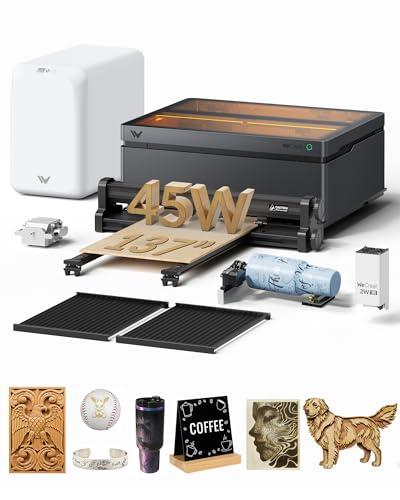
WECREAT Vision Pro 45W Enclosed Laser Cutter
Best for: large-format batch engraving and multi-material projects
- Laser Power
- 45W (what this guide is about)
- Laser Type
- Diode, IR
- Working Area
- 22.83" x 15.75"
- Engraving Speed
- 600mm/s
- Form Factor
- Fully metal enclosed (Class 1)
- Cutting Capacity
- 25mm wood, 20mm black acrylic
View on Amazon: WECREAT Vision Pro 45W Enclosed Laser Cutter
This fully enclosed machine delivers 45W of diode laser power alongside a switchable 2W infrared laser for mixed-material jobs. It provides a spacious 22.83 by 15.75-inch bed that can be extended using the included auto-pass-through feeder to 18.11 by 137 inches. Complete with LiDAR-powered auto-focus, an AirGuard Ultra fume extractor, and a Rotary Pro attachment, it suits makers tackling diverse materials and oversized projects.
Pros
- Dual 45W diode and 2W IR switchable laser setup
- Large 22.83" x 15.75" base area, expandable to 137" with feeder
- LiDAR-powered auto-focus with 0.001" precision
- Cuts up to 25mm wood and 20mm black acrylic in one pass
- Includes Rotary Pro tool and AirGuard Ultra fume extractor
Cons
- Diode laser cannot process clear acrylic as effectively as CO2 systems
- Requires substantial workshop space to run the 137" pass-through feeder
Good fit if
- You want a turnkey setup with an included rotary tool and fume extraction.
- You work with long materials that require an automated conveyor feeder.
- You switch frequently between organic materials and metals using diode and IR lasers.
Skip if
- You need a dedicated CO2 laser for cutting translucent or colored acrylics.
- You have tight desk space that cannot fit extended conveyor accessories.
Verdict: WECREAT Vision Pro 45W Laser Cutter Super Bundle delivers exceptional flexibility through its switchable dual-laser heads, Class 1 safety enclosure, and extensive suite of included accessories.

OMTech K40+ 45W Desktop CO2 Laser Engraver
Best for: dedicated desktop CO2 laser engraving
- Laser Power
- 45W (what this guide is about)
- Laser Type
- CO2
- Form Factor
- Desktop
- Dimensions
- 31.9 × 19.7 × 9.8 inches
- Weight
- 53.8 pounds
The OMTech K40+ is a desktop CO2 laser engraver and cutter powered by a 45W laser tube. Its outer blue enclosure measures 31.9 inches long, 19.7 inches wide, and 9.8 inches high, weighing 53.8 pounds. This standalone unit provides 45W CO2 capability in an enclosed benchtop footprint, making it a solid fit if you need dedicated laser power without extra bundled attachments.
Pros
- 45W CO2 laser source
- Enclosed desktop footprint measuring 31.9 x 19.7 x 9.8 inches
- Laser Class 2 rating with 0.827 mW output
Cons
- Weighs 53.8 pounds, making relocation difficult
- Does not include an external chiller in the package
Good fit if
- You need a standalone 45W CO2 laser in an enclosed desktop chassis.
- You have a sturdy workbench that can hold a 53.8-pound machine.
Skip if
- You want a bundle that comes with an external water chiller included.
- You require a lightweight machine designed for easy transport.
Verdict: OMTech K40+ 45W Desktop CO2 Laser Engraver provides standard 45W CO2 output in an enclosed benchtop design.

OMTech K40+ CO2 Laser Engraver with Chiller
Best for: compact nonmetallic engraving with dedicated active cooling
- Laser Power
- 45W (what this guide is about)
- Laser Type
- CO2
- Working Area
- 8"x12" (200x300 mm)
- Engraving Speed
- 350 mm/s
- Software Compatibility
- LightBurn
- Features
- Water Chiller
This desktop CO2 laser engraver package pairs a 200 x 300 mm work area with LightBurn software compatibility and an included water chiller. Operating at speeds up to 350 mm/s, it cuts up to 1/8 inch deep into nonmetallic materials like wood, glass, and acrylic. You also get an adjustable laser head and a detachable base, making it a solid setup for small-scale projects requiring dedicated active cooling.
Pros
- Includes dedicated water chiller and LightBurn software
- Engraving speeds reach up to 350 mm/s (13.8 ips)
- Detachable base and laser head with 1.2 inches of travel
- Comes with both a flat bed and a clamping workbed
- Built-in air assist and exhaust fan
Cons
- Workbed is limited to 8 x 12 inches (200 x 300 mm)
- Laser tube and power supply warranty coverage is limited to 6 months
- Only cuts nonmetallic materials up to 1/8 inch (3 mm) deep
Good fit if
- You need an included water chiller for continuous cooling during runs
- You plan to engrave nonmetallic items within an 8 x 12 inch working footprint
- You want a machine that is ready to run directly with LightBurn
Skip if
- You need to cut materials thicker than 1/8 inch (3 mm)
- You require a larger bed size for oversized sheet materials
- You work primarily with bare metals
Verdict: OMTech K40+ CO2 Laser with Chiller and LightBurn delivers reliable cooling, intuitive software support, and flexible bed options for compact desktop engraving.

OMTech K40+ 45W Desktop CO2 Laser Engraver
Best for: small-scale cutting and engraving on compact workbenches
- Laser Power
- 45W (what this guide is about)
- Laser Type
- CO2
- Working Area
- 12" x 8"
- Engraving Speed
- up to 300 mm/s
- Software Compatibility
- LightBurn, LaserGRBL
- Cutting Capacity
- 0.31" (8mm) wood, 0.4" (10mm) acrylic
The OMTech 12x8 Desktop CO2 Laser Engraver pairs a 45W CO2 laser tube with a 12 by 8-inch working area. It cuts up to 0.4-inch acrylic and 0.31-inch wood, operating at speeds up to 300 mm/s. It features integrated air assist, LightBurn and LaserGRBL support, and a detachable base for taller objects. This machine suits you if you need reliable CO2 cutting power for small crafts without taking up extensive workbench space.
Pros
- Cuts up to 0.4-inch acrylic and 0.31-inch wood
- Built-in 45-degree air assist clears debris automatically
- Compatible with both LightBurn and LaserGRBL software
- Detachable base accommodates taller items and optional rotary setups
Cons
- Working area is limited to 12 by 8 inches
- Top engraving speed is capped at 300 mm/s
- Rotary axis attachment is sold separately
Good fit if
- You work primarily on smaller stock that fits the 12 by 8-inch bed.
- You need 45W CO2 beam strength to cut thick acrylic and wood.
- You plan to run your jobs using LightBurn or LaserGRBL.
Skip if
- You regularly work with sheets larger than 12 by 8 inches.
- You require high-speed engraving beyond 300 mm/s.
Verdict: OMTech 12x8 Desktop CO2 Laser Engraver provides standard 45W cutting performance in a space-saving desktop footprint. It gives you capable cutting power for detailed small-format jobs.

VEVOR 45W Desktop CO2 Laser Engraver
Best for: small-format acrylic cutting and cylindrical engraving
- Laser Power
- 45W (what this guide is about)
- Laser Type
- CO2
- Working Area
- 12 x 8 in
- Engraving Speed
- Up to 300 mm/s
- Software Compatibility
- LightBurn, GRBL, CorelDraw, AutoCAD
- Cutting Capacity
- ≤ 3 mm wood, ≤ 5 mm acrylic
This desktop CO2 machine delivers 45W of output power over a compact 12 x 8-inch working area. Designed for non-metal materials, it handles acrylic up to 5 mm thick and wood up to 3 mm thick at speeds reaching 300 mm/s. It includes an integrated rotary axis, built-in air assist, and wide software support covering LightBurn, GRBL, CorelDraw, and AutoCAD. It suits makers focusing on small-format acrylic and craft items.
Pros
- Cuts acrylic up to 5 mm and wood up to 3 mm
- Comes equipped with a rotary axis for cylindrical items
- Built-in air assist and pull-out waste tray
- Works with LightBurn, GRBL, CorelDraw, and AutoCAD on Windows, macOS, and Linux
Cons
- Compact 12 x 8-inch working area restricts project size
- Uses manual knob focusing rather than autofocus
- Cannot engrave bare metals without a coating
Good fit if
- You plan to cut or engrave acrylic panels up to 5 mm thick
- You want an included rotary attachment for cylindrical objects
- You need a compact desktop unit compatible with LightBurn and Linux
Skip if
- You need a bed size larger than 12 x 8 inches for wider sheets
- You prefer automated z-axis focusing instead of manual adjustments
- You require direct engraving onto bare, uncoated metal
Verdict: VEVOR 45W Desktop CO2 Laser Engraver delivers clean edges on acrylic and small wood blanks within a compact 12 x 8-inch footprint. It provides practical functionality with its rotary axis and broad operating system support.
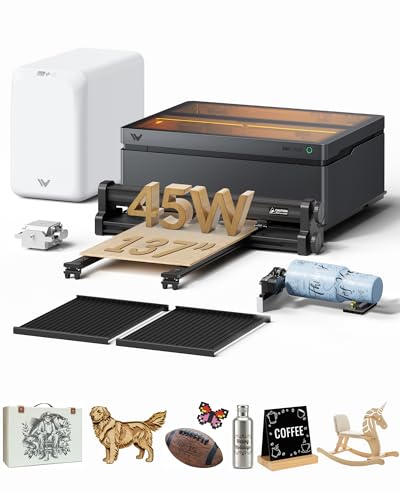
WECREAT Vision Pro 45W with Conveyor Feeder
Best for: extra-long materials and batch processing
- Laser Power
- 45W (what this guide is about)
- Laser Type
- Diode
- Working Area
- 22.83" x 15.75"
- Engraving Speed
- 600mm/s
- Form Factor
- Fully metal enclosed (Class 1)
- Cutting Capacity
- 25mm wood, 20mm black acrylic
The WECREAT Vision Pro 45W with Conveyor Feeder is a fully enclosed Class 1 diode laser cutter. It offers a standard 22.83 by 15.75-inch work area and includes an auto-feeder that expands your working length up to 137 inches. With a 45W output, 600 mm/s engraving speed, and an included fume extractor, it suits makers handling extra-long materials or batch engraving without needing an open-frame setup.
Pros
- Auto conveyor feeder expands workspace up to 18.11 by 137 inches
- Cuts up to 25mm wood and 20mm black acrylic in one pass
- LiDAR auto-focus maintains 0.001-inch precision
- Includes AirGuard Ultra fume extractor with 99% odor removal
- Class 1 safety certified enclosure with automatic lid shutoff
Cons
- 2W IR laser module is not included
- Working width decreases from 22.83 inches to 18.11 inches when using the conveyor feeder
Good fit if
- You need to engrave or cut extra-long boards up to 137 inches using an automated feed system.
- You want an enclosed Class 1 diode setup with an included dedicated fume extractor.
- You require single-pass cutting on thick materials like 25mm wood or 20mm black acrylic.
Skip if
- You plan to engrave bare metal out of the box without purchasing the optional 2W IR module.
- You do not have the bench space to accommodate a 137-inch pass-through setup.
Verdict: WECREAT Vision Pro 45W with Conveyor Feeder pairs strong 45W cutting capacity and a spacious standard bed with extended pass-through feed capability. It provides a clean, fully enclosed option for workshops producing long or continuous projects.
Specifications side by side
| Spec | WECREAT Vision Pro 45W Enclosed Diode Laser | OMTech K40+ 45W CO2 Laser Engraver | WECREAT Vision Pro 45W Enclosed Laser Cutter | WECREAT Vision Pro 45W Enclosed Laser Cutter | OMTech K40+ 45W Desktop CO2 Laser Engraver | OMTech K40+ CO2 Laser Engraver with Chiller | OMTech K40+ 45W Desktop CO2 Laser Engraver | VEVOR 45W Desktop CO2 Laser Engraver | WECREAT Vision Pro 45W with Conveyor Feeder |
|---|---|---|---|---|---|---|---|---|---|
| Laser Type | Diode | CO2 | Diode | Diode, IR | CO2 | CO2 | CO2 | CO2 | Diode |
| Laser Power | 45000mW | 45W | 45W | 45W (45000mW) | 45W | 40W | 45W | 45W (45,000 mW) | 45W (45000mW) |
| Working Area | 22.83" x 15.75" | 12"x8" | 19.7" x 12.6" | 22.83" x 15.75" | not specified | 8"x12" (200x300 mm) | 12" x 8" | 12 x 8 in | 22.83" x 15.75" |
| Engraving Speed | 600mm/s | not specified | not specified | 600mm/s | not specified | 350 mm/s | up to 300 mm/s | Up to 300 mm/s | 600mm/s |
| Software Compatibility | not specified | LightBurn, LaserGRBL | WeCreat MakeIt | not specified | not specified | LightBurn | LightBurn, LaserGRBL | LightBurn, GRBL, CorelDraw, AutoCAD | not specified |
| Form Factor | Fully metal enclosed | not specified | Fully Enclosed (Class 1) | Fully metal enclosed (Class 1) | not specified | not specified | not specified | not specified | Fully metal enclosed (Class 1) |
| Cutting Capacity | 25mm wood, 20mm black acrylic | 0.4" (10mm) acrylic, 0.31" (8mm) wood | 1" | 25mm wood, 20mm black acrylic | not specified | not specified | 0.31" (8mm) wood, 0.4" (10mm) acrylic | ≤ 3 mm wood, ≤ 5 mm acrylic | 25mm wood, 20mm black acrylic |
| Compatible Material | Wood | not specified | Wood, Metal | not specified | not specified | not specified | not specified | Wood, Acrylic, Glass | not specified |
| Features | not specified | Water Chiller | not specified | not specified | not specified | Water Chiller | not specified | Air Assist, Rotary Axis | not specified |
| Target Audience | not specified | not specified | not specified | Small Business | not specified | not specified | not specified | not specified | not specified |
| Dimensions | 31.5 × 25.6 × 16.1 inches | 31.9 × 19.7 × 9.8 inches | not specified | not specified | 31.9 × 19.7 × 9.8 inches | not specified | 31.9 × 19.7 × 9.8 inches | 31.9 × 20.5 × 10.2 inches | not specified |
| Weight | not specified | 53.8 pounds | not specified | not specified | 53.8 pounds | not specified | not specified | 64 pounds | not specified |
| Size | 45W | 45W with LB&Chiller | not specified | 45W | not specified | not specified | not specified | not specified | 45W |
| Color | Basic Pack | Blue | not specified | Super Pack | Blue | not specified | Blue | Orange+black | Rotary+Conveyor+Fume Extractor Pack |
| Model | LC2451 | K40+ 45W | not specified | LC2450 | RYGEL-USB0302U1 | SH-G350 | K40+ | SH-3020 | LC2450 |
Is 45W laser power worth the upgrade?
Forty-five watts changes what you can cut in a single pass. You can slice thicker wood or acrylic faster than lower-power units. The OMTech K40+ and VEVOR CO2 models use this power for clean edges on 3mm acrylic. Diode options like the WECREAT Vision Pro handle dense wood blanks efficiently. If you batch-process items, this wattage reduces cycle times significantly. It provides consistent results for detailed small-format jobs without multiple passes.
Worth it if
- You cut thick wood or acrylic in single passes
- You need to process batch orders quickly
- You want clean edges on 3mm materials
Skip it if
- You only engrave surface details on thin materials
- You work with extremely small, delicate pieces
- You have limited bench space for larger units
If you need mobility rather than cutting power, compare specifications for the best portable laser printers.
How we picked these 45W lasers
We selected machines by scanning Amazon listings for the specific feature: 45W laser power. We only included products where the title or feature list explicitly stated this output. This ensures every unit on the list meets your power requirement. We did not test these machines. All details come from published specifications. We chose one size or variant for each product family to keep the guide focused.
We ordered the results by availability first. Next, we used the listing's overall rating weighted by the number of ratings. Finally, we ranked products by how many of our criteria the specs met. We excluded prices from this text. Live stock and pricing appear on the page. You can trust this list is built strictly from the data provided by the sellers.
How to choose the right 45W laser
-
Check laser type first
Diode lasers like the WECREAT Vision Pro use visible light to mark wood effectively. They are safe in enclosed Class 1 housings. CO2 lasers like the OMTech K40+ use gas tubes. They cut acrylic cleanly and are better for glass. You should match the laser type to your primary material. Diode units are versatile for wood. CO2 units excel at non-metallic cutting. Your choice determines which materials you can process safely and efficiently.
-
Verify compatible materials
Not all 45W units handle every material. The WECREAT Vision Pro 45W Enclosed Laser Cutter explicitly supports metal engraving. This is rare for standard diode models. Most wood-focused units do not list metal compatibility. If you need to mark steel or aluminum, verify the spec sheet. The WECREAT model with the Best metal badge offers this capability. Other units may only list wood or acrylic. Always check the compatible material list before buying.
-
Assess work area size
Bed dimensions dictate what you can cut. The top-ranked WECREAT Vision Pro offers a 25.6-inch width. This supports large-format cutting and batch processing. Smaller units like the VEVOR SH-3020 have a 12 x 8-inch footprint. This is suitable for detailed small-format jobs. You must measure your workspace. Large beds require more room. Compact models fit smaller benches. Choose based on the size of your typical projects.
-
Look for active cooling
CO2 lasers generate significant heat. The OMTech K40+ bundles a water chiller. This active cooling maintains stable laser output. It prevents overheating during long cuts. The VEVOR SH-3020 also supports cooling features. Diode lasers often rely on air cooling. Check if the unit includes a chiller or fan. Active cooling extends tube life. It ensures consistent performance. You should prioritize this feature for CO2 models.
-
Confirm software compatibility
Software determines how you control the machine. The OMTech K40+ and VEVOR SH-3020 support LightBurn. This is a powerful third-party tool. It offers advanced controls and vector editing. Some basic units may only include proprietary software. Verify the supported software list. LightBurn compatibility is a significant advantage. It allows you to use familiar tools. Check this spec before purchasing to ensure smooth operation.
Frequently asked questions
Which 45W laser engraver is best for cutting thick wood?
The WECREAT Vision Pro 45W Enclosed Laser Cutter is a strong choice for thick materials. It offers a 1-inch cutting depth, allowing you to slice through substantial wood blanks in a single pass. Its large 19.7 by 12.6-inch work area supports batch processing, making it efficient for production workflows involving dense timber.
Do I need a chiller for a 45W CO2 laser?
Active cooling is highly recommended for sustained CO2 cutting. The OMTech K40+ 45W CO2 Laser Engraver bundles a dedicated water chiller to maintain tube temperature and stability. This feature ensures consistent power output during long jobs, preventing overheating and extending the lifespan of the gas tube compared to air-cooled alternatives.
Can 45W diode lasers engrave metal?
Yes, but with limitations. The WECREAT Vision Pro 45W Enclosed Laser Cutter lists metal as a compatible material. Diode lasers typically mark or lightly engrave coated metals rather than cutting them. For clean, deep cuts in metal, you would need a fiber laser, but for surface marking on steel or aluminum, this 45W diode unit works.
What is the largest 45W laser engraver bed size?
The WECREAT Vision Pro 45W Enclosed Diode Laser features the largest footprint on this list. Its bed width measures 25.6 inches, with a length of 31.5 inches and a height of 16.1 inches. This generous space allows you to process large sheets of wood or tall items without frequent repositioning, ideal for big-format projects.
Which 45W laser is best for acrylic cutting?
The VEVOR 45W Desktop CO2 Laser Engraver is optimized for acrylic. CO2 lasers naturally produce cleaner edges on plastics like acrylic compared to diode models. This unit includes a rotary axis for cylindrical items and air assist for sharper cuts. Its 12 by 8-inch workspace is compact but sufficient for detailed acrylic signage and decor.
Is a conveyor feeder necessary for 45W engraving?
A conveyor feeder is optional but useful for continuous production. The WECREAT Vision Pro 45W with Conveyor Feeder model supports extended pass-through capabilities. This allows you to process materials longer than the standard bed length. It is ideal for workshops that regularly produce long strips of wood or continuous batch jobs without manual loading.
Do 45W CO2 lasers come with software pre-installed?
Many models bundle third-party software for immediate use. The OMTech K40+ 45W CO2 Laser Engraver with Chiller and LightBurn includes LightBurn compatibility. This software offers precise vector control and material settings. Having dedicated software support simplifies setup, allowing you to start cutting and engraving quickly without searching for compatible drivers or programs separately.