Best Laser Engravers for Plastic in 2026: 15 Picks Ranked by Specs
As an Amazon Associate we earn from qualifying purchases. Links on this page are affiliate links.
Choosing the best laser engravers for plastic requires balancing beam wavelength, power output, and machine size for your specific projects. We evaluated 15 models based strictly on the specifications published on their product listings.
The Carverall K15 Pro Infrared Laser Engraver leads the rankings because its 1W 1064nm infrared laser delivers fine 0.01mm surface marking on hard plastics. This guide helps you decide whether a compact desktop unit, a high-power fiber system, or an add-on laser module best matches your workshop space and workflow requirements.
Quick picks
The best fit for you
- You want ultra-fine detail when marking hard plastic surfaces. Carverall K15 Pro Infrared Laser Engraver Its 1W 1064nm infrared laser delivers precise 0.01mm marking accuracy across hard plastics and metals.
- You want an enclosed design for indoor plastic projects. Carverall K15 Pro 10W Enclosed Engraver Its built-in enclosure and 10W optical output support contained indoor desktop plastic marking and cutting.
- You need cordless operation for marking plastics on site. Therble 10W Handheld Laser Marker A portable 10W build with battery power and an integrated touchscreen enables untethered on-site plastic marking.
- You need maximum laser power for plastic and rotary marking. AchiPrin 100W JPT MOPA Fiber Engraver The 100W MOPA fiber laser includes a rotary axis for engraving flat and cylindrical plastic items.
Our 15 picks

Carverall K15 Pro Infrared Laser Engraver
Best for: Precise surface marking on hard plastics and bare metals
- Compatible Material
- Metal, Jewelry, Plastic, Silver (what this guide is about)
- Laser Type
- Infrared (1064nm)
- Laser Power
- 1W (1000mW)
- Working Area
- 200x300mm (7.87x11.81 in)
- Software Compatibility
- CutLabX
- Form Factor
- Portable
This desktop unit uses a 1064nm infrared laser with 1W output power, engineered specifically for marking bare metals, rubber, and hard plastics. With a 200x300mm working area and 0.01mm precision, you get near-A4 coverage on a portable aluminum frame. It supports wireless control through the CutLabX mobile app as well as PC software like LightBurn and LaserGRBL, making it practical for hobbyists handling detailed plastic marking.
Pros
- 1064nm infrared beam marks hard plastics, rubber, and bare metals
- Generous 200x300mm (7.87x11.81 in) near-A4 working area
- High 0.01mm engraving precision with a built-in alignment guide
- Tool-free assembly designed to set up in 90 seconds
- Wi-Fi app control alongside LightBurn and LaserGRBL compatibility
Cons
- 1W laser output is limited to surface marking rather than cutting
- Rotary roller and honeycomb bed are not included in the standard kit
- Non-metal cutting requires purchasing a separate blue laser module
Good fit if
- You need to engrave fine details onto hard plastics or bare metals
- You want a portable near-A4 workspace with Wi-Fi mobile control
- You prefer tool-free assembly right out of the box
Skip if
- You need high-wattage laser power for deep engraving or cutting thick parts
- You need an included rotary attachment for cylindrical objects right away
Verdict: Carverall K15 Pro 1W Infrared Laser Engraver delivers fine 0.01mm marking across hard plastics and metals on a spacious near-A4 bed. Its tool-free setup and broad software support make it a versatile, highly accessible desktop engraver.

Ortur F20 Pro 10W Desktop Laser Engraver
Best for: compact home desktop engraving on plastic crafts
- Compatible Material
- Wood, Metal, Leather, Plastic (what this guide is about)
- Laser Power
- 10W
- Target Audience
- DIY
- Form Factor
- Desktop
- Dimensions
- 16.1 × 15.2 × 11.4 inches
The Ortur F20 Pro is a 10W desktop laser engraver designed for craft and DIY projects. It measures 16.1 inches long, 15.2 inches wide, and 11.4 inches tall, giving it a compact footprint that easily fits on a standard home desk. In addition to engraving plastic, it handles wood, leather, and coated metal. Integrated safety guards provide built-in protection while you work on personalized pieces.
Pros
- 10W laser output power
- Compact desktop footprint measuring 16.1 by 15.2 by 11.4 inches
- Compatible with plastic, wood, leather, and coated metal
- Built-in integrated safety guards
Cons
- Fixed 10W output cannot be adjusted for higher-powered cutting
- Specific working area dimensions are not listed in the specs
Good fit if
- You want a dedicated 10W desktop unit for plastic and light craft engraving
- You have limited workspace and need a machine with a compact footprint
- You want built-in safety guards for everyday home DIY projects
Skip if
- You need an industrial high-power fiber laser for bare metals
- You require an exact published working area before buying
Verdict: Ortur F20 Pro 10W Desktop Laser Engraver provides a compact, 10W desktop solution for engraving plastic and common craft materials. It is a solid, space-conscious choice for hobbyists needing built-in safety guards for home use.

Creality Falcon A1C 1.2W IR Module
Best for: Creality Falcon A1C owners marking plastics
- Compatible Material
- Metal, Jewelry, Plastic (what this guide is about)
- Laser Type
- Infrared
- Laser Power
- 1.2W
- Dimensions
- 4.52 × 1.73 × 2.14 inches
This is an add-on infrared laser module designed to expand the Creality Falcon A1C engraver. It delivers 1.2W of infrared laser power to mark plastics, jewelry, and metals with fine detail. A quick-swap mount lets you change heads in roughly 15 seconds, and integrated true autofocus removes the need for manual height calibration. It suits Falcon A1C owners who need dedicated infrared marking capabilities on plastic materials.
Pros
- 1.2W infrared laser engineered for marking plastics, jewelry, and metals
- True autofocus automatically adjusts to optimal height without manual setup
- Modular quick-swap design allows head changes in 15 seconds
- Compact footprint measuring 4.52 by 1.73 by 2.14 inches
Cons
- Requires an existing Falcon A1C base machine to function
- Output power is limited to 1.2W
- Not compatible with non-A1C laser engraving frames
Good fit if
- You already own a Creality Falcon A1C laser engraver
- You need an infrared beam for fine detail marking on plastic and metal
- You want automatic focusing without manual height adjustments
Skip if
- You do not own a Creality Falcon A1C machine
- You need a standalone, fully assembled laser engraving unit
- You require higher laser wattage for deep cutting tasks
Verdict: Creality Falcon A1C 1.2W IR Module provides an effortless autofocus infrared upgrade for Falcon A1C owners working with plastics. It adds clean surface-marking capabilities via a fast 15-second module swap.

Carverall K15 Pro 10W Enclosed Engraver
Best for: enclosed indoor plastic engraving and desktop crafting
- Compatible Material
- Wood, Acrylic, Leather, Glass, Paper, Plastic (what this guide is about)
- Laser Power
- 10W (10000mW)
- Working Area
- 300 x 200 mm (11.8×7.9-inch)
- Engraving Speed
- 15,000mm/min
- Software Compatibility
- CutLabX, mobile APP
- Form Factor
- Class 1 Fully Enclosed
The Carverall K15 Pro is a 10W desktop laser engraver built into a fully enclosed Class 1 safety housing. With a 300 x 200 mm working bed and working speeds up to 15,000 mm/min, it processes plastics, acrylics, and organic materials cleanly in shared spaces. Its sealed hood blocks laser light and contains fumes, while triple Wi-Fi, USB, and TF connectivity provides standalone control. It suits hobbyists needing enclosed desktop safety.
Pros
- Class 1 fully enclosed body with lid-open pause and tilt safety detection
- 10W optical output with 0.01 mm precision and 15,000 mm/min maximum speed
- Supports Wi-Fi, USB, and offline TF card operation with LightBurn and LaserGRBL
- Reserved expansion ports for accessories like rotary rollers, cameras, and air pumps
Cons
- Workbed of 300 x 200 mm limits project size compared to open-frame platforms
- 1W infrared module for bare metal processing is an optional add-on
Good fit if
- You want an enclosed Class 1 machine that traps fumes and shields laser light indoors.
- You engrave plastic parts, signage, or small crafts within an 11.8 x 7.9-inch area.
- You prefer wireless or standalone TF card job execution without a dedicated PC tether.
Skip if
- You need to engrave workpieces larger than the 300 x 200 mm fixed bed dimensions.
- You require factory-included infrared capability without buying separate add-on heads.
Verdict: Carverall K15 Pro 10W Enclosed Engraver delivers certified Class 1 safety, versatile wireless operation, and reliable 10W power for desktop plastic cutting and marking.

xTool 2W 1064nm IR Module for D1 Pro
Best for: xTool D1 Pro owners engraving plastic
- Compatible Material
- Metal, Plastic, Silver, Gold (what this guide is about)
- Laser Type
- 1064nm Infrared
- Laser Power
- 2W
- Engraving Speed
- up to 400mm/s
- Dimensions
- 35.1 × 14.6 × 5.1 inches
This add-on 1064nm infrared laser module upgrades an existing D1 Pro frame for fine plastic and metal marking. With 2W laser power, 15KW peak power, and a tight 0.03mm by 0.03mm focal spot, it avoids burn marks on plastics and acrylics while operating at speeds up to 400mm/s. You will find it practical if you already own a D1 Pro and need detailed marking on plastic components without buying a separate engraving machine.
Pros
- Ultra-fine 0.03mm by 0.03mm compressed spot size
- 1064nm infrared wavelength marks plastic and acrylic without burn marks
- Engraving speeds reach up to 400mm/s
- Features 15KW peak power
Cons
- Compatible only with the xTool D1 Pro frame
- Requires an existing engraver frame rather than working as a standalone machine
- 2W laser power limits use to surface marking rather than cutting
Good fit if
- You already own an xTool D1 Pro and want dedicated plastic marking capabilities.
- You need 0.03mm precision for detailed text and logos on plastic surfaces.
- You want quick module swapping without assembling a second machine.
Skip if
- You do not own or plan to purchase an xTool D1 Pro frame.
- You need an all-in-one standalone laser machine.
- You need higher continuous laser wattage to cut thick plastics.
Verdict: xTool 2W 1064nm IR Module for D1 Pro delivers burn-free plastic marking and fine 0.03mm spot precision directly to your current D1 Pro setup. It provides a focused upgrade path if you require infrared engraving without buying a whole new machine chassis.

Therble 10W Handheld Laser Marker
Best for: Cordless on-site plastic part identification and coding
- Compatible Material
- Wood, Metal, Leather, Glass, Plastic (what this guide is about)
- Laser Power
- 10W
- Form Factor
- Handheld
- Dimensions
- 9.4 × 4 × 11 inches
The Therble 10W Handheld Laser Marker is a fully portable engraving system designed for plastic, coated metals, and other rigid surfaces. It features a standalone Linux operating setup operated via a built-in 5-inch HD touchscreen, so you do not need a computer tethered to the unit. Powered by two removable 9900mAh batteries, it suits industrial users and fabricators who need to mark large, fixed plastic components directly in warehouses or production floors.
Pros
- 10W laser system capable of marking plastics, metals, wood, and ceramics
- Dual 9900mAh removable batteries provide cordless, standalone operation
- Integrated 5-inch HD touchscreen eliminates the need for an external computer
- Generates variable data including serial numbers, QR codes, and barcodes on device
- Accepts standard image imports via USB in JPG, PNG, and BMP formats
Cons
- Handheld design lacks a fixed workbed for small, delicate craft alignment
- Image format support is limited to raster files like JPG, PNG, and BMP
- At 11 inches tall and 9.4 inches long, it requires manual positioning over parts
Good fit if
- You need to mark large or fixed plastic items that cannot fit inside a desktop enclosure
- You want a fully cordless marker powered by dual rechargeable batteries
- You prefer generating barcodes, serial numbers, and QR codes directly on an integrated touchscreen
Skip if
- You require vector graphics formats beyond basic JPG, PNG, and BMP files
- You prefer a stationary desktop engraver with a fixed work grid for repeatable positioning
Verdict: Therble 10W Handheld Laser Marker offers dedicated battery-powered portability and a built-in touchscreen for direct on-site plastic marking. It excels at applying industrial identification and batch codes without being tethered to a workbench.

Genmitsu 1W 1064nm Infrared Laser Module
Best for: Kortek and Kiosk owners engraving fine plastic details
- Compatible Material
- Metal, Acrylic, Jewelry, Plastic (what this guide is about)
- Laser Type
- Infrared (1064nm)
- Laser Power
- 1W (1000mW)
The Genmitsu 1W 1064nm Infrared Laser Module is an add-on tool head designed for Genmitsu Kortek and Kiosk machines. Featuring a 1064nm wavelength, a 0.05 × 0.05 mm spot size, and 0.01 mm engraving accuracy, it focuses fine energy onto plastic, acrylic, and metal surfaces. If you already own a compatible Genmitsu frame and want to mark plastics or jewelry with micro details, this plug-and-play 1000mW module expands your material capabilities.
Pros
- 1064nm infrared wavelength suitable for marking plastics, acrylic, and metals
- Ultra-fine 0.05 × 0.05 mm spot size with 0.01 mm accuracy
- Built-in cooling fan with a rated 10,000+ hour service life
- Three-step plug-and-play installation on Kortek frames
Cons
- Requires a Genmitsu Kortek or Kiosk base machine to operate
- Output power is limited to 1W (1000mW)
Good fit if
- You already operate a Genmitsu Kortek or Kiosk engraver
- You need fine 0.01 mm precision for detailed text or graphics on plastic
- You want an infrared beam that processes materials with less heat
Skip if
- You need a complete standalone engraving machine rather than a separate module
- You require higher laser power than 1000mW for fast or deep material removal
Verdict: Genmitsu 1W 1064nm Infrared Laser Module provides precise 0.01 mm marking accuracy for plastic and metal on existing Genmitsu frames. It is a targeted upgrade for owners who want clean infrared detailing without buying an entirely new machine.

WAINLUXPRO 3W Compact Laser Engraver
Best for: small DIY plastic crafts on a budget
- Compatible Material
- Wood, Leather, Paper, Plastic (what this guide is about)
- Laser Power
- 3000mW
- Working Area
- 80x80mm (3.15x3.15 in)
- Software Compatibility
- CutlabX
- Features
- Offline Controller
- Target Audience
- DIY
The WAINLUXPRO 3W Compact Laser Engraver is a desktop unit featuring a 3000mW laser and an 80x80mm working area. Built for marking plastic crafts such as phone cases and keychains, it delivers 0.01mm precision. You can control it through Wi-Fi, USB, or an SD card for offline jobs. Its enclosed Class 1 design and safety shut-off sensors make it an accessible desktop tool for small DIY projects.
Pros
- Class 1 enclosed design with auto-shutoff when opened or tilted over 13 degrees
- Supports offline engraving via SD card alongside Wi-Fi and USB
- Compatible with CutlabX, LaserGRBL, and LightBurn software
- High 0.01mm precision for detailed markings
Cons
- Small 80x80mm work area limits the size of compatible items
- 3000mW laser output provides lower power than larger benchtop engravers
Good fit if
- You need an enclosed desktop machine to mark small plastic items like tags or keychains
- You want multiple connection options including wireless phone control and offline SD card use
Skip if
- You need to engrave workpieces larger than 3.15x3.15 inches
- You require high-wattage laser output for fast production runs
Verdict: WAINLUXPRO 3W Compact Laser Engraver delivers precise 0.01mm detailing and enclosed Class 1 safety for small-format plastic projects.
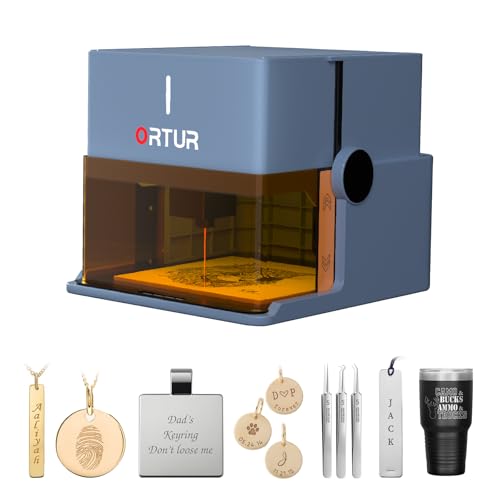
Ortur Foldable 1064nm Infrared Laser Engraver
Best for: portable, zero-assembly plastic and jewelry marking
- Compatible Material
- Metal, Acrylic, Jewelry, Plastic (what this guide is about)
- Laser Type
- 1064nm Infrared
- Laser Power
- 1000mW
- Form Factor
- Class 1 Foldable
- Dimensions
- 10.7 × 9.84 × 8.58 inches
View on Amazon: Ortur Foldable 1064nm Infrared Laser Engraver
This compact unit combines a 1000mW 1064nm infrared laser module with a Class 1 foldable design. It unfolds ready for use without assembly, making it convenient to store or relocate. The 1064nm wavelength works directly on plastics, acrylics, and metals. Built-in safeguards include auto-shutdown, tilt detection, and an aluminum base plate. If you need a fully enclosed, portable marking tool for small plastic parts and jewelry, it matches those needs.
Pros
- 1064nm infrared laser module compatible with plastic, acrylic, and metals
- Foldable Class 1 enclosed structure requires no assembly
- Integrated safety features include tilt detection, lid-stop, and auto shutdown
- Comes with an aluminum alloy desktop protection base plate
Cons
- Low 1000mW output power limits processing speed
- Working area dimensions are not specified in the data
- Requires an inserted USB key to operate
Good fit if
- You want a fully enclosed Class 1 engraver that folds up for easy storage
- You need a dedicated 1064nm infrared wavelength for marking plastic and metal
- You prefer a setup that requires zero initial assembly
Skip if
- You need higher optical wattage for faster production or deep cutting
- You require verified large-format engraving dimensions
Verdict: Ortur Foldable 1064nm Infrared Laser Engraver delivers portable, zero-assembly Class 1 safety for detail work on plastics and metals. Its 1000mW output is designed strictly for surface marking rather than heavy cutting.

AchiPrin 100W JPT MOPA Fiber Engraver
Best for: high-power plastic marking across flat and cylindrical items
- Compatible Material
- Metal, Jewelry, Plastic (what this guide is about)
- Laser Type
- Fiber (1064nm)
- Laser Power
- 100W
- Working Area
- 175×175mm, 300×300mm
- Software Compatibility
- EZCAD
- Features
- Rotary Axis
This machine delivers a 100W JPT MOPA fiber laser running at a 1064nm wavelength for plastic and metal processing. You get two field lenses providing working areas of 175×175mm and 300×300mm, along with an included D80 rotary axis. It uses an air-cooled setup driven by EZCAD software. This configuration suits you if you need high power and adjustable frequency settings for varied plastic surfaces.
Pros
- High-power 100W JPT MOPA fiber laser source
- Dual field lenses provide 175×175mm and 300×300mm working areas
- Includes D80 rotary axis for 360-degree cylindrical marking
- Air-cooled design requires no external water tank
Cons
- Large footprint measuring 21.7 by 13.8 by 24.8 inches
- Only EZCAD software compatibility is listed
Good fit if
- You need 100W fiber power with adjustable pulse parameters for plastics
- You want interchangeable lenses for small fine details and 300×300mm large jobs
- You plan to mark cylindrical plastic items using a rotary fixture
Skip if
- You need a compact or portable desktop unit
- You require verified LightBurn software support directly out of the box
Verdict: AchiPrin 100W JPT MOPA Fiber Engraver provides high optical output, dual working fields up to 300×300mm, and an included rotary axis for heavy-duty plastic marking.

Cloudray 50W Portable Fiber Laser Engraver
Best for: high-speed 50W fiber marking on plastics
- Compatible Material
- Metal, Leather, Jewelry, Plastic, Gold (what this guide is about)
- Laser Type
- Fiber laser
- Laser Power
- 50W (50,000 mW)
- Working Area
- 4.3"x4.3", 6.9"x6.9", 7.9"x7.9"
- Engraving Speed
- 10,000mm/s
- Software Compatibility
- EzCad2, Lightburn
This is a 50W fiber laser machine built for marking plastics, metals, and jewelry. It delivers up to 10,000 mm/s engraving speeds using a Max laser source and galvo head. You get two interchangeable F-theta lenses offering 4.3 by 4.3 inch and 6.9 by 6.9 inch working fields, plus a D69 rotary axis. It suits makers who need high optical wattage and fast marking on plastic parts.
Pros
- High 50W fiber laser power output
- Fast marking speeds up to 10,000 mm/s
- Includes two F-theta lenses and a 360-degree D69 rotary axis
- Supports both LightBurn core version and EzCad2
Cons
- Relatively heavy machine at 43 pounds
- Manual lift column requires physical height adjustment
Good fit if
- You need 50W of fiber power for rapid marking on plastics and metals
- You want bundled accessories like a rotary axis and two focal lenses
- You run your laser workflows through EzCad2 or LightBurn on Windows or macOS
Skip if
- You need an ultra-light machine that weighs significantly less than 43 pounds
- You need an automated motorized focus system instead of a manual lift column
Verdict: Cloudray 50W Fiber Laser Engraver provides high optical wattage and 10,000 mm/s galvanometer speeds for quick, detailed plastic and metal processing. It includes a rotary tool and dual lenses, making it a flexible high-power fiber option.

xTool 5W IR Laser Module for P3
Best for: xTool P3 owners engraving plastics and metals
- Compatible Material
- Metal, Acrylic, Jewelry, Plastic (what this guide is about)
- Laser Type
- Infrared (IR)
- Laser Power
- 5W (5000mW)
- Engraving Speed
- 1000mm/s
- Form Factor
- Class I
- Dimensions
- 5.37 × 3.72 × 3.64 inches
The xTool 5W IR Laser Module for P3 is an add-on infrared engraving head built specifically for your xTool P3 base machine. It provides a 5W (5000mW) infrared laser output paired with a 0.03mm spot size and engraving speeds reaching 1000mm/s. If you already run a P3 and need to mark plastics and metals without scorching or heat warping, this module gives you fine detail and fast processing.
Pros
- 5W (5000mW) infrared output engineered to mark plastics without scorching or warping
- High engraving speed reaching up to 1000mm/s
- Ultra-fine 0.03mm laser spot with 0.01mm motion precision
- Class I laser form factor
Cons
- Requires an xTool P3 machine and cannot function as a standalone engraver
- Not compatible with other xTool models or third-party frames
Good fit if
- You already own an xTool P3 and want to engrave plastics and metals
- You need fast 1000mm/s processing speeds for high-volume jobs
- You work with fine details like micro-text and dense QR codes
Skip if
- You do not own an xTool P3 CO2 laser engraver
- You need an all-in-one, standalone desktop engraving machine
Verdict: xTool 5W IR Laser Module for P3 is a specialized upgrade that adds high-speed, 0.03mm infrared engraving for plastics and metals to an existing xTool P3 setup.

ComMarker 60W MOPA Fiber Engraver
Best for: High-speed 60W non-transparent plastic marking
- Compatible Material
- Metal, Jewelry, Plastic (what this guide is about)
- Laser Type
- JPT M7 Mopa Fiber (1064nm)
- Laser Power
- 60W
- Working Area
- 150mm x 150mm
- Engraving Speed
- 15,000mm/s
- Software Compatibility
- Lightburn, EzCad2
The ComMarker 60W MOPA Fiber Engraver combines a 60W JPT M7 fiber source with a 15,000 mm/s marking speed for non-transparent plastics and metals. It features a 150 mm by 150 mm work area, a touchscreen for motorized auto focus, and compatibility with both LightBurn and EzCad2. If you need a high-power galvo setup capable of marking plastics quickly within a compact 13 kg desktop footprint, this unit provides industrial-grade fiber output.
Pros
- High-speed marking at up to 15,000 mm/s
- 60W JPT M7 MOPA fiber laser source
- Integrated touchscreen with auto focus function
- Supports both LightBurn and EzCad2 software
Cons
- Working area is limited to 150 mm by 150 mm
- Marking is restricted to non-transparent plastics
- Mac OS compatibility is limited strictly to LightBurn
Good fit if
- You need rapid 15,000 mm/s marking speeds on non-transparent plastics or metals.
- You want automated touchscreen focusing on a portable 13 kg desktop machine.
- You run your laser projects through LightBurn or EzCad2.
Skip if
- You need an engraving area larger than 150 mm by 150 mm.
- You need to mark clear or transparent plastics.
Verdict: ComMarker 60W MOPA Fiber Engraver delivers rapid 15,000 mm/s marking speeds and automated focus for marking non-transparent plastics and metals. It is a capable pick if you want high-wattage fiber performance within a compact 150 mm by 150 mm field.

MR. Carve M1 Pro Portable Fiber Laser Engraver
Best for: compact, fast batch marking on hard plastics
- Compatible Material
- Jewelry, Plastic (what this guide is about)
- Laser Type
- Fiber, Infrared (1064nm)
- Laser Power
- 2500 mW
- Working Area
- 70mm x 70mm (2.7 x 2.7 in)
- Form Factor
- Portable
- Dimensions
- 9.84 × 7.87 × 17.7 inches
View on Amazon: MR. Carve M1 Pro Portable Fiber Laser Engraver
The MR. Carve M1 Pro uses a 2500 mW, 1064nm infrared fiber laser designed to mark metals and hard plastics. With a compact 70mm by 70mm working area, it uses a digital galvanometer scanner head for fast marking. Weighing 13.2 pounds (6 kg), it gives you a portable benchtop setup built specifically for small items like keyboard keycaps and jewelry without taking up significant workspace.
Pros
- Dedicated 1064nm infrared fiber laser for hard plastics and metals
- Digital galvanometer scanner head enables fast marking speeds
- Lightweight 13.2-pound portable build with hidden fiber cable routing
- Supports multi-region custom batch marking
Cons
- Small working area limited to 70mm x 70mm (2.7 x 2.7 inches)
- Laser power is limited to 2500 mW
- Class 4 laser rating requires open-beam eye protection precautions
Good fit if
- You need a portable 1064nm unit to mark small hard plastic parts or keycaps
- You want a fast galvanometer scanner in a compact 13.2-pound machine
- Your projects fit within a 2.7 by 2.7-inch working area
Skip if
- You need to engrave workpieces larger than 70mm by 70mm
- You require high-wattage fiber laser output beyond 2500 mW
- You prefer a fully enclosed Class 1 laser housing
Verdict: MR. Carve M1 Pro Portable Fiber Laser Engraver is a lightweight 1064nm marking machine built for fast, detailed jobs on small plastic and metal components. Its 70mm by 70mm working field makes it an ideal fit for desktop batch work where portability matters.

ComMarker 30W Fiber Laser Engraver
Best for: high-speed marking on non-transparent plastics
- Compatible Material
- Metal, Jewelry, Plastic (what this guide is about)
- Laser Type
- Fiber (1064nm)
- Laser Power
- 30W
- Working Area
- 150mm x 150mm
- Engraving Speed
- 15,000mm/s
- Software Compatibility
- Lightburn, EzCad2
The ComMarker 30W Fiber Laser Engraver uses a 1064nm JPT M7 fiber source designed for high-speed marking on metals and non-transparent plastics. It delivers engraving speeds up to 15,000mm/s across a 150mm by 150mm workspace. Featuring an integrated touch screen for motorized auto focus and broad software compatibility across LightBurn and EzCad2, it suits you if you need rapid batch marking on plastic parts within a dedicated tabletop footprint.
Pros
- High engraving speeds up to 15,000mm/s
- Motorized auto focus via dedicated touch screen
- Compatible with both LightBurn and EzCad2 on Windows and macOS
- Includes foot switch, riser, and alignment tools in the package
Cons
- Work area is confined to 150mm by 150mm
- Plastic compatibility is limited to non-transparent plastics
- Machine weighs 13kg, requiring a dedicated tabletop setup
Good fit if
- You need 15,000mm/s marking speeds on non-transparent plastics or metals.
- You want touch-screen-controlled auto focus instead of manual focal height adjustments.
- You intend to use industry-standard software such as LightBurn or EzCad2.
Skip if
- You need to engrave clear, translucent, or transparent plastics.
- You require an engraving field larger than 150mm by 150mm.
Verdict: ComMarker 30W Fiber Laser Engraver provides industrial-level 15,000mm/s marking speeds on non-transparent plastics and metals in a compact footprint. Its motorized auto focus and dual software support make it an efficient 30W workstation for small-to-medium parts.
Specifications side by side
| Spec | Carverall K15 Pro Infrared Laser Engraver | Ortur F20 Pro 10W Desktop Laser Engraver | Creality Falcon A1C 1.2W IR Module | Carverall K15 Pro 10W Enclosed Engraver | xTool 2W 1064nm IR Module for D1 Pro | Therble 10W Handheld Laser Marker | Genmitsu 1W 1064nm Infrared Laser Module | WAINLUXPRO 3W Compact Laser Engraver | Ortur Foldable 1064nm Infrared Laser Engraver | AchiPrin 100W JPT MOPA Fiber Engraver | Cloudray 50W Portable Fiber Laser Engraver | xTool 5W IR Laser Module for P3 | ComMarker 60W MOPA Fiber Engraver | MR. Carve M1 Pro Portable Fiber Laser Engraver | ComMarker 30W Fiber Laser Engraver |
|---|---|---|---|---|---|---|---|---|---|---|---|---|---|---|---|
| Laser Type | Infrared (1064nm) | not specified | Infrared | not specified | 1064nm Infrared | not specified | Infrared (1064nm) | not specified | 1064nm Infrared | Fiber (1064nm) | Fiber laser | Infrared (IR) | JPT M7 Mopa Fiber (1064nm) | Fiber, Infrared (1064nm) | Fiber (1064nm) |
| Laser Power | 1W (1000mW) | 10W | 1.2W | 10W (10000mW) | 2W | 10W | 1W (1000mW) | 3000mW | 1000mW | 100W | 50W (50,000 mW) | 5W (5000mW) | 60W | 2500 mW | 30W |
| Working Area | 200x300mm (7.87x11.81 in) | not specified | not specified | 300 x 200 mm (11.8×7.9-inch) | not specified | not specified | not specified | 80x80mm (3.15x3.15 in) | not specified | 175×175mm, 300×300mm | 4.3"x4.3", 6.9"x6.9", 7.9"x7.9" | not specified | 150mm x 150mm | 70mm x 70mm (2.7 x 2.7 in) | 150mm x 150mm |
| Engraving Speed | not specified | not specified | not specified | 15,000mm/min | up to 400mm/s | not specified | not specified | not specified | not specified | not specified | 10,000mm/s | 1000mm/s | 15,000mm/s | not specified | 15,000mm/s |
| Software Compatibility | CutLabX | not specified | not specified | CutLabX, mobile APP | not specified | not specified | not specified | CutlabX | not specified | EZCAD | EzCad2, Lightburn | not specified | Lightburn, EzCad2 | not specified | Lightburn, EzCad2 |
| Form Factor | not specified | not specified | not specified | Class 1 Fully Enclosed | not specified | Handheld | not specified | not specified | Class 1 Foldable | not specified | not specified | Class I | Portable desktop and tabletop | not specified | not specified |
| Compatible Material | Metal, Jewelry, Plastic, Silver | Wood, Metal, Leather, Plastic | Metal, Jewelry, Plastic | Wood, Acrylic, Leather, Glass, Paper, Plastic | Metal, Plastic, Silver, Gold | Wood, Metal, Leather, Glass, Plastic | Metal, Acrylic, Jewelry, Plastic | Wood, Leather, Paper, Plastic | Metal, Acrylic, Jewelry, Plastic | Metal, Jewelry, Plastic | Metal, Leather, Jewelry, Plastic, Gold | Metal, Acrylic, Jewelry, Plastic | Metal, Jewelry, Plastic | Jewelry, Plastic | Metal, Jewelry, Plastic |
| Features | not specified | not specified | not specified | Enclosure | not specified | not specified | not specified | Offline Controller | not specified | Rotary Axis | not specified | not specified | Auto Focus | not specified | Auto Focus |
| Target Audience | not specified | DIY | not specified | not specified | not specified | not specified | not specified | DIY | not specified | DIY | not specified | not specified | not specified | not specified | not specified |
| Size | 1W | not specified | not specified | 10W | For D1 Pro | not specified | not specified | K10-3W-US-NEW | 1064nm Infrared | not specified | 27"Lx14"Wx22"H-50W US | not specified | not specified | not specified | not specified |
| Dimensions | 13.4 × 11.5 × 6 inches | 16.1 × 15.2 × 11.4 inches | 4.52 × 1.73 × 2.14 inches | 18.6 × 10.8 × 5.16 inches | 35.1 × 14.6 × 5.1 inches | 9.4 × 4 × 11 inches | not specified | 8.86 × 8.03 × 7.36 inches | 10.7 × 9.84 × 8.58 inches | 13.8 × 21.7 × 24.8 inches | 15 × 11 × 15.8 inches | 5.37 × 3.72 × 3.64 inches | 12 × 10 × 28 inches | 9.84 × 7.87 × 17.7 inches | 12 × 28 × 10 inches |
| Weight | not specified | not specified | not specified | not specified | not specified | not specified | not specified | 6.42 pounds | not specified | not specified | 43 pounds | not specified | not specified | 13.2 pounds | not specified |
| Color | Silver | F20 Pro 10w | Falcon-A1C 1.2W IR Laser Module | Silver | Grey | sliver | Gray | White + Orange | Misty Blue | 175mm+300mm | Black | Gold | B6-60W Mopa | Black | B6 30w |
| Model | K15 Pro 1064nm Infrared Laser engraver | F20 Pro LU2-10B | A1C IR Module | K15 Pro | P5010176 | R4 ultra | 618831480 | K10-W | R1 | M7-100W | CLM50F | MXP-P17-01P | B6 MOPA | M1 | B6 |
Is Plastic Compatibility Worth It?
Choosing an engraver specified for plastic dictates the laser source and beam setup you use daily. Machines supporting plastic range from 1W to 2W 1064nm infrared modules and 3W to 10W desktop engravers up to 100W fiber systems. In practice, this material compatibility allows you to engrave craft blanks, etch fine details, or apply identification marks to hard and non-transparent plastics. However, low-wattage infrared options on this list are limited to surface marking rather than cutting through thicker synthetic sheets.
Worth it if
- You need to add surface markings, fine graphics, or batch codes to hard or non-transparent plastics.
- You plan to process mixed materials like acrylic, plastics, and metals using a single machine.
Skip it if
- You only work with organic craft materials like untreated wood, paper, and leather.
- You expect a 1W to 2W infrared unit to slice completely through thick plastic stock.
You might also want to see our list of the best epson laser printers for your office needs.
How We Chose the Engravers
To build this 2026 guide of 15 engravers, we evaluated published manufacturer specifications to identify models with explicit plastic compatibility. A machine qualifies when the product listing states plastic in the title or feature list. We select only one variant per product family and rely entirely on published specs rather than physical testing.
We order the selections with products in stock first, then by Amazon sales rank, with better-selling products first. This lets you compare verified specs such as laser power, optical hardware, and chassis dimensions directly. Live prices and stock status refresh at least daily on the page.
How to Choose the Right Plastic Engraver
-
Select the Laser Source
Check the laser type on the specification sheet before buying. Standard diode engravers handle common craft plastics, but infrared and fiber sources offer distinct advantages. A 1064nm infrared laser source excels at high-contrast surface marking on dense plastics without melting the material. High-wattage fiber options, such as the ComMarker 30W Fiber Laser Engraver, provide rapid galvanometer marking speeds for industrial batches. If you need fine surface etching rather than cutting, look for a 1064nm infrared or fiber laser specification.
-
Assess Optical Wattage Needs
Match laser power to your processing requirements. Low-wattage units ranging from 1W to 3W focus strictly on shallow surface marking and delicate graphics on polymer items. Higher outputs, like 10W desktop diodes, provide enough energy to cut thin plastic sheets or engrave deeper reliefs into opaque stock. If you plan to process thick materials or handle rapid serial production runs, choose higher outputs up to 100W, as seen on the AchiPrin 100W JPT MOPA Fiber Engraver.
-
Examine the Form Factor
Review the physical dimensions and chassis style to suit your workspace. Open-frame gantry units accommodate flat sheets but demand dedicated desk space. Foldable designs reduce footprint during storage, while enclosed units keep the work area self-contained. For mobile part labeling, portable handheld tools like the Therble 10W Handheld Laser Marker allow you to mark large plastic assemblies directly in the field. Compare machine width, length, and weight to ensure the hardware fits your intended operational area.
-
Verify Software Compatibility
Confirm the control software supported by the engraver motherboard. Many desktop and fiber platforms integrate directly with established applications like LightBurn, which gives you precise control over pulse frequencies, fill intervals, and speed parameters. Entry-level units may rely on proprietary vendor apps or mobile wireless controls. Check whether a machine supports offline controllers, such as the WAINLUXPRO 3W Compact Laser Engraver, if you prefer running repetitive plastic jobs via memory card without keeping a computer tethered to the unit.
-
Check Focus Mechanisms
Review how the machine handles focal alignment on plastic workpieces. Maintaining the correct focal distance is critical to avoid burning edges or getting uneven mark depths across uneven plastic surfaces. Manual focal setups require alignment sticks or stepped gauges under the lens. Advanced models incorporate motorized auto focus systems to calibrate the focal height over the target surface instantly. Choosing auto focus reduces calibration errors when frequently switching between plastic items of varying thicknesses.
-
Review Accessory Expansion
Inspect the feature list for modular accessories if your plastic parts are not flat. Standard flatbeds handle tags, cards, and sheet stock, but cylindrical objects like plastic tumblers, pipes, or pens require a dedicated rotational chuck or roller. Some commercial fiber systems bundle an external rotary axis directly in the package. Check the included accessories list to confirm rotary capability before purchase so you do not need to hunt for third-party add-on hardware later.
Frequently asked questions
Can you use a fiber laser engraver on plastic materials?
Yes, fiber lasers can mark plastics if the material is non-transparent. Models like the ComMarker 30W Fiber Laser Engraver and ComMarker 60W MOPA Fiber Engraver are explicitly specified for non-transparent plastic marking. These high-power fiber units operate at speeds up to 15,000 mm/s, making them useful for rapid serial numbering and part identification on compatible polymers.
What is the benefit of a 1064nm infrared laser for plastics?
A 1064nm infrared beam produces fine surface marks without overheating the surrounding material. For instance, the Carverall K15 Pro 1064nm infrared laser delivers a 0.01mm spot size for delicate work on hard plastics. Add-on modules like the xTool 2W 1064nm IR Module also use this wavelength to produce sharp, 0.03mm precision details on plastic surfaces without scorching.
Are all laser engravers for plastic complete standalone machines?
No, several plastic-capable options are sold strictly as upgrade heads for existing frames. The Creality Falcon A1C 1.2W IR Module, the Genmitsu 1W 1064nm Infrared Laser Module, and the xTool 5W IR Laser Module require a host chassis to function. If you need an all-in-one setup, check for standalone options like the Ortur F20 Pro 10W or WAINLUXPRO 3W.
Which laser engravers support marking curved or cylindrical plastic items?
Engravers that include or support a rotary axis can handle curved plastic pieces like tumblers or tubes. The AchiPrin 100W JPT MOPA Fiber Engraver includes a rotary axis directly in its specifications, alongside dual field sizes up to 300 by 300 mm. The Cloudray 50W Portable Fiber Laser Engraver also lists a bundled rotary tool for processing cylindrical items.
Can you engrave plastic parts on-site without a computer connection?
Yes, certain models feature portable builds and onboard controls for field operation. The Therble 10W Handheld Laser Marker includes a built-in touchscreen and battery power, allowing cordless plastic part coding away from a desk. For stationary offline jobs, the WAINLUXPRO 3W Compact Laser Engraver includes an offline controller to run jobs without a continuous computer hookup.
What safety enclosure options exist for desktop plastic laser engraving?
Several desktop engravers integrate full enclosures to contain light and debris during operation. The Carverall K15 Pro 10W Enclosed Engraver features a built-in enclosure rated for Class 1 safety while handling acrylic and general plastic sheets. Similarly, the compact WAINLUXPRO 3W provides an enclosed body designed for safe hobbyist plastic crafting in home environments.
How fast do high-wattage fiber lasers mark plastic components?
High-power fiber engravers reach galvanometer speeds well beyond typical gantry machines. The Cloudray 50W Portable Fiber Laser Engraver is specified to reach marking speeds up to 10,000 mm/s. Both the 30W and 60W ComMarker fiber units achieve up to 15,000 mm/s, allowing quick processing cycles when marking batch plastic products or commercial tags.