Best Laser Engravers Under $4000: 15 Spec-Based Picks
As an Amazon Associate we earn from qualifying purchases. Links on this page are affiliate links.
Finding the best laser engravers under $4000 requires matching the laser source to the exact materials you plan to process. We compared 15 machines based entirely on the specifications published on their listings to help you choose the right setup.
The xTool F2 Ultra 60W MOPA Fiber Laser Engraver takes our top spot because its 60W fiber source and 15,000 mm/s galvanometer speed deliver rapid metal marking and color engraving on a compact footprint. This guide helps you weigh laser types, wattage, and chassis sizes so you can select the right workstation for your shop.
Quick picks
The best fit for you
- You need high-speed metal color marking on a desktop xTool F2 Ultra 60W MOPA Fiber Laser Engraver Its 60W MOPA fiber source operates at speeds up to 15,000 mm/s for precise metal marking and thin cutting.
- You want ultra-fine engraving on delicate glass workpieces xTool F2 Ultra 5W UV Laser Engraver A 5W UV laser with a sub-10μm beam provides the precision needed for fine glass, crystal, and plastic details.
- You cut large organic materials in a dedicated workshop OMTech Maker 90W CO2 Laser Engraver Bundle This model packs a 90W CO2 laser tube, a 57.1-inch frame, and an included water chiller for continuous cutting.
- You require rotary engraving on cylindrical metal and jewelry OMTech 50W Galvo Fiber Laser Engraver It pairs a 50W galvo fiber laser with an included rotary axis to mark curved metal surfaces at 7,000 mm/s.
- You need cordless operation for mobile on-site marking Clyertek 30W Portable Fiber Laser Engraver A built-in battery and compact portable frame let you mark metal and plastic parts away from a workbench.
Our 15 picks

xTool F2 Ultra 60W MOPA Fiber Laser Engraver
Best for: high-speed metal engraving and color marking
- Laser Type
- MOPA Fiber
- Laser Power
- 60W
- Working Area
- 8.7" x 8.7"
- Engraving Speed
- Up to 15,000 mm/s
- Dimensions
- 16.9 × 11.6 × 20.5 inches
View on Amazon: xTool F2 Ultra 60W MOPA Fiber Laser Engraver
The xTool F2 Ultra 60W MOPA Fiber Laser is a desktop metal-marking machine featuring a 60W MOPA fiber source, an 8.7 by 8.7-inch working area, and speeds up to 15,000 mm/s. It includes dual 48MP AI cameras for 0.2 mm positioning accuracy and supports color engraving, 3D embossing, and 2 mm metal cutting. It suits you if you need rapid, high-precision marking and color processing across varied metals.
Pros
- Fast engraving speeds up to 15,000 mm/s
- Dual 48MP AI cameras with 0.2 mm positioning accuracy
- Supports 100+ color marking on metals and cuts up to 2 mm metal
- Working area expands to 8.7 x 19.7 inches with an optional conveyor
Cons
- Base working area is limited to 8.7 x 8.7 inches without adding the separate conveyor
- Single-laser configuration lacks a secondary diode laser for non-metal materials
Good fit if
- You need high-speed metal engraving up to 15,000 mm/s.
- You want color marking, 3D embossing, or thin cutting on metals like stainless steel, titanium, and brass.
- You rely on dual-camera alignment and automated settings detection for precise placement.
Skip if
- You need a large standard cutting bed without purchasing an add-on conveyor.
- You require a dual-laser setup with a diode beam for organic materials.
Verdict: xTool F2 Ultra 60W MOPA Fiber Laser combines a 60,000 mW fiber source with 15,000 mm/s speeds and dual-camera precision for advanced metal processing. It delivers dependable color marking, embossing, and thin metal cutting on a compact desktop footprint.

xTool F2 Ultra 5W UV Laser Engraver
Best for: ultra-fine glass, crystal, and plastic engraving
- Laser Power
- 5W (5000mW)
- Engraving Speed
- 15,000 mm/s
- Form Factor
- Fully Enclosed
- Compatible Material
- Glass
- Dimensions
- 11.6 × 16.9 × 20.5 inches
- Weight
- 49.6 pounds
The xTool F2 Ultra 5W UV Laser Engraver is a fully enclosed galvo desktop machine designed for delicate materials. It features a 5W UV cold laser source with a spot size under 10 micrometers and operational speeds reaching up to 15,000 mm/s. Dual 48MP cameras handle autofocus and project alignment. If you need clean surface marking or 3D internal engraving on glass, crystal, and heat-sensitive plastics, this setup fits your workspace.
Pros
- Sub-10μm laser spot size allows micron-level precision
- Marking speeds reach up to 15,000 mm/s
- Dual 48MP cameras provide automated alignment and focus
- Cold UV beam marks glass, crystal, and plastics without charring
- Software supports 2D-to-3D internal glass engraving
Cons
- 5W laser power is unsuited for deep cutting of thick workpieces
- Rotary and conveyor add-ons must be purchased separately
- Unit weighs 49.6 pounds, limiting frequent repositioning
Good fit if
- You work extensively with glass, crystal, acrylic, ceramics, or heat-sensitive plastics.
- You need internal 3D glass engraving without requiring external pre-coatings.
- You want high-speed galvo batch marking backed by automated camera positioning.
Skip if
- You need high optical wattage for cutting thick hardwoods or dense stock.
- You require included rotary attachments right out of the box.
Verdict: xTool F2 Ultra 5W UV Laser Engraver delivers exceptional detail on delicate and transparent workpieces with its sub-10μm beam, high galvo speeds, and dual-camera alignment.

OMTech Maker 90W CO2 Laser Engraver Bundle
Best for: large-format cutting and deep engraving projects
- Laser Type
- CO2
- Laser Power
- 90W
- Working Area
- 20"x28"
- Software Compatibility
- LightBurn
- Features
- Water Chiller
- Dimensions
- 57.1 × 34.3 × 27.6 inches
This bundle pairs a 90W CO2 laser tube with a dedicated water chiller and LightBurn software. It features a spacious 20 by 28-inch work area equipped with both honeycomb and aluminum blade beds. Four-way pass-through doors allow you to feed oversized stock through the cabinet. It suits makers who need high cutting power and a wide bed for larger materials.
Pros
- High-output 90W Yongli H2 CO2 laser tube
- Spacious 20" x 28" working area with four-way pass-through doors
- Includes dedicated water chiller and LightBurn software
- Safety interlock automatically stops the laser when the cover opens
Cons
- Heavy unit weighing 227 pounds
- Large physical footprint measuring 57.1 by 34.3 inches
- Rotary axis is not included in the bundle
Good fit if
- You cut thicker materials that demand a 90W CO2 laser tube
- You work with long sheets that require four-way pass-through access
- You want a complete setup that already includes a chiller and LightBurn
Skip if
- You have limited workspace and cannot fit a 57-inch-long machine
- You need a lightweight or portable engraving machine
- You primarily engrave bare metals that require a fiber laser
Verdict: OMTech Maker 90W CO2 Laser Engraver Bundle delivers substantial cutting capability and a large working area for demanding workshop tasks. It gives you ready-to-run operation with bundled cooling and software.

OMTech 30W MOPA Fiber Laser Engraver
Best for: Color metal marking and small-item rotary engraving
- Laser Type
- MOPA Fiber Laser
- Laser Power
- 30W
- Working Area
- 5.9" x 5.9"
- Engraving Speed
- 10,000 mm/s
- Software Compatibility
- Lightburn, EzCad
- Compatible Material
- Metal
This is a 30W MOPA solid-state fiber laser engraver designed for detailed metal marking and color engraving. It features a 5.9" x 5.9" work area and operates at speeds up to 10,000 mm/s. The package includes a rotary axis, autofocus with ±1 mm accuracy, and LightBurn software compatibility. It suits you if you need fine color marking on metals and cylindrical item processing in a compact benchtop format.
Pros
- MOPA fiber source enables color marking on metals with adjustable pulse frequency and width
- Engraving speeds reach up to 10,000 mm/s
- Includes autofocus with ±1 mm accuracy and a rotary axis
- Works with both LightBurn and EzCad software
Cons
- Working area is limited to 5.9" x 5.9"
- 30W output provides lower raw power than 50W, 60W, or 100W alternatives
Good fit if
- You want to produce color marks on stainless steel using adjustable MOPA pulse settings
- You need to engrave cylindrical objects using an included rotary axis
- You work on smaller parts that fit within a 5.9" x 5.9" field
Skip if
- You need a large working area beyond 5.9" x 5.9" without tiling
- You require 60W or 100W of power for faster deep-metal engraving
Verdict: OMTech 30W MOPA Fiber Laser Engraver delivers high-speed metal marking and color capability with autofocus convenience in a compact footprint.

OMTech Polar2 70W Desktop CO2 Laser
Best for: enclosed desktop cutting and cylindrical engraving
- Laser Type
- Glass CO2 laser tube
- Laser Power
- 70W
- Working Area
- 28" × 14"
- Engraving Speed
- Up to 1200 mm/s
- Software Compatibility
- LightBurn, RDWorks V8
- Form Factor
- Desktop (Class I)
The OMTech Polar2 70W Desktop CO2 Laser is an enclosed Class I cutter and engraver built for home workshops, schools, and small businesses. It features a 70W glass CO2 laser tube, a 28 by 14-inch working area, and speeds up to 1200 mm/s. With an included rotary attachment, built-in 16MP camera, and integrated water cooling, you get a fully enclosed production setup ready for cutting and engraving wood, acrylic, and leather.
Pros
- 70W glass CO2 tube operating at speeds up to 1200 mm/s
- 28" × 14" work area with 4.92" (125 mm) material clearance
- Built-in 16MP camera with ±0.04" positioning accuracy and included rotary tool
- Enclosed Class I safety design with integrated water cooling
Cons
- Heavy desktop footprint with a total weight of 216 pounds
- Vertical material clearance is limited to 4.92 inches
Good fit if
- You need an enclosed Class I desktop CO2 laser with integrated water cooling.
- You want a 28" × 14" workspace with speeds up to 1200 mm/s for cutting wood and acrylic.
- You want built-in camera alignment and an included rotary attachment for cylindrical objects.
Skip if
- You need a portable unit, as this machine weighs 216 pounds.
- You work with objects taller than the 4.92-inch clearance limit.
Verdict: OMTech Polar2 70W Desktop CO2 Laser delivers fast 1200 mm/s engraving, an integrated camera, and an included rotary tool inside a secure Class I desktop enclosure. It provides a complete, self-contained CO2 cutting and marking setup if you have a sturdy workbench.

OMTech Maker 60W CO2 Laser Engraver
Best for: large sheet cutting with bundled cooling equipment
- Laser Type
- CO2
- Laser Power
- 60W
- Working Area
- 20"x28" (500x700 mm)
- Software Compatibility
- LightBurn
- Features
- Water Chiller
- Dimensions
- 47.2 × 34.3 × 36.6 inches
This is a 60W CO2 laser cutting and engraving machine designed for mid-sized production. It provides a spacious 20"x28" (500x700 mm) working area supported by four-way pass-through doors for oversized stock. It includes a dedicated water chiller and LightBurn software straight out of the box, alongside preinstalled autofocus. It suits you if you need a dependable CO2 setup for cutting organic materials without sourcing cooling gear separately.
Pros
- 20"x28" (500x700 mm) work area with four-way pass-through doors
- Comes bundled with a water chiller and LightBurn software
- Preinstalled autofocus with motorized bed height adjustment
- Includes both honeycomb and aluminum blade workbeds
- Built-in air assist clears smoke to protect mirrors and lenses
Cons
- Heavy unit weighing 249 pounds
- Large footprint measuring 47.2 by 34.3 inches
- No rotary axis included in this bundle
Good fit if
- You work with wider sheet goods that benefit from a 20"x28" bed and pass-through doors
- You want an all-in-one bundle that already includes a dedicated water chiller and LightBurn
- You prefer push-button motorized bed leveling with automatic focusing
Skip if
- You have tight workshop space that cannot fit a 249-pound freestanding unit
- You need a portable desktop machine that is easy to relocate
Verdict: OMTech Maker 60W CO2 Laser Engraver delivers a generous 20"x28" cutting envelope backed by included cooling and software essentials. It is an efficient standalone workstation for makers tackling larger organic material projects.

OMTech 50W Galvo Fiber Laser Engraver
Best for: High-speed metal marking and cylindrical jewelry engraving
- Laser Type
- Fiber
- Laser Power
- 50W
- Working Area
- 7.9"x7.9" (200x200 mm)
- Engraving Speed
- Up to 7000 mm/s (275.6 ips)
- Software Compatibility
- LightBurn, EZCAD2
- Compatible Material
- Metal, Jewelry, Gold
This is a 50W fiber laser engraver designed for high-speed metal marking. It pairs a 7.9 x 7.9 inch working area with Galvo engraving speeds up to 7,000 mm/s. The bundle includes an integrated rotary axis for curved workpieces and supports both LightBurn and EZCAD2 software. It is a solid match if you need substantial fiber power to mark jewelry and metals without stepping up to larger shop footprints.
Pros
- High engraving speeds up to 7,000 mm/s (275.6 ips)
- Includes a rotary axis for cylindrical items
- Dual red dot locators for fast visual focusing
- Compatible with both LightBurn and EZCAD2 software
Cons
- Heavy unit at 120 pounds
- Marking area limited to 7.9 x 7.9 inches
- Fiber source is limited primarily to metals and jewelry rather than organic materials
Good fit if
- You mark jewelry, gold, and other metal parts regularly
- You need high galvo speeds up to 7,000 mm/s to process batches quickly
- You want a rotary axis included in the box for round objects
Skip if
- You need to cut or engrave large sheets beyond 7.9 x 7.9 inches
- You primarily work with non-metal materials like wood or acrylic
- You need a portable or lightweight desktop machine
Verdict: OMTech 50W Galvo Fiber Laser Engraver delivers rapid 7,000 mm/s marking speeds and bundled rotary capability for dedicated metalwork. Its 50W fiber source makes it an efficient option for detailed jewelry and industrial part marking.
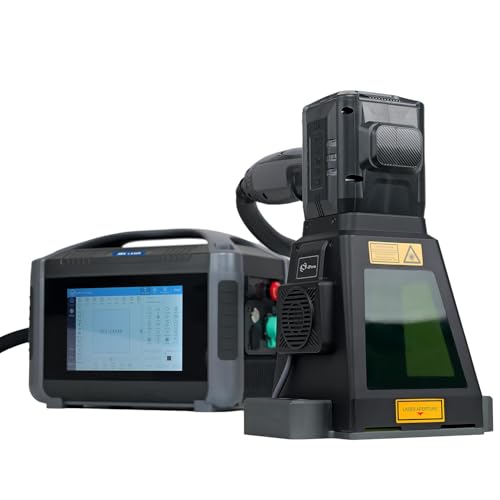
Clyertek 30W Portable Fiber Laser Engraver
Best for: cordless on-site metal and plastic marking
- Laser Type
- Fiber (1064 nm)
- Laser Power
- 30W
- Working Area
- 100*100mm
- Engraving Speed
- <7000mm/s
- Form Factor
- Handheld / Semi-enclosed
- Dimensions
- 20.7 × 16.7 × 12.2 inches
The Clyertek 30W Portable Fiber Laser Engraver is a 1064 nm handheld marking machine powered by a built-in 216Wh battery or standard AC power. It features a 100 by 100 mm marking area, an electromagnetic base for attaching directly to metal, and speeds up to 7000 mm/s. Controlled via an 8-inch touchscreen, it suits you if you need to mark metals and plastics on-site without being tied to a fixed workbench.
Pros
- Built-in 216Wh battery supports cordless operation away from wall outlets
- High-speed galvo system marks at speeds up to 7000 mm/s
- Electromagnetic base attaches firmly to metal surfaces to reduce vibration
- Standalone operation with an integrated 8-inch touchscreen interface
- OD4+ protective cover provides semi-enclosed laser shielding
Cons
- Working area is limited to 100 by 100 mm
- Weighs approximately 14 pounds, which can be heavy during extended handheld use
- 30W laser power offers lower output than higher-wattage stationary fiber lasers
Good fit if
- You need a portable, battery-powered fiber laser for mobile or field marking jobs.
- You mark metal workpieces directly and benefit from magnetic surface mounting.
- You want an all-in-one setup that runs without a dedicated external computer.
Skip if
- You require an engraving field larger than 100 by 100 mm.
- You need high-wattage laser output exceeding 30W for fast, deep metal engraving.
Verdict: Clyertek 30W Portable Fiber Laser Engraver delivers cordless marking flexibility with an integrated touchscreen and magnetic mounting base. Its compact 100 by 100 mm field is tailored for mobile metal and plastic marking where stationary machines cannot reach.

OMTech 60W CO2 Laser Engraver with Chiller
Best for: Cutting and engraving nonmetals like wood
- Laser Type
- CO2
- Laser Power
- 60W
- Working Area
- 16"x24" (400x600 mm)
- Software Compatibility
- LightBurn
- Compatible Material
- Wood, Acrylic, Glass
- Features
- Air Assist, Water Chiller
The OMTech 60W CO2 Laser Engraver gives you a 16"x24" work area designed for cutting and engraving nonmetallic items like wood, acrylic, and leather. Its 60W CO2 laser tube can cut as deep as 0.4 inches. Bundled with a water chiller and compatible with LightBurn, this machine suits makers who need a generous bed and pass-through doors for large stock.
Pros
- 16"x24" working area with two-way pass-through doors
- Engraves up to 0.4 inches deep on nonmetallic materials
- Includes a dedicated water chiller and air assist
- Safety cover interlock automatically cuts beam when opened
Cons
- Requires manual focusing
- Weighs 187 pounds and takes up substantial floor space
- Tube lifespan rated up to 1000 hours
Good fit if
- You frequently cut or engrave sheet materials like wood, acrylic, and leather
- You need pass-through capability to handle oversized stock
- You want a machine bundled with a water chiller and LightBurn support
Skip if
- You want motorized autofocus instead of manual bed adjustments
- You do not have room for a heavy 187-pound workshop unit
Verdict: OMTech 60W CO2 Laser Engraver with Chiller provides a large cutting bed and included cooling hardware, making it a capable option for deep wood and acrylic projects.

AchiPrin 100W JPT MOPA Fiber Engraver
Best for: versatile plastic and metal marking with dual lenses
- Laser Type
- Fiber (1064nm)
- Laser Power
- 100W
- Working Area
- 175×175mm, 300×300mm
- Software Compatibility
- EZCAD
- Compatible Material
- Metal, Jewelry, Plastic
- Features
- Rotary Axis
This machine features a 100W JPT MOPA M7 fiber laser source paired with an air-cooled setup. It includes two interchangeable field lenses providing 175×175mm and 300×300mm working areas, plus a D80 rotary axis. With adjustable pulse width and frequency, you can mark plastics without thermal damage and produce color marks on stainless steel. It is built for shops handling varied industrial marking on metals and plastics.
Pros
- 100W JPT MOPA M7 laser source with adjustable pulse parameters
- Comes with both 175×175mm and 300×300mm field lenses
- Includes D80 rotary axis for 360-degree cylindrical marking
- Air-cooled design requires no external water chiller
Cons
- Software compatibility lists only EZCAD
- Large physical footprint at 21.7 by 13.8 by 24.8 inches
- Open galvo layout requires safety discipline during operation
Good fit if
- You need to mark sensitive plastics using controlled pulse widths
- You want interchangeable lenses for both fine detail and large work areas
- You plan to engrave round objects like tumblers, pipes, or rings using a rotary axis
Skip if
- You prefer running your jobs through LightBurn software
- You need an enclosed desktop engraver with built-in exhaust filtration
Verdict: AchiPrin 100W JPT MOPA Fiber Engraver offers adjustable pulse controls, dual field lenses up to 300×300mm, and a rotary axis for detailed plastic and metal marking.

Ovsuqu 100W MOPA Fiber Laser Engraver
Best for: high-power metal engraving across wide working areas
- Laser Type
- Fiber (JPT MOPA M7)
- Laser Power
- 100W
- Working Area
- 300 x 300 mm (11.8 x 11.8 in.)
- Software Compatibility
- LightBurn
- Compatible Material
- Metal
- Features
- Rotary Axis
The Ovsuqu 100W MOPA Fiber Laser Engraver combines a high-output 100W JPT M7 MOPA source with a generous 300 x 300 mm (11.8 x 11.8 inch) working area. With adjustable pulse durations from 2 to 500 ns and frequencies up to 4000 kHz, it gives you fine control over deep metal carving and color marking. Native LightBurn software support makes running production jobs straightforward for workshops marking metals and plastics.
Pros
- 100W JPT MOPA M7 laser source with 2 to 500 ns pulse duration
- Large 300 x 300 mm quartz field lens working area
- Wide repetition rate frequency range of 1 to 4000 kHz
- Built with BJJCZ control board, SINO-GALVO scanner, and MW power supply
- Direct compatibility with LightBurn software
Cons
- Large 300 x 300 mm lens reduces beam concentration compared to smaller focal lenses
- Substantial physical footprint measuring 30.3 by 18.9 by 22.4 inches
Good fit if
- You need 100W MOPA power for deep metal engraving and fine parameter tuning.
- You want a wide 300 x 300 mm galvo marking area for larger metal or plastic workpieces.
- You prefer using LightBurn software for your daily workflow.
Skip if
- You need an enclosed desktop workstation with a smaller bench footprint.
- You primarily need to cut organic non-metals like wood, leather, or thick cast acrylic.
Verdict: Ovsuqu 100W MOPA Fiber Laser Engraver delivers substantial 100W pulse power and an expansive 300 x 300 mm marking field for demanding metal fabrication jobs. Its standard LightBurn support and branded internal components make it a capable high-power galvo solution.

Cloudray 60W JPT MOPA Fiber Laser Engraver
Best for: high-speed color marking and dual-field metal engraving
- Laser Type
- Fiber (JPT MOPA)
- Laser Power
- 60W
- Working Area
- 110x110mm, 200x200mm
- Engraving Speed
- 10,000mm/s
- Compatible Material
- Metal
- Dimensions
- 15 × 11 × 20.8 inches
This fiber laser pairs a 60W JPT MOPA source with a GSOBK galvo head capable of marking speeds up to 10,000mm/s. It includes two interchangeable F-theta lenses giving you working fields of 110x110mm and 200x200mm. The MOPA configuration enables over 100 color marks on stainless steel alongside fine 0.01mm resolution. It suits you if you need fast metal marking, color etching, and flexible field sizes.
Pros
- 60W JPT MOPA fiber source supports 100+ color markings on stainless steel
- Comes with two F-theta lenses: 110x110mm and 200x200mm
- Marking speeds reach up to 10,000mm/s with 0.01mm accuracy
- Laser source rated for over 100,000 hours of operation
Cons
- Rotary axis is optional and not included in the standard package
- Focus adjustment relies on a manual lift column rather than motorized autofocus
- Max engraving depth is limited to 0.5mm per specifications
Good fit if
- You want to engrave color markings on stainless steel and other metals
- You need interchangeable working fields of 4.3x4.3 inches and 7.9x7.9 inches
- You prioritize high-speed galvo marking up to 10,000mm/s
Skip if
- You need an included rotary attachment out of the box
- You require motorized or automated autofocus adjustment
- You want deep metal cutting rather than marking and light engraving
Verdict: Cloudray 60W JPT MOPA Fiber Laser Engraver delivers fast 10,000mm/s marking, two lens options, and color etching versatility for dedicated metalwork.

OMTech 60W MOPA Fiber Laser with Rotary
Best for: High-speed, adjustable pulse metal marking and cylindrical engraving
- Laser Type
- MOPA Fiber
- Laser Power
- 60W
- Working Area
- 5.9" x 5.9"
- Engraving Speed
- Up to 10,000 mm/s
- Compatible Material
- Metal
- Features
- Rotary Axis
This OMTech system is a 60W MOPA fiber laser engraver designed specifically for metal marking. It pairs a wide pulse width range of 2 to 500 ns with frequencies from 1 to 4000 kHz, letting you fine-tune energy output. With speeds reaching 10,000 mm/s across a 5.9 by 5.9-inch working area and an included rotary axis, it suits users who need precise, detailed metal processing.
Pros
- Wide frequency range from 1 to 4000 kHz
- Adjustable pulse width from 2 to 500 ns
- Marking speeds reach up to 10,000 mm/s
- 0.01 mm engraving accuracy with dual red dot focus
- Includes a rotary axis for cylindrical items
Cons
- Work area is limited to 5.9 by 5.9 inches
- Maximum engraving depth is limited to 0.1 mm per pass
- Built for metal and not suited for standard non-metal cutting
Good fit if
- You need an adjustable pulse width and wide frequency range for specialized metal marking.
- You mark cylindrical objects using an included rotary axis.
- You require marking speeds up to 10,000 mm/s.
Skip if
- You need a working area larger than 5.9 by 5.9 inches.
- You plan to cut thick sheets or process organic non-metal materials.
- You require deep stock removal beyond 0.1 mm engraving capability.
Verdict: OMTech 60W MOPA Fiber Laser with Rotary delivers versatile pulse tuning and high-speed marking for detailed metal jobs. It is a solid pick if your primary focus is compact metal engraving and cylindrical parts.

OMTech Maker 90W CO2 Laser Engraver
Best for: large-format cutting and engraving of organic materials
- Laser Type
- CO2
- Laser Power
- 90W
- Working Area
- 28"x20"
- Engraving Speed
- 600 mm/s
- Cutting Capacity
- up to 0.4" deep in wood
- Dimensions
- 59.1 × 34.3 × 35.4 inches
The OMTech Maker 90W CO2 Laser Engraver gives you a large 28" x 20" working bed paired with a 90W CO2 tube. It reaches engraving speeds up to 600 mm/s and cuts wood up to 0.4 inches thick. Featuring one-button autofocus, four-way pass-through doors, and built-in air assist, it suits makers who require substantial cutting depth and space for oversized organic sheets.
Pros
- Spacious 28" x 20" work area with four-way pass-through doors
- 90W CO2 tube cuts wood up to 0.4 inches deep
- Engraving speeds reach up to 600 mm/s on acrylic, glass, and leather
- Push-button autofocus automatically adjusts the focal distance
- Built-in air assist and automatic cover interlock for safe operation
Cons
- Heavy 258-pound unit requires dedicated floor space
- Large 59.1" x 34.3" footprint cannot be easily moved
- Laser tube has an estimated lifespan of 1,000 hours
Good fit if
- You need to cut wood up to 0.4 inches thick and engrave large sheet materials.
- You want a 28" x 20" bed with four-way pass-through doors for oversized stock.
- You prefer automated focal height setup via a single-button control.
Skip if
- You have a small workspace unable to hold a 59.1" wide, 258-pound machine.
- You need a fiber laser specifically for direct bare-metal marking.
Verdict: OMTech Maker 90W CO2 Laser Engraver delivers a generous 28" x 20" workspace, 90W of cutting capability, and convenient autofocus for high-volume organic material processing.

WeCreat Lumos Flex 15W Dual Fiber and Diode Engraver
Best for: dual-material marking and portable engraving
- Laser Type
- Fiber & Diode
- Laser Power
- 15W Fiber & 15W Diode
- Engraving Speed
- Up to 10,000 mm/s
- Software Compatibility
- WeCreat MakeIt
- Form Factor
- Desktop / Handheld mode
- Cutting Capacity
- Up to 0.3 mm metal
View on Amazon: WeCreat Lumos Flex 15W Dual Fiber and Diode Engraver
The WeCreat Lumos Flex pairs a 15W fiber laser with a 15W diode laser in a compact desktop enclosure. It reaches marking speeds up to 10,000 mm/s and supports both desktop and handheld operation. The dual-source configuration handles metals, wood, leather, and acrylic without swapping machines. It fits your setup if you need to mark diverse materials and want a portable system with auto focus and built-in camera alignment.
Pros
- Combines a 15W fiber laser and a 15W diode laser in one chassis
- High-speed marking reaching up to 10,000 mm/s
- Supports both desktop operation and handheld mode with a protective cone
- Includes a 50MP camera and auto focus for precise positioning
Cons
- Metal cutting capacity tops out at 0.3 mm thickness
- Works with WeCreat MakeIt software without listed LightBurn support
Good fit if
- You need to engrave both metals and organic materials like wood or leather on one unit.
- You want high-speed galvo marking alongside the flexibility of handheld engraving.
- You prefer automated job alignment using a built-in 50MP camera and auto focus.
Skip if
- You need to cut sheet metal thicker than 0.3 mm.
- You require LightBurn software compatibility for your daily workflow.
Verdict: WeCreat Lumos Flex 15W Dual Fiber and Diode Engraver delivers dual-wavelength versatility and fast 10,000 mm/s speeds in an adaptable desktop-and-handheld design. It serves makers who want to mark metals and soft materials without maintaining two distinct machines.
Specifications side by side
| Spec | xTool F2 Ultra 60W MOPA Fiber Laser Engraver | xTool F2 Ultra 5W UV Laser Engraver | OMTech Maker 90W CO2 Laser Engraver Bundle | OMTech 30W MOPA Fiber Laser Engraver | OMTech Polar2 70W Desktop CO2 Laser | OMTech Maker 60W CO2 Laser Engraver | OMTech 50W Galvo Fiber Laser Engraver | Clyertek 30W Portable Fiber Laser Engraver | OMTech 60W CO2 Laser Engraver with Chiller | AchiPrin 100W JPT MOPA Fiber Engraver | Ovsuqu 100W MOPA Fiber Laser Engraver | Cloudray 60W JPT MOPA Fiber Laser Engraver | OMTech 60W MOPA Fiber Laser with Rotary | OMTech Maker 90W CO2 Laser Engraver | WeCreat Lumos Flex 15W Dual Fiber and Diode Engraver |
|---|---|---|---|---|---|---|---|---|---|---|---|---|---|---|---|
| Laser Type | MOPA Fiber | not specified | CO2 | MOPA Fiber Laser | Glass CO2 laser tube | CO2 | Fiber | Fiber (1064 nm) | CO2 | Fiber (1064nm) | Fiber (JPT MOPA M7) | Fiber (JPT MOPA) | MOPA Fiber | CO2 | Fiber & Diode |
| Laser Power | 60W | 5W (5000mW) | 90W | 30W | 70W | 60W | 50W | 30W | 60W | 100W | 100W | 60W | 60W | 90W | 15W Fiber & 15W Diode |
| Working Area | 8.7" x 8.7" | not specified | 20"x28" | 5.9" x 5.9" | 28" × 14" | 20"x28" (500x700 mm) | 7.9"x7.9" (200x200 mm) | 100*100mm | 16"x24" (400x600 mm) | 175×175mm, 300×300mm | 300 x 300 mm (11.8 x 11.8 in.) | 110x110mm, 200x200mm | 5.9" x 5.9" | 28"x20" | not specified |
| Engraving Speed | Up to 15,000 mm/s | 15,000 mm/s | not specified | 10,000 mm/s | Up to 1200 mm/s | not specified | Up to 7000 mm/s (275.6 ips) | <7000mm/s | not specified | not specified | not specified | 10,000mm/s | Up to 10,000 mm/s | 600 mm/s | Up to 10,000 mm/s |
| Software Compatibility | not specified | not specified | LightBurn | Lightburn, EzCad | LightBurn, RDWorks V8 | LightBurn | LightBurn, EZCAD2 | not specified | LightBurn | EZCAD | LightBurn | not specified | not specified | not specified | WeCreat MakeIt |
| Form Factor | not specified | Fully Enclosed | not specified | not specified | Desktop (Class I) | not specified | not specified | Handheld / Semi-enclosed | not specified | not specified | not specified | not specified | not specified | not specified | Desktop / Handheld mode |
| Cutting Capacity | not specified | not specified | not specified | not specified | not specified | not specified | not specified | not specified | not specified | not specified | not specified | not specified | not specified | up to 0.4" deep in wood | Up to 0.3 mm metal |
| Compatible Material | not specified | Glass | not specified | Metal | Glass | not specified | Metal, Jewelry, Gold | not specified | Wood, Acrylic, Glass | Metal, Jewelry, Plastic | Metal | Metal | Metal | not specified | not specified |
| Features | not specified | not specified | Water Chiller | Rotary Axis, Auto Focus | not specified | Water Chiller | Rotary Axis | not specified | Air Assist, Water Chiller | Rotary Axis | Rotary Axis | not specified | Rotary Axis | not specified | not specified |
| Target Audience | not specified | not specified | not specified | not specified | not specified | not specified | not specified | not specified | not specified | DIY | not specified | not specified | not specified | not specified | not specified |
| Dimensions | 16.9 × 11.6 × 20.5 inches | 11.6 × 16.9 × 20.5 inches | 57.1 × 34.3 × 27.6 inches | not specified | 22.2 × 9.2 × 38.2 inches | 47.2 × 34.3 × 36.6 inches | 30.5 × 17.7 × 31.1 inches | 20.7 × 16.7 × 12.2 inches | 44.9 × 30.7 × 25.4 inches | 13.8 × 21.7 × 24.8 inches | 30.3 × 18.9 × 22.4 inches | 15 × 11 × 20.8 inches | not specified | 59.1 × 34.3 × 35.4 inches | 15.2 × 14.4 × 16.9 inches |
| Weight | not specified | 49.6 pounds | 227 pounds | not specified | 216 pounds | 249 pounds | 120 pounds | not specified | 187 pounds | not specified | not specified | not specified | not specified | 258 pounds | not specified |
| Size | Single Laser (60W MOPA) | not specified | with LB&Chiller | MOPA 30W | 70W Glass | AF 60W&LB&Chiller | Galvo 50W with Lightburn and Rotary | not specified | with LB&Chiller | not specified | not specified | 27"Lx14"Wx22"H-60W US | 60 Mopa With MN70 | AF 90W | 15W Fiber & 15W Doide |
| Color | Single Laser (60w Mopa) | not specified | MF 90W&LB&Chiller | with Rotary Axis and Lightburn | not specified | Blue, Gray | not specified | 30w Pro (With Battery) | 60W Manual Focus | 175mm+300mm | Silver | Black | Silver-1 | 90W Auto Focus | Super Bundle |
| Model | MXF-K003-002 | MXF-K007-002 | not specified | not specified | not specified | RYGELAMZ-USB0705U1&LCW5200&USBLIGH | RYGEL-FMM5RRABURYGELAMZ1 | SFX-30GS Pro | RYGEL-UCW0604BU | M7-100W | FL-100W | CLM60F | not specified | SH-G570 | LG2407 |
Trade-offs to Expect Under $4000
When shopping Under $4000, you encounter a clear divide between footprint and material versatility. Fiber engravers offer up to 100W of power or speeds reaching 15,000 mm/s, but their galvo platen sizes remain constrained to fields between 100×100 mm and 300×300 mm. To obtain larger cutting areas for wood and acrylic, you must switch to CO2 lasers. These high-capacity units provide up to 90W of cutting power but require substantial workshop space, with machine weights reaching between 187 and 258 pounds.
- Laser type separation requires choosing dedicated metal marking with fiber sources or organic sheet processing with CO2 tubes.
- Working area on high-speed galvo fiber systems tops out at 300×300 mm, with portable formats dropping to 100×100 mm.
- Machine weight on large-format CO2 cutters reaches between 187 and 258 pounds, requiring permanent, heavy-duty workshop placement.
- Laser power on ultra-fine precision UV setups drops to 5W, limiting operations to delicate surface marking rather than deep cuts.
If you also evaluate home wellness gear, compare the best saunas under 4000 by their published electrical specifications.
How We Picked These Engravers
To build this guide, we evaluate Amazon listings that fit the Under $4000 range. We compare each machine strictly by its published specifications, compatibility details, and manufacturer feature lists. We do not physically handle or test the hardware. To keep the lineup clear, you will see only one size or configuration from any single product family.
We show products in stock first, then by Amazon sales rank. Because product availability and pricing update live at least daily, the selections can change over time. When a machine shifts out of the Under $4000 category or goes out of stock, the guide updates to reflect current specs.
How to Choose the Right Laser Engraver
-
Selecting the Right Laser Wattage
Match the laser wattage directly to the depth and speed your projects demand. For fiber machines, 30W models handle basic surface marking, serial numbers, and light etching. Stepping up to 60W or 100W, as seen on the Ovsuqu 100W MOPA Fiber Laser Engraver, delivers faster cycle times and enough energy for deep metal engraving or thin sheet cutting. For CO2 tubes, higher wattages like 90W allow you to cut through thicker wood and acrylic sheets in fewer passes.
-
Checking Physical Size and Weight
Verify your available workspace and table capacity before selecting a machine. Large CO2 laser cutters often require dedicated floor space rather than desktop placement. For example, the OMTech Maker 90W CO2 Laser Engraver Bundle measures 57.1 inches long and weighs 227 pounds, requiring a sturdy support base and wide door clearance. In contrast, desktop galvo fiber units occupy smaller bench spaces. Always check the exterior dimensions and total unit weight against your shop layout.
-
Evaluating Bundled Cooling Hardware
High-power CO2 laser tubes generate heat that requires active water circulation to prevent tube damage. Look closely at the listing specs to confirm whether cooling equipment is included. Configurations like the OMTech Maker 60W CO2 Laser Engraver bundle an industrial water chiller directly with the machine. If a package does not list a chiller, you will need to supply a dedicated water pump or chiller setup before running jobs, adding extra hardware footprint to your work area.
-
Portable Versus Stationary Designs
Consider whether your work stays on a bench or requires moving to large structural items. Standard galvo and gantry machines feature fixed enclosures or heavy frames designed for stationary shop operation. In contrast, handheld or portable models like the Clyertek 30W Portable Fiber Laser Engraver feature compact frames and battery power for on-site marking. If you must etch heavy machinery, outdoor fixtures, or oversized components, verify whether the laser head detaches or operates cord-free.
-
Rotary Attachments for Curved Work
If you plan to engrave tumblers, rings, or cylindrical industrial parts, check the accessory specifications. Marking curved surfaces with a galvo or gantry laser requires a rotary axis to rotate the workpiece in sync with the beam. Models like the OMTech 50W Galvo Fiber Laser Engraver include a rotary attachment directly in the package. Verifying that a rotary axis is included saves you from sourcing compatible motor drivers and chuck hardware separately later.
-
Software and Controller Compatibility
Examine the supported control software listed in the product specifications. Many maker-grade and industrial engravers list direct compatibility with LightBurn, which provides advanced layer controls, vector editing, and standardized settings across different laser hardware. Some units instead rely strictly on proprietary software packages that may limit your workflow or design options. Confirming native LightBurn support on the spec sheet ensures you can integrate the machine smoothly into your existing digital design pipeline.
Frequently asked questions
Can a fiber laser engrave color on metal?
Yes, MOPA fiber lasers can create color marks on specific metals like stainless steel and titanium by adjusting pulse parameters. Models such as the xTool F2 Ultra 60W MOPA and OMTech 30W MOPA fiber lasers offer this color marking capability. Standard fixed-pulse galvo fiber lasers generally produce only monochrome high-contrast etchings instead of colored oxide layers.
What is the difference between a CO2 laser and a fiber laser?
CO2 and fiber lasers utilize different wavelengths to interact with completely distinct materials. CO2 units, such as the OMTech Maker 90W and OMTech 60W models, process non-metallic goods including wood, acrylic, and glass. Fiber engravers, including 30W to 100W systems from OMTech and Ovsuqu, direct their beam energy into marking metals, dense plastics, and jewelry.
Do high-power CO2 laser engravers require a water chiller?
Yes, high-power CO2 laser tubes generate substantial heat during operation and require active liquid chilling to maintain beam stability and protect the tube. Standalone packages like the OMTech Maker 90W bundle and OMTech 60W CO2 engraver supply a dedicated external water chiller. In contrast, smaller galvo fiber or UV engravers rely primarily on internal or air-assisted cooling structures.
Which laser engraver works best for glass and crystal?
UV and CO2 lasers are the optimal choices for processing transparent surfaces. The xTool F2 Ultra 5W UV laser utilizes a sub-10μm beam suited for fine detail on delicate glass and crystal workpieces. If you need deeper engraving or cutting on non-metals, CO2 machines like the enclosed OMTech Polar2 70W and OMTech 60W effectively engrave glass items.
Can you control these laser engravers with LightBurn software?
Many workshop laser engravers support LightBurn, but software compatibility depends on the specific machine controller. Units like the OMTech Maker 90W CO2, OMTech 50W Galvo Fiber, and Ovsuqu 100W MOPA list native LightBurn compatibility. However, specialized machines or handheld devices may operate using proprietary companion software, mobile applications, or integrated touchscreen interfaces instead.
What equipment is needed to engrave tumblers and rings?
You need an optional or bundled rotary axis attachment to rotate curved workpieces under the laser beam. Models such as the OMTech 30W MOPA, OMTech 50W Galvo Fiber, AchiPrin 100W, and OMTech Polar2 70W include a rotary axis or rotary tool. This accessory synchronizes rotation with the laser pulses to engrave rings, tumblers, and cylinders evenly.
Are there portable fiber lasers for handheld metal marking?
Yes, specialized portable fiber lasers operate in spaces where stationary gantry or cabinet units cannot fit. For example, the Clyertek 30W Pro features a built-in battery, integrated touchscreen, and magnetic mounting base for cordless on-site metal marking. The WeCreat Lumos Flex 15W also provides a convertible design that transitions between desktop and handheld marking positions.