Best Portable Laser Engravers: 15 Spec-Based Picks
As an Amazon Associate we earn from qualifying purchases. Links on this page are affiliate links.
Finding the best portable laser engravers requires matching specs to your workflow. We compared 15 models based strictly on published specifications. The xTool F2 15W Diode & 5W IR Laser Engraver leads because its dual-wavelength system handles both metal and wood quickly. This guide helps you decide which form factor, power level, and material compatibility fit your needs. You will see how weight, size, and laser type impact portability. We focus on what the data shows, so you can choose a device that fits your workspace and project requirements.
Quick picks
The best fit for you
- You need fast on-site metal and wood personalization xTool F2 15W Diode & 5W IR Laser Engraver Its dual diode and infrared lasers mark diverse materials quickly in a 10-pound portable chassis.
- You want standalone engraving without a computer AlgoLaser Pixi 10W Portable Engraver The integrated 3.5-inch touchscreen and lightweight enclosure allow operation without a connected laptop.
- You require marking bare metals and hard plastics Carverall K15 Pro Infrared Laser Engraver The 1064nm infrared laser provides specialized precision for permanent markings on metals and plastics.
- You need to engrave cylindrical and long items LaserPecker LP2 Portable Laser Engraver with Roller The multi-mode electric roller facilitates curved and extended-length marking on objects like tumblers.
- You seek high power for mobile metal cutting LaserPecker LP5 20W Dual Laser Engraver The 20W fiber laser delivers the cutting power needed for metal and thick wood on the go.
Our 15 picks

xTool F2 15W Diode & 5W IR Laser Engraver
Best for: Fast on-site metal and wood personalization
- Form Factor
- Portable (what this guide is about)
- Laser Type
- Diode, IR
- Laser Power
- 15W Diode, 5W IR
- Engraving Speed
- Up to 6000mm/s
- Compatible Material
- Metal
- Features
- Camera
You get a compact, fully enclosed unit combining a 15W diode laser with a 5W infrared laser. It delivers speeds up to 6000mm/s and integrates a 50MP camera for accurate design alignment down to 0.1 mm. Weighing 10 pounds (4.6 kg), it packs portable power for on-site personalization across metals, wood, and thick materials without requiring assembly.
Pros
- Dual-source setup with 15W diode and 5W infrared lasers
- Engraving speeds up to 6000mm/s
- Built-in 50MP camera with 0.1 mm alignment accuracy
- Fully enclosed body with a built-in fan
- Lightweight 10-pound (4.6 kg) portable design
Cons
- Class 4 laser classification requires active safety precautions
- Slide Extension and smoke purifier accessories sold separately
- Compact portable footprint restricts large workpiece dimensions
Good fit if
- You need dual-laser capability to mark metals with IR and cut organic materials with diode power.
- You want rapid job completion at speeds up to 6000mm/s for pop-ups or craft fairs.
- You prefer visual workpiece positioning using an integrated high-resolution camera.
Skip if
- You only require a basic, single-diode laser for simple hobby wood burning.
- You need a large open-gantry bed for oversized signs or furniture panels.
Verdict: xTool F2 Dual Laser Engraver delivers exceptional portable speed and versatile dual-wavelength marking in an enclosed 10-pound chassis. It sets the standard for high-speed, on-the-go personalization across diverse materials.

Carverall K15 Pro Infrared Laser Engraver
Best for: marking bare metals and hard plastics
- Form Factor
- Portable (what this guide is about)
- Laser Type
- Infrared (1064nm)
- Laser Power
- 1W (1000mW)
- Working Area
- 200x300mm (7.87x11.81 in)
- Software Compatibility
- CutLabX
- Compatible Material
- Metal, Jewelry, Plastic, Silver
This portable machine uses a dedicated 1064nm infrared laser delivering 1W of output power. It gives you a generous 200 by 300 mm workspace in an aluminum frame measuring 13.4 by 11.5 by 6 inches. Because infrared light reacts cleanly with dense surfaces, it marks bare metals, rubber, and hard plastics without relying on surface coatings. It fits your workspace if you focus on small electronics, plastic parts, or jewelry.
Pros
- Dedicated 1064nm infrared laser marks hard plastics and bare metals directly
- Generous 200 by 300 mm working area for a portable footprint
- High 0.01 mm engraving precision with a built-in alignment guide
- Supports LightBurn, LaserGRBL, and CutLabX via Wi-Fi and PC
Cons
- Low 1W optical power is built for surface marking rather than cutting
- Requires a separate add-on blue laser module to engrave organic non-metals like standard wood
- Rotary roller and protective enclosure are sold separately
Good fit if
- You specifically need to mark hard plastics, bare metals, or rubber components
- You want a large 200 by 300 mm working area inside a portable machine
- You prefer using standard software like LightBurn or wireless mobile control
Skip if
- You plan to cut through thick materials out of the box
- You primarily engrave standard woods and paper without buying extra modules
Verdict: Carverall K15 Pro 1W Infrared Engraver delivers specialized 1064nm precision across a wide near-A4 bed. It is an ideal portable choice if your work centers on permanent markings on plastics and bare metals.

Longer Ray5 5.5W Portable Laser Engraver
Best for: detailed small-format diode engraving and light cutting
- Form Factor
- Portable (what this guide is about)
- Laser Type
- Diode
- Laser Power
- 5.5W
- Working Area
- 130×130mm
- Engraving Speed
- Up to 12000mm/min
- Software Compatibility
- LightBurn, LaserGRBL
The Longer Ray5 5.5W Portable Laser Engraver delivers a 5.5-watt diode beam within a compact 130 by 130 millimeter workspace. It operates at travel speeds up to 12000 millimeters per minute and features a fine 0.04 by 0.04 millimeter laser spot. Supporting LightBurn, LaserGRBL, and wireless app connectivity, it suits hobbyists and makers who need desktop portability for small wood, acrylic, and leather engraving tasks.
Pros
- Fine 0.04 by 0.04 mm laser spot with 0.01 mm accuracy
- Engraving speeds reaching up to 12000 mm/min
- Flexible connectivity supporting Wi-Fi, USB, app, and offline operation
- Works with both LightBurn and LaserGRBL software
Cons
- Work area is constrained to 130 by 130 mm
- 5.5W output is limited for thick material cutting
Good fit if
- You need a compact desktop footprint measuring 13 by 13.3 inches.
- You prioritize fine detail work requiring a 0.04 by 0.04 mm laser focus.
- You prefer running jobs wirelessly or offline without constant tethering.
Skip if
- You need to engrave materials wider than 130 mm in a single job.
- You require higher optical wattage for frequent cutting operations.
Verdict: Longer Ray5 5.5W Portable Laser Engraver provides precise, high-speed diode marking in a tight 130 by 130 mm desktop frame. It offers versatile control options and solid detail accuracy for small custom projects.

Artilume Foldable 7W Laser Engraver
Best for: portable tabletop engraving and taller items
- Form Factor
- Portable (what this guide is about)
- Laser Type
- Diode
- Laser Power
- 7000mW
- Working Area
- 200 x 150 mm (8 x 6 in)
- Engraving Speed
- Up to 10,000 mm/min
- Features
- Enclosure
The Artilume 7W Foldable Laser Engraver is a compact diode machine designed for easy transport and small workspaces. Weighing 3 pounds, it features a folding frame, a 200 by 150 mm working area, and speeds up to 10,000 mm/min. Its 0.04 by 0.04 mm compressed spot handles fine marking on wood, leather, and acrylic, making it a practical option if you need mobile crafting capability.
Pros
- Weighs 3 pounds with a pre-assembled, folding design
- Multifunctional cover doubles as a 3.15-inch elevation stand
- Fine 0.04 x 0.04 mm compressed spot with up to 10,000 mm/min engraving speed
- Wireless mobile app control over Wi-Fi
Cons
- Working area is limited to 200 x 150 mm
- Mobile app connection requires Wi-Fi with no wired interface listed
Good fit if
- You need an ultralight 3-pound engraver that folds up for compact storage.
- You plan to engrave taller objects using the integrated 3.15-inch elevation stand.
- You prefer configuring and monitoring jobs wirelessly from a phone or tablet.
Skip if
- You regularly cut or engrave materials wider than 200 x 150 mm.
- You need a dedicated wired cable connection to control the machine.
Verdict: Artilume 7W Foldable Laser Engraver combines a 3-pound folding frame with a 7000mW diode, offering dependable precision for mobile desktop projects.

LaserPecker LP2 Portable Laser Engraver with Roller
Best for: cylindrical and extended-length portable laser engraving
- Form Factor
- Portable (what this guide is about)
- Engraving Speed
- 1417 "/min
- Cutting Capacity
- Within 0.2" (wood, paper)
- Compatible Material
- Wood, Metal, Acrylic, Leather
- Features
- Rotary Axis
- Dimensions
- 5.91 × 5.91 × 8.66 inches
View on Amazon: LaserPecker LP2 Portable Laser Engraver with Roller
The LaserPecker LP2 is a compact galvo engraver measuring 5.91 by 5.91 by 8.66 inches. It comes equipped with a versatile electric roller that supports 360-degree cylindrical marking, as well as extended trolley and slab modes up to 196 inches in length. With galvo engraving speeds up to 1417 inches per minute and a 0.05 mm spot, you get rapid, detailed results on curved tumblers, wood, leather, and coated metal.
Pros
- Includes an electric roller supporting 360-degree cylindrical, slab, and trolley modes up to 196 inches long
- Galvo drive system reaches engraving speeds up to 1417 inches per minute
- Compressed 0.05 mm laser spot with selectable 1K, 1.3K, and 2K resolutions
- Compact frame with a handle design for handheld engraving operations
- Cuts wood and paper up to 0.2 inches thick
Cons
- Cannot engrave bare, shiny, or pure metals
- Engraving width remains limited to 4 inches in extended roller modes
- Requires coating light or transparent materials black prior to engraving
Good fit if
- You need to engrave cylindrical items such as tumblers, cups, and pencils
- You want fast galvo engraving on wood, leather, paper, or coated metals
- You need extended-length engraving on banners or boards up to 196 inches long
Skip if
- You need to engrave untreated, raw, or reflective pure metals
- You need wide working areas exceeding 4 inches on rolling projects
Verdict: LaserPecker LP2 Portable Engraver with Roller stands out for its multi-mode electric roller and rapid galvo drive, making curved and long-format marking straightforward. It is a solid choice for tumblers and compact projects, provided your workflow does not require marking bare metals.

Longer Ray5 Mini 2.5W Laser Engraver
Best for: entry-level small-format desktop engraving
- Form Factor
- Portable (what this guide is about)
- Laser Power
- 2500mW
- Working Area
- 130x130mm (5.1" x 5.5")
- Engraving Speed
- Up to 12,000mm/min
- Software Compatibility
- LightBurn, LaserGRBL
- Cutting Capacity
- Up to 6mm for wood, 2mm for acrylic
The Longer Ray5 Mini is a compact, pre-assembled diode laser engraver built for small desktop projects. It features a 2,500mW laser module, an ultra-fine 0.04 x 0.04mm spot size, and a 130 x 130mm (5.1 x 5.5-inch) work area. Capable of speeds up to 12,000mm/min, it cuts wood up to 6mm thick and connects via Wi-Fi or USB, making it a practical entry-level option if you want portable, detailed marking without assembly.
Pros
- Pre-assembled one-piece design requires no hardware setup
- Fine 0.04 x 0.04mm laser spot for precise, detailed engraving
- Wi-Fi and USB connectivity with LightBurn and LaserGRBL support
- Engraving speeds reach up to 12,000mm/min
Cons
- Modest 2,500mW power limits fast, heavy-duty cutting
- Compact 130 x 130mm working area restricts maximum object size
Good fit if
- You need a pre-assembled portable engraver ready to run right out of the box.
- You prioritize fine detail on smaller items that fit within 130 x 130mm.
- You want wireless control via Wi-Fi alongside standard USB connectivity.
Skip if
- You need to engrave workpieces larger than 5.1 x 5.5 inches.
- You require high optical output for frequent, thick-material cutting.
Verdict: Longer Ray5 Mini 2.5W Laser Engraver delivers fine detail and zero-setup convenience in an ultra-compact footprint. Its modest 2,500mW power and 130 x 130mm area suit hobbyists focused on small-scale desktop engraving.

Carverall A1 Pro 12W Enclosed Laser Engraver
Best for: compact high-power cutting and enclosed desktop crafting
- Form Factor
- Portable (what this guide is about)
- Laser Power
- 12W (12000mW)
- Working Area
- 3.94 x 3.94 inches
- Engraving Speed
- 12,000mm/min
- Software Compatibility
- CutLabX, LightBurn, LaserGRBL
- Cutting Capacity
- 12mm plywood, 8mm acrylic
View on Amazon: Carverall A1 Pro 12W Enclosed Laser Engraver
This compact desktop unit combines 12W optical power with an enclosed Class 1 safety design. You get an integrated HD camera for drag-and-drop alignment, built-in air assist, and a 12,000mm/min engraving speed. While its 3.94 x 3.94-inch working area targets small items, its removable base lets you set the engraver directly onto larger objects. It suits crafters needing strong cutting capabilities in a safe, contained desktop footprint.
Pros
- High 12W output cuts up to 12mm plywood and 8mm acrylic
- Fully enclosed Class 1 housing with auto-shutoff and tilt protection
- Built-in HD camera for accurate visual positioning
- Integrated air assist and exhaust fan for cleaner processing
Cons
- Small working area limited to 3.94 x 3.94 inches
- Rotary roller attachment is not included and must be purchased separately
Good fit if
- You prioritize an enclosed Class 1 safety design for home or studio work
- You need 12W cutting power for dense materials like thick wood and acrylic
- You make small items like keychains, dog tags, and jewelry blanks
Skip if
- You regularly work on projects larger than 3.94 x 3.94 inches without removing the base
- You need an out-of-the-box rotary accessory for cylindrical objects
Verdict: Carverall A1 Pro 12W Enclosed Laser Engraver delivers exceptional cutting power and integrated safety features in a compact body. It is an excellent choice for detailed small-batch crafts where workspace safety is your primary requirement.
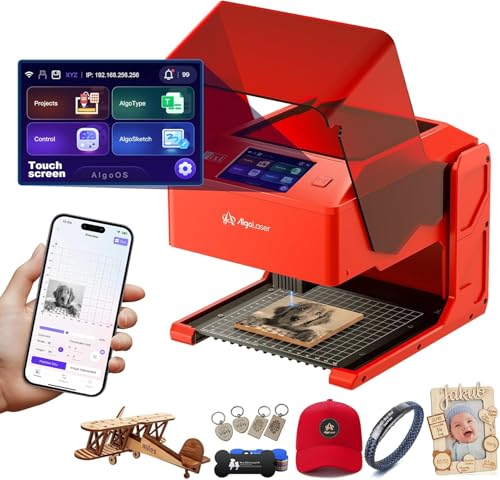
AlgoLaser Pixi 10W Portable Engraver
Best for: standalone engraving without a computer
- Form Factor
- Portable (what this guide is about)
- Laser Power
- 10W
- Software Compatibility
- AlgoOS
- Compatible Material
- Wood, Acrylic, Leather
- Features
- Touchscreen
- Dimensions
- 10.5 × 8.5 × 7.7 inches
The AlgoLaser Pixi 10W is a compact, enclosed portable laser engraver weighing just 4.41 pounds with dimensions of 10.5 by 8.5 by 7.7 inches. It features an integrated 3.5-inch touchscreen running AlgoOS, allowing you to draw, type, and process jobs without connecting a computer. With its 10W laser and certified Class 1 safety enclosure, it suits crafters, educators, and hobbyists who want a truly self-contained machine for wood, leather, and acrylic.
Pros
- Integrated 3.5-inch touchscreen with standalone AlgoOS navigation
- Certified Class 1 enclosed safety system with auto-pause lid
- Weighs 4.41 pounds and requires no assembly out of the box
- Versatile connectivity via Wi-Fi, USB-C, and SD card
- 10W laser module handles wood, leather, glass, and acrylic
Cons
- Enclosed exterior dimensions limit the size of workpieces you can load
- Engraving transparent materials requires applying colored backing
Good fit if
- You want to engrave directly via touchscreen without tethering a computer
- You prioritize safety features like a Class 1 enclosure and an auto-pause lid
- You need an ultra-lightweight 4.41-pound machine for small-batch crafting
Skip if
- You need to engrave large objects that exceed the compact enclosed chamber
- You require more than 10W of laser output for heavy-duty material cutting
Verdict: AlgoLaser Pixi 10W Touchscreen Engraver delivers true standalone convenience thanks to its integrated 3.5-inch display and lightweight Class 1 enclosure. It is a capable choice if you want portable 10W engraving without needing a laptop hooked up to your workstation.

LaserPecker LP4 Dual Laser Engraver
Best for: dual-source high-speed engraving on varied materials
- Form Factor
- Portable (what this guide is about)
- Laser Type
- Diode, IR
- Laser Power
- 10W, 2W
- Working Area
- 160 × 120 mm
- Engraving Speed
- Up to 4000 mm/s
- Software Compatibility
- LaserPecker Design Space, LightBurn
The LaserPecker LP4 Dual Laser Engraver combines a 10W diode laser and a 2W infrared laser in a portable format measuring 11.2 by 13.2 by 15 inches. It delivers galvanometer scanning speeds up to 2000 mm/s across a 160 by 120 mm working area with 0.003 mm detail. It suits you if you need to engrave both metals and organics on a compact desktop device with LightBurn support.
Pros
- Dual 10W diode and 2W infrared lasers for handling metals and organics
- Galvanometer scanning speeds reaching up to 2000 mm/s
- High engraving detail down to 0.003 mm
- Integrated LED touchscreen for standalone controls and project management
Cons
- Compact working area limited to 160 × 120 mm
- Cutting depth capped at 8 mm for wood and 5 mm for dark opaque acrylic
Good fit if
- You need to engrave both bare metals and organic materials with a single unit.
- You want fast galvanometer engraving speeds up to 2000 mm/s.
- You prefer running jobs using LightBurn or an onboard LED touchscreen.
Skip if
- You need a work surface larger than the 160 × 120 mm limit.
- You require through-cutting on wood thicker than 8 mm.
Verdict: LaserPecker LP4 Dual Laser Engraver pairs diode and infrared sources with 2000 mm/s speeds for detailed work on diverse materials. Its compact 160 × 120 mm work area makes it best suited for smaller items.

LaserPecker LP5 20W Dual Laser Engraver
Best for: Mobile metal and wood cutting
- Form Factor
- Portable (what this guide is about)
- Laser Type
- Fiber & Diode Dual Laser
- Laser Power
- 20W
- Engraving Speed
- 10,000mm/s
- Cutting Capacity
- 20mm wood, 15mm acrylic, 0.5mm metal
- Compatible Material
- Wood, Metal, Jewelry
The LaserPecker LP5 combines a 20W diode and a fiber laser for portable engraving and cutting. It reaches 10,000mm/s with 0.0027mm precision. The system cuts 20mm wood and 0.5mm metal. It weighs 6.02kg for easy transport. You get app control for mobile setups. This dual-laser tool handles jewelry and thick crafts efficiently.
Pros
- 20W dual fiber and diode laser system
- 10,000mm/s engraving speed
- 0.0027mm high precision focus
- Cuts 20mm wood and 0.5mm metal
- App control for mobile operation
Cons
- Smaller work area than desktop units
- Higher power requires more ventilation
- Complex setup for beginners
Good fit if
- You need to cut thick wood
- You engrave metal jewelry
- You work at craft fairs
Skip if
- You only engrave flat plastics
- You need a large bed
- You want a simple diode only
Verdict: The LaserPecker LP5 20W Dual Laser is ideal for mobile jewelers and crafters who need to cut metal and thick wood. It delivers high precision for small, high-value items.

Longer Ray5 5.5W Portable Laser Engraver
Best for: small-format detailed engraving on compact workbenches
- Form Factor
- Portable (what this guide is about)
- Laser Type
- Diode
- Laser Power
- 5.5W
- Working Area
- 130 x 130 mm
- Engraving Speed
- 12000mm/min
- Software Compatibility
- LightBurn, LaserGRBL
The Longer Ray5 5.5W Portable Laser Engraver provides a compact 130 by 130 mm workspace with a 5.5-watt diode laser module. It delivers engraving speeds up to 12,000 mm/min with an ultra-fine 0.04 by 0.04 mm laser spot. With connectivity options including Wi-Fi, USB, a mobile app, and offline engraving, this desktop-friendly unit suits makers and hobbyists who need fine detailing on small wooden plaques, acrylic, or leather items.
Pros
- 12,000 mm/min maximum engraving speed
- Ultra-fine 0.04 × 0.04 mm laser spot with 0.01 mm repeat accuracy
- Multiple connection modes: Wi-Fi, USB, mobile app, and offline control
- Compatible with both LightBurn and LaserGRBL
Cons
- Working area is limited to 130 × 130 mm
- 5.5W diode output cuts only thin materials
- Rotary roller, risers, and shade cover are add-on upgrades
Good fit if
- You need a compact engraver that fits comfortably on a small desk or workbench.
- You prioritize fine detail work supported by a 0.04 × 0.04 mm focal spot.
- You want flexible workflow options including Wi-Fi and offline engraving.
Skip if
- You need to engrave workpieces larger than 130 × 130 mm.
- You require high optical wattage to cut through thick boards and dense stock.
Verdict: Longer Ray5 5.5W Portable Laser Engraver combines a tight 130 × 130 mm footprint with a fine 0.04 × 0.04 mm spot for accurate desktop engraving. Its fast 12,000 mm/min speed and offline support make it a capable tool for small-scale projects.

WIZMAKER Wand 7W Compact Laser Engraver
Best for: paper and lightweight craft engraving
- Form Factor
- Portable (what this guide is about)
- Laser Power
- 7W (7000mW)
- Engraving Speed
- Up to 10,000 mm/min
- Software Compatibility
- AtomStack, LightBurn, LaserGRBL
- Compatible Material
- Wood, Leather, Paper
- Target Audience
- DIY, Small Business
The WIZMAKER Wand is a compact 7W laser engraver designed for crafting and small projects. It comes fully pre-assembled in a 5 by 5 by 5-inch footprint. With engraving speeds reaching 10,000 mm/min and 0.1mm repeatable positioning accuracy, it handles materials such as paper, cardboard, wood, and felt. You can control it across Windows, macOS, Android, and iOS devices using Wi-Fi, hotspot, or USB connections with LightBurn or LaserGRBL.
Pros
- Fully pre-assembled with a compact 5 x 5 x 5-inch footprint
- Engraving speed up to 10,000 mm/min with 0.1 mm repeatable positioning accuracy
- Multi-device connectivity via Wi-Fi, hotspot, and USB across Windows, macOS, Android, and iOS
- Compatible with both LightBurn and LaserGRBL software
- Built-in safety protections including flame monitoring and tilt detection
Cons
- 7W laser power limits cutting capability on dense or thick materials
- Class 4 laser design lacks an integrated enclosure
- Rotary tools, honeycomb boards, and air assist require separate purchases
Good fit if
- You need a portable engraver that arrives fully assembled without setup steps
- You primarily engrave or cut paper, cardboard, felt, and thin wood
- You want wireless control from either a mobile phone or a desktop computer
Skip if
- You need a fully enclosed laser engraver for beam containment
- You require high optical wattage to cut through thick slabs of dense material
Verdict: WIZMAKER Wand 7W Portable Laser Engraver provides a pre-assembled, compact setup suited for lightweight materials like paper and wood. Its broad connectivity and support for standard software make it easy to run in small workspaces.

WeCreat Lumos Flex 15W Dual Fiber and Diode Laser
Best for: Dual-material engraving with high speed
- Form Factor
- Portable (what this guide is about)
- Laser Type
- Fiber, Diode
- Laser Power
- 15W Fiber, 15W Diode
- Engraving Speed
- Up to 10,000mm/s
- Software Compatibility
- WeCreat MakeIt
- Compatible Material
- Metal
View on Amazon: WeCreat Lumos Flex 15W Dual Fiber and Diode Laser
The WeCreat Lumos Flex combines a 15W fiber laser for metal and a 15W diode laser for wood in one compact, portable unit. It features a built-in 50MP camera for precise visual positioning and reaches engraving speeds up to 10,000mm/s. This fully enclosed machine weighs 2.8 kg, making it easy to carry to markets or pop-up events while handling batch processing tasks efficiently.
Pros
- Dual 15W fiber and diode lasers for metal and wood
- Built-in 50MP camera for 0.01mm visual positioning
- High engraving speed up to 10,000mm/s
- Compact 2.8 kg weight for portability
- Fully enclosed design with pre-assembled safety features
Cons
- Requires WeCreat MakeIt software for operation
- Rotary and extension accessories sold separately
- Protective cone not included with the base unit
Good fit if
- You need to engrave both metal and wood without switching machines
- You require high-speed production for batch orders
- You want precise positioning via a built-in camera
Skip if
- You prefer a machine that includes all rotary accessories
- You need a larger work area for big projects
- You want to use third-party software instead of the proprietary app
Verdict: The WeCreat Lumos Flex 15W Dual Laser is a practical solution for creators who need to process both metal and wood quickly. Its dual-laser system and high speed make it ideal for small business owners handling diverse materials on the go.

AlgoLaser Pixi 3W Portable Engraver
Best for: Beginners seeking safe, standalone engraving
- Form Factor
- Portable (what this guide is about)
- Laser Power
- 3W
- Software Compatibility
- AlgoOS, LightBurn, LaserGRBL
- Compatible Material
- Wood, Leather, Glass
- Features
- Touchscreen
- Target Audience
- DIY, Beginners
The AlgoLaser Pixi is a Class 1 portable laser engraver with 3W power. It features a 3.5-inch touchscreen running AlgoOS for standalone operation. You can connect via USB-C, WiFi, or SD card. It supports LightBurn and LaserGRBL software. The compact unit measures 10.4 x 8.4 x 7.7 inches. It suits beginners who want a simple, safe desktop engraver without complex setup.
Pros
- Class 1 safety rating with auto-stop cover
- 3.5-inch touchscreen with AlgoOS for standalone use
- Supports LightBurn and LaserGRBL software
- No assembly required
Cons
- 3W laser power is lower than many competitors
- No built-in camera for image tracing
- Limited to 3W output for thicker materials
Good fit if
- You want a Class 1 safe device for home use
- You prefer standalone operation via touchscreen
- You need a compact unit for small projects
Skip if
- You require high-power cutting for thick wood
- You need a built-in camera for precision
- You want to engrave metals with an IR module
Verdict: AlgoLaser Pixi 3W Portable Engraver is a safe, simple entry point for beginners who prioritize ease of use over raw power. It fits users who want a plug-and-play device for light engraving on wood, leather, and acrylic.

SCULPFUN 3W Portable Mini Laser Engraver
Best for: beginners engraving small wood and craft items
- Form Factor
- Portable (what this guide is about)
- Laser Power
- 3W (3000mW)
- Working Area
- 150 x 130 mm
- Software Compatibility
- Sculpfun Space, LaserGRBL, LightBurn
- Target Audience
- Beginners
- Dimensions
- 10.5 × 9.8 × 5.5 inches
The SCULPFUN 3W Mini Portable Laser Engraver arrives fully pre-assembled and ready to use out of the box. Weighing just 2.3 pounds with a 10.5 by 9.8-inch footprint, it delivers 3W of optical output across a 150 by 130 mm working area. It supports Windows and macOS using LaserGRBL, LightBurn, or Sculpfun Space, making it a straightforward choice if you are new to engraving wood, leather, or paper.
Pros
- Weighs 2.3 pounds and comes fully pre-assembled out of the box
- Offers a 150 x 130 mm working area with built-in frame measurement scales
- Includes X and Y limit switches and a 100–500nm magnetic protective cover
- Compatible with Windows and macOS using Sculpfun Space, LaserGRBL, and LightBurn
Cons
- Cannot engrave bare metal and is not recommended for laser cutting
- Does not support smartphone connectivity
Good fit if
- You want a compact, 2.3-pound engraver that requires no assembly.
- You plan to engrave lightweight materials such as wood, leather, or slate.
- You intend to control your machine via a Windows or macOS computer.
Skip if
- You need to cut materials or engrave directly onto bare metals.
- You want to operate your laser engraver using a smartphone app.
Verdict: SCULPFUN 3W Mini Portable Laser Engraver offers beginners an accessible, pre-assembled platform for small surface marking without setup complexity. Its modest 3W output focuses strictly on light engraving tasks rather than cutting or metalwork.
Specifications side by side
| Spec | xTool F2 15W Diode & 5W IR Laser Engraver | Carverall K15 Pro Infrared Laser Engraver | Longer Ray5 5.5W Portable Laser Engraver | Artilume Foldable 7W Laser Engraver | LaserPecker LP2 Portable Laser Engraver with Roller | Longer Ray5 Mini 2.5W Laser Engraver | Carverall A1 Pro 12W Enclosed Laser Engraver | AlgoLaser Pixi 10W Portable Engraver | LaserPecker LP4 Dual Laser Engraver | LaserPecker LP5 20W Dual Laser Engraver | Longer Ray5 5.5W Portable Laser Engraver | WIZMAKER Wand 7W Compact Laser Engraver | WeCreat Lumos Flex 15W Dual Fiber and Diode Laser | AlgoLaser Pixi 3W Portable Engraver | SCULPFUN 3W Portable Mini Laser Engraver |
|---|---|---|---|---|---|---|---|---|---|---|---|---|---|---|---|
| Laser Type | Diode, IR | Infrared (1064nm) | Diode | Diode | not specified | not specified | not specified | not specified | Diode, IR | Fiber & Diode Dual Laser | Diode | not specified | Fiber, Diode | not specified | not specified |
| Laser Power | 15W Diode, 5W IR | 1W (1000mW) | 5.5W | 7000mW | not specified | 2500mW | 12W (12000mW) | 10W | 10W, 2W | 20W | 5.5W | 7W (7000mW) | 15W Fiber, 15W Diode | 3W | 3W (3000mW) |
| Working Area | not specified | 200x300mm (7.87x11.81 in) | 130×130mm | 200 x 150 mm (8 x 6 in) | not specified | 130x130mm (5.1" x 5.5") | 3.94 x 3.94 inches | not specified | 160 × 120 mm | not specified | 130 x 130 mm | not specified | not specified | not specified | 150 x 130 mm |
| Engraving Speed | Up to 6000mm/s | not specified | Up to 12000mm/min | Up to 10,000 mm/min | 1417 "/min | Up to 12,000mm/min | 12,000mm/min | not specified | Up to 4000 mm/s | 10,000mm/s | 12000mm/min | Up to 10,000 mm/min | Up to 10,000mm/s | not specified | not specified |
| Software Compatibility | not specified | CutLabX | LightBurn, LaserGRBL | not specified | not specified | LightBurn, LaserGRBL | CutLabX, LightBurn, LaserGRBL | AlgoOS | LaserPecker Design Space, LightBurn | not specified | LightBurn, LaserGRBL | AtomStack, LightBurn, LaserGRBL | WeCreat MakeIt | AlgoOS, LightBurn, LaserGRBL | Sculpfun Space, LaserGRBL, LightBurn |
| Form Factor | Fully enclosed | not specified | not specified | not specified | not specified | not specified | Fully enclosed Class 1 | Class 1 | not specified | Portable | not specified | not specified | Fully enclosed | not specified | not specified |
| Cutting Capacity | not specified | not specified | not specified | not specified | Within 0.2" (wood, paper) | Up to 6mm for wood, 2mm for acrylic | 12mm plywood, 8mm acrylic | not specified | 8mm wood, 5mm dark opaque acrylic | 20mm wood, 15mm acrylic, 0.5mm metal | not specified | not specified | not specified | not specified | not specified |
| Compatible Material | Metal | Metal, Jewelry, Plastic, Silver | not specified | not specified | Wood, Metal, Acrylic, Leather | Wood, Metal, Acrylic, Glass | Wood, Metal, Leather, Glass | Wood, Acrylic, Leather | Wood, Metal, Leather, Jewelry | Wood, Metal, Jewelry | Wood, Acrylic, Leather | Wood, Leather, Paper | Metal | Wood, Leather, Glass | not specified |
| Features | Camera | not specified | not specified | Enclosure | Rotary Axis | not specified | Camera | Touchscreen | not specified | not specified | not specified | not specified | Camera | Touchscreen | not specified |
| Target Audience | not specified | not specified | not specified | not specified | not specified | not specified | not specified | not specified | not specified | not specified | DIY, Beginners | DIY, Small Business | not specified | DIY, Beginners | Beginners |
| Size | xTool F2 Basic | 1W | 130×130mm | T1-P 7000mW | LP2 Suit | not specified | not specified | 10W | LP4 | LP5 Basic | 130×130mm | not specified | not specified | not specified | not specified |
| Dimensions | 6.89 × 9.33 × 0.1 inches | 13.4 × 11.5 × 6 inches | 13.3 × 13 × 7.79 inches | 14.5 × 14.2 × 5.79 inches | 5.91 × 5.91 × 8.66 inches | 11.5 × 11.3 × 6.5 inches | not specified | 10.5 × 8.5 × 7.7 inches | 11.2 × 13.2 × 15 inches | 7.8 × 11.3 × 14.4 inches | 13.3 × 7.8 × 13 inches | 5 × 5 × 5 inches | 15.2 × 14.4 × 16.9 inches | 10.4 × 8.4 × 7.7 inches | 10.5 × 9.8 × 5.5 inches |
| Weight | 10 pounds | not specified | not specified | 3 pounds | not specified | not specified | not specified | 4.41 pounds | not specified | not specified | not specified | not specified | not specified | 6.7 pounds | 2.3 pounds |
| Color | Orange | Silver | Deep Black | BLUE-7W Full Kit | LP2 (SpinTrack) | 2.5w | 12w | Passion Red | Space Gray | LP5 Basic Bundle | Metallic Black | 7000mW | Basic | Red-1 | Blue |
| Model | MXF-K005-002 | K15 Pro 1064nm Infrared Laser engraver | mini-5.5w | T1 | L2-KDR88 | Ray5 mini 2.5W | A1 Pro 12W | Pixi-Red-10W | LaserPecker 4 | LaserPecker 5 | MINI-5.5W-VC | WM-LE001 | LG2407 | Pixi | C1 |
Is a Portable Form Factor Worth It for You?
Portable units range from 3 to 16.9 inches in width. The xTool F2 weighs 10 pounds and includes a camera for precise alignment. The Artilume T1 folds to just 3 pounds for easy transport. Smaller options like the WIZMAKER Wand measure 5 inches square, while the LaserPecker LP2 fits in a compact case. These designs suit mobile work or tight desktops. They lack the large beds found in stationary cutters, limiting part size but maximizing flexibility for on-the-go projects.
Worth it if
- You need to engrave at markets or client sites
- Your workspace has limited counter space
- You frequently move your equipment between locations
Skip it if
- You require a large bed for wide panels
- You prioritize maximum cutting depth over mobility
- You want a stationary setup for heavy industrial use
If you compare wattage and footprint across other compact gear, a dedicated guide examines the best portable saunas.
How We Picked Portable Models
We identified portable laser engravers by checking product titles and feature lists for the Form Factor: Portable specification. Only listings that explicitly state this form factor are included in this guide. We selected one size or variant per product family to keep the comparison clean and focused. All details come directly from the specifications published on the Amazon listings. We do not handle or test these machines physically. This approach ensures every item meets your portability needs based on published data alone.
We ordered these 15 picks by availability first, then by overall rating weighted by review count. We also considered how well each spec meets our core criteria. This method highlights the most reliable and highly rated portable options for you. You can trust this list reflects current market data. The products are ranked to help you find the best portable tool for your specific workflow and material requirements.
Choosing Portable Laser Specs
-
Match Laser Type to Material
Select your laser source based on your primary material. Diode lasers, like the xTool F2, handle wood, leather, and acrylic well. Infrared or fiber lasers are required for bare metals and jewelry. The Carverall K15 Pro uses infrared for hard plastics and metals. If you need both, choose a dual-source model like the LaserPecker LP4. This approach ensures you can mark the specific surfaces you work with most often without needing multiple machines.
-
Check Laser Power Output
Higher wattage means faster engraving and cutting ability. The LaserPecker LP5 offers 20W power for cutting thick wood and metal. The AlgoLaser Pixi 10W provides strong performance for standalone use. Lower power options like the SCULPFUN 3W or Longer Ray5 Mini 2.5W are better for light engraving on small items. Match the wattage to your project depth. You need more power for cutting, but less is sufficient for surface marking on paper or thin leather.
-
Evaluate Work Area Size
The working area determines the maximum size of your projects. The Carverall K15 Pro offers a wide near-A4 bed for larger items. The Longer Ray5 Mini has a tight 130 by 130 mm area, ideal for small crafts. The LaserPecker LP4 provides a compact 160 by 120 mm space. Consider the dimensions of the objects you engrave most. A larger bed allows for bigger tags or signs, while a smaller footprint saves space on your desk.
-
Look for Useful Features
Features like cameras, touchscreens, and enclosures change your workflow. The xTool F2 includes a camera for precise alignment. The AlgoLaser Pixi 10W has a 3.5-inch touchscreen for standalone operation without a computer. The Artilume T1 comes with an enclosure for safety. These additions reduce setup time and improve accuracy. Choose the features that match your technical comfort level and workspace safety requirements.
-
Consider Portability and Weight
Portability varies significantly across models. The Artilume T1 folds to just 3 pounds for easy transport. The xTool F2 weighs 10 pounds in a sturdy chassis. The SCULPFUN 3W Mini is lightweight at 2.3 pounds. The LaserPecker LP2 includes a roller axis for cylindrical items. Check the weight and dimensions if you plan to move the device frequently. A lighter unit is easier to carry to events or client sites.
Frequently asked questions
What is the smallest portable laser engraver available?
The WIZMAKER Wand 7W Compact Laser Engraver is the most compact option, measuring 5 by 5 by 5 inches. It weighs 5 inches in each dimension, making it ideal for paper and lightweight craft engraving. Its pre-assembled design suits small workspaces where portability and minimal footprint are priorities for DIY users.
Which portable laser engraver is best for marking bare metals?
The Carverall K15 Pro Infrared Laser Engraver is designed specifically for marking bare metals and hard plastics. It uses a 1064nm infrared laser source to ensure permanent markings on jewelry and silver. This model offers a wide near-A4 bed, making it a specialized portable choice for industrial-style metalwork.
Do any portable laser engravers work without a computer?
Yes, the AlgoLaser Pixi 10W Portable Engraver operates as a standalone unit. It features an integrated 3.5-inch touchscreen that allows you to control the device without connecting it to a laptop. This design provides true convenience for portable engraving tasks where carrying a computer is impractical or inconvenient.
Which portable laser engraver can mark cylindrical objects?
The LaserPecker LP2 Portable Laser Engraver with Roller is built for marking cylindrical and extended-length items. It includes a multi-mode electric roller that handles curved surfaces like tumblers with ease. This feature makes it a solid choice for users who need to mark round objects alongside flat materials.
What is the most powerful portable laser engraver for cutting?
The LaserPecker LP5 20W Dual Laser Engraver offers the highest power at 20W. It combines fiber and diode sources to cut metal and thick wood with high precision. This model is ideal for mobile jewelers and crafters who need to process high-value items and perform cutting tasks on the go.
Which portable laser engraver includes a camera for alignment?
The xTool F2 15W Diode & 5W IR Laser Engraver includes a built-in camera. This feature helps you achieve precise alignment when engraving diverse materials quickly. The camera assists in positioning designs accurately on the work surface, which is essential for maintaining quality during fast, on-site personalization projects.
Is there a folding portable laser engraver?
The Artilume Foldable 7W Laser Engraver features a folding frame that weighs just 3 pounds. It combines this lightweight, portable design with a 7000mW diode laser for dependable precision. The foldable structure makes it easy to transport, offering a practical solution for mobile desktop projects that require a compact footprint.
Which portable laser engraver is best for beginners?
The SCULPFUN 3W Portable Mini Laser Engraver is designed specifically for beginners. It offers an accessible, pre-assembled platform for small surface marking without complex setup. Its modest 3W output focuses on light engraving tasks on wood and crafts, making it a safe and simple entry point for new users.