The Best Creality Falcon Laser Engravers in 2026: 8 Picks
As an Amazon Associate we earn from qualifying purchases. Links on this page are affiliate links.
You can find the best creality falcon laser engravers in this guide, covering open-frame cutters and enclosed desktop units. The lineup includes models with varying power outputs, work areas, and safety features like auto-focus and camera alignment. The Creality Falcon 10W Laser Engraver leads as the top pick for balanced everyday cutting and fine wood engraving. We compared 8 products based strictly on the specifications published on the listings. This approach ensures you get practical data to match your specific workshop needs.
Quick picks
Our 8 picks

Creality Falcon 10W Laser Engraver
Best for: balanced everyday cutting and fine wood engraving
- Laser Power
- 10W
- Working Area
- 15.7" x 16.3" (400 x 415 mm)
- Engraving Speed
- 10000mm/min
- Software Compatibility
- LightBurn, LaserGRBL
- Cutting Capacity
- 12mm wood, 5mm black acrylic
- Compatible Material
- Wood, Metal, Acrylic, Leather
The Creality Falcon 10W Laser Engraver pairs a 10W optical output with a standard 15.7 by 16.3-inch workspace. It provides a 0.06 by 0.06 mm compressed spot size, reaches speeds up to 10,000 mm/min, and cuts up to 12 mm wood in one pass. It suits you if you need a dependable, open-frame diode machine that handles everyday cutting and engraving across wood, acrylic, and leather.
Pros
- 15.7 by 16.3-inch (400 by 415 mm) working area
- Fine 0.06 by 0.06 mm compressed laser spot
- One-pass cutting capacity for 12 mm wood and 5 mm black acrylic
- Supports offline creation with an SD card slot
- Compatible with both LightBurn and LaserGRBL
Cons
- Open-frame design lacks a fully enclosed housing
- No integrated AI camera for positioning
- Maximum speed is capped at 10,000 mm/min
Good fit if
- You want a balanced 10W laser for general cutting and detailed engraving
- You need standard working dimensions of 400 by 415 mm
- You prefer running jobs offline via an SD card
Skip if
- You require an enclosed laser cutter for your workspace
- You want higher laser power like 20W or 60W for thicker materials
- You need an integrated camera for automated material alignment
Verdict: Creality Falcon 10W Laser Engraver is a versatile open-frame cutter that delivers a balanced 10W output and a spacious 400 by 415 mm work area. It provides a solid blend of fine detail and single-pass cutting depth for standard workshop projects.

Creality Falcon 5W Laser Engraver
Best for: detailed surface engraving and light cutting projects
- Laser Power
- 5W
- Working Area
- 400 x 415 mm
- Engraving Speed
- Up to 10,000 mm/min
- Compatible Material
- Wood, Acrylic, Leather, Glass
- Dimensions
- 17.3 × 9.33 × 24.8 inches
The Creality Falcon 5W Laser Engraver is an open-frame diode machine designed for detailed marking and light cutting. It features a 5W optical output with a fine 0.06 x 0.06 mm laser spot and a 400 x 415 mm workspace. Powered by a 32-bit chip, it reaches engraving speeds up to 10,000 mm/min. This model suits you if you need a spacious, entry-level platform for wood, acrylic, and leather.
Pros
- Ultra-fine 0.06 x 0.06 mm compression spot for sharp detail
- Spacious 400 x 415 mm working area
- Engraving speeds reach up to 10,000 mm/min via a 32-bit chip
- Active stop function halts the machine if movement is detected
- Laser cover filters up to 97% of UV light
Cons
- 5W laser power requires multiple passes for thicker cuts
- Rotary roller and height raisers must be purchased separately
- Lacks a full protective enclosure
Good fit if
- You prioritize fine detail engraving with an ultra-small 0.06 mm laser spot.
- You need a large 400 x 415 mm working bed for flat stock.
- You engrave primarily on wood, leather, acrylic, or glass.
Skip if
- You need high optical wattage for cutting thick hardwoods in single passes.
- You want an enclosed workstation with a built-in exhaust system.
- You need an included rotary attachment out of the box.
Verdict: Creality Falcon 5W Laser Engraver delivers a precise 0.06 mm spot and a roomy 400 x 415 mm bed for everyday maker tasks. It gives you dependable engraving accuracy across more than 200 materials without unnecessary complexity.

Creality Falcon A1 10W Enclosed Engraver
Best for: desktop hobbyists prioritizing enclosed safety and speed
- Laser Power
- 10W (10000mW)
- Working Area
- 381 × 305mm
- Engraving Speed
- 600mm/s
- Software Compatibility
- Falcon, LightBurn, LaserGRBL, Cutlabx
- Form Factor
- Enclosed
- Compatible Material
- Wood, Metal
The Creality Falcon A1 10W Enclosed Laser Engraver provides a Class 1 enclosed workspace with a 381 × 305mm working area. Powered by a CoreXY motion system, it operates at speeds up to 600mm/s and includes an integrated HD camera, air assist, and dual-door safety enclosure. It suits you if you need a ready-to-use, desktop-safe diode laser for engraving wood and coated materials without setting up standalone ventilation tents.
Pros
- Class 1 enclosed design with 99% laser filtration and auto-lock
- CoreXY motion system delivering speeds up to 600mm/s
- Integrated pre-calibrated HD camera for visual layout positioning
- Equipped with built-in air assist and smoke management
Cons
- Working area limited to 381 × 305mm
- Cannot cut acrylic and requires coating to engrave it
- Prohibited from engraving mirror-finished metals and reflective materials
Good fit if
- You want a fully enclosed Class 1 laser with smoke filtration and safety interlocks.
- You need rapid engraving speeds up to 600mm/s driven by a dual-motor system.
- You prefer using an overhead camera to position artwork directly on the workpiece.
Skip if
- You need to cut acrylic sheets rather than just engrave surface designs.
- You require a working bed larger than 381 × 305mm.
Verdict: Creality Falcon A1 10W Enclosed Laser Engraver balances fast 600mm/s processing and camera-assisted alignment inside a safe, fully enclosed desktop chassis. Just note that its working envelope is restricted to 381 × 305mm and acrylic cutting is not supported.

Creality Falcon 10W Enclosed Laser Engraver
Best for: compact enclosed engraving with camera alignment
- Laser Power
- 10W
- Working Area
- 150 × 150 × 148 mm
- Engraving Speed
- 15,000 mm/min
- Form Factor
- Fully Enclosed (Class 1)
- Compatible Material
- Wood, Acrylic, Leather
- Features
- Camera, Auto Focus
This fully enclosed desktop engraver features a 10W laser module, built-in AI HD camera, and automated focusing. With a working area of 150 × 150 × 148 mm and engraving speeds reaching 15,000 mm/min, it handles materials like wood, acrylic, and leather. The system supports interchangeable Falcon modules, making it a strong pick if you want an enclosed Class 1 setup with automated visual alignment for small projects.
Pros
- Fully enclosed structure meeting FDA Class 1 laser safety standards
- Built-in AI HD camera provides up to 0.1 mm positioning accuracy
- Engraving speeds reach up to 15,000 mm/min with auto focus
- Interchangeable laser platform supports 1.2W, 5W, and 10W modules
Cons
- Working area is limited to 150 × 150 × 148 mm
- Includes only one laser module in the package
- Module tops out at 10W of laser output
Good fit if
- You need a certified Class 1 enclosed machine for a classroom or home desk
- You want an integrated camera to automatically position artwork on materials
- You plan to engrave objects up to 148 mm in height within a compact footprint
Skip if
- You need a larger working area than 150 × 150 mm for big sheet goods
- You require more than 10W of optical power for heavy cutting tasks
Verdict: Creality Falcon A1C 10W AI Laser Engraver delivers automated camera alignment and Class 1 enclosed safety in a compact desktop format. It is a reliable choice when your projects require precision on smaller workpieces.
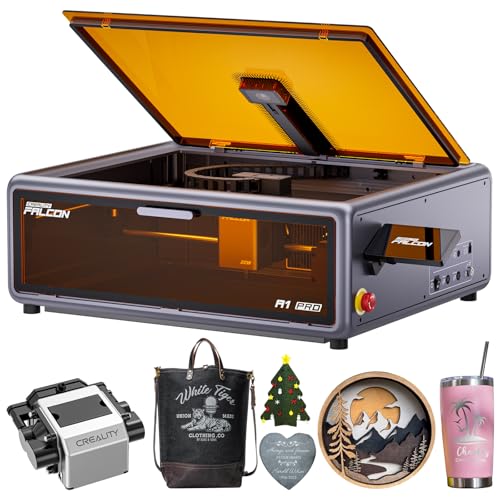
Creality Falcon A1 Pro 20W Enclosed Laser
Best for: standalone touchscreen control and enclosed desktop engraving
- Laser Power
- 20W (20000mW)
- Engraving Speed
- Up to 600 mm/s
- Form Factor
- Enclosed (Class 1)
- Cutting Capacity
- 10 mm basswood, 8 mm black acrylic
- Compatible Material
- Wood, Metal
- Features
- Enclosure, Air Assist, Camera, Touchscreen, Auto Focus
The Creality Falcon A1 Pro 20W Enclosed Engraver pairs a 20W laser output with a fully enclosed Class 1 safety housing. You get an integrated smart touchscreen that lets you reopen recent jobs without re-importing files, plus an HD camera and 3-second autofocus for material alignment. Running on a CoreXY system at up to 600 mm/s, it cuts up to 10 mm basswood. It suits makers seeking self-contained, screen-driven operation.
Pros
- Smart touchscreen interface with project history access and real-time previews
- CoreXY motion system delivering engraving speeds up to 600 mm/s
- Class 1 enclosed build with air assist, lid-open shutoff, and emergency stop
- HD camera with full-bed preview and ~3-second autofocus
Cons
- Optional 2W infrared module requires a separate purchase
- Cutting capacity tops out at 10 mm basswood and 8 mm black acrylic
Good fit if
- You want a standalone touchscreen to recall and start projects directly at the machine.
- You prioritize an enclosed Class 1 setup with built-in air assist and safety shutoffs.
- You need rapid material alignment using an HD camera and automatic focusing.
Skip if
- You need 1064nm infrared engraving capability included in the standard package.
- You frequently cut materials thicker than 10 mm and need higher wattage.
Verdict: Creality Falcon A1 Pro 20W Enclosed Engraver delivers responsive touchscreen operation alongside CoreXY speeds up to 600 mm/s and integrated safety features. It gives you dependable Class 1 enclosure protection and quick file access for daily engraving projects.

Creality Falcon A1C 5W Enclosed Engraver
Best for: compact, safety-focused desktop DIY projects
- Laser Power
- 5W
- Working Area
- 150 × 150 × 148 mm
- Engraving Speed
- 15,000 mm/min
- Form Factor
- Fully Enclosed (Class 1)
- Compatible Material
- Wood, Leather
- Features
- Camera, Auto Focus
The Creality Falcon A1C 5W is a compact, fully enclosed desktop laser engraver built for DIY projects. It features an FDA Class 1 safety enclosure, a 150 × 150 × 148 mm work area, and engraving speeds reaching up to 15,000 mm/min. With an integrated AI camera providing 0.1 mm positioning accuracy and an interchangeable platform compatible with other Falcon modules, you get a clean, adaptable setup for wood and leather crafts.
Pros
- Class 1 fully enclosed design for safe indoor desktop operation
- Built-in AI camera with 0.1 mm positioning accuracy and auto focus
- Engraving speeds reaching up to 15,000 mm/min
- Interchangeable laser platform compatible with 5W, 10W, and 1.2W modules
Cons
- Work area is limited to 150 × 150 × 148 mm
- Package includes only the base 5W laser module
- 5W output provides limited cutting depth compared to higher-wattage units
Good fit if
- You need a certified Class 1 enclosed machine for a home workspace or classroom.
- You prioritize automated positioning and camera alignment for small items like coasters and wallets.
- You plan to upgrade laser modules later using the interchangeable platform.
Skip if
- You need a working area larger than 150 × 150 mm.
- You require high-wattage laser power out of the box for deep cutting.
Verdict: Creality Falcon A1C 5W Enclosed Engraver provides a secure, fully enclosed creative station with automated camera alignment and modular expandability. It is a solid desktop choice when you want high-precision DIY engraving in a small footprint.

Creality Falcon2 Pro 60W Enclosed Laser Cutter
Best for: Heavy-duty cutting and high-volume workshop production
- Laser Power
- 60W (switchable 60W/40W/22W)
- Software Compatibility
- LightBurn, LaserGRBL
- Form Factor
- Fully Enclosed (Class 1)
- Compatible Material
- Wood, Metal, Acrylic, Leather
- Features
- Enclosure, Camera
- Dimensions
- 26 × 22.4 × 13 inches
View on Amazon: Creality Falcon2 Pro 60W Enclosed Laser Cutter
This fully enclosed Class 1 laser cutter brings heavy-duty output to the lineup with a switchable 60W, 40W, and 22W main beam paired with an integrated 1.6W secondary laser. It includes a built-in HD camera for live preview and positioning, integrated Air Assist, and compatibility with LightBurn and LaserGRBL. It suits you if you need commercial-grade cutting power alongside controlled settings for fine detailing on wood, acrylic, and leather.
Pros
- Switchable power output between 60W, 40W, and 22W plus an extra 1.6W laser
- Fully enclosed Class 1 safety housing with viewing window and exhaust management
- Built-in HD camera for material positioning and batch alignment
- Integrated Air Assist for reduced burn marks on cuts
- Works with both LightBurn and LaserGRBL software
Cons
- Large footprint measuring 26 inches long and 22.4 inches wide
- Heavier fully enclosed build is less portable than open-frame units
Good fit if
- You need heavy cutting performance with the option to dial down power for fine engraving
- You want an enclosed Class 1 setup with built-in smoke containment and safety monitoring
- You run batch jobs that benefit from an overhead camera and integrated Air Assist
Skip if
- You have limited workspace and need a compact desktop engraver
- You only engrave light materials and do not require high-wattage cutting
Verdict: Creality Falcon2 Pro 60W Enclosed Laser Cutter is the most powerful enclosed option on the list, giving you multi-wattage flexibility and camera-assisted alignment for demanding production runs.

Creality Falcon T1 20W Enclosed Fiber Laser
Best for: high-speed metal and jewelry marking
- Laser Type
- Fiber
- Laser Power
- 20W
- Engraving Speed
- 10,000mm/s
- Software Compatibility
- Falcon Design Space, LightBurn
- Form Factor
- Fully Enclosed
- Compatible Material
- Jewelry, Aluminum
The Creality Falcon T1 20W Fiber Laser Engraver is a fully enclosed Class 1 workstation designed for high-speed marking on metals and jewelry. It uses galvo technology to achieve engraving speeds up to 10,000 mm/s. The platform features tool-free module swapping in 15 seconds for future upgrades. If you need fast metal marking with LightBurn support and room to expand into other wavelengths, this machine suits your workshop.
Pros
- Engraving speeds reach up to 10,000 mm/s via galvo technology
- Tool-free module swaps in as little as 15 seconds
- Fully enclosed Class 1 safety system with auto focus and flame detection
- Compatible with both LightBurn and Falcon Design Space software
Cons
- Package includes only the 20W fiber head; additional modules require separate purchase
- Substantial bench footprint measuring 27.2 by 25.2 by 27.2 inches
Good fit if
- You prioritize rapid marking on metals such as stainless steel, brass, titanium, and aluminum.
- You want a fully enclosed Class 1 machine with built-in safety monitoring and touchscreen controls.
- You plan to expand into diode or UV engraving without buying a whole new machine.
Skip if
- You have tight workspace constraints that cannot accommodate a 27.2-inch cubical chassis.
- You only require basic surface cutting and engraving on wood or acrylic.
Verdict: Creality Falcon T1 20W Fiber Laser Engraver delivers specialized 10,000 mm/s metal marking inside an enclosed Class 1 safety chassis. It provides dedicated fiber capability while allowing you to swap in other laser modules as your projects evolve.
Specifications side by side
| Spec | Creality Falcon 10W Laser Engraver | Creality Falcon 5W Laser Engraver | Creality Falcon A1 10W Enclosed Engraver | Creality Falcon 10W Enclosed Laser Engraver | Creality Falcon A1 Pro 20W Enclosed Laser | Creality Falcon A1C 5W Enclosed Engraver | Creality Falcon2 Pro 60W Enclosed Laser Cutter | Creality Falcon T1 20W Enclosed Fiber Laser |
|---|---|---|---|---|---|---|---|---|
| Laser Type | not specified | not specified | not specified | not specified | not specified | not specified | not specified | Fiber |
| Laser Power | 10W | 5W | 10W (10000mW) | 10W | 20W (20000mW) | 5W | 60W (switchable 60W/40W/22W) | 20W |
| Working Area | 15.7" x 16.3" (400 x 415 mm) | 400 x 415 mm | 381 × 305mm | 150 × 150 × 148 mm | not specified | 150 × 150 × 148 mm | not specified | not specified |
| Engraving Speed | 10000mm/min | Up to 10,000 mm/min | 600mm/s | 15,000 mm/min | Up to 600 mm/s | 15,000 mm/min | not specified | 10,000mm/s |
| Software Compatibility | LightBurn, LaserGRBL | not specified | Falcon, LightBurn, LaserGRBL, Cutlabx | not specified | not specified | not specified | LightBurn, LaserGRBL | Falcon Design Space, LightBurn |
| Form Factor | not specified | not specified | Enclosed | Fully Enclosed (Class 1) | Enclosed (Class 1) | Fully Enclosed (Class 1) | Fully Enclosed (Class 1) | Fully Enclosed |
| Cutting Capacity | 12mm wood, 5mm black acrylic | not specified | not specified | not specified | 10 mm basswood, 8 mm black acrylic | not specified | not specified | not specified |
| Compatible Material | Wood, Metal, Acrylic, Leather | Wood, Acrylic, Leather, Glass | Wood, Metal | Wood, Acrylic, Leather | Wood, Metal | Wood, Leather | Wood, Metal, Acrylic, Leather | Jewelry, Aluminum |
| Features | not specified | not specified | Enclosure, Air Assist, Camera | Camera, Auto Focus | Enclosure, Air Assist, Camera, Touchscreen, Auto Focus | Camera, Auto Focus | Enclosure, Camera | not specified |
| Target Audience | not specified | not specified | not specified | not specified | not specified | DIY | not specified | not specified |
| Dimensions | 1 × 1 × 1 inches | 17.3 × 9.33 × 24.8 inches | not specified | 18.5 × 16.5 × 15.7 inches | 177 × 94.5 × 256 inches | 18.5 × 16.5 × 15.7 inches | 26 × 22.4 × 13 inches | 27.2 × 25.2 × 27.2 inches |
| Size | Falcon-10W | Falcon-5W | Creality Falcon A1 | not specified | not specified | not specified | not specified | not specified |
| Color | Falcon-10W | Falcon-5W | Gray | Purple Gray | Dark Gray | Purple Gray | Falcon2 Pro 60W | T1 Fiber 20W |
| Model | CR-Laser Falcon | CR-Laser Falcon | Creality Falcon A1 | Falcon A1C | Creality Falcon A1 | Falcon A1C | Falcon2 Pro 60W | Falcon T1 |
Creality Falcon Laser Engraver Specs
The Creality Falcon lineup separates models by laser type and enclosure design. You can choose between diode units like the Falcon 10W and 5W for general wood and acrylic work, or enclosed Class 1 systems like the A1 and A1C for safer desktop use. The Falcon A1 Pro 20W adds a touchscreen for standalone operation.
For specialized needs, the Falcon T1 20W Fiber Laser targets jewelry and aluminum marking with high-speed capabilities. The Falcon2 Pro 60W offers heavy-duty cutting power for production environments. You should match your choice to your material list and required safety features rather than just wattage.
Who Should Choose Creality Falcon
Creality Falcon suits makers who need versatile desktop engraving or specialized metal marking. The range spans from 5W open-frame units for light cutting to 20W enclosed models with touchscreens for standalone operation. You can choose between diode lasers for wood and acrylic or a fiber option for jewelry. The lineup covers small work envelopes up to 400 by 415 millimeters. However, none of these models support large-format industrial sheets or include rotary attachments in their listed features. This range is ideal for hobbyists and small workshops seeking safety and precision over high-volume production.
If you need smaller dimensions for mobile work, compare these unit specifications with the best portable laser printers.
How to choose the right creality falcon
-
Match power to material
Laser power determines what you can cut and how fast. The 5W models, such as the Falcon 5W, are ideal for detailed surface engraving on wood, leather, and glass. They handle light cutting well but struggle with thick materials. For deeper single-pass cuts in wood or acrylic, step up to the 10W options like the top-ranked Falcon 10W. If you need heavy-duty production cutting, the 60W Falcon2 Pro offers significant power. Choose lower wattage for precision details and higher wattage for speed and depth.
-
Check enclosure safety
Enclosed models provide Class 1 safety, which is crucial for home or office use. The Falcon A1 Pro and A1C keep you safe while allowing higher speeds. Open-frame units like the standard Falcon 10W require more caution and external ventilation. Enclosed units often include air assist to improve cut quality. If you work in a shared space, prioritize the fully enclosed chassis. This feature protects you from laser radiation and flying debris. It also contains smoke better than open designs, keeping your workspace cleaner during long engraving sessions.
-
Verify material compatibility
Not all models handle every material. The 10W open-frame unit supports wood, metal, acrylic, and leather. However, the enclosed Falcon A1 does not support acrylic cutting. If you need to cut clear or colored acrylic, avoid the A1. The fiber laser T1 is specialized for jewelry and aluminum marking. It cannot process wood or acrylic. Always check the compatible material list before buying. Ensure the laser type matches your primary projects. Mixing up diode and fiber capabilities can lead to poor results or damaged materials.
-
Consider workspace footprint
Physical dimensions matter for desk placement. The open-frame 5W model measures 17.3 by 9.33 inches. The enclosed A1C is slightly larger at 18.5 by 16.5 inches. The powerful Falcon2 Pro takes up more space at 26 by 22.4 inches. Smaller footprints fit standard desks better. Larger models require dedicated workbenches. Check your available space before ordering. The work area size also differs. The A1 has a smaller envelope of 381 by 305mm. Larger beds allow bigger projects without resizing your design.
-
Review control features
Control interfaces affect your workflow. The A1 Pro features a dedicated touchscreen for standalone operation. You can load files directly without a computer. Most other models rely on computer connection. Camera-assisted alignment helps with precision on the A1, A1C, and Falcon2 Pro. Auto-focus saves time when changing material thickness. Touchscreens offer quick access to settings. If you prefer minimal setup, the touchscreen model is best. For users who already use slicing software, camera alignment adds accuracy without extra hardware costs.
Frequently asked questions
What is the difference between the Creality Falcon 10W and 5W models?
The primary difference is laser power, which affects cutting depth and speed. The 10W model, ranked best overall, delivers a balanced output for single-pass cutting and fine wood engraving. The 5W model, ranked best budget, offers a precise 0.06 mm spot for detailed surface engraving. Both share a 400 by 415 mm work area, making them suitable for everyday maker tasks.
Which Creality Falcon laser engraver is best for metal marking?
The Creality Falcon T1 20W Fiber Laser is the best choice for metal. It uses specialized fiber technology to deliver high-speed marking at 10,000 mm/s. It is designed for jewelry and aluminum marking inside a safe, enclosed Class 1 chassis. Other models in the lineup are primarily diode lasers suited for wood, acrylic, and leather.
Does the Creality Falcon A1 Pro have a touchscreen?
Yes, the Creality Falcon A1 Pro 20W includes a responsive touchscreen. It is ranked best for standalone operation, allowing you to access files directly without a computer. The unit also features CoreXY speeds up to 600 mm/s and integrated Class 1 enclosure protection for safe desktop engraving projects.
What is the working area of the Creality Falcon A1?
The Creality Falcon A1 10W Enclosed Engraver has a restricted working envelope of 381 by 305 mm. While it offers fast processing speeds and camera-assisted alignment, its smaller footprint limits large projects. Note that acrylic cutting is not supported on this specific enclosed model.
Can I use the Creality Falcon A1C for DIY projects?
Yes, the Creality Falcon A1C 5W is ranked best for DIY. It provides a secure, fully enclosed creative station with automated camera alignment. Its compact desktop format and modular expandability make it a solid choice for high-precision projects in a small footprint. It supports wood and leather materials.
Is the Creality Falcon2 Pro suitable for heavy-duty cutting?
Yes, the Creality Falcon2 Pro 60W is the most powerful enclosed option for heavy-duty cutting. It offers multi-wattage flexibility and camera-assisted alignment for demanding production runs. The unit is compatible with LightBurn software and supports wood, metal, acrylic, and leather materials.
What safety features do the enclosed Creality Falcon models have?
Enclosed models like the A1, A1C, and A1 Pro provide Class 1 enclosure protection. This design ensures safe desktop operation by containing laser radiation. Many also include air assist and camera systems for alignment and auto-focus, enhancing precision and safety during use.