KENTOKTOOL Laser Engraver Alternatives: 6 Similar Picks Compared
As an Amazon Associate we earn from qualifying purchases. Links on this page are affiliate links.
The KENTOKTOOL LE400PRO offers a 400 x 400 mm working area and 5.5W laser power for thick material cutting. You might seek kentoktool laser engraver alternatives if you need a smaller footprint, higher speed, or different software integration. This list compares 6 similar picks based on overlapping specifications. We focus on practical differences in laser output, bed size, and cutting capacity to help you choose the right tool.
Some users prefer higher wattage for faster processing, while others prioritize portability with foldable designs. The alternatives here range from compact 3W units to high-speed 7W desktop models. Each option shares core traits with the KENTOKTOOL, such as diode laser technology and compatibility with standard engraving software. You will find options tailored for precise detail work or larger surface engraving. We evaluated these picks strictly by their published specs to ensure you get accurate performance data for your specific project needs.
Our top pick: KENTOKTOOL 5.5W Laser Engraver with 400x400mm Bed.
How these alternatives compare
Carverall 7W Laser Engraver
The Carverall K15 Pro offers 7W of laser power, which is higher than the KENTOKTOOL’s 5.5W. This extra power allows for faster cutting on thicker materials. It is smaller at 13.4 by 17.5 inches, making it better for tight spaces. It includes app control for easier setup. You should choose this if you need more power and wireless convenience. It sacrifices the large 400x400mm bed size of the KENTOKTOOL. It is ideal for beginners who prioritize cutting speed over workspace area. The silver finish and compact design suit users with limited desk space.
Artilume Foldable 3000mW Laser Engraver
The Artilume T1-P is a foldable engraver with 3W power. It is much weaker than the KENTOKTOOL’s 5.5W laser. It weighs only 3 pounds and measures 14.2 by 14.5 inches. This portability is its main advantage. It is designed for detailed engraving on thin materials like wood and leather. It cannot cut thick wood or acrylic like the KENTOKTOOL. You should pick this if you need a portable unit for small projects. It gives up cutting capacity and large workspace for easy storage and transport. It is best for beginners who value compactness and precision over raw power.
Woxcker 5.5W Diode Laser Engraver
The Woxcker L2 features a 300x300mm working area, which is smaller than the KENTOKTOOL’s 400x400mm bed. It has 5.5W laser power, matching the KENTOKTOOL. However, it offers a much faster engraving speed of 20,000mm/min. This speed is significantly higher than the KENTOKTOOL’s 6000mm/min. It is ideal for surface engraving tasks where speed matters more than area. You should choose this if you prioritize fast processing over large workspace. It sacrifices the larger bed size for quicker operation. The black finish and 3.08-pound weight make it a solid desktop option.
Artilume 7W Desktop Laser Engraver
The Artilume U1 provides 7W of laser power, exceeding the KENTOKTOOL’s 5.5W. It has a desktop form factor with a 11.4 by 13.4-inch footprint. This is much smaller than the KENTOKTOOL’s 24.3-inch width. It is designed for precise engraving on wood and leather. It lacks the large cutting capacity of the KENTOKTOOL. You should pick this if you need higher power in a compact package. It gives up the 400x400mm workspace for a smaller, easier-to-manage unit. It is best for beginners who want precision and power without a large machine. The 3-pound weight aids in portability.
Ortur Laser Master 3 LE 5W Laser Engraver
The Ortur Laser Master 3 LE has 5W of laser power, slightly less than the KENTOKTOOL’s 5.5W. It features app control for wireless convenience. Its dimensions are 12 by 26 inches, offering a different workspace shape. It is designed for fine detail engraving on wood and leather. It does not match the KENTOKTOOL’s cutting capacity for thick materials. You should choose this if you value app integration and precision over raw power. It sacrifices the larger bed and higher wattage for easier setup and detailed work. The 4.5-inch height makes it a low-profile desktop option. It suits users who prioritize software convenience.
Comgrow Z1 5W Laser Engraver
The Comgrow Z1 has 5W of laser power, which is lower than the KENTOKTOOL’s 5.5W. It has a square 15.7 by 15.7-inch working area. This is significantly smaller than the KENTOKTOOL’s 400x400mm bed. It weighs 11.8 pounds, making it heavier and more stable. It is designed for precise engraving on smaller materials. You should pick this if you need a stable unit for detailed work. It gives up the large workspace and higher power for stability and software flexibility. It is ideal for beginners who value precision over size. The black finish and square format suit users with limited space.
Quick picks
Our 7 picks

KENTOKTOOL 5.5W Laser Engraver with 400x400mm Bed
Best for: Beginners needing a large 400x400mm bed
- Laser Power
- 5.5W (5500mW)
- Working Area
- 400 x 400 mm
- Engraving Speed
- 6000mm/min
- Software Compatibility
- GRBL, LightBurn
- Cutting Capacity
- 8mm wood, 5mm black acrylic
- Compatible Material
- Wood, Acrylic, Leather
View on Amazon: KENTOKTOOL 5.5W Laser Engraver with 400x400mm Bed
The KENTOKTOOL LE400PRO is a 5.5W laser engraver with a 400 x 400 mm working area. It features an ultra-fine 0.08mm focus and reaches speeds of 6000mm/min. The all-metal frame supports GRBL and LightBurn software. This unit suits beginners who need a large bed for wood, acrylic, and glass projects.
Pros
- 5.5W laser power cuts 8mm wood
- 400 x 400 mm large working area
- 0.08mm precision focus for fine details
- Supports LightBurn and GRBL software
Cons
- No app control for mobile management
- No USB connectivity listed for direct transfers
- Requires manual focus adjustment via knob
Good fit if
- You need a 400 x 400 mm bed
- You want to cut 8mm thick wood
- You prefer LightBurn software compatibility
Skip if
- You require wireless app control
- You need to engrave stainless steel
- You want a foldable design
Verdict: The KENTOKTOOL LE400PRO 5.5W 400x400mm offers a large 400 x 400 mm bed and 5.5W power for thick cuts. It fits beginners who prioritize a spacious workspace and standard software over wireless features.

Carverall 7W Laser Engraver
Best for: Beginners needing 7W power and app control
- Laser Type
- Blue diode
- Laser Power
- 7W
- Working Area
- 200 x 300 mm (7.87 x 11.81 in)
- Software Compatibility
- CutLabX, LightBurn, LaserGRBL
- Cutting Capacity
- 8 mm wood, 5 mm acrylic
- Compatible Material
- Wood, Metal, Acrylic, Leather, Silver
The Carverall K15 Pro is a 7W blue diode laser engraver with a 200 x 300 mm working area. It cuts up to 8 mm wood and 5 mm acrylic. The unit features 0.01mm precision and a visible blue laser for alignment. You can control it via the CutLabX app or LightBurn. It includes a starter kit and tool-free assembly. This model suits beginners needing reliable power and a compact footprint.
Pros
- 7W laser power for 8mm wood cutting
- 0.01mm repeatable positioning precision
- Visible blue diode laser for alignment
- CutLabX app with WiFi control
- 200 x 300 mm working area
Cons
- 7W power is lower than the 50W LE400PRO
- No remote control listed in specifications
- Limited to 200 x 300 mm area
Good fit if
- You want 7W power for thicker materials
- You prefer app-based phone control
- You need a compact 200 x 300 mm area
Skip if
- You require 50W cutting speed
- You need a working area larger than 300 mm
- You prefer a standard red laser dot
Verdict: Carverall K15 Pro 7W Blue Diode Engraver fits users who need 7W power and app control for small batches. It is not for those requiring high-speed 50W cutting.

Artilume Foldable 3000mW Laser Engraver
Best for: Small detailed engraving on thin materials
- Laser Type
- Diode
- Laser Power
- 3000mW
- Working Area
- 200 x 150 mm (8 x 6 in)
- Engraving Speed
- Up to 10,000 mm/min
- Compatible Material
- Wood, Acrylic, Leather
- Target Audience
- Beginners
The Artilume T1-P offers a 200 x 150 mm working area with 3000 mW diode laser power. It features 0.01 mm precision and speeds up to 10,000 mm/min. The foldable design makes it portable and easy to store. Smart app control allows wireless connection for design uploads. It includes a protective cover that acts as an elevation stand for taller items.
Pros
- Foldable design for easy storage and portability
- 0.01 mm precision for intricate details
- Smart app control via Wi-Fi
- Protective cover doubles as elevation stand
Cons
- Smaller 200 x 150 mm working area
- 3000 mW power limits cutting thick materials
- Wi-Fi only connection without Bluetooth option
Good fit if
- You need a portable engraver for small projects
- You want precise engraving on thin materials
- You prefer wireless app control over cables
Skip if
- You require a large working area for big items
- You need to cut thick wood or acrylic
- You prefer direct USB connection without app
Verdict: Artilume T1-P 3W Foldable Engraver suits beginners who need precision on small items and value portability. It is ideal for detailed work on thin materials rather than heavy-duty cutting.

Woxcker 5.5W Diode Laser Engraver
Best for: Large workspace surface engraving
- Laser Type
- Diode
- Laser Power
- 5.5W (5500mW)
- Working Area
- 300 x 300 mm
- Engraving Speed
- 20,000 mm/min
- Software Compatibility
- LightBurn, LaserGRBL, Cutlabx
- Form Factor
- Class 1
The Woxcker L2 is a Class 1 diode laser engraver with a 5.5W output and a 300 x 300 mm working area. It reaches speeds of 20,000 mm/min and offers 0.01mm precision. The unit supports LightBurn and LaserGRBL software. It includes Wi-Fi, USB, and app control. This model suits beginners who need a large workspace and fast engraving speeds without complex assembly.
Pros
- 300 x 300 mm large working area
- 20,000 mm/min engraving speed
- 0.01mm high precision focus
- Class 1 safety enclosure
- LightBurn and LaserGRBL compatibility
Cons
- Lower 5.5W power compared to 50W competitors
- Heavier build at 3.08 pounds
- Smaller laser output than 5000mW alternatives
Good fit if
- You need a large 300x300mm workspace
- You want fast 20,000 mm/min speeds
- You prefer Class 1 safety standards
Skip if
- You require high-power 50W cutting
- You need deep material penetration
- You prefer a lighter portable unit
Verdict: Woxcker L2 5.5W 300x300mm Engraver fits beginners who prioritize a large 300 x 300 mm workspace and fast 20,000 mm/min speeds over raw cutting power. It delivers precise results for surface engraving tasks.

Artilume 7W Desktop Laser Engraver
Best for: detailed engraving on wood and leather
- Laser Type
- Diode
- Laser Power
- 7000mW
- Working Area
- 150 x 200 mm (6 x 8 in)
- Software Compatibility
- LaserGRBL, LightBurn, CutLabX
- Compatible Material
- Wood, Acrylic, Leather
- Target Audience
- Beginners
The Artilume U1 is a 7W diode laser engraver designed for desktop use. It offers a 150 x 200 mm working area and 0.01 mm precision. The unit arrives pre-assembled and calibrated for immediate use. You can connect via USB, TF card, or WiFi. It supports LightBurn and LaserGRBL software. This model suits beginners who want detailed engraving on wood, leather, or acrylic without complex setup.
Pros
- 7000mW diode laser power for cutting and engraving
- 0.01mm precision with ultra-fine compressed spot technology
- Pre-assembled and calibrated for easy start
- WiFi, USB, and TF card connectivity options
Cons
- 150 x 200 mm working area is smaller than many competitors
- Diode laser cannot engrave metals like stainless steel
- No built-in display mentioned in specifications
Good fit if
- You need high precision for intricate designs
- You want a pre-assembled desktop unit
- You prefer WiFi connectivity for file transfer
Skip if
- You require a larger working area than 150 x 200 mm
- You need to engrave metal surfaces
- You prefer a machine with a built-in display
Verdict: Artilume U1 7W Desktop Laser Engraver fits beginners who prioritize precision and ease of setup over large workspace size. It is ideal for detailed work on non-metal materials.

Ortur Laser Master 3 LE 5W Laser Engraver
Best for: fine detail engraving and app control
- Laser Type
- Diode
- Laser Power
- 5,000mW
- Working Area
- 400 x 400 mm (15.7 x 15.7 in)
- Engraving Speed
- Up to 15,000 mm/min
- Software Compatibility
- LaserGRBL, LightBurn, ORTUR APP
- Cutting Capacity
- 5 mm plywood, 5 mm black acrylic
The Ortur Laser Master 3 LE offers a 5,000mW diode laser with a 400 x 400 mm work area. It achieves speeds up to 15,000 mm/min and 0.01 mm accuracy. You can control it via the ORTUR APP, LightBurn, or LaserGRBL. The system includes six safety protections and silent TMC2209 drivers. This machine suits users needing fine detail engraving on wood, acrylic, and leather.
Pros
- 5,000mW laser cuts 5 mm plywood in one pass
- 400 x 400 mm large working area
- 0.01 mm accuracy with 0.09 x 0.15 mm spot
- Built-in WiFi and ORTUR APP control
- Six-layer safety protection system
Cons
- 5W power limits cutting depth compared to 50W alternatives
- No physical display panel for manual operation
- Requires software like LightBurn for full functionality
Good fit if
- You need high precision for fine detail work
- You want wireless control via a smartphone app
- You require a large 400 x 400 mm workspace
Skip if
- You need to cut thick wood in a single pass
- You prefer a machine with a built-in screen
- You want to engrave metal surfaces
Verdict: Ortur Laser Master 3 LE 5W delivers precise engraving and app control for detailed projects. It fits users who prioritize accuracy and wireless convenience over raw cutting power.
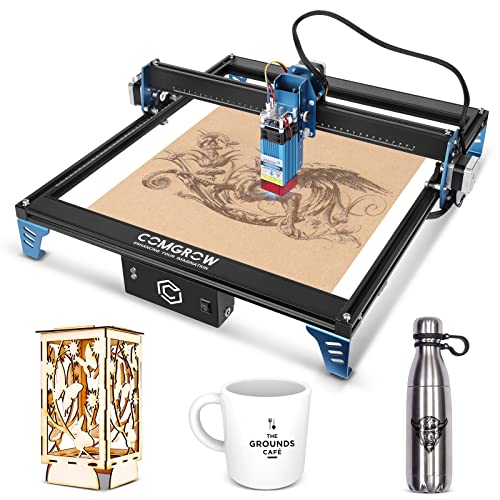
Comgrow Z1 5W Laser Engraver
Best for: precise engraving on smaller materials
- Laser Power
- 5000mW
- Working Area
- 15.7"x15.7"
- Engraving Speed
- 10000mm/min
- Software Compatibility
- LightBurn, LaserGRBL
- Cutting Capacity
- 5mm plywood
- Compatible Material
- Wood, Metal, Acrylic, Leather, Glass
The Comgrow Z1 delivers 5000mW of laser power with a 15.7 by 15.7 inch working area. It supports an engraving speed of 10000mm/min and cuts up to 5mm plywood. You get dual Y-axis motors for stability and compatibility with LightBurn or LaserGRBL. The unit weighs 11.8 pounds and connects via Wi-Fi, USB, or SD card. It suits users needing precise marking on wood, metal, or acrylic.
Pros
- 5000mW laser power for cutting 5mm plywood
- 15.7 x 15.7 inch working area
- Dual Y-axis motor for improved stability
- Compatible with LightBurn and LaserGRBL software
Cons
- Smaller working area than 300x300mm competitors
- No integrated app control mentioned in data
- Heavier build at 11.8 pounds
Good fit if
- You need precise engraving on small to medium projects
- You prefer desktop stability over portability
- You want compatibility with LightBurn software
Skip if
- You require a large format working area
- You need app-based control for convenience
- You prefer lightweight portable designs
Verdict: Comgrow Z1 5W Laser Engraver fits users who prioritize stability and software flexibility for detailed work on smaller materials. It suits those who value precise cutting capabilities over large format coverage.
Specifications side by side
| Spec | KENTOKTOOL 5.5W Laser Engraver with 400x400mm Bed | Carverall 7W Laser Engraver | Artilume Foldable 3000mW Laser Engraver | Woxcker 5.5W Diode Laser Engraver | Artilume 7W Desktop Laser Engraver | Ortur Laser Master 3 LE 5W Laser Engraver | Comgrow Z1 5W Laser Engraver |
|---|---|---|---|---|---|---|---|
| Laser Type | not specified | Blue diode | Diode | Diode | Diode | Diode | not specified |
| Laser Power | 5.5W (5500mW) | 7W | 3000mW | 5.5W (5500mW) | 7000mW | 5,000mW | 5000mW |
| Working Area | 400 x 400 mm | 200 x 300 mm (7.87 x 11.81 in) | 200 x 150 mm (8 x 6 in) | 300 x 300 mm | 150 x 200 mm (6 x 8 in) | 400 x 400 mm (15.7 x 15.7 in) | 15.7"x15.7" |
| Engraving Speed | 6000mm/min | not specified | Up to 10,000 mm/min | 20,000 mm/min | not specified | Up to 15,000 mm/min | 10000mm/min |
| Software Compatibility | GRBL, LightBurn | CutLabX, LightBurn, LaserGRBL | not specified | LightBurn, LaserGRBL, Cutlabx | LaserGRBL, LightBurn, CutLabX | LaserGRBL, LightBurn, ORTUR APP | LightBurn, LaserGRBL |
| Form Factor | not specified | not specified | not specified | Class 1 | not specified | not specified | not specified |
| Cutting Capacity | 8mm wood, 5mm black acrylic | 8 mm wood, 5 mm acrylic | not specified | not specified | not specified | 5 mm plywood, 5 mm black acrylic | 5mm plywood |
| Compatible Material | Wood, Acrylic, Leather | Wood, Metal, Acrylic, Leather, Silver | Wood, Acrylic, Leather | Wood, Metal, Acrylic, Leather, Glass | Wood, Acrylic, Leather | Wood, Acrylic, Leather | Wood, Metal, Acrylic, Leather, Glass |
| Target Audience | Beginners | DIY, Beginners | Beginners | Beginners | Beginners | not specified | not specified |
| Size | 400mm Bed Size | 7W | T1-P 3000mW | 300×300mm 5W | 7W | not specified | 5W |
| Dimensions | 22.7 × 24.3 × 8.32 inches | 17.5 × 13.4 × 0.1 inches | 14.5 × 14.2 × 5.79 inches | 20.7 × 18.5 × 6.6 inches | 13.4 × 11.4 × 5.8 inches | 26 × 12 × 4.5 inches | not specified |
| Weight | not specified | not specified | 3 pounds | 3.08 pounds | 3 pounds | not specified | 11.8 pounds |
| Length | not specified | not specified | not specified | not specified | not specified | not specified | 15.7 inches |
| Width | not specified | not specified | not specified | not specified | not specified | not specified | 15.7 inches |
| Color | Black | Silver | BLUE-3W Full Kit | black | Blue | 5W LU3-5 | Black |
| Model | LE400 PRO | K15 Pro | T1 | L2 5.5W | U1 | Ortur OLM3 LE | Z1 5W |
If you also need standard document printing, review specs for lexmark ms531dw monochrome laser alternatives.
Frequently asked questions
Which alternative offers the largest engraving area?
The KENTOKTOOL LE400PRO provides the largest working area with a 400 x 400 mm bed. This spacious surface suits beginners who need room for bigger projects. Other options like the Woxcker L2 offer a 300 x 300 mm area, while the Artilume T1 is significantly smaller for portable use.
Can I engrave metal with these machines?
Yes, several models support metal engraving. The Carverall K15 Pro and Woxcker L2 both list metal as a compatible material. The Comgrow Z1 also handles metal, glass, and other surfaces. The KENTOKTOOL LE400PRO and Artilume T1 are limited to wood, acrylic, and leather.
Which laser engraver is best for portability?
The Artilume T1-P is designed for portability with a foldable form factor. It weighs only 3 pounds and measures 14.2 by 14.5 inches. This compact size makes it ideal for detailed work on thin materials where space is limited or you need to move the device often.
Do any alternatives offer app control?
The Carverall K15 Pro and Ortur Laser Master 3 LE both feature app control. This allows you to manage engraving tasks wirelessly from a mobile device. Other models like the KENTOKTOOL LE400PRO rely on standard software integration without specific wireless app features mentioned in their specifications.
Which model has the highest laser power?
The Carverall K15 Pro and Artilume U1 both offer 7W of laser power. This is higher than the 5W or 5.5W output found in the KENTOKTOOL, Woxcker, Ortur, and Comgrow models. Higher wattage generally supports faster cutting on thicker materials compared to the lower power alternatives.
Is there a fast engraving speed option?
The Woxcker L2 delivers fast speeds up to 20,000 mm/min. This makes it suitable for surface engraving tasks where speed is a priority. While other models focus on precision or power, the Woxcker emphasizes rapid processing for detailed work on wood, metal, acrylic, leather, and glass.
Which engraver is best for small, detailed projects?
The Artilume U1 and T1 are ideal for detailed work. The U1 is a desktop unit focused on precision for wood and leather. The T1 is foldable and suited for small items. Both prioritize accuracy over large workspace size, making them better than the larger bed alternatives for intricate designs.