6 Best Alternatives to the Creality Falcon A1C 10W AI Laser Engraver (2026)
As an Amazon Associate we earn from qualifying purchases. Links on this page are affiliate links.
You may be looking for creality falcon a1c 10w AI laser engraver alternatives if its specific feature set does not match your workflow. The original model excels in safety and precision with its Class 1 enclosed design and AI-assisted camera focus. It offers a compact 150 × 150 mm working area and fast 15,000 mm/min engraving speeds. These specs make it ideal for detailed work on wood, acrylic, and leather in small spaces.
However, you might need more power for thicker materials, a larger cutting area, or a different form factor. Some users prefer standalone touchscreen operation or dual-laser capabilities for marking bare metal. The 6 options listed here were chosen because their published specifications overlap with the Falcon A1C. We compared laser power, working dimensions, and key features like air assist or camera systems. This list helps you find a machine that fits your specific material needs and workspace constraints without relying on personal testing or subjective opinions.
Our top pick: Creality Falcon 10W Enclosed Laser Engraver.
How the alternatives compare to the original
Creality Falcon2 Pro S 40W Enclosed Laser Cutter
The Creality Falcon2 Pro S 40W trades the original’s 10W power for 40W diode output, enabling thick material cutting rather than just surface engraving. It shares the enclosed safety design and auto-focus camera but measures 22 by 26 inches, making it significantly larger and heavier at 50.5 pounds. You gain cutting depth for production work but lose the compact footprint ideal for small desks. Pick this if you need to slice through thicker wood or acrylic sheets and have the space for a heavier, more powerful machine.
WECREAT Vision 20W Enclosed Laser Engraver
The WECREAT Vision 20W offers double the laser power of the original at 20W, improving its ability to cut through thicker wood and acrylic. It retains the enclosed safety feature and built-in camera but lacks the auto-focus mechanism found in the A1C. Its working area is comparable, yet the unit is slightly wider and deeper. You get more cutting power and metal marking capability but sacrifice the automated focusing speed. Choose this alternative if you prioritize raw cutting power and metal compatibility over the convenience of auto-adjustment.
Carverall Dual Laser Desktop Engraver
The Carverall Dual Laser Desktop Engraver uses a 7W laser but adds a second laser source to mark bare metal, which the original cannot do. It is much smaller at 12 by 10 inches, fitting easily into tight spaces. While it includes a camera for positioning, it lacks the high-speed motion system and auto-focus of the A1C. You give up engraving speed and large format capacity for dual-material versatility in a tiny footprint. Select this option if you need to engrave both wood and metal in a very small workspace.
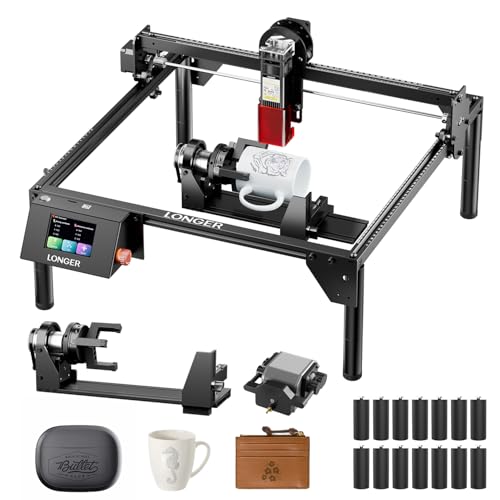
Longer RAY5 10W with Air Assist & Rotary
The Longer RAY5 10W matches the original’s power but features a significantly larger working area of 400 by 401 mm for large-format projects. It includes air assist for cleaner cuts but omits the built-in camera and auto-focus system. The design prioritizes offline connectivity and high-speed output over automated setup features. You gain substantial workspace for bigger signs or panels but lose the AI-assisted precision and quick positioning of the A1C. Opt for this model if you need to engrave large items and prefer manual focus control.
Ortur R2 10W Enclosed Laser Engraver
The Ortur R2 10W Enclosed Laser Engraver offers a standalone touchscreen interface, allowing operation without a connected computer, which the original lacks. It shares the 10W power level and enclosed safety design but features a smaller working area. The unit includes a camera for positioning but relies on the touchscreen for control rather than software automation. You gain the convenience of standalone operation and a dedicated display but lose the AI workflow features and larger workspace. Choose this if you want a simple, self-contained desktop engraver for small tasks.
Creality Falcon2 Pro S 40W Enclosed Laser
The Creality Falcon2 Pro S 40W (second entry) provides 40W of cutting power in an enclosed design similar to the original but is much larger at 21.7 by 24.4 inches. It includes air assist and a camera for precision but weighs significantly more. You get high-speed cutting capabilities for thick materials but sacrifice the compact, portable nature of the A1C. This model fits users who need serious cutting power and do not mind a heavier, bulkier machine dedicated to production work rather than casual desktop crafting.
Quick picks
Our 7 picks

Creality Falcon 10W Enclosed Laser Engraver
Best for: Compact desktop engraving with AI precision
- Laser Power
- 10W
- Working Area
- 150 × 150 × 148 mm
- Engraving Speed
- 15,000 mm/min
- Form Factor
- Fully Enclosed (Class 1)
- Compatible Material
- Wood, Acrylic, Leather
- Features
- Camera, Auto Focus
The Creality Falcon A1C is a Class 1 enclosed laser engraver with a 10W diode laser. It features a 150 by 150 by 148 mm work area and engraving speeds up to 15,000 mm/min. An integrated AI camera with auto-focus helps you position designs with 0.1 mm accuracy. This compact desktop unit suits beginners and experienced creators who want fast, precise results on wood, leather, and acrylic.
Pros
- 10W laser power for efficient cutting and engraving
- Built-in AI HD camera with auto-focus
- Fast engraving speed up to 15,000 mm/min
- Fully enclosed Class 1 safety design
- Interchangeable laser platform for 5W, 10W, and 1.2W modules
Cons
- Smaller 150 by 150 mm work area limits large projects
- Interchangeable laser modules sold separately
- No mention of rotary attachment included in bundle
Good fit if
- You need a safe, enclosed machine for home or classroom use
- You value fast setup and precise positioning with AI camera
- You want to switch laser power levels for different materials
Skip if
- You require a large work area over 150 mm
- You need a machine with a larger cutting capacity
- You prefer a fully assembled unit with all accessories included
Verdict: Creality Falcon A1C 10W AI Laser Engraver is ideal for users who prioritize safety and precision in a compact footprint. It fits makers who want to engrave detailed gifts and signs without sacrificing speed or setup time.

Creality Falcon2 Pro S 40W Enclosed Laser Cutter
Best for: Thick material cutting and batch work
- Laser Type
- Diode
- Laser Power
- 40W
- Engraving Speed
- 600mm/s
- Form Factor
- Fully Enclosed
- Cutting Capacity
- 20mm basswood, 30mm black acrylic
- Compatible Material
- Wood, Acrylic
View on Amazon: Creality Falcon2 Pro S 40W Enclosed Laser Cutter
The Creality Falcon2 Pro S 40W is a fully enclosed desktop laser with 40W optical output. It cuts 20mm basswood and 30mm black acrylic in a single pass. The unit includes a built-in camera for intelligent auto focus and positioning. Air assist and a debris drawer are standard. This machine suits professional makers needing high-speed batch production in a safe, Class 1 enclosure.
Pros
- 40W diode laser for deep cutting
- Fully enclosed Class 1 design
- Built-in camera with auto focus
- Air assist included
Cons
- Heavier build at 50.5 pounds
- Larger footprint than open-frame models
- Requires 10-minute setup
Good fit if
- You need to cut thick wood or acrylic
- You want a safe enclosed workspace
- You value fast batch processing
Skip if
- You need to engrave metal directly
- You have limited floor space
- You want a lightweight portable unit
Verdict: The Creality Falcon2 Pro S 40W delivers serious cutting power for thick materials in a safe, enclosed design. It fits makers who need reliable, high-speed production without manual focus adjustments.

WECREAT Vision 20W Enclosed Laser Engraver
Best for: Thick wood cutting and safety
- Laser Type
- Diode
- Laser Power
- 20W (20,000mW)
- Engraving Speed
- 600mm/s
- Software Compatibility
- Proprietary software, Lightburn
- Form Factor
- Fully enclosed (FDA Class 1)
- Cutting Capacity
- 10mm wood, 8mm opaque black acrylic
The WECREAT Vision 20W is a fully enclosed diode laser with 20,000mW output. It cuts 10mm wood and 8mm black acrylic. The auto-lifting bed handles materials from 1mm to 140mm. A built-in HD camera and Quick View Matrix simplify setup. It runs on proprietary software or Lightburn. This machine suits users who need high power in a safe, desktop form factor.
Pros
- 20W laser power for fast cutting
- Auto-lifting bed for varied material heights
- Fully enclosed Class 1 safety design
- Built-in HD camera for precise positioning
Cons
- Proprietary software included
- Basic Pack lacks rotary attachment
- No mention of mobile app support
Good fit if
- You need to cut thick wood quickly
- You want a safe enclosed workspace
- You engrave materials of different heights
Skip if
- You require a rotary attachment included
- You prefer third-party software only
- You need to engrave on curved surfaces
Verdict: The WECREAT Vision 20W Laser Engraver delivers high power in a safe enclosure. It fits users who cut thick materials and value auto-lifting convenience.

Carverall Dual Laser Desktop Engraver
Best for: Dual material marking in small spaces
- Laser Type
- Diode (455nm), Infrared (1064nm)
- Laser Power
- 7W Diode, 1.2W IR
- Working Area
- 3.94 x 3.94 inches
- Software Compatibility
- CutLabX, LightBurn, LaserGRBL
- Form Factor
- Fully enclosed Class 1
- Cutting Capacity
- 3mm or less beech plywood
The Carverall A1 Pro combines a 7W blue diode laser and a 1.2W infrared module in one enclosed Class 1 unit. It features a 3.94 x 3.94 inch work area and an HD camera for precise alignment. You can switch between wood engraving and bare metal marking by swapping heads manually. The compact design includes air assist and supports offline batch jobs via TF card.
Pros
- Dual 7W diode and 1.2W infrared laser heads
- Class 1 enclosed safety design with auto-stop
- HD camera with preloaded alignment file
- Compatible with LightBurn and LaserGRBL software
Cons
- Small 3.94 x 3.94 inch working area
- Manual head swapping required for material changes
- Limited cutting capacity for 3mm beech plywood
Good fit if
- You need to mark bare metals like stainless steel
- You want a Class 1 enclosed desktop machine
- You prefer offline batch processing via TF card
Skip if
- You require a large working area for big projects
- You want automatic head switching without manual effort
- You need to cut materials thicker than 3mm
Verdict: Carverall A1 Pro Dual Laser is a practical choice for makers who need to engrave both wood and bare metal without buying two separate devices. It suits small-batch crafters who value safety and precision over large workspace dimensions.
Longer RAY5 10W with Air Assist & Rotary
Best for: large format cutting and multi-machine setups
- Laser Power
- 10W
- Working Area
- 400×400mm
- Engraving Speed
- Up to 10,000 mm/min
- Software Compatibility
- LaserGRBL, LightBurn
- Cutting Capacity
- 20mm solid wood, 30mm acrylic
- Compatible Material
- Wood, Acrylic, Leather
The Longer RAY5 delivers 10W of laser power with a 400×400mm working area. It reaches speeds up to 10,000 mm/min and cuts 20mm solid wood or 30mm acrylic. You get multi-device control for parallel work and offline operation via USB, TF card, or WiFi. The bundle includes air assist and a rotary roller for cylindrical items.
Pros
- 10W laser output for fast engraving
- 400×400mm large working area
- Supports multi-machine control
- Includes 3-in-1 rotary roller
- Adjustable air assist pump
Cons
- Requires assembly
- No built-in camera for AI tracking
- Touchscreen only, no physical emergency stop visible in data
Good fit if
- You need to engrave large formats
- You want to cut thick wood
- You require offline operation
Skip if
- You need AI camera tracking
- You want a pre-assembled unit
- You prefer a smaller footprint
Verdict: The Longer RAY5 10W Desktop Engraver fits users who need large-format cutting and multi-machine setups. It suits those who value offline connectivity and high-speed output over automated camera features.

Ortur R2 10W Enclosed Laser Engraver
Best for: compact standalone desktop engraving and marking
- Laser Power
- 10W
- Working Area
- 300 x 210 mm (11.8" x 8.3")
- Engraving Speed
- Up to 20,000 mm/min (333 mm/s)
- Form Factor
- Fully Enclosed (Class 1)
- Compatible Material
- Wood, Metal, Acrylic, Leather
- Features
- Enclosure, Camera, Touchscreen
The Ortur R2 provides a 10W diode laser inside a fully enclosed Class 1 metal-and-acrylic housing. You can align graphics using its integrated HD camera and run jobs without a computer via the built-in touchscreen and TF card slot. Its 300 by 210 mm work area and 20,000 mm/min speed suit tabletop crafting.
Pros
- Fully enclosed Class 1 body contains laser light for desk use
- Built-in touchscreen and TF card slot allow offline use without a PC
- Integrated HD camera provides live material alignment
- Engraving speeds reach up to 20,000 mm/min
Cons
- 300 by 210 mm work area restricts maximum material size
- 10W output cuts slower on thick materials than higher-wattage units
Good fit if
- You want an enclosed Class 1 machine for home workshop safety.
- You prefer running jobs directly from a touchscreen without connecting a computer.
- You engrave small items like coasters, tags, and keychains.
Skip if
- You need a work bed larger than 300 by 210 mm.
- You require more than 10W of optical power for heavy cutting tasks.
Verdict: Ortur R2 10W Enclosed Laser Engraver suits home makers who require a safe Class 1 enclosure and standalone touchscreen operation for small-format engraving.

Creality Falcon2 Pro S 40W Enclosed Laser
Best for: High-speed cutting and thick material processing
- Laser Type
- Diode
- Laser Power
- 40W (switchable to 22W)
- Engraving Speed
- Over 600 mm/s
- Software Compatibility
- Falcon Design Space, LightBurn
- Form Factor
- Enclosed (Class 1)
- Cutting Capacity
- 20 mm wood, 20 mm dark acrylic
The Creality Falcon2 Pro S 40W is a desktop diode laser with a Class 1 enclosed design. It switches between 22W and 40W power, allowing you to cut up to 20mm wood or dark acrylic in a single pass. The unit reaches speeds over 600 mm/s and includes a built-in HD camera for batch processing. It works with LightBurn and Falcon Design Space, offering a balance of speed and precision for demanding projects.
Pros
- Switchable 40W and 22W laser modes
- Cuts 20mm wood and acrylic in one pass
- Built-in HD camera for visual tracking
- Enclosed Class 1 safety design with exhaust
Cons
- Requires LightBurn for camera batch functions
- Heavier build than open-frame models
- Limited to diode laser technology
Good fit if
- You need fast cutting through thick materials
- You want enclosed safety for home use
- You prefer auto-focus convenience
Skip if
- You require fiber laser for metal marking
- You need a lightweight portable unit
- You prefer open-frame accessibility
Verdict: The Creality Falcon2 Pro S 40W delivers high-speed cutting and enclosed safety for users who prioritize power and speed over portability. It fits makers who need to process thick materials quickly without sacrificing safety standards.
Specifications side by side
| Spec | Creality Falcon 10W Enclosed Laser Engraver | Creality Falcon2 Pro S 40W Enclosed Laser Cutter | WECREAT Vision 20W Enclosed Laser Engraver | Carverall Dual Laser Desktop Engraver | Longer RAY5 10W with Air Assist & Rotary | Ortur R2 10W Enclosed Laser Engraver | Creality Falcon2 Pro S 40W Enclosed Laser |
|---|---|---|---|---|---|---|---|
| Laser Type | not specified | Diode | Diode | Diode (455nm), Infrared (1064nm) | not specified | not specified | Diode |
| Laser Power | 10W | 40W | 20W (20,000mW) | 7W Diode, 1.2W IR | 10W | 10W | 40W (switchable to 22W) |
| Working Area | 150 × 150 × 148 mm | not specified | not specified | 3.94 x 3.94 inches | 400×400mm | 300 x 210 mm (11.8" x 8.3") | not specified |
| Engraving Speed | 15,000 mm/min | 600mm/s | 600mm/s | not specified | Up to 10,000 mm/min | Up to 20,000 mm/min (333 mm/s) | Over 600 mm/s |
| Software Compatibility | not specified | not specified | Proprietary software, Lightburn | CutLabX, LightBurn, LaserGRBL | LaserGRBL, LightBurn | not specified | Falcon Design Space, LightBurn |
| Form Factor | Fully Enclosed (Class 1) | Fully Enclosed | Fully enclosed (FDA Class 1) | Fully enclosed Class 1 | not specified | Fully Enclosed (Class 1) | Enclosed (Class 1) |
| Cutting Capacity | not specified | 20mm basswood, 30mm black acrylic | 10mm wood, 8mm opaque black acrylic | 3mm or less beech plywood | 20mm solid wood, 30mm acrylic | not specified | 20 mm wood, 20 mm dark acrylic |
| Compatible Material | Wood, Acrylic, Leather | Wood, Acrylic | Wood, Metal, Acrylic, Leather | Wood, Metal, Acrylic, Leather, Jewelry | Wood, Acrylic, Leather | Wood, Metal, Acrylic, Leather | Wood, Metal, Acrylic, Leather |
| Features | Camera, Auto Focus | Air Assist, Camera, Auto Focus | Camera | Camera | Air Assist | Enclosure, Camera, Touchscreen | Enclosure, Air Assist, Camera |
| Target Audience | not specified | not specified | DIY, Beginners | not specified | DIY | DIY, Beginners | not specified |
| Size | not specified | Falcon2 Pro S 40W with Integrated Enclosure | 20W | not specified | 400 * 401mm | R2 10W Camera Laser Engraver | Pro S 40W |
| Dimensions | 18.5 × 16.5 × 15.7 inches | 26 × 22 × 12.9 inches | 24.2 × 21 × 10 inches | 10 × 12 × 9 inches | not specified | 18.5 × 15.7 × 8.43 inches | 24.4 × 21.7 × 16.9 inches |
| Weight | not specified | 50.5 pounds | not specified | not specified | not specified | not specified | not specified |
| Color | Purple Gray | Falcon2 Pro S 40W | Basic Pack | 7w | Black bundle | R2 10W Camera Laser Engraver | Pro S 40W Laser |
| Model | Falcon A1C | Falcon2 pro 40W | LC2321 | A1 PRO 7W | RAY5 | Ortur R2 | Creality Falcon2 Pro S 40W |
Frequently asked questions
Which alternative offers the highest laser power for thick material cutting?
The Creality Falcon2 Pro S 40W delivers the highest power at 40W. This diode laser enables reliable cutting of thick wood and acrylic. It includes air assist and auto-focus for batch work. The enclosed design ensures safety during high-speed operations. It is larger than the original, measuring 22 by 26 inches.
Is there a dual-laser option for engraving both wood and metal?
Yes, the Carverall A1 Pro Dual Laser supports both wood and bare metal. It features a 7W diode laser and a camera for precision. The compact footprint measures 12 by 10 inches. This makes it suitable for small-batch crafters who need versatility without a large workspace.
Which machine includes a touchscreen for standalone operation?
The Ortur R2 10W Enclosed Laser Engraver includes a touchscreen. This allows for standalone operation without needing a computer connection. It offers 10W power and a camera for detailed work. The Class 1 enclosure provides safety for home makers. It measures 15.7 by 18.5 inches.
What is the best choice for large-format cutting and offline use?
The Longer RAY5 10W is designed for large-format cutting and multi-machine setups. It includes air assist for cleaner cuts on wood and acrylic. It prioritizes high-speed output and offline connectivity over automated camera features. This makes it ideal for users needing extensive workspace dimensions.
Which 20W engraver is best for thick wood cutting?
The WECREAT Vision 20W offers 20W diode power for thick wood cutting. It features a camera for precision and an auto-lifting bed for convenience. The unit measures 21 by 24.2 inches. It is suitable for beginners and DIY users who value safety in an enclosed design.
Are there other 40W options for high-speed production?
The second listing for the Creality Falcon2 Pro S 40W is also noted for high-speed cutting. It processes thick materials quickly while maintaining enclosed safety standards. It includes air assist and a camera. This model measures 21.7 by 24.4 inches, offering a slightly different footprint than the first 40W option.