11 Best Creality Laser Engravers with Camera, Compared
As an Amazon Associate we earn from qualifying purchases. Links on this page are affiliate links.
You need the best Creality laser engravers with camera to balance precision and safety. This guide compares 11 models ranked by their published specifications. The Creality Falcon2 Pro S 40W Enclosed Laser Cutter leads because its 40W diode laser handles high-power cutting projects requiring an enclosed workspace. All picks rely strictly on data from the listings. Use this comparison to decide which machine fits your material needs and workspace constraints.
Quick picks
The best fit for you
- You need high-power cutting inside an enclosed workspace Creality Falcon2 Pro S 40W Enclosed Laser Cutter The 40W diode laser provides substantial cutting capability within a fully enclosed design.
- You are a beginner wanting a safe, camera-assisted setup Creality Falcon A1 10W Enclosed Laser Engraver This model delivers certified Class 1 safety, visual camera positioning, and ready-to-use software.
- You want the most compact model on the list Creality Falcon A1C 10W Enclosed Laser Engraver The Falcon A1C measures just 14.8 by 13.2 inches with camera-assisted alignment.
- You require fast, detailed metal and jewelry engraving Creality Falcon T1 20W Fiber Engraver The 20W fiber laser delivers rapid galvo marking speeds for precise metalwork.
Our 11 picks
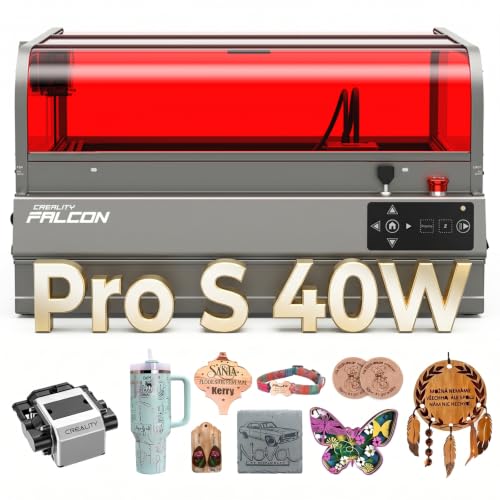
Creality Falcon2 Pro S 40W Enclosed Laser Cutter
Best for: high-power cutting projects requiring an enclosed workspace
- Features
- Air Assist, Camera, Auto Focus (what this guide is about)
- Laser Type
- Diode
- Laser Power
- 40W
- Engraving Speed
- 600mm/s
- Form Factor
- Fully Enclosed
- Cutting Capacity
- 20mm basswood, 30mm black acrylic
View on Amazon: Creality Falcon2 Pro S 40W Enclosed Laser Cutter Affiliate link
This desktop diode laser delivers 40W of optical output inside a fully enclosed, Class 1 certified chassis. You get a built-in top-center camera connected via USB to preview your work area and place graphics accurately. Along with 600mm/s engraving speeds, it features Z-axis autofocus and an integrated debris drawer. It suits makers and small workshops needing heavy-duty diode cutting power with built-in containment and visual alignment.
Pros
- Powerful 40W optical output diode cuts 20mm basswood in one pass
- Built-in center camera enables live workspace preview via USB
- Fully enclosed metal frame with Class 1 certification and safety lock
- Z-axis autofocus and automatic cut-through path compensation
- Slide-out debris drawer catches residue for faster cleanup
Cons
- Heavy 50.5-pound unit requires a sturdy, dedicated bench
- Substantial 26 by 22-inch footprint takes up significant desk space
- Requires USB tethering to a computer for camera previews
Good fit if
- You need 40W of optical power to cut dense materials like 30mm black acrylic
- You want a fully enclosed work area with integrated flame detection and smoke containment
- You prefer automatic Z-axis focusing paired with visual camera layout
Skip if
- You need a lightweight, highly portable engraver you can easily stow away
- You work in a tight craft space unable to fit a 26-inch wide enclosure
Verdict: Creality Falcon2 Pro S 40W Enclosed Laser provides substantial cutting capability inside a fully enclosed design with integrated camera alignment. It is a capable choice if you require high diode wattage without compromising on workspace safety containment.

Creality Falcon A1 10W Enclosed Laser Engraver
Best for: camera-assisted desktop engraving and light cutting
- Features
- Enclosure, Camera (what this guide is about)
- Laser Type
- Diode
- Laser Power
- 10W
- Working Area
- 15.0" × 12.0"
- Engraving Speed
- Up to 600 mm/s
- Software Compatibility
- LightBurn, LaserGRBL
View on Amazon: Creality Falcon A1 10W Enclosed Laser Engraver Affiliate link
This fully enclosed machine delivers 10W of laser power with an integrated HD camera that handles material recognition and automated positioning. It runs on a CoreXY system reaching speeds up to 600mm/s with 0.05mm accuracy, cutting up to 6mm wood in one pass. It ships fully assembled as a Class 1 device, making it a dependable, safe choice if you want camera-guided alignment without setup hassles.
Pros
- Built-in camera provides automatic material recognition and positioning
- Class 1 fully enclosed safety design with lid-open auto-pause
- Engraving speeds reach up to 600mm/s with 0.05mm accuracy
- Pre-assembled unit ready for use with zero initial assembly
- Cuts through 6mm wood in a single pass
Cons
- Only compatible with 460 x 346mm honeycomb panels
- Strictly prohibited from engraving mirror-finished and reflective materials
- 10W optical output cuts thinner materials than higher-wattage units
Good fit if
- You want an enclosed, Class 1 laser with camera alignment right out of the box
- You work with wood up to 6mm thick and need speeds up to 600mm/s
- You prioritize safety features like lid-open pausing and emergency stop
Skip if
- You plan to engrave mirror-finished metals or mirrored acrylic
- You need higher wattage to cut through thick, dense materials in one pass
- You require custom or oversized honeycomb workbeds
Verdict: Creality Falcon A1 10W Laser Engraver balances turnkey Class 1 enclosure safety with smart camera-assisted alignment and high-speed precision. It is an ideal baseline for clean, low-maintenance crafting.

Creality Falcon A1 10W Enclosed Laser Engraver
Best for: Beginners wanting an enclosed, camera-assisted desktop setup
- Features
- Enclosure, Air Assist, Camera (what this guide is about)
- Laser Power
- 10W
- Software Compatibility
- LightBurn, LaserGRBL
- Form Factor
- Class 1 Enclosed
- Cutting Capacity
- 6mm wood, 10mm acrylic
- Compatible Material
- Wood, Metal, Acrylic
View on Amazon: Creality Falcon A1 10W Enclosed Laser Engraver Affiliate link
The Creality Falcon A1 is a fully enclosed 10W desktop laser engraver fitted with an HD camera and built-in air assist. Its Class 1 enclosure filters 99% of laser light and automatically halts operation if opened, while the 0.06 x 0.08 mm laser spot can cut up to 6 mm wood or 10 mm acrylic. If you are starting out and want safe, contained engraving with precise visual alignment, this unit covers your essentials.
Pros
- Class 1 enclosed design with auto-shutoff when the lid opens
- Integrated HD camera for material positioning via computer
- 0.06 x 0.08 mm fine spot cuts up to 6 mm wood and 10 mm acrylic
- Double-door access with transparent top and side panels
Cons
- 10W optical output cuts slower than higher-wattage alternatives
- Camera positioning requires an active computer connection
- Exhaust fan requires direct venting to outdoors or an air purifier
Good fit if
- You want a fully enclosed Class 1 machine for home workspace safety.
- You need visual alignment via an overhead camera to position designs accurately.
- You work mostly with thinner materials up to 6 mm wood or 10 mm acrylic.
Skip if
- You need higher wattage for faster cuts through dense or thick materials.
- You want to use camera positioning without connecting to a computer.
Verdict: Creality Falcon A1 10W Enclosed Engraver delivers certified safety, visual camera positioning, and ready-to-use software for new creators working in indoor spaces.

Creality Falcon A1C 10W Enclosed Laser Engraver
Best for: safe desktop crafting with camera alignment
- Features
- Camera, Auto Focus (what this guide is about)
- Laser Type
- Diode
- Laser Power
- 10W
- Engraving Speed
- Up to 15,000 mm/min
- Software Compatibility
- Falcon Design Space
- Form Factor
- Fully enclosed (Class 1)
View on Amazon: Creality Falcon A1C 10W Enclosed Laser Engraver Affiliate link
The Creality Falcon A1C is an enclosed desktop laser engraver featuring a 10W diode laser, built-in HD camera, and auto focus. It operates at speeds up to 15,000 mm/min inside a Class 1 safety enclosure equipped with flame detection and tilt protection. Controlled via the Falcon Design Space app or PC software, it suits desktop hobbyists seeking quick material alignment and clean visual positioning in a compact footprint.
Pros
- Built-in HD camera provides visual positioning and real-time design preview
- Class 1 enclosed build includes flame detection, tilt shutoff, and a USB safety lock
- Auto-focus system adjusts the laser module height without manual calibration
- Quick-swap design lets you change compatible modules in 15 seconds
Cons
- Compatible 5W diode and 1.2W infrared modules are sold separately
- Only lists compatibility with Falcon Design Space software
- 10W diode module cannot engrave bare metals without the optional infrared head
Good fit if
- You want an enclosed Class 1 laser with an integrated alignment camera
- You prefer automatic height adjustment over manual focus tools
- You need a compact machine that fits in a 14.8 by 13.2-inch desktop footprint
Skip if
- You need more than 10W of optical output power out of the box
- You want metal engraving capability included without purchasing separate modules
Verdict: Creality Falcon A1C 10W Enclosed Laser Engraver delivers camera-assisted alignment and Class 1 safety in a compact desktop format. It is a solid pick if you prioritize automated setup and enclosed operation for light craft production.

Creality Falcon2 Pro S 40W Enclosed Laser
Best for: workshops needing high power and camera alignment
- Features
- Enclosure, Air Assist, Camera (what this guide is about)
- Laser Type
- Diode
- Laser Power
- 40W (switchable to 22W)
- Engraving Speed
- Over 600 mm/s
- Software Compatibility
- Falcon Design Space, LightBurn
- Form Factor
- Enclosed (Class 1)
View on Amazon: Creality Falcon2 Pro S 40W Enclosed Laser Affiliate link
The Creality Falcon2 Pro S 40W is a fully enclosed Class 1 desktop diode laser with an integrated HD camera. It features a dual-power mode that switches between 40W for cutting up to 20 mm wood and 22W for fine engraving. With an auto-focus module, speeds exceeding 600 mm/s, and a built-in honeycomb bed, it suits users who need both heavy cutting power and precise visual alignment for batch jobs.
Pros
- Dual-power module switches between 40W cutting and 22W engraving
- Built-in HD camera enables pattern scanning and batch positioning in LightBurn
- Enclosed Class 1 design with safety auto-stop when opened
- Cuts through up to 20 mm wood and 20 mm dark acrylic
Cons
- Batch camera processing requires a LightBurn connection
- Desktop footprint is substantial at 24.4 by 21.7 inches
Good fit if
- You need to cut thick materials like 20 mm wood or acrylic in a single pass.
- You want an auto-focus enclosed laser with built-in camera positioning.
- You prefer switching between 22W precision engraving and 40W high-power cutting.
Skip if
- You have limited workspace for a machine measuring 24.4 by 21.7 inches.
- You do not plan to use LightBurn for batch camera operations.
Verdict: Creality Falcon2 Pro S 40W Laser Engraver combines switchable 40W and 22W optical power with an enclosed Class 1 safety frame and built-in camera monitoring. It delivers top-tier cutting capacity and automated focusing for workshops needing versatile, high-output production.

Creality Falcon A1C 5W Desktop Laser
Best for: entry-level camera-guided engraving in small spaces
- Features
- Camera, Auto Focus (what this guide is about)
- Laser Type
- Diode
- Laser Power
- 5W
- Engraving Speed
- Up to 15,000 mm/min
- Software Compatibility
- Falcon Design Space
- Form Factor
- Fully enclosed (Class 1)
View on Amazon: Creality Falcon A1C 5W Desktop Laser Affiliate link
The Creality Falcon A1C 5W Laser Engraver is a compact, fully enclosed desktop machine equipped with an HD smart camera and auto focus. Its 5W diode laser operates at speeds up to 15,000 mm/min, controlled through Falcon Design Space on PC or mobile. If you want precise visual material positioning and a Class 1 eye-safe housing for basic engraving and light cutting projects, this model suits your small workspace.
Pros
- Built-in HD smart camera provides visual positioning and real-time preview
- Class 1 fully enclosed design with flame detection and tilt protection
- Auto focus sets proper laser height without manual calibration
- 15-second quick-swap laser module system allows future head upgrades
Cons
- 5W diode laser delivers lower output power than 10W or 20W options
- Alternative 10W diode and 1.2W infrared modules are sold separately
Good fit if
- You need camera-based design alignment for accurate placement on materials
- You want a fully enclosed Class 1 safety unit for a home, classroom, or retail counter
- You work primarily on lighter engraving materials like wood, paper, leather, and dark acrylic
Skip if
- You require high optical wattage to cut through thick materials quickly
- You need an infrared or 10W laser module included out of the box
Verdict: Creality Falcon A1C 5W Laser Engraver provides camera-assisted alignment and fully enclosed Class 1 safety in an entry-level 5W footprint. It is a practical match if you want smart positioning and auto focus for light engraving tasks.

Creality Falcon2 Pro 22W Enclosed Laser Engraver
Best for: Enclosed batch production and mid-power cutting
- Features
- Enclosure, Air Assist, Camera (what this guide is about)
- Laser Power
- 22W
- Working Area
- 400*450mm
- Form Factor
- Enclosed (FDA Class 1)
- Compatible Material
- Wood, Metal, Acrylic
- Dimensions
- 18 × 18 × 8 inches
View on Amazon: Creality Falcon2 Pro 22W Enclosed Laser Engraver Affiliate link
This enclosed laser cutter pairs a 22W laser with an HD camera for precise positioning and real-time previews. It gives you a 400 by 450 mm working area, FDA Class 1 safety enclosure, and integrated air assist. The system supports batch processing and handles wood, metal, and acrylic. It suits you if you need a mid-power, fully enclosed machine for studio cutting and engraving.
Pros
- 22W laser output with integrated air assist
- 400 by 450 mm working area
- FDA Class 1 fully enclosed design with flame protection
- HD camera for positioning and real-time preview
- Drawer design for material handling
Cons
- Heavier unit at 39.7 pounds
- Lower laser wattage than the 40W and 60W versions
Good fit if
- You want an enclosed Class 1 laser with built-in air assist
- You need camera positioning for batch processing tasks
- You work with wood, acrylic, or metal in a 400 by 450 mm space
Skip if
- You need higher cutting power than 22W
- You require an ultra-lightweight, portable engraving setup
Verdict: Creality Falcon2 Pro 22W Enclosed Laser delivers balanced cutting power, Class 1 safety, and camera-based alignment inside a tidy drawer-style enclosure.

Creality Falcon T1 20W Diode Engraver
Best for: high-speed diode engraving with modular upgrade options
- Features
- Camera (what this guide is about)
- Laser Type
- Diode
- Laser Power
- 20W
- Working Area
- 175 x 175 mm
- Engraving Speed
- Up to 10,000 mm/s
- Software Compatibility
- Creality Falcon Design Space, LightBurn
View on Amazon: Creality Falcon T1 20W Diode Engraver Affiliate link
The Creality Falcon T1 20W Diode Engraver is a fully enclosed galvo laser system designed for rapid detail work. It pairs a 20W diode module with galvo optics capable of speeds up to 10,000 mm/s and 0.001 mm repeat accuracy. The integrated smart camera provides visual alignment and project tracking within a 175 x 175 mm workspace. It suits you if you need fast, precise cutting and engraving on wood, leather, or acrylic.
Pros
- Galvo engraving speeds up to 10,000 mm/s with 0.001 mm repeat accuracy
- Integrated smart camera for visual alignment and real-time tracking
- Class 1 fully enclosed body with flame detection and emergency stop
- Modular system compatible with optional fiber, MOPA, and UV heads
Cons
- Base working area is limited to 175 x 175 mm without optional conveyor
- Alternative laser modules must be purchased separately
Good fit if
- You prioritize ultra-fast galvo engraving speeds on materials like wood, leather, and acrylic.
- You want camera-guided alignment inside a safe, Class 1 enclosed machine.
- You want a modular chassis that can accept fiber or UV heads later on.
Skip if
- You need a large standard cutting area without purchasing extra accessories.
- You need dedicated metal color marking or deep metal engraving out of the box.
Verdict: Creality Falcon T1 20W Diode Engraver delivers high-speed galvo processing and camera alignment within a fully enclosed enclosure. It is a solid choice for detailed organic engraving with room to add specialized modules later.
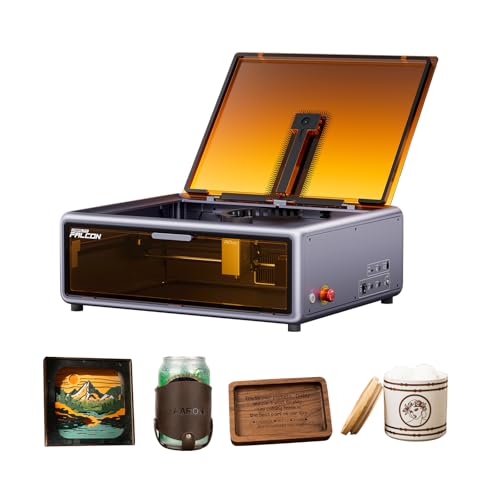
Creality Falcon A1 10W Enclosed Engraver
Best for: desktop makers wanting a Class 1 camera-equipped engraver
- Features
- Enclosure, Camera (what this guide is about)
- Laser Power
- 10W (80W machine power)
- Engraving Speed
- 600 mm/s
- Form Factor
- Fully Enclosed (Class 1)
- Cutting Capacity
- 6 mm (wood)
- Compatible Material
- Wood, Metal
View on Amazon: Creality Falcon A1 10W Enclosed Engraver Affiliate link
This fully enclosed Class 1 laser cutter pairs a 10W laser with an integrated HD camera for automated setup and alignment. Operating on a CoreXY structure, it engraves at speeds up to 600 mm/s with 0.05 mm precision and cuts through 6 mm wood in a single pass. The filtered enclosure reduces light, smoke, and noise, making it a practical desktop choice if you need safe, self-contained crafting.
Pros
- Integrated HD camera automates material scanning and setting application
- Fully enclosed Class 1 build with double doors, lid sensor, and emergency stop
- Engraving speeds reach up to 600 mm/s with 0.05 mm precision
- Single-pass cutting capacity up to 6 mm on wood
Cons
- Not permitted for use on mirrored metals or reflective acrylic
- 10W optical output cuts slower than higher-wattage units
Good fit if
- You want an enclosed Class 1 desktop unit that operates safely without protective goggles
- You prefer an integrated HD camera to detect materials and apply settings automatically
- You primarily engrave wood or metal and cut thinner materials up to 6 mm
Skip if
- You plan to engrave highly reflective materials such as mirrored metals or mirrored acrylic
- You require high-wattage laser output above 10W for deeper or faster cutting
Verdict: Creality Falcon A1 10W Enclosed Laser Engraver provides a secure, fully enclosed Class 1 workspace paired with an automated HD camera for streamlined desktop making.

Creality Falcon T1 20W Fiber Laser Engraver
Best for: High-speed bare-metal marking and jewelry customization
- Features
- Enclosure, Camera, Auto Focus (what this guide is about)
- Laser Type
- Fiber
- Laser Power
- 20W
- Engraving Speed
- 10,000mm/s
- Form Factor
- Class 1 Enclosed
- Compatible Material
- Metal
View on Amazon: Creality Falcon T1 20W Fiber Laser Engraver Affiliate link
The Creality Falcon T1 20W Fiber Laser Engraver is a Class 1 enclosed galvo system designed specifically for bare metal marking. It pairs a camera-based AI visual auto-focus system with a 20W fiber laser module, reaching scanning speeds up to 10,000 mm/s. If you need to engrave stainless steel, brass, titanium, or precious metals without using spray coatings, this high-speed setup gives you rapid production capabilities within a fully protected enclosure.
Pros
- Camera-based AI visual auto-focus system
- High-speed galvo scanning up to 10,000 mm/s
- Engraves bare metals directly without marking spray
- Tool-free quick-swap dock compatible with five laser module types
- Class 1 enclosure with flame detection, door interlock, and tilt stop
Cons
- Only includes the fiber module; additional laser heads are sold separately
- Supports only one laser module installed at a time
- Requires powering off the machine before replacing modules or lenses
Good fit if
- You need to engrave bare metals like stainless steel, titanium, brass, or gold.
- You want high-speed galvo throughput paired with camera-assisted auto-focus.
- You plan to expand into diode or UV engraving later using modular attachments.
Skip if
- You need to cut non-metal materials like wood or acrylic right out of the box.
- You want a multi-beam system that operates different wavelengths simultaneously.
Verdict: Creality Falcon T1 20W Fiber Laser Engraver delivers rapid 10,000 mm/s galvo marking on bare metals with camera-based visual auto-focus and enclosed safety sensors. Its modular dock also allows upgrading to diode, MOPA, or UV heads as your needs grow.

Creality Falcon T1 20W Fiber Engraver
Best for: fast, detailed metal and jewelry engraving
- Features
- Camera (what this guide is about)
- Laser Type
- Fiber
- Laser Power
- 20W
- Engraving Speed
- 10,000 mm/s
- Software Compatibility
- Falcon Design Space, LightBurn, GRBL
- Form Factor
- Fully enclosed (Class 1)
View on Amazon: Creality Falcon T1 20W Fiber Engraver Affiliate link
The Creality Falcon T1 20W Fiber Laser Engraver gives you dedicated metal and jewelry marking capability inside a fully enclosed Class 1 workspace. It pairs a 20W fiber module with high-speed galvo scanning reaching up to 10,000 mm/s and 0.001 mm repeat accuracy. An integrated HD smart camera handles visual alignment and auto-focusing. It suits you if you need fine, detailed engraving and color marking on metals without sacrificing eye safety.
Pros
- Galvo scanning system operates at speeds up to 10,000 mm/s
- Built-in HD camera provides visual alignment and automatic focus
- Fully enclosed Class 1 housing with flame detection and airflow monitoring
- Fine 0.001 mm repeat accuracy suited for detailed jewelry marking
Cons
- Heavy workstation at 77.9 pounds
- Includes only the fiber module; other swappable heads are sold separately
- Cutting is limited to thin stock such as 0.2 mm anodized aluminum
Good fit if
- You need high-speed marking and color oxide engraving on metals or jewelry.
- You want an enclosed, eye-safe laser with camera alignment and touchscreen control.
- You plan to work primarily with stainless steel, aluminum, coated metals, and stone.
Skip if
- You need to cut thick non-metal materials like wood or acrylic.
- You want a lightweight, portable engraver that is easy to store away.
Verdict: Creality Falcon T1 20W Fiber Laser Engraver delivers rapid galvo marking speeds and precise camera alignment for detailed metalwork. Its fully enclosed Class 1 build makes it a safe, dedicated choice for jewelry and metal engraving.
Specifications side by side
| Spec | Creality Falcon2 Pro S 40W Enclosed Laser Cutter | Creality Falcon A1 10W Enclosed Laser Engraver | Creality Falcon A1 10W Enclosed Laser Engraver | Creality Falcon A1C 10W Enclosed Laser Engraver | Creality Falcon2 Pro S 40W Enclosed Laser | Creality Falcon A1C 5W Desktop Laser | Creality Falcon2 Pro 22W Enclosed Laser Engraver | Creality Falcon T1 20W Diode Engraver | Creality Falcon A1 10W Enclosed Engraver | Creality Falcon T1 20W Fiber Laser Engraver | Creality Falcon T1 20W Fiber Engraver |
|---|---|---|---|---|---|---|---|---|---|---|---|
| Laser Type | Diode | Diode | not stated | Diode | Diode | Diode | not stated | Diode | not stated | Fiber | Fiber |
| Laser Power | 40W | 10W | 10W | 10W | 40W (switchable to 22W) | 5W | 22W | 20W | 10W (80W machine power) | 20W | 20W |
| Working Area | not stated | 15.0" × 12.0" | not stated | not stated | not stated | not stated | 400*450mm | 175 x 175 mm | not stated | not stated | not stated |
| Engraving Speed | 600mm/s | Up to 600 mm/s | not stated | Up to 15,000 mm/min | Over 600 mm/s | Up to 15,000 mm/min | not stated | Up to 10,000 mm/s | 600 mm/s | 10,000mm/s | 10,000 mm/s |
| Software Compatibility | not stated | LightBurn, LaserGRBL | LightBurn, LaserGRBL | Falcon Design Space | Falcon Design Space, LightBurn | Falcon Design Space | not stated | Creality Falcon Design Space, LightBurn | not stated | not stated | Falcon Design Space, LightBurn, GRBL |
| Form Factor | Fully Enclosed | Fully Enclosed (Class 1) | Class 1 Enclosed | Fully enclosed (Class 1) | Enclosed (Class 1) | Fully enclosed (Class 1) | Enclosed (FDA Class 1) | Fully enclosed | Fully Enclosed (Class 1) | Class 1 Enclosed | Fully enclosed (Class 1) |
| Cutting Capacity | 20mm basswood, 30mm black acrylic | 6 mm wood, 9.6 mm black acrylic | 6mm wood, 10mm acrylic | not stated | 20 mm wood, 20 mm dark acrylic | not stated | not stated | not stated | 6 mm (wood) | not stated | not stated |
| Compatible Material | Wood, Acrylic | Wood, Metal | Wood, Metal, Acrylic | not stated | Wood, Metal, Acrylic, Leather | not stated | Wood, Metal, Acrylic | not stated | Wood, Metal | Metal | Metal |
| Features | Air Assist, Camera, Auto Focus | Enclosure, Camera | Enclosure, Air Assist, Camera | Camera, Auto Focus | Enclosure, Air Assist, Camera | Camera, Auto Focus | Enclosure, Air Assist, Camera | Camera | Enclosure, Camera | Enclosure, Camera, Auto Focus | Camera |
| Target Audience | not stated | not stated | Beginners | not stated | not stated | not stated | not stated | not stated | not stated | not stated | not stated |
| Dimensions | 26 × 22 × 12.9 inches | 30 × 25 × 15 inches | 22.3 × 18.4 × 7.7 inches | 13.2 × 14.8 × 13.4 inches | 24.4 × 21.7 × 16.9 inches | 13.2 × 14.8 × 13.4 inches | 18 × 18 × 8 inches | 18.3 × 12.3 × 19.8 inches | 21 × 18 × 10 inches | 18 × 12.2 × 20 inches | 18.2 × 12.2 × 19.8 inches |
| Weight | 50.5 pounds | 28.7 pounds | 35.2 pounds | not stated | not stated | 21.6 pounds | 39.7 pounds | not stated | not stated | not stated | 77.9 pounds |
| Size | Falcon2 Pro S 40W with Integrated Enclosure | Falcon-A1 | 22.3*18.4*7.7 inch | not stated | Pro S 40W | not stated | Falcon2 Pro 22W | Diode 20W | not stated | not stated | not stated |
| Color | Falcon2 Pro S 40W | Falcon-A1 10W Gray | A1-10W-Grey | Purple Gray | Pro S 40W Laser | Purple Gray | Pro 22W | White | falcon-A1 Gray | Fiber 20W | T1 Fiber 20W |
| Model | Falcon2 pro 40W | Laser Engraver | Creality Falcon A1 | Creality Falcon A1C | Creality Falcon2 Pro S 40W | Creality Falcon A1C 5W | Creality Falon 2 Pro Engraver | Creality Falcon T1 Diode 20W | Creality Falcon A1 | Falcon T1 Fiber 20W | Creality Falcon T1 Fiber 20W |
If you need separate workshop monitoring, you can review specifications for the best GNCC security cameras.
How to choose the right one
-
Match laser type to material
Diode lasers work best for wood, acrylic, and leather. Fiber lasers are designed specifically for bare metal marking. The Falcon2 Pro S uses a 40W diode for cutting wood and acrylic. The Falcon T1 Fiber 20W handles metal engraving with galvo marking. Choose diode for organic materials. Select fiber for industrial metal marking. Check the laser type in the attributes. This ensures the machine handles your primary materials efficiently.
-
Check laser power for depth
Higher wattage allows deeper cutting and faster processing. The Falcon2 Pro S offers 40W for substantial cutting capability. The Falcon2 Pro 22W provides balanced power for mid-power cutting tasks. The Falcon A1C 5W suits light engraving in small spaces. The Falcon T1 20W delivers high-speed galvo processing. Match the wattage to your material thickness. Higher power cuts thicker wood. Lower power preserves fine detail on thin materials. Review the wattage specs carefully.
-
Verify camera and auto focus
The camera assists with precise alignment and positioning. Auto focus adjusts the laser height automatically. The Falcon2 Pro S includes an integrated camera and auto focus. The Falcon A1C 5W offers camera-assisted alignment and auto focus. The Falcon T1 Fiber 20W uses camera-based visual auto focus. These features streamline setup and reduce manual adjustment time. Look for camera and auto focus in the features list. This ensures accurate placement for complex designs.
-
Assess enclosure and safety class
An enclosed workspace contains laser radiation and fumes. The Falcon2 Pro S provides a fully enclosed design for safety. The Falcon A1 10W balances turnkey Class 1 enclosure safety. The Falcon A1C 5W delivers certified Class 1 safety. Class 1 certification indicates safe operation during use. Check for enclosure in the features or attributes. This protects you and your surroundings from stray laser light and smoke. Enclosed models are ideal for indoor desktop use.
-
Consider form factor and size
Desktop form factors fit on standard workspaces. The Falcon2 Pro S measures 22 inches wide. The Falcon A1 10W is 25 inches wide. The Falcon A1C 5W is compact at 14.8 inches wide. Check width, height, and length in the specs. Ensure the machine fits your desk or shelf. Weight also matters for stability and portability. The Falcon2 Pro S weighs 50.5 pounds. The Falcon A1C 5W weighs 21.6 pounds. Measure your space before purchasing.
Frequently asked questions
Which Creality laser engraver with camera is best for cutting thick materials?
The Falcon2 Pro S 40W is the top choice for high-power cutting. It features a 40W diode laser capable of handling wood and acrylic effectively. The enclosed design ensures safety while you work on substantial projects. This model provides the necessary wattage for deeper cuts without compromising on workspace containment.
Can I use a Creality laser engraver with camera on metal?
Yes, but you must select the correct laser type. The Falcon A1 10W and A1C models list metal as a compatible material, likely for surface engraving. For bare metal marking, the Falcon T1 Fiber 20W is designed specifically for this task. It delivers rapid galvo marking speeds on metal surfaces with camera alignment.
Does the Falcon2 Pro S have auto focus capabilities?
Yes, the Falcon2 Pro S 40W includes auto focus features. This allows for precise alignment and consistent engraving quality across different material thicknesses. The integrated camera assists with positioning, while the auto focus ensures the laser remains sharp on the work surface. This combination supports high-power cutting projects efficiently.
What is the smallest Creality laser engraver with camera available?
The Falcon T1 Fiber 20W is the most compact option listed. Its dimensions are 8 inches by 8 inches by 10 inches. This small footprint makes it ideal for jewelry engraving and detailed metalwork. Despite its size, it includes camera alignment and a fully enclosed Class 1 build for safety.
Do these models include air assist for better cutting results?
Several models include air assist to improve performance. The Falcon2 Pro S 40W, Falcon A1 10W (Beginners version), and Falcon2 Pro 22W all feature air assist. This function blows air onto the cut line to remove debris and prevent burning. It helps achieve cleaner edges on wood and acrylic materials.
Is the Falcon A1C suitable for beginners in small spaces?
The Falcon A1C 5W is an excellent choice for beginners. It offers camera-assisted alignment and auto focus for easy setup. Its compact size, measuring 14.8 by 13.2 inches, fits well in small workspaces. The fully enclosed Class 1 safety design makes it a practical match for light engraving tasks in indoor environments.
Can I upgrade the laser head on the Falcon T1?
Yes, the Falcon T1 series supports modular upgrades. The 20W Fiber version includes a modular dock that allows you to add specialized heads. You can upgrade to diode, MOPA, or UV heads as your needs grow. This flexibility makes it a solid choice for detailed organic engraving with room for expansion.
What is the weight of the heaviest Creality laser engraver with camera?
The Falcon2 Pro S 40W Enclosed Laser Cutter is the heaviest model. It weighs 50.5 pounds. Its substantial weight contributes to stability during high-power cutting operations. The enclosed design adds to the overall mass, ensuring the unit remains steady while processing thick wood and acrylic materials with its 40W diode laser.