12 Best Creality Laser Engravers for Metal, Compared
As an Amazon Associate we earn from qualifying purchases. Links on this page are affiliate links.
Choosing the best creality laser engravers for metal requires looking at published specifications rather than marketing claims. We compared 12 models ranked by their technical data. The top pick is the Creality Falcon 10W Laser Engraver. It leads because its 0.06mm beam spot delivers fine detail for general DIY metal engraving. All selections rely strictly on specs from the product listings. This guide helps you decide which machine fits your workspace and material needs.
Quick picks
The best fit for you
- You want the most well-rounded diode option for metal Creality Falcon 10W Laser Engraver The 10W power and 0.06mm beam spot make it versatile for general DIY metal engraving.
- You need a safe enclosed setup with touchscreen controls Creality Falcon A1 Pro 20W Enclosed Engraver This 20W model includes an integrated touchscreen and fully enclosed housing for safe operation.
- You are a beginner wanting an enclosed desktop setup Creality Falcon A1 10W Enclosed Laser Engraver The Class 1 enclosure and integrated camera provide a safe, accessible starting point for metal engraving.
- You want high-speed precision metal marking with color options Creality Falcon T1 20W Fiber Laser The 20W fiber laser delivers galvo performance for precise and colorful metal marking.
Our 12 picks

Creality Falcon 10W Laser Engraver
Best for: general DIY metal engraving and open-frame crafting
- Compatible Material
- Wood, Metal, Acrylic, Leather, Glass, Paper (what this guide is about)
- Laser Power
- 10W
- Working Area
- 17" x 16"
- Engraving Speed
- Up to 10000mm/m
- Software Compatibility
- LightBurn, LaserGRBL
- Cutting Capacity
- 5mm basswood, 3mm black acrylic
View on Amazon: Creality Falcon 10W Laser Engraver Affiliate link
This desktop open-frame machine pairs a 10W optical output laser with a 17 by 16-inch work area. It engraves materials like metal and glass with a precise 0.06 by 0.06mm spot focus, reaching travel speeds up to 10,000mm/min. You can transfer projects over Wi-Fi, USB, or an SD card, making it a capable balance of working space and fine detail for DIY metal marking.
Pros
- Fine 0.06 by 0.06mm laser spot focus
- Generous 17 by 16-inch working area
- Multiple data connections including Wi-Fi, USB, and SD card
- Speeds up to 10,000mm/min on an aluminum frame
- Anti-UV filter acrylic blocks 97% of UV rays
Cons
- Open-frame construction lacks a full protective enclosure
- Air assist pump is not included on this base model
Good fit if
- You want an open 17 by 16-inch working area for medium-sized items
- You need wireless connectivity via Wi-Fi or offline SD card control
- You require fine line detail down to 0.004-inch accuracy on coated metals
Skip if
- You need a fully enclosed laser setup right out of the box
- You prefer higher laser wattage than 10W output for faster metal processing
Verdict: Creality CR-Laser Falcon 10W Engraver delivers a spacious workspace and fine 0.06mm beam spot that makes it the most well-rounded Creality diode option for metal marking.

Creality Falcon A1 Pro 20W Enclosed Engraver
Best for: enclosed diode engraving with touchscreen operation
- Compatible Material
- Wood, Metal (what this guide is about)
- Laser Type
- Blue-laser
- Laser Power
- 20W
- Engraving Speed
- up to 600 mm/s
- Software Compatibility
- Falcon Design Space
- Form Factor
- Full Enclosed, Class 1
View on Amazon: Creality Falcon A1 Pro 20W Enclosed Engraver Affiliate link
You get a fully enclosed 20W blue-diode laser engraver featuring a smartphone-style touchscreen for standalone operation. It engraves at speeds up to 600 mm/s and includes an HD positioning camera alongside a 3-second Z-axis auto-focus system. Designed to work on metal and wood, this Class 1 unit suits creators who want onboard display control and an integrated enclosure without relying on a tethered computer.
Pros
- Smartphone-style touchscreen and app control for untethered operation
- Engraving speeds reaching up to 600 mm/s
- HD camera preview with automatic 3-second Z-axis auto-focus
- Fully enclosed Class 1 design with internal exhaust fan and emergency stop
Cons
- Optional 2W infrared module for fine metal marking is not included
- Only compatible with 460 x 346 mm honeycomb panels
- Arrives 80 percent pre-assembled and requires final setup
Good fit if
- You want direct machine control via an integrated touchscreen display
- You prefer an enclosed workspace that filters light and contains smoke
- You need automated focusing and camera alignment for fast job setup
Skip if
- You need dedicated 1064 nm infrared metal engraving right out of the box
- You already own non-standard honeycomb panels other than 460 x 346 mm
- You want an open-frame machine with unlimited pass-through room
Verdict: Creality Falcon A1 Pro 20W Enclosed Engraver combines an integrated touchscreen interface with automated focusing in a safe, fully enclosed housing. It delivers fast 600 mm/s engraving for metal marking and cutting projects.

Creality Falcon A1 10W Enclosed Laser Engraver
Best for: safe, enclosed desktop metal and wood engraving
- Compatible Material
- Wood, Metal (what this guide is about)
- Laser Type
- Diode
- Laser Power
- 10W
- Working Area
- 15.0" × 12.0"
- Engraving Speed
- Up to 600 mm/s
- Software Compatibility
- LightBurn, LaserGRBL
View on Amazon: Creality Falcon A1 10W Enclosed Laser Engraver Affiliate link
The Creality Falcon A1 is a fully enclosed 10W desktop laser engraver built on a CoreXY motion system. It reaches engraving speeds up to 600 mm/s with an engraving accuracy of 0.05 mm, and includes an overhead camera for material positioning. It works on compatible metals and wood right out of the box with zero assembly, making it a clean, contained option for workshops needing enclosure safety without complex setup.
Pros
- Fully enclosed Class 1 setup with automatic pause when the lid opens
- Built-in camera for automated positioning and material recognition
- Engraving speeds up to 600 mm/s with 0.05 mm accuracy
- Ships fully pre-assembled with no hardware assembly required
Cons
- Cannot engrave mirror-finished metals or highly reflective surfaces
- Compatible only with 460 × 346 mm honeycomb panels
- 10W optical output limits depth compared to higher-wattage units
Good fit if
- You want a fully enclosed, pre-assembled engraver with built-in camera alignment.
- You need to engrave non-reflective metals or wood at speeds up to 600 mm/s.
Skip if
- You plan to engrave mirror-finished or highly reflective metals.
- You require high-wattage laser output for deeper cutting or faster metal marking.
Verdict: Creality Falcon A1 10W Enclosed Laser Engraver provides precise, camera-assisted marking up to 600 mm/s inside a fully assembled Class 1 enclosure. It handles standard metal engraving cleanly, though it cannot be used on mirror-finished surfaces.

Creality Falcon A1 10W Enclosed Laser Engraver
Best for: beginners wanting an enclosed, camera-assisted desktop setup
- Compatible Material
- Wood, Metal, Acrylic (what this guide is about)
- Laser Power
- 10W
- Software Compatibility
- LightBurn, LaserGRBL
- Form Factor
- Class 1 Enclosed
- Cutting Capacity
- 6mm wood, 10mm acrylic
- Features
- Enclosure, Air Assist, Camera
View on Amazon: Creality Falcon A1 10W Enclosed Laser Engraver Affiliate link
The Creality Falcon A1 10W Enclosed Laser Engraver is a desktop machine designed for marking materials like metal, wood, and acrylic. It combines a 10W diode laser with a fine 0.06 x 0.08 mm focal spot, an integrated HD alignment camera, and a Class 1 protective enclosure. If you are new to laser work, its pre-assembled build and dedicated beginner software settings provide a direct path to getting started safely.
Pros
- Class 1 enclosed chassis with protective filtering panels and lid safety stop
- Fine 0.06 x 0.08 mm laser spot for detailed surface marking
- Built-in HD camera for workpiece alignment via computer
- Double-door access with both top and side baffles
Cons
- 10W output provides less power for metal marking than higher-wattage options
- HD camera requires an active computer connection to operate
- Internal exhaust fan requires ducting outdoors or linking to an air purifier
Good fit if
- You want an enclosed, out-of-the-box system that requires no frame assembly.
- You need an overhead camera to position designs accurately on small metal blanks.
- You prefer running beginner-friendly software with pre-configured material presets.
Skip if
- You need more than 10W of laser power for faster runs or deeper cuts.
- You lack room to vent the exhaust hose outdoors or attach a separate purifier.
Verdict: Creality Falcon A1 10W Enclosed Laser Engraver offers a safe, accessible starting point with its Class 1 enclosure, 0.06 x 0.08 mm spot, and integrated alignment camera. It is well-suited for controlled desktop engraving without requiring open-frame safety goggles.

Creality Falcon A1C 1.2W IR Module
Best for: Falcon A1C owners marking metal and jewelry
- Compatible Material
- Metal, Jewelry, Plastic (what this guide is about)
- Laser Type
- Infrared
- Laser Power
- 1.2W
- Dimensions
- 4.52 × 1.73 × 2.14 inches
View on Amazon: Creality Falcon A1C 1.2W IR Module Affiliate link
This add-on unit upgrades your setup with a dedicated 1.2W infrared beam for detailed surface marking. Built specifically for the Falcon A1C base, it focuses on precise engraving across metal, jewelry, and plastic. A quick-swap mounting design lets you switch heads in about 15 seconds, and integrated autofocus handles focal positioning automatically. It suits you if you already own an A1C and want metal marking capability.
Pros
- Dedicated 1.2W infrared laser for metal, jewelry, and plastic engraving
- True autofocus eliminates manual focal height adjustments
- Quick-swap mechanism allows module changes in roughly 15 seconds
- Compact housing measuring 4.52 by 1.73 by 2.14 inches
Cons
- Operates exclusively with Creality Falcon A1C machines
- Low 1.2W output power is built for engraving, not cutting
- Requires a separate base engraver to function
Good fit if
- You own a Creality Falcon A1C machine and need metal engraving capability
- You work with jewelry, bare metals, or plastics requiring fine detail
- You want automatic focus setting instead of manual height calibration
Skip if
- You do not own a compatible Creality Falcon A1C engraver
- You need higher output power to cut through dense stock
Verdict: Creality Falcon A1C 1.2W Infrared Laser Module gives Falcon A1C owners a direct, autofocus path to fine metal and jewelry marking. It installs in seconds to expand your material range without a standalone second machine.

Creality Falcon 5W Laser Engraver
Best for: marking coated metals on an entry-level diode setup
- Compatible Material
- Wood, Metal, Acrylic, Leather, Paper (what this guide is about)
- Laser Power
- 5W
- Software Compatibility
- LaserGRBL, LightBurn
- Cutting Capacity
- 4mm wood
- Dimensions
- 23 × 10 × 7 inches
View on Amazon: Creality Falcon 5W Laser Engraver Affiliate link
The Creality Falcon 5W Laser Engraver is an open-frame diode machine featuring a 5W optical output and 72W total machine power. For metal applications, it is designed to mark coated metal surfaces, while also handling non-metal tasks like cutting 4mm wood. The unit includes 8 mm steel rails, a fixed-focus slide mechanism, and built-in smoke filtration. It suits you if you need an entry-level Creality tool for basic surface marking.
Pros
- 5W laser output power with 72W machine power draw
- Engineered to engrave coated metal surfaces and cut up to 4mm wood
- Slide-down focusing facilitator and blue light position preview
- Module includes an anti-UV acrylic shield and washable cotton filter
- Compatible with both LightBurn and LaserGRBL
Cons
- 5W diode power is limited to coated metals rather than bare metal etching
- Open-frame structure lacks a full protective enclosure
Good fit if
- You only need to mark coated metal items alongside standard craft materials.
- You prefer an entry-level diode setup compatible with LightBurn and LaserGRBL.
- You want simple manual focusing with a fixed-focus slide tool.
Skip if
- You need to engrave bare, untreated metals or need deep metal etching.
- You require a fully enclosed laser setup for workplace containment.
Verdict: Creality Falcon 5W Laser Engraver provides a stable, accessible diode platform suited for marking coated metals and basic hobby cutting.

Creality Falcon2 Pro S 40W Enclosed Laser
Best for: enclosed dual-power diode cutting and metal marking
- Compatible Material
- Wood, Metal, Acrylic, Leather (what this guide is about)
- Laser Type
- Diode
- Laser Power
- 40W (switchable to 22W)
- Engraving Speed
- Over 600 mm/s
- Software Compatibility
- Falcon Design Space, LightBurn
- Form Factor
- Enclosed (Class 1)
View on Amazon: Creality Falcon2 Pro S 40W Enclosed Laser Affiliate link
The Creality Falcon2 Pro S 40W is a desktop diode engraver housed in a Class 1 fire-resistant metal enclosure. It features a switchable dual-power module that lets you toggle between 40W for deep cutting and 22W for fine marking on metal and other surfaces. With speeds exceeding 600 mm/s, an integrated HD camera, and automated focusing, it suits users who want high diode power and enclosed safety without manual calibration.
Pros
- Dual-power mode toggles between 40W cutting and 22W precision engraving
- Certified Class 1 enclosure with integrated exhaust system and auto-stop
- Engraving speeds exceeding 600 mm/s with a 0.06 by 0.08 mm focal spot
- Built-in HD camera and auto-focus system for visual job setup
Cons
- Batch camera processing requires a connection to LightBurn software
- Large 24.4 by 21.7 inch footprint requires significant bench space
- Uses a diode laser rather than a dedicated fiber laser module for metal
Good fit if
- You want a fully enclosed Class 1 laser with built-in smoke exhaust and eye protection.
- You need the flexibility to switch between 40W heavy cutting and 22W detailed marking.
- You prefer visual camera positioning and automatic focusing over manual alignment.
Skip if
- You specifically require a high-speed fiber laser module for specialized metal engraving.
- You have limited workspace that cannot accommodate a 24.4 by 21.7 by 16.9 inch unit.
Verdict: Creality Falcon2 Pro S 40W Enclosed Laser combines high-output diode performance and switchable wattage modes inside a certified Class 1 safety enclosure. It provides a clean, automated setup for users handling varied cutting and metal marking tasks.

Creality Falcon2 Pro 22W Enclosed Laser Engraver
Best for: enclosed metal marking with camera positioning
- Compatible Material
- Wood, Metal, Acrylic (what this guide is about)
- Laser Power
- 22W
- Working Area
- 400*450mm
- Form Factor
- Enclosed (FDA Class 1)
- Features
- Enclosure, Air Assist, Camera
- Dimensions
- 18 × 18 × 8 inches
View on Amazon: Creality Falcon2 Pro 22W Enclosed Laser Engraver Affiliate link
The Creality Falcon2 Pro 22W Enclosed Engraver provides a 22W laser output inside an FDA Class 1 safety enclosure. It offers a 400 x 450 mm working area, integrated air assist, and an HD camera for visual layout on metal, acrylic, and wood. A built-in drawer design assists material handling. It suits you if you want an enclosed workspace for desktop metal marking.
Pros
- 22W laser output with a 400 x 450 mm working area
- FDA Class 1 fully enclosed build with flame protection
- Integrated camera positioning and built-in air assist
- Drawer design for loading and batch processing
Cons
- Weighs 39.7 pounds, requiring a dedicated bench
- Offers less output power than 40W or 60W variants
Good fit if
- You want an enclosed Class 1 laser setup for metal marking.
- You need camera alignment to place graphics accurately on items.
- You process batches across a 400 x 450 mm surface.
Skip if
- You require the higher cutting speeds of 40W or 60W units.
- You need a lightweight, open-frame setup that is easy to relocate.
Verdict: Creality Falcon2 Pro 22W Enclosed Engraver delivers an enclosed 400 x 450 mm workspace complete with camera positioning and built-in air assist. It gives you a balanced mix of safety features and diode power for metal marking.

Creality Falcon T1 20W Fiber Laser
Best for: high-speed precision metal marking and color engraving
- Compatible Material
- Metal (what this guide is about)
- Laser Type
- Fiber
- Laser Power
- 20W (20,000 mW)
- Working Area
- 175 x 175 mm
- Engraving Speed
- Up to 10,000 mm/s
- Software Compatibility
- Creality Falcon Design Space, LightBurn
View on Amazon: Creality Falcon T1 20W Fiber Laser Affiliate link
This fully enclosed machine delivers a dedicated 20W fiber laser specifically suited for metal processing. It features a galvo system running at speeds up to 10,000 mm/s with 0.001 mm repeat accuracy. The base working area measures 175 x 175 mm, designed for deep engraving, 3D embossing, and color marking on metal surfaces. You control projects through a touchscreen or mobile app with built-in visual alignment tools.
Pros
- Engraving speeds reach up to 10,000 mm/s using galvo technology
- High 0.001 mm repeat accuracy for fine metal detailing
- Fully enclosed Class 1 safety enclosure with radiation blocking
- Supports 3D embossing and color marking on metal
- Modular system supports swapping to other diode, UV, or MOPA heads
Cons
- Standard working area is limited to 175 x 175 mm out of the box
- Heavier unit at 44 pounds
- Alternative laser modules must be purchased separately
Good fit if
- You need ultra-fast marking speeds up to 10,000 mm/s on metal items
- You want a fully enclosed Class 1 laser with built-in safety sensors
- You plan to do fine metal embossing and color marking
Skip if
- You need a large cutting bed without buying an optional conveyor
- You want a lightweight, highly portable engraver
Verdict: Creality Falcon T1 20W Fiber Laser provides high-speed galvo performance and precise metal color marking inside an enclosed safety frame.
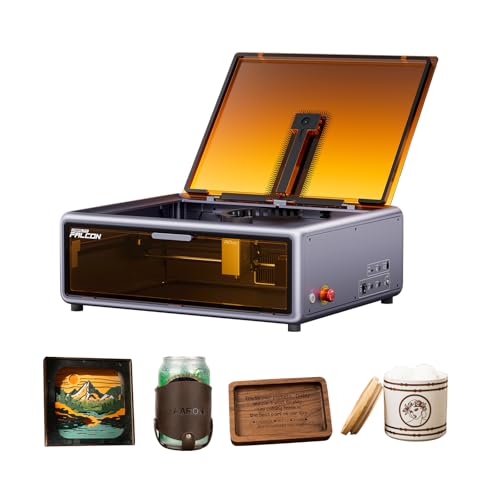
Creality Falcon A1 10W Enclosed Engraver
Best for: enclosed desktop metal engraving with camera alignment
- Compatible Material
- Wood, Metal (what this guide is about)
- Laser Power
- 10W (80W machine power)
- Engraving Speed
- 600 mm/s
- Form Factor
- Fully Enclosed (Class 1)
- Cutting Capacity
- 6 mm (wood)
- Features
- Enclosure, Camera
View on Amazon: Creality Falcon A1 10W Enclosed Engraver Affiliate link
The Creality Falcon A1 is a desktop laser engraver featuring a 10W optical output and an 80W total machine power rating. Built on a CoreXY structure, it delivers engraving speeds up to 600 mm/s with 0.05 mm precision. It supports metal engraving while operating inside a fully enclosed Class 1 safety chamber with an integrated HD camera. This setup suits you if you need a contained, ready-to-run desktop unit for non-mirrored metal projects.
Pros
- Fully enclosed Class 1 build with viewing panels and lid safety sensor
- Engraving speeds reach up to 600 mm/s with 0.05 mm precision
- Integrated HD camera automates material scanning and layout positioning
- Enclosed chamber filters 99% of harmful light and limits smoke
Cons
- Strictly prohibited on highly reflective or mirrored metals
- 10W optical output is lower than higher-wattage alternatives
- Roller kit for curved objects requires a separate purchase
Good fit if
- You want an enclosed Class 1 engraver with built-in camera positioning.
- You plan to engrave standard non-reflective metals at speeds up to 600 mm/s.
- You need safety interlocks like an emergency stop and automatic lid sensors.
Skip if
- You need to mark highly reflective surfaces or mirrored metals.
- You require more than 10W of optical laser power for your workflow.
Verdict: Creality Falcon A1 10W Enclosed Engraver provides a protected Class 1 workspace with 600 mm/s CoreXY speeds and automated camera positioning. It is an effective desktop option for metal engraving as long as your materials are not mirrored or highly reflective.
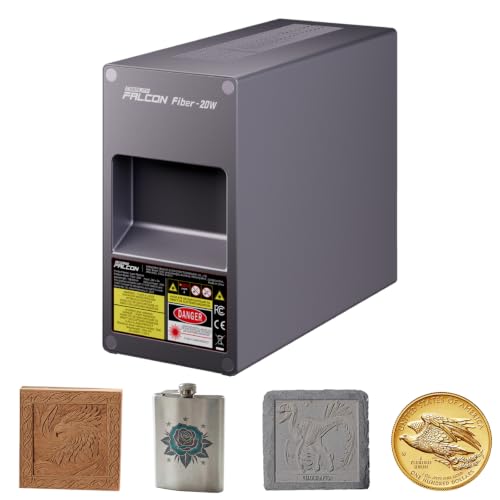
Creality Falcon T1 20W Fiber Laser Module
Best for: Creality Falcon T1 owners engraving metal and jewelry
- Compatible Material
- Metal, Jewelry (what this guide is about)
- Laser Type
- Fiber
- Laser Power
- 20W
- Dimensions
- 9.3 × 3.74 × 6.9 inches
View on Amazon: Creality Falcon T1 20W Fiber Laser Module Affiliate link
This add-on module equips your Creality Falcon T1 engraver with a 20W fiber laser head. It is built specifically for marking and engraving metals, including stainless steel, copper, aluminum, and titanium, as well as select plastics. With its tool-free quick-swap mount, you can install or remove the module in 15 seconds. It suits Falcon T1 owners who want dedicated fiber laser capabilities without buying a completely separate engraving machine.
Pros
- 20W fiber laser output for engraving stainless steel, copper, aluminum, and titanium
- Tool-free quick-swap design installs in roughly 15 seconds
- Includes calibration cards for both the module and the field lens
- Compatible with select plastics, metals, and jewelry
Cons
- Requires a separate Creality Falcon T1 machine to function
- Supports only one installed module at a time on the machine
Good fit if
- You already own a Creality Falcon T1 engraving unit.
- You want to engrave metals such as aluminum, copper, and stainless steel.
- You prefer a tool-free head swap when switching laser types.
Skip if
- You need a complete, standalone laser engraving machine.
- You own a Creality engraver model other than the Falcon T1.
Verdict: Creality Falcon T1 20W Fiber Laser Module gives existing Falcon T1 owners a straightforward, 15-second swap for dedicated metal marking and jewelry engraving. It adds 20W fiber power to your setup without the footprint of a second machine.

Creality Falcon T1 20W Fiber Engraver
Best for: High-speed precision metal marking and color embossing
- Compatible Material
- Metal (what this guide is about)
- Laser Type
- Fiber
- Laser Power
- 20W
- Engraving Speed
- 10,000 mm/s
- Software Compatibility
- Falcon Design Space, LightBurn, GRBL
- Form Factor
- Fully enclosed (Class 1)
View on Amazon: Creality Falcon T1 20W Fiber Engraver Affiliate link
The Creality Falcon T1 20W Fiber Engraver is a fully enclosed workstation designed for metal marking. It features a 20W fiber laser, galvo-driven speeds up to 10,000 mm/s, and 0.001 mm repeat accuracy. An integrated HD camera handles automated focus and visual alignment. If you need dedicated metal engraving and thin cutting up to 0.2 mm on anodized aluminum inside an eye-safe enclosure, this unit fits your bench.
Pros
- Galvo scanning achieves speeds up to 10,000 mm/s
- 0.001 mm repeat accuracy for fine metal detailing
- Fully enclosed Class 1 safety design with flame detection
- Built-in HD camera provides automatic focus and layout alignment
- Supports LightBurn, GRBL, and Falcon Design Space
Cons
- Substantial overall weight at 77.9 pounds
- Metal cutting is limited to 0.2 mm anodized aluminum
- Includes only the 20W fiber module despite modular hardware design
Good fit if
- You need rapid, high-detail marking and color embossing on metals.
- You require an eye-safe Class 1 enclosure with active safety sensors.
- You want camera-guided alignment and automated focal adjustment.
Skip if
- You need a lightweight machine that is easy to move between work areas.
- You need to cut structural metal sheets thicker than 0.2 mm aluminum.
Verdict: Creality Falcon T1 20W Fiber Engraver provides high-speed 10,000 mm/s marking and 0.001 mm repeat precision in a fully enclosed Class 1 setup. It is a solid match when you need production-level metal engraving with camera alignment.
Specifications side by side
| Spec | Creality Falcon 10W Laser Engraver | Creality Falcon A1 Pro 20W Enclosed Engraver | Creality Falcon A1 10W Enclosed Laser Engraver | Creality Falcon A1 10W Enclosed Laser Engraver | Creality Falcon A1C 1.2W IR Module | Creality Falcon 5W Laser Engraver | Creality Falcon2 Pro S 40W Enclosed Laser | Creality Falcon2 Pro 22W Enclosed Laser Engraver | Creality Falcon T1 20W Fiber Laser | Creality Falcon A1 10W Enclosed Engraver | Creality Falcon T1 20W Fiber Laser Module | Creality Falcon T1 20W Fiber Engraver |
|---|---|---|---|---|---|---|---|---|---|---|---|---|
| Laser Type | not stated | Blue-laser | Diode | not stated | Infrared | not stated | Diode | not stated | Fiber | not stated | Fiber | Fiber |
| Laser Power | 10W | 20W | 10W | 10W | 1.2W | 5W | 40W (switchable to 22W) | 22W | 20W (20,000 mW) | 10W (80W machine power) | 20W | 20W |
| Working Area | 17" x 16" | not stated | 15.0" × 12.0" | not stated | not stated | not stated | not stated | 400*450mm | 175 x 175 mm | not stated | not stated | not stated |
| Engraving Speed | Up to 10000mm/m | up to 600 mm/s | Up to 600 mm/s | not stated | not stated | not stated | Over 600 mm/s | not stated | Up to 10,000 mm/s | 600 mm/s | not stated | 10,000 mm/s |
| Software Compatibility | LightBurn, LaserGRBL | Falcon Design Space | LightBurn, LaserGRBL | LightBurn, LaserGRBL | not stated | LaserGRBL, LightBurn | Falcon Design Space, LightBurn | not stated | Creality Falcon Design Space, LightBurn | not stated | not stated | Falcon Design Space, LightBurn, GRBL |
| Form Factor | not stated | Full Enclosed, Class 1 | Fully Enclosed (Class 1) | Class 1 Enclosed | not stated | not stated | Enclosed (Class 1) | Enclosed (FDA Class 1) | Fully enclosed | Fully Enclosed (Class 1) | not stated | Fully enclosed (Class 1) |
| Cutting Capacity | 5mm basswood, 3mm black acrylic | 10 mm basswood, 8 mm black acrylic | 6 mm wood, 9.6 mm black acrylic | 6mm wood, 10mm acrylic | not stated | 4mm wood | 20 mm wood, 20 mm dark acrylic | not stated | not stated | 6 mm (wood) | not stated | not stated |
| Compatible Material | Wood, Metal, Acrylic, Leather, Glass, Paper | Wood, Metal | Wood, Metal | Wood, Metal, Acrylic | Metal, Jewelry, Plastic | Wood, Metal, Acrylic, Leather, Paper | Wood, Metal, Acrylic, Leather | Wood, Metal, Acrylic | Metal | Wood, Metal | Metal, Jewelry | Metal |
| Features | not stated | Enclosure, Touchscreen, Auto Focus | Enclosure, Camera | Enclosure, Air Assist, Camera | not stated | not stated | Enclosure, Air Assist, Camera | Enclosure, Air Assist, Camera | Camera | Enclosure, Camera | not stated | Camera |
| Target Audience | DIY | not stated | not stated | Beginners | not stated | not stated | not stated | not stated | not stated | not stated | not stated | not stated |
| Dimensions | 22.4 × 24.9 × 7.79 inches | 32 × 27 × 15 inches | 30 × 25 × 15 inches | 22.3 × 18.4 × 7.7 inches | 4.52 × 1.73 × 2.14 inches | 23 × 10 × 7 inches | 24.4 × 21.7 × 16.9 inches | 18 × 18 × 8 inches | 18.3 × 12.3 × 19.8 inches | 21 × 18 × 10 inches | 9.3 × 3.74 × 6.9 inches | 18.2 × 12.2 × 19.8 inches |
| Weight | 7.05 pounds | 37.5 pounds | 28.7 pounds | 35.2 pounds | not stated | not stated | not stated | 39.7 pounds | 44 pounds | not stated | not stated | 77.9 pounds |
| Size | Falcon-10W Basic | not stated | Falcon-A1 | 22.3*18.4*7.7 inch | not stated | not stated | Pro S 40W | Falcon2 Pro 22W | Fiber 20W | not stated | not stated | not stated |
| Color | Falcon-10W Basic | Falcon-A1 Pro 20W | Falcon-A1 10W Gray | A1-10W-Grey | Falcon-A1C 1.2W IR Laser Module | Falcon-5W Basic | Pro S 40W Laser | Pro 22W | White | falcon-A1 Gray | T1-Fiber 20W Laser Module | T1 Fiber 20W |
| Model | CR-Laser Falcon 10W | Falcon A1 Pro | Laser Engraver | Creality Falcon A1 | A1C IR Module | 1005010023 | Creality Falcon2 Pro S 40W | Creality Falon 2 Pro Engraver | Creality Falcon T1 Fiber 20W | Creality Falcon A1 | Falcon T1 Fiber 20W Laser Module | Creality Falcon T1 Fiber 20W |
If you need covered outdoor workspace for metal projects, the guide covering best metal carports details frame specifications.
How to Choose the Right One
-
Match Laser Type to Metal
Diode lasers work best for coated metals and basic marking. The Creality Falcon 10W Laser Engraver uses a diode source suitable for general DIY tasks. Fiber lasers like the Falcon T1 20W Fiber Laser offer higher precision and speed for bare metal. They are ideal for jewelry or industrial marking. Choose diode for hobby projects and fiber for production. The fiber module allows existing users to upgrade without buying a new machine. Select the type that matches your material finish.
-
Check Laser Power Output
Power determines how fast you can mark and what thickness you can cut. The Falcon 5W Laser Engraver is an entry-level option for coated metals. The 10W models provide a balanced speed for most DIY users. Higher power units like the 20W and 40W diode options handle thicker materials and deeper engraving. The 40W Falcon2 Pro S Enclosed Laser offers dual-power modes for varied tasks. Match the wattage to your typical project depth. Higher power means faster throughput but requires more safety precautions.
-
Verify Compatible Materials
Ensure the machine handles your specific metal type. Most diode models support wood, metal, acrylic, and leather. The Falcon A1 series works well with standard metals but cannot process mirror-finished surfaces. Reflective materials can damage the lens. The Falcon T1 Fiber models are specialized for metal and jewelry. They provide color marking on stainless steel. Check the compatible material list before buying. If you work with reflective metals, a fiber laser is the safer choice. Diode lasers require careful settings to avoid damage.
-
Select Enclosure for Safety
Enclosed units provide Class 1 safety ratings, reducing the need for protective eyewear. The Falcon A1 Pro 20W Enclosed Engraver features a fully enclosed housing with a touchscreen. The Falcon A1 10W models also offer enclosed options with camera assistance. Open-frame models like the basic Falcon 10W require safety goggles. Enclosures contain fumes and debris. They also protect the laser module from dust. Choose an enclosed unit if you work in shared spaces. Verify the enclosure rating matches your local safety regulations for continuous operation.
-
Use Camera for Positioning
Integrated cameras simplify alignment and ensure accurate placement. The Falcon A1 and Falcon2 Pro series include camera positioning systems. These systems help you center designs on irregular objects. The Falcon T1 Fiber Engraver also features camera alignment for precision work. Camera-assisted setups reduce setup time and improve repeatability. They are especially useful for small jewelry or detailed metal parts. Check if the camera supports autofocus. Automated focusing combined with camera positioning creates a smoother workflow for complex metal engraving projects.
Frequently asked questions
Which Creality laser is best for marking bare metals?
The Creality Falcon T1 20W Fiber Laser is the top choice for bare metal. It uses a fiber source rather than a diode. This allows for high-speed galvo performance and precise color marking. It handles jewelry and industrial metal tasks better than diode models. The enclosed Class 1 frame ensures safety during these precise operations.
Can I engrave metal with the Creality Falcon 10W?
Yes, the Creality Falcon 10W Laser Engraver works well for metal. It features a fine 0.06mm beam spot for detailed marks. This model is best for coated metals and general DIY projects. It provides a spacious workspace and is open-frame, so you need safety goggles. It is not suitable for highly reflective surfaces.
Is the Creality Falcon A1 Pro safe for home use?
The Creality Falcon A1 Pro 20W Enclosed Engraver is designed for safe home use. It features a fully enclosed housing that protects you from laser exposure. The unit includes an integrated touchscreen and automated focusing. It delivers fast 600 mm/s engraving speeds. This setup is ideal for enclosed diode engraving without requiring external safety gear.
Does the Falcon T1 support color engraving on metal?
The Creality Falcon T1 20W Fiber Laser supports color engraving on metal. It provides high-speed precision and precise metal color marking. The fiber source allows for distinct color results on certain metals. It operates inside an enclosed safety frame. This makes it suitable for production-level metal engraving with camera alignment.
What is the difference between the Falcon A1 and A1 Pro?
The main difference is the control interface and power. The Falcon A1 Pro 20W includes an integrated touchscreen and automated focusing. It offers 20W of power for faster cutting and marking. The standard Falcon A1 10W uses a camera-assisted alignment system. Both are enclosed, but the Pro model provides more power and direct touch control.
Can I add metal engraving to an existing Creality machine?
Yes, you can add metal engraving capabilities to specific Creality machines. The Creality Falcon A1C 1.2W IR Module allows Falcon A1C owners to mark metal and jewelry. The Creality Falcon T1 20W Fiber Laser Module lets existing T1 owners swap in fiber power. These modules install quickly to expand your material range without buying a second machine.
Which model is best for beginners wanting a safe setup?
The Creality Falcon A1 10W Enclosed Laser Engraver is best for beginners. It offers a Class 1 enclosure for safe desktop engraving. It includes an integrated alignment camera and air assist. The 0.06 x 0.08 mm spot size helps with precision. You do not need open-frame safety goggles, making it a controlled starting point for new users.