ATOMSTACK Kraft Enclosed Dual Laser Cutter Laser Engraver Alternatives: 6 Similar Picks Compared
As an Amazon Associate we earn from qualifying purchases. Links on this page are affiliate links.
The AtomStack Kraft enclosed dual laser cutter laser engraver alternatives list helps you find similar machines if this specific model does not fit your needs. This unit combines a 20 W diode laser and a 1.2 W IR laser in a Class 1 enclosure. It offers a 50x32 cm working area and cuts materials up to 10 mm thick. The integrated autofocus and 16 MP camera streamline setup for various materials like wood, leather, and metal.
You might prefer a different option if you need higher cutting power, a smaller footprint, or color printing capabilities. The alternatives in this guide were selected because their specifications overlap with the AtomStack Kraft. This list includes 6 picks ranging from 10 W to 40 W diode models. Some feature CMYK inkjet integration, while others prioritize compact desktop designs or faster galvo engraving speeds. Each choice maintains enclosed safety or comparable working areas, ensuring you can compare features like laser type, software support, and material compatibility without guessing.
Our top pick: AtomStack Kraft 20W Diode & 1.2W IR Enclosed Engraver.
How alternatives compare to AtomStack Kraft
xTool M2 20W Laser Cutter with CMYK Inkjet
The xTool M2 20W replaces the dual-laser setup with a single 20W diode module and a CMYK inkjet printer. You lose the ability to engrave metals directly with an IR laser, but you gain full-color printing on paper and fabric. This unit keeps the enclosed Class 1 safety design. It fits makers who need color output more than metal marking. The xTool M2 is a solid choice if your projects involve paper crafts or textile labeling alongside wood cutting.
WECREAT Vision 20W Enclosed Laser Engraver
The WECREAT Vision 20W sticks to a single 20W diode laser, removing the IR module found in the AtomStack Kraft. You get a Class 1 enclosed design with air assist and a camera for precision. This machine prioritizes safety and height flexibility over multi-material versatility. It handles moderate cutting tasks well but lacks the specific capability for metal engraving. Choose the WECREAT Vision if you want a reliable, safe desktop unit for wood and acrylic without the complexity of switching laser types.
Creality Falcon2 Pro S 40W Enclosed Laser
The Creality Falcon2 Pro S 40W doubles the diode laser power to 40W, offering significantly faster cutting speeds for thick wood and acrylic. It keeps the enclosed Class 1 safety form factor and includes air assist and a camera. You give up the IR laser for metal engraving, focusing entirely on high-power diode performance. This unit is larger and heavier than the AtomStack Kraft. Pick the Creality Falcon2 Pro S if your primary need is rapid production on thick materials rather than multi-module versatility.
Gluwphy AIM 20 20W Enclosed Laser
The Gluwphy AIM 20 20W is a single 20W diode laser in an enclosed Class 1 chassis. It removes the IR laser module, so you cannot engrave metals directly. It includes air assist and focuses on auto-focus precision for small-item detail. This machine is less flexible than the AtomStack Kraft regarding material types. It is a strong option for beginners who prioritize safety and precise engraving on wood, metal, and acrylic over the ability to cut thicker materials with dual beams.
WECREAT Vista 10W Diode Laser
The WECREAT Vista 10W reduces laser power to 10W, making it less suitable for thick cutting compared to the 20W AtomStack Kraft. It lacks an enclosure, so it is not a Class 1 safety laser. It includes a camera and rotary pack for detailed work on thin materials like wood, leather, and glass. This unit is ideal for beginners who need safe rotary engraving over raw cutting power. Choose the WECREAT Vista if you focus on detailed craft projects rather than heavy-duty material removal.
Creality Falcon T1 20W Diode
The Creality Falcon T1 20W is a galvo engraver, not a standard vector cutter. It uses a 20W diode laser for rapid production speeds on small items. It lacks the IR module and the large working area of the AtomStack Kraft. The enclosed design ensures Class 1 safety. This machine is built for high-volume small batch engraving jobs rather than cutting large sheets of material. Pick the Creality Falcon T1 if you need efficiency and modular scalability for repetitive engraving tasks over versatile cutting capabilities.
Quick picks
Our 7 picks

AtomStack Kraft 20W Diode & 1.2W IR Enclosed Engraver
Best for: Dual material engraving and cutting
- Laser Type
- Diode, IR
- Laser Power
- 20 W Diode, 1.2 W IR
- Working Area
- 50x32 cm (19.69 x 12.60 in)
- Software Compatibility
- AtomStack Studio, LightBurn
- Form Factor
- Enclosed (Class 1)
- Cutting Capacity
- Up to 10 mm (0.39 in)
View on Amazon: AtomStack Kraft 20W Diode & 1.2W IR Enclosed Engraver
The AtomStack Kraft is a Class 1 enclosed laser that combines a 20 W diode module with a 1.2 W IR laser. It features a 50 x 32 cm working area and cuts up to 10 mm in one pass. You get a 16 MP camera for precise positioning and air assist for clean cuts. It runs on AtomStack Studio or LightBurn. This setup suits beginners and small businesses who need to engrave metals and cut wood without swapping modules.
Pros
- Dual 20 W diode and 1.2 W IR lasers for versatile material handling
- Enclosed Class 1 design with automatic extinguisher and door detection
- 16 MP camera with 0.5 mm accuracy for precise focusing
- Large 50 x 32 cm working area for bigger projects
- Compatible with LightBurn and offline operation
Cons
- IR laser power is limited to 1.2 W for metal engraving
- Requires assembly of the enclosure and components
- No mention of mobile app control in the data
Good fit if
- You need to engrave metals and cut wood in one machine
- You want a safe, enclosed Class 1 unit for home use
- You prefer working with LightBurn software
Skip if
- You require higher power for cutting thick acrylic quickly
- You need a machine that arrives fully assembled
- You are looking for a compact unit under 20 inches wide
Verdict: AtomStack Kraft Dual Laser 20W Diode offers a complete dual-laser system in a safe enclosure. It fits users who want to switch between wood cutting and metal engraving without changing hardware.

xTool M2 20W Laser Cutter with CMYK Inkjet
Best for: makers needing color printing and laser cutting
- Laser Type
- Diode
- Laser Power
- 20W (20000mW)
- Software Compatibility
- xTool Studio
- Form Factor
- Class 1 Enclosed
- Compatible Material
- Wood, Leather, Paper, Fabric
- Features
- Enclosure, Camera
The xTool M2 20W Color Craft is a Class 1 enclosed laser engraver that combines a 20W diode laser with a CMYK inkjet printer. It features dual cameras for precise placement and includes the RA3 Lite rotary attachment. This all-in-one machine handles engraving, cutting, and full-color printing on materials like wood, leather, and paper. It suits DIY makers who want a single device for versatile crafting projects.
Pros
- Integrates CMYK inkjet printing with 20W laser engraving
- Dual cameras enable real-time preview and precise alignment
- Class 1 enclosed design ensures safe home use
- Includes RA3 Lite rotary for cylindrical objects
Cons
- IR laser module sold separately
- No remote control listed in specifications
- Heavier build due to integrated inkjet system
Good fit if
- You want to print full-color designs and cut materials in one machine
- You need precise alignment for complex multi-step projects
- You prefer a Class 1 safe enclosure for home crafting
Skip if
- You only need basic laser engraving without color printing
- You require a lightweight portable unit for travel
- You already own separate inkjet and laser machines
Verdict: xTool M2 20W Color Craft is the right pick if you want to combine color printing and laser cutting in one enclosed unit. It fits makers who value precision and versatility over a basic single-function machine.

WECREAT Vision 20W Enclosed Laser Engraver
Best for: Home users needing Class 1 safety
- Laser Type
- Diode
- Laser Power
- 20W (20,000mW)
- Engraving Speed
- 600mm/s
- Software Compatibility
- LightBurn, WeCreat proprietary software
- Form Factor
- Fully enclosed (Class 1)
- Cutting Capacity
- 10mm wood, 8mm opaque black acrylic
The WECREAT Vision 20W is a fully enclosed Class 1 diode laser engraver with a 20W (20,000mW) module. It reaches 600mm/s and cuts 10mm wood or 8mm opaque black acrylic in one pass. The unit features an auto-lifting bed for materials up to 140mm thick, a built-in HD camera, and air assist. It includes a rotary attachment and supports LightBurn software. This desktop machine suits users who need safety certifications and quick setup for varied material heights.
Pros
- Fully enclosed Class 1 safety design
- Auto-lifting bed handles up to 140mm thickness
- Built-in HD camera for precise positioning
- Cuts 10mm wood or 8mm acrylic in one pass
- Compatible with LightBurn and proprietary software
Cons
- Limited to 20W diode power
- No mention of WiFi or remote connectivity
- Requires assembly before first use
Good fit if
- You need a Class 1 enclosed machine for home use
- You engrave tall items up to 140mm without risers
- You want auto-lifting height adjustment
Skip if
- You require high-power fiber or CO2 lasers
- You need WiFi connectivity for remote control
- You only engrave thin materials under 1mm
Verdict: WECREAT Vision 20W Diode Laser fits users who prioritize safety and height flexibility. It handles moderate cutting tasks well. It is less suitable for those needing wireless control.

Creality Falcon2 Pro S 40W Enclosed Laser
Best for: Fast cutting of thick wood and acrylic
- Laser Type
- Diode
- Laser Power
- 40W (switchable to 22W)
- Engraving Speed
- Over 600 mm/s
- Software Compatibility
- Falcon Design Space, LightBurn
- Form Factor
- Enclosed (Class 1)
- Cutting Capacity
- 20 mm wood, 20 mm dark acrylic
The Creality Falcon2 Pro S 40W is a Class 1 enclosed diode laser with switchable 40W and 22W modes. It reaches speeds over 600 mm/s and cuts 20 mm wood or acrylic in one pass. A built-in HD camera and auto-focus simplify setup. It suits users needing fast cutting and enclosed safety without external glasses.
Pros
- Switchable 40W and 22W dual power modes
- Engraving speed exceeds 600 mm/s
- Class 1 enclosed safety with auto-stop
- Built-in HD camera for batch work
- Cuts 20 mm wood and acrylic in one pass
Cons
- Camera requires LightBurn software connection
- No mention of air assist in specs
- Heavier build than 20W desktop units
Good fit if
- You need to cut thick wood quickly
- You want enclosed safety without glasses
- You use LightBurn for batch processing
Skip if
- You need a portable desktop unit
- You only engrave small delicate items
- You prefer a 20W power level
Verdict: The Creality Falcon2 Pro S 40W delivers high-speed cutting for thick materials. It fits users who prioritize power and enclosed safety over compact size.
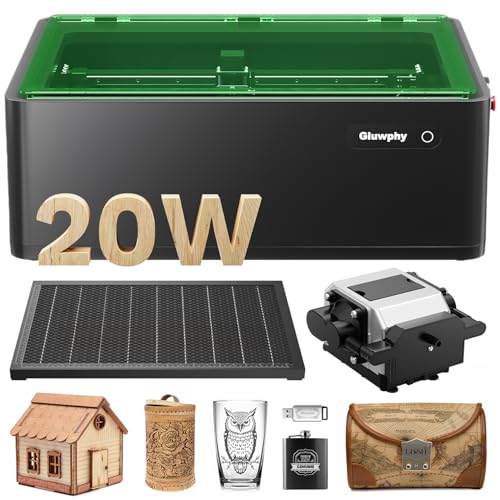
Gluwphy AIM 20 20W Enclosed Laser
Best for: Beginners needing Class 1 safety and auto-focus
- Laser Type
- Diode
- Laser Power
- 20000mW (20W)
- Engraving Speed
- 400 mm/second
- Software Compatibility
- LightBurn
- Form Factor
- Enclosed (Class 1)
- Cutting Capacity
- 10mm (wood, acrylic)
The Gluwphy AIM 20W is a Class 1 enclosed diode laser with 20,000mW power. It cuts wood and acrylic up to 10mm. The unit moves at 400 mm/s with a 0.06 x 0.04 mm spot size. Auto-focus handles small items like rings. An air assist system prevents surface yellowing. The enclosed design includes a HEPA filter and turbo fan for safety.
Pros
- Class 1 enclosed safety with HEPA filter
- 20,000mW power cuts 10mm wood and acrylic
- Auto-focus saves time on small items
- Air assist prevents material yellowing
Cons
- Limited to LightBurn software compatibility
- Heavier build at 39.7 pounds
- No mention of app control or remote
Good fit if
- You need Class 1 safety for home use
- You engrave small items like jewelry
- You want auto-focus for beginners
Skip if
- You require third-party software support
- You need to cut thick materials over 10mm
- You prefer a lighter portable unit
Verdict: Gluwphy AIM 20W Enclosed Laser is a safe, precise option for beginners who value Class 1 protection and auto-focus. It fits users who prioritize safety and small-item detail over software flexibility.
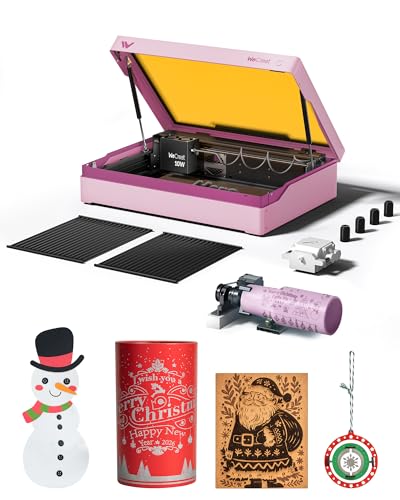
WECREAT Vista 10W Diode Laser
Best for: Beginners needing safe rotary engraving
- Laser Type
- Diode
- Laser Power
- 10W
- Working Area
- 16.34"x11.42"
- Engraving Speed
- 600mm/s
- Software Compatibility
- LightBurn, WeCreat MakeIt
- Form Factor
- Metal-enclosed (Class 1)
The WECREAT Vista is a 10W diode laser in a Class 1 metal enclosure. It offers a 16.34 by 11.42 inch work area and 600mm/s speed. The included HD camera aids positioning. You get a 9-in-1 rotary for tumblers. It works with LightBurn and MakeIt. This compact unit suits beginners needing safety and precision for thin materials.
Pros
- Class 1 enclosed safety design
- Smart HD TopView camera
- 9-in-1 rotary attachment included
- Compatible with LightBurn software
Cons
- Lower 10W power output
- Smaller 16.34 inch work area
- No Bluetooth connectivity listed
Good fit if
- You need a Class 1 safe machine
- You want to engrave tumblers easily
- You prefer a compact desktop size
Skip if
- You require 20W cutting power
- You need a large work area
- You want to cut thick wood
Verdict: The WECREAT Vista 10W Desktop Laser fits beginners who prioritize safety and rotary engraving over raw power. It is ideal for detailed work on thin materials rather than heavy cutting.

Creality Falcon T1 20W Diode
Best for: high-volume small batch engraving jobs
- Laser Type
- Diode
- Laser Power
- 20W
- Engraving Speed
- 10,000mm/s
- Software Compatibility
- Falcon Design Space
- Form Factor
- Class 1 Enclosed
- Compatible Material
- Wood, Acrylic, Leather
The Creality Falcon T1 is a Class 1 enclosed laser engraver featuring a 20W diode module. It uses galvo technology to reach engraving speeds of 10,000mm/s. The system includes AI visual auto-focus and active flame detection for safety. You can control the machine via the Falcon Design Space app on your smartphone. This modular design allows for future upgrades, making it suitable for small businesses seeking high-speed production.
Pros
- Galvo scanning achieves 10,000mm/s engraving speed
- Class 1 enclosed safety with flame detection
- AI visual auto-focus eliminates manual adjustment
- Smartphone app control via Falcon Design Space
Cons
- Only one laser module can be used at a time
- Modules are not hot-swappable and require power off
- Laser modules and lenses are not included with base
Good fit if
- You need high-speed engraving for small batch production
- You want a Class 1 enclosed machine for safer operation
- You prefer app-based control and auto-focus features
Skip if
- You require simultaneous use of multiple laser types
- You need to swap modules without powering down
- You want a complete kit with all laser modules included
Verdict: The Creality Falcon T1 20W Galvo Engraver offers rapid production speeds and robust safety features for users focused on efficiency. It fits makers who prioritize speed and modular scalability over immediate multi-module versatility.
Specifications side by side
| Spec | AtomStack Kraft 20W Diode & 1.2W IR Enclosed Engraver | xTool M2 20W Laser Cutter with CMYK Inkjet | WECREAT Vision 20W Enclosed Laser Engraver | Creality Falcon2 Pro S 40W Enclosed Laser | Gluwphy AIM 20 20W Enclosed Laser | WECREAT Vista 10W Diode Laser | Creality Falcon T1 20W Diode |
|---|---|---|---|---|---|---|---|
| Laser Type | Diode, IR | Diode | Diode | Diode | Diode | Diode | Diode |
| Laser Power | 20 W Diode, 1.2 W IR | 20W (20000mW) | 20W (20,000mW) | 40W (switchable to 22W) | 20000mW (20W) | 10W | 20W |
| Working Area | 50x32 cm (19.69 x 12.60 in) | not specified | not specified | not specified | not specified | 16.34"x11.42" | not specified |
| Engraving Speed | not specified | not specified | 600mm/s | Over 600 mm/s | 400 mm/second | 600mm/s | 10,000mm/s |
| Software Compatibility | AtomStack Studio, LightBurn | xTool Studio | LightBurn, WeCreat proprietary software | Falcon Design Space, LightBurn | LightBurn | LightBurn, WeCreat MakeIt | Falcon Design Space |
| Form Factor | Enclosed (Class 1) | Class 1 Enclosed | Fully enclosed (Class 1) | Enclosed (Class 1) | Enclosed (Class 1) | Metal-enclosed (Class 1) | Class 1 Enclosed |
| Cutting Capacity | Up to 10 mm (0.39 in) | not specified | 10mm wood, 8mm opaque black acrylic | 20 mm wood, 20 mm dark acrylic | 10mm (wood, acrylic) | not specified | not specified |
| Compatible Material | Wood, Leather, Jewelry | Wood, Leather, Paper, Fabric | Wood, Metal, Acrylic | Wood, Metal, Acrylic, Leather | Wood, Metal, Acrylic | Wood, Metal, Leather, Glass, Jewelry | Wood, Acrylic, Leather |
| Features | Enclosure | Enclosure, Camera | Enclosure, Air Assist, Camera | Enclosure, Air Assist, Camera | Enclosure, Air Assist | Camera | Enclosure |
| Target Audience | Beginners, Small Business | DIY | not specified | not specified | Beginners | DIY, Beginners | not specified |
| Size | not specified | 20W | 20W | Pro S 40W | 20W | Rotary Pack | not specified |
| Dimensions | 31 × 24 × 10 inches | not specified | 24 × 21 × 10 inches | 24.4 × 21.7 × 16.9 inches | 26.4 × 19.7 × 9.37 inches | 30 × 23.6 × 13.6 inches | 12.3 × 19.8 × 18.3 inches |
| Weight | not specified | not specified | not specified | not specified | 39.7 pounds | not specified | 54.3 pounds |
| Color | Black | M2 Basic + CMYK Inkjet + RA3 Lite | Rotary Pack | Pro S 40W Laser | Black | Taffy Pink | diode 20W |
| Model | Kraft | MLM-K610-001 | LC2320 | Creality Falcon2 Pro S 40W | AIM 20 | LE2410 | Falcon T1 |
If you cut thick conductive sheet metal instead, awt plasma cutter alternatives compare specs for high-amperage thermal cutting systems.
Frequently asked questions
Which alternative is best for dual-material engraving?
The AtomStack Kraft 20W Diode & 1.2W IR Enclosed Engraver remains the top choice for switching between wood cutting and metal engraving. It features a complete dual-laser system housed in a safe enclosure. This setup allows you to change materials without swapping hardware modules.
What is the best budget option with color printing?
The xTool M2 20W Laser Cutter with CMYK Inkjet is the best budget pick for makers needing color printing. It combines laser cutting with a CMYK inkjet printer in one enclosed unit. This is ideal if you value precision and versatility over a basic single-function machine.
Which machine offers the highest laser power?
The Creality Falcon2 Pro S 40W Enclosed Laser delivers the highest power at 40W. It is designed for fast cutting of thick wood and acrylic. This machine fits users who prioritize raw power and enclosed safety over a compact desktop footprint.
Which engraver is best for beginners needing auto-focus?
The Gluwphy AIM 20 20W Enclosed Laser is best for beginners who value Class 1 protection and auto-focus. It provides a safe and precise option for small-item detail. This model prioritizes safety features and ease of use over advanced software flexibility.
What is the best choice for safe rotary engraving?
The WECREAT Vista 10W Diode Laser is the best choice for beginners needing safe rotary engraving. It is ideal for detailed work on thin materials rather than heavy cutting. This machine prioritizes safety and rotary capabilities over raw cutting power.
Which laser is best for high-volume small batch jobs?
The Creality Falcon T1 20W Diode offers rapid production speeds for high-volume small batch engraving. It features robust safety features and a galvo system. This model fits makers who prioritize speed and modular scalability over immediate multi-module versatility.
Which alternative is best for home users needing Class 1 safety?
The WECREAT Vision 20W Enclosed Laser Engraver is best for home users needing Class 1 safety. It handles moderate cutting tasks well and offers height flexibility. This unit is less suitable for those needing wireless control, focusing instead on enclosed safety and precision.