6 Best Alternatives to the AlgoLaser Pixi 10W Portable Laser Engraver (2026)
As an Amazon Associate we earn from qualifying purchases. Links on this page are affiliate links.
The AlgoLaser Pixi 10W Portable Laser Engraver offers a compact, Class 1 enclosed design with a 3.5-inch touchscreen for offline operation. If you are looking for algolaser pixi 10w portable laser engraver alternatives, you might want a different size, power level, or additional features like a camera. This list compares 6 options that share key specifications with the Pixi, such as 10W laser power or beginner-friendly controls.
Each alternative matches specific needs that the Pixi may not cover. For example, some models provide a larger working area for bigger projects, while others include camera systems for precise alignment. You can choose based on your priority for portability, safety, or cutting depth. All selected products overlap with the original in core areas like laser type or target audience, ensuring you find a practical replacement without sacrificing essential performance.
How each alternative compares
Ortur R2 10W Enclosed Laser Engraver
The Ortur R2 10W is larger than the Pixi, measuring 18.5 by 15.7 inches. It shares the 10W power and enclosed Class 1 safety but adds a built-in camera and touchscreen for precise alignment. You gain a bigger work area and visual framing for complex designs. You give up the Pixi’s portability, as the R2 is heavier and bulkier. This model suits home users who want offline control and accuracy over a compact footprint. It is ideal for medium projects where precise positioning matters more than easy storage. The camera system helps you center designs without a computer, offering a streamlined workflow for beginners who prioritize safety and detail.
AlgoLaser Pixi 5W Touchscreen Laser Engraver
The AlgoLaser Pixi 5W matches the original’s portable form factor and touchscreen interface but reduces laser power to 5W. It keeps the enclosed Class 1 safety and offline operation, making it safer for tight spaces. You sacrifice engraving speed and cutting ability on thicker materials. This model is best for beginners who only need to mark wood and leather lightly. It is ideal for small, portable projects where raw power is unnecessary. The 5W output handles detailed text and small logos well. You do not get the deeper cuts or faster processing of the 10W version. If you value compactness and ease of use over performance, this budget-friendly option provides the same safe, intuitive experience with less intensity.
WAINLUX X2 10W Enclosed Laser Engraver
The WAINLUX X2 10W offers an enclosed design similar to the Pixi but lacks a built-in touchscreen in the provided data. It shares the 10W power and supports wood, metal, leather, and glass. You gain a potentially different control method, likely requiring a computer or app, which reduces offline convenience. This model suits users who prioritize safety and precision over integrated controls. It is ideal for beginners who want a compact footprint without the touchscreen interface. The enclosed chamber ensures Class 1 safety for home use. You give up the Pixi’s immediate, standalone operation. If you prefer connecting to a device for design uploads, this engraver delivers comparable power and material support with a focus on safe, precise engraving.
WECREAT Vista 10W Diode Laser
The WECREAT Vista 10W is a desktop unit, significantly larger than the portable Pixi. It features a 10W diode laser and a built-in camera for precise alignment. You gain rotary support and a larger workspace for detailed work on jewelry and glass. You give up portability and the Pixi’s enclosed, standalone touchscreen operation. This model suits users who need a camera system for complex designs. It is ideal for beginners who prioritize precision and rotary capabilities over compactness. The desktop form factor requires a dedicated spot. You do not get the easy, offline setup of the Pixi. If you value visual framing and rotary options for intricate projects, the Vista offers advanced features at the cost of mobility and simplicity.
Carverall 6W Desktop Laser Engraver
The Carverall 6W Desktop Engraver uses a lower 6W laser power compared to the Pixi’s 10W. It is designed for compact desktop use and metal marking. You gain a smaller footprint suitable for tight spaces but sacrifice cutting depth and speed. This model suits users who value app control and compact size over raw power. It is ideal for small projects and light metal marking. You give up the Pixi’s higher power output and enclosed safety features. The 6W setting is sufficient for wood and leather but less effective on thicker materials. If you prioritize a small desktop tool with app integration, this option provides a practical solution for light engraving tasks without the bulk or power of the Pixi.
Creality Falcon 10W Laser Engraver
The Creality Falcon 10W is a desktop engraver with a larger workspace than the portable Pixi. It shares the 10W power but lacks the enclosed, standalone touchscreen interface. You gain a bigger area for larger projects and potentially faster cutting. You give up portability and the Pixi’s Class 1 enclosed safety. This model suits DIY users who need high cutting power and a large workspace. It is ideal for those who prioritize performance over compactness and offline operation. The desktop format requires a dedicated setup. You do not get the easy, touch-based control of the Pixi. If you value size and cutting capability for bigger projects, the Falcon offers strong performance at the cost of mobility and integrated safety features.
Quick picks
Our 7 picks

AlgoLaser Pixi 10W Portable Laser Engraver
Best for: beginners seeking safe, offline engraving
- Laser Power
- 10W
- Engraving Speed
- 100–300 mm/s
- Software Compatibility
- AlgoOS
- Form Factor
- Fully enclosed Class 1
- Compatible Material
- Wood, Metal, Leather
- Features
- Touchscreen
View on Amazon: AlgoLaser Pixi 10W Portable Laser Engraver Affiliate link
The AlgoLaser Pixi is a fully enclosed Class 1 laser engraver with 10W output. It features a 3.5-inch touchscreen for offline operation without a PC. You can adjust power from 50–100% and speed up to 300 mm/s. It weighs 6.7 pounds and measures 10.4 by 8.4 by 7.7 inches. This portable unit suits beginners and DIYers who want simple, safe engraving on wood, leather, and metal.
Pros
- 10W laser power for crisp details
- Fully enclosed Class 1 safety design
- 3.5-inch touchscreen for offline use
- Adjustable speed up to 300 mm/s
- Portable build at 6.7 pounds
Cons
- No rotary attachment included in base data
- Touchscreen is small for complex designs
- External ventilation recommended for fumes
Good fit if
- You want a safe, enclosed machine for home use
- You prefer operating without a computer
- You need a portable unit for small projects
Skip if
- You require high-volume industrial production
- You need to engrave large curved surfaces
- You want built-in app control
Verdict: The AlgoLaser Pixi 10W Portable Engraver is a compact, safe option for beginners who value offline touchscreen control and Class 1 safety in a portable form factor.

Ortur R2 10W Enclosed Laser Engraver
Best for: Safe home use with offline control
- Laser Power
- 10W
- Working Area
- 300 x 210 mm (11.8" x 8.3")
- Engraving Speed
- Up to 20,000 mm/min (333 mm/s)
- Form Factor
- Fully Enclosed (Class 1)
- Compatible Material
- Wood, Metal, Acrylic, Leather
- Features
- Enclosure, Camera, Touchscreen
View on Amazon: Ortur R2 10W Enclosed Laser Engraver Affiliate link
The Ortur R2 is a fully enclosed Class 1 laser engraver with a 10W module and a 300 x 210 mm work area. It features a built-in touchscreen and HD camera for offline operation without a computer. The machine supports swappable modules for future upgrades. This compact unit suits beginners and home users who want a safe, ready-to-use device for wood, leather, acrylic, and coated metals.
Pros
- Fully enclosed Class 1 safety design
- Built-in touchscreen for offline control
- HD camera for precise alignment
- 10W power for engraving and cutting
- Supports swappable laser modules
Cons
- 300 x 210 mm work area is smaller than some competitors
- No smartphone app control required
- Higher price point than basic open-frame models
Good fit if
- You want a safe, enclosed machine for home use
- You prefer offline control without a computer
- You need precise alignment with a built-in camera
Skip if
- You require a large work area over 300 mm
- You want to control the machine via a smartphone app
- You are looking for the lowest possible price
Verdict: Ortur R2 10W Enclosed Engraver fits beginners and home users who prioritize safety and offline convenience. It is ideal for small to medium projects where precise alignment matters.

AlgoLaser Pixi 5W Touchscreen Laser Engraver
Best for: Beginners seeking a safe, portable engraver
- Laser Power
- 5W
- Software Compatibility
- AlgoOS, APP
- Form Factor
- Class 1
- Compatible Material
- Wood, Leather
- Features
- Touchscreen
- Target Audience
- DIY, Beginners, Small Business
View on Amazon: AlgoLaser Pixi 5W Touchscreen Laser Engraver Affiliate link
The AlgoLaser Pixi is a portable, Class 1 laser engraver with 5W output. It features a 3.5-inch smart touchscreen and runs on AlgoOS, allowing you to design and engrave without a computer. The unit measures 10.5 by 8.5 by 7.7 inches. It supports USB-C, WiFi, and app control. This model suits beginners and small business owners who need a compact, plug-and-play solution for wood and leather.
Pros
- Class 1 safety enclosure with auto-pause door
- 3.5-inch smart touchscreen for standalone operation
- 5W laser power for wood and leather
- WiFi and app control for mobile design
- No assembly required for immediate use
Cons
- 5W laser power is lower than 10W competitors
- Limited material compatibility to wood and leather
- No physical display for status beyond the touchscreen
Good fit if
- You want a portable machine for small projects
- You prefer designing directly on the device
- You need a safe, enclosed Class 1 system
Skip if
- You require high-power cutting through thick materials
- You need to engrave metal or acrylic
- You prefer a larger working area for big items
Verdict: AlgoLaser Pixi 5W Portable Engraver fits beginners who prioritize safety and ease of use over raw power. It is ideal for small, portable projects on wood and leather.

WAINLUX X2 10W Enclosed Laser Engraver
Best for: Safe home use with high precision
- Laser Power
- 10W
- Working Area
- 150x200mm
- Engraving Speed
- 7000mm/min
- Software Compatibility
- LightBurn, LaserGRBL, self-developed app
- Form Factor
- Class 1, with Enclosure
- Cutting Capacity
- 5-8mm plywood, 8-10mm pine boards
View on Amazon: WAINLUX X2 10W Enclosed Laser Engraver Affiliate link
The WAINLUX X2 is a Class 1 enclosed laser engraver with 10W output power. It offers a 150x200mm working area and 0.01mm ultra-precision focus. You get 7000mm/min engraving speeds and cutting capacity for up to 10mm pine. It supports LightBurn and a self-developed app. This machine suits beginners and DIY users who need a safe, enclosed workspace for wood, leather, and glass.
Pros
- Class 1 enclosed design with UV-resistant semi-transparent acrylic cover
- 10W laser power cuts 5-8mm plywood and 8-10mm pine
- 0.01mm ultra-precision focus for detailed photo-level engraving
- Supports LightBurn, LaserGRBL, and a free self-developed app
Cons
- 150x200mm working area is smaller than many desktop alternatives
- 7000mm/min speed is standard for this power class
- No mention of rotary attachment compatibility in the data
Good fit if
- You need a Class 1 enclosed machine for safe home use
- You want to engrave detailed photos on wood or leather
- You prefer app control alongside desktop software options
Skip if
- You require a large working area over 200mm
- You need to cut thick hardwoods beyond 10mm
- You want a machine with a built-in rotary included
Verdict: The WAINLUX X2 10W Laser Engraver fits users who prioritize safety and precision in a compact footprint. It is ideal for beginners who want to start with wood and leather projects without worrying about laser exposure.
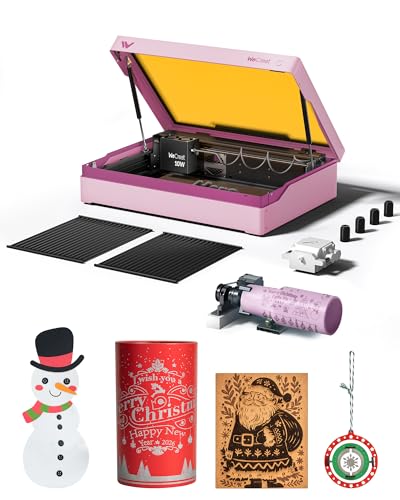
WECREAT Vista 10W Diode Laser
Best for: Safe desktop engraving with camera
- Laser Type
- Diode
- Laser Power
- 10W
- Working Area
- 16.34"x11.42"
- Engraving Speed
- 600mm/s
- Software Compatibility
- LightBurn, WeCreat MakeIt
- Form Factor
- Metal-enclosed (Class 1)
View on Amazon: WECREAT Vista 10W Diode Laser Affiliate link
The WECREAT Vista is a Class 1 enclosed diode laser with 10W output. It offers a 16.34 by 11.42 inch work area and 600mm/s speed. The unit includes a smart HD camera for positioning and a 9-in-1 rotary attachment. It supports LightBurn and WeCreat MakeIt software. This compact desktop machine suits beginners who need safety features and precise engraving on thin materials.
Pros
- Class 1 enclosed metal design for safety
- Smart HD TopView camera for auto-focus
- 9-in-1 rotary attachment for tumblers
- Compatible with LightBurn software
- 600mm/s engraving speed
Cons
- Smaller 16.34 by 11.42 inch work area
- Requires optional 2W infrared module for metal
- Larger physical footprint than portable units
Good fit if
- You want a Class 1 enclosed laser for home use
- You need precise camera positioning for small projects
- You plan to engrave cylindrical items like mugs
Skip if
- You require a large work area for big boards
- You need native metal engraving without extra modules
- You prefer a compact portable design without enclosure
Verdict: The WECREAT Vista 10W Diode Engraver fits users who prioritize safety and precision in a desktop format. It is ideal for beginners who need a camera system and rotary support for detailed work.

Carverall 6W Desktop Laser Engraver
Best for: compact desktop engraving and metal marking
- Laser Type
- Diode
- Laser Power
- 6W
- Working Area
- A4
- Engraving Speed
- 15,000 mm/min
- Software Compatibility
- CutLabX, LightBurn, LaserGRBL
- Form Factor
- Class 1
View on Amazon: Carverall 6W Desktop Laser Engraver Affiliate link
The Carverall K15 Pro is a Class 1 diode laser with 6W output and an 11.8x7.9 inch A4 work area. It reaches 15,000mm/min and cuts 8mm plywood. You control it via the CutLabX app or LightBurn. It includes an IR head option for metal. This compact unit fits under a desk while offering reliable daily performance for beginners.
Pros
- 6W diode laser with 15,000mm/min speed
- 11.8x7.9 inch A4 work area
- Class 1 enclosed safety design
- Compatible with CutLabX and LightBurn
- Includes optional IR head for metal
Cons
- Lower 6W power than 10W competitors
- Smaller A4 work area limits large projects
- Requires manual focus with a pin
Good fit if
- You need a compact desktop engraver
- You want app-based control
- You mark metal with the IR head
Skip if
- You require high-power 10W cutting
- You need a large 16x16 inch bed
- You prefer auto-focus systems
Verdict: Carverall K15 Pro 6W fits users who value compact size and app control over raw power. It is a practical desktop tool for small projects and metal marking.

Creality Falcon 10W Laser Engraver
Best for: DIY users needing high cutting power
- Laser Power
- 10W
- Working Area
- 17" x 16"
- Engraving Speed
- Up to 10000mm/m
- Software Compatibility
- LightBurn, LaserGRBL
- Cutting Capacity
- 5mm basswood, 3mm black acrylic
- Compatible Material
- Wood, Metal, Acrylic, Leather, Glass, Paper
View on Amazon: Creality Falcon 10W Laser Engraver Affiliate link
The Creality CR-Laser Falcon 10W delivers 10W of output power for cutting 5mm basswood and 3mm black acrylic in one pass. It features a 17 by 16 inch working area and engraving speeds up to 10000mm/m. You can connect via Wi-Fi, USB, or SD card. It supports LightBurn and LaserGRBL software. This DIY machine suits users who need high precision with a 0.06mm spot focus.
Pros
- 10W output power cuts 5mm basswood in one pass
- 17 by 16 inch working area
- Compatible with LightBurn and LaserGRBL software
- Wi-Fi, USB, and SD card connectivity
Cons
- Class IIIa laser requires eye protection
- 7.05 pounds weight reduces portability
- Basic model lacks air assist pump
Good fit if
- You need to cut 5mm basswood in a single pass
- You prefer software compatibility with LightBurn
- You want a large 17 by 16 inch work area
Skip if
- You require a Class 1 enclosed machine
- You need a built-in air assist pump
- You want a compact portable design
Verdict: Creality CR-Laser Falcon 10W offers strong cutting power and a large workspace for DIY users who prioritize performance over portability.
Specifications side by side
| Spec | AlgoLaser Pixi 10W Portable Laser Engraver | Ortur R2 10W Enclosed Laser Engraver | AlgoLaser Pixi 5W Touchscreen Laser Engraver | WAINLUX X2 10W Enclosed Laser Engraver | WECREAT Vista 10W Diode Laser | Carverall 6W Desktop Laser Engraver | Creality Falcon 10W Laser Engraver |
|---|---|---|---|---|---|---|---|
| Laser Type | not stated | not stated | not stated | not stated | Diode | Diode | not stated |
| Laser Power | 10W | 10W | 5W | 10W | 10W | 6W | 10W |
| Working Area | not stated | 300 x 210 mm (11.8" x 8.3") | not stated | 150x200mm | 16.34"x11.42" | A4 | 17" x 16" |
| Engraving Speed | 100–300 mm/s | Up to 20,000 mm/min (333 mm/s) | not stated | 7000mm/min | 600mm/s | 15,000 mm/min | Up to 10000mm/m |
| Software Compatibility | AlgoOS | not stated | AlgoOS, APP | LightBurn, LaserGRBL, self-developed app | LightBurn, WeCreat MakeIt | CutLabX, LightBurn, LaserGRBL | LightBurn, LaserGRBL |
| Form Factor | Fully enclosed Class 1 | Fully Enclosed (Class 1) | Class 1 | Class 1, with Enclosure | Metal-enclosed (Class 1) | Class 1 | not stated |
| Cutting Capacity | not stated | not stated | not stated | 5-8mm plywood, 8-10mm pine boards | not stated | 8 mm plywood, 5 mm black acrylic | 5mm basswood, 3mm black acrylic |
| Compatible Material | Wood, Metal, Leather | Wood, Metal, Acrylic, Leather | Wood, Leather | Wood, Metal, Leather, Glass | Wood, Metal, Leather, Glass, Jewelry | Wood, Metal, Acrylic, Leather, Paper | Wood, Metal, Acrylic, Leather, Glass, Paper |
| Features | Touchscreen | Enclosure, Camera, Touchscreen | Touchscreen | Enclosure | Camera | not stated | not stated |
| Target Audience | DIY, Beginners | DIY, Beginners | DIY, Beginners, Small Business | DIY, Beginners | DIY, Beginners | DIY, Beginners, Small Business | DIY |
| Dimensions | 10.4 × 8.4 × 7.7 inches | 18.5 × 15.7 × 8.43 inches | 10.5 × 8.5 × 7.7 inches | not stated | 30 × 23.6 × 13.6 inches | 1 × 1 × 1 inches | 22.4 × 24.9 × 7.79 inches |
| Weight | 6.7 pounds | not stated | not stated | not stated | not stated | not stated | 7.05 pounds |
| Color | Classic Red | R2 10W Camera Laser Engraver | Power Red | Blue+Green+Grey | Taffy Pink | Gray | Falcon-10W Basic |
| Size | not stated | R2 10W Camera Laser Engraver | not stated | K15-10W-E | Rotary Pack | 6W | Falcon-10W Basic |
| Model | not stated | Ortur R2 | Pixi 2025 | not stated | LE2410 | K15 Pro | CR-Laser Falcon 10W |
Frequently asked questions
Which alternative offers the largest work area for bigger projects?
The WECREAT Vista 10W Diode Laser provides the largest footprint among these options. It measures 30 inches in length and 23.6 inches in width. This desktop format suits users who need space for larger wood, metal, or jewelry pieces. It also includes a camera system for precise alignment during detailed work.
Is there a lighter and more portable option than the Pixi 10W?
The AlgoLaser Pixi 5W Touchscreen Laser Engraver is a slightly lighter portable choice. It weighs 6.7 pounds, similar to the 10W version, but features lower power. This model is ideal for beginners who prioritize safety and portability for small wood and leather projects without needing the extra cutting power of the 10W unit.
Which engraver includes a built-in camera for precise alignment?
The Ortur R2 10W Enclosed Laser Engraver and the WECREAT Vista 10W both feature built-in cameras. The Ortur model adds this to an enclosed, Class 1 design with a touchscreen. The WECREAT Vista offers camera support in a larger desktop format. These tools help you align designs accurately on wood, metal, or acrylic.
Can these alternatives engrave metal surfaces safely?
Yes, several models support metal engraving or marking. The AlgoLaser Pixi 10W, Ortur R2 10W, WAINLUX X2 10W, WECREAT Vista 10W, and Carverall 6W all list metal as a compatible material. The WAINLUX X2 and WECREAT Vista also support glass. Ensure you follow safety guidelines when working with reflective or hard surfaces.
Which machine is best for users who want offline touchscreen control?
The AlgoLaser Pixi 10W and the Ortur R2 10W both feature touchscreens for offline operation. The Pixi is compact and portable, while the Ortur R2 is larger and enclosed. These interfaces allow you to control the engraving process without connecting to a computer, making them convenient for quick projects or limited workspace setups.
Is there a budget-friendly alternative with lower power consumption?
The AlgoLaser Pixi 5W Touchscreen Laser Engraver serves as a budget-friendly alternative with lower power. It offers 5W laser power compared to the 10W options. This makes it suitable for small, portable projects on wood and leather. It retains the safe, portable design and touchscreen interface found in the higher-power Pixi models.
Which alternative provides the most comprehensive material compatibility?
The WECREAT Vista 10W Diode Laser supports the widest range of materials listed. It engraves wood, metal, leather, glass, and jewelry. The Creality Falcon 10W also handles paper and acrylic alongside these materials. If you need to work with diverse surfaces like glass or jewelry, these models offer broader compatibility than the portable-focused options.