Ortur Laser Master 3 20000mW Review (2026): A Spec-Based Look
As an Amazon Associate we earn from qualifying purchases. Links on this page are affiliate links.
This ortur laser master 3 20000mw review looks at a machine built for high-power cutting and precision engraving. It delivers a true 20,000mW output with a tight 0.08 × 0.08 mm beam spot. You get engraving speeds up to 20,000 mm/min for fast work. The unit includes an integrated air assist system to reduce burn marks. It supports Windows and macOS with LightBurn and LaserGRBL. The frame measures 25.9 by 24.6 inches with a height of 5.91 inches. This setup targets users who need industrial-grade capability for thick materials like pine and acrylic.
What stands out
- 20,000mW laser power with 0.08 × 0.08 mm beam spot
- Integrated air assist system with adjustable airflow knob
- Engraving speed up to 20,000 mm/min
- Cuts 15mm pine, 10mm plywood, and 8mm black acrylic in one pass
- Color engraving on stainless steel using speed and power control
Who it fits
Good fit for
You should consider this unit if you frequently cut thick materials like 15mm pine or 8mm black acrylic. The high power and air assist make it suitable for professional workshops needing clean edges. It fits users who want color engraving on metal or fast throughput on wood and leather. The software support for LightBurn and LaserGRBL suits experienced operators. The safety features, including eight built-in protections, add reliability for daily use.
Who should skip it
Skip this model if you only need to engrave thin materials or small items. The large frame size may not fit compact desks or small hobby spaces. If you require a portable or desktop-sized unit, the 25.9-inch length is too bulky. Users who do not need air assist or high-speed cutting might find the complexity unnecessary. Those preferring simpler, smaller engravers should look for a more compact alternative that matches their space constraints.
Verdict: The Ortur Laser Master 3 offers strong cutting power and speed for serious users. Its air assist and software support make it a practical choice for demanding projects.
Key specs explained for Ortur LM3
Laser Power: 20W
This machine outputs a true 20,000mW of laser power. The tight 0.08 × 0.08 mm beam spot concentrates energy for high-density cutting. You can complete one-pass cuts on 15mm pine, 10mm plywood, and 8mm black acrylic. It also handles up to 30mm thick black acrylic. This power level suits users who need industrial-grade cutting strength and precision on thicker materials.
Engraving Speed: Up to 20,000 mm/min
The laser head moves at speeds reaching 20,000 mm/min. This allows for smooth and efficient engraving on wood, leather, paper, plastic, and dark acrylic. You can also engrave glass and coated metals with ease. Higher speeds reduce processing time for large designs. When comparing machines, look for this rate to ensure fast workflow and efficient production of detailed patterns.
Cutting Capacity: 15mm pine, 10mm plywood, 8mm acrylic
These figures represent the maximum thickness the laser can cut in a single pass. You can slice through 15mm pine wood, 10mm plywood, and 8mm black acrylic reliably. The air assist system minimizes burn marks by lowering surface temperature, ensuring cleaner edges. This capacity helps you determine if the machine meets your specific material thickness requirements before purchasing.
Software Compatibility: LaserGRBL, LightBurn, ORTUR App, Web UI
The device works with Web UI and popular engraving software like LaserGRBL and LightBurn. It supports Windows 7/8/10/11 and macOS with LightBurn. The dedicated ORTUR App allows switching between simple and professional modes. You can import formats like NC, BMP, JPG, PNG, and DXF. This flexibility lets you choose the interface that best fits your skill level and workflow preferences.
Design and build analysis
The Ortur Laser Master 3 measures 25.9 inches in length, 24.6 inches in width, and 5.91 inches in height according to the listing. These dimensions define the physical footprint you need on your workbench. The compact height allows it to fit under standard cabinets, while the length accommodates larger sheets of material. The listing does not specify the weight, so you should check shipping details if portability matters for your setup. The unit is available in a 20W configuration, which aligns with the high-power cutting capabilities described elsewhere in the specifications. This color coding helps you identify the correct module version when ordering or comparing variations.
The machine includes an integrated air assist system, featuring a built-in air tube and a 50L pump. This hardware choice directly impacts the finish quality of your cuts by lowering surface temperatures and reducing burn marks. You can adjust the airflow using a dedicated knob, giving you control over the cooling intensity for different materials like wood or dark acrylic. The design prioritizes functional integration, placing these components within the main chassis to keep your workspace organized. There are no external sensors or remote controls mentioned in the data, so operation relies on the included software ecosystem. The build focuses on delivering industrial-grade cutting strength through its robust laser module housing and safety systems, ensuring reliable performance during extended engraving sessions.
Setup and everyday use
The Ortur Laser Master 3 connects via USB and supports Windows and macOS systems. You can control the machine through the Web UI, the dedicated ORTUR App, or third-party software like LaserGRBL and LightBurn. The app allows you to switch between simple and professional modes, which helps you adjust settings based on your skill level. The system accepts standard file formats such as NC, BMP, JPG, PNG, and DXF, making it easy to import your designs without complex conversion steps.
Daily operation benefits from the integrated air assist system. The listing notes a built-in air tube paired with a 50L pump. This feature lowers surface temperature during cutting and engraving. You can adjust the airflow using a dedicated knob. This adjustment helps minimize burn marks by up to 50 percent, resulting in cleaner edges on wood and dark acrylic. The high engraving speed of 20,000 mm/min allows for rapid processing of materials like leather, paper, and plastic.
Safety is managed through eight built-in protections. These include an emergency stop, tilt and motion detection, and an anti-crash watchdog. The USB connection monitor ensures the link remains stable during long jobs. Voltage and current controls help prevent electrical issues. These features work together to create a reliable workflow. You do not need to manually monitor every movement, as the active position protection and exposure time limits handle common risks automatically. This setup reduces the learning curve for new users while providing the stability needed for consistent production work.
Before you buy this laser
You need a dedicated work area for this unit. It measures 25.9 inches long and 24.6 inches wide. Ensure your table supports this footprint. The listing includes a 50L air assist pump. You must connect it to an air source for optimal results. This system reduces burn marks significantly. Check your software preferences early. The machine supports LaserGRBL, LightBurn, and the ORTUR App. Verify your computer runs Windows or macOS. LightBurn requires macOS compatibility. Regular maintenance involves cleaning the lens and mirrors. Dust from wood and acrylic accumulates quickly. Wipe surfaces after each session. This model sits at the high-power end of the 1 options reviewed here. Its 20W output handles thicker materials than entry-level units. If you only engrave small items, a lower-power machine may suffice. For cutting 15mm pine or 8mm acrylic, this spec is necessary. Plan your ventilation accordingly. The air assist helps, but smoke extraction is still required for safe operation. Keep the workspace clear of flammable materials.
Check before you buy
- Verify table space for 25.9 x 24.6 inch footprint
- Check computer OS for LightBurn or LaserGRBL support
- Ensure ventilation for air assist and smoke extraction
- Confirm material thickness needs match 20W cutting capacity
The product at a glance
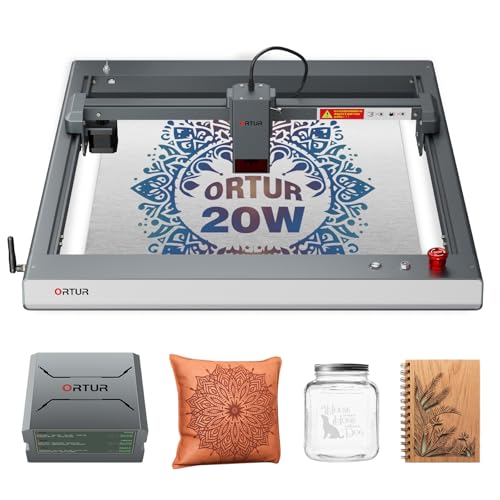
Ortur Laser Master 3 20W with Air Assist
Best for: Thick material cutting and metal color engraving
- Laser Power
- 20W
- Engraving Speed
- Up to 20,000 mm/min
- Software Compatibility
- LaserGRBL, LightBurn, ORTUR App, Web UI
- Cutting Capacity
- 15mm pine, 10mm plywood, 8mm acrylic
- Compatible Material
- Wood, Metal, Acrylic, Leather
- Features
- Air Assist
View on Amazon: Ortur Laser Master 3 20W with Air Assist Affiliate link
The Ortur Laser Master 3 20W delivers 20,000mW of power with a 0.08 × 0.08 mm beam spot. It cuts 15mm pine and 8mm acrylic in one pass. You get engraving speeds up to 20,000 mm/min and color engraving on stainless steel. The unit includes an integrated air assist system and eight safety protections. It supports LightBurn, LaserGRBL, and the ORTUR App for Windows and macOS users.
Pros
- 20,000mW true laser power for deep cuts
- Integrated air assist reduces burn marks
- Supports color engraving on stainless steel
- Eight built-in safety protections
- Compatible with LightBurn and LaserGRBL
Cons
- Large footprint measures 25.9 by 24.6 inches
- Requires assembly before first use
- No physical display panel mentioned
Good fit if
- You need to cut thick wood or acrylic
- You want color engraving on metal
- You prefer app-based control
Skip if
- You have limited desktop space
- You only engrave small items
- You need a compact portable unit
Verdict: Ortur Laser Master 3 20W suits makers who need industrial-grade cutting power and color metal engraving. It fits well on large workbenches where size is not a constraint.
Specifications side by side
| Spec | Ortur Laser Master 3 20W with Air Assist |
|---|---|
| Laser Power | 20W |
| Engraving Speed | Up to 20,000 mm/min |
| Software Compatibility | LaserGRBL, LightBurn, ORTUR App, Web UI |
| Cutting Capacity | 15mm pine, 10mm plywood, 8mm acrylic |
| Compatible Material | Wood, Metal, Acrylic, Leather |
| Features | Air Assist |
| Dimensions | 25.9 × 24.6 × 5.91 inches |
| Color | 20W |
| Model | ORTUR LM3 |
Frequently asked questions
What materials can the Ortur Laser Master 3 cut?
This machine is built for thick material cutting and metal color engraving. It is compatible with wood, metal, acrylic, and leather. The 20W laser power allows for one-pass cuts on 15mm pine, 10mm plywood, and 8mm black acrylic. You can also engrave metals for color effects using the appropriate settings.
Does the Ortur LM3 include an air assist pump?
Yes, the listing includes a 50L air assist pump. This feature is essential for clean cutting and preventing material flare-ups. You must connect the pump to an air source to use it. The air assist helps clear debris from the cut line, improving precision on wood and acrylic.
What software works with the Ortur Laser Master 3?
You can control the machine through the Web UI, the dedicated ORTUR App, or third-party software like LaserGRBL and LightBurn. It connects via USB and supports Windows and macOS systems. The app allows you to switch between different control modes. This flexibility lets you choose the interface that fits your workflow.
How large is the work area on this laser engraver?
The unit measures 25.9 inches in length and 24.6 inches in width. These dimensions define the physical footprint you need on your workbench. The compact height of 5.91 inches allows it to fit on standard tables. Ensure your table supports this size and weight before placing the machine.
Is this machine suitable for industrial-grade cutting?
Yes, the Ortur Laser Master 3 suits makers who need industrial-grade cutting power. It delivers a true 20,000mW output with a tight beam spot for high-density energy. This power level enables fast work and clean cuts on thicker materials. It fits well on large workbenches where size is not a constraint.
Can I engrave colors on metal with this device?
Yes, this machine is specifically noted for metal color engraving. The 20W power and precise beam spot allow for detailed work on metals. You can create colorful marks on stainless steel and other compatible surfaces. This capability makes it a versatile tool for both cutting wood and marking metal.