Ortur Laser Master 3 20000mW Alternatives: 6 Similar Picks Compared
As an Amazon Associate we earn from qualifying purchases. Links on this page are affiliate links.
The ortur laser master 3 20000mw alternatives list helps you find machines with similar 20W power. You might want these options if you need a different bed size or extra features like a rotary axis. The original Ortur Laser Master 3 delivers strong cutting performance on thick wood and acrylic. It also supports color engraving on stainless steel and includes an integrated air assist system. Its high engraving speed of 20,000 mm/min makes it efficient for detailed work.
However, some users prefer a larger workspace or a more compact footprint. Others may prioritize safety enclosures or touchscreen controls over raw power. The alternatives in this guide were chosen because their specifications overlap with the original. All listed machines feature 20W diode lasers or comparable power levels. They also support similar materials like wood, metal, and acrylic. This selection allows you to compare key specs such as cutting capacity, software compatibility, and safety features. You can find a machine that fits your specific project requirements without sacrificing performance.
Our top pick: Ortur Laser Master 3 20W with Air Assist.
How alternatives compare to Ortur
ATOMSTACK 20W Laser Engraver with R8 Rotary Chuck
The ATOMSTACK A20 Pro V2 matches the 20W laser power of the Ortur Laser Master 3 but adds a dedicated rotary chuck. This inclusion makes it a stronger choice for precise cylindrical engraving on items like tumblers or pens. The Ortur model focuses on flat-surface cutting and color engraving on stainless steel. You should pick the ATOMSTACK if your projects involve round objects more than thick material cuts. It shares the air assist feature for cleaner edges but sacrifices the larger working area found on some other competitors. The beam focus remains tight for detailed work.
Longer Laser B1 20W Engraver Cutter
The Longer Laser B1 20W offers a significantly larger workspace compared to the Ortur Laser Master 3. It provides a 450 x 440 mm area, which is ideal for DIY users handling large sheets of wood or acrylic. The Ortur model prioritizes compact precision and industrial-grade cutting on smaller scales. The Longer B1 supports fast speeds up to 600 mm/s, aiding efficiency on big projects. You might choose the Longer if workspace size matters more than the Ortur’s specific software ecosystem. Both machines include air assist and handle similar materials, but the Longer is better for bulk production or large-format designs.
Longer Ray5 20W Laser Engraver with Touchscreen
The Longer RAY5 20W includes a touchscreen interface and rotary axis capabilities that the Ortur Laser Master 3 lacks. This makes it suitable for users who value direct machine control and cylindrical engraving over maximum bed size. The Ortur relies on external software and apps for operation. The RAY5’s enclosed design and touchscreen offer a streamlined workflow for detailed DIY projects. You should select the Longer if you prefer integrated hardware controls and rotary versatility. Both share 20W power and air assist, but the RAY5 gives up the Ortur’s specific focus on high-density beam compression for color steel engraving.
Longer B1 20W Laser Engraver with Enclosure
The Longer B1 20W with Enclosure combines a large workspace with a built-in safety cover, a feature the open-frame Ortur Laser Master 3 does not include. This enclosure provides added protection for home workshops. The Ortur model relies on software-based safety systems and external air assist. You should pick the enclosed Longer if safety and a spacious 450 x 440 mm area are your top priorities. Both machines deliver 20W power for cutting thick materials like wood and acrylic. The enclosure adds convenience, while the Ortur offers a more compact footprint for users who do not need a protective housing.
Creality Falcon Pro 10W Engraver
The Creality Falcon Pro 10W has half the laser power of the Ortur Laser Master 3, making it less effective for thick material cutting. It is designed for precise engraving and beginners who prioritize safety and ease of use. The Ortur machine cuts deeper into wood and acrylic with its 20W output. The Creality supports offline workflows via TF card, which simplifies operation for some users. You should choose the Creality if your work focuses on detailed surface engraving on wood, leather, or metal rather than cutting. It shares the air assist feature but sacrifices raw cutting strength for a more accessible entry-level experience.
WECREAT Vision 20W Enclosed Laser Engraver
The WECREAT Vision 20W features an enclosed design with an auto-lifting bed, offering a different workflow than the flat-bed Ortur Laser Master 3. It includes a camera for position verification, a feature not listed for the Ortur. This machine is ideal for home workshops where safety and ease of setup are key. The Ortur model provides a larger working area and specific color engraving capabilities on stainless steel. You should pick the WECREAT if you value an integrated enclosure and camera assistance over the Ortur’s beam precision. Both deliver 20W power and air assist for clean cuts on wood and acrylic.
Quick picks
Our 7 picks
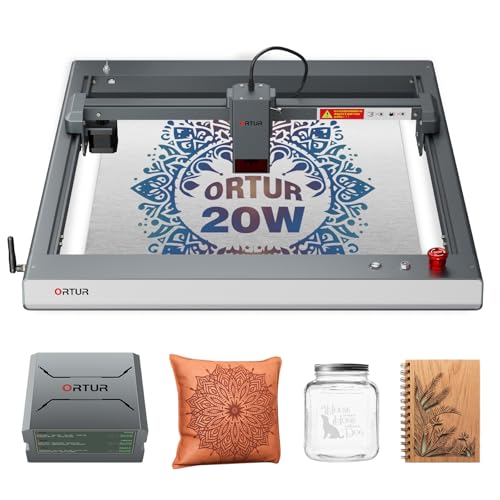
Ortur Laser Master 3 20W with Air Assist
Best for: Thick material cutting and metal color engraving
- Laser Power
- 20W
- Engraving Speed
- Up to 20,000 mm/min
- Software Compatibility
- LaserGRBL, LightBurn, ORTUR App, Web UI
- Cutting Capacity
- 15mm pine, 10mm plywood, 8mm acrylic
- Compatible Material
- Wood, Metal, Acrylic, Leather
- Features
- Air Assist
View on Amazon: Ortur Laser Master 3 20W with Air Assist Affiliate link
The Ortur Laser Master 3 delivers 20W of laser power with a tight 0.08 mm beam spot. It cuts 15mm pine, 10mm plywood, and 8mm acrylic in one pass. Integrated air assist reduces burn marks by 50%. You get engraving speeds up to 20,000 mm/min and color engraving on stainless steel. It works with LightBurn, LaserGRBL, and the ORTUR App. This machine suits users who need industrial-grade cutting strength and precise detail.
Pros
- 20W laser power cuts 15mm pine and 8mm black acrylic
- Built-in air assist minimizes burn marks by 50%
- Engraving speeds reach 20,000 mm/min
- Engraves 380 colors on stainless steel
- Supports LightBurn, LaserGRBL, and ORTUR App
Cons
- Smaller 24.6 x 25.9 inch work area than larger competitors
- Requires separate purchase of 50L air assist pump
- No mention of rotary attachment support in specifications
Good fit if
- You need to cut thick wood and acrylic in a single pass
- You want to engrave colors on metal surfaces
- You prefer software like LightBurn for control
Skip if
- You require a large format for wide materials
- You need a complete ready-to-use package without extra parts
- You only engrave on small, thin materials
Verdict: Ortur Laser Master 3 20W offers high cutting power and precise beam focus for detailed work. It fits makers who prioritize cutting thickness and metal color engraving over a larger bed size.

ATOMSTACK 20W Laser Engraver with R8 Rotary Chuck
Best for: precise cylindrical engraving tasks
- Laser Power
- 20W
- Engraving Speed
- Up to 400 mm/s (24,000 mm/min)
- Software Compatibility
- LightBurn, LaserGRBL
- Compatible Material
- Wood, Metal, Acrylic, Leather
- Features
- Air Assist, Rotary Axis
- Dimensions
- 10 × 10 × 10 inches
View on Amazon: ATOMSTACK 20W Laser Engraver with R8 Rotary Chuck Affiliate link
The Atomstack A20 Pro V2 delivers 20W of laser power with 0.01mm precision. It features a 400mm/s engraving speed and includes an R8 rotary chuck for cylindrical work. The unit comes with auto air assist and linear guides for stability. It runs on LightBurn and LaserGRBL software. This setup suits users needing high accuracy and versatile rotary capabilities for various materials.
Pros
- 20W laser output for clean marks
- 0.01mm engraving accuracy
- 400mm/s fast engraving speed
- Includes R8 rotary chuck
- Auto air assist system
Cons
- Smaller 10x10 inch work area
- No smartphone app control
- Requires manual software setup
Good fit if
- You need precise cylindrical engraving
- You want fast processing times
- You prefer linear guide stability
Skip if
- You require a large work area
- You need app-based control
- You want a plug-and-play experience
Verdict: Atomstack A20 Pro V2 20W Engraver fits users who prioritize precision and rotary versatility over a large footprint.

Longer Laser B1 20W Engraver Cutter
Best for: DIY users needing large workspace and fast cutting
- Laser Power
- 20W (up to 24W)
- Working Area
- 450 x 440 mm (17.72 x 17.32 in)
- Engraving Speed
- Up to 600 mm/s (36,000 mm/min)
- Software Compatibility
- LightBurn
- Cutting Capacity
- 25mm basswood, 35mm acrylic
- Compatible Material
- Wood, Metal, Acrylic, Leather, Glass, Paper
View on Amazon: Longer Laser B1 20W Engraver Cutter Affiliate link
The Longer B1 is a 20W laser engraver with an output power up to 24W. It features a large 450 x 440 mm working area and speeds up to 600 mm/s. This machine includes auto air assist and supports colorful engraving on stainless steel. It suits DIY users who need a spacious workspace and fast cutting for thick materials like 25mm basswood.
Pros
- 20W laser power with up to 24W output
- 450 x 440 mm large working area
- High engraving speed of 600 mm/s
- Auto air assist for precision
- Capable of colorful engraving on stainless steel
Cons
- Limited to LightBurn software compatibility
- No mention of camera or rotary accessory support
- Basic blue color option only
Good fit if
- You need a large 450 x 440 mm workspace for bigger projects
- You require high-speed cutting for thick materials like 25mm basswood
- You want auto air assist to improve cut quality
Skip if
- You need compatibility with multiple software platforms beyond LightBurn
- You want to engrave color on metal without specialized settings
- You prefer a machine with included rotary or camera accessories
Verdict: Longer B1 20W Laser Engraver offers a spacious 450 x 440 mm area and fast 600 mm/s speeds for DIY users tackling thick materials. It fits those who prioritize workspace size and cutting power over software flexibility.

Longer Ray5 20W Laser Engraver with Touchscreen
Best for: cylindrical engraving and touchscreen control
- Laser Power
- 20W
- Engraving Speed
- up to 10000mm/min
- Software Compatibility
- LaserGRBL, LightBurn
- Compatible Material
- Wood, Metal, Acrylic, Leather, Glass
- Features
- Air Assist, Rotary Axis, Touchscreen
- Target Audience
- DIY
View on Amazon: Longer Ray5 20W Laser Engraver with Touchscreen Affiliate link
The Longer RAY5 20W bundle delivers high-precision engraving with a compressed beam laser head and speeds up to 10000mm/min. You get a built-in 3.5-inch color touchscreen for direct control and four connection modes including WiFi and app support. The package includes an air assist kit, a 4-in-1 rotary roller, and riser pads. It suits DIY users who need versatile connectivity and cylindrical engraving capabilities.
Pros
- 20W laser power for efficient cutting and engraving
- Built-in 3.5-inch color touchscreen for easy operation
- Supports WiFi, USB, TF card, and app connections
- Includes 4-in-1 rotary roller for cylindrical objects
- Air assist kit with adjustable airflow up to 30L/min
Cons
- Smaller work area compared to 300x300mm models
- No mention of auto-focus or lens cleaning features
- Requires separate purchase of compatible software licenses
Good fit if
- You need to engrave cylindrical items like wine glasses
- You prefer controlling the machine via a touchscreen
- You want WiFi connectivity for wireless operation
Skip if
- You require a larger 300x300mm work area
- You need auto-focus technology for speed
- You prefer machines with no app dependency
Verdict: The Longer RAY5 20W Laser Engraver fits users who value touchscreen control and rotary capabilities over maximum workspace size. It is a solid choice for detailed DIY projects involving cylinders.
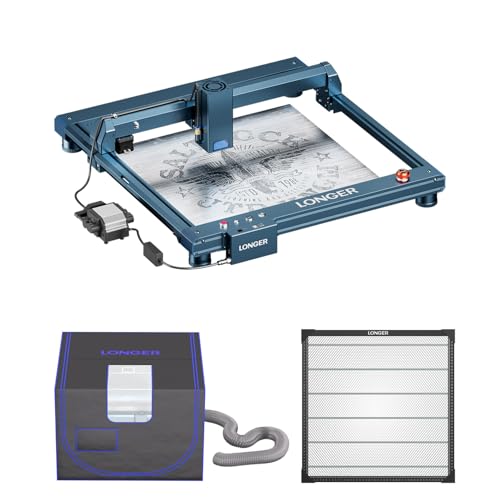
Longer B1 20W Laser Engraver with Enclosure
Best for: Large DIY projects with thick materials
- Laser Power
- 20000mW (up to 24W output)
- Working Area
- 450 x 440 mm
- Engraving Speed
- 36,000 mm/min
- Cutting Capacity
- 25mm basswood, 35mm acrylic
- Compatible Material
- Wood, Metal, Acrylic, Leather, Glass, Paper
- Features
- Enclosure, Air Assist
View on Amazon: Longer B1 20W Laser Engraver with Enclosure Affiliate link
The Longer B1 20W laser cutter offers a 450 x 440 mm working area and up to 24W output power. It includes an enclosure with ventilation and an air assist system. The machine reaches engraving speeds of 36,000 mm/min. It can cut 25mm basswood and 35mm acrylic. This model suits DIY users who need a large workspace and safety features in one unit.
Pros
- 20000mW laser power with up to 24W output
- 450 x 440 mm large working area
- Includes protective enclosure with ventilation
- Fast 36,000 mm/min engraving speed
- Air assist system for cleaner cuts
Cons
- Heavier build due to included enclosure
- Limited to 20W input power variant
- No mention of rotary attachment compatibility
Good fit if
- You need a large 450 x 440 mm workspace
- You want an enclosed unit for safety
- You cut thick materials like 25mm basswood
Skip if
- You require a compact desktop footprint
- You need automatic material sensing
- You want a machine under 15 inches wide
Verdict: The Longer B1 20W Laser Cutter fits users who prioritize a large 450 x 440 mm workspace and integrated safety enclosure. It is ideal for DIY projects requiring thick material cuts.

Creality Falcon Pro 10W Engraver
Best for: precise engraving and safety-focused beginners
- Laser Power
- 10W
- Compatible Material
- Wood, Metal, Acrylic, Leather, Paper
- Features
- Air Assist
- Dimensions
- 12.2 × 24.2 × 7.68 inches
- Weight
- 11.2 pounds
View on Amazon: Creality Falcon Pro 10W Engraver Affiliate link
The Creality Falcon Pro 10W delivers 72000mW output power with a 0.06mm spot size for fine detail work. It includes built-in air assist and an emergency stop button for safer operation. The unit weighs 11.2 pounds and measures 24.2 inches wide. You can load files via a TF card for offline use. This model suits beginners who want safety features and precise engraving on materials like wood, leather, and metal.
Pros
- 0.06mm spot size for high precision
- Built-in air assist for clean results
- Emergency stop button for safety
- Offline operation via TF card
Cons
- Smaller 10W laser power than 20W alternatives
- No mention of WiFi or app connectivity
- Requires TF card for file import
Good fit if
- You need precise engraving on small items
- You value safety features like emergency stops
- You want offline operation without a computer
Skip if
- You require high-speed cutting of thick materials
- You need WiFi connectivity for remote control
- You prefer larger work areas than 24.2 inches
Verdict: Creality Falcon Pro 10W Laser Engraver fits beginners who prioritize safety and precision over raw cutting power. It is ideal for detailed work on wood, leather, and metal using offline TF card workflows.

WECREAT Vision 20W Enclosed Laser Engraver
Best for: Home workshops needing safety features
- Laser Type
- Diode
- Laser Power
- 20W (20,000mW)
- Engraving Speed
- 600mm/s
- Software Compatibility
- LightBurn, WeCreat proprietary software
- Form Factor
- Fully enclosed (Class 1)
- Cutting Capacity
- 10mm wood, 8mm opaque black acrylic
View on Amazon: WECREAT Vision 20W Enclosed Laser Engraver Affiliate link
The WECREAT Vision 20W is a fully enclosed Class 1 diode laser with 20,000mW output. It reaches 600mm/s engraving speed and cuts 10mm wood or 8mm acrylic. The auto-lifting design handles materials from 1mm to 140mm. An HD camera and air assist improve precision. It includes a rotary and smart software. This machine suits users who want safety and ease of use.
Pros
- Fully enclosed Class 1 safety design
- Auto-lifting bed for 1mm to 140mm materials
- Built-in HD camera for positioning
- 600mm/s engraving speed
- Includes rotary and air assist
Cons
- Proprietary software required for basic functions
- Limited to 21x24 inch work area
- No mention of mobile app control
Good fit if
- You need a safe, enclosed laser for home use
- You engrave varied material heights frequently
- You want precise alignment via camera
Skip if
- You require a large industrial work area
- You prefer open-frame desktop machines
- You need high-speed metal marking
Verdict: The WECREAT Vision 20W Desktop Laser fits hobbyists who value safety and ease of setup. Its enclosed design and auto-lifting bed make it ideal for home workshops.
Specifications side by side
| Spec | Ortur Laser Master 3 20W with Air Assist | ATOMSTACK 20W Laser Engraver with R8 Rotary Chuck | Longer Laser B1 20W Engraver Cutter | Longer Ray5 20W Laser Engraver with Touchscreen | Longer B1 20W Laser Engraver with Enclosure | Creality Falcon Pro 10W Engraver | WECREAT Vision 20W Enclosed Laser Engraver |
|---|---|---|---|---|---|---|---|
| Laser Type | not stated | not stated | not stated | not stated | not stated | not stated | Diode |
| Laser Power | 20W | 20W | 20W (up to 24W) | 20W | 20000mW (up to 24W output) | 10W | 20W (20,000mW) |
| Working Area | not stated | not stated | 450 x 440 mm (17.72 x 17.32 in) | not stated | 450 x 440 mm | not stated | not stated |
| Engraving Speed | Up to 20,000 mm/min | Up to 400 mm/s (24,000 mm/min) | Up to 600 mm/s (36,000 mm/min) | up to 10000mm/min | 36,000 mm/min | not stated | 600mm/s |
| Software Compatibility | LaserGRBL, LightBurn, ORTUR App, Web UI | LightBurn, LaserGRBL | LightBurn | LaserGRBL, LightBurn | not stated | not stated | LightBurn, WeCreat proprietary software |
| Form Factor | not stated | not stated | not stated | not stated | not stated | not stated | Fully enclosed (Class 1) |
| Cutting Capacity | 15mm pine, 10mm plywood, 8mm acrylic | not stated | 25mm basswood, 35mm acrylic | not stated | 25mm basswood, 35mm acrylic | not stated | 10mm wood, 8mm opaque black acrylic |
| Compatible Material | Wood, Metal, Acrylic, Leather | Wood, Metal, Acrylic, Leather | Wood, Metal, Acrylic, Leather, Glass, Paper | Wood, Metal, Acrylic, Leather, Glass | Wood, Metal, Acrylic, Leather, Glass, Paper | Wood, Metal, Acrylic, Leather, Paper | Wood, Metal, Acrylic |
| Features | Air Assist | Air Assist, Rotary Axis | Air Assist | Air Assist, Rotary Axis, Touchscreen | Enclosure, Air Assist | Air Assist | Enclosure, Air Assist, Camera |
| Target Audience | not stated | not stated | DIY | DIY | DIY | not stated | not stated |
| Size | not stated | A20 PRO V2 + F80 + R8 | 20W | 20W Bundle Basic Edition | B1 Protection Kit(20W) | Falcon Pro-10W with Air Assist Pump | 20W |
| Dimensions | 25.9 × 24.6 × 5.91 inches | 10 × 10 × 10 inches | 29.3 × 5.31 × 22.4 inches | 24 × 12.5 × 5.9 inches | 20 × 15 × 9 inches | 12.2 × 24.2 × 7.68 inches | 24 × 21 × 10 inches |
| Weight | not stated | not stated | not stated | not stated | not stated | 11.2 pounds | not stated |
| Color | 20W | Black | Basic(blue) | black | BLUE | Falcon Pro-10W with Air Assist Pump | Rotary Pack |
| Model | ORTUR LM3 | A20 Pro V2+F80+R8 | 1-B1 | 202406024 | B1 | Falcon Pro 10W | LC2320 |
If you build a workshop computer, compare cooler master n200 alternatives to review similar enclosure dimensions and clearances.
Frequently asked questions
Which laser engraver offers the largest workspace among these alternatives?
The Longer B1 20W provides a spacious 450 x 440 mm area. This large working surface allows you to tackle bigger projects or cut multiple pieces at once. It is designed for DIY users who prioritize workspace size over software flexibility. The machine also supports fast cutting speeds of 600 mm/s.
Are there options with built-in safety enclosures?
Yes, the Longer B1 20W with Enclosure and the WECREAT Vision 20W both include safety features. The Longer B1 kit comes with an integrated enclosure for dust and light containment. The WECREAT Vision 20W features an enclosed design suitable for home workshops, ensuring a safer environment during operation.
Which models support rotary engraving for cylindrical items?
The ATOMSTACK A20 Pro V2 and the Longer Ray5 20W both support rotary axis functions. The ATOMSTACK includes an R8 Rotary Chuck for precise cylindrical tasks. The Longer Ray5 20W bundle also includes rotary capabilities, making it ideal for detailed DIY projects involving cylinders or round objects.
Is there a model with a touchscreen interface?
The Longer Ray5 20W Laser Engraver features a touchscreen for control. This interface allows you to manage settings directly on the device without needing a connected computer. It fits users who value convenient, direct control over their engraving workflow while maintaining rotary capabilities for detailed work.
Which engraver is best for beginners prioritizing safety?
The Creality Falcon Pro 10W is ideal for beginners who prioritize safety and precision. It features an enclosed design and air assist pump to enhance operational safety. Although it has lower power than the 20W alternatives, it is perfect for detailed work on wood, leather, and metal using offline workflows.
Do these machines include air assist technology?
Most listed models include air assist to improve cutting quality and lens protection. The Ortur Laser Master 3, ATOMSTACK A20 Pro V2, Longer B1 20W, Longer Ray5 20W, Creality Falcon Pro 10W, and WECREAT Vision 20W all feature this function. It helps blow away debris and cools the material during engraving.
Which option is best for metal color engraving?
The Ortur Laser Master 3 20W is specifically noted for metal color engraving. Its high cutting power and precise beam focus allow for detailed work on metals. This makes it the top pick for makers who prioritize cutting thickness and the ability to create colored marks on metal surfaces over a larger bed size.