Best WECREAT Laser Engravers for DIY in 2026: 2 Picks
As an Amazon Associate we earn from qualifying purchases. Links on this page are affiliate links.
Finding the best WECREAT laser engravers for DIY requires focusing on practical specs. We compared 2 models based strictly on published listing data. Our top pick is the WECREAT Vision 20W Enclosed Laser Engraver. It leads because its 20W diode laser handles thick materials efficiently. This power level ensures you can cut through dense wood or acrylic without hesitation. The enclosed design also adds a layer of safety for home workshops. These picks are organized by capability and feature sets. Use this guide to decide which machine fits your workspace and material needs.
Quick picks
| # | Product | Best for | Price |
|---|---|---|---|
| 1 | WECREAT Vision 20W Enclosed Laser Engraver Best overall | Thick material cutting and safe DIY use | Check price of WECREAT Vision 20W Enclosed Laser Engraver on Amazon |
| 2 | WECREAT Vista 10W Diode Laser Also great | Safe home crafting and detailed engraving | Check price of WECREAT Vista 10W Diode Laser on Amazon |
The best fit for you
- You need to cut thick materials safely WECREAT Vision 20W Enclosed Laser Engraver The 20W diode laser and enclosed design handle thick wood and acrylic with high speed.
- You want detailed engraving on small items WECREAT Vista 10W Diode Laser This 10W model includes a camera system for precise alignment on jewelry and glass.
- You prefer a compact desktop footprint WECREAT Vision 20W Enclosed Laser Engraver The Vision 20W measures 21 inches wide, fitting easily on standard workbenches.
Our 2 picks

WECREAT Vision 20W Enclosed Laser Engraver
Best for: Thick material cutting and safe DIY use
- Target Audience
- DIY, Beginners (what this guide is about)
- Laser Type
- Diode
- Laser Power
- 20W (20,000mW)
- Engraving Speed
- 600mm/s
- Software Compatibility
- Proprietary software, Lightburn
- Form Factor
- Fully enclosed (FDA Class 1)
View on Amazon: WECREAT Vision 20W Enclosed Laser Engraver Affiliate link
The WECREAT Vision 20W is a fully enclosed diode laser engraver designed for DIY users. It features 20W output power and 600mm/s speed, allowing you to cut 10mm wood or 8mm acrylic in a single pass. The auto-lifting bed handles materials up to 140mm thick. A built-in HD camera aids precise positioning. This machine suits those who want safety and speed without manual risers.
Pros
- 20W laser power cuts 10mm wood easily
- Auto-lifting bed accommodates 140mm material height
- Built-in HD camera for precise alignment
- Fully enclosed FDA Class 1 safety design
- Compatible with Lightburn software
Cons
- No rotary attachment included in Basic Pack
- Proprietary software required for full feature access
- Larger footprint than compact desktop models
Good fit if
- You need to engrave thick materials without risers
- You prioritize safety with a fully enclosed unit
- You want fast cutting speeds for batch work
Skip if
- You only have small, thin materials to engrave
- You need a portable or travel-friendly device
- You prefer open-frame machines for easy access
Verdict: WECREAT Vision 20W Laser Engraver is ideal for DIYers who need to process thick materials safely and efficiently. Its auto-lifting bed and high speed make it a strong choice for serious home workshops.
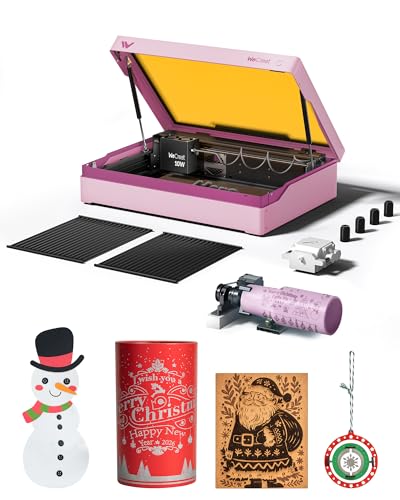
WECREAT Vista 10W Diode Laser
Best for: Safe home crafting and detailed engraving
- Target Audience
- DIY, Beginners (what this guide is about)
- Laser Type
- Diode
- Laser Power
- 10W
- Working Area
- 16.34"x11.42"
- Engraving Speed
- 600mm/s
- Software Compatibility
- LightBurn, WeCreat MakeIt
View on Amazon: WECREAT Vista 10W Diode Laser Affiliate link
The WECREAT Vista 10W is a Class 1 diode laser with a 16.34"x11.42" work area. It engraves at 600mm/s with a 0.06x0.04mm spot size. The unit includes a smart HD camera for precision positioning and a 9-in-1 rotary attachment. It works with LightBurn and WeCreat MakeIt software. This compact desktop machine suits DIY beginners who need safety features and clean air management for home projects.
Pros
- 10W diode laser with 0.06x0.04mm precision spot
- Smart HD camera for auto-focus and alignment
- 9-in-1 rotary attachment for tumblers and mugs
- Class 1 safety rating with metal enclosure
- Compatible with LightBurn and WeCreat MakeIt
Cons
- 10W power is lower than the 20W alternative
- Smaller 16.34"x11.42" work area limits large projects
- Requires optional 2W infrared module for metal engraving
Good fit if
- You need a Class 1 safe laser for home use
- You want to engrave cylindrical items like tumblers
- You prefer a compact desktop machine with a camera
Skip if
- You require high power for thick material cutting
- You need a large work area for big projects
- You want to engrave metal without extra modules
Verdict: The WECREAT Vista 10W Diode Laser fits DIY beginners who value safety and precision over raw power. Its compact size and camera system make it ideal for detailed home crafts.
Specifications side by side
| Spec | WECREAT Vision 20W Enclosed Laser Engraver | WECREAT Vista 10W Diode Laser |
|---|---|---|
| Laser Type | Diode | Diode |
| Laser Power | 20W (20,000mW) | 10W |
| Working Area | not stated | 16.34"x11.42" |
| Engraving Speed | 600mm/s | 600mm/s |
| Software Compatibility | Proprietary software, Lightburn | LightBurn, WeCreat MakeIt |
| Form Factor | Fully enclosed (FDA Class 1) | Metal-enclosed (Class 1) |
| Cutting Capacity | 10mm wood, 8mm opaque black acrylic | not stated |
| Compatible Material | Wood, Metal, Acrylic, Leather | Wood, Metal, Leather, Glass, Jewelry |
| Features | Camera | Camera |
| Target Audience | DIY, Beginners | DIY, Beginners |
| Size | 20W | Rotary Pack |
| Dimensions | 24.2 × 21 × 10 inches | 30 × 23.6 × 13.6 inches |
| Color | Basic Pack | Taffy Pink |
| Model | LC2321 | LE2410 |
How to choose the right one
-
Check laser power for thickness
Laser power determines how thick a material you can cut. Higher wattage handles denser woods and acrylics faster. The WECREAT Vision 20W uses a 20W diode laser for efficient thick material processing. This power level suits serious home workshops needing speed. Lower wattage models focus on surface engraving rather than deep cutting. You should match the wattage to your most common project thickness. Thicker items require more energy to penetrate completely. Choose based on the heaviest material you plan to use regularly.
-
Verify compatible material types
Not all lasers work with every material. You must check the listed compatible materials before buying. The WECREAT Vision 20W handles wood, metal, acrylic, and leather. The WECREAT Vista 10W adds glass and jewelry to that list. Metal compatibility often requires special spray or coatings on diode lasers. Ensure the machine supports the specific substrates you intend to use. Some materials release toxic fumes when engraved. Always verify safety guidelines for each material type in your workspace.
-
Use camera for precision
A built-in camera helps with alignment and framing. It allows you to see the work area through the software. Both the Vision 20W and Vista 10W include this feature. The camera system aids in precise placement for detailed crafts. This is especially useful for jewelry or small glass items. You can adjust the design position without opening the lid. This saves time and reduces material waste. If you value accuracy over raw speed, ensure the model includes this visual aid.
-
Consider form factor size
Desktop form factors fit on standard workbenches. You should measure your available workspace carefully. The WECREAT Vision 20W measures 21 inches wide and 24.2 inches long. The Vista 10W is larger at 30 inches long. Height matters for ventilation and lid clearance. Ensure your desk can support the weight and dimensions. A compact footprint leaves room for accessories. Check the dimensions against your dedicated crafting area to avoid fit issues.
-
Match target audience needs
Models are often tagged for specific user groups. Beginners benefit from enclosed designs and safety features. The Vision 20W targets DIYers needing safe, thick material cutting. The Vista 10W suits beginners valuing precision and safety. Enclosed units contain light and fumes better. Open frames offer easier access but less containment. Choose based on your experience level and safety concerns. New users should prioritize enclosed models for better protection during operation.
Frequently asked questions
Which WECREAT laser engraver is best for thick material cutting?
The WECREAT Vision 20W Enclosed Laser Engraver is the top choice for this task. Its 20W diode laser provides the necessary power to process thick materials efficiently. The enclosed design also ensures safer operation while you work with denser woods and acrylics.
Can I use these machines for jewelry engraving?
Yes, the WECREAT Vista 10W Diode Laser is suitable for jewelry engraving. It supports glass and jewelry materials and includes a camera system for precise alignment. This feature helps you achieve detailed results on small items like rings or pendants.
Do these models include a camera for positioning?
Both the Vision 20W and Vista 10W models feature a built-in camera. This tool assists with accurate image positioning and focus. You can use it to ensure your designs are placed exactly where you want them on the work surface.
What is the working area size of the Vision 20W?
The WECREAT Vision 20W measures 21 inches in width, 10 inches in height, and 24.2 inches in length. These dimensions define the physical footprint of the desktop unit. You should ensure you have adequate space on your workbench for this size.
Is the WECREAT Vista 10W good for beginners?
Yes, the Vista 10W is ideal for DIY beginners. It offers 10W of power, which is sufficient for detailed engraving on thinner materials. The compact size and camera system make it easier to learn and use for home crafting projects.
What materials are compatible with these diode lasers?
These machines handle wood, acrylic, leather, and metal. The Vision 20W is versatile for wood, metal, acrylic, and leather. The Vista 10W also engraves glass and jewelry. Always verify material compatibility with your specific settings to avoid damage.
Which model is better for safe home use?
The WECREAT Vision 20W is designed for safe DIY use. It features an enclosed structure that contains the laser beam. This design helps protect you and your surroundings while you cut thick materials or engrave at high speeds.