Choosing Laser Engravers in 2026: The Specs That Matter and 8 Picks
As an Amazon Associate we earn from qualifying purchases. Links on this page are affiliate links.
This laser engraver buying guide helps you choose the right machine for your workspace. You will compare power, size, and safety features across 8 top picks. Each product was selected strictly from its published specifications. We explain what each spec means for your actual projects. You can decide between enclosed safety or open-frame speed. You can also choose between small desktop units and large format cutters.
The list covers diode and CO2 options for wood, metal, and acrylic. You will see how laser power affects cutting depth. You will learn why camera systems matter for precision. The recommendations include portable units for hobbyists and high-power machines for small businesses. Read on to find the engraver that matches your material needs and budget constraints.
Our top pick: xTool M2 20W Enclosed Laser Engraver.
Key Specs for Choosing a Laser Engraver
Laser Power and Type
Laser power determines how fast and deeply you can cut materials. Higher wattage, such as 40W, allows for thicker wood cutting and faster throughput, while 6W to 10W units suit light engraving and small crafts. The laser type also matters; diode lasers are standard for wood and acrylic, while IR modules enable metal marking. You must match the power to your thickest material. For instance, the xTool S1 offers 40W for heavy-duty tasks, whereas the ACMER S1 provides 6W for delicate desktop work. Choosing the right power prevents motor strain and ensures clean edges.
- Wattage matching your material thickness
- Diode for wood or IR for metal
- Actual output vs. advertised power
Work Area Size
The bed size dictates the maximum dimensions of your projects. Larger beds, like the 385x385mm area on the Longer Ray5, accommodate big panels or multiple items at once. Smaller footprints, such as the portable xTool F2, fit tight desks but limit project scale. Consider your typical project size and available workspace. If you frequently cut full sheets of plywood, a larger bed is essential. For small jewelry or keychain engraving, a compact unit saves space. Ensure the machine fits your table with room for ventilation and material loading.
- Bed dimensions in inches or millimeters
- Available desktop space for the machine
- Expandable bed options for larger items
Safety Enclosure
An enclosed design protects you from harmful laser radiation and flying debris. Class 1 safety ratings, found in machines like the xTool M2, allow safe operation without goggles during normal use. Open-frame models, such as the Longer Ray5, require strict safety protocols and protective eyewear at all times. Enclosures also contain smoke and fumes, improving air quality in your workspace. If you work in a shared home or office, an enclosed unit is the responsible choice. Evaluate whether the enclosure allows easy material loading and ventilation.
- Class 1 safety rating certification
- Interlock switches that stop the laser
- Ventilation ports for smoke extraction
Camera and Positioning
Built-in cameras help you frame designs accurately and locate small details. This feature is crucial for precise engraving on irregular surfaces or small items like rings. The xTool F2 and xTool M2 include camera systems that assist with alignment. Without a camera, you must manually align designs using physical markers, which takes more time and increases error risk. For batch work or intricate patterns, a camera significantly speeds up setup. Check if the camera supports live preview and focus assistance for better results.
- Integrated camera for visual alignment
- Live preview software support
- Focus adjustment capabilities
Compatible Materials
Not all lasers work with every material. Diode lasers excel on wood, leather, and acrylic but struggle with bare metals without special sprays. The OMTech Laser Marking Spray helps CO2 and diode users mark metal by creating a dark oxide layer. Some machines, like the xTool S1, support rotary axes for tumblers, expanding material versatility. Verify the laser type matches your desired materials. If you plan to engrave metal regularly, ensure the machine supports IR modules or use marking aids. Check for restrictions on reflective materials to avoid damage.
- Supported material list in specs
- IR module support for metal
- Rotary axis compatibility for cylinders
Form Factor and Portability
The physical design affects where and how you use the machine. Portable units like the xTool F2 are lightweight and compact, making them easy to move or store. Desktop models, such as the Carverall K15 Pro, offer stability for precise work but take up permanent space. Consider your workflow needs. If you travel to markets or work in multiple locations, portability is key. For a dedicated workshop, a larger, stationary machine may offer better performance. Check weight and dimensions to ensure it fits your transport or workspace.
- Weight and dimensions for transport
- Stability on your work surface
- Ease of assembly and disassembly
Types of Laser Engravers
Enclosed Home Engravers
Enclosed machines prioritize safety for home use. The xTool M2 20W features a Class 1 design with an enclosure and dual-camera system. This setup protects you from laser exposure while engraving wood or leather. The 20W power handles moderate cutting tasks. You benefit from reduced fumes and a safer environment. The trade-off is a smaller work area compared to open-frame models. It suits DIY makers who value precision and safety over raw speed.
Portable Desktop Models
Portable units offer flexibility for small desktop projects. The ACMER S1 6W and Carverall K15 Pro 6W fit hobbyists needing quick setup. These 6W diode lasers engrave wood, acrylic, and leather. They are compact and easy to store. You sacrifice large cutting capacity for portability. The lower wattage limits thick material removal. This type is ideal for detailed engraving on small items. It is not suitable for high-volume production or large-scale crafting.
High-Power Open Frame
High-power open-frame cutters focus on speed and area. The Longer Ray5 40W and xTool S1 40W provide large beds for big projects. The 40W power cuts thicker wood and acrylic quickly. These machines lack safety enclosures, requiring careful operation. You gain throughput and workspace but lose built-in safety features. The xTool S1 includes a rotary axis for tumblers. This type suits serious hobbyists and small businesses needing high output.
Dual-Source Systems
Dual-source engravers handle both wood and metal. The xTool F2 combines a 15W diode laser for wood with a 5W IR laser for metal. You switch materials without buying two machines. The portable form factor and camera aid in precision work. This versatility suits users doing on-site customization. The trade-off is complexity in managing two laser sources. It is ideal for small business owners needing fast batch work across different material types.
Marking Accessories
Specialized accessories enhance specific laser capabilities. The OMTech 13 oz Laser Marking Spray helps CO2 lasers mark bare metals. It creates durable, high-contrast black designs on jewelry or tools. This is not a machine but a consumable aid. You use it with existing CO2 units for metal work. It solves the problem of poor contrast on shiny surfaces. This product fits users needing professional-looking metal marks without fiber lasers.
Common Mistakes When Buying
Ignoring work area dimensions
Check the actual X and Y travel limits, not just the machine footprint. A large frame may have a small bed. Ensure your material size fits within the usable area. Measure your largest project pieces before purchasing to avoid cutting stock into smaller, unusable scraps during the process.
Overlooking exhaust port placement
Locate where the smoke extraction port sits on the enclosure. It must align with your ventilation hose. Poor placement can trap fumes inside the chamber. This affects air quality and lens clarity. Verify the port diameter matches your existing ducting or plan to buy compatible adapters for safe operation.
Assuming all materials cut equally
Laser power requirements vary significantly by material density. Acrylic cuts differently than wood. Check the maximum thickness rating for each material type in the spec sheet. Do not assume a machine that engraves thin wood can also slice through thick plywood. Match the wattage to your heaviest intended cuts.
Neglecting focus mechanism type
Determine if the machine uses manual knobs or automatic focus sensors. Manual adjustment requires precise measurement for each new material thickness. Auto-focus saves time but may have a limited range. Consider your workflow speed and material variety when deciding which focus system best suits your daily production needs.
Forgetting safety certification details
Verify the laser class rating, such as Class 1 or Class 4. Enclosed Class 1 machines are safer for home offices. Open beam Class 4 units require strict safety protocols. Ensure the specs confirm adequate shielding. Proper certification protects your eyes and skin from harmful laser exposure during operation.
Quick picks
Our 8 picks

xTool M2 20W Enclosed Laser Engraver
Best for: DIY makers wanting safe, enclosed home engraving
- Laser Type
- Diode
- Laser Power
- 20W (20000mW)
- Software Compatibility
- xTool Studio
- Form Factor
- Class 1 Enclosed
- Compatible Material
- Wood, Leather, Paper, Fabric
- Features
- Enclosure, Camera
The xTool M2 is a Class 1 enclosed diode laser engraver with 20W power. It features built-in dual cameras for real-time preview and automated alignment. You get a safe, fully enclosed design suitable for home use. The machine runs on xTool Studio software with customizable templates. It supports wood, leather, paper, and fabric. You can add inkjet or IR modules later for expanded material compatibility.
Pros
- Class 1 enclosed safety design
- 20W (20000mW) diode laser power
- Built-in dual cameras for precision
- xTool Studio software with templates
- Supports wood, leather, paper, and fabric
Cons
- CMYK Inkjet module sold separately
- 3W IR laser module sold separately
- RA3 Lite Rotary sold separately
Good fit if
- You want a Class 1 enclosed machine for home safety
- You need dual cameras for precise alignment
- You plan to add inkjet or IR modules later
Skip if
- You need full-color printing out of the box
- You want metal engraving capability without extra purchases
- You prefer a desktop open-frame design
Verdict: The xTool M2 20W Enclosed Laser Engraver is ideal for DIY makers who prioritize safety and precision in a home environment. Its enclosed Class 1 design and dual-camera system make it a practical choice for those starting with wood and leather projects.

OMTech 13 oz Metal Laser Marking Spray 3-Pack
Best for: CO2 laser metal marking
- Laser Type
- Diode
- Compatible Material
- Metal, Aluminum
- Dimensions
- 2.6 × 2.6 × 7.9 inches
View on Amazon: OMTech 13 oz Metal Laser Marking Spray 3-Pack
This OMTech marking spray is designed for CO2 laser engravers with 25W power or higher. It creates high-contrast black marks on bare metals like aluminum, stainless steel, and brass. The 13 oz aerosol cans provide an even coat that dries in under five minutes. You can wash off excess spray with a simple rinse after engraving. This product suits users who need to personalize metal items such as jewelry or tumblers.
Pros
- Compatible with CO2 lasers 25W and above
- Dries in under 5 minutes without heat
- Clog-proof nozzle ensures even coating
- Washes off easily with water
Cons
- Requires a CO2 laser with at least 25W power
- Only works on bare metal surfaces
- Sold as a 3-pack of 13 oz cans
Good fit if
- You engrave bare metals like aluminum or stainless steel
- You use a CO2 laser with 25W power or more
- You need high-contrast black markings on metal
Skip if
- You use a diode laser below 25W power
- You engrave non-metal materials like wood or acrylic
- You prefer a fiber laser for metal marking
Verdict: OMTech Laser Marking Spray 3-Pack is a practical solution for CO2 laser users marking bare metals. It fits those who need durable, high-contrast black designs on items like jewelry or tools.
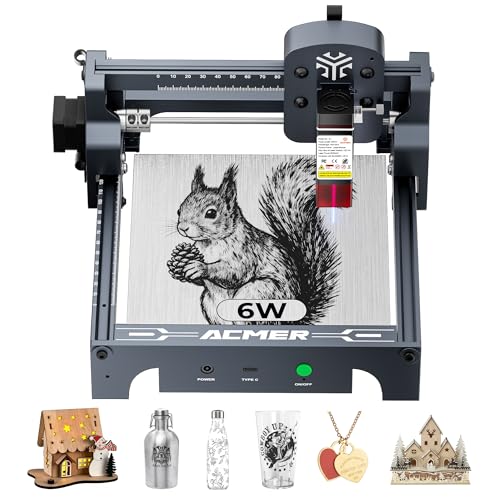
ACMER S1 6W Portable Laser Engraver
Best for: Small desktop wood and acrylic projects
- Laser Type
- Diode
- Laser Power
- 6000 mW
- Working Area
- 130 x 130 mm
- Engraving Speed
- 10,000 mm/min
- Software Compatibility
- ACMER studio, LightBurn, LaserGRBL
- Compatible Material
- Wood, Acrylic, Silver
The ACMER S1 is a 6W diode laser engraver with a 130x130mm working area. It reaches 10,000mm/min engraving speeds and offers 0.01mm positioning accuracy. The unit arrives 99% preassembled, requiring only a 1-minute head installation. It supports ACMER Studio, LightBurn, and LaserGRBL software. This compact machine suits beginners needing a portable, lightweight tool for small wood and acrylic projects.
Pros
- 6000mW diode laser power for cutting thin materials
- 99% preassembled for quick 1-minute setup
- Compatible with LightBurn and LaserGRBL software
- 0.01mm repeatable positioning accuracy
- Lightweight 2kg aluminum alloy build
Cons
- Small 130x130mm working area limits large projects
- Class 4 laser certification requires strict safety precautions
- No built-in camera for real-time alignment
Good fit if
- You need a lightweight engraver for small desktop projects
- You want a machine that arrives mostly assembled
- You prefer using LightBurn or LaserGRBL software
Skip if
- You require a large working area for big items
- You need a Class 1 enclosed laser for safe operation
- You want to engrave on glass or metal directly
Verdict: The ACMER S1 6W Laser Engraver fits hobbyists who value portability and quick setup over large workspaces. It is a practical entry point for small, detailed wood and acrylic projects.

xTool F2 15W Diode & 5W IR Laser Engraver
Best for: Dual-material engraving and fast batch work
- Laser Type
- Diode, IR
- Laser Power
- 15W Diode, 5W IR
- Engraving Speed
- Up to 6000mm/s
- Form Factor
- Fully enclosed
- Compatible Material
- Metal
- Features
- Camera
The xTool F2 combines a 15W diode laser and a 5W infrared laser in one enclosed unit. It reaches speeds up to 6000mm/s and includes a 50MP camera for precise alignment. This dual-laser setup handles both cutting thick materials and marking metal with color. You get a fully enclosed, portable design that weighs 10 pounds. It is ready to use right out of the box.
Pros
- 15W diode and 5W IR dual-laser system
- Built-in 50MP camera for precise positioning
- Engraving speeds up to 6000mm/s
- Fully enclosed and portable form factor
Cons
- Class 4 laser safety rating
- 10-pound weight limits true pocket portability
- Basic model lacks slide extension accessory
Good fit if
- You need to engrave both wood and metal
- You want fast batch processing speeds
- You prefer a fully enclosed workspace
Skip if
- You require Class 1 eye-safe operation
- You need a compact pocket-sized device
- You only engrave non-metal materials
Verdict: The xTool F2 15W Diode & 5W IR Engraver suits users who need to switch between cutting wood and marking metal without buying two machines. Its speed and camera make it ideal for small business owners doing on-site customization.

xTool S1 40W Enclosed Laser Cutter
Best for: High-speed large format engraving and cutting
- Laser Power
- 40W (40,000mW)
- Working Area
- 23.93" x 15.16"
- Engraving Speed
- 600mm/s
- Software Compatibility
- xTool Creative Space (XCS)
- Form Factor
- Enclosed
- Cutting Capacity
- 18mm cherry wood
The xTool S1 is a 40W enclosed laser engraver designed for high-volume work. It features a large 23.93 by 15.16 inch bed and reaches speeds up to 600mm/s. The Class 1 safety rating allows use without goggles. It cuts up to 18mm cherry wood and includes a rotary axis for tumblers. This machine suits users who need speed and safety in a single pass.
Pros
- 40W (40,000mW) laser power for fast cutting
- 600mm/s engraving speed for high productivity
- Class 1 enclosed design with flame sensors
- 23.93 x 15.16 inch spacious working area
- Includes rotary axis for cylindrical items
Cons
- Larger physical footprint requires more desk space
- No mention of mobile app control in specs
- Enclosed design may limit access to large items
Good fit if
- You need to engrave large projects like door signs
- You want a Class 1 safe machine for home use
- You require high speed for batch production
Skip if
- You have a very small workspace with limited clearance
- You only need to engrave small personal items
- You prefer an open-frame machine for easy access
Verdict: The xTool S1 40W Enclosed Laser Engraver fits users who prioritize speed and safety for large-scale projects. Its 40W power and large bed make it ideal for professional or serious hobbyist workflows.

Carverall 6W Desktop Laser Engraver
Best for: Small desktop wood and acrylic projects
- Laser Type
- Diode
- Laser Power
- 6W (6000mW)
- Working Area
- 11.8×7.9 inches (A4)
- Engraving Speed
- 15,000mm/min
- Software Compatibility
- CutLabX, LightBurn, LaserGRBL
- Form Factor
- Class 1
The Carverall K15 Pro is a compact 6W diode laser with an A4 work area. It offers 0.01mm precision and 15,000mm/min speed. You can control it via the CutLabX app or offline with a TF card. The Class 1 enclosure includes tilt protection. This machine suits beginners needing a small footprint for wood and acrylic projects.
Pros
- Class 1 enclosed safety design
- 0.01mm high precision engraving
- App and offline TF card control
- Fits under standard desks
Cons
- 6W power limits deep cutting
- A4 size restricts large projects
- IR head sold separately
Good fit if
- You need a small desktop footprint
- You want app-based control
- You prioritize safety features
Skip if
- You require large format engraving
- You need to cut thick materials
- You want bare metal marking included
Verdict: The Carverall K15 Pro 6W Laser Engraver fits beginners who need a safe, compact machine for small wood and acrylic items. It is not suitable for large-scale production or thick material cutting.

Longer Ray5 40W Laser Engraver
Best for: large format cutting and high speed
- Laser Power
- 40W
- Working Area
- 385 x 385 mm
- Engraving Speed
- 24,000 mm/min
- Software Compatibility
- LaserGRBL, LightBurn
- Cutting Capacity
- 20 mm pine wood, 15 mm acrylic
- Compatible Material
- Wood, Metal, Acrylic, Leather, Glass
The Longer Ray5 is a 40W laser engraver with a 385 x 385 mm working area. It reaches engraving speeds of 24,000 mm/min and cuts up to 20 mm pine wood or 15 mm acrylic in a single pass. The unit includes a 3.5-inch touchscreen and supports Wi-Fi, USB, and app connectivity. You can use it with LightBurn or LaserGRBL software. This machine suits users needing high power and a large bed for detailed work.
Pros
- 40W laser module for strong cutting power
- 385 x 385 mm large working area
- 24,000 mm/min maximum engraving speed
- 0.1 x 0.15 mm ultra-fine laser spot
- Built-in 3.5-inch touchscreen for control
Cons
- No built-in camera for alignment
- No enclosed Class 1 safety housing
- No dual-camera system for precision
Good fit if
- You need to cut thick wood or acrylic
- You require a large 385 x 385 mm workspace
- You want fast engraving speeds over 20,000 mm/min
Skip if
- You need a Class 1 enclosed safety system
- You require built-in dual cameras
- You want a compact desktop size
Verdict: The Longer Ray5 40W 385x385mm Engraver fits users who prioritize raw cutting power and a large bed. It lacks the safety enclosure and cameras found in enclosed competitors, making it better for open-frame setups.

Creality Falcon 10W Laser Engraver
Best for: Large area engraving and fast wood cutting
- Laser Power
- 10W
- Working Area
- 15.7" x 16.3" (400 x 415 mm)
- Engraving Speed
- 10000mm/min
- Software Compatibility
- LightBurn, LaserGRBL
- Cutting Capacity
- 12mm wood, 5mm black acrylic
- Compatible Material
- Wood, Metal, Acrylic, Leather
The Creality Falcon 10W delivers 72W of effective power for cutting 12mm wood or 5mm black acrylic. It features a 15.7 by 16.3 inch working area and reaches speeds of 10000mm/min. You get 0.004 inch precision with a compressed spot module. It supports LightBurn and LaserGRBL software, plus offline SD card use. This machine suits users needing speed and a large bed for diverse materials.
Pros
- 72W effective power cuts 12mm wood in one pass
- 15.7 x 16.3 inch working area handles large projects
- 10000mm/min engraving speed finishes work quickly
- 0.004 inch accuracy with 0.06mm compressed spot module
- Supports LightBurn, LaserGRBL, and offline SD card operation
Cons
- 10W laser rating is lower than 15W or 20W competitors
- No built-in camera for real-time alignment or preview
- No enclosed Class 1 safety housing for protection
Good fit if
- You need a large 400 x 415 mm working area
- You require fast 10000mm/min engraving speeds
- You want to cut thick wood or acrylic efficiently
Skip if
- You prefer enclosed Class 1 safety for home use
- You need a built-in camera for precision alignment
- You require higher than 10W laser power for metals
Verdict: The Creality Falcon 10W Laser Engraver offers high speed and a large bed for users prioritizing throughput and cutting capacity over enclosed safety or camera assistance.
Specifications side by side
| Spec | xTool M2 20W Enclosed Laser Engraver | OMTech 13 oz Metal Laser Marking Spray 3-Pack | ACMER S1 6W Portable Laser Engraver | xTool F2 15W Diode & 5W IR Laser Engraver | xTool S1 40W Enclosed Laser Cutter | Carverall 6W Desktop Laser Engraver | Longer Ray5 40W Laser Engraver | Creality Falcon 10W Laser Engraver |
|---|---|---|---|---|---|---|---|---|
| Laser Type | Diode | not specified | Diode | Diode, IR | not specified | Diode | not specified | not specified |
| Laser Power | 20W (20000mW) | not specified | 6000 mW | 15W Diode, 5W IR | 40W (40,000mW) | 6W (6000mW) | 40W | 10W |
| Working Area | not specified | not specified | 130 x 130 mm | not specified | 23.93" x 15.16" | 11.8×7.9 inches (A4) | 385 x 385 mm | 15.7" x 16.3" (400 x 415 mm) |
| Engraving Speed | not specified | not specified | 10,000 mm/min | Up to 6000mm/s | 600mm/s | 15,000mm/min | 24,000 mm/min | 10000mm/min |
| Software Compatibility | xTool Studio | not specified | ACMER studio, LightBurn, LaserGRBL | not specified | xTool Creative Space (XCS) | CutLabX, LightBurn, LaserGRBL | LaserGRBL, LightBurn | LightBurn, LaserGRBL |
| Form Factor | Class 1 Enclosed | not specified | not specified | Fully enclosed | Enclosed | Class 1 | not specified | not specified |
| Cutting Capacity | not specified | not specified | not specified | not specified | 18mm cherry wood | 8mm plywood, 5mm black acrylic | 20 mm pine wood, 15 mm acrylic | 12mm wood, 5mm black acrylic |
| Compatible Material | Wood, Leather, Paper, Fabric | Metal, Aluminum | Wood, Acrylic, Silver | Metal | Wood, Metal, Acrylic | Wood, Metal, Acrylic, Leather, Paper | Wood, Metal, Acrylic, Leather, Glass | Wood, Metal, Acrylic, Leather |
| Features | Enclosure, Camera | not specified | not specified | Camera | Rotary Axis | not specified | Touchscreen | not specified |
| Target Audience | DIY | not specified | DIY | not specified | not specified | DIY, Beginners, Small Business | DIY | not specified |
| Size | 20W | 3 Pcs | 6000mW | xTool F2 Basic | 40W | 6W | 385×385mm | Falcon-10W |
| Application | not specified | not specified | not specified | not specified | Tumblers | not specified | not specified | not specified |
| Dimensions | not specified | 2.6 × 2.6 × 7.9 inches | not specified | 6.89 × 9.33 × 0.1 inches | not specified | 1 × 1 × 1 inches | 24.2 × 17 × 5.2 inches | 1 × 1 × 1 inches |
| Weight | not specified | not specified | not specified | 10 pounds | not specified | not specified | not specified | not specified |
| Length | not specified | not specified | not specified | not specified | 19.6 inches | not specified | not specified | not specified |
| Width | not specified | not specified | not specified | not specified | 19.6 inches | not specified | not specified | not specified |
| Color | M2 Basic | 13 OZ -- Black | Silver, White-6 | Orange | Black Rotary | Gray | black | Falcon-10W |
| Model | MLM-K610-001 | RYGEL-USBPW0103 | not specified | MXF-K005-002 | MXD-K101-001 | k15pro6w | Ray5 40W | CR-Laser Falcon |
If you also evaluate garden equipment specifications, the tiller buying guide outlines tilling depth and engine metrics.
Frequently asked questions
Do I need an enclosed laser engraver for home use?
Yes, if you prioritize safety and precision in a home environment. Enclosed models like the xTool M2 20W feature a Class 1 design that protects users from laser exposure. This setup is ideal for DIY makers working with wood and leather. The enclosure also contains debris and fumes, making the machine safer for indoor spaces.
Which laser engraver is best for marking metal?
The xTool F2 15W Diode & 5W IR Laser Engraver is designed for dual-material work. It includes a 5W IR source specifically for marking metal without needing additional sprays. This unit suits users who switch between cutting wood and marking metal. Its portable form factor and camera system aid in precise placement on small items.
What is the largest work area available in these picks?
The Longer Ray5 40W offers a large 385x385mm bed. This size supports large format cutting and high-speed throughput. The machine measures 24.2 inches in length and 17 inches in width. It is suitable for users who need raw cutting power and ample space for big projects, though it lacks an enclosure.
Can a 6W laser engraver cut thick wood?
No, 6W units are best for small desktop projects. The ACMER S1 6W and Carverall 6W are designed for light engraving on wood, acrylic, and leather. They are not suitable for large-scale production or thick material cutting. These machines prioritize portability and quick setup over heavy-duty cutting capabilities.
Is a rotary axis necessary for tumbler engraving?
It is highly recommended for cylindrical objects. The xTool S1 40W Enclosed Laser Cutter includes a rotary axis feature. This attachment allows you to engrave tumblers and other round items evenly. The 40W power ensures fast processing, while the large bed accommodates various sizes of tumblers and containers.
Do I need a camera system on my engraver?
A camera system helps with precision and alignment. The xTool M2 20W and xTool F2 15W both include camera features. These systems assist in framing designs accurately on the material. They are particularly useful for detailed work on wood, leather, or metal, ensuring your engraving matches your digital design exactly.
What is the difference between diode and CO2 lasers?
Diode lasers, like the xTool F2, are versatile for wood and metal with IR modules. CO2 lasers, often used with marking sprays like the OMTech 13 oz option, are better for bare metal marking. Diode units are generally more compact and suitable for home workshops, while CO2 systems require specific accessories for metal work.