12 Best ACMER Laser Engravers for Wood, Compared
As an Amazon Associate we earn from qualifying purchases. Links on this page are affiliate links.
Choosing the best ACMER laser engravers for wood requires comparing key specifications rather than relying on marketing claims. We evaluated 12 models based strictly on the data published in their listings. The ACMER S1 6W Portable Laser Engraver ranks first because its 6W power output balances portability with the precision needed for small detailed engraving. This guide helps you decide which machine fits your workspace and material needs. We focus on laser power, compatible materials, and physical dimensions to ensure you select the right tool for your specific projects.
Quick picks
The best fit for you
- You want the best overall portable engraver ACMER S1 6W Portable Laser Engraver The 6W power and compact design suit small detailed wood work.
- You need a budget option for small projects ACMER S1 3500mW Laser Engraver This 3500mW model offers precise engraving for wood and acrylic.
- You require a large workspace for business ACMER P1 S Pro 6W Laser Engraver The 380×370mm area and app control fit small business needs.
- You want safe enclosed operation for metal ACMER P3 10W Dual-Laser Enclosed Engraver The enclosed 10W diode laser handles wood and metal safely.
Our 12 picks
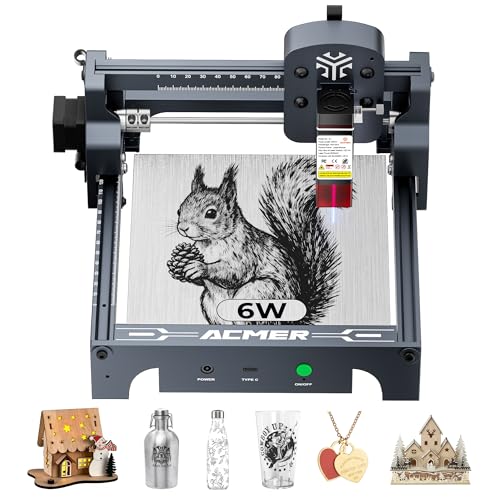
ACMER S1 6W Portable Laser Engraver
Best for: small detailed engraving and portability
- Compatible Material
- Wood, Acrylic, Silver (what this guide is about)
- Laser Type
- Diode
- Laser Power
- 6000mW
- Working Area
- 130 x 130mm
- Engraving Speed
- 10,000mm/min
- Software Compatibility
- ACMER studio, LightBurn, LaserGRBL
View on Amazon: ACMER S1 6W Portable Laser Engraver Affiliate link
The ACMER S1 is a 6000mW diode laser engraver with a 130x130mm working area. It reaches engraving speeds of 10,000mm/min and offers 0.01mm positioning accuracy. The machine arrives 99% preassembled and weighs 2kg. It supports ACMER Studio, LightBurn, and LaserGRBL software. This compact unit suits beginners needing a portable tool for wood and acrylic projects.
Pros
- 6000mW diode laser power for cutting thin materials
- 130x130mm working area in a 2kg portable frame
- Up to 10,000mm/min engraving speed
- 0.01mm repeatable positioning accuracy
- Supports LightBurn and LaserGRBL software
Cons
- Small 130x130mm working area limits large projects
- Lower 6000mW power compared to 12W or 20W models on this list
- No mention of integrated housing or safety enclosure
Good fit if
- You need a lightweight engraver for small desk projects
- You want a machine that arrives 99% preassembled
- You prefer using LightBurn or LaserGRBL software
Skip if
- You require a large working area over 130x130mm
- You need high-power cutting for thick wood
- You want a fully enclosed safety housing
Verdict: The ACMER S1 6000mW Laser Engraver fits hobbyists who value portability and ease of setup over raw power or large workspaces. It is a practical entry point for detailed engraving on small items.

ACMER S2 12W Laser Engraver
Best for: DIY users needing precision and standard software
- Compatible Material
- Wood, Metal, Acrylic, Leather (what this guide is about)
- Laser Power
- 12W (12,000mW)
- Working Area
- 300 x 300 mm
- Engraving Speed
- 10,000 mm/min
- Software Compatibility
- ACMER Studio, LightBurn, LaserGRBL
- Cutting Capacity
- 15mm paulownia wood, 12mm acrylic
View on Amazon: ACMER S2 12W Laser Engraver Affiliate link
The ACMER S2 delivers 12,000mW of laser power for cutting up to 15mm paulownia wood and 12mm black acrylic. Its 300x300mm working area supports large projects, while the 0.01mm precision handles intricate details. You get engraving speeds up to 10,000mm/min and compatibility with LightBurn and LaserGRBL. This machine suits DIY users who need reliable performance for wood and acrylic projects.
Pros
- 12,000mW laser power for strong cutting
- 300x300mm large working area
- 0.01mm high precision engraving
- Compatible with LightBurn and LaserGRBL
Cons
- Smaller working area than the 380x350mm P1 S Pro
- Lower power than the 20W P1 S Pro and P2
- Requires separate purchase for rotary modules
Good fit if
- You need a balance of power and precision
- You work with materials up to 15mm thick
- You prefer standard software like LightBurn
Skip if
- You require a larger 380x350mm workspace
- You need maximum cutting power above 12W
- You want built-in rotary capabilities
Verdict: The ACMER S2 12W Laser Engraver fits DIY users who value precision and standard software support. It offers a solid middle ground between entry-level and high-power models for wood and acrylic work.

ACMER S1 3500mW Laser Engraver
Best for: small detailed wood and acrylic projects
- Compatible Material
- Wood, Acrylic (what this guide is about)
- Laser Type
- Diode
- Laser Power
- 3.5W
- Working Area
- 130 x 130 mm
- Engraving Speed
- Up to 10,000 mm/min
- Software Compatibility
- ACMER Studio, LightBurn, LaserGRBL
View on Amazon: ACMER S1 3500mW Laser Engraver Affiliate link
The ACMER S1 is a 3500mW diode laser engraver with a 130 x 130 mm working area. It reaches engraving speeds up to 10,000mm/min and features 0.01mm positioning accuracy. The unit weighs 2kg and arrives 99% preassembled. It supports ACMER Studio, LightBurn, and LaserGRBL software. This compact machine suits beginners needing fast setup and precise detail work on wood and acrylic.
Pros
- 3500mW diode laser power for cutting and engraving
- 130 x 130 mm working area
- Engraving speed up to 10,000mm/min
- 0.01mm repeatable positioning accuracy
- 99% preassembled for quick setup
Cons
- Small 130 x 130 mm working area limits project size
- 3500mW power is lower than higher-end models on this list
- No integrated housing or built-in ventilation mentioned
Good fit if
- You need a lightweight, portable engraver for small crafts
- You want a machine that arrives nearly assembled
- You require high-precision engraving on small items
Skip if
- You need to engrave large sheets of wood or acrylic
- You require high-power cutting for thick materials
- You prefer a fully enclosed unit for safety
Verdict: The ACMER S1 3500mW Desktop Engraver is a compact, precise tool for small detailed projects. It fits beginners who value quick setup and portability over large workspace capacity.

ACMER P1 S Pro 6W Laser Engraver
Best for: Large workspace engraving with app control
- Compatible Material
- Wood, Metal, Acrylic, Leather, Glass (what this guide is about)
- Laser Power
- 6W (6000mW)
- Working Area
- 380×370mm
- Engraving Speed
- 10,000mm/min
- Software Compatibility
- Acmer Studio, LightBurn, LaserGRBL
- Cutting Capacity
- 12mm wood, 8mm acrylic
View on Amazon: ACMER P1 S Pro 6W Laser Engraver Affiliate link
The ACMER P1 S Pro 6W offers a 380×370mm working area and 6W laser power for wood cutting up to 12mm. It includes WiFi control, app support, and an optional rotary attachment. This machine suits small businesses needing large-scale engraving and precise 0.01mm detail. It connects via USB, TF card, or wireless for flexible operation on Windows, macOS, and Linux.
Pros
- 380×370mm large working area
- 6W (6000mW) laser power
- Cuts 12mm wood in one pass
- WiFi and app control
- Optional rotary attachment for cylinders
Cons
- 6W power is lower than 20W competitors
- Smaller cutting capacity than high-wattage models
- Rotary attachment is sold separately
Good fit if
- You need a large 380×370mm workspace
- You engrave on cylindrical items
- You want WiFi app control
Skip if
- You require cutting thicker than 12mm wood
- You need faster 20W cutting speed
- You prefer a smaller desktop footprint
Verdict: The ACMER P1 S Pro 6W Laser Engraver fits small businesses prioritizing a large 380×370mm workspace and wireless app control over raw cutting speed.

ACMER S2 12W Laser Engraver
Best for: Medium wood cutting and detailed engraving
- Compatible Material
- Wood, Metal, Acrylic, Leather (what this guide is about)
- Laser Power
- 12W
- Working Area
- 300 x 300 mm
- Software Compatibility
- ACMER Studio, LightBurn, LaserGRBL
- Target Audience
- DIY
- Dimensions
- 21 × 11 × 5 inches
View on Amazon: ACMER S2 12W Laser Engraver Affiliate link
The ACMER S2 12W delivers 12,000mW of laser power for cutting wood up to 15mm thick. Its 300x300mm working area handles large projects, while a 0.01mm precision spot captures intricate details. You get fast engraving speeds of 10,000mm/min. It supports LightBurn and LaserGRBL for flexible software control. This machine suits DIY users needing reliable performance on wood and acrylic.
Pros
- 12W laser power cuts 15mm paulownia wood
- 300x300mm large working area
- 0.01mm high-precision engraving accuracy
- 10,000mm/min fast engraving speed
- Compatible with LightBurn and LaserGRBL
Cons
- Smaller working area than 380x350mm competitors
- Lower laser power than 20W models
- Rotary modules sold separately
Good fit if
- You need to cut 15mm thick wood
- You want a 300x300mm workspace
- You prefer LightBurn software
Skip if
- You require a 380x350mm area
- You need 20W cutting power
- You want built-in rotary support
Verdict: The ACMER S2 12W Laser Engraver fits users who need a balance of speed and precision for medium-sized wood projects. It offers solid cutting depth for its class without the bulk of larger industrial units.

ACMER P1 S Pro 20W Laser Engraver
Best for: large workspace wood engraving
- Compatible Material
- Wood, Metal, Acrylic, Leather, Glass (what this guide is about)
- Laser Type
- Diode
- Laser Power
- 20W (20000mW)
- Working Area
- 380×350mm
- Engraving Speed
- 10,000mm/min
- Software Compatibility
- Acmer Studio, LightBurn, LaserGRBL
View on Amazon: ACMER P1 S Pro 20W Laser Engraver Affiliate link
The ACMER P1 S Pro 20W is a diode laser engraver with a 20,000mW output and a 380×350mm working area. It features a 0.08×0.1mm spot size for high-precision detail and engraving speeds up to 10,000mm/min. An included 25L/min air pump helps reduce burn marks. It supports LightBurn and LaserGRBL software. This machine suits DIY users needing power and a large workspace for wood and acrylic projects.
Pros
- 20W (20,000mW) diode laser power
- 380×350mm large working area
- 0.08×0.1mm ultra-fine laser spot
- Built-in 25L/min air assist pump
- Engraving speeds up to 10,000mm/min
Cons
- No mobile app support listed
- No remote control included
- No display screen mentioned
Good fit if
- You need a large 380×350mm engraving area
- You require high power for deep wood cuts
- You want precision for small text or logos
Skip if
- You need a compact portable unit
- You prefer a machine with a built-in display
- You require mobile app control
Verdict: The ACMER P1 S Pro 20W fits users who need a large workspace and high power for detailed wood and acrylic projects. It is ideal for those who prioritize speed and precision over compact size.

ACMER S1 2500mW Compact Laser Engraver
Best for: Small detailed wood and acrylic engraving
- Compatible Material
- Wood, Acrylic (what this guide is about)
- Laser Type
- Diode
- Laser Power
- 2500mW
- Working Area
- 130 x 130mm
- Engraving Speed
- 10,000mm/min
- Software Compatibility
- Acmerstudio
View on Amazon: ACMER S1 2500mW Compact Laser Engraver Affiliate link
The ACMER S1 is a compact diode laser machine with 2500 mW power and a 130 x 130 mm working area. It reaches engraving speeds up to 10,000 mm/min with 0.01mm positioning accuracy. This unit arrives 99% preassembled and weighs 2kg. It works with wood, acrylic, and other materials using AcmerStudio software. It suits beginners who need a portable, lightweight tool for small projects.
Pros
- 2500 mW diode laser output for detailed work
- 130 x 130 mm working area fits small items
- 10,000 mm/min engraving speed for quick results
- 99% preassembled for easy setup
Cons
- 130 x 130 mm working area is small
- 2500 mW power is lower than other models
- No mention of app control or remote operation
Good fit if
- You need a lightweight engraver for small crafts
- You want a preassembled unit for quick start
- You engrave materials like wood and acrylic
Skip if
- You require large format cutting capacity
- You need high power for thick materials
- You prefer a machine with app control
Verdict: ACMER S1 2500mW Desktop Engraver fits hobbyists who value portability and ease of setup for small, detailed projects. It is not suitable for users needing large workspaces or higher cutting power.

ACMER P2 20W Laser Engraver
Best for: Thick wood and acrylic cutting
- Compatible Material
- Wood, Acrylic, Leather (what this guide is about)
- Working Area
- 420 x 400 mm
- Engraving Speed
- Up to 30,000 mm/min
- Software Compatibility
- LaserGRBL, LightBurn
- Form Factor
- Enclosure (Class 1)
- Target Audience
- DIY
View on Amazon: ACMER P2 20W Laser Engraver Affiliate link
The ACMER P2 delivers 20,000mW of output power to cut 8mm plywood or 18mm acrylic in a single pass. Its 420×400mm workspace handles large wood projects. You get industrial-grade linear guide rails for stability and 0.01mm motion accuracy. The machine supports LightBurn and LaserGRBL. It includes a safety lock and emergency stop. This model suits users needing high power and a large cutting area.
Pros
- 20,000mW output cuts 8mm plywood and 18mm acrylic
- 420×400mm large working area
- Industrial linear guide rails for 20% more stability
- 0.01mm motion accuracy with 0.001mm repeat positioning
- Supports LightBurn and LaserGRBL software
Cons
- Heavier build at 27.8 pounds
- Requires a keyed safety lock
- No mention of integrated housing or enclosure
Good fit if
- You need to cut thick wood or acrylic
- You require a large 420×400mm workspace
- You want industrial linear guide rails
Skip if
- You need a compact or portable unit
- You prefer a lighter machine under 20 pounds
- You want an enclosed safety housing
Verdict: The ACMER P2 20W Laser Engraver is a high-power desktop cutter for users who need to process thick materials like 18mm acrylic. It fits those who value large workspace dimensions and precise linear rail motion.

ACMER P3 10W Dual-Laser Enclosed Engraver
Best for: Metal marking and detailed wood engraving
- Compatible Material
- Wood, Metal, Acrylic (what this guide is about)
- Laser Type
- Diode & Infrared
- Laser Power
- 10W (10000mW) & 2W (2000mW)
- Engraving Speed
- 800mm/s
- Software Compatibility
- LaserGRBL, LightBurn
- Form Factor
- Class 1, Closed-box
View on Amazon: ACMER P3 10W Dual-Laser Enclosed Engraver Affiliate link
The ACMER P3 2-in-1 combines a 10W diode laser with a 2W infrared module. This dual setup lets you engrave wood, leather, and acrylic, then switch to mark metals. The closed Class 1 housing includes a camera for visual alignment. You get high precision with 0.01mm accuracy and speeds up to 800mm/s. It supports LightBurn and LaserGRBL for flexible control.
Pros
- Dual 10W diode and 2W infrared lasers for versatile material marking
- Class 1 closed-box design reduces smoke and sound by 90%
- Integrated camera aids in precise visual alignment of projects
- CoreXY structure delivers 0.01mm engraving accuracy at 800mm/s
Cons
- Infrared laser power is limited to 2W
- Smaller build height compared to larger 20W models
- No mention of physical emergency stop button
Good fit if
- You need to engrave both wood and metals
- You want a safer Class 1 enclosed workspace
- You require high precision for detailed designs
Skip if
- You need high power for thick wood cutting
- You prefer a larger open-frame work area
- You want to avoid infrared module complexity
Verdict: The ACMER P3 2-in-1 10W Diode Laser suits users who need to mark metals and engrave wood in a contained space. It is ideal for detailed work where safety and precision matter more than raw cutting speed.

ACMER P3 24W Enclosed Dual Laser Engraver
Best for: Safe wood and metal engraving
- Compatible Material
- Wood, Metal, Acrylic (what this guide is about)
- Laser Type
- Diode and infrared
- Laser Power
- 24W (24000mW)
- Working Area
- 400*400mm
- Engraving Speed
- 48000mm/s
- Software Compatibility
- LaserGRBL, LightBurn, ACMER APP
View on Amazon: ACMER P3 24W Enclosed Dual Laser Engraver Affiliate link
This ACMER P3 24W is a closed-box diode and infrared laser engraver with a 400x400mm working area. It delivers 24,000mW output and reaches speeds up to 48,000mm/min. The unit includes a built-in camera, air assist, and safety sensors. It suits users who need to engrave wood, metal, and acrylic safely without smoke exposure.
Pros
- Diode and infrared laser module for diverse materials
- 400x400mm large working area
- Built-in camera and air assist
- Closed box reduces smoke and noise
Cons
- Heavier build at 55.1 pounds
- LightBurn software requires a paid license
- Limited to desktop placement due to size
Good fit if
- You want to engrave metal and wood safely
- You need a large 400x400mm engraving area
- You prefer a closed box to contain smoke
Skip if
- You need a portable machine for travel
- You only want to use free software
- You require a smaller footprint for tight spaces
Verdict: The ACMER P3 24W Closed Laser Engraver offers high power and safety for desktop use. It fits users who need to process wood and metal without smoke exposure.

ACMER K1 7W Enclosed Laser Engraver
Best for: small detail engraving
- Compatible Material
- Wood, Acrylic (what this guide is about)
- Laser Type
- Blue Diode
- Laser Power
- 7000 mW
- Working Area
- 150 x 150 mm
- Engraving Speed
- 10000 mm/min
- Software Compatibility
- AcmerTool, other popular software
View on Amazon: ACMER K1 7W Enclosed Laser Engraver Affiliate link
The ACMER K1 7W is a compact desktop engraver with a 150×150mm work area and 0.08mm fine spot size. It features a Class 1 enclosed design with a built-in fan for safe, clean operation. The 7000mW blue diode laser delivers sharp details on wood and acrylic. Its lightweight 2.4kg frame makes it easy to move. This machine suits hobbyists needing precision for small craft projects and gift personalization.
Pros
- 0.08mm fine laser spot for sharp detail
- Class 1 enclosed design with built-in fan
- Lightweight 2.4kg portable frame
- 10,000mm/min engraving speed
Cons
- Small 150×150mm work area limits large projects
- 7W power cuts only thin materials
- No mention of app control or remote
Good fit if
- You need precise engraving for small items
- You want a safe, enclosed desktop unit
- You value portability for craft shows
Skip if
- You need to cut thick wood
- You require a large work area
- You want high-speed bulk production
Verdict: The ACMER K1 7W Desktop Laser is a precise, safe choice for hobbyists engraving small wood or acrylic items. It fits users who prioritize detail and portability over cutting depth.
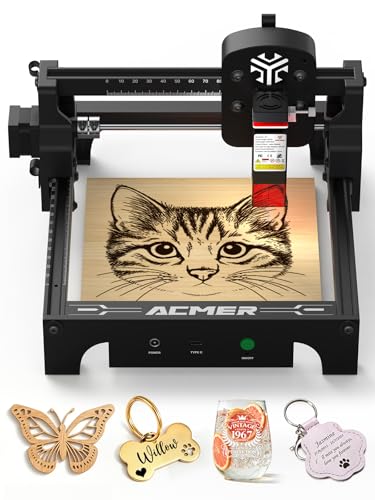
ACMER S1 2.5W Portable Laser Engraver
Best for: small beginner wood projects
- Compatible Material
- Wood, Metal (what this guide is about)
- Laser Type
- Diode
- Laser Power
- 2500mW
- Working Area
- 130 x 130mm
- Engraving Speed
- up to 10,000mm/min
- Software Compatibility
- AcmerStudio, LightBurn, LaserGRBL
View on Amazon: ACMER S1 2.5W Portable Laser Engraver Affiliate link
The ACMER S1 is a portable diode laser engraver with 2500mW power and a 130x130mm working area. It features a Class 1 safety rating and weighs only 2kg. The unit arrives 99% preassembled for quick setup. It supports AcmerStudio, LightBurn, and LaserGRBL software. This compact machine suits beginners who need a lightweight tool for small wood projects.
Pros
- Class 1 laser certification for safe operation
- 99% preassembled for 1-minute setup
- Compatible with LightBurn and LaserGRBL software
- Lightweight 2kg aluminum alloy build
Cons
- Small 130x130mm working area limits project size
- 2500mW laser power is lower than other models
- No integrated housing or enclosure included
Good fit if
- You need a portable engraver for small desktop projects
- You want a Class 1 safe device for home use
- You prefer preassembled units with minimal setup
Skip if
- You require a large working area for big projects
- You need high-power cutting for thick materials
- You want an enclosed machine for dust containment
Verdict: ACMER S1 2500mW Portable Laser Engraver fits beginners who prioritize portability and safety over speed or size. It is a practical entry point for small, detailed wood work.
Specifications side by side
| Spec | ACMER S1 6W Portable Laser Engraver | ACMER S2 12W Laser Engraver | ACMER S1 3500mW Laser Engraver | ACMER P1 S Pro 6W Laser Engraver | ACMER S2 12W Laser Engraver | ACMER P1 S Pro 20W Laser Engraver | ACMER S1 2500mW Compact Laser Engraver | ACMER P2 20W Laser Engraver | ACMER P3 10W Dual-Laser Enclosed Engraver | ACMER P3 24W Enclosed Dual Laser Engraver | ACMER K1 7W Enclosed Laser Engraver | ACMER S1 2.5W Portable Laser Engraver |
|---|---|---|---|---|---|---|---|---|---|---|---|---|
| Laser Type | Diode | not stated | Diode | not stated | not stated | Diode | Diode | not stated | Diode & Infrared | Diode and infrared | Blue Diode | Diode |
| Laser Power | 6000mW | 12W (12,000mW) | 3.5W | 6W (6000mW) | 12W | 20W (20000mW) | 2500mW | not stated | 10W (10000mW) & 2W (2000mW) | 24W (24000mW) | 7000 mW | 2500mW |
| Working Area | 130 x 130mm | 300 x 300 mm | 130 x 130 mm | 380×370mm | 300 x 300 mm | 380×350mm | 130 x 130mm | 420 x 400 mm | not stated | 400*400mm | 150 x 150 mm | 130 x 130mm |
| Engraving Speed | 10,000mm/min | 10,000 mm/min | Up to 10,000 mm/min | 10,000mm/min | not stated | 10,000mm/min | 10,000mm/min | Up to 30,000 mm/min | 800mm/s | 48000mm/s | 10000 mm/min | up to 10,000mm/min |
| Software Compatibility | ACMER studio, LightBurn, LaserGRBL | ACMER Studio, LightBurn, LaserGRBL | ACMER Studio, LightBurn, LaserGRBL | Acmer Studio, LightBurn, LaserGRBL | ACMER Studio, LightBurn, LaserGRBL | Acmer Studio, LightBurn, LaserGRBL | Acmerstudio | LaserGRBL, LightBurn | LaserGRBL, LightBurn | LaserGRBL, LightBurn, ACMER APP | AcmerTool, other popular software | AcmerStudio, LightBurn, LaserGRBL |
| Form Factor | not stated | not stated | not stated | not stated | not stated | not stated | not stated | Enclosure (Class 1) | Class 1, Closed-box | Closed box | Fully Enclosed (Class 1) | Class 1 |
| Cutting Capacity | not stated | 15mm paulownia wood, 12mm acrylic | not stated | 12mm wood, 8mm acrylic | not stated | not stated | not stated | not stated | not stated | not stated | 8mm Paulownia wood (at 12W) | not stated |
| Compatible Material | Wood, Acrylic, Silver | Wood, Metal, Acrylic, Leather | Wood, Acrylic | Wood, Metal, Acrylic, Leather, Glass | Wood, Metal, Acrylic, Leather | Wood, Metal, Acrylic, Leather, Glass | Wood, Acrylic | Wood, Acrylic, Leather | Wood, Metal, Acrylic | Wood, Metal, Acrylic | Wood, Acrylic | Wood, Metal |
| Features | not stated | not stated | not stated | not stated | not stated | not stated | not stated | Enclosure | Air Assist, Camera | Air Assist, Camera | not stated | not stated |
| Target Audience | DIY | DIY | DIY | DIY, Small Business | DIY | DIY | DIY | DIY | not stated | not stated | not stated | DIY, Beginners |
| Dimensions | not stated | 2 × 2 × 2 inches | 25 × 25 × 16.2 inches | 1 × 1 × 1 inches | 21 × 11 × 5 inches | 1 × 1 × 1 inches | 1 × 1 × 1 inches | 26.4 × 28.4 × 7.48 inches | not stated | 29.9 × 26.4 × 14.6 inches | 1 × 1 × 1 inches | 1 × 1 × 1 inches |
| Weight | not stated | not stated | not stated | not stated | not stated | not stated | not stated | 27.8 pounds | not stated | 55.1 pounds | not stated | not stated |
| Size | 6000mW | 12000mW | 3500mW | P1-6W | S2-12w | P1s pro-20W | 2500mW | P2-20W | not stated | P3-24W | k1 7w | s1-2.5W |
| Color | Silver, White-6 | Red | Blue, Black | Orange,white | Orange | Blue,white | Gold, White | Pack-002 | P3 2-in-1 | P3 24W | Red, White | Black |
| Model | not stated | S2 | S1 | P1 S PRO 6W | GM-RYXT-S1.1-12W | JRT-P1 S PRO 20W-0082010066-US-001 | S1 2500mW gold | P2 33W | P3 | ACMER P3 24W | k1 12w | 2.5W |
If you want to engrave furniture, review specs for the best wood dressers to verify dimensions and materials.
How to choose the right one
-
Match power to thickness
Laser power determines how deep you can cut into wood. The ACMER S1 2.5W is best for surface engraving on thin items. If you need to cut through thicker plywood or acrylic, look for higher wattage. The ACMER P2 20W and P1 S Pro 20W models offer enough power for deeper cuts. Check the milliwatt or watt rating in the specs. Higher numbers mean faster processing and greater depth capability for dense materials like hardwood.
-
Check workspace dimensions
The working area size dictates the maximum dimensions of your wood projects. Compact units like the ACMER S1 6W are ideal for small tags or jewelry. For larger signs or furniture parts, you need a bigger bed. The ACMER P1 S Pro 6W features a 380×370mm workspace. The ACMER P2 20W offers a 26.4×28.4 inch area. Measure your largest project before buying. Ensure the width and length specs in the data meet your needs.
-
Verify material compatibility
Not all ACMER models handle every wood type equally. Some are optimized for softwoods, while others handle hardwoods better. The ACMER P3 10W is a diode laser suitable for detailed wood engraving and metal marking. The ACMER S2 12W supports wood, acrylic, and leather. Always check the compatible material list in the attributes. Ensure the specific wood you plan to use is listed. This prevents wasted time on materials the laser cannot process effectively.
-
Consider safety enclosures
Wood engraving produces smoke and debris. Enclosed models like the ACMER P3 24W contain these byproducts. This feature is crucial for indoor use. The P3 24W includes air assist and a camera for safety. Open-frame models like the S1 2500mW require external ventilation. If you work in a small room, prioritize an enclosed form factor. Check the form factor spec. Enclosed units often cost more but offer better protection and cleaner operation.
-
Assess target audience needs
Your experience level influences the best model choice. Beginners should start with portable, easy-to-setup units like the ACMER S1 2.5W. These are safe and straightforward for small projects. Small business owners need reliability and larger workspaces. The ACMER P1 S Pro 6W supports app control and large formats. DIY users might prefer the precision of the ACMER S2 12W. Match the target audience label to your actual usage. This ensures the machine fits your skill and volume requirements.
Frequently asked questions
Can ACMER laser engravers cut thick wood?
Yes, higher power models can cut through substantial thicknesses. The ACMER P2 20W is capable of processing materials up to 18mm thick, such as acrylic or dense wood. The P1 S Pro 20W also offers high power for deeper cuts. Lower wattage units like the 2.5W S1 are limited to surface engraving only.
Which ACMER model is best for beginners?
The ACMER S1 2.5W Portable Laser Engraver is designed for beginners. It prioritizes safety and portability over raw speed or large workspace size. This makes it a practical entry point for small, detailed wood projects. It is ideal for hobbyists who want to learn without managing complex industrial-grade equipment.
Do ACMER engravers support app control?
The ACMER P1 S Pro 6W supports wireless app control. This feature allows you to manage engraving tasks remotely, which is useful for small business operations. Other models in the lineup rely on standard software connections rather than dedicated mobile applications for device management.
Are enclosed models available for safety?
Yes, the ACMER P3 24W and P3 10W are enclosed dual-laser engravers. These models provide a contained space for marking metals and engraving wood. The enclosure helps reduce smoke exposure, making them safer for desktop use in home or office environments compared to open-frame units.
What is the largest workspace size?
The ACMER P1 S Pro 6W features a large 380×370mm workspace. This size is ideal for small businesses prioritizing area over raw cutting speed. The P2 20W also offers large dimensions, measuring 28.4 by 26.4 inches, suitable for processing larger wood pieces with precise linear rail motion.
Can ACMER engravers mark metal?
Several models can mark metal surfaces. The ACMER S2 12W and P1 S Pro 6W list metal as a compatible material. The enclosed P3 series, including the 10W and 24W variants, are specifically suited for detailed metal marking alongside wood engraving. Check the compatible material list for each specific unit.
Is there a portable option for travel?
The ACMER S1 2.5W and S1 6W are designed for portability. These compact units fit hobbyists who value ease of setup and small item engraving. They are not suitable for users needing large workspaces or high cutting power, but they offer practical mobility for detailed wood work on the go.