AlgoLaser 10W Engraver Rotary Roller vs AlgoLaser Pixi 5W Compact Laser Engraver (2026): Key Differences
As an Amazon Associate we earn from qualifying purchases. Links on this page are affiliate links.
This comparison of the algolaser 10w engraver rotary roller vs pixi 5w compact laser engraver highlights two distinct approaches to desktop laser engraving. Both units feature a 3.5-inch touchscreen and run AlgoOS, allowing you to operate without a computer for simple tasks. They also support LightBurn and LaserGRBL for advanced workflows. The primary difference lies in power and size. The 10W model offers higher speed and a rotary attachment for cylinders, while the Pixi 5W is a compact, assembled unit for small, precise craft work.
Key differences
| Aspect | AlgoLaser 10W Engraver with Rotary Roller | AlgoLaser Pixi 5W Compact Laser Engraver |
|---|---|---|
| Laser Power | 10W (10000mW) | 5W |
| Max Engraving Speed | Up to 12000mm/min | Not listed |
| Working Area | Not listed | 100 x 100 mm |
| Key Features | Rotary Roller & Riser Kit | Touchscreen, Compact Assembled Unit |
| Dimensions | 23.7 x 25.3 x 7.17 inches | 8.27 x 10.2 x 7.48 inches |
| Weight | 14.3 pounds | 6.61 pounds |
Which one should you choose?
Choose AlgoLaser 10W Engraver with Rotary Roller if
- You need to engrave cylindrical objects like tumblers or bottles using the included rotary roller.
- You require higher laser power and faster speeds for cutting thicker materials or detailed work.
- You have a dedicated workspace and do not mind assembling a DIY kit.
Choose AlgoLaser Pixi 5W Compact Laser Engraver if
- You want a fully assembled unit that fits on a small counter or cabinet top.
- You primarily create small ornaments, tags, or detailed line art on flat surfaces.
- You need a lightweight machine that is easy to move or store.
Verdict: Choose the AlgoLaser 10W if you need versatility for cylindrical objects and higher power for cutting. Select the Pixi 5W if you prioritize a compact, ready-to-use footprint for small-scale crafting. Both share the same software ecosystem, so your choice depends on physical space and material needs.
AlgoLaser 10W vs Pixi 5W Comparison
Laser Power
Power determines how deep and fast the laser can cut or engrave materials. The AlgoLaser 10W Engraver with Rotary Roller uses a 10000mW (10W) laser module. This higher output allows for faster speeds up to 12000mm/min and supports cutting through thicker wood, acrylic, and coated metals. In contrast, the AlgoLaser Pixi 5W Compact Laser Engraver features a 5W laser. This lower power is designed for detailed engraving and light cutting on thin materials like wood, leather, and dark acrylic. The 10W model offers significantly more cutting capability and speed for production work, while the 5W model focuses on precision for smaller crafts.
Working Area
The size of the engraving bed dictates what you can create in one go. The AlgoLaser Pixi 5W has a compact 100 x 100 mm working area. This small footprint makes it ideal for tiny ornaments, gift tags, and detailed jewelry pieces. The AlgoLaser 10W Engraver has a much larger bed, measuring approximately 23.7 inches in width and 25.3 inches in length. This expansive area allows you to engrave larger signs, multiple items simultaneously, or bigger panels of wood and acrylic. If you need to work on larger projects without resizing your design, the 10W model provides the necessary space.
Portability
Weight and dimensions determine how easy it is to move the machine. The AlgoLaser Pixi 5W Compact Laser Engraver weighs only 6.61 pounds and measures 10.2 x 8.27 x 7.48 inches. It arrives assembled and fits easily on a counter or in a cabinet. You can take it to craft stalls or store it away quickly. The AlgoLaser 10W Engraver with Rotary Roller is heavier at 14.3 pounds and measures 25.3 x 23.7 x 7.17 inches. It is a larger desktop unit that requires a dedicated workbench. For users who value a lightweight, plug-and-play device that fits in small spaces, the Pixi is the clear choice.
Rotary Capability
Engraving cylindrical objects requires specific attachments. The AlgoLaser 10W Engraver includes a rotary roller and riser base right out of the box. This setup allows you to engrave tumblers, mugs, bottles, and other round items with stability. The riser also helps accommodate thicker materials. The AlgoLaser Pixi 5W Compact Laser Engraver does not list a rotary attachment in its specifications. It focuses on flat-surface engraving and cutting. While the Pixi allows you to raise the base for taller flat objects up to 134 mm, it lacks the rotary function needed for cylindrical personalization. If you plan to make custom drinkware, the 10W model is essential.
Software Features
Both machines feature a 3.5-inch smart touchscreen and run AlgoOS, allowing you to operate without a computer. The AlgoLaser Pixi 5W emphasizes simplicity with AlgoType for text and AlgoSketch for drawing, plus 300+ built-in designs. This makes it very user-friendly for beginners who want quick results. The AlgoLaser 10W also uses AlgoOS but highlights its compatibility with LightBurn and LaserGRBL for more complex workflows. It supports WiFi, USB, and TF card transfers. While both support external software, the Pixi’s built-in design library offers a more guided experience for casual users, whereas the 10W targets those who may already use advanced design software.
Which AlgoLaser engraver suits your needs
Users needing to engrave cylindrical items
The 10W model includes a rotary roller attachment. This feature allows you to engrave tumblers, mugs, and bottles with precision. The riser base also supports thicker materials. With 10000mW power and speeds up to 12000mm/min, it handles diverse materials efficiently. You get expanded project options right out of the box for personalized customization.
Creators with limited workspace
The Pixi 5W is compact, measuring 10.2 x 8.27 x 7.48 inches. It weighs only 6.61 pounds, making it easy to move or store. It arrives fully assembled, so you skip frame building. The 100 x 100 mm working area fits on a counter. You can place it on larger flat surfaces to engrave bigger objects, saving dedicated bench space.
Beginners wanting simple standalone operation
Both units feature a 3.5-inch touchscreen and AlgoOS. The Pixi 5W simplifies this with AlgoType and AlgoSketch. You can type text or draw motifs directly on the device. It offers 300+ built-in designs with preset parameters. This lets you create ornaments or tags without preparing files on a computer, ideal for quick DIY projects.
The products compared

AlgoLaser 10W Engraver with Rotary Roller
Best for: engraving cylinders and thick materials
- Laser Power
- 10W (10000mW)
- Engraving Speed
- Up to 12000mm/min
- Software Compatibility
- AlgoOS, LightBurn, LaserGRBL
- Form Factor
- Class 1
- Compatible Material
- Wood, Metal, Glass
- Features
- Rotary Axis, Touchscreen
View on Amazon: AlgoLaser 10W Engraver with Rotary Roller Affiliate link
This machine features a 10W laser module and a 3.5-inch smart touchscreen. It reaches engraving speeds up to 12000mm/min. The included rotary roller and riser kit allow for cylindrical objects and thicker materials. You get WiFi, USB, and TF card connectivity. It runs AlgoOS, LightBurn, and LaserGRBL. This setup suits hobbyists and small business users who need expanded engraving capabilities.
Pros
- 10W (10000mW) laser power for precise engraving and cutting
- Built-in 3.5-inch smart touchscreen for standalone operation
- Includes rotary roller and riser for cylindrical items
- Engraving speeds up to 12000mm/min
- Compatible with LightBurn, LaserGRBL, and AlgoOS
Cons
- Heavier build at 14.3 pounds
- Larger footprint measuring 25.3 by 23.7 inches
- Requires protective goggles during operation
Good fit if
- You need to engrave tumblers or mugs
- You want to process thicker materials
- You prefer standalone touchscreen control
Skip if
- You require a compact desktop footprint
- You only engrave flat small items
- You need maximum portability
Verdict: Algolaser 10W Engraver with Rotary Roller offers high speed and expanded material handling for serious hobbyists. It fits users who need to process cylinders or thick stock without constant computer connection.
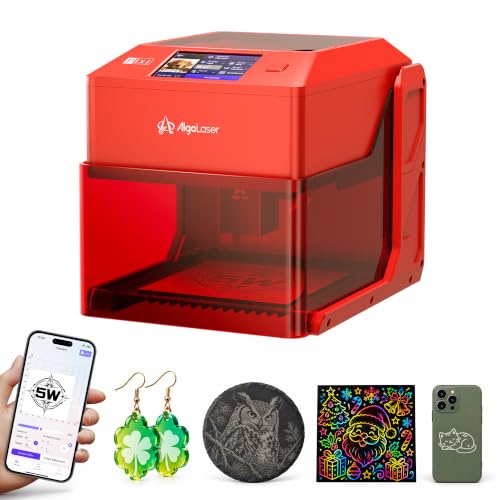
AlgoLaser Pixi 5W Compact Laser Engraver
Best for: small personalization projects and portable crafting
- Laser Power
- 5W
- Working Area
- 100 x 100 mm
- Software Compatibility
- AlgoOS, LightBurn, LaserGRBL
- Compatible Material
- Wood, Acrylic, Leather
- Features
- Touchscreen
- Target Audience
- DIY, Beginners, Small Business
View on Amazon: AlgoLaser Pixi 5W Compact Laser Engraver Affiliate link
The AlgoLaser Pixi 5W is a compact laser engraver with a 5W power output and a 100 x 100 mm working area. It features a 3.5-inch touchscreen for standalone operation, eliminating the need for a PC. The unit weighs 6.61 pounds and measures 10.2 x 8.27 x 7.48 inches. It supports LightBurn and LaserGRBL for advanced users. This model suits hobbyists needing a portable, space-saving device for small personalization tasks.
Pros
- 5W laser power for detailed engraving and light cutting
- 3.5-inch touchscreen with AlgoOS for standalone use
- Compact dimensions: 10.2 x 8.27 x 7.48 inches
- Lightweight build at 6.61 pounds for easy portability
- Compatible with LightBurn and LaserGRBL software
Cons
- Smaller 100 x 100 mm working area limits project size
- 5W power restricts cutting depth on thicker materials
- No rotary roller included for cylindrical objects
Good fit if
- You need a small engraver that fits on a counter
- You want to engrave without connecting a computer
- You prioritize portability for craft shows or travel
Skip if
- You require a large working area for big projects
- You need to cut thick wood or acrylic
- You want to engrave cylindrical items like tumblers
Verdict: AlgoLaser Pixi 5W Compact Engraver is a practical tool for hobbyists who value portability and standalone touchscreen operation for small personalization projects.
Specifications side by side
| Spec | AlgoLaser 10W Engraver with Rotary Roller | AlgoLaser Pixi 5W Compact Laser Engraver |
|---|---|---|
| Laser Power | 10W (10000mW) | 5W |
| Working Area | not stated | 100 x 100 mm |
| Engraving Speed | Up to 12000mm/min | not stated |
| Software Compatibility | AlgoOS, LightBurn, LaserGRBL | AlgoOS, LightBurn, LaserGRBL |
| Form Factor | Class 1 | not stated |
| Compatible Material | Wood, Metal, Glass | Wood, Acrylic, Leather |
| Features | Rotary Axis, Touchscreen | Touchscreen |
| Target Audience | Beginners | DIY, Beginners, Small Business |
| Application | Tumblers | not stated |
| Dimensions | 25.3 × 23.7 × 7.17 inches | 10.2 × 8.27 × 7.48 inches |
| Weight | 14.3 pounds | 6.61 pounds |
| Size | DIY KIT MK2 10W with Rotary Roller | not stated |
| Color | Size-2 | Red 5 |
| Model | Algolaser Laser Engraver | Pixi red |
Frequently asked questions
Which AlgoLaser engraver is better for engraving cylindrical items like tumblers?
The AlgoLaser 10W Engraver with Rotary Roller is the better choice. It includes a rotary axis attachment designed for processing cylinders. This feature allows you to engrave mugs, bottles, and other round objects with precision. The Pixi 5W lacks this specific rotary capability, making it less suitable for such projects.
How does the working area size compare between the two models?
The AlgoLaser 10W offers a significantly larger footprint than the Pixi 5W. The 10W unit measures 23.7 inches in width and 25.3 inches in length. In contrast, the Pixi 5W is compact, measuring only 8.27 inches wide and 10.2 inches long. You should choose the 10W for larger materials.
Is the AlgoLaser Pixi 5W portable enough for travel?
Yes, the Pixi 5W is designed for portability. It weighs just 6.61 pounds and features a small form factor. Its compact dimensions make it easy to transport. The 10W model is much heavier at 14.3 pounds and is bulkier, making it less ideal for mobile crafting or small workspaces.
Can I operate both engravers without connecting them to a computer?
Yes, both models support standalone operation. They feature a 3.5-inch touchscreen and run AlgoOS. This allows you to load and execute simple engraving tasks directly on the device. You do not need to keep a computer connected for basic projects, which adds convenience for both users.
Which laser power is sufficient for thick materials?
The AlgoLaser 10W Engraver is better for thick materials. It uses a 10W laser module, providing higher output for deeper engraving and cutting. The Pixi 5W has a lower 5W power output. If you plan to work with dense or thick stock, the 10W model offers more capability.
Does the AlgoLaser 10W come with a rotary attachment included?
Yes, the AlgoLaser 10W Engraver includes a rotary roller. This accessory is essential for engraving cylindrical items. The Pixi 5W does not list a rotary attachment in its features. If you need to engrave round objects, the 10W model provides this functionality out of the box.