Best AlgoLaser Laser Engravers for Beginners: 3 Spec-Based Picks
As an Amazon Associate we earn from qualifying purchases. Links on this page are affiliate links.
Finding the best AlgoLaser laser engravers for beginners requires looking at published specs rather than marketing claims. We compared 3 models to help you choose based on practical data. Our top pick is the AlgoLaser Pixi 5W Touchscreen Laser Engraver. It leads because its 5W laser power handles light engraving on wood and leather effectively. This guide breaks down key specifications like power, material compatibility, and form factor. You will use this information to decide which machine fits your workspace and skill level.
Quick picks
| # | Product | Best for | Price |
|---|---|---|---|
| 1 | AlgoLaser Pixi 5W Touchscreen Laser Engraver Best overall | Beginner light engraving on wood and leather | Check price of AlgoLaser Pixi 5W Touchscreen Laser Engraver on Amazon |
| 2 | AlgoLaser Pixi 10W Portable Laser Engraver Best budget | beginners wanting simple, offline engraving | Check price of AlgoLaser Pixi 10W Portable Laser Engraver on Amazon |
| 3 | AlgoLaser Pixi 3W Enclosed Laser Engraver Also great | Safe, detailed engraving on light materials | Check price of AlgoLaser Pixi 3W Enclosed Laser Engraver on Amazon |
The best fit for you
- You want the best overall portable engraver AlgoLaser Pixi 5W Touchscreen Laser Engraver The 5W laser and touchscreen make this the top choice for beginners.
- You need a budget-friendly option for small projects AlgoLaser Pixi 10W Portable Laser Engraver This 10W model offers offline simplicity and engraves wood and leather.
- You prioritize safety during detailed light engraving AlgoLaser Pixi 3W Enclosed Laser Engraver The enclosed design and 3W power ensure safe use without a PC.
Our 3 picks

AlgoLaser Pixi 5W Touchscreen Laser Engraver
Best for: Beginner light engraving on wood and leather
- Target Audience
- DIY, Beginners, Small Business (what this guide is about)
- Laser Power
- 5W
- Software Compatibility
- AlgoOS, APP
- Form Factor
- Class 1
- Compatible Material
- Wood, Leather
- Features
- Touchscreen
View on Amazon: AlgoLaser Pixi 5W Touchscreen Laser Engraver Affiliate link
The AlgoLaser Pixi is a Class 1 laser engraver with 5W power, designed for beginners. It features a 3.5-inch smart touchscreen and runs on AlgoOS, allowing you to engrave without a computer. Its portable form factor measures 10.5 by 8.5 by 7.7 inches. You can connect via USB-C or WiFi. It suits DIYers and small businesses needing a safe, plug-and-play machine for wood and leather.
Pros
- Class 1 safety rating with auto-pause door
- 3.5-inch smart touchscreen for direct design
- No assembly required for immediate use
- Portable size at 10.5 inches long
Cons
- 5W laser power limits cutting depth
- No physical control panel for manual adjustments
- Touchscreen only, no dedicated display for settings
Good fit if
- You want a portable machine for small projects
- You prefer touchscreen operation over computer software
- You need a Class 1 safe system for home use
Skip if
- You require high-power cutting for thick materials
- You need a desktop-sized large workspace
- You prefer physical buttons over touchscreen controls
Verdict: AlgoLaser Pixi 5W Portable Engraver fits beginners who value portability and safety. It is ideal for light engraving tasks on wood and leather using the built-in touchscreen.

AlgoLaser Pixi 10W Portable Laser Engraver
Best for: beginners wanting simple, offline engraving
- Target Audience
- DIY, Beginners (what this guide is about)
- Laser Power
- 10W
- Engraving Speed
- 100–300 mm/s
- Software Compatibility
- AlgoOS
- Form Factor
- Fully enclosed Class 1
- Compatible Material
- Wood, Metal, Leather
View on Amazon: AlgoLaser Pixi 10W Portable Laser Engraver Affiliate link
The AlgoLaser Pixi is a portable, fully enclosed Class 1 laser engraver with 10W power. It features a 3.5-inch smart touchscreen for offline operation, removing the need for a computer. You can adjust power from 50–100% and speed up to 300 mm/s. It weighs 6.7 pounds and supports wood, leather, and metal. This unit is designed for beginners who want simple, direct control without complex software setups.
Pros
- 10W laser power for crisp details on wood, leather, and metal
- 3.5-inch touchscreen allows offline operation with no PC required
- Fully enclosed Class 1 safety design with auto-pause lid
- Adjustable speed up to 300 mm/s and power from 50–100%
Cons
- Smaller 3.5-inch screen limits workspace visibility compared to larger models
- 6.7-pound weight is heavier than the ultra-portable Pixi variant
- Requires external ventilation for wood or coated materials
Good fit if
- You want a beginner-friendly machine that works without a computer
- You need a portable unit for small workshop or home use
- You prefer direct touchscreen control over software interfaces
Skip if
- You require a large engraving area for big projects
- You need a lightweight device for frequent travel
- You prefer full software integration over offline touchscreen operation
Verdict: AlgoLaser Pixi 10W Portable Engraver fits beginners who value simplicity and safety over large workspace size. It is ideal for small, detailed projects on materials like wood and leather.
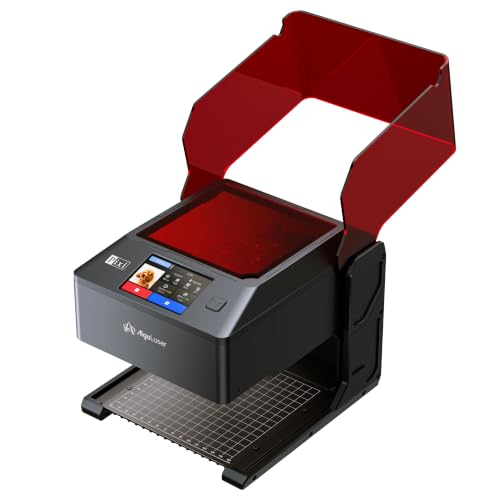
AlgoLaser Pixi 3W Enclosed Laser Engraver
Best for: Safe, detailed engraving on light materials
- Target Audience
- Beginners (what this guide is about)
- Laser Power
- 3W
- Software Compatibility
- AlgoOS
- Form Factor
- Fully Enclosed (Class 1)
- Features
- Touchscreen
- Dimensions
- 1 × 1 × 1 inches
View on Amazon: AlgoLaser Pixi 3W Enclosed Laser Engraver Affiliate link
The AlgoLaser Pixi is a Class 1 enclosed laser engraver designed for beginners who want a standalone workflow. It features a 3W laser module for fine detail work on light materials like wood, leather, and paper. The 3.5-inch touchscreen allows you to create designs directly on the device without a computer. You can also connect via WiFi or USB-C for more complex projects. This compact unit includes a safety lid and exhaust fan for safer home use.
Pros
- Fully enclosed Class 1 safety system with auto-pause lid
- 3.5-inch smart touchscreen for standalone operation
- 3W laser module for fine detail engraving
- Supports WiFi, USB-C, and App connectivity
Cons
- 3W laser power limits speed and depth on thicker materials
- Rotary accessories for cylindrical items are sold separately
- External ventilation is recommended for wood and leather
Good fit if
- You want a beginner-friendly machine with no computer required
- You need a compact, enclosed unit for safe home or classroom use
- You primarily engrave light-duty materials like paper, leather, and thin wood
Skip if
- You require high-speed cutting or deep engraving on thick materials
- You need a rotary attachment included for cylindrical objects
- You prefer a larger working area for bigger projects
Verdict: AlgoLaser Pixi 3W Touchscreen is a practical entry point for hobbyists who value safety and ease of use over raw power. It fits users who want to engrave small, detailed items in a controlled environment without setting up a PC.
Specifications side by side
| Spec | AlgoLaser Pixi 5W Touchscreen Laser Engraver | AlgoLaser Pixi 10W Portable Laser Engraver | AlgoLaser Pixi 3W Enclosed Laser Engraver |
|---|---|---|---|
| Laser Power | 5W | 10W | 3W |
| Engraving Speed | not stated | 100–300 mm/s | not stated |
| Software Compatibility | AlgoOS, APP | AlgoOS | AlgoOS |
| Form Factor | Class 1 | Fully enclosed Class 1 | Fully Enclosed (Class 1) |
| Compatible Material | Wood, Leather | Wood, Metal, Leather | not stated |
| Features | Touchscreen | Touchscreen | Touchscreen |
| Target Audience | DIY, Beginners, Small Business | DIY, Beginners | Beginners |
| Dimensions | 10.5 × 8.5 × 7.7 inches | 10.4 × 8.4 × 7.7 inches | 1 × 1 × 1 inches |
| Weight | not stated | 6.7 pounds | not stated |
| Color | Power Red | Classic Red | BLACK-3W |
| Model | Pixi 2025 | not stated | PIXI |
How to choose the right one
-
Check laser power needs
Laser power determines what materials you can process. A 5W unit handles light engraving on wood and leather. This is sufficient for most beginner tasks. If you need to engrave metal, you must look for a higher wattage. The 10W model adds metal compatibility. The 3W option is for very light materials only. Match the wattage to your heaviest intended project. Higher power cuts deeper but costs more.
-
Verify material compatibility
Not all machines work with every surface. You must check the compatible materials list before buying. The Pixi 5W works well on wood and leather. The Pixi 10W expands this to include metal engraving. The Pixi 3W is limited to light materials. If you plan to work with plastics or glass, ensure the spec sheet lists them. Choosing the wrong power for a material can damage the machine or the item.
-
Assess touchscreen features
Interface type affects your workflow significantly. A built-in touchscreen allows you to operate the device without a computer. This is ideal for beginners who want simplicity. Both the 5W and 10W models feature this convenience. It lets you run projects offline. You do not need to install drivers or connect cables for every job. This reduces setup time and technical friction for new users who are not tech-savvy.
-
Consider form factor size
Physical dimensions dictate where you can place the unit. Portability is a key factor for many beginners. The Pixi 5W measures 10.5 by 8.5 by 7.7 inches. The Pixi 10W is slightly smaller at 10.4 by 8.4 by 7.7 inches. These compact sizes fit on small desks or shelves. If you have limited workspace, these portable forms are practical. Larger machines require dedicated benches and more clearance for ventilation and operation.
-
Match target audience goals
Identify your primary use case early. Some models target DIY hobbyists, while others suit small business needs. The Pixi 5W serves beginners and small businesses well. The Pixi 10W focuses on DIY and beginner users. The Pixi 3W is strictly for beginners. Aligning the target audience with your goals ensures you get the right balance of features. A business user might need durability, while a hobbyist prioritizes ease of use.
Frequently asked questions
Which AlgoLaser engraver is best for beginners?
The AlgoLaser Pixi 5W is the top pick for beginners. It features a 5W laser and a built-in touchscreen. This model is ideal for light engraving on wood and leather. Its portable form factor makes it easy to handle. You get a safe, straightforward entry point into laser engraving without needing complex setups.
Can the Pixi 10W engrave metal?
Yes, the AlgoLaser Pixi 10W can engrave metal. It offers 10W of laser power, which is stronger than the 5W or 3W models. This power level allows it to process wood, leather, and metal. It is a good choice if you need versatility in your materials while keeping the device portable and simple to use.
Is the Pixi 3W safe for home use?
The Pixi 3W is designed for safety and detailed work. It features an enclosed design to contain the laser. This makes it practical for hobbyists who value a controlled environment. It is suitable for light materials like wood and leather. The enclosed structure helps protect you while you engrave small, detailed items.
Do these machines require a computer?
No, these models do not require a computer. They all feature built-in touchscreens for operation. You can use them offline for simple engraving tasks. This eliminates the need for complex software connections. It makes the process straightforward for beginners who want to engrave directly from the device interface.
Which model is the most portable?
The AlgoLaser Pixi series is designed for portability. The Pixi 5W measures 10.5 inches in length and 8.5 inches in width. The Pixi 10W weighs 6.7 pounds and has similar dimensions. These compact sizes allow you to move them easily. They are ideal for users who need a lightweight, space-saving engraver.
What is the difference between the 3W and 5W models?
The main difference is laser power and enclosure. The Pixi 5W has 5W power and is open for general use. The Pixi 3W has 3W power and is enclosed for safety. Both use touchscreens and handle wood and leather. Choose the 5W for more power or the 3W for a safer, contained experience.