VEVOR 55W CO2 Laser Engraver Review: Who It Fits and Who Should Skip It
As an Amazon Associate we earn from qualifying purchases. Links on this page are affiliate links.
This vevor 55w co2 laser engraver review covers a desktop machine built for non-metal materials. It features a 55W CO2 laser tube and a 20 x 12 inch work area. The unit supports speeds up to 500 mm/s and cuts acrylic up to 7 mm. It includes a 5MP camera for auto focus and a rotary axis for cylindrical items. The system runs on LightBurn and RDWorks software. It connects via USB or Wi-Fi to Windows, macOS, and Linux. This model, SH-530, weighs 121 pounds and measures 40.4 inches long.
What stands out
- 55W CO2 laser tube with 3,500+ hour life
- 20 x 12 inch desktop work area
- 5MP camera with auto focus function
- Integrated rotary axis for cylindrical objects
- Supports LightBurn and RDWorks software
Who it fits
Good fit for
This machine suits hobbyists and small business owners who need a spacious desktop engraver for wood and acrylic. The 20 x 12 inch area handles large signs and furniture panels. The auto focus and 5MP camera simplify setup for users who want quick, precise results. The included rotary axis expands capabilities for items like tumblers. If you already use LightBurn or RDWorks, this unit fits your workflow. The air-assist and waste tray help maintain a clean workspace during long sessions.
Who should skip it
You should skip this model if you plan to engrave bare metals, as the data states it is only suitable for coated metals. The 55W power limits cutting thickness to 7 mm for acrylic and 5 mm for wood. Users needing metal marking capabilities should look elsewhere. The desktop form factor requires significant floor space, weighing 121 pounds. If you prefer a more compact unit, this large footprint may not fit your setup. The focus remains strictly on non-metal materials.
Verdict: This is a capable desktop CO2 laser for wood and acrylic projects. It offers a large work area and useful automation features. It is not suitable for bare metal engraving.
Key specs explained for this model
Laser Power: 55W
This power rating indicates the output of the CO2 tube. You can cut thicker materials or work faster than with lower-wattage units. The listing notes a life of 3,500+ hours. You should compare this against 40W or 30W desktop models. Higher wattage allows for deeper cuts in wood and acrylic, making it suitable for small business production or serious hobbyists who need consistent results.
Working Area: 20 x 12 in
This defines the maximum size of the material you can place on the bed. It accommodates large signs, furniture panels, or batch production of leather tags. You should compare this to smaller 12x8 inch machines. A larger area reduces the need to reposition material frequently. It is ideal for users who need to engrave wide items without cropping their designs.
Cutting Capacity: ≤ 7 mm acrylic, ≤ 5 mm wood
These limits show the maximum thickness the laser can pierce through completely. You can cut 7 mm acrylic or 5 mm wood in a single pass. You should compare this to entry-level machines that often stop at 3 mm. This capacity allows you to create sturdy boxes, decorative panels, or structural components. Thicker materials may require multiple passes or slower speeds.
Engraving Speed: Up to 500 mm/s
This speed indicates how fast the laser head moves during engraving. Faster speeds reduce production time for large projects or multiple items. You should compare this to standard speeds around 300 mm/s. Higher speeds are beneficial for marking text or filling large areas quickly. Note that speed may vary depending on the material density and desired depth of engraving.
Software Compatibility: LightBurn, RDWorks
These are the supported control programs for designing and sending jobs to the machine. LightBurn and RDWorks are industry-standard tools for vector and raster graphics. You should compare this to machines that only support proprietary software. Broad compatibility gives you flexibility to use existing design files. It also allows you to manage multiple engraving layers within a single file for complex projects.
Design and build overview
The VEVOR 55W CO2 Laser Engraver is a desktop unit constructed from spray-painted iron or galvanized steel, according to the listing. It measures 40.4 inches in length, 22.8 inches in width, and stands 10.2 inches tall. The machine weighs 121 pounds. This substantial mass suggests stability during high-speed engraving at 500 mm/s. The black finish provides a uniform look for a workspace environment. The 20 by 12 inch working area accommodates large signs or furniture panels. You can place bulky items on the bed without worrying about overhang.
The layout includes a pull-out waste tray for easy cleanup. An air-assist system is built in to clear dust and smoke, keeping the workspace cleaner. Water pump cooling helps maintain stable operation during long sessions. Security features are integrated to ensure safe use. The unit supports a rotary axis for cylindrical objects, expanding its utility beyond flat surfaces. This feature is useful for crafting items like tumblers or pens.
Controls are managed via software rather than a physical panel. The listing notes compatibility with LightBurn and RDWorks. You can connect via USB or Wi-Fi. A 5 MP camera aids in precise positioning and auto-focus. This setup means you do not need to adjust the laser head manually. The design prioritizes digital control and automated adjustments. You will rely on your computer interface to start jobs and manage layers. The physical controls are minimal, focusing on power and safety.
Setup and everyday use
Setting up this VEVOR 55W CO2 Laser Engraver requires connecting the water pump cooling system. You must also attach the air-assist unit to manage dust and smoke during operation. The listing highlights a pull-out waste tray, which simplifies cleanup after each session. Power connections and software installation follow standard desktop machine procedures.
For daily use, the machine offers a 20 x 12 inch work area. This size accommodates large signs, furniture panels, or batches of leather tags. The included rotary axis allows you to engrave cylindrical objects, expanding your material options beyond flat surfaces. You can connect via USB or Wi-Fi. The system supports Windows, macOS, and Linux. It works with LightBurn and RDWorks software. These tools let you manage multiple engraving layers within a single file.
Operation begins with the auto focus function. The 5 MP camera helps you position designs accurately. The laser head adjusts height automatically, so you can start engraving with a single click. Speeds reach up to 500 mm/s. The laser tube is rated for 3,500+ hours of use. You should note that this unit is not for metal engraving. It is only suitable for coated metals. It handles wood and acrylic well, with recommended limits of 5 mm for wood and 7 mm for acrylic. The air-assist system keeps the workspace clear, ensuring consistent results across different projects.
Before you buy this laser
You will need to verify your workspace dimensions before ordering. The unit measures 40.4 inches long and weighs 121 pounds, so ensure your table supports the load. You must also confirm your software preferences, as it works with LightBurn and RDWorks on Windows, macOS, and Linux. Check your material inventory, since this machine handles wood and acrylic but not bare metal. Upkeep involves maintaining the water cooling system and emptying the waste tray regularly. The 55W power output allows for faster cutting than lower-wattage models, but you should stay within the 7 mm acrylic and 5 mm wood limits. This desktop unit fits well if you need a large 20 x 12 inch area. It suits those who prioritize speed and precision over portability. Consider whether you need the rotary axis for cylindrical items. If you require metal engraving, look elsewhere. This machine is best for dedicated hobbyists or small business owners with fixed workspaces who value consistent performance and broad software compatibility for their projects.
Check before you buy
- Verify your table can hold 121 pounds.
- Confirm you use LightBurn or RDWorks software.
- Ensure your space fits the 40.4 inch length.
- Check if you need to engrave bare metal.
- Decide if you require the rotary axis.
The product at a glance
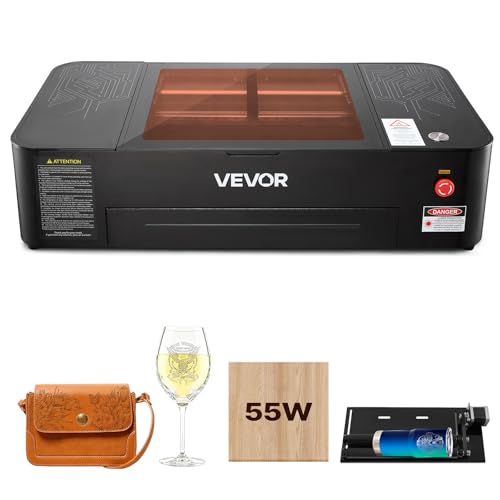
VEVOR 55W CO2 Laser Engraver 20x12
Best for: Large non-metal projects with auto-focus
- Laser Type
- CO2
- Laser Power
- 55W
- Working Area
- 20 x 12 in
- Engraving Speed
- Up to 500 mm/s
- Software Compatibility
- LightBurn, RDWorks
- Cutting Capacity
- ≤ 7 mm acrylic, ≤ 5 mm wood
View on Amazon: VEVOR 55W CO2 Laser Engraver 20x12 Affiliate link
This 55W CO2 laser engraver features a 20 x 12 inch work area and reaches speeds up to 500 mm/s. It includes a 5MP camera for auto-focus positioning and supports USB and Wi-Fi connectivity. The system works with LightBurn and RDWorks software. It is suitable for engraving wood, acrylic, and coated metals. The unit weighs 121 pounds and requires water cooling.
Pros
- 55W laser power cuts up to 7 mm acrylic
- 20 x 12 inch large work area
- 5MP camera with auto-focus function
- Supports LightBurn and RDWorks software
- Built-in air-assist and water pump cooling
Cons
- Not suitable for bare metal engraving
- Heavy 121 pounds desktop build
- Requires water cooling system setup
Good fit if
- You need a large 20 x 12 inch workspace
- You want auto-focus precision for detailed work
- You use LightBurn or RDWorks software
Skip if
- You plan to engrave bare metals
- You require a lightweight portable machine
- You prefer air-cooled laser systems
Verdict: VEVOR 55W CO2 Laser 20x12 in fits users who need a large desktop workspace and precise auto-focus for non-metal materials. It is ideal for those already using LightBurn or RDWorks software.
Specifications side by side
| Spec | VEVOR 55W CO2 Laser Engraver 20x12 |
|---|---|
| Laser Type | CO2 |
| Laser Power | 55W |
| Working Area | 20 x 12 in |
| Engraving Speed | Up to 500 mm/s |
| Software Compatibility | LightBurn, RDWorks |
| Cutting Capacity | ≤ 7 mm acrylic, ≤ 5 mm wood |
| Compatible Material | Wood, Acrylic, Glass |
| Features | Rotary Axis, Camera |
| Form Factor | Desktop |
| Dimensions | 40.4 × 22.8 × 10.2 inches |
| Weight | 121 pounds |
| Size | Working Area: 20" x 12" |
| Color | Black |
| Model | SH-530 |
Frequently asked questions
Can this VEVOR 55W laser engrave glass and acrylic?
Yes, the device is compatible with wood, acrylic, and glass. The 55W CO2 laser tube provides sufficient power to etch these non-metal materials effectively. You can expect clear marks on glass and clean cuts on acrylic up to 7 mm thick, making it suitable for detailed decorative projects.
Does the machine include a rotary axis for cylinders?
Yes, the unit comes with a rotary axis feature. This accessory allows you to engrave on cylindrical objects like tumblers or pens. It expands your creative options beyond flat surfaces, enabling you to create custom gifts or branded items on curved materials with consistent precision and alignment.
Is the work area large enough for big projects?
The working area measures 20 inches by 12 inches. This size accommodates large sheets of wood or acrylic without needing to split designs. It provides ample space for substantial desktop projects, allowing you to engrave full-sized items in a single pass rather than tiling smaller sections together.
What software does this VEVOR engraver support?
The machine works with LightBurn and RDWorks software. These programs run on Windows and macOS, giving you flexibility in design creation. LightBurn is particularly noted for its intuitive interface, while RDWorks offers robust control over laser parameters. Both tools help you manage the 500 mm/s speed settings.
How does the auto-focus camera improve accuracy?
The built-in camera assists with precise auto-focusing for the laser head. This feature ensures the focal point remains consistent across uneven surfaces or varying material thicknesses. By automating this adjustment, you save time and reduce errors, leading to sharper engraving results without manual recalibration for every new job.
Can I use this for cutting thick materials?
The 55W output allows you to cut acrylic up to 7 mm thick. It also handles wood efficiently, though thickness limits apply based on the wood density. The high speed of 500 mm/s helps complete cuts quickly, but you may need multiple passes for denser materials to achieve clean edges.
Does the unit require water cooling for operation?
Yes, you must connect a water pump cooling system. The CO2 laser tube generates heat during use, and water cooling prevents overheating. You also need to attach the air-assist unit to manage dust and smoke. Proper setup of these systems is essential for maintaining the 3,500-hour tube lifespan.
Is the machine heavy and difficult to move?
The unit weighs 121 pounds, making it a substantial desktop machine. Its dimensions are 40.4 inches long and 22.8 inches wide. You should ensure your table supports this weight. Moving it requires care due to its mass, so plan your workspace layout carefully before unpacking and assembling the components.