VEVOR 20W Enclosed Diode Laser Engraver Review (2026): A Spec-Based Look
As an Amazon Associate we earn from qualifying purchases. Links on this page are affiliate links.
This vevor 20w enclosed diode laser engraver review focuses on the JL3PRO model. It features a 20W (20,000 mW) diode laser and a Class 1 enclosed design. The working area measures 11.8 x 11.8 inches. This compact footprint fits smaller workspaces while offering solid power for hobbyists. The enclosure filters light and blocks smoke, providing a safer environment for indoor use. We look at how these specs translate to real-world performance for cutting and engraving tasks.
What stands out
- 20W (20,000 mW) laser power cuts 0.3 in basswood in one pass.
- Class 1 safety enclosure with emergency stop and tilt protection.
- High precision with a 0.12 x 0.15 mm spot size and 7,000 mm/min speed.
- Supports LaserGRBL, LightBurn, and CutLabX software for flexible control.
Who it fits
Good fit for
This machine suits hobbyists and small business owners who need a safe, enclosed unit for wood, leather, and paper projects. The 11.8 x 11.8 in area is ideal for moderate-sized items. If you value safety features like smoke filtering and emergency stops, this Class 1 design is a strong fit. It also works well for users who prefer offline engraving or Wi-Fi control via the CutLabX app on Mac or Windows.
Who should skip it
You should look elsewhere if you plan to engrave or cut metals. The data states it cannot cut metals or transparent/reflective materials without black coating. It is also not suitable for gold, silver, or copper. Additionally, if you require a large working area beyond 11.8 x 11.8 inches, this compact unit may feel restrictive. Users needing to process transparent acrylic will find it unsuitable for cutting tasks.
Verdict: The VEVOR JL3PRO offers a safe, enclosed workspace with sufficient power for wood and leather. It is a practical choice for hobbyists who prioritize safety and software flexibility over large-format cutting.
Key specs explained for this model
Laser Power: 20W (20000mW)
This value indicates the optical output of the diode source. Higher wattage generally allows for deeper cuts and faster processing speeds on thicker materials. You can expect this unit to slice through 0.3-inch basswood in a single pass. When comparing engravers, note that 20W is a mid-range power level suitable for hobbyists who need more than basic surface engraving but do not require industrial-grade throughput.
Working Area: 11.8 x 11.8 in
This measurement defines the maximum size of the material you can place on the bed for processing. A square format offers flexibility for both wide and tall projects. It is compact enough to fit on standard desks but large enough for common items like coasters, small signs, or phone cases. Check this dimension against your typical project sizes to ensure the bed is neither too small nor unnecessarily bulky.
Laser Type: Diode (455 nm)
This specifies the technology and color spectrum of the light source. Diode lasers use semiconductor chips to generate light, which is typically absorbed well by organic materials like wood, leather, and coated metals. The 455 nm wavelength is standard for this class of machine. Unlike fiber lasers, diode units cannot cut clear glass or bare metals without special coatings, so verify material compatibility before purchasing.
Form Factor: Enclosed (Class 1)
The enclosure houses the laser head and work area within a sealed box. This design filters harmful laser light and captures smoke and debris, allowing you to operate the machine safely indoors without external ventilation. Class 1 certification means the laser is contained and safe during normal operation. This feature is essential for home workshops where open-air safety shields or exhaust fans are not practical or desired.
Design and Build Quality
The VEVOR JL3PRO features a grey enclosure with a sturdy aluminum frame. According to the listing, this metal construction minimizes vibration during operation. Reduced shake helps maintain smooth edges and consistent engraving quality. The unit measures 21.6 inches in length, 18.8 inches in width, and 8.43 inches in height. It weighs 16.1 pounds. This mass provides stability on your workbench, preventing movement when the laser head travels at speeds up to 7,000 mm/min.
The enclosed Class 1 design surrounds the 11.8 x 11.8 inch working area. This shell filters laser light and blocks smoke, creating a safer environment for indoor use. Safety features include an emergency stop button, tilt stop, limit switches, and a security lock. These controls allow you to halt operations immediately if something goes wrong or if the door is opened.
The compact footprint fits smaller workspaces, making it suitable for desks or small workshops. The 32-bit control board manages precise movements, ensuring the fine 0.12 x 0.15 mm laser spot lands accurately. The overall build prioritizes safety and precision over raw size. You get a contained system that manages debris and light while delivering consistent results on wood, leather, and paper.
Setup and everyday use
Setup begins with assembling the grey enclosure and aluminum frame. The unit weighs 16.1 pounds and measures 21.6 inches by 18.8 inches. You place the device on a stable surface. Connect the power and data cables. The listing notes Wi-Fi support for the CutLabX app, which allows wireless control. You do not need a physical cable for every operation if you use this specific software.
Daily use relies on compatible software. You can choose LaserGRBL for Windows, LightBurn for Mac or Windows, or CutLabX for Mac, Windows, or mobile devices. LightBurn is a paid option. LaserGRBL is free but limited to low-speed tasks. CutLabX offers offline engraving and Wi-Fi connectivity. You load your design files into the chosen program. The 32-bit control board processes these instructions to move the laser head accurately.
The enclosed Class 1 design affects your workflow. The housing filters laser light and contains smoke. You must ensure the enclosure is closed during operation to maintain safety. Limit switches and an emergency stop button are integrated into the system. These features stop the machine if the head hits an obstacle or if you press the stop button. The 0.12 by 0.15 mm spot size requires precise focus. You adjust the lens distance to match the material thickness. The machine handles wood, leather, paper, and acrylic. It cannot cut metals or transparent materials without black coating. You load your material into the 11.8 by 11.8 inch working area. Start the job from your software interface.
Before You Buy This Vevor
Before you buy this VEVOR JL3PRO, verify your workspace dimensions. The unit measures 21.6 by 18.8 inches and weighs 16.1 pounds. You need a stable, flat surface to minimize vibration. Check your software needs carefully. LaserGRBL works on Windows but is limited for low-speed devices. LightBurn requires a paid license for Mac and Windows. CutLabX offers Wi-Fi support via its app. Plan for ventilation. The enclosure filters light and blocks smoke, but you still need adequate room airflow. Consider material compatibility. This diode laser handles wood, leather, and paper well. It cannot cut metals or transparent acrylic. If you engrave reflective surfaces, apply a black coating first. This model sits among 1 options in Laser Engravers & Cutters. It suits users who prioritize safety and compact size over raw power. Ensure your materials align with its 0.3-inch basswood cutting limit.
Check before you buy
- Verify your workspace fits the 21.6 by 18.8 inch footprint.
- Check if you need paid LightBurn or free LaserGRBL.
- Ensure proper ventilation despite the smoke-blocking enclosure.
- Confirm materials are non-metallic and non-reflective.
- Plan for black coating on reflective surfaces.
The product at a glance
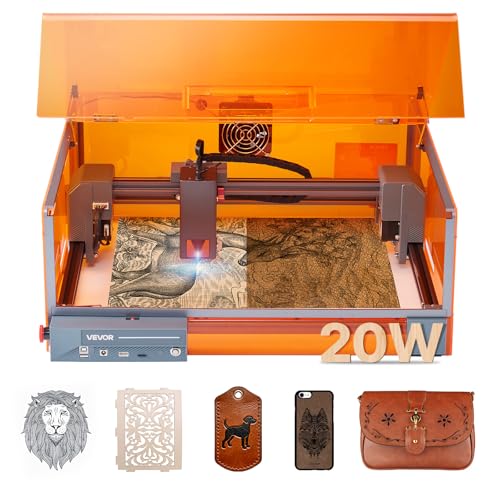
VEVOR 20W Enclosed Diode Laser Engraver
Best for: hobbyists needing a safe, enclosed setup
- Laser Type
- Diode (455 nm)
- Laser Power
- 20W (20000mW)
- Working Area
- 11.8 x 11.8 in
- Engraving Speed
- 7,000 mm/min
- Software Compatibility
- LaserGRBL, LightBurn, CutLabX
- Form Factor
- Enclosed (Class 1)
View on Amazon: VEVOR 20W Enclosed Diode Laser Engraver Affiliate link
This VEVOR 20W enclosed diode laser offers a 11.8 x 11.8 in working area and speeds up to 7,000 mm/min. It features a Class 1 safety enclosure with smoke filtration and emergency stops. The 455 nm diode laser cuts 0.3 in basswood in a single pass. It supports LaserGRBL, LightBurn, and CutLabX software. This machine suits hobbyists who need a contained, safe environment for engraving wood and leather.
Pros
- 20W (20000mW) diode laser power
- Class 1 enclosed safety design
- Cuts 0.3 in basswood in one pass
- Supports LightBurn and CutLabX apps
Cons
- Not suitable for cutting metals
- Cannot engrave reflective materials without coating
- LaserGRBL limited to low-speed devices
Good fit if
- You want a Class 1 safe enclosure
- You engrave wood and leather
- You need offline engraving options
Skip if
- You cut metal materials
- You engrave gold or silver
- You require high-speed engraving only
Verdict: VEVOR 20W Enclosed Diode Laser is a safe, contained option for hobbyists who prioritize safety and software flexibility over metal cutting capabilities. It fits users who primarily work with wood and leather in a controlled environment.
Specifications side by side
| Spec | VEVOR 20W Enclosed Diode Laser Engraver |
|---|---|
| Laser Type | Diode (455 nm) |
| Laser Power | 20W (20000mW) |
| Working Area | 11.8 x 11.8 in |
| Engraving Speed | 7,000 mm/min |
| Software Compatibility | LaserGRBL, LightBurn, CutLabX |
| Form Factor | Enclosed (Class 1) |
| Cutting Capacity | 0.3 in basswood |
| Compatible Material | Wood, Metal, Leather, Glass |
| Features | Enclosure |
| Dimensions | 21.6 × 18.8 × 8.43 inches |
| Weight | 16.1 pounds |
| Color | Grey |
| Model | JL3PRO |
Frequently asked questions
Does the VEVOR 20W enclosed diode laser engraver cut metal?
Yes, the listing indicates compatibility with metal. However, diode lasers generally only mark or engrave metal surfaces rather than cutting through them. You should expect to work with thin sheets or use specific coatings for better results on metallic materials.
What is the working area of this laser engraver?
The working area measures 11.8 by 11.8 inches. This square format provides ample space for most hobbyist projects. You can fit standard materials like leather patches or small wooden signs within this boundary without needing to rotate the workpiece frequently.
Is the VEVOR JL3PRO safe for home use?
It features a Class 1 enclosed design, which traps laser radiation inside the housing. This makes it safer for indoor environments compared to open-frame units. The grey enclosure contains the beam, reducing eye strain and protecting against accidental exposure during operation.
What software works with this VEVOR laser?
The unit supports the CutLabX app via Wi-Fi connectivity. You can also use LaserGRBL on Windows systems. Note that LaserGRBL may have limitations with low-speed devices, so testing your specific workflow is recommended before starting large projects.
How heavy is the VEVOR 20W laser engraver?
The device weighs 16.1 pounds. This weight helps stabilize the machine during operation by reducing vibration. You should place it on a flat, sturdy surface to ensure consistent engraving quality and prevent movement while the laser is active.
Can I engrave glass with this machine?
Yes, the specifications list glass as a compatible material. You can create frosted designs or markings on glass surfaces. Ensure the glass is clean and flat against the bed for optimal results, and adjust the power settings to avoid cracking the material.