SCULPFUN S9 Pro Laser Engraver Review: Specs, Pros and Cons
As an Amazon Associate we earn from qualifying purchases. Links on this page are affiliate links.
This sculpfun s9 pro laser engraver review breaks down the key specifications of the SCULPFUN S9 Pro 10W Laser Engraver. It is an open modular machine built for high-precision work. The defining specs are its 10W laser output and a large 400 x 410 mm working area. These figures suggest it is designed for users who need to handle thicker materials and larger projects. The device features a 0.06mm laser focus for detailed engraving. It is compatible with mainstream software and operates on Windows and Mac systems. This listing provides the technical details you need to decide if this unit fits your workflow.
What stands out
- 10W laser power cuts up to 15mm wood and 10mm acrylic
- 400 x 410 mm working area for large projects
- 0.06mm laser focus for extreme precision on hard materials
- Compatible with LaserGRBL and LightBurn software
Who it fits
Good fit for
This unit suits hobbyists and small business owners who need to process thicker materials. The 10W power allows you to cut 15mm wood and 10mm acrylic in one pass. The 400 x 410 mm area is ideal for larger DIY projects or batch production. If you already use LightBurn or LaserGRBL, the software compatibility is seamless. The quick assembly setup, which takes 10-20 minutes, is also good for those who want to start working without professional experience.
Who should skip it
You should look elsewhere if you prioritize portability or compact storage. The machine weighs 9.7 pounds and measures 24.6 inches in length. This makes it a stationary desktop unit rather than a portable tool. If you need a smaller footprint, the large working area and full-metal frame may take up too much space. Additionally, while it includes a safety cover, the laser class is 4, which requires careful handling and adherence to safety protocols during operation.
Verdict: The SCULPFUN S9 Pro is a robust choice for users needing high power and a large workspace. Its 10W output and 400 x 410 mm area make it suitable for serious cutting and engraving tasks.
SCULPFUN S9 Pro Key Specs
Laser Power: 10W
This output level allows the machine to cut through thicker materials than entry-level models. You can expect it to slice through wood up to 15 mm thick and acrylic up to 10 mm. This power range suits users who need to process solid stock rather than just surface engraving on thin veneers. It provides the necessary energy density for clean edges on harder materials like stainless steel and ceramics.
Working Area: 400 x 410 mm
This large bed size lets you engrave or cut substantial pieces in a single pass. You can fit larger signs, detailed artwork, or multiple small items side by side without repositioning. This is significantly bigger than compact desktop units. It benefits makers who produce commercial orders or large DIY projects, reducing the time spent managing smaller material sheets or repeating patterns across a limited workspace.
Laser Focus: 0.06mm
An ultra-fine focus spot creates extremely sharp details and thin lines. This precision is ideal for intricate portraits, fine text, or delicate jewelry designs. A smaller spot size means higher resolution in your final output. You get cleaner edges on curves and better definition in complex vector files compared to machines with wider laser spots, making it suitable for high-quality decorative work.
Software Compatibility: LaserGRBL, LightBurn
Support for these mainstream programs ensures you can use familiar tools for design and job control. LightBurn offers advanced features for complex layouts, while LaserGRBL provides a straightforward interface for basic tasks. Both work with Windows and Mac systems. This compatibility means you are not locked into proprietary software, allowing you to import common file formats like SVG, DXF, and AI directly into your workflow.
Form Factor: Open modular structure
The open design allows you to replace the laser module or extend the beam path later. This modularity supports future upgrades to the engraving area or power output. You can adapt the machine as your needs change without buying a new unit. It also simplifies maintenance and cleaning. This flexibility is valuable for hobbyists who want to grow their capabilities over time.
Design and Build Overview
The SCULPFUN S9 Pro features a full-metal frame that the listing describes as rugged and durable. This construction choice aims to provide long-term stability for engraving accuracy. The open modular structure allows for laser module replacement and beam extension. You can expand the engraving area if your projects require more space. The machine weighs 9.7 pounds and measures 24.6 inches in length, 14.2 inches in width, and 5.32 inches in height. These dimensions fit on most standard workbenches without requiring a dedicated large footprint. The blue finish is noted in the specifications, though the primary focus is on the structural integrity of the metal chassis.
Assembly is designed to be quick, taking approximately 10 to 20 minutes. The listing highlights a sliding fixed-focus design that simplifies the focusing process. You finish focusing in seconds by sliding the mechanism and tightening a screw. This reduces the learning curve for new users. The layout includes built-in precise X/Y axis scale lines to aid in positioning your workpieces accurately. A 400 x 410 mm engraving area provides ample room for diverse DIY and commercial creation needs. The open design also supports the use of an A4 steel pad, which protects your desktop and isolates fire hazards. This practical addition helps prevent pets from touching the laser spot during operation. The sturdy build ensures the machine remains stable even when cutting harder materials like ceramics or 304 stainless steel. According to the listing, this design prioritizes both safety and expandability for daily use.
Setup and Everyday Use Guide
The SCULPFUN S9 Pro is designed for rapid assembly. You can complete the full setup in ten to twenty minutes. The listing states that no professional experience is required. The machine uses a sliding fixed-focus design. You focus the laser by sliding the module and tightening a screw. This process takes only seconds. The full-metal structure supports this quick build.
Daily operation relies on compatibility with mainstream software. The S9 Pro works with LaserGRBL and LightBurn. It supports PWM mode engraving for varied results. You can use the machine on both Windows and MAC operating systems. It accepts common file formats including JPG, PNG, DXF, SVG, AI, and G-code. The open modular structure allows you to replace the laser module or extend the beam if needed.
Safety is built into the daily workflow. A professional laser filter cover blocks ninety-eight percent of UV light. This allows you to view the engraving process without wearing goggles. The unit includes an independent safety power switch. You can place it on the included A4 steel pad. This pad protects your desktop from fire hazards and prevents pets from touching the laser spot. The frame also has reserved fixing holes for stable placement. The large 400 by 410 mm area provides ample space for diverse projects. Built-in scale lines on the X and Y axes help you position materials accurately. This setup supports consistent, high-precision work for both DIY and commercial needs.
Before You Buy The S9 Pro
You need to prepare your workspace before using this machine. The listing notes a complimentary A4 steel pad to protect surfaces and isolate fire hazards. This is essential for safety. You must also verify your computer’s operating system. The device works with Windows and Mac, but you should confirm compatibility with LaserGRBL or LightBurn software. Check that your files are in supported formats like JPG, PNG, DXF, SVG, AI, or G-code. Regular maintenance involves keeping the full-metal frame clean to ensure long-term durability. The open modular structure allows for easy laser module replacement. This feature helps you maintain precision over time. Compared to other options in Laser Engravers & Cutters, this model stands out for its large 400 x 410 mm working area. It suits users who need extensive space for diverse DIY and commercial projects. Ensure you have adequate ventilation for the 10W laser output.
Check before you buy
- Confirm your computer runs Windows or Mac.
- Install LaserGRBL or LightBurn software beforehand.
- Verify file formats like DXF, SVG, or G-code.
- Prepare a stable surface for the steel pad.
- Ensure good ventilation for the 10W laser.
The product at a glance
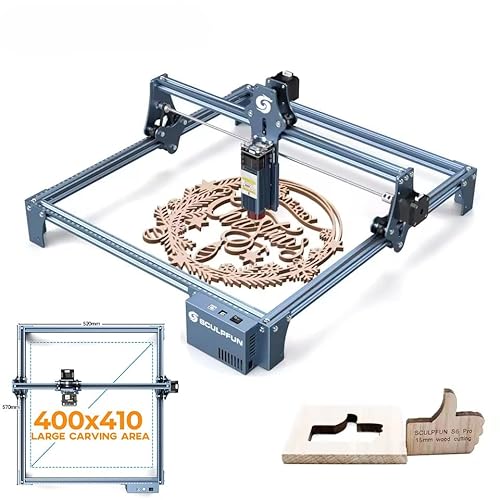
SCULPFUN S9 Pro 10W Laser Engraver
Best for: engraving metals and cutting thick wood
- Laser Power
- 10W
- Working Area
- 400 x 410 mm (15.75 x 16.14 in)
- Software Compatibility
- LaserGRBL, LightBurn
- Form Factor
- Open modular structure
- Cutting Capacity
- Up to 15 mm wood, 10 mm acrylic
- Compatible Material
- Wood, Metal, Acrylic, Leather
View on Amazon: SCULPFUN S9 Pro 10W Laser Engraver Affiliate link
The SCULPFUN S9 Pro is a 10W laser engraver with a 400 x 410 mm working area. It uses beam shaping for a 0.06mm focus, cutting up to 15mm wood or 10mm acrylic. The open modular design allows for quick assembly and module replacement. It supports LightBurn and LaserGRBL on Windows and Mac. This machine suits users needing high precision for hard materials like steel.
Pros
- 10W laser power cuts 15mm wood and 10mm acrylic
- 0.06mm laser focus for high precision engraving
- 400 x 410 mm large working area
- Compatible with LightBurn and LaserGRBL software
Cons
- Class 4 laser requires safety precautions
- Open modular structure lacks full enclosure
- Heavy 9.7 pound build limits portability
Good fit if
- You need to engrave hard materials like stainless steel
- You require a large 400 x 410 mm workspace
- You prefer using LightBurn software for control
Skip if
- You need a fully enclosed safety system
- You require portability for frequent moving
- You only engrave small items under 100 mm
Verdict: SCULPFUN S9 Pro 10W Desktop Laser is a high-precision tool for users who need to cut thick wood or engrave metals on a large surface. It fits those who value beam shaping technology and software flexibility over compact design.
Specifications side by side
| Spec | SCULPFUN S9 Pro 10W Laser Engraver |
|---|---|
| Laser Power | 10W |
| Working Area | 400 x 410 mm (15.75 x 16.14 in) |
| Software Compatibility | LaserGRBL, LightBurn |
| Form Factor | Open modular structure |
| Cutting Capacity | Up to 15 mm wood, 10 mm acrylic |
| Compatible Material | Wood, Metal, Acrylic, Leather |
| Dimensions | 24.6 × 14.2 × 5.32 inches |
| Weight | 9.7 pounds |
| Color | Blue |
| Model | S9 Pro |
Frequently asked questions
Can the SCULPFUN S9 Pro engrave on metal surfaces?
Yes, the SCULPFUN S9 Pro is capable of engraving on metal. The product listing explicitly includes metal in its list of compatible materials. This versatility, alongside wood, acrylic, and leather, makes it suitable for diverse project types. You can use it for marking tools or creating custom metal tags with high precision.
What is the working area size for the S9 Pro?
The working area is 400 x 410 mm. This large surface allows you to process bigger items without needing to reposition them frequently. The machine itself measures 24.6 inches in length and 14.2 inches in width. This footprint provides ample space for substantial engraving or cutting tasks.
Is the SCULPFUN S9 Pro suitable for cutting thick wood?
Yes, it is designed for cutting thick wood. With 10W of laser power, the machine can slice through wood up to 15 mm thick. This capability distinguishes it from lower-power entry-level models. It is an ideal choice if you need to create structural components from plywood or solid wood boards.
How much does the SCULPFUN S9 Pro weigh?
The unit weighs 9.7 pounds. This weight contributes to the stability of the full-metal frame during operation. The compact dimensions of 14.2 by 5.32 inches make it manageable for desktop placement. You can move it relatively easily if your workspace layout changes.
Does the S9 Pro support Mac computers?
Yes, the device works with Mac operating systems. It is also compatible with Windows computers. This cross-platform support ensures you can use your preferred software environment. The listing confirms this compatibility, allowing flexibility in your digital workflow setup.
What materials can I use with this laser engraver?
You can use wood, metal, acrylic, and leather. These four materials are listed as compatible with the 10W output. This range covers most common hobbyist and small business needs. You can create detailed engravings on leather goods or cut through acrylic sheets for signage.