SCULPFUN S9 Laser Engraver vs SCULPFUN S9 Pro Laser Engraver: Spec Comparison
As an Amazon Associate we earn from qualifying purchases. Links on this page are affiliate links.
You are deciding between the sculpfun s9 laser engraver vs s9 pro laser engraver. Both machines share a full-metal frame, quick-focus sliding design, and a 400x410mm working area. They both cut up to 15mm wood and 10mm acrylic. The main difference is laser power. The S9 Pro offers 10W output. The standard S9 provides 5.5W. This affects cutting speed and material range. You need to check which power level fits your projects.
Key differences
| Aspect | SCULPFUN S9 Pro 10W Laser Engraver | SCULPFUN S9 5.5W Diode Laser Engraver |
|---|---|---|
| Laser Power | 10W | 5.5W |
| Laser Type | not listed | Diode |
| Compatible Material | Wood, Metal, Acrylic, Leather | Wood, Jewelry |
| Software Compatibility | LaserGRBL, LightBurn | LaserGRBL, LightBurn, Benbox, LiteFire |
| Target Audience | not listed | DIY |
| Form Factor | Open modular structure | not listed |
Which one should you choose?
Choose SCULPFUN S9 Pro 10W Laser Engraver if
- You need to engrave hard materials like ceramics and 304 stainless steel.
- You want faster cutting speeds for thicker wood or acrylic.
- You plan to upgrade the laser module or beam extension later.
Choose SCULPFUN S9 5.5W Diode Laser Engraver if
- You prefer a broader list of supported software like Benbox.
- You are a DIY user focused on wood and jewelry projects.
- You want the standard model with 5.5W output.
Verdict: The S9 Pro is the better choice if you need higher power for metals and faster cutting. The standard S9 is suitable for basic DIY tasks with wood and jewelry. Both models share the same build quality and working area.
S9 Pro vs S9 Spec Breakdown
Laser Power
The SCULPFUN S9 Pro features a 10W laser output, while the standard SCULPFUN S9 offers 5.5W. Both units utilize diode laser beam shaping technology to achieve an ultra-fine 0.06mm focus. This precision allows both machines to handle similar cutting depths for wood and acrylic. However, the higher wattage on the Pro model provides more consistent energy delivery for harder materials. You get double the power with the Pro, which matters for throughput and material consistency.
Software Compatibility
Both engravers support LaserGRBL and LightBurn for PWM mode engraving on Windows and Mac systems. They accept common file formats like JPG, PNG, DXF, SVG, AI, and G-code. The SCULPFUN S9 adds Benbox, GrblController, and LiteFire to its list of supported applications. The S9 Pro lists LaserGRBL and LightBurn specifically. If you rely on Benbox or GrblController, the S9 has a slight edge in native software options.
Compatible Materials
The S9 Pro explicitly lists wood, metal, acrylic, and leather as compatible materials. It notes the ability to directly engrave ceramics and 304 stainless steel. The S9 data mentions wood, jewelry, and generally hard materials like ceramics and stainless steel. While both handle wood, acrylic, and metals, the S9 Pro’s explicit inclusion of leather and specific steel grades suggests a broader defined material scope in its specifications.
Build and Assembly
Both machines share a full-metal frame designed for durability and stability. They feature a sliding fixed-focus design that allows focusing in seconds by sliding and tightening screws. Assembly for both takes 10-20 minutes without professional experience. The S9 Pro specifies a width of 14.2 inches and height of 5.32 inches. The S9 does not list width or height dimensions. Both weigh 9.7 pounds. The S9 Pro provides more specific physical dimensions for your workspace planning.
Safety Features
Both units include a laser filter cover that blocks 98% of UV light, allowing safe viewing without goggles. They both feature an independent safety power switch. The S9 Pro includes reserved fixing holes for stable placement and comes with a complimentary A4 steel pad to protect surfaces and isolate fire hazards. The S9 mentions preventing animals from touching the laser spot but does not explicitly list the steel pad or fixing holes in its features. The Pro offers more detailed safety accessories.
Which SCULPFUN S9 Model Fits You
Users needing faster cutting on thick materials
The S9 Pro’s 10W laser output provides higher power than the standard 5.5W model. This extra wattage helps you cut through 15mm wood and 10mm acrylic more efficiently. If you process materials frequently, the increased power reduces engraving time significantly while maintaining the same 0.06mm precision focus.
Budget-conscious hobbyists doing light DIY projects
The standard S9 offers 5.5W laser power, which is sufficient for most DIY tasks. It shares the same 400x410mm working area and quick-focus design as the Pro. You get full-metal durability and compatibility with LightBurn or LaserGRBL without paying for the higher wattage that you might not fully utilize.
Engravers working with hard materials like steel
Direct engraving on 304 stainless steel and ceramics requires significant power. The S9 Pro’s 10W output handles these hard materials more effectively than the 5.5W standard model. Both machines feature the same safety filter and open modular structure, but the Pro’s higher power ensures better results on dense surfaces.
The products compared
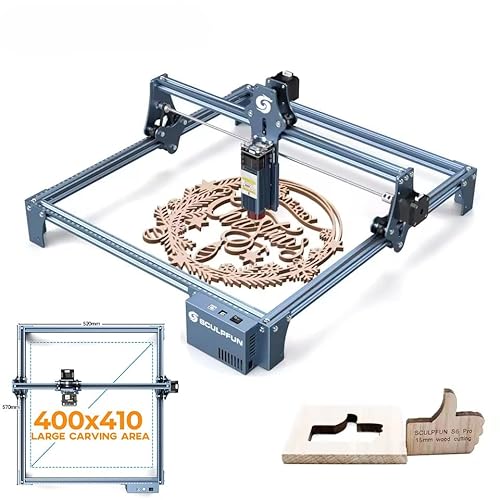
SCULPFUN S9 Pro 10W Laser Engraver
Best for: Thick material cutting and large format engraving
- Laser Power
- 10W
- Working Area
- 400 x 410 mm (15.75 x 16.14 in)
- Software Compatibility
- LaserGRBL, LightBurn
- Form Factor
- Open modular structure
- Cutting Capacity
- Up to 15 mm wood, 10 mm acrylic
- Compatible Material
- Wood, Metal, Acrylic, Leather
View on Amazon: SCULPFUN S9 Pro 10W Laser Engraver Affiliate link
The SCULPFUN S9 Pro delivers 10W of laser power with a 0.06mm focus spot for high-precision work. It features a 400x410mm open modular working area and cuts up to 15mm wood or 10mm acrylic. You get full-metal durability and quick assembly. This model suits users needing strong cutting depth and large format engraving capabilities.
Pros
- 10W laser output with 0.06mm focus for extreme precision
- 400x410mm large engraving area with open modular structure
- Cuts up to 15mm wood and 10mm acrylic
- Full-metal frame for stability and quick 10-20 minute assembly
Cons
- Heavier build at 9.7 pounds compared to standard models
- Requires manual sliding focus mechanism instead of auto-focus
- Laser Class 4 requires careful handling and safety measures
Good fit if
- You need to cut thicker materials like 15mm wood
- You require a large 400x410mm working area
- You want a durable full-metal frame structure
Skip if
- You prefer a compact desktop unit under 10 pounds
- You need automatic focusing capabilities
- You only work with thin materials under 5mm
Verdict: The SCULPFUN S9 Pro 10W Laser Engraver fits users who prioritize cutting depth and a large workspace. Its robust metal build supports serious DIY and commercial creation needs.

SCULPFUN S9 5.5W Diode Laser Engraver
Best for: DIY users needing precision on thin materials
- Laser Type
- Diode
- Laser Power
- 5.5W
- Working Area
- 16.14 x 16.34 in
- Software Compatibility
- LaserGRBL, LightBurn, Benbox, LiteFire
- Cutting Capacity
- Up to 15 mm wood, 10 mm acrylic
- Compatible Material
- Wood, Jewelry
View on Amazon: SCULPFUN S9 5.5W Diode Laser Engraver Affiliate link
The SCULPFUN S9 is a 5.5W diode laser engraver with a 16.14 x 16.34 inch working area. It features a 0.06mm sharp focus and cuts up to 15mm wood or 10mm acrylic. The full-metal frame allows for easy assembly and upgrades. It supports LightBurn and LaserGRBL software. This unit suits DIY users who need high precision and a sturdy build for various materials.
Pros
- 5.5W laser output with 0.06mm focus precision
- Cuts up to 15mm wood and 10mm acrylic
- Full-metal structure for durability and stability
- Compatible with LightBurn and LaserGRBL software
- Fast sliding focus design for quick setup
Cons
- Lower 5.5W power compared to 10W Pro models
- Smaller working area than larger industrial units
- Requires manual focus adjustment via sliding mechanism
Good fit if
- You need precise engraving on thin to medium materials
- You want a sturdy metal frame for stability
- You prefer compatibility with LightBurn software
Skip if
- You require high-speed cutting of thick materials
- You need a larger working area than 16 inches
- You prefer fully automated focus systems
Verdict: SCULPFUN S9 5.5W Diode Laser Engraver is a solid choice for DIYers who prioritize precision and build quality over raw cutting speed. It fits users who value software compatibility and a durable metal frame for detailed work.
Specifications side by side
| Spec | SCULPFUN S9 Pro 10W Laser Engraver | SCULPFUN S9 5.5W Diode Laser Engraver |
|---|---|---|
| Laser Type | not stated | Diode |
| Laser Power | 10W | 5.5W |
| Working Area | 400 x 410 mm (15.75 x 16.14 in) | 16.14 x 16.34 in |
| Software Compatibility | LaserGRBL, LightBurn | LaserGRBL, LightBurn, Benbox, LiteFire |
| Form Factor | Open modular structure | not stated |
| Cutting Capacity | Up to 15 mm wood, 10 mm acrylic | Up to 15 mm wood, 10 mm acrylic |
| Compatible Material | Wood, Metal, Acrylic, Leather | Wood, Jewelry |
| Target Audience | not stated | DIY |
| Dimensions | 24.6 × 14.2 × 5.32 inches | not stated |
| Weight | 9.7 pounds | 9.7 pounds |
| Color | Blue | Blue |
| Model | S9 Pro | S9 |
Frequently asked questions
Does the S9 Pro cut thicker wood than the standard S9?
Yes, the S9 Pro cuts thicker material more efficiently due to its 10W laser power. The standard S9 uses 5.5W. Both models share the same working area and can handle up to 15mm wood. The higher wattage on the Pro model allows for faster and deeper cuts in dense materials like wood and acrylic.
Is the SCULPFUN S9 Pro better for commercial use?
The S9 Pro is better suited for commercial needs because of its 10W output. This power level supports serious DIY and commercial creation tasks. It handles thick material cutting and large format engraving more effectively than the 5.5W S9, which targets precision on thin materials for hobbyists.
Can the S9 engrave metal jewelry?
Yes, the standard SCULPFUN S9 is compatible with metal and jewelry. It is designed for DIY users who prioritize precision on these delicate surfaces. The 5.5W laser provides the fine focus needed for detailed work on small items, making it a solid choice for jewelry marking and engraving.
Do both models have the same working area size?
Yes, both the S9 and S9 Pro feature a 400x410mm working area. This consistent size allows you to use the same software settings for both machines. The difference lies in the laser power, not the workspace dimensions, so your existing project files will work on either device.
What is the weight difference between the S9 and S9 Pro?
Both the SCULPFUN S9 and S9 Pro weigh 9.7 pounds. They share a robust metal build that contributes to this weight. The identical weight suggests similar structural components, despite the difference in laser power output. This stability helps reduce vibration during high-speed engraving tasks.
Is the S9 Pro suitable for large format engraving?
Yes, the S9 Pro fits users who prioritize large format engraving. Its 10W laser output supports more demanding projects across the full 400x410mm area. The robust metal build ensures stability during these larger jobs, making it a reliable choice for extensive designs compared to the standard S9.
Does the S9 support acrylic cutting?
Yes, the SCULPFUN S9 is compatible with acrylic. Both models can cut up to 10mm acrylic. The standard 5.5W laser is sufficient for this material, though the Pro model may cut faster. Acrylic is listed as a compatible material for both units in their specifications.