SCULPFUN C1 Mini Laser Engraver or SCULPFUN iCube 3W Mini Laser Engraver? Which SCULPFUN Model to Buy
As an Amazon Associate we earn from qualifying purchases. Links on this page are affiliate links.
This sculpfun c1 mini laser engraver vs icube 3w mini laser engraver comparison helps you choose the right machine for your workspace. Both models offer 3W of laser power and target beginners with portable designs. The main difference lies in their structure and connectivity. The C1 is a compact, pre-assembled unit with a fixed enclosure. The iCube uses a semi-open design with a removable shield and supports mobile app control. You should look at the specs to see which fits your workflow.
Key differences
| Aspect | SCULPFUN 3W Portable Mini Laser Engraver | SCULPFUN iCube 3W Mini Laser Engraver |
|---|---|---|
| Form Factor | Compact, portable, fully enclosed | Semi-open structure, removable shield |
| Working Area | 150 x 130 mm | 130 x 130 mm |
| Engraving Speed | Not listed | Up to 10,000 mm/min |
| Software Compatibility | Sculpfun Space, LaserGRBL, LightBurn | Sculpfun APP |
| Connectivity | Windows and MacOS only | Bluetooth, Type-C, iOS, Android |
| Safety Features | Limit switches, protective cover | Smoke filter, temperature alarm |
Which one should you choose?
Choose SCULPFUN 3W Portable Mini Laser Engraver if
- You need a larger working area for multiple small items
- You prefer using desktop software like LaserGRBL or LightBurn
- You want a fully enclosed unit for immediate use
Choose SCULPFUN iCube 3W Mini Laser Engraver if
- You want to engrave using a mobile phone app
- You need faster engraving speeds up to 10,000 mm/min
- You want to place large objects inside the machine
Verdict: Choose the SCULPFUN C1 if you need a larger fixed workspace and desktop software flexibility. Pick the iCube if you value mobile connectivity, higher speed, and the ability to engrave on larger surfaces. Both models provide 3W power suitable for detailed engraving on non-metal materials.
C1 Mini vs iCube 3W Specs
Laser power
Both the SCULPFUN C1 Mini and the SCULPFUN iCube 3W Mini Laser Engraver deliver identical laser output. Each model features a 3W diode laser with a maximum output of 3000mW. This power level places both machines in Laser Class IV, meaning they require proper safety precautions during operation. Since the power specifications are exactly the same, neither machine has an advantage in raw energy output. You will get the same engraving depth potential from both units, assuming you use similar settings and materials. The choice between them will not depend on power strength.
Working area
The working areas differ slightly between the two models. The SCULPFUN C1 Mini offers a rectangular workspace measuring 150 by 130 mm. This shape provides a longer horizontal span, which can be useful for engraving longer items like bracelets or nameplates. The SCULPFUN iCube 3W Mini provides a square workspace of 130 by 130 mm. While the total area is smaller on the iCube, the square format offers balanced dimensions for most standard projects. If you frequently engrave elongated objects, the C1 Mini provides a slight practical advantage due to its extra length.
Engraving speed
The SCULPFUN iCube 3W Mini Laser Engraver is built for higher speed. It features a 32-bit high-speed engraving base plate that supports speeds up to 10,000 mm/min. The manufacturer states this saves 50% of engraving time compared to other portable engravers. The SCULPFUN C1 Mini does not list a specific maximum speed in its published specifications. Because the iCube explicitly advertises this high-speed capability and hardware, it is the better choice if you plan to run long jobs or need faster turnaround times for production work.
Software compatibility
Connectivity and software options vary between the two machines. The SCULPFUN C1 Mini supports Sculpfun Space, LaserGRBL, and LightBurn. It connects to Windows and MacOS systems but currently does not support smartphones. In contrast, the SCULPFUN iCube 3W Mini supports the Sculpfun APP for mobile connection via Bluetooth or Type-C. It also works with Windows, MacOS, IOS, Android, and Linux. If you prefer controlling your engraver from a smartphone or need broader operating system support, the iCube provides more flexible connectivity options for modern workflows.
Safety features
Both models include essential safety mechanisms, but they differ in type. The SCULPFUN C1 Mini uses limit switches on the X and Y axes for accurate positioning and a magnetic quick-release protective cover that filters harmful wavelengths. The SCULPFUN iCube 3W Mini includes a built-in smoke filter to reduce fumes and a temperature alarm. If the internal temperature exceeds 45°C, the iCube stops and sounds an audible alarm. The iCube offers more active safety monitoring with its thermal protection, while the C1 relies on mechanical limits and passive shielding.
Portability and size
Portability differs significantly due to weight and form factor. The SCULPFUN C1 Mini is much lighter at 2.3 pounds and measures 9.8 by 10.5 by 5.5 inches. It is fully pre-assembled and designed for easy transport. The SCULPFUN iCube 3W Mini weighs 7.05 pounds and measures 10.3 by 11.8 by 8.9 inches. The iCube has a semi-open structure with a removable shield, which adds bulk. If you need to move your engraver frequently or have limited desk space, the C1 Mini is the more portable and compact option.
Which SCULPFUN Model Fits Your Needs
Users needing mobile app control and fast engraving
The iCube 3W supports the Sculpfun APP for iOS and Android, allowing you to engrave directly from your phone. It also features a faster engraving speed of up to 10,000mm/min. This 32-bit base plate saves time compared to standard portable machines, making it ideal for quick, detailed projects.
Beginners wanting a compact, pre-assembled machine
The C1 Mini arrives fully pre-assembled, so you can start engraving immediately without setup hassle. It is one of the smallest engravers on the market, measuring 9.8 x 5.5 x 10.5 inches. This space-saving design fits well in tight workspaces while still offering a 150 x 130mm working area for small items.
Those prioritizing precise axis positioning and safety
The C1 Mini includes limit switches on both the X and Y axes for accurate positioning. It also features precise measurement scales on the frame. A magnetic quick-release protective cover filters harmful wavelengths between 100–500nm, ensuring safer operation during use compared to models without these specific physical safety indicators.
Users engraving on uneven or large surfaces
The iCube 3W has a semi-open structure with a removable protective shield. This design allows you to place objects inside the machine or place the machine on top of large items. It is not limited by the size of the product, offering flexibility for engraving on surfaces that do not fit in a closed box.
The products compared

SCULPFUN 3W Portable Mini Laser Engraver
Best for: beginners engraving small items on wood and leather
- Laser Power
- 3W
- Working Area
- 150 x 130 mm
- Software Compatibility
- Sculpfun Space, LaserGRBL, LightBurn
- Compatible Material
- Leather
- Target Audience
- Beginners
- Form Factor
- Portable
View on Amazon: SCULPFUN 3W Portable Mini Laser Engraver Affiliate link
The Sculpfun C1 Mini is a compact, pre-assembled laser engraver designed for beginners. It features a 3W (3000mW) laser and a 150×130mm working area. You can engrave detailed images on wood, leather, and slate. It supports Windows and MacOS with LaserGRBL, LightBurn, and Sculpfun Space software. The unit includes safety limit switches and a magnetic protective cover. It is not suitable for cutting or direct bare metal engraving.
Pros
- Pre-assembled for immediate use with zero setup hassle
- 150×130mm working area allows processing multiple small items
- Supports LaserGRBL, LightBurn, and Sculpfun Space software
- Includes X and Y axis limit switches for safe operation
Cons
- 3W power limits engraving depth and prevents cutting
- Cannot directly engrave bare metals
- Does not support smartphone connectivity
Good fit if
- You need a portable, space-saving engraver for small projects
- You want a pre-assembled unit for immediate use
- You primarily engrave wood, leather, or slate
Skip if
- You require cutting capabilities
- You need to engrave bare metals directly
- You want to control the device via a smartphone
Verdict: Sculpfun C1 Mini 3W Portable Engraver fits beginners who want a compact, pre-assembled tool for detailed engraving on non-metal materials. It is not suitable for cutting or metal work.
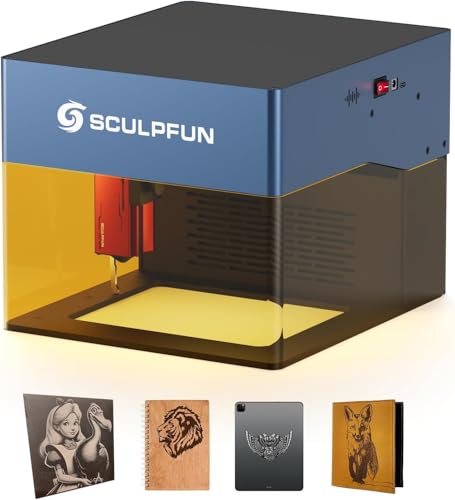
SCULPFUN iCube 3W Mini Laser Engraver
Best for: Fine detail engraving on small to medium items
- Laser Type
- Diode
- Laser Power
- 3 W (3000mW)
- Working Area
- 130 * 130mm
- Engraving Speed
- up to 10,000mm/min
- Software Compatibility
- Sculpfun APP
- Form Factor
- Semi-open structure
View on Amazon: SCULPFUN iCube 3W Mini Laser Engraver Affiliate link
The SCULPFUN iCube 3W Mini Laser Engraver uses a 3 W diode laser with a 0.02 mm ultra-fine spot for high-resolution detail work. It reaches engraving speeds up to 10,000 mm/min and includes a built-in smoke filter and temperature alarm. Its semi-open design allows engraving on large surfaces. This model suits users needing precision and speed in a compact 130 by 130 mm working area.
Pros
- 3 W laser with 0.02 mm ultra-fine spot for detailed engraving
- High engraving speed up to 10,000 mm/min
- Built-in smoke filter and temperature alarm for safety
- Semi-open structure allows engraving on large objects
Cons
- Small 130 by 130 mm working area limits large projects
- Requires external fume extraction for heavy use
- Laser class 4 requires strict safety precautions
Good fit if
- You need ultra-fine detail for small items like jewelry
- You want high-speed engraving for quick tasks
- You need to engrave on irregular or large surfaces
Skip if
- You require a large working area for big projects
- You prefer a fully enclosed safety design
- You need a laser with higher power for cutting
Verdict: SCULPFUN iCube 3W Mini Engraver is ideal for users who prioritize fine detail and speed for small to medium-sized objects. Its semi-open design offers flexibility for engraving on larger items, making it a practical choice for detailed craft work.
Specifications side by side
| Spec | SCULPFUN 3W Portable Mini Laser Engraver | SCULPFUN iCube 3W Mini Laser Engraver |
|---|---|---|
| Laser Type | not stated | Diode |
| Laser Power | 3W | 3 W (3000mW) |
| Working Area | 150 x 130 mm | 130 * 130mm |
| Engraving Speed | not stated | up to 10,000mm/min |
| Software Compatibility | Sculpfun Space, LaserGRBL, LightBurn | Sculpfun APP |
| Form Factor | not stated | Semi-open structure |
| Compatible Material | Leather | not stated |
| Target Audience | Beginners | not stated |
| Dimensions | 10.5 × 9.8 × 5.5 inches | 11.8 × 10.3 × 8.9 inches |
| Weight | 2.3 pounds | 7.05 pounds |
| Color | Blue | Blue |
| Model | C1 | Mini iCube 3W |
| Size | not stated | iCube |
Frequently asked questions
Is the SCULPFUN C1 Mini good for beginners?
Yes, the C1 Mini is designed for beginners. It comes pre-assembled and is compact for easy handling. It is best for engraving small items on wood and leather. Do not use it for cutting or metal work. Its portable form factor makes it simple to set up and store.
Can the SCULPFUN iCube 3W engrave metal?
No, neither model is suitable for metal engraving. Both machines feature a 3W diode laser intended for non-metal materials. The iCube 3W focuses on fine detail for small to medium items. It is ideal for detailed craft work on materials like wood or leather, not metal surfaces.
Which model is faster for engraving?
The SCULPFUN iCube 3W is faster. It offers an engraving speed of up to 10,000mm/min. This allows for quicker processing of designs compared to the C1 Mini. If speed is a priority for your projects, the iCube 3W provides better performance for detailed work.
Does the iCube 3W support mobile app control?
Yes, the iCube 3W supports the Sculpfun APP for iOS and Android. You can control the engraver directly from your phone. This feature adds flexibility and convenience. The C1 Mini does not highlight this connectivity in its specifications, making the iCube 3W the better choice for mobile control.
How much space does the C1 Mini take up?
The C1 Mini measures 9.8 inches in width, 5.5 inches in height, and 10.5 inches in length. It weighs only 2.3 pounds. This compact size makes it highly portable. It fits easily on smaller desks or in tight workspaces where a larger machine would not fit.
Is the iCube 3W heavier than the C1 Mini?
Yes, the iCube 3W is significantly heavier. It weighs 7.05 pounds compared to the C1 Mini’s 2.3 pounds. The iCube also has a larger footprint, measuring 10.3 inches wide and 11.8 inches long. Its semi-open design allows for larger items but requires more stable surface space.
Which engraver is better for fine detail work?
The SCULPFUN iCube 3W is ideal for fine detail. It is built for users who prioritize precision on small to medium items. Its design supports detailed craft work. The C1 Mini is also capable but is positioned more as a portable, entry-level tool for basic engraving tasks.
Can I use the C1 Mini for large projects?
No, the C1 Mini is not suitable for large projects. Its small dimensions and portable design limit the size of items you can engrave. It is best for small items on wood and leather. For larger objects, the iCube 3W’s semi-open design offers more flexibility and workspace.