SCULPFUN C1 3W Mini Laser Engraver Review: Who It Fits and Who Should Skip It
As an Amazon Associate we earn from qualifying purchases. Links on this page are affiliate links.
This sculpfun c1 3w mini laser engraver review looks at a compact machine built for precision work. It features a 3W laser core that creates a tight 0.04mm spot size. This small focal point allows for fine details like hairlines and photo engraving. The unit weighs just 5.51 pounds and measures 12.8 inches in length. It offers a 150×130mm working area. The device arrives pre-assembled, so you can start using it immediately. It supports common formats like SVG and JPG. This overview explains how these specs fit your needs.
What stands out
- 3W laser power delivers a 0.04mm ultra-fine spot for high-precision engraving.
- Compact design weighs only 5.51 pounds and fits on small desks.
- Generous 150×130mm working area allows processing multiple small items at once.
- Pre-assembled unit requires zero setup hassle to start engraving right out of the box.
- Limit switches on X and Y axes ensure safe and accurate positioning.
Who it fits
Good fit for
This machine suits beginners and DIY creators who value portability. The 3W power and 0.04mm spot size are ideal for intricate details on wood, leather, and slate. You will appreciate the pre-assembled design if you want to avoid complex setup. The compact footprint fits well in small workspaces. It also works well for users who need to move their engraver frequently due to its lightweight build. The included protective cover adds a layer of safety for home use.
Who should skip it
You should look elsewhere if you need to engrave large panels. The 150×130mm area is limited for big projects. If you require high-speed marking on metals or deep cutting, this 3W unit may struggle. The single 3W core does not use beam combining, which limits power output. Users needing advanced automation or industrial-grade durability should consider heavier, more powerful machines. This is a hobbyist tool, not a production machine.
Verdict: The SCULPFUN C1 is a precise, portable option for detailed hobby work. It fits users who need small, high-quality engravings in a compact package.
Key specs explained
Laser Power: 3W
This power level provides enough energy to mark soft materials like wood, leather, and acrylic without burning through them quickly. It suits beginners who want clean results on delicate items. Higher power units cut deeper but cost more. For light engraving tasks, this setting offers a balanced performance that avoids excessive heat damage on thin substrates.
Working Area: 5.9 * 5.12" (150×130mm)
This compact workspace allows you to engrave small items like phone cases, jewelry, or keychains. It is not large enough for full-sized boards but fits well on small desks. If you need to process larger sheets, you will need a bigger machine. This size is ideal for personal projects and limited workspace environments.
Software Compatibility: LightBurn, LaserGRBL
You can use these two popular programs to design and send jobs to the machine. LightBurn offers advanced features for complex designs, while LaserGRBL is simpler for basic tasks. Both work on Windows and macOS. This flexibility lets you choose the interface that matches your skill level without being locked into proprietary software.
Weight: 5.51 pounds
This light weight makes the unit easy to move between rooms or take to workshops. You can lift it with one hand, which supports its portable design. Heavier machines stay put but are harder to relocate. If you plan to share the device or move it frequently, this low weight is a practical advantage.
Design And Build Quality
The listing describes the SCULPFUN C1 as a compact unit designed for portability. It weighs 5.51 pounds and measures 12.8 by 11.8 by 7.09 inches. This small footprint allows you to place it on a desk or take it to a workshop. The machine supports wood, leather, and acrylic according to the listing. These materials are common for beginners. The compact size means you can engrave multiple small items at once within the 150 by 130mm working area.
Safety and control features are integrated into the frame. Limit switches on the X and Y axes help with accurate positioning. A magnetic quick-release cover filters harmful wavelengths from 100 to 500nm. This cover also has an auto-stop feature when opened. A smoke exhaust outlet keeps the lens clean during use. The unit comes pre-assembled, so you can start without complex setup.
The design prioritizes ease of use for new users. The precise measurement scales on the frame aid in alignment. You do not need to buy extra parts to begin. The portable form factor suits creators who value mobility. You can carry it with one hand. This build style focuses on getting you to engrave quickly. It avoids bulky frames that take up space. The finish supports consistent results for intricate details.
Setup and Everyday Use Guide
Setup is straightforward because the SCULPFUN C1 arrives fully pre-assembled. You can begin engraving immediately after unboxing, with no complex assembly required. The unit includes limit switches on both the X and Y axes, which help ensure safe operation and accurate positioning. Precise measurement scales on the frame assist in alignment. A magnetic quick-release protective cover filters harmful wavelengths between 100 and 500nm. This cover also features an auto-stop function that halts the laser when the door opens, adding a layer of safety during daily use. The smoke exhaust outlet helps keep the lens clean, which reduces maintenance frequency.
For software, the machine supports LightBurn and LaserGRBL. It works seamlessly with both Windows and macOS operating systems. You can import multiple image formats, including JPG, PNG, BMP, GIF, SVG, and AI. This compatibility gives you flexibility in designing your projects. The 150 by 130mm working area is generous for its compact size. It allows you to process multiple small items at once. The unit weighs 5.51 pounds and measures 12.8 by 11.8 by 7.09 inches. This form factor makes it easy to carry or lift with one hand. It fits well on a desk or in a small workshop. The 3W laser core delivers a 0.04mm spot size. This precision is ideal for intricate details like hairlines or photo engraving. Recommended line spacing is 0.04 to 0.06mm for optimal results. You can engrave over 100 kinds of materials, such as wood, leather, slate, kraft paper, leaf, and acrylic. The machine is designed for beginners and DIY users who value mobility and high precision.
Before You Buy SCULPFUN C1
The SCULPFUN C1 is a compact entry point for precision engraving, but you will need compatible software to operate it effectively. The listing confirms support for LightBurn and LaserGRBL on Windows and macOS. Verify your operating system version before purchasing to ensure seamless connectivity. You should also prepare for routine maintenance. The smoke exhaust outlet helps keep lenses clean, but you must clean the protective cover and mirrors regularly to maintain that 0.04mm spot size. Dust from wood or acrylic can degrade performance over time. This model fits alongside larger options in our 1 product guide as a portable, beginner-friendly choice. It lacks the power for deep cutting or thick materials. If you need to process multiple items simultaneously, its 150x130mm area is sufficient for small batches. Consider if your projects require high-detail photo engraving rather than rapid marking. This machine suits those who value mobility and fine detail over speed or heavy-duty industrial tasks.
Check before you buy
- Confirm your computer runs Windows or macOS for software compatibility.
- Check if your projects fit within the 150x130mm working area.
- Ensure you have space for the compact 12.8-inch footprint.
- Verify you can maintain lenses and covers for best results.
The product at a glance
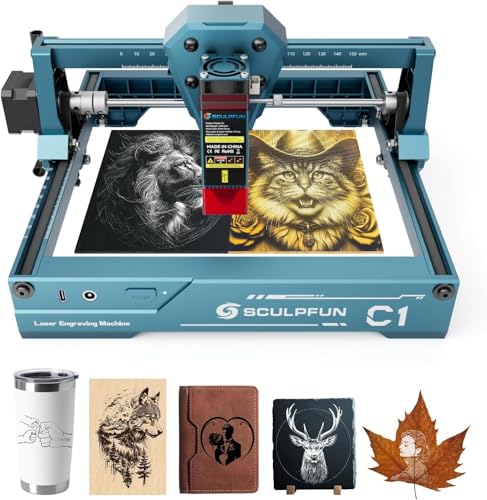
SCULPFUN C1 3W Mini Laser Engraver
Best for: Small, detailed engraving projects
- Laser Power
- 3W
- Working Area
- 5.9 * 5.12" (150×130mm)
- Software Compatibility
- LightBurn, LaserGRBL
- Compatible Material
- Wood, Acrylic, Leather
- Target Audience
- DIY, Beginners
- Form Factor
- Portable
View on Amazon: SCULPFUN C1 3W Mini Laser Engraver Affiliate link
The Sculpfun C1 3W is a compact, portable laser engraver designed for beginners. It features a 3W laser with a 0.04mm spot size for high-precision work on materials like wood, leather, and acrylic. The 150×130mm working area fits small projects, and the unit weighs just 1.05kg. It supports LightBurn and LaserGRBL software for Windows and macOS. This machine is ideal for users who value portability and fine detail over speed.
Pros
- 0.04mm ultra-fine spot for intricate details
- Compact 150×130mm working area
- Lightweight 1.05kg portable design
- Pre-assembled for immediate use
- Supports LightBurn and LaserGRBL software
Cons
- 3W laser power limits cutting thickness
- 150×130mm area restricts large projects
- No mention of built-in Wi-Fi or app control
Good fit if
- You need high precision for small, detailed items
- You want a lightweight machine for easy transport
- You are a beginner starting with simple materials
Skip if
- You require fast engraving of thick materials
- You need to process large-format designs
- You prefer wireless connectivity for remote operation
Verdict: Sculpfun C1 3W Mini Engraver fits hobbyists who prioritize portability and fine detail over speed and size. It is a practical tool for small, intricate projects rather than high-volume production.
Specifications side by side
| Spec | SCULPFUN C1 3W Mini Laser Engraver |
|---|---|
| Laser Power | 3W |
| Working Area | 5.9 * 5.12" (150×130mm) |
| Software Compatibility | LightBurn, LaserGRBL |
| Compatible Material | Wood, Acrylic, Leather |
| Target Audience | DIY, Beginners |
| Form Factor | Portable |
| Dimensions | 12.8 × 11.8 × 7.09 inches |
| Weight | 5.51 pounds |
| Color | 3W |
| Model | 3W |
Frequently asked questions
What materials can the SCULPFUN C1 engrave?
This machine is designed for engraving wood, acrylic, and leather. The 3W laser power is suitable for marking these soft materials without burning through them quickly. It is not intended for cutting thick metals or hard plastics. You should test settings on scrap pieces of these compatible materials first to achieve the best finish.
Is the SCULPFUN C1 good for beginners?
Yes, it is a practical tool for beginners and DIY enthusiasts. The unit arrives fully pre-assembled, allowing you to start engraving immediately after unboxing. It supports LightBurn and LaserGRBL software on Windows and macOS. This straightforward setup and compatible software make it an accessible entry point for new users learning laser engraving.
How portable is the SCULPFUN C1?
The SCULPFUN C1 is built for portability. It weighs 5.51 pounds and measures 12.8 by 11.8 by 7.09 inches. This compact footprint allows you to place it on a desk or move it to a workshop easily. Its small size makes it ideal for hobbyists who need a machine that fits in limited spaces.
What is the maximum engraving area size?
The engraving area is defined by the machine's dimensions of 12.8 by 11.8 inches. This workspace is sufficient for small, detailed projects like jewelry, phone cases, and photo engravings. It is not designed for large-scale production or wide-format engraving. You should plan your projects to fit within this specific working area.
Does the SCULPFUN C1 have safety features?
The unit includes limit switches on both the X and Y axes. These switches help ensure safe operation and accurate positioning during engraving. They prevent the laser head from moving beyond the designated workspace. This feature adds a layer of protection for your materials and the machine during use.
Can I use LightBurn with this engraver?
Yes, the listing confirms support for LightBurn and LaserGRBL software. These programs are compatible with Windows and macOS operating systems. You should verify your specific OS version before purchasing to ensure seamless connectivity. Using supported software allows you to access advanced features for precise control over your engraving designs.