Portable or Desktop Laser Engravers? Compared by Specs
As an Amazon Associate we earn from qualifying purchases. Links on this page are affiliate links.
Choosing between a portable vs desktop laser engraver depends on your workspace and output needs. We compare the xTool F2 and Creality Falcon2 Pro S. Both units are fully enclosed and include built-in cameras for precise positioning. The main difference lies in their power and mobility. The xTool F2 weighs just 10 pounds, making it easy to transport. The Creality Falcon2 Pro S is a heavier desktop unit weighing 50.5 pounds, designed for stationary high-power cutting.
Key differences
| Aspect | xTool F2 15W Diode & 5W IR Laser Engraver | Creality Falcon2 Pro S 40W Enclosed Laser Cutter |
|---|---|---|
| Laser Power | 15W Diode, 5W IR | 40W Diode |
| Weight | 10 pounds | 50.5 pounds |
| Engraving Speed | Up to 6000mm/s | 600mm/s |
| Cutting Capacity | Not listed | 20mm basswood, 30mm black acrylic |
| Features | Camera | Air Assist, Camera, Auto Focus |
| Compatible Material | Metal | Wood, Acrylic |
Which one should you choose?
Choose xTool F2 15W Diode & 5W IR Laser Engraver if
- You need to transport the engraver to markets or client sites
- You want to engrave color marks on metal surfaces
- You prioritize high-speed engraving over deep cutting
Choose Creality Falcon2 Pro S 40W Enclosed Laser Cutter if
- You need to cut thick wood or acrylic in one pass
- You want automatic focus adjustment for varying material heights
- You prefer a stationary unit with advanced safety features
Verdict: The xTool F2 is the better choice for mobile professionals who need to engrave metal and move their equipment frequently. The Creality Falcon2 Pro S suits stationary users who require high-power cutting capabilities for thick materials. Your decision should hinge on whether mobility or raw cutting power is more critical for your workflow.
Portable vs Desktop Laser Specs
Laser Power
Power dictates cutting depth and speed. The xTool F2 uses a dual-laser setup with 15W diode and 5W IR output. This combination allows for deep color marking on metal while handling 3D embossing. The Creality Falcon2 Pro S offers a single 40W diode laser. This higher wattage enables one-pass cutting of 20mm basswood and 30mm black acrylic. The xTool F2 is better for detailed metal work and small crafts. The Creality Falcon2 Pro S is superior for thick material cutting. You must choose based on whether you need metal marking or heavy wood cutting.
Engraving Speed
Speed affects your daily output volume. The xTool F2 reaches up to 6000mm/s. This ultra-fast rate allows it to engrave a single card in just three seconds. The Creality Falcon2 Pro S operates at 600mm/s. While slower, it prioritizes cutting power over rapid surface marking. The xTool F2 is clearly faster for high-volume engraving tasks. The Creality Falcon2 Pro S is designed for precision cutting rather than rapid texturing. If you produce many small items quickly, the xTool F2 has the advantage. For slower, deeper cuts, the Creality Falcon2 Pro S is adequate.
Weight and Portability
Portability determines where you can take your machine. The xTool F2 weighs 10 pounds. Its compact design allows you to bring it to fairs, pop-up markets, and trade shows easily. The Creality Falcon2 Pro S weighs 50.5 pounds. It is a heavy desktop unit meant for a fixed location. The xTool F2 is ideal for mobile vendors or small workshops with limited space. The Creality Falcon2 Pro S requires a sturdy table and cannot be moved frequently. Choose the xTool F2 for mobility and the Creality Falcon2 Pro S for a permanent studio setup.
Cutting Capacity
Cutting capacity defines the materials you can process. The Creality Falcon2 Pro S can cut 20mm basswood and 30mm black acrylic in one pass. It can even cut 0.1mm thin metal sheets. The xTool F2 data does not list specific cutting thicknesses for wood or acrylic. It focuses on engraving and 3D embossing capabilities. The Creality Falcon2 Pro S is the clear winner for thick material cutting. The xTool F2 is better suited for surface engraving and light crafting. If you need to cut thick boards, the Creality Falcon2 Pro S is necessary.
Features
Features enhance usability and precision. Both units include built-in cameras for positioning. The xTool F2 has a 50MP camera with 0.1mm alignment accuracy. It also features a 0.00199-inch motion accuracy for high-resolution details. The Creality Falcon2 Pro S includes Z-axis auto focus, auto cut-through path compensation, and a flame detector. It also has a debris drawer for easy cleaning. The xTool F2 offers higher positional precision. The Creality Falcon2 Pro S offers more automated safety and cutting features. You should choose based on whether you value precision or automation.
Which Laser Engraver Fits Your Needs
Traveling vendors needing portability
The xTool F2 weighs just 10 pounds and measures 9.33 by 6.89 inches. This compact form factor allows you to easily transport it to markets or pop-up events. Its fully enclosed design ensures safe operation in public spaces while the dual-laser system handles diverse materials without requiring a permanent workstation setup.
Users cutting thick materials
The Creality Falcon2 Pro S delivers 40W of optical output, enabling one-pass cuts through 20mm basswood and 30mm black acrylic. This significantly higher power allows you to process thicker stock efficiently. The desktop form factor supports a larger working area, making it ideal for batch production of substantial items in a fixed studio.
Those needing metal color marking
Only the xTool F2 includes a 5W infrared laser alongside its 15W diode. This specific configuration allows for deep, dark, and vivid color marking directly on metal surfaces. If your projects require permanent, high-contrast identification on metal tags or jewelry, this dual-laser versatility provides capabilities the single diode unit cannot match.
Quick picks
| # | Product | Best for | Price |
|---|---|---|---|
| 1 | xTool F2 15W Diode & 5W IR Laser Engraver | Dual-material engraving and high-speed batch work | Check price of xTool F2 15W Diode & 5W IR Laser Engraver on Amazon |
| 2 | Creality Falcon2 Pro S 40W Enclosed Laser Cutter | high-power batch production in fixed studios | Check price of Creality Falcon2 Pro S 40W Enclosed Laser Cutter on Amazon |
The products compared
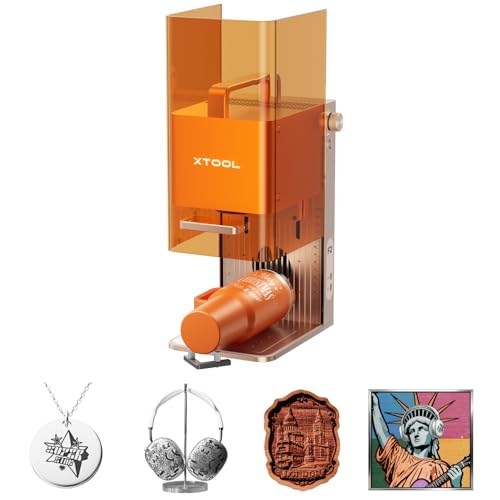
xTool F2 15W Diode & 5W IR Laser Engraver
Best for: Dual-material engraving and high-speed batch work
- Form Factor
- Portable (what this guide is about)
- Laser Type
- Diode, IR
- Laser Power
- 15W Diode, 5W IR
- Engraving Speed
- Up to 6000mm/s
- Compatible Material
- Metal
- Features
- Camera
View on Amazon: xTool F2 15W Diode & 5W IR Laser Engraver Affiliate link
The xTool F2 combines a 15W diode laser and a 5W IR laser in a fully enclosed, portable design. It reaches speeds up to 6000mm/s and includes a 50MP camera for precise alignment. This machine handles metal marking and 3D embossing on over 300 materials. Weighing 10 pounds, it suits users needing high-speed batch processing and indoor safety without sacrificing mobility.
Pros
- Dual 15W diode and 5W IR lasers for versatile material compatibility
- Built-in 50MP camera for 0.1 mm alignment accuracy
- Ultra-fast engraving speed up to 6000mm/s
- Fully enclosed, leak-proof design with built-in fan
Cons
- Higher weight of 10 pounds compared to lighter portable units
- IR laser power limited to 5W for metal marking
- No mention of remote control or wireless connectivity features
Good fit if
- You need to engrave both metal and thick organic materials
- You require high-speed batch processing for small items
- You want a fully enclosed unit for safe indoor operation
Skip if
- You prioritize the lightest possible portable weight
- You only need a single diode laser for wood and acrylic
- You require wireless app control for remote operation
Verdict: xTool F2 Portable Dual Laser Engraver is a heavy-duty portable unit for users who need dual-laser versatility and high speed. It fits professionals who move between workshops and markets while demanding precise, fast results.
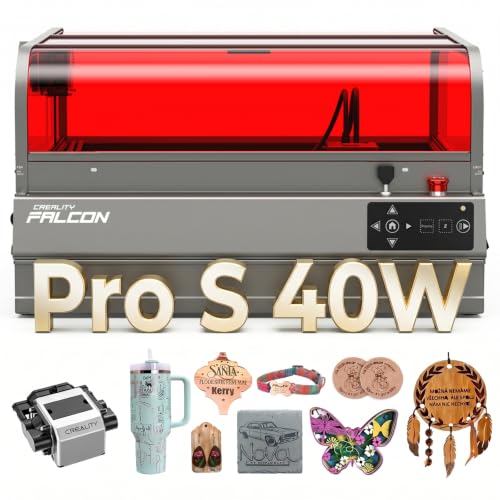
Creality Falcon2 Pro S 40W Enclosed Laser Cutter
Best for: high-power batch production in fixed studios
- Form Factor
- Desktop (what this guide is about)
- Laser Type
- Diode
- Laser Power
- 40W
- Engraving Speed
- 600mm/s
- Cutting Capacity
- 20mm basswood, 30mm black acrylic
- Compatible Material
- Wood, Acrylic
View on Amazon: Creality Falcon2 Pro S 40W Enclosed Laser Cutter Affiliate link
The Creality Falcon2 Pro S is a fully enclosed desktop laser engraver with 40W diode output. It reaches 600mm/s engraving speed and cuts up to 20mm basswood or 30mm black acrylic. The unit includes a built-in camera for auto focus and positioning. It weighs 50.5 pounds and measures 26 by 22 inches. This machine suits small studios needing batch production capabilities with integrated safety features.
Pros
- 40W optical output for fast cutting
- Built-in camera for auto positioning
- Fully enclosed metal frame
- 600mm/s engraving speed
- Cuts 20mm basswood in one pass
Cons
- Heavy 50.5 pound build
- Large 26 inch footprint
- No Bluetooth connectivity listed
Good fit if
- You need a fully enclosed unit for safety
- You require high-power cutting for thick materials
- You want auto focus and camera positioning
Skip if
- You need a portable desktop engraver
- You have limited workspace for large machines
- You prefer lightweight equipment for transport
Verdict: The Creality Falcon2 Pro S 40W Desktop fits makers who need a stationary, high-power cutter with safety enclosures. It is not suitable for those seeking portable or compact desktop options like the xTool F2.
Specifications side by side
| Spec | xTool F2 15W Diode & 5W IR Laser Engraver | Creality Falcon2 Pro S 40W Enclosed Laser Cutter |
|---|---|---|
| Laser Type | Diode, IR | Diode |
| Laser Power | 15W Diode, 5W IR | 40W |
| Engraving Speed | Up to 6000mm/s | 600mm/s |
| Form Factor | Fully enclosed | Fully Enclosed |
| Cutting Capacity | not stated | 20mm basswood, 30mm black acrylic |
| Compatible Material | Metal | Wood, Acrylic |
| Features | Camera | Air Assist, Camera, Auto Focus |
| Dimensions | 6.89 × 9.33 × 0.1 inches | 26 × 22 × 12.9 inches |
| Weight | 10 pounds | 50.5 pounds |
| Size | xTool F2 Basic | Falcon2 Pro S 40W with Integrated Enclosure |
| Color | Orange | Falcon2 Pro S 40W |
| Model | MXF-K005-002 | Falcon2 pro 40W |
Frequently asked questions
Can a portable laser engraver cut thick materials?
Portability does not guarantee cutting depth. The xTool F2 is a portable unit with 5W IR and 15W diode lasers. It excels at engraving and marking metal. It is not designed for deep cutting. For thick materials, you need higher power. The desktop Creality Falcon2 Pro S offers 40W diode power. It handles wood and acrylic cutting better than portable options.
Which machine is better for working at markets?
The portable option is best for market vendors. The xTool F2 weighs only 10 pounds. Its dimensions are 9.33 by 6.89 inches. You can easily transport it to pop-up events. The desktop Creality Falcon2 Pro S weighs 50.5 pounds. It measures 26 inches long. This stationary unit is not suitable for frequent travel.
Do these engravers have safety enclosures?
Yes, both units include safety features. The xTool F2 is a fully enclosed portable unit. This design protects you during operation. The Creality Falcon2 Pro S also comes with an integrated enclosure. It includes air assist for cleaner cuts. Both machines prioritize safety while allowing you to monitor work through built-in cameras.
Can I engrave metal with a portable laser?
Yes, you can engrave metal with the portable option. The xTool F2 includes a 5W IR laser. This specific laser type is compatible with metal surfaces. It allows for precise marking and deep color engraving. The desktop Creality Falcon2 Pro S focuses on wood and acrylic. It does not list metal compatibility in its specifications.
Which machine has auto-focus capabilities?
The desktop Creality Falcon2 Pro S features auto-focus. This function helps maintain precision across uneven surfaces. It works alongside its air assist and camera. The xTool F2 includes a camera for positioning. However, the data does not list auto-focus for this portable unit. You may need to adjust focus manually for best results.
How much workspace does a desktop laser need?
Desktop lasers require significant stationary space. The Creality Falcon2 Pro S measures 26 inches in length. It is 22 inches wide and 12.9 inches high. You need a dedicated desk or table for this unit. The portable xTool F2 is much smaller. It fits easily on any surface and can be stored away when not in use.