Ortur R2 10W Laser Engraver vs Ortur R1 Class 1 Foldable Laser Engraver (2026): Key Differences
As an Amazon Associate we earn from qualifying purchases. Links on this page are affiliate links.
You are comparing the ortur r2 10w laser engraver vs r1 class 1 foldable laser engraver. Both machines are Class 1 safe and require no external computer. The main difference lies in their design and laser type. The R2 is a fully enclosed unit with a 10W module for wood and acrylic. The R1 is a foldable device using a 1064nm infrared laser for precise metal work. Your choice depends on whether you prioritize material versatility or portability.
Key differences
| Aspect | Ortur R2 10W Enclosed Laser Engraver | Ortur Foldable 1064nm Infrared Laser Engraver |
|---|---|---|
| Form Factor | Fully Enclosed | Foldable |
| Laser Power | 10W | 1000mW |
| Laser Type | Not listed | 1064nm Infrared |
| Control Method | Built-in Touch Screen | Mobile App |
| Working Area | 300 x 210 mm | Not listed |
Which one should you choose?
Choose Ortur R2 10W Enclosed Laser Engraver if
- You need to engrave wood, acrylic, or leather.
- You want to operate the machine without a smartphone.
- You prefer a fixed unit with a built-in camera for alignment.
Choose Ortur Foldable 1064nm Infrared Laser Engraver if
- You primarily engrave metals like jewelry or tags.
- You need a compact device that folds for storage.
- You want to use AI tools or hand-drawn sketches via an app.
Verdict: The R2 suits users who need a versatile, enclosed machine for general crafting on wood and acrylic. The R1 is better for those who focus on metal engraving or need a portable, foldable design. Your decision rests on the materials you plan to use most often.
Ortur R2 vs R1 Comparison
Laser Type
The Ortur R2 uses a standard 10W laser module designed for general-purpose engraving and cutting on materials like wood, leather, acrylic, and marked coated metals. In contrast, the Ortur R1 employs a specialized 1000mW 1064nm infrared laser module. This infrared technology is specifically engineered for marking metals, including gold, silver, platinum, and copper, as well as glass and stones. The R1 cannot cut wood or acrylic effectively, while the R2 is not optimized for permanent metal marking. Your choice depends on whether you need general material versatility or specialized metal jewelry engraving.
Laser Power
Power output significantly impacts what each machine can cut and how fast it operates. The Ortur R2 features a 10W laser module, providing substantial energy for cutting thicker woods and acrylics. The Ortur R1 is rated at 1000mW, which equals 1W. This lower power is sufficient for surface marking on metals and hard materials but lacks the intensity for deep engraving or cutting organic materials like wood. If your projects involve slicing through materials or deep relief engraving, the R2 offers a clear advantage. For delicate surface marking, the R1 power is adequate.
Form Factor
Physical design dictates where and how you can use each machine. The Ortur R2 is a fully enclosed Class 1 unit with a fixed metal-and-acrylic housing. It measures 18.5 inches in length, 15.7 inches in width, and 8.43 inches in height. This footprint requires a dedicated desk space but offers maximum safety and stability. The Ortur R1 features a foldable design that unfolds for use and collapses for storage. It measures 10.7 inches by 9.84 inches by 8.58 inches. The R1 is portable and ideal for small spaces or travel, while the R2 is a stationary workstation.
Control Interface
How you control the machine affects ease of use. The Ortur R2 includes a built-in touch screen and an HD camera. You can load designs via TF card, preview positioning on the screen, and start engraving offline without a computer. The Ortur R1 relies entirely on a smartphone app for control. It requires a USB connection to start and uses AI algorithms to generate images or hand-drawn sketches on your phone. The R2 is better for users who prefer standalone operation, while the R1 suits those comfortable with mobile app workflows.
Working Area
The working area determines the size of projects you can complete in one session. The Ortur R2 provides a 300 x 210 mm (11.8 x 8.3 inches) work area. This larger surface allows for batch engraving of coasters, nameplates, or multiple keychains simultaneously. The data does not specify the exact working dimensions for the Ortur R1, but its compact foldable form factor suggests a smaller surface area. The R2 is superior for larger or multiple-item projects, offering more flexibility for production work compared to the likely smaller R1 surface.
Safety Features
Both machines are Class 1 certified, meaning they are safe for home and office use without additional enclosures. The Ortur R2 achieves this through a fully enclosed metal and acrylic housing that contains the laser light. The Ortur R1 uses a combination of a foldable design, tilt detection, lid-stop, auto shutdown, and a watchdog system to ensure safety. The R1 also requires a USB connection to operate, preventing unauthorized use. Both designs effectively protect users from stray beams, making them suitable for beginners and families.
Which Ortur Laser Fits Your Needs
Beginners wanting offline, enclosed safety
The R2 offers a fully enclosed Class 1 design that contains laser light, making it safe for home use without extra covers. Its built-in touch screen lets you load designs via TF card and preview positions with an HD camera. You can operate it entirely offline, removing the need for a computer or smartphone app, which simplifies the learning curve for new users.
Metal and jewelry engraving specialists
The R1 uses a 1000mW 1064nm infrared laser module, which is specifically optimized for marking metals like gold, silver, platinum, and copper. This wavelength allows for precise, high-contrast engraving on jewelry items such as rings and necklaces. It also works on glass and stone, making it the superior choice if your primary focus is metalwork rather than wood or acrylic cutting.
Users needing compact, portable storage
The R1 features a foldable design that unfolds for immediate use without installation. Its compact dimensions, measuring 10.7 inches in length and 9.84 inches in width, allow it to fit easily into small spaces or be stored away when not in use. The aluminum alloy base protects your desk, and the portable form factor makes it ideal for users with limited workspace.
The products compared

Ortur R2 10W Enclosed Laser Engraver
Best for: Beginners seeking a safe, offline desktop engraver
- Laser Power
- 10W
- Working Area
- 300 x 210 mm (11.8" x 8.3")
- Engraving Speed
- Up to 20,000 mm/min (333 mm/s)
- Form Factor
- Fully Enclosed (Class 1)
- Compatible Material
- Wood, Metal, Acrylic, Leather
- Features
- Enclosure, Camera, Touchscreen
View on Amazon: Ortur R2 10W Enclosed Laser Engraver Affiliate link
The Ortur R2 is a Class 1 enclosed laser engraver with a 10W module and a 300 x 210 mm working area. It features a built-in touch screen and HD camera for offline operation, meaning you do not need a computer to start. The machine handles wood, leather, acrylic, and coated metals. Its compact footprint fits most desks. It suits beginners who want a safe, ready-to-use setup without complex software installation.
Pros
- Fully enclosed Class 1 design for safe desk use
- Built-in touch screen allows offline control via TF card
- HD camera provides live preview for precise alignment
- 10W laser module handles engraving and cutting on various materials
- Swappable module platform supports future upgrades
Cons
- 300 x 210 mm work area is smaller than larger frame models
- Requires a TF card for design input instead of direct USB transfer
- Touch screen interface may feel less intuitive than a computer monitor
Good fit if
- You want a safe, enclosed machine for home or office use
- You prefer offline operation without installing software on a PC
- You are a beginner who needs a clear visual preview of your design
Skip if
- You need to engrave materials larger than 300 x 210 mm
- You require a large open-frame workspace for bulky items
- You prefer controlling the laser directly from a smartphone app
Verdict: Ortur R2 10W Enclosed Laser Engraver is a practical choice for beginners who value safety and simplicity. It fits users who want to engrave small items on a desk without dealing with computer software.
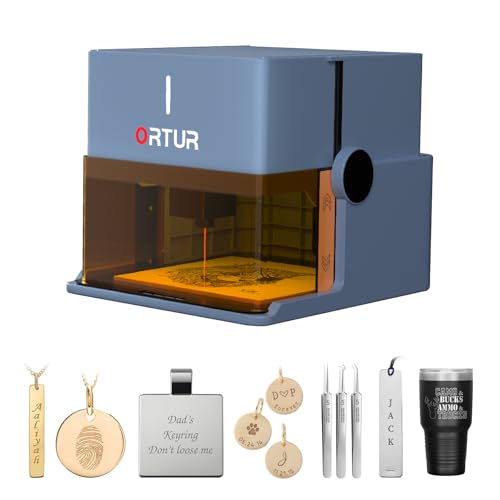
Ortur Foldable 1064nm Infrared Laser Engraver
Best for: portable metal and jewelry engraving
- Laser Type
- 1064nm Infrared
- Laser Power
- 1000mW
- Form Factor
- Class 1 Foldable
- Compatible Material
- Metal, Acrylic, Jewelry, Plastic
- Dimensions
- 10.7 × 9.84 × 8.58 inches
View on Amazon: Ortur Foldable 1064nm Infrared Laser Engraver Affiliate link
The Ortur R1 is a Class 1 foldable laser engraver with a 1000mW 1064nm infrared module. Its compact design folds into a gift box, requiring no assembly. The infrared laser specializes in engraving metals, jewelry, glass, and stone. It includes an AI app for design generation and hand-drawn engraving. This unit suits users prioritizing portability and metal engraving over high-power cutting.
Pros
- Foldable Class 1 design requires no installation
- 1064nm infrared laser for metal and jewelry
- AI app generates images and supports hand-drawn engraving
- Comprehensive safety features including tilt detection
Cons
- 1000mW power limits cutting depth on thick materials
- 1064nm wavelength is ineffective on wood or acrylic
- No physical display or manual controls listed
Good fit if
- You need a portable unit for metal engraving
- You want a safe, Class 1 device for home use
- You prefer app-based AI design tools
Skip if
- You primarily engrave wood or acrylic
- You require high-power cutting capabilities
- You need a larger working area
Verdict: Ortur R1 Foldable Laser Engraver fits users who need a compact, safe tool for metal and jewelry engraving. It is not suitable for those who primarily work with wood or require deep cutting.
Specifications side by side
| Spec | Ortur R2 10W Enclosed Laser Engraver | Ortur Foldable 1064nm Infrared Laser Engraver |
|---|---|---|
| Laser Type | not stated | 1064nm Infrared |
| Laser Power | 10W | 1000mW |
| Working Area | 300 x 210 mm (11.8" x 8.3") | not stated |
| Engraving Speed | Up to 20,000 mm/min (333 mm/s) | not stated |
| Form Factor | Fully Enclosed (Class 1) | Class 1 Foldable |
| Compatible Material | Wood, Metal, Acrylic, Leather | Metal, Acrylic, Jewelry, Plastic |
| Features | Enclosure, Camera, Touchscreen | not stated |
| Target Audience | DIY, Beginners | not stated |
| Dimensions | 18.5 × 15.7 × 8.43 inches | 10.7 × 9.84 × 8.58 inches |
| Size | R2 10W Camera Laser Engraver | 1064nm Infrared |
| Color | R2 10W Camera Laser Engraver | Misty Blue |
| Model | Ortur R2 | R1 |
Frequently asked questions
Is the Ortur R2 10W better for beginners than the R1?
Yes, the R2 is designed for beginners seeking safety and simplicity. It features a fully enclosed Class 1 design, which contains laser light for safe home use. The built-in touchscreen allows you to load designs via a TF card without needing a computer. This makes it a practical choice for desk engraving.
Can the Ortur R1 engrave wood or acrylic?
No, the R1 is not suitable for wood or general acrylic cutting. It uses a 1064nm infrared laser module specialized for marking metals and jewelry. The R2 is the better option if you need to work with wood, leather, or acrylic, as it uses a standard 10W laser for these materials.
Which laser engraver is more portable, the R2 or R1?
The Ortur R1 is more portable due to its foldable form factor. Its compact dimensions of 10.7 inches in length and 9.84 inches in width make it easy to store or transport. The R2 is larger, measuring 18.5 inches in length, and is intended as a stationary desktop unit.
Does the Ortur R2 require a computer to operate?
No, the R2 does not require a connected computer. It features a built-in touchscreen that allows you to load designs directly from a TF card. This offline capability makes it convenient for engraving small items on a desk without dealing with complex software or USB connections.
What is the main difference in laser type between the two models?
The R2 uses a standard 10W laser module for general-purpose engraving and cutting. The R1 employs a specialized 1000mW 1064nm infrared laser. This infrared technology is optimized for marking metals and jewelry, whereas the R2 laser handles materials like wood, leather, and acrylic more effectively.
Is the Ortur R1 safe for home use without extra covers?
Yes, the R1 is a Class 1 foldable laser engraver, meaning it is safe for home use. Its enclosed design contains the laser light during operation. You do not need to purchase additional safety covers or enclosures, making it a safe choice for portable metal and jewelry engraving tasks.