Ortur R1 5000mW Class 1 Foldable Laser Engraver Alternatives: 6 Similar Picks Compared
As an Amazon Associate we earn from qualifying purchases. Links on this page are affiliate links.
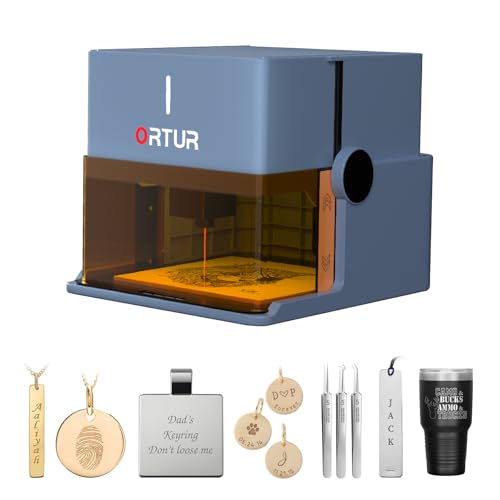
The ortur r1 5000mw class 1 foldable laser engraver alternatives list helps you find comparable machines. This original model offers a compact, foldable design with a 100x100mm workspace and Class 1 safety. It uses a 1064nm infrared laser for precise metal and jewelry engraving. The enclosed lid allows operation without goggles, making it safe for beginners. You can control it via a dedicated app that supports offline file transfer.
However, you might need a larger workspace or different capabilities. Some users prefer direct touchscreen control or rotary attachments for tumblers. Others may want higher power for faster cutting or a more budget-friendly option. We selected these 6 alternatives because their specifications overlap with the R1. Each pick shares key features like laser type, form factor, or material compatibility. This comparison focuses on published specs to help you decide which machine fits your specific needs.
Our top pick: Ortur R1 Foldable 5W Laser.
How each alternative compares
Ortur Foldable 1064nm Infrared Laser Engraver
This model keeps the same compact foldable footprint and Class 1 safety rating as the R1. It shares the 1064nm infrared laser and Misty Blue color. The main difference is the power output. This version lists only the 1000mW infrared module, whereas the original combines 5000mW diode and 1000mW infrared. You lose the versatile diode laser for wood and acrylic. This pick is for users who only need precise metal marking and want a smaller, dedicated infrared tool. It sacrifices multi-material flexibility for a focused, safe metal engraving experience.
Creality Falcon Pro 10W with Rotary Roller
The Creality Falcon Pro trades the R1’s portability for raw power and rotary capability. It features a 10W laser, double the power of the R1’s diode module. The workspace is significantly larger at 24.2 inches long. It includes a rotary roller for tumblers, which the R1 lacks. However, it is not a Class 1 foldable device. You get more cutting speed and versatility for flat materials and cylinders. You give up the enclosed safety and pocket-sized design. This alternative suits makers who need offline operation and larger format engraving over safe, portable metal marking.
LONGER Ray5 5W Laser Engraver
The Longer Ray5 offers a much larger 400x400mm workspace compared to the R1’s 100x100mm area. It uses a 5W diode laser, similar to the R1’s primary output, but lacks the infrared module for metal. It features a direct touchscreen interface, removing the need for a computer connection. The device is not foldable and has a desktop form factor. You gain substantial room for large DIY projects and direct control. You lose the ability to engrave metals and the compact, travel-ready design. This option is best for hobbyists prioritizing workspace size and ease of use over metal engraving.
Carverall Dual Laser Desktop Engraver
The Carverall A1 Pro provides a 7W diode laser, offering more power than the R1’s 5W module. It includes a built-in camera for precise alignment, a feature absent on the R1. The workspace is larger, but the device is a standard desktop unit, not foldable. It maintains a safe, enclosed footprint suitable for home use. You get better precision for detailed hobby projects and enhanced metal marking capabilities due to higher power. You sacrifice the unique foldable portability and the infrared laser for metal. This pick fits users who value camera-assisted accuracy and a stable desktop setup.
TOOCAA L2 10W Enclosed Laser Engraver
The TOOCAA L2 is a 10W enclosed engraver with a Class 1 safety rating, matching the R1’s safety standard. It has a significantly larger bed size, measuring 25.5 inches wide. It includes a dedicated enclosure to contain smoke, which is not part of the R1’s design. The laser power is double the R1’s diode output. You gain better cutting speed for wood and acrylic and improved air quality management. You lose the foldable, portable form factor and the infrared laser for metal marking. This alternative is ideal for users who prioritize a large, safe, indoor workspace with smoke containment.
Woxcker 5.5W Diode Laser Engraver
The Woxcker L2 offers a 300x300mm workspace, which is three times larger than the R1’s 100x100mm area. It uses a 5.5W diode laser, slightly more power than the R1. The device is not foldable and has a standard desktop design. It targets beginners with a focus on ease of setup and software flexibility. You get a larger area for wood, leather, and acrylic projects. You lose the compact portability, the Class 1 enclosed safety, and the infrared laser for metal engraving. This option is best for beginners who need a larger, safe workspace and do not require metal marking capabilities.
Quick picks
Our 7 picks

Ortur R1 Foldable 5W Laser
Best for: Safe, portable metal and small wood engraving
- Laser Type
- 1064nm Infrared
- Laser Power
- 5000mW / 1000mW
- Working Area
- 100 x 100 mm
- Engraving Speed
- 5000mm/min
- Form Factor
- Class 1 Foldable
- Cutting Capacity
- 3mm
View on Amazon: Ortur R1 Foldable 5W Laser Affiliate link
The Ortur R1 is a Class 1 foldable laser engraver with a 100 by 100 mm working area. It combines a 5W diode laser for wood with a 1064nm infrared module for metals and plastics. The design requires no assembly and includes safety features like tilt detection. You get precise engraving at 5000mm/min and cutting capacity for 3mm basswood. It suits beginners who want a safe, portable tool for small projects.
Pros
- Foldable Class 1 design for safe, portable use
- Dual laser system with 5W diode and 1064nm IR module
- 100 by 100 mm working area with 0.05mm accuracy
- Cuts 3mm basswood in one pass
- Comprehensive safety protections including lid-stop and watchdog
Cons
- Small 100 by 100 mm working area limits project size
- 5W power is lower than competitors like the 20W Atomstack
- No physical display mentioned for manual control
Good fit if
- You need a safe, Class 1 machine for home or classroom use
- You want to engrave metals and plastics with the infrared module
- You value portability and a foldable, no-assembly design
Skip if
- You require a large working area for big projects
- You need high power for thick wood cutting
- You prefer a desktop machine with a physical display
Verdict: Ortur R1 5W Foldable Laser Engraver is a compact, safe option for beginners who need to engrave metals and small wood items. It fits users who prioritize portability and safety over raw power or large workspaces.
Ortur Foldable 1064nm Infrared Laser Engraver
Best for: compact metal and jewelry engraving
- Laser Type
- 1064nm Infrared
- Laser Power
- 1000mW
- Form Factor
- Class 1 Foldable
- Compatible Material
- Metal, Acrylic, Jewelry, Plastic
- Dimensions
- 10.7 × 9.84 × 8.58 inches
View on Amazon: Ortur Foldable 1064nm Infrared Laser Engraver Affiliate link
The Ortur R1 is a Class 1 foldable laser engraver with a 1000mW 1064nm infrared module. Its compact dimensions of 9.84 by 8.58 by 10.7 inches allow for easy storage. The device supports metal, acrylic, and jewelry engraving. You get app-based AI design tools and hand-drawn features. This unit requires no installation and includes a 365-day warranty for peace of mind.
Pros
- Foldable Class 1 design for safe, compact use
- 1000mW 1064nm infrared laser for metal and jewelry
- App with AI image generation and hand-draw mode
- No assembly required with aluminum alloy base plate
Cons
- Lower 1000mW power limits cutting thickness
- No air assist system included
- Infrared laser cannot engrave standard wood
Good fit if
- You need precise metal or jewelry engraving
- You want a compact, foldable unit for small spaces
- You prefer app-based AI design tools
Skip if
- You require high-power wood cutting
- You need air assist for clean cuts
- You want to engrave standard timber
Verdict: Ortur R1 Foldable 1000mW IR Engraver fits users who prioritize safe, compact metal engraving over raw power. It is ideal for jewelry makers and small-space hobbyists who value portability and app integration.

Creality Falcon Pro 10W with Rotary Roller
Best for: Engraving tumblers and flat materials offline
- Laser Power
- 10W (72000mW)
- Working Area
- 17" x 16"
- Compatible Material
- Wood, Metal, Acrylic, Leather, Glass, Paper
- Features
- Rotary Axis
- Application
- Tumblers
- Dimensions
- 24.2 × 12.2 × 7.68 inches
View on Amazon: Creality Falcon Pro 10W with Rotary Roller Affiliate link
The Creality Falcon Pro 10W is a 17 by 16 inch laser engraver with a 72000mW output. It includes a rotary roller kit for tumblers and a built-in air assist. The machine features a 0.06mm spot size and a 3-in-1 laser system. It supports offline use via TF card. This unit suits users needing rotary engraving capabilities on wood, glass, and metal.
Pros
- 10W laser power with 72000mW output
- 17 x 16 inch working area
- Includes rotary roller kit for tumblers
- Built-in air assist for clean cuts
- 0.06mm spot size for high precision
Cons
- Class IIIa laser rating requires caution
- No mobile app or remote control listed
- Heavier build at 11.2 pounds
Good fit if
- You need to engrave cylindrical items like tumblers
- You want offline operation via TF card
- You require a 17 x 16 inch workspace
Skip if
- You require Class 1 safety certification
- You need a compact unit under 10 pounds
- You prefer app-based wireless control
Verdict: Creality Falcon Pro 10W Rotary is a capable choice for engraving tumblers and flat materials. It fits users who value offline operation and rotary capabilities over Class 1 safety ratings.

LONGER Ray5 5W Laser Engraver
Best for: large workspace DIY engraving
- Laser Power
- 5W
- Working Area
- 400*400mm
- Engraving Speed
- Up to 10,000mm/min
- Software Compatibility
- LaserGRBL, LightBurn
- Compatible Material
- Wood, Metal, Acrylic, Glass
- Features
- Touchscreen
View on Amazon: LONGER Ray5 5W Laser Engraver Affiliate link
The Longer Ray5 5W is a foldable laser engraver designed for DIY users. It features a 400x400mm working area and a 3.5-inch touchscreen for offline operation. The unit achieves engraving speeds up to 10,000mm/min with 0.01mm accuracy. It connects via USB, TF card, or WiFi. This machine suits those who need a large build volume and direct hardware control without relying solely on a computer.
Pros
- 3.5-inch touchscreen for offline use
- 400x400mm large working area
- 10,000mm/min engraving speed
- 0.01mm engraving accuracy
Cons
- Class 2 laser requires safety precautions
- No mention of air assist in specs
- Limited to 5W output power
Good fit if
- You need a large 400x400mm build area
- You prefer using a touchscreen interface
- You want offline operation via TF card
Skip if
- You require Class 1 laser safety ratings
- You need high-power cutting capabilities
- You rely exclusively on app control
Verdict: The Longer Ray5 5W Laser Engraver fits users who prioritize a large 400x400mm workspace and direct touchscreen control. It is a practical option for detailed DIY engraving on wood, metal, and acrylic.

Carverall Dual Laser Desktop Engraver
Best for: Small metal marking and precise hobby projects
- Laser Type
- Diode (455nm), Infrared (1064nm)
- Laser Power
- 7W Diode, 1.2W IR
- Working Area
- 3.94 x 3.94 inches
- Software Compatibility
- CutLabX, LightBurn, LaserGRBL
- Form Factor
- Fully enclosed Class 1
- Cutting Capacity
- 3mm or less beech plywood
View on Amazon: Carverall Dual Laser Desktop Engraver Affiliate link
The Carverall A1 Pro combines a 7W blue diode laser and a 1.2W infrared laser in one compact, enclosed unit. It features a 3.94 x 3.94-inch working area and an HD camera for precise alignment. This desktop machine handles wood, leather, and bare metals. It includes CutLabX, LightBurn, and LaserGRBL support. The design stops the laser when the enclosure opens, ensuring safe operation for hobbyists and small business owners.
Pros
- Dual 7W diode and 1.2W IR lasers for versatile material marking
- Class 1 enclosed design with automatic safety shut-off
- HD camera ensures precise alignment without manual calibration
- Compatible with LightBurn and LaserGRBL for advanced control
Cons
- Small 3.94 x 3.94-inch working area limits large projects
- Manual laser head swapping requires stopping work to change modules
- 3mm cutting capacity is restricted to thin materials like beech plywood
Good fit if
- You need to mark bare metals without buying a separate fiber laser
- You want a fully enclosed machine for safer, cleaner indoor use
- You prioritize precise alignment tools like an HD camera for detailed work
Skip if
- You require a large working area for big signage or furniture
- You need to cut thick wood or acrylic beyond 3mm
- You prefer automatic laser switching without manual head changes
Verdict: Carverall A1 Pro Dual Laser fits makers who need metal marking in a small, safe footprint. It suits those valuing precision alignment and enclosed operation over large workspace size.

TOOCAA L2 10W Enclosed Laser Engraver
Best for: safe indoor engraving with contained smoke
- Laser Power
- 10W
- Working Area
- 16.34" x 15.55"
- Engraving Speed
- 40,000 mm/min
- Software Compatibility
- TOOCAA Studio, LightBurn, LaserGRBL
- Form Factor
- Fully Enclosed (Class 1)
- Cutting Capacity
- 8 mm pinewood
View on Amazon: TOOCAA L2 10W Enclosed Laser Engraver Affiliate link
The TOOCAA L2 is a Class 1 enclosed laser engraver with a 10W diode laser. It offers a 16.34 x 15.55 inch working area and cuts up to 8mm pinewood. The fully enclosed lid blocks 99% of laser emissions and includes safety interlocks. It supports LightBurn and LaserGRBL software. This machine suits users who need a contained workspace for smoke and debris control without separate goggles.
Pros
- Class 1 certified fully enclosed lid blocks 99% of laser emissions
- 10W laser power cuts 8mm pinewood in one pass
- Compatible with LightBurn and LaserGRBL professional software
- Cartesian motion system with dual-motor power for stability
Cons
- 16.34 x 15.55 inch working area is smaller than some competitors
- No mention of air assist or dust extraction integration
- Proprietary TOOCAA Studio required for full feature access
Good fit if
- You need a Class 1 safe machine for indoor use
- You want to avoid wearing protective goggles during operation
- You prefer a contained workspace to manage smoke and debris
Skip if
- You require a larger working area than 16.34 x 15.55 inches
- You need to engrave materials thicker than 8mm pinewood
- You prefer a CoreXY motion system over Cartesian
Verdict: TOOCAA L2 10W Enclosed Laser Engraver fits users who prioritize safety and containment over maximum bed size. Its Class 1 enclosure makes it ideal for home workshops where smoke and laser exposure are concerns.

Woxcker 5.5W Diode Laser Engraver
Best for: Beginners needing a large, safe workspace
- Laser Type
- Diode
- Laser Power
- 5.5W (5500mW)
- Working Area
- 300 x 300 mm
- Engraving Speed
- 20,000 mm/min
- Software Compatibility
- LightBurn, LaserGRBL, Cutlabx
- Form Factor
- Class 1
View on Amazon: Woxcker 5.5W Diode Laser Engraver Affiliate link
This Woxcker L2 is a Class 1 diode laser engraver with a 5.5W output and a 300 x 300 mm working area. It reaches engraving speeds of 20,000 mm/min. The unit supports LightBurn, LaserGRBL, and Cutlabx. It connects via Wi-Fi, USB, or TF card. The design prioritizes quick assembly and safety features like a flame sensor. It suits beginners who need a large workspace and straightforward setup.
Pros
- Class 1 safety enclosure with auto-stop
- 300 x 300 mm large working area
- 20,000 mm/min engraving speed
- Compatible with LightBurn and LaserGRBL
- Tool-free assembly in under 15 minutes
Cons
- 5.5W power is lower than 10W competitors
- No integrated camera for image alignment
- Air assist is an optional accessory
Good fit if
- You want a Class 1 machine for home use
- You need a large 300 x 300 mm work area
- You prefer quick assembly without tools
Skip if
- You require higher than 5.5W laser power
- You need a built-in camera for precision
- You prefer a fully enclosed professional cabinet
Verdict: Woxcker L2 5.5W 300x300mm Laser offers a safe, large-format workspace for beginners who value quick setup and software flexibility over raw cutting power.
Specifications side by side
| Spec | Ortur R1 Foldable 5W Laser | Ortur Foldable 1064nm Infrared Laser Engraver | Creality Falcon Pro 10W with Rotary Roller | LONGER Ray5 5W Laser Engraver | Carverall Dual Laser Desktop Engraver | TOOCAA L2 10W Enclosed Laser Engraver | Woxcker 5.5W Diode Laser Engraver |
|---|---|---|---|---|---|---|---|
| Laser Type | 1064nm Infrared | 1064nm Infrared | not stated | not stated | Diode (455nm), Infrared (1064nm) | not stated | Diode |
| Laser Power | 5000mW / 1000mW | 1000mW | 10W (72000mW) | 5W | 7W Diode, 1.2W IR | 10W | 5.5W (5500mW) |
| Working Area | 100 x 100 mm | not stated | 17" x 16" | 400*400mm | 3.94 x 3.94 inches | 16.34" x 15.55" | 300 x 300 mm |
| Engraving Speed | 5000mm/min | not stated | not stated | Up to 10,000mm/min | not stated | 40,000 mm/min | 20,000 mm/min |
| Software Compatibility | not stated | not stated | not stated | LaserGRBL, LightBurn | CutLabX, LightBurn, LaserGRBL | TOOCAA Studio, LightBurn, LaserGRBL | LightBurn, LaserGRBL, Cutlabx |
| Form Factor | Class 1 Foldable | Class 1 Foldable | not stated | not stated | Fully enclosed Class 1 | Fully Enclosed (Class 1) | Class 1 |
| Cutting Capacity | 3mm | not stated | not stated | not stated | 3mm or less beech plywood | 8 mm pinewood | not stated |
| Compatible Material | Wood, Metal, Acrylic, Plastic | Metal, Acrylic, Jewelry, Plastic | Wood, Metal, Acrylic, Leather, Glass, Paper | Wood, Metal, Acrylic, Glass | Wood, Metal, Acrylic, Leather, Jewelry | Wood, Metal, Acrylic | Wood, Metal, Acrylic, Leather, Glass |
| Features | not stated | not stated | Rotary Axis | Touchscreen | Camera | Enclosure | not stated |
| Target Audience | not stated | not stated | not stated | DIY | not stated | not stated | Beginners |
| Size | 5W+1064nm Infrared | 1064nm Infrared | Falcon Pro-10W with Rotary Roller Kit | 5W | not stated | 10W | 300×300mm 5W |
| Application | not stated | not stated | Tumblers | not stated | not stated | Tumblers | not stated |
| Dimensions | 10.7 × 9.84 × 8.58 inches | 10.7 × 9.84 × 8.58 inches | 24.2 × 12.2 × 7.68 inches | 12.2 × 23.6 × 5.9 inches | 10 × 12 × 9 inches | 24.5 × 25.5 × 11.5 inches | 20.7 × 18.5 × 6.6 inches |
| Weight | not stated | not stated | 11.2 pounds | 8.26 pounds | not stated | not stated | 3.08 pounds |
| Color | Misty Blue | Misty Blue | Falcon Pro-10W with Rotary Roller Kit | 5w | 7w | L2 Basic | black |
| Model | R1 | R1 | Laser Engraver | 5W | A1 PRO 7W | L2 | L2 5.5W |
When you need compact home fitness gear, compare specs among ativafit 5 in 1 foldable exercise bike alternatives.
Frequently asked questions
Which alternative offers the largest workspace for DIY projects?
The Longer Ray5 5W Laser Engraver provides a 400x400mm workspace, which is the largest option listed. It also features a touchscreen for direct control. This makes it a practical choice for detailed DIY engraving on wood, metal, and acrylic in a larger area.
Can I engrave tumblers with these machines?
Yes, the Creality Falcon Pro 10W with Rotary Roller Kit and the TOOCAA L2 10W Enclosed Laser Engraver support tumbler engraving. The Creality model includes a rotary axis for this specific application, while the TOOCAA unit is designed for safe indoor use with contained smoke.
Which model is best for safe metal marking in a small footprint?
The Carverall Dual Laser Desktop Engraver is ideal for small, safe metal marking. It uses a 7W diode laser and includes a camera for precise alignment. Its enclosed desktop design suits hobbyists who value precision and safety over having a large workspace.
Is there a foldable option for portable engraving?
Both the Ortur R1 Foldable 5W Laser and the Ortur Foldable 1064nm Infrared Laser Engraver offer foldable designs. These compact units measure approximately 9.84 inches wide and 10.7 inches long. They are best for users who prioritize portability and Class 1 safety for metal or small wood items.
Which engraver includes an enclosure for smoke containment?
The TOOCAA L2 10W Enclosed Laser Engraver features a Class 1 enclosure. This design contains smoke and laser exposure, making it suitable for home workshops. It supports wood, metal, and acrylic engraving while prioritizing safety and indoor air quality over maximum bed size.
What is the most budget-friendly option for beginners?
The Longer Ray5 5W Laser Engraver is listed as the best budget option. It offers a large workspace and touchscreen control for DIY users. The Woxcker 5.5W Diode Laser Engraver is also noted for beginners, providing a safe 300x300mm workspace with quick setup and software flexibility.
Which machine supports offline operation for flat materials?
The Creality Falcon Pro 10W with Rotary Roller Kit supports offline operation for flat materials. It is a capable choice for engraving wood, metal, acrylic, leather, glass, and paper. This model fits users who value offline functionality and rotary capabilities rather than Class 1 safety ratings.