Ortur LU2-10A Laser Module Laser Review: Specs, Pros and Cons
As an Amazon Associate we earn from qualifying purchases. Links on this page are affiliate links.
This ortur lu2 10a laser module laser review looks at the 10W diode upgrade for Ortur engravers. It features a 10,000mW output and a 0.05x0.1mm compressed spot. The unit weighs 235g and uses dual fans for cooling. It fits Laser Master 2, S2, Pro, and 3 models. You get a built-in air-assist nozzle for cutting. The system runs on a 24V motherboard with flexible cables. This module aims to boost speed and precision for your existing machine.
What stands out
- 10,000mW diode power output for deeper cuts
- 0.05x0.1mm ultra-thin square compressed spot for fine detail
- Built-in air-assist interface designed for cutting tasks
- Dual fan cooling system for stable long-term operation
- Compatible with LightBurn and LaserGRBL software
Who it fits
Good fit for
You should choose this if you own an Ortur Laser Master 2, S2, Pro, or 3 series machine. It suits users who need to cut thicker materials like 20mm wood or 30mm acrylic. The high power and compressed spot benefit those engraving portraits or detailed designs. If you rely on LightBurn or LaserGRBL, this module integrates directly. It is ideal for workshops requiring faster engraving speeds and consistent results over long periods.
Who should skip it
Skip this if you use a different brand of laser engraver, as it is only compatible with specific Ortur models. Do not buy this if you need to engrave metal without additional tools, as the data lists stainless steel but does not confirm easy marking. Avoid it if you require a complete new machine, since this is a replacement module. You also need a 24V motherboard setup, so check your current system supports the required voltage and cable connections.
Verdict: The Ortur LU2-10A is a powerful upgrade for compatible Ortur machines, offering high power and fine detail. It fits users needing deeper cutting capacity and faster engraving speeds.
Ortur LU2-10A Key Specs
Laser Type: Diode
This module uses diode laser technology, which emits visible light to mark surfaces. You can use it on wood, acrylic, leather, and coated metals. Unlike CO2 lasers, diode units are compact and require less ventilation. This type is ideal for hobbyists who want a desktop-friendly tool for detailed engraving rather than deep industrial cutting.
Laser Power: 10000mW
The output is rated at 10,000 milliwatts, or 10 watts. This higher power allows for faster engraving speeds and deeper cuts compared to lower-wattage modules. You can expect improved performance on thicker materials. When shopping, compare this to standard 5W or 7W modules to see the difference in processing time and material thickness capabilities.
Cutting Capacity: 20mm wood, 30mm acrylic
The listing states this module can cut up to 20mm thick wood and 30mm thick acrylic sheets. This penetration depth is significantly higher than many entry-level diode lasers. You benefit from this capability when creating larger projects or using thicker stock materials. Always verify material density, as hardwoods may require slower speeds than softwoods for clean cuts.
Software Compatibility: LightBurn, LaserGRBL
You control the laser using LightBurn or LaserGRBL software. These programs allow you to design vectors, set power levels, and control speed. LightBurn offers advanced features for complex designs, while LaserGRBL is a free option for basic tasks. Ensure your computer meets the requirements for these applications to ensure smooth operation and precise control over your engraving projects.
Design and Build Quality
According to the listing, the Ortur LU2-10A laser module is built for high-output performance in a compact form. The unit weighs 235g, making it light enough to move between compatible machines without adding significant inertia to the gantry. This low mass supports faster engraving speeds, as the motors do not need to accelerate heavy components. The listing notes that the module uses dual-compression diode technology to achieve its 10,000mW output. This design choice allows for a smaller, ultra-thin square compressed spot measuring 0.05 by 0.1mm. A smaller spot size means finer detail in engravings, particularly for portraits or intricate patterns. The listing states this precision is superior to ordinary lasers.
The physical layout includes a built-in air-assist interface, which is designed specifically for cutting tasks. This feature helps clear debris from the cut line, improving edge quality on materials like wood and acrylic. The module uses a 24V electric system, which the listing says supports powerful operation and additional add-ons. High-quality flexible cables and wire-protecting chains are included to ensure stable connections during movement. The listing claims these components allow for 24-hour uninterrupted operation. Dual fans provide cooling to maintain stability and prevent power-offs due to overheating. The finish is black, a standard color for industrial components that helps reduce glare. The module is compatible with Ortur Laser Master 2, S2, Pro, and Pro-S2 models, allowing you to upgrade existing setups rather than buying a new machine.
Setup And Daily Use Guide
Setting up this module requires connecting it to a compatible Ortur Laser Master 2, S2, Pro, or Pro-S2 machine. The unit includes an assist nozzle for cutting tasks, which you attach to the built-in air-assist interface. This setup helps manage debris and improves cut quality on thicker materials. You will need to configure the speed settings through LightBurn or LaserGRBL software, as the module does not control speed internally. The 24V electric system supports the high power demand, so ensure your motherboard and power supply meet these requirements. The flexible cables and wire-protecting chains are designed to handle repeated movement, which is essential for daily use. In practice, the dual fan cooling system runs continuously to maintain stability. This prevents power-off events caused by overheating, allowing for long sessions. The ultra-thin 0.05 by 0.1mm compressed spot delivers precise engraving, which is noticeable when working on detailed portraits or fine lines. The 10,000mW output provides significant cutting power, capable of handling 20mm wood and 30mm acrylic. This performance level is higher than standard diode modules. The lightweight 235g head reduces inertia, enabling faster acceleration and deceleration during engraving. Consistent results are supported by the stable power delivery and efficient cooling. You can expect reliable operation over extended periods, provided you monitor the cooling fans and maintain the air-assist flow. The software integration allows you to adjust parameters for different materials, including acrylic, metal, wood, and leather. This flexibility supports a wide range of creative projects without needing to swap hardware frequently.
Compatibility And Maintenance Checks
Before you buy, verify your machine’s compatibility. This module works with Laser Master 2, S2, Pro, and Pro-S2. Check your motherboard voltage. The listing specifies a 24V electric system. Ensure your controller supports this power level. You must use LightBurn or LaserGRBL software. These programs allow you to set the speed for this high-output unit. Do not assume standard settings work. The 10,000mW output requires proper ventilation. Diode lasers generate significant heat. The dual fan cooling helps, but airflow remains critical. Plan for regular maintenance. Clean the lens frequently to maintain the 0.05x0.1mm spot quality. Dust reduces engraving precision. Consider your material needs. This module cuts 20mm wood and 30mm acrylic. If you need deeper cuts, compare it against other options in Laser Engravers & Cutters. This unit suits users who want higher power in a compact 235g form. It replaces older modules for better penetration. Ensure your current setup can handle the increased thermal load.
Check before you buy
- Verify your machine is a Laser Master 2, S2, Pro, or Pro-S2.
- Confirm your motherboard supports a 24V electric system.
- Download LightBurn or LaserGRBL for speed control.
- Ensure adequate ventilation for the dual fan cooling system.
- Plan for frequent lens cleaning to maintain spot quality.
The product at a glance
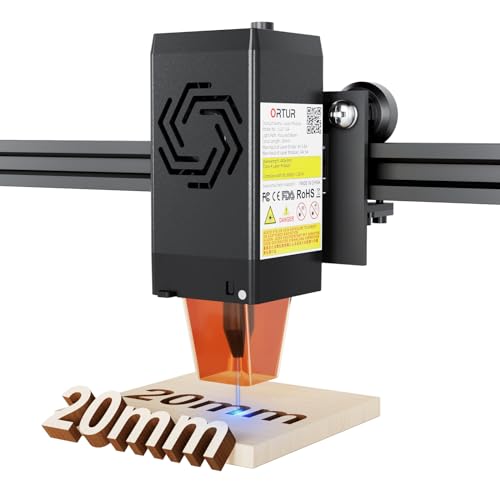
Ortur LU2-10A 10W Laser Module
Best for: thick material cutting and fine engraving
- Laser Type
- Diode
- Laser Power
- 10000mW
- Software Compatibility
- LightBurn, LaserGRBL
- Cutting Capacity
- 20mm wood, 30mm acrylic
View on Amazon: Ortur LU2-10A 10W Laser Module Affiliate link
The Ortur LU2-10A is a 10000mW diode laser module designed for Ortur Laser Master series machines. It features a 0.05x0.1mm compressed spot for refined engraving and cuts up to 20mm wood or 30mm acrylic. Dual fans and a 24V system support long, stable operation. You get high power and speed for detailed work on materials like wood, acrylic, and metal. It requires LightBurn or LaserGRBL software.
Pros
- 10000mW laser power for deep cutting
- 0.05x0.1mm ultra-thin compressed spot
- Dual fan cooling for stability
- Cuts 20mm wood and 30mm acrylic
Cons
- Requires external software like LightBurn
- Limited to Ortur Laser Master series
- No built-in display or controls
Good fit if
- You need high power for thick materials
- You want fine detail in engraving
- You use Ortur Laser Master machines
Skip if
- You prefer plug-and-play simplicity
- You use non-Ortur laser machines
- You need to cut thick metals
Verdict: Ortur LU2-10A 10W Diode Laser delivers strong cutting power and fine detail for Ortur machine owners. It suits users who prioritize depth and precision over ease of setup.
Specifications side by side
| Spec | Ortur LU2-10A 10W Laser Module |
|---|---|
| Laser Type | Diode |
| Laser Power | 10000mW |
| Software Compatibility | LightBurn, LaserGRBL |
| Cutting Capacity | 20mm wood, 30mm acrylic |
| Size | LU2-10A |
| Color | black |
| Model | LU2-10A |
Frequently asked questions
What is the actual laser power of the Ortur LU2-10A?
The module delivers 10W of output power, which equals 10,000mW. This high wattage allows for deeper cuts in thicker materials compared to lower-power alternatives. It is designed for users who need strength and precision for detailed engraving tasks on various surfaces.
Which Ortur machines are compatible with this laser module?
This unit fits the Laser Master 2, S2, Pro, and Pro-S2 models. You must verify your specific machine model before purchasing. The module is not a universal upgrade for all laser engravers. It is engineered specifically for the mechanical and electrical interfaces of these four Ortur systems.
Does the Ortur LU2-10A require specific software to operate?
Yes, you must use LightBurn or LaserGRBL software to control the module. These programs manage the laser’s movement and power settings. The hardware does not include its own control interface. You rely on your computer or compatible controller to send instructions via these specific applications.
What voltage does the Ortur LU2-10A require to run?
The listing specifies a 24V electric system requirement. You must ensure your controller supports this power level. Using an incorrect voltage can damage the module or the host machine. Always check your motherboard voltage compatibility before connecting this high-output diode laser to your engraver.
How does the cooling system work on this module?
The unit uses dual fans for active cooling. This design helps manage heat during extended cutting or engraving sessions. The fans are integrated into the compact 235g housing. Proper cooling is essential for maintaining the 0.05x0.1mm spot size consistency and preventing thermal throttling of the diode.
What is the spot size of the Ortur LU2-10A laser?
The compressed spot size is 0.05x0.1mm. This fine focus allows for high-detail engraving on materials like leather, wood, and coated metals. The small spot size concentrates the 10W power into a tight area, enabling precise lines and intricate designs that larger spot sizes cannot achieve.
Does this module include an air assist nozzle?
Yes, the unit includes an assist nozzle for cutting tasks. You attach it to the built-in air-assist interface on the module. This feature helps manage debris and improves cut quality by blowing away smoke and particles. It is particularly useful when cutting thicker materials like wood or acrylic.