Ortur Laser Master 2 10W vs Ortur R1 5W Foldable Laser Engraver (2026): Key Differences
As an Amazon Associate we earn from qualifying purchases. Links on this page are affiliate links.
You are comparing the ortur laser master 2 10w vs r1 5w foldable laser engraver. Both machines come from Ortur and offer Class 4 and Class 1 safety ratings respectively. They share a focus on precision with similar spot sizes. The main difference lies in their power and form factor. The Master 2 delivers 10W of power in a rigid metal frame. The R1 offers 5W in a portable, foldable design. Each serves a distinct use case for you.
Key differences
| Aspect | Ortur Laser Master 2 10W Engraver | Ortur R1 5W Foldable Laser Engraver |
|---|---|---|
| Laser Power | 10W (10000mW) | 5W (5000mW) |
| Form Factor | Industrial metal structure | Foldable, portable design |
| Working Area | 390 x 410mm | 100 x 100mm |
| Safety Class | Class 4 | Class 1 |
| Cutting Capacity | 20mm wood, 30mm acrylic | 3mm basswood |
Which one should you choose?
Choose Ortur Laser Master 2 10W Engraver if
- You need to cut thick wood or acrylic sheets
- You require a large working area for bigger projects
- You prefer a stable, industrial-grade metal frame
Choose Ortur R1 5W Foldable Laser Engraver if
- You want a machine that unfolds without assembly
- You need a Class 1 safe device for home or office use
- You prioritize portability and compact storage
Verdict: Choose the Laser Master 2 if you need high power and a large workspace for serious fabrication. Pick the R1 if you value portability, easy setup, and safe indoor operation. Your choice depends on whether you prioritize cutting depth or convenience.
Ortur Laser Master 2 10W vs R1 5W
Laser Power
The Ortur Laser Master 2 S2 LU2-10A delivers 10W of optical power, or 10,000mW. This high output allows it to cut through 30mm acrylic and 20mm wood in a single pass. The R1 5W offers 5,000mW. It can cleanly cut 3mm basswood board. The Master 2 provides significantly more power for thicker materials. The R1 focuses on precision engraving rather than deep cutting. You need more power for heavy-duty tasks. The Master 2 wins for cutting capacity.
Form Factor
The R1 5W features a foldable design that unfolds and is ready for use. It requires no assembly. The package includes an aluminum alloy base plate to protect your desktop. The Laser Master 2 S2 LU2-10A has an industrial-grade full metal structure. Assembly takes about 10-15 minutes. It is heavier and larger. The R1 is portable and compact. The Master 2 is a stationary workstation. Portability favors the R1. Stability favors the Master 2.
Working Area
The Laser Master 2 S2 LU2-10A has a large working area of 390 x 410mm. This space accommodates bigger projects. The R1 5W has a smaller engraving area of 100 x 100mm. It is suitable for small items or detailed work. The Master 2 offers more room for large batches. The R1 is limited to small-scale engraving. You should choose the Master 2 for larger materials. The R1 is better for small, precise pieces.
Safety Class
The R1 5W is classified as Class 1. It has an enclosed design with a high-definition transparent cover. You can observe engraving without goggles. It includes tilt detection and lid-stop features. The Laser Master 2 S2 LU2-10A is Class 4. It requires protective goggles and a laser protective cover. The cover filters 98% of UV light. It has a G-sensor for safety. Class 1 is safer for home use. Class 4 offers more power but needs more caution.
Software Compatibility
The Laser Master 2 S2 LU2-10A works with LaserGRBL and LightBurn. It supports Windows and Mac systems. It accepts SVG, DXF, JPG, and PNG files. The R1 5W uses a dedicated mobile app. It features AI algorithms to generate images. You can hand-draw on your phone and engrave directly. It also supports puzzle modes and QR code generation. The Master 2 uses standard desktop software. The R1 uses a unique app ecosystem. Desktop users prefer the Master 2.
Which Ortur Laser Engraver Should You Buy
Users needing deep cuts on thick materials
The Laser Master 2 10W delivers 10,000mW of optical power. This high output enables it to cut 30mm acrylic and 20mm wood. Its 390 x 410mm working area handles larger projects. The industrial metal frame ensures stability during heavy cutting tasks. You get a robust machine built for serious material removal and larger format engraving work.
Beginners wanting safe, portable, and easy setup
The R1 5W is a Class 1 foldable device that requires no assembly. Its enclosed design allows safe observation without goggles. The 100 x 100mm area is ideal for small crafts. It supports offline mode and app control for simple operation. The portable form factor makes it perfect for desks, classrooms, or travel where safety and convenience matter most.
DIYers seeking large format engraving capabilities
With a 390 x 410mm workspace, the Laser Master 2 accommodates large sheets. The 10W module provides precision at 0.05mm x 0.1mm spot size. It supports multiple file formats like SVG and DXF. The modular design allows for easy repair and part replacement. This machine suits those who need to engrave bigger items consistently and reliably.
The products compared

Ortur Laser Master 2 10W Engraver
Best for: Thick material cutting and DIY projects
- Laser Power
- 10W (10000mW)
- Working Area
- 390 x 410mm
- Software Compatibility
- LaserGRBL, LightBurn
- Cutting Capacity
- 20mm wood, 30mm acrylic
- Compatible Material
- Metal
- Target Audience
- DIY
View on Amazon: Ortur Laser Master 2 10W Engraver Affiliate link
The Ortur Laser Master 2 S2 LU2-10A is a Class 4 laser engraver with a 10000mW module. It offers a 390 x 410mm working area and cuts up to 20mm wood or 30mm acrylic. The industrial metal frame ensures stability. It supports LightBurn and LaserGRBL software. This machine suits DIY users needing high power for thick materials.
Pros
- 10000mW laser module cuts 20mm wood and 30mm acrylic
- 390 x 410mm large working area
- Industrial grade full metal structure for reliability
- Dual fan cooling for heat dissipation
- G-sensor automatically stops laser if displaced
Cons
- Class 4 laser requires strict safety precautions
- Requires assembly upon arrival
- No mention of built-in air assist, only an interface
Good fit if
- You need to cut thick wood or acrylic
- You prefer a sturdy metal frame over plastic
- You use LightBurn or LaserGRBL software
Skip if
- You want a portable, foldable design
- You need a Class 1 safe enclosure
- You prefer a plug-and-play setup without assembly
Verdict: Ortur Laser Master 2 S2 10W delivers serious power for thick materials. It fits makers who prioritize cutting depth and build stability over portability.
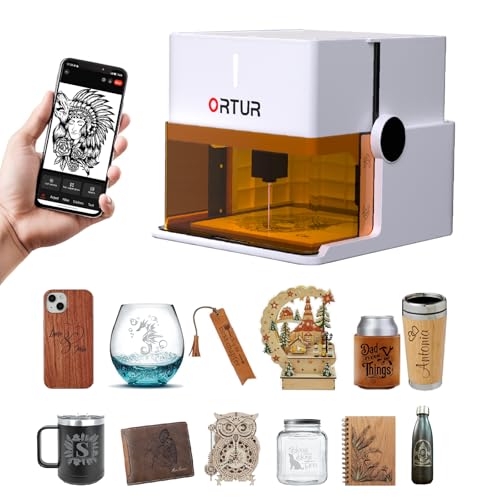
Ortur R1 5W Foldable Laser Engraver
Best for: Small, safe, portable engraving projects
- Laser Power
- 5000mW
- Working Area
- 100 x 100 mm
- Engraving Speed
- 5000mm/min
- Form Factor
- Class 1 Foldable
- Cutting Capacity
- 3mm
- Compatible Material
- Wood, Leather, Glass
View on Amazon: Ortur R1 5W Foldable Laser Engraver Affiliate link
The Ortur R1 is a foldable, Class 1 laser engraver with 5000mW power. It offers a 100 x 100 mm working area and reaches speeds of 5000mm/min. You can cut 3mm basswood in one pass. Its enclosed design allows safe observation without goggles. This portable unit requires no assembly and fits well for small, precise projects in limited spaces.
Pros
- Foldable Class 1 design for safe, enclosed operation
- 5000mW laser power cuts 3mm basswood in one pass
- 100 x 100 mm working area with 5000mm/min speed
- No assembly required; unfolds and is ready to use
- Supports online and offline control via mobile app
Cons
- Smaller 100 x 100 mm working area limits large projects
- Lower 5W power compared to 10W competitors
- Limited 3mm cutting capacity restricts thicker materials
Good fit if
- You need a portable, foldable engraver for small spaces
- You prioritize safety with a Class 1 enclosed design
- You want a unit that requires no assembly
Skip if
- You require a larger working area than 100 x 100 mm
- You need to cut materials thicker than 3mm
- You prefer higher power for faster, deeper engraving
Verdict: The Ortur R1 5W Portable Laser Engraver is ideal for users who need a safe, compact, and portable solution for small-scale engraving and light cutting tasks.
Specifications side by side
| Spec | Ortur Laser Master 2 10W Engraver | Ortur R1 5W Foldable Laser Engraver |
|---|---|---|
| Laser Power | 10W (10000mW) | 5000mW |
| Working Area | 390 x 410mm | 100 x 100 mm |
| Engraving Speed | not stated | 5000mm/min |
| Software Compatibility | LaserGRBL, LightBurn | not stated |
| Form Factor | not stated | Class 1 Foldable |
| Cutting Capacity | 20mm wood, 30mm acrylic | 3mm |
| Compatible Material | Metal | Wood, Leather, Glass |
| Target Audience | DIY | not stated |
| Size | 10W | 5W |
| Dimensions | 22.4 × 21.7 × 6.9 inches | 12.4 × 11.4 × 7.28 inches |
| Color | Black | White |
| Model | Laser Master 2 | R1 |
Frequently asked questions
Is the Ortur R1 safe for home use?
Yes, the Ortur R1 5W Foldable Laser Engraver features a Class 1 safety rating. This classification means it is enclosed and safe for general home environments. In contrast, the Laser Master 2 10W holds a Class 4 rating, requiring stricter safety precautions due to its higher power output.
Which machine fits in a small workspace?
The Ortur R1 5W is the better choice for small spaces. It measures 11.4 inches wide and 12.4 inches long, with a foldable design for portability. The Laser Master 2 10W is significantly larger, measuring 21.7 inches wide and 22.4 inches long, making it less suitable for compact desks.
Can I engrave metal with these Ortur models?
The Laser Master 2 10W supports metal engraving according to its specifications. The R1 5W lists wood, leather, and glass as compatible materials. If metal work is a priority, the higher power output of the Laser Master 2 10W is necessary for that specific material type.
Which engraver is better for thick acrylic?
The Laser Master 2 10W is superior for thick materials. It delivers 10W of optical power, allowing it to cut through 30mm acrylic in a single pass. The R1 5W focuses on light cutting and engraving tasks, making it less effective for deep cuts on thick acrylic sheets.
Does the R1 5W support leather engraving?
Yes, the Ortur R1 5W explicitly lists leather as a compatible material. It is designed for small-scale engraving and light cutting tasks on such surfaces. The Laser Master 2 10W is also compatible with leather but is primarily marketed for thicker materials and DIY projects requiring more power.
Which model is more portable?
The Ortur R1 5W is designed for portability. It features a foldable form factor and weighs less due to its smaller dimensions. The Laser Master 2 10W is a stationary unit built for stability and power, not for frequent movement or transport to different locations.