Ortur Laser Master 2 10W vs Ortur LU2-10A 10W Laser Module: Spec Comparison
As an Amazon Associate we earn from qualifying purchases. Links on this page are affiliate links.
When comparing the ortur laser master 2 10w vs lu2 10a 10w laser module, you are looking at a complete desktop engraver against a standalone replacement head. Both units share a 10W (10000mW) diode laser and support LightBurn or LaserGRBL software. The main difference lies in form factor. One is a ready-to-use machine with a large metal frame. The other is a compact module designed for upgrades or specific integrations. You need to decide if you need the full system or just the laser component.
Key differences
| Aspect | Ortur Laser Master 2 10W Engraver | Ortur LU2-10A 10W Laser Module |
|---|---|---|
| Form Factor | Complete desktop engraver with industrial metal frame | Standalone laser head module |
| Working Area | 390 x 410mm | Not listed |
| Dimensions | 21.7 x 6.9 x 22.4 inches | Not listed |
| Safety Features | G-sensor, auto-stop on disconnect, idle timeout | Not listed |
| Eye Protection | Protective cover and included goggles | Not listed |
| Cooling System | Dual fan cooling | Dual fan cooling |
Which one should you choose?
Choose Ortur Laser Master 2 10W Engraver if
- You want a complete machine with a large 390 x 410mm working area
- You need built-in safety sensors like the G-sensor for automatic stops
- You require a stable metal frame and included protective eyewear
Choose Ortur LU2-10A 10W Laser Module if
- You already own a compatible Ortur frame and need a replacement head
- You are upgrading an existing Laser Master 2 or Pro S2 system
- You need a compact 235g module for faster integration into custom builds
Verdict: The Laser Master 2 10W is the better choice if you need a complete, safe, and ready-to-use engraving system with a generous working area. The LU2-10A module is the practical option for users who already have a compatible machine frame and simply need a powerful upgrade head. Both deliver identical 10W cutting power for wood and acrylic.
Engraver vs Laser Module Specs
Form factor
The Ortur Laser Master 2 10W Engraver is a complete desktop machine with an industrial-grade full metal structure. It measures 21.7 inches in width, 22.4 inches in length, and 6.9 inches in height. This modular design allows for easy assembly in about 10 to 15 minutes. In contrast, the Ortur LU2-10A 10W Laser Module is a standalone replacement head. It weighs only 235 grams and is designed to fit into existing Ortur Laser Master 2, Pro, or 3 series engravers. You must already own a compatible machine frame to use this module. The choice depends on whether you need a standalone unit or an upgrade part.
Working area
The Ortur Laser Master 2 10W Engraver provides a fixed working area of 390 by 410 millimeters. This space is determined by the machine's physical frame and rail system. The data does not specify a distinct working area for the Ortur LU2-10A 10W Laser Module because it is a component, not a standalone machine. Its effective area depends entirely on the host engraver it is installed into. For example, it fits the Laser Master 2 Pro S2, which may have different dimensions than the standard Laser Master 2. You must check the frame specifications of your existing machine to know the actual engraving space.
Laser power
Both products share the same core laser specification. The Ortur Laser Master 2 10W Engraver is equipped with a true 10000mW laser module. Similarly, the Ortur LU2-10A 10W Laser Module delivers 10000mW of optical power. This power level allows both setups to cut up to 20mm wood and 30mm acrylic. The module uses dual-compression diode technology to achieve this output. Since the power rating is identical, there is no performance difference in raw cutting or engraving capability based on the laser source alone. Both rely on the same 10W diode technology.
Cooling system
The Ortur LU2-10A 10W Laser Module features a dual fan cooling design built directly into the laser head. This optimized system ensures stability during long-term operation and prevents power loss due to overheating. The module itself is lightweight, which aids in faster movement speeds. The Ortur Laser Master 2 10W Engraver also uses a 10000mW laser module with dual fan cooling. The data indicates these are the same or very similar components, as the engraver is often sold with this specific module. Both benefit from active dual-fan heat dissipation to maintain consistent performance.
Safety features
The Ortur Laser Master 2 10W Engraver includes several built-in safety protections. It has a G-sensor on the motherboard that stops the laser if the machine is tilted or displaced. It also stops the beam if the USB cable disconnects or the computer halts. If there is no movement for a long time, the laser turns off automatically. The data does not list specific electronic safety sensors for the Ortur LU2-10A 10W Laser Module, as it is a component. Safety features for the module depend on the host machine's motherboard. The complete engraver offers more integrated safety controls.
Compatibility
The Ortur LU2-10A 10W Laser Module is widely compatible with multiple Ortur machines, including the Laser Master 2, Laser Master 2-S2, Laser Master 2 Pro, and Laser Master 3. It is designed as a replacement or upgrade head. The Ortur Laser Master 2 10W Engraver is a complete system that comes with this module pre-installed. It is not a universal part for other brands. If you need to upgrade an existing Ortur machine, the module is the correct choice. If you are building a new setup from scratch, the complete engraver is the necessary option.
Which Ortur 10W Laser Should You Buy
Users needing a complete ready-to-use machine
The Laser Master 2 10W Engraver is a complete desktop unit with a full metal structure. It includes a 390 x 410mm working area and safety features like a G-sensor. You get a modular machine that is easy to assemble and comes with eye protection, making it a complete solution for immediate use.
Owners upgrading existing Ortur Laser Master 2
The LU2-10A is a standalone laser module designed to upgrade compatible Ortur machines. It features dual-compression diode technology and a built-in air-assist interface for better cutting. This head fits various Ortur models, allowing you to boost power and precision on your existing frame without buying a new machine.
Those prioritizing compact and lightweight components
The LU2-10A module weighs only 235g and uses a dual fan cooling system. Its ultra-thin square compressed spot of 0.05 x 0.1mm ensures refined engraving. This lightweight design helps achieve faster speeds and stable operation, making it ideal if you want to enhance your current setup with a high-performance head.
The products compared

Ortur Laser Master 2 10W Engraver
Best for: DIY users cutting thick materials
- Laser Power
- 10W (10000mW)
- Working Area
- 390 x 410mm
- Software Compatibility
- LaserGRBL, LightBurn
- Cutting Capacity
- 20mm wood, 30mm acrylic
- Compatible Material
- Metal
- Target Audience
- DIY
View on Amazon: Ortur Laser Master 2 10W Engraver Affiliate link
The Ortur Laser Master 2 S2 features a 10W laser module with a 0.05mm x 0.1mm compressed point. It offers a 390 x 410mm working area and cuts up to 20mm wood or 30mm acrylic. The machine uses a full metal structure and includes dual fan cooling. It supports LightBurn and LaserGRBL software for Windows and Mac.
Pros
- 10W optical power with 10000mW output
- 390 x 410mm engraving area
- Dual fan cooling system
- Built-in air-assist interface
- G-sensor safety protection
Cons
- Class 4 laser requires strict safety protocols
- Assembly takes 10-15 minutes
- No mention of mobile app control
Good fit if
- You need to cut thick acrylic or wood
- You prefer a metal frame for stability
- You use LightBurn or LaserGRBL
Skip if
- You want a plug-and-play desktop unit
- You require Class 1 safety enclosure
- You need to engrave metal surfaces
Verdict: Ortur Laser Master 2 S2 10W delivers high power for thick materials but demands assembly and safety awareness. It fits DIY users who prioritize cutting capacity and software flexibility over convenience.
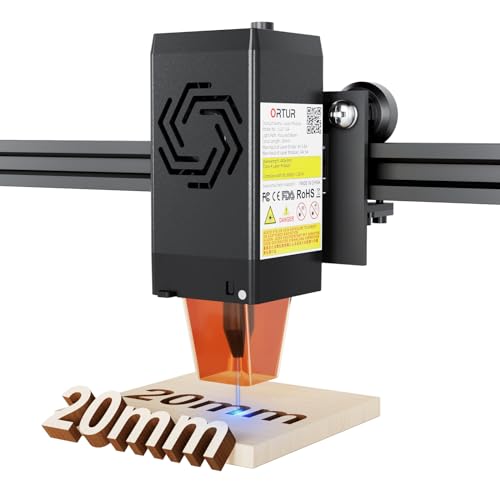
Ortur LU2-10A 10W Laser Module
Best for: Upgrading compatible Ortur machines for detail
- Laser Type
- Diode
- Laser Power
- 10000mW
- Software Compatibility
- LightBurn, LaserGRBL
- Cutting Capacity
- 20mm wood, 30mm acrylic
View on Amazon: Ortur LU2-10A 10W Laser Module Affiliate link
The Ortur LU2-10A is a 10W diode laser module designed for the Laser Master 2 series. It features a 0.05x0.1mm compressed spot for fine engraving and dual-fan cooling. The unit weighs 235g and supports speeds adjustable via LightBurn or LaserGRBL. It includes a built-in air-assist interface for cutting. This module suits users needing higher power and stability for long sessions.
Pros
- 10W (10000mW) diode laser output
- Ultra-thin 0.05x0.1mm square compressed spot
- Dual fan cooling system for stability
- Built-in air-assist interface for cutting
- Lightweight 235g body for faster speed
Cons
- Requires LightBurn or LaserGRBL software
- No mention of app control or remote
- Sold as a module, not a full machine
Good fit if
- You want to upgrade an existing Ortur Laser Master 2
- You need precise engraving on portraits or detailed materials
- You prefer manual speed control via desktop software
Skip if
- You need a complete ready-to-use engraving machine
- You require automatic app-based control
- You are looking for a CO2 laser source
Verdict: Ortur LU2-10A 10W Laser Module delivers high precision with its compressed spot and stable cooling. It is ideal for upgrading compatible Ortur machines for detailed work and cutting.
Specifications side by side
| Spec | Ortur Laser Master 2 10W Engraver | Ortur LU2-10A 10W Laser Module |
|---|---|---|
| Laser Type | not stated | Diode |
| Laser Power | 10W (10000mW) | 10000mW |
| Working Area | 390 x 410mm | not stated |
| Software Compatibility | LaserGRBL, LightBurn | LightBurn, LaserGRBL |
| Cutting Capacity | 20mm wood, 30mm acrylic | 20mm wood, 30mm acrylic |
| Compatible Material | Metal | not stated |
| Target Audience | DIY | not stated |
| Size | 10W | LU2-10A |
| Dimensions | 22.4 × 21.7 × 6.9 inches | not stated |
| Color | Black | black |
| Model | Laser Master 2 | LU2-10A |
Frequently asked questions
Can I use the LU2-10A module with my existing Ortur machine?
Yes, the LU2-10A is designed as a replacement head for compatible Ortur machines. It allows you to upgrade your current setup for better detail and stable cooling. This makes it ideal if you already own a frame and just need a more powerful or precise laser source for detailed work and cutting.
Is the Laser Master 2 a standalone unit or a module?
The Laser Master 2 is a complete desktop engraver with an industrial-grade full metal structure. It is not just a module but a ready-to-use machine. You get the frame, the laser head, and the working area all integrated, which suits DIY users who want a complete system rather than a spare part.
What is the working area size for the Laser Master 2?
The Laser Master 2 10W Engraver features a 390 x 410mm working area. This provides ample space for larger projects compared to smaller modules. The physical dimensions of the unit are 21.7 inches wide, 22.4 inches long, and 6.9 inches high, ensuring it fits on most standard workbenches.
Does the LU2-10A offer better precision than the Laser Master 2?
The LU2-10A module delivers high precision with a compressed spot and stable cooling. It is specifically noted for detailed work and cutting. If your priority is fine detail on smaller projects, this standalone module may provide sharper results than the broader capabilities of the full Laser Master 2 desktop unit.
Which machine is better for cutting thick materials?
The Laser Master 2 10W Engraver is best for DIY users cutting thick materials. It delivers high power suitable for deeper cuts. While the LU2-10A also has 10W power, the Laser Master 2 is built as a complete system that prioritizes cutting capacity and software flexibility for robust material handling.
Do both products require software to operate?
Both units support LightBurn or LaserGRBL software for operation. You will need to connect either the complete Laser Master 2 or the LU2-10A module to your computer. These programs allow you to control the laser path, adjust power levels, and manage your engraving or cutting designs effectively.
Is the Laser Master 2 safe for home use?
The Laser Master 2 includes safety features like a G-sensor. This helps protect you and your workspace during operation. As a complete desktop unit, it is designed for DIY users who are aware of safety protocols. Always ensure proper ventilation and eye protection when using any 10W diode laser device.