Longer Ray5 MiniS 3.5W Compact Review: Specs, Pros and Cons
As an Amazon Associate we earn from qualifying purchases. Links on this page are affiliate links.
This longer ray5 minis 3 5w compact review covers the Longer Ray5 MiniS, a desktop laser engraver designed for precision and speed. It features a 3.5W laser module that delivers clear results on various materials. The working area measures 130 by 140 millimeters, offering a compact footprint for small workspaces. With engraving speeds up to 12,000 mm/min, it handles detailed tasks efficiently. The unit arrives mostly pre-assembled with a full-aluminum frame for stability. This guide explains how these specs translate to practical use for hobbyists and small business owners.
What stands out
- 3.5W laser power for high-precision engraving on wood, acrylic, metal, and glass.
- Maximum engraving speed of 12,000 mm/min for fast production runs.
- 130 by 140 mm working area fits easily on most desks.
- Built-in Wi-Fi for remote file transfer and real-time monitoring.
- Safety features include X/Y-axis limit switches and a door sensor.
Who it fits
Good fit for
This machine suits hobbyists, crafters, and small business owners who need a reliable desktop engraver. The 130 by 140 mm area is ideal for custom gifts, personalized items, and small-batch logo engraving. Its compatibility with LightBurn and LaserGRBL makes it accessible for users familiar with standard software. The pre-assembled design and simple setup appeal to beginners. If you want a stable, aluminum-framed unit that works with Windows, macOS, and mobile devices, this compact model fits your workflow.
Who should skip it
You should look at another option if you require a larger working area. The 130 by 140 mm space limits the size of items you can engrave in a single pass. If you need to process large panels or wide materials, this compact footprint will be restrictive. Additionally, if you prefer a machine with a more extensive feature set or industrial-grade durability, this entry-level model may not meet your needs. It is best for small-scale projects rather than high-volume manufacturing.
Verdict: The Longer Ray5 MiniS offers a stable, compact solution for detailed engraving tasks. Its speed and software compatibility make it a practical choice for small-scale production and hobby use.
Key specs explained
Laser Power: 3.5W
This wattage indicates the laser module's output strength. A 3.5W source allows for clean engraving on materials like wood, acrylic, and painted surfaces. It is not powerful enough to cut thick wood or metal deeply. You should choose this spec if you focus on surface marking rather than cutting. Compare this to higher wattage units if you need to slice through thicker materials quickly.
Working Area: 130 × 140 mm
This measurement defines the maximum size of the design you can engrave at one time. The area is small, suitable for keychains, phone cases, or small jewelry items. Larger projects require multiple passes or different machines. If you plan to engrave large signs or boards, you need a machine with a bigger bed. Check this dimension before buying to ensure it fits your typical project sizes.
Engraving Speed: 12,000 mm/min
This speed shows how fast the laser head moves across the material. A rate of 12,000 mm/min helps complete simple designs quickly. Faster speeds reduce the time spent on small batches. However, speed can affect detail quality on complex images. Compare this to slower machines if you prioritize fine detail over rapid production. This spec is useful for hobbyists who want quick results.
Software Compatibility: LaserGRBL, LightBurn, LaserBurn
This list shows which programs control the machine. LightBurn is a popular paid option with advanced features. LaserGRBL is a free choice for basic tasks. Compatibility ensures you can use familiar tools to design and send files. Check if your preferred software is on this list. This flexibility makes the machine easier to integrate into your existing workflow without needing special drivers.
Design and Build Overview
The frame is constructed from full aluminum, which the listing states provides stability during operation. This rigid structure helps maintain precision as the laser head moves across the work surface. The unit arrives mostly pre-assembled, meaning you can begin setup with only a few simple steps. An adjustable dovetail groove allows for quick height settings, accommodating different material thicknesses without extensive recalibration. This design choice saves time and improves workflow efficiency for users who switch materials frequently.
Dimensions are listed as 11.9 inches in width, 12.6 inches in length, and 7.87 inches in height. The working area measures 130 by 140 millimeters, fitting comfortably on standard desks. The exterior features a deep black and orange color scheme. According to the listing, built-in limit switches on the X and Y axes prevent over-travel collisions. A door sensor pauses the laser when the cover is open, and a large acrylic shield offers eye protection. These safety features make the device suitable for home workshops or small business environments where casual use is common. The compact footprint and integrated safety mechanisms suggest it is designed for users who value a tidy, secure workspace without sacrificing operational speed.
Setup And Everyday Use
Setup is straightforward because the unit arrives mostly pre-assembled. You only need to complete a few simple steps before operation. The full-aluminum frame provides stability, which helps maintain precision during movement. An adjustable dovetail groove allows you to set the height quickly for different material thicknesses. This feature saves time and improves efficiency when switching between projects. Safety is built into the design with X and Y axis limit switches. These prevent over-travel collisions that could damage the machine or materials. A door sensor pauses the laser beam if the cover opens, protecting your eyes. A large acrylic shield adds an extra layer of protection during use.
Daily operation is supported by broad software compatibility. The system works with LaserGRBL, LightBurn, and LaserBurn. You can connect via Windows, macOS, Android, or iOS devices. Built-in Wi-Fi enables remote file transfer and real-time monitoring. This allows for wire-free operation, keeping your workspace tidy. The 12,000 mm/min engraving speed ensures fast processing for detailed work. The 130 by 140 mm working area is suitable for small items like custom gifts, logos, or personalized decor. Hobbyists and small business owners find this size practical for batch production. The combination of quick setup, safety features, and wireless connectivity makes this engraver efficient for everyday tasks. You can start creating with minimal effort and consistent accuracy across wood, acrylic, glass, and painted surfaces.
Before You Buy This Engraver
Before you buy the Longer Ray5 MiniS, consider your workspace and software needs. The 130 by 140 millimeter working area suits small projects like jewelry or phone cases. Ensure your computer or mobile device runs compatible software such as LightBurn or LaserGRBL. The built-in Wi-Fi helps, but verify your network stability for remote transfers. You will need materials like wood, acrylic, or painted surfaces to test the 3.5W laser’s precision. Regularly clean the acrylic shield and check the X/Y-axis limit switches to prevent collisions. This compact unit fits well alongside larger cutters if you prioritize portability and quick setup. It is ideal for hobbyists who want a pre-assembled machine. Check the available color options, as they vary in finish. The full-aluminum frame offers stability, but ensure your table is level. This model complements other options by focusing on ease of use rather than heavy-duty cutting power.
Check before you buy
- Verify your software supports LightBurn or LaserGRBL.
- Ensure your workspace fits the 11.9-inch width.
- Check network stability for Wi-Fi file transfers.
- Confirm the 130x140mm area suits your projects.
The product at a glance
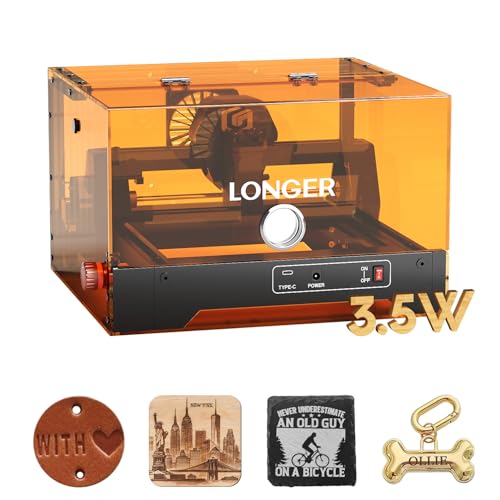
Longer Ray5 MiniS 3.5W Compact Engraver
Best for: small detailed engraving projects
- Laser Power
- 3.5W
- Working Area
- 130 x 140 mm
- Engraving Speed
- Up to 12,000 mm/min
- Software Compatibility
- LaserGRBL, LightBurn, LaserBurn
- Compatible Material
- Wood, Acrylic, Leather, Paper
- Target Audience
- DIY
View on Amazon: Longer Ray5 MiniS 3.5W Compact Engraver Affiliate link
The Longer Ray5 MiniS is a compact 3.5W laser engraver with a 130 by 140 mm working area. It engraves at speeds up to 12,000 mm/min. The unit arrives mostly pre-assembled with a full-aluminum frame. It supports LaserGRBL, LightBurn, and LaserBurn software. Wi-Fi connectivity allows remote file transfer. This model suits hobbyists and small business owners needing precise engraving on wood, acrylic, or metal.
Pros
- 3.5W laser power for high-precision engraving
- Fast engraving speed up to 12,000 mm/min
- Built-in Wi-Fi for remote file transfer
- Mostly pre-assembled for quick setup
- Compatible with LightBurn and LaserGRBL
Cons
- Small 130 by 140 mm working area
- Limited to 3.5W output power
- No mention of mobile app control
Good fit if
- You need a compact machine for small projects
- You want a pre-assembled unit for easy setup
- You require Wi-Fi connectivity for file transfer
Skip if
- You need to engrave large items
- You require high-power cutting capabilities
- You prefer a machine with a dedicated mobile app
Verdict: The Longer Ray5 MiniS 3.5W Compact Engraver fits hobbyists who need a small footprint and fast engraving speeds. It is ideal for detailed work on small materials like wood or acrylic.
Specifications side by side
| Spec | Longer Ray5 MiniS 3.5W Compact Engraver |
|---|---|
| Laser Power | 3.5W |
| Working Area | 130 x 140 mm |
| Engraving Speed | Up to 12,000 mm/min |
| Software Compatibility | LaserGRBL, LightBurn, LaserBurn |
| Compatible Material | Wood, Acrylic, Leather, Paper |
| Target Audience | DIY |
| Dimensions | 12.6 × 11.9 × 7.87 inches |
| Size | 130×140mm |
| Color | Deep Black & Orange |
| Model | Ray5 miniS 3.5w |
Frequently asked questions
What is the working area of the Longer Ray5 MiniS?
The working area measures 130 by 140 millimeters. This compact size fits well on small desks or workbenches. It is ideal for detailed projects like jewelry or phone cases. You can engrave small items with high precision within this footprint. Larger sheets may require multiple passes or trimming.
Is the Longer Ray5 MiniS good for beginners?
Yes, it is suitable for beginners who need a small footprint and fast engraving speeds. The unit arrives mostly pre-assembled, making setup straightforward. You only need to complete a few simple steps before operation. The clear laser output helps you achieve clean results on various materials quickly.
What materials can the 3.5W laser engrave effectively?
The 3.5W laser module delivers clear results on wood, acrylic, and painted surfaces. This wattage allows for clean engraving on these common hobby materials. It is not powerful enough to cut thick wood or metal deeply. You should use it for surface marking rather than deep cutting tasks.
How large is the physical footprint of the machine?
The unit measures 11.9 inches in width, 7.87 inches in height, and 12.6 inches in length. This compact design saves valuable desk space. The deep black and orange color scheme fits modern workspaces. Its small dimensions make it easy to store when not in use.
Does the Longer Ray5 MiniS have Wi-Fi connectivity?
Yes, the device includes built-in Wi-Fi for convenient operation. You can connect it to your computer or mobile device wirelessly. This feature simplifies file transfer and remote control. Ensure your software, such as LightBurn or LaserGRBL, supports this connectivity for a smooth workflow.
What software is compatible with this engraver?
You can use compatible software such as LightBurn or LaserGRBL for operation. Ensure your computer or mobile device runs these programs before starting. The built-in Wi-Fi helps streamline the connection process. These tools allow you to design and send engraving jobs directly to the laser head.