Creality Laser Rotary Roller Review: Specs, Pros and Cons
As an Amazon Associate we earn from qualifying purchases. Links on this page are affiliate links.
This creality laser rotary roller review covers the Falcon Rotary Roller Pro. It is a Y-axis rotary chuck designed for cylindrical and spherical objects. The unit measures 14 inches in length and 4.2 inches wide. It achieves an engraving accuracy of 0.1mm. The kit includes a 3-in-1 jaw system for various shapes. You connect it directly to the Y-axis motor. This accessory expands your machine capabilities for tumblers and cans.
What stands out
- 3-in-1 external jaw system for irregular shapes
- 0.1mm engraving accuracy with high torque motor
- Clamps cylinders from 1-110mm diameter
- Supports spheres from 10-130mm diameter
- Integrated high-strength aluminum alloy structure
Who it fits
Good fit for
You should buy this if you own a Creality Falcon or Falcon2 series engraver. The direct Y-axis connection makes setup simple. You do not need complex installation. The wide jaw range suits tumblers, cans, and thermos pots. The high precision helps with detailed work on glass or metal. If you need to engrave round items regularly, this kit provides the necessary stability and range for your projects.
Who should skip it
Skip this product if you have an engraver from a different brand. The data notes that other motherboards and drivers may cause errors. It will not work reliably on non-Creality machines. You should also skip it if you only engrave flat sheets. The rotary function adds no value for planar materials. Additionally, if you require a display or remote control, this basic roller kit does not include those features. It is strictly a mechanical accessory.
Verdict: This is a solid, spec-driven accessory for Falcon users needing to engrave round objects. It offers good versatility through its 3-in-1 jaw design. Stick with it only if your machine is compatible.
Key specs explained
Accuracy: 0.1mm
This value indicates the precision of the rotary movement during engraving. An accuracy of 0.1mm ensures that curved surfaces, such as tumblers or cans, retain sharp details without distortion. You should compare this figure with other rotary kits to ensure fine lines remain crisp. Higher accuracy matters most when engraving small text or intricate logos on cylindrical items.
Compatible Material: Glass
The listing specifies glass as a compatible material, suggesting the roller can handle delicate surfaces without slipping. This is essential for engraving wine glasses or glass bottles. You need a stable grip to prevent breakage during rotation. Check other accessories to confirm if they support fragile materials equally well for your specific project needs.
Application: Tumblers
This tag highlights the roller's primary use case for standard tumblers and similar cylindrical drinkware. It confirms the unit is optimized for the diameter range of common travel mugs. You can rely on this specification when selecting accessories for holiday gifts or promotional items. Compare this with general-purpose rollers to ensure it fits your typical engraving objects.
Model: AMUS-HYZ-LE-AC-Rotary Roller2
This unique identifier distinguishes the Pro version from other Creality rotary kits. It helps you verify compatibility with your Falcon series engraver before purchasing. Using the correct model ensures seamless connection to the Y-axis motor. You should match this model number precisely to avoid driver errors or connection issues with your machine.
Design and build overview
According to the listing, the Creality Falcon Rotary Roller Pro features an integrated structure made from high-strength aluminum alloy. This material choice suggests a rigid frame that resists flexing during high-speed rotation. The outer jaws are constructed from high-density plastic. This softer material helps secure objects tightly without scratching delicate surfaces like glass or finished metal tumblers. You get a durable base that prioritizes protection for your workpieces.
The unit measures 14 inches in length, 4.2 inches in width, and 5.9 inches in height. These dimensions indicate a substantial footprint that requires adequate space on your engraver bed. The design includes a flexible tensioner and a rear support module. This layout allows for wide-range adjustments, accommodating irregularly shaped items. You can mount it directly to the Y-axis motor without complex installation steps. Simply connect the cable and adjust software parameters.
The kit supports a wide variety of shapes through its three-in-one external jaw system. You can clamp cylindrical objects with diameters from 1 to 110mm from the outside. Alternatively, you can prop items up from the inner side for diameters between 25 and 75mm. The hex stud option handles spheres from 10 to 130mm or rings from 15 to 100mm. This versatile layout means you can engrave cans, wine cups, and bracelets without changing hardware. The design focuses on compatibility with Falcon series machines, ensuring stable operation for diverse projects.
Setup and everyday use guide
The Creality Falcon Rotary Roller Pro requires no internal installation. You connect the provided cable directly to the Y-axis motor of your engraving machine. This simple connection allows the unit to integrate with your existing hardware without complex modifications. After connecting the device, you must adjust relevant settings and parameters within the operating software to activate the rotary function. The listing notes that this kit is exclusively compatible with the Falcon and Falcon2 series. Using it with other brands or manufacturers may result in driver conflicts or error reports due to differing motherboard architectures. Daily use involves selecting the appropriate jaw configuration from the included 3-in-1 external jaws. You can clamp cylindrical objects with diameters between 1 and 110mm, such as cans or thermos pots. Alternatively, you can prop items from the inner side for cups with diameters of 25 to 75mm. The hex stud option supports spheres up to 130mm or rings from 15 to 100mm. The flexible tensioner and rear support module help stabilize these varied shapes. This setup ensures high-torque motor performance for consistent rotation. The high-density plastic jaws grip objects tightly without scratching surfaces. You should verify your software settings match the specific geometry of your workpiece before starting the engraving process. This approach minimizes alignment issues and maximizes the 0.1mm accuracy across curved materials like glass or tumblers.
Before You Buy This Rotary Kit
Before you buy, verify that your machine is a Creality Falcon or Falcon2 series. The listing warns that other brands may report errors due to different motherboards. You must connect the cable to the Y-axis motor. Then, adjust software settings to use the device. This rotary kit complements the core laser engraver by adding a third axis for cylindrical objects. You will need compatible software to control the rotation speed and direction. The 3-in-1 jaws handle items from 1mm to 110mm in diameter. Clean the high-density plastic jaws regularly to prevent debris from affecting grip. Store the unit in a dry place to protect the aluminum alloy structure. This accessory expands your creative range for tumblers and spheres. It fits well alongside the main engraver as a specialized tool. Check your Falcon model compatibility first. Ensure your software supports rotary functions. Inspect the jaws for wear. Keep the cable tidy. This setup requires no complex installation.
Check before you buy
- Confirm your machine is a Falcon or Falcon2 series.
- Check that your software supports rotary axis functions.
- Verify the cable connects to your Y-axis motor.
- Ensure the object diameter fits within the 1-110mm range.
- Keep the plastic jaws clean for consistent grip.
The product at a glance
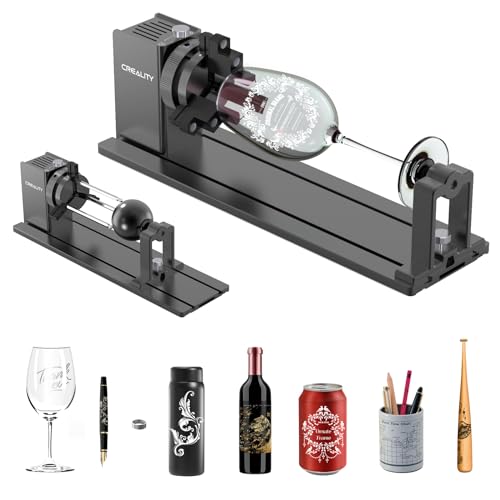
Creality Falcon Rotary Roller Pro
Best for: Falcon series rotary engraving
- Compatible Material
- Glass
- Features
- Rotary Axis
- Application
- Tumblers
- Dimensions
- 14 × 4.2 × 5.9 inches
View on Amazon: Creality Falcon Rotary Roller Pro Affiliate link
This is a Y-axis rotary chuck for the Creality Falcon and Falcon2 series. It features a 3-in-1 jaw system with external clamps, inner props, and hex studs. The unit supports cylindrical objects from 1mm to 110mm in diameter. It includes a flexible tensioner and rear support module for high precision. The accuracy reaches 0.1mm. You connect the cable directly to the Y-axis motor. The build uses high-strength aluminum alloy and high-density plastic jaws.
Pros
- 3-in-1 jaw system for irregular shapes
- Supports diameters from 1mm to 110mm
- 0.1mm engraving accuracy
- High-strength aluminum alloy construction
Cons
- Limited to Falcon and Falcon2 series only
- Requires software parameter adjustment after connection
- May report errors on non-Creality motherboards
Good fit if
- You own a Creality Falcon or Falcon2 engraver
- You need to engrave cylindrical tumblers or cans
- You require precision for small diameter objects
Skip if
- You use an engraver from another brand
- You need to engrave flat surfaces only
- You want a plug-and-play setup without software changes
Verdict: Creality Laser Rotary Roller Pro is a specialized accessory for Falcon series users. It fits those who need precise rotary engraving on varied cylindrical items.
Specifications side by side
| Spec | Creality Falcon Rotary Roller Pro |
|---|---|
| Compatible Material | Glass |
| Features | Rotary Axis |
| Application | Tumblers |
| Dimensions | 14 × 4.2 × 5.9 inches |
| Size | Laser Rotary Roller Pro |
| Color | Creality Laser Rotary Roller Pro |
| Model | AMUS-HYZ-LE-AC-Rotary Roller2 |
Frequently asked questions
What types of objects can the Creality Falcon Rotary Roller Pro engrave?
This accessory is designed for cylindrical and spherical items. It is best suited for tumblers and glass containers. The rotary axis allows you to wrap designs around curved surfaces. You can achieve precise engraving on varied round materials. It fits users who need consistent rotation for detailed artwork on non-flat objects.
Does this rotary roller work with all laser engravers?
No, it is specialized for the Falcon series. The listing warns that other brands may report errors due to different motherboards. You must verify your machine is a Creality Falcon or Falcon2 series. Connecting it to incompatible hardware can cause software conflicts or motor errors. Stick to the recommended series for proper function.
How difficult is it to set up the rotary roller?
Setup is straightforward and requires no internal installation. You simply connect the provided cable directly to the Y-axis motor of your engraving machine. This integration avoids complex modifications to your hardware. After connecting, you adjust software settings to use the device. The process is designed for quick adoption by existing users.
What are the physical dimensions of the rotary roller?
The unit measures 14 inches in length and 4.2 inches wide. The height is 5.9 inches. These dimensions accommodate standard tumblers and cylindrical objects. The size allows for stable rotation during the engraving process. You should check your workspace to ensure it fits comfortably on your machine bed.
What material is the rotary roller made from?
The structure is made from high-strength aluminum alloy. This material provides a rigid frame that resists flexing during high-speed rotation. The outer jaws are constructed from high-density plastic. This combination ensures durability and precise grip on your workpiece. The build quality supports consistent performance for repeated engraving tasks.
What is the engraving accuracy of this device?
The device achieves an engraving accuracy of 0.1mm. This value indicates the precision of the rotary movement during operation. An accuracy of 0.1mm ensures that curved surfaces retain sharp details without distortion. You should compare this figure with other rotary kits to ensure it meets your project requirements for fine detail.