Creality Falcon2 Pro S 40W Laser Engraver Review: Who It Fits and Who Should Skip It
As an Amazon Associate we earn from qualifying purchases. Links on this page are affiliate links.
This creality falcon2 pro s 40w laser engraver review covers the key details of a desktop diode laser system. The machine features a fully enclosed design for safety and a 40W optical output for high power. It also includes auto focus and a built-in camera for precise positioning. These specs define its role as a capable tool for batch production. You get a robust unit that handles thicker materials with ease. The enclosed frame contains dust and noise, making it suitable for small studios. This guide explains how the specifications translate to real-world performance for makers.
What stands out
- 40W diode laser delivers up to 240,000mW machine power for fast cutting.
- Fully enclosed metal frame with Class 1 certification and flame detection.
- Built-in camera with auto focus for one-key intelligent positioning.
- Cutting capacity of 20mm basswood and 30mm black acrylic in one pass.
- 80% pre-assembled for setup in under 10 minutes.
Who it fits
Good fit for
This machine suits professional makers, small studios, and sole traders who need reliable batch production. The 40W power and high-speed cutting allow you to process materials like 20mm basswood efficiently. The enclosed design protects you from smoke and dust, which is ideal for compact workshops. The auto focus and camera reduce setup time between jobs. If you require high throughput and safety features without manual measurements, this setup fits your needs.
Who should skip it
You should look elsewhere if you need to engrave thin metal sheets directly without assistance. While the listing mentions 0.1mm thin metal sheets, diode lasers typically struggle with bare metals compared to fiber systems. If you prefer an open-frame machine for easy access to large, irregular objects, the fully enclosed design may limit your workspace. Additionally, if you require wireless connectivity, the data only mentions USB connection for the camera. This model is built for enclosed, controlled environments rather than open benchtop use.
Verdict: The Creality Falcon2 Pro S 40W offers strong cutting power and safety features for small business use. Its enclosed design and auto focus make it a practical choice for batch production.
Key specs explained for Falcon2 Pro S
Laser Type: Diode
This machine uses a diode laser, which is the standard technology for desktop engravers. Diode lasers are ideal for marking and cutting organic materials like wood and acrylic. They do not cut thick metals. If you need to engrave on glass or stone, you will likely need a different type of laser source. This type is best for makers focusing on woodwork and plastics.
Laser Power: 40W
The optical output is 40 watts, which provides significant cutting depth. This power level allows the machine to cut through 20mm basswood and 30mm black acrylic in a single pass. Higher power means faster processing for thicker materials. If you are comparing machines, this spec indicates it can handle denser materials than lower-wattage diode lasers, which struggle with anything over 10mm wood.
Form Factor: Fully Enclosed
The unit comes with a complete metal enclosure that covers the laser head and work area. This design contains smoke, dust, and noise during operation. It also includes safety features like a flame detector and emergency stop. This is crucial for home workshops or small studios where ventilation is limited. An open frame requires external fume extraction and offers less protection from stray light.
Engraving Speed: 600mm/s
The laser head moves at up to 600 millimeters per second. This high speed reduces the time needed to complete large engraving projects. It allows for efficient batch processing of multiple items. When shopping, compare this to standard speeds of 400mm/s or lower. Faster speeds do not necessarily reduce quality if the power is sufficient, but they do increase throughput for repetitive tasks.
Cutting Capacity: 20mm basswood, 30mm black acrylic
This spec defines the maximum thickness the laser can cut through in one pass. It can slice 20mm basswood and 30mm black acrylic. Black acrylic absorbs the laser energy better than clear acrylic, allowing for deeper cuts. This capacity is suitable for professional makers creating signs or models. If you need to cut thicker materials, you may need to make multiple passes or use a higher-power machine.
Design and build details
The listing describes the Falcon2 Pro S as a fully enclosed desktop unit. Its dimensions are 22 inches wide, 12.9 inches high, and 26 inches long. The total weight is 50.5 pounds. This substantial mass helps stabilize the frame during high-speed operations. The enclosure features a full metal structure covered with a fireproof fiber cover. This design isolates smoke, dust, and noise, allowing you to work in compact spaces without excessive ventilation. The transparent sections provide visibility while maintaining safety containment.
According to the listing, the machine ships 80% pre-assembled. You can install and test it in ten minutes or less. A built-in debris drawer sits at the base to collect cutting residue. You simply pull it out to empty it, which reduces cleaning frequency. The layout includes a camera positioned above the center of the workspace. This camera connects via USB to your computer for intuitive preview and intelligent auto positioning. It eliminates the need for manual distance measurements between different works.
The control interface emphasizes one-key intelligent operation. The system handles Z-axis auto focus and cut-through path compensation automatically. This automation improves the success rate for batch processing. The enclosed form factor and integrated safety features, such as the emergency stop and flame detector, make it suitable for professional makers and small studios. The design prioritizes reliability and ease of use for consistent output.
Setup and daily operation details
You can begin using the Falcon2 Pro S quickly because it arrives 80% pre-assembled. The listing states you can install and test the unit in 10 minutes or less. This rapid setup is ideal for compact workshops where time matters. The machine includes a built-in debris drawer that collects cutting residue. You simply pull this drawer out and empty it after use. This design reduces the frequency of deep cleaning sessions, keeping the workspace tidy during batch production.
Daily operation relies on the integrated camera and auto focus system. The camera is positioned above the center of the product area inside the shield. You connect it via USB to your computer to preview the work area. This allows for intuitive and efficient positioning without manual measurement. The system supports one-key intelligent control for auto focus, which removes the need to manually measure distances between different works. This feature significantly improves the success rate of your projects.
Safety is managed through several built-in features. The unit includes a flame detector, dual wire limit switches, a safety lock, an emergency stop button, and a laser detection cover. These components work together to contain smoke, dust, and noise. The fully enclosed structure with a fireproof fiber cover isolates these elements. This lets you focus on your work without constant monitoring. The machine supports high-speed cutting at 600mm/s, enabling efficient batch processing for professional makers and small studios.
Before You Buy This Laser
You need a stable surface for this 50.5-pound unit. The 22 by 26-inch footprint requires dedicated space. You must check material compatibility before loading. The diode laser handles wood and acrylic well but cannot cut thick metals. You should verify your exhaust needs. The enclosed design traps smoke, so you may need external ventilation for heavy use. Keep the debris drawer empty. The listing mentions easy cleaning, but regular maintenance ensures consistent cuts. This machine suits professional makers and small studios. It fits alongside other desktop options if you need speed. The 40W output allows faster batch processing than lower-power rivals. You should also consider the camera positioning. It aids precision but requires computer connection. Ensure your workspace has power for the full enclosure. This system is for users who value safety and speed. It is less suitable for those needing open-air access or metal cutting. Check your software requirements. The one-key control simplifies operation, but you still need compatible design files. This is a practical choice for high-volume work.
Check before you buy
- Verify your workspace has enough space for the 26-inch length.
- Check if your materials are wood or acrylic compatible.
- Ensure you have a computer for the built-in camera.
- Confirm you can manage smoke from the enclosed design.
- Check that your surface supports the 50.5-pound weight.
The product at a glance
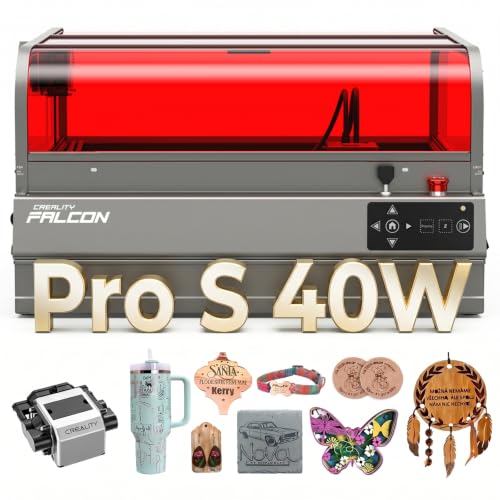
Creality Falcon2 Pro S 40W Enclosed Laser Cutter
Best for: High-speed batch production in small studios
- Laser Type
- Diode
- Laser Power
- 40W
- Engraving Speed
- 600mm/s
- Form Factor
- Fully Enclosed
- Cutting Capacity
- 20mm basswood, 30mm black acrylic
- Compatible Material
- Wood, Acrylic
View on Amazon: Creality Falcon2 Pro S 40W Enclosed Laser Cutter Affiliate link
The Creality Falcon2 Pro S 40W is a fully enclosed diode laser engraver with a 40W optical output. It reaches engraving speeds of 600mm/s and cuts up to 20mm basswood or 30mm black acrylic in one pass. The unit includes a built-in camera, Z-axis auto focus, and a debris drawer. It weighs 50.5 pounds and measures 26 by 22 by 12.9 inches. This machine suits makers needing high-speed batch processing in a compact, safe workspace.
Pros
- 40W diode laser for fast cutting
- Built-in camera with auto focus
- Fully enclosed safety design
- 600mm/s engraving speed
- Cuts 30mm black acrylic
Cons
- Heavier build at 50.5 pounds
- Limited to diode laser technology
- No mention of remote control support
Good fit if
- You need high-speed batch production
- You want a fully enclosed safety system
- You require auto focus for varied materials
Skip if
- You need to cut thick metal sheets
- You prefer a lightweight portable unit
- You require fiber laser precision
Verdict: Creality Falcon2 Pro S 40W Desktop Laser delivers powerful 40W cutting and fast speeds for small studios. It fits makers who prioritize safety and automation over portability.
Specifications side by side
| Spec | Creality Falcon2 Pro S 40W Enclosed Laser Cutter |
|---|---|
| Laser Type | Diode |
| Laser Power | 40W |
| Engraving Speed | 600mm/s |
| Form Factor | Fully Enclosed |
| Cutting Capacity | 20mm basswood, 30mm black acrylic |
| Compatible Material | Wood, Acrylic |
| Features | Air Assist, Camera, Auto Focus |
| Dimensions | 26 × 22 × 12.9 inches |
| Weight | 50.5 pounds |
| Size | Falcon2 Pro S 40W with Integrated Enclosure |
| Color | Falcon2 Pro S 40W |
| Model | Falcon2 pro 40W |
Frequently asked questions
What materials can the Creality Falcon2 Pro S engrave?
The machine is compatible with wood and acrylic. These materials work well with the 40W diode laser output. You should avoid attempting to cut thick metals, as diode lasers are not designed for that task. Stick to organic materials for best results.
Does this laser engraver have auto focus?
Yes, the Falcon2 Pro S includes an auto focus feature. This function helps maintain precise engraving depth without manual adjustment. You also get a built-in camera to monitor your work area. These features support high-speed batch production in small studios.
Is the Creality Falcon2 Pro S safe to use?
The unit features a fully enclosed design for safety. This enclosure helps contain laser light and debris during operation. The desktop form factor allows for stable placement in your workspace. You can operate it with greater confidence knowing the beam is contained.
How much space does the Falcon2 Pro S take up?
The footprint measures 22 inches wide and 26 inches long. The height is 12.9 inches. The total weight is 50.5 pounds. You need a sturdy surface to support this mass. The compact size fits well on standard workbenches in small workshops.
Does it include air assist for cutting?
Yes, the specifications list air assist as a key feature. This system blows air onto the material during cutting. It helps clear away smoke and debris. This results in cleaner cuts and protects the lens from residue. It is essential for handling acrylic and wood effectively.
Who is this laser engraver best for?
It is best for makers who prioritize safety and automation. The enclosed design and auto focus suit those running small studios. It fits users needing high-speed batch production. If you value a stable, powerful desktop unit over portability, this model aligns with your needs.