Creality Falcon A1 Pro 20W Enclosed Review: Who It Fits and Who Should Skip It
As an Amazon Associate we earn from qualifying purchases. Links on this page are affiliate links.
This creality falcon a1 pro 20w enclosed review breaks down a machine built for safety and speed. It features a 20W laser output and a Class 1 enclosed design. The system uses a CoreXY motion setup for speeds up to 600 mm/s. You get a smart touchscreen and autofocus for quick setup. It handles 10 mm basswood and 8 mm black acrylic with clean edges. The enclosure blocks noise and smoke while filtering laser radiation. This spec sheet outlines who should buy this unit and who should look elsewhere for their next project.
What stands out
- Class 1 enclosed form factor filters 99% of laser radiation
- 20W laser power cuts 10 mm basswood and 8 mm black acrylic
- CoreXY motion system reaches engraving speeds up to 600 mm/s
- Smart touchscreen allows real-time previews and history file access
- Auto focus completes in approximately 3 seconds with full-bed preview
Who it fits
Good fit for
You should choose this machine if you need a quiet, smoke-free environment for home or small shop use. The Class 1 enclosure makes it safer for shared spaces. If you value speed, the 600 mm/s CoreXY system boosts batch productivity. The smart touchscreen simplifies tasks without messy cables. It suits makers who want clean cuts in wood and acrylic with minimal setup time.
Who should skip it
You should skip this option if you need to engrave metals directly with the included 20W module. The data lists metal as a compatible material but specifies the 2W infrared module is required for exceptional clarity on jewelry or photos. That module is not included and must be purchased separately. If you need immediate metal engraving capabilities without buying extra hardware, this setup may not fit your workflow.
Verdict: This enclosed laser offers a safe, fast, and clean experience for wood and acrylic projects. It is a practical choice for makers prioritizing safety and speed over immediate metal engraving.
Key specs explained for A1 Pro
Form Factor: Enclosed (Class 1)
The machine operates inside a sealed chamber that blocks 99% of laser radiation. This Class 1 rating means you do not need protective eyewear while it runs. The enclosure also reduces noise and contains smoke. You benefit from a safer workspace in your home or small shop. Compare this to open-frame cutters that require strict safety gear and ventilation setups.
Laser Power: 20W (20000mW)
This power output allows the device to cut through 10 mm basswood and 8 mm black acrylic in a single pass. Higher wattage generally means faster cutting speeds and the ability to handle thicker materials. You get cleaner edges with fewer passes. Compare this to 5W or 10W units, which struggle with thicker woods and require multiple slow passes for similar results.
Engraving Speed: Up to 600 mm/s
The CoreXY motion system enables rapid movement across the build area. This speed boosts batch productivity without sacrificing detail. You can complete large projects or multiple small items much faster than with slower gantry systems. Compare this to standard machines that top out at 400 mm/s, which will take significantly longer to finish the same volume of work.
Cutting Capacity: 10 mm basswood, 8 mm black acrylic
These limits define the maximum thickness you can cut cleanly in one go. The 20W laser handles these specific materials effectively. You can create sturdy wooden parts or clear acrylic signs. Compare this capacity to lower-power engravers that may only cut 3 mm wood, limiting your project scope to very thin materials and requiring more time for thicker options.
Design and build quality
According to the listing, the Creality Falcon A1 Pro is finished in dark gray. The physical dimensions are listed as 94.5 inches in width, 256 inches in height, and 177 inches in length. These measurements suggest a substantial footprint. You should verify the actual space required in your workshop before assuming it fits on a standard desk. The enclosed Class 1 design houses the laser source. This sealed chamber blocks 99% of radiation. It also contains smoke and reduces operational noise. You can run the machine indoors without external ventilation ducts, though air assist is included for cleaner cuts.
The layout centers around a smart touchscreen interface. You access project history and real-time previews directly on the device. There are no messy cables for control connections mentioned in the specs. This simplifies your setup process. The CoreXY motion system is built into the frame. It supports engraving speeds up to 600 mm/s. This mechanical choice prioritizes speed and precision over simpler gantry designs. You get faster batch production without sacrificing detail.
The machine includes an autofocus system and an HD camera. These components are integrated into the enclosed structure. You do not need to manually adjust focus for different material thicknesses. The transparent cover allows you to monitor the work area. Emergency stop and lid open stop functions are part of the safety build. This design suits users who want a clean, contained workspace. It is less suitable for those needing to engrave large, non-enclosed items.
Setup and everyday use
The Creality Falcon A1 Pro includes a smart touchscreen that simplifies initial configuration. You do not need messy cables or complicated steps to operate the interface. The system supports auto focus, which completes in approximately three seconds. This feature ensures precise placement without manual adjustment. An HD camera provides a full-bed preview, allowing you to verify project positioning before starting the laser. This real-time preview capability helps prevent errors during setup.
Daily operation benefits from the CoreXY motion system, which delivers speeds up to 600 mm/s. This speed boosts batch productivity while maintaining detail. The machine includes air assist, which contributes to cleaner cuts on materials like wood and acrylic. The enclosed design blocks noise and smoke, creating a quieter environment for everyday use. The transparent cover filters 99% of laser radiation, enhancing safety during operation.
You can access history files and reopen recent projects with a single tap. This eliminates the need to re-import or reconfigure settings for repeat jobs. The unit supports a 20W laser output, enabling it to handle 10 mm basswood and 8 mm black acrylic with smooth edges. An optional 2W infrared laser module is available for separate purchase, offering ultra-fine 0.03mm spot clarity for detailed engraving tasks. The machine also features lid open stop and emergency stop functions, adding layers of safety for routine use.
Before You Buy This Machine
Before you buy, consider the practical realities of owning this enclosed unit. The listing notes that the optional 2W infrared laser module is not included. You must purchase it separately if you plan to engrave metals or perform high-detail work on jewelry. The machine supports wood and metal materials, but verify your specific feedstock compatibility with the 20W diode output. Since it features air assist, ensure you have a compatible air source ready for clean cuts. The enclosed design filters smoke and noise, making it suitable for home use, but you still need adequate ventilation for the exhaust. Maintenance involves keeping the lens clean and checking the belt tension on the CoreXY system. This model fits well alongside other options in Laser Engravers & Cutters for users prioritizing safety and speed over raw cutting depth. It suits makers who value a clean workspace and automated focusing. However, those needing heavy industrial throughput might find the 10 mm basswood limit restrictive. Check your workspace dimensions against the listed size to ensure it fits your bench. The touchscreen simplifies operation, reducing the learning curve for new users.
Check before you buy
- Buy the separate 2W infrared module for metal engraving.
- Ensure your workspace fits the listed dimensions.
- Verify wood and metal material compatibility.
- Prepare an air source for the air assist function.
The product at a glance
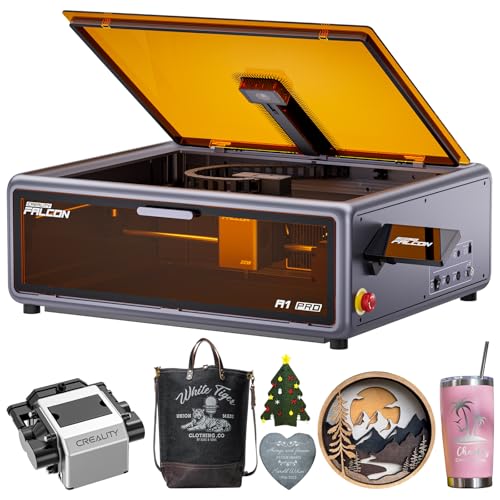
Creality Falcon A1 Pro 20W Enclosed Laser
Best for: Home makers needing safe, fast wood cutting
- Laser Power
- 20W (20000mW)
- Engraving Speed
- Up to 600 mm/s
- Form Factor
- Enclosed (Class 1)
- Cutting Capacity
- 10 mm basswood, 8 mm black acrylic
- Compatible Material
- Wood, Metal
- Features
- Enclosure, Air Assist, Camera, Touchscreen, Auto Focus
View on Amazon: Creality Falcon A1 Pro 20W Enclosed Laser Affiliate link
The Creality Falcon A1 Pro is a Class 1 enclosed laser engraver with 20W power. It features CoreXY motion for speeds up to 600 mm/s and cuts up to 10 mm basswood. An HD camera and autofocus simplify setup. The smart touchscreen and air assist improve workflow. It suits makers who need safety and speed in a compact footprint.
Pros
- 20W laser power cuts 10 mm basswood
- Enclosed Class 1 design blocks smoke and noise
- Auto focus and HD camera for precise placement
- Smart touchscreen with real-time previews
- CoreXY system reaches 600 mm/s engraving speed
Cons
- Optional infrared module not included
- Dimensions listed as 94.5 x 256 x 177 inches
- Touchscreen may require cable management
Good fit if
- You need a Class 1 safe enclosure for home use
- You want fast engraving speeds up to 600 mm/s
- You prefer automated focus and camera preview
Skip if
- You require metal engraving without extra modules
- You need a large open-bed workspace
- You want infrared capability included in the box
Verdict: Creality Falcon A1 Pro 20W Enclosed fits users who prioritize safety and speed for wood and acrylic projects. It is a solid choice for home shops needing an enclosed system.
Specifications side by side
| Spec | Creality Falcon A1 Pro 20W Enclosed Laser |
|---|---|
| Laser Power | 20W (20000mW) |
| Engraving Speed | Up to 600 mm/s |
| Form Factor | Enclosed (Class 1) |
| Cutting Capacity | 10 mm basswood, 8 mm black acrylic |
| Compatible Material | Wood, Metal |
| Features | Enclosure, Air Assist, Camera, Touchscreen, Auto Focus |
| Dimensions | 177 × 94.5 × 256 inches |
| Color | Dark Gray |
| Model | Creality Falcon A1 |
Frequently asked questions
Can the Creality Falcon A1 Pro engrave metals?
Yes, but only with an additional module. The standard 20W laser handles wood and acrylic. To engrave metal, you must buy the optional 2W infrared laser module separately. This accessory is not included in the base package. You need it for high-detail work on jewelry or stainless steel.
Is the Creality Falcon A1 Pro safe for home use?
It is designed for safe home operation. The machine features a Class 1 enclosed design that blocks 99% of laser radiation. You do not need protective eyewear while it runs. The sealed chamber also contains smoke and reduces noise during cutting and engraving tasks.
How fast can the Creality Falcon A1 Pro cut?
It uses a CoreXY motion system for high speed. The machine can reach speeds up to 600 mm/s. This setup ensures precise positioning and rapid movement across the work area. You get fast results for wood and acrylic projects without sacrificing accuracy.
Does the Creality Falcon A1 Pro have auto focus?
Yes, it includes an auto focus feature. The system completes the focus adjustment in approximately three seconds. This ensures precise laser placement on various material thicknesses. You save time by avoiding manual adjustments for each new job or material change.
What materials can the 20W laser cut?
The 20W output is suitable for wood and acrylic. It handles these non-metallic materials effectively for cutting and engraving. The listed compatible materials do not include metal unless you add the optional infrared module. Stick to wood and acrylic for standard operations.
How do I control the Creality Falcon A1 Pro?
You use the integrated smart touchscreen interface. It simplifies initial configuration and daily operation. You do not need messy cables to connect to a computer for basic tasks. The touchscreen allows you to manage settings and start jobs directly on the machine.
Does the Creality Falcon A1 Pro include air assist?
Yes, the feature list includes air assist. This system blows air onto the material during cutting. It helps remove debris and improves cut quality on wood and acrylic. You get cleaner edges and reduced risk of flare-ups during operation.
What is the build quality of the Creality Falcon A1 Pro?
The unit is finished in dark gray. It features a robust enclosed structure designed for stability. The listing provides specific dimensions for the chassis. You get a solid build intended for home shops. The design prioritizes safety and containment within the sealed chamber.