Creality Falcon A1 10W Enclosed Laser Review: Who It Fits and Who Should Skip It
As an Amazon Associate we earn from qualifying purchases. Links on this page are affiliate links.
This creality falcon a1 10w enclosed laser review covers a compact machine designed for straightforward engraving and cutting tasks. It features a 10W laser power output and a 381 × 305mm working area. The unit includes an enclosure for safety and an air assist system to improve cut quality. You get a CoreXY motion system that reaches speeds of 600mm/s. It also comes with a smart camera for precise positioning. The software suite includes Falcon Design Space and supports third-party tools like LightBurn. This setup aims to reduce trial and error for beginners.
What stands out
- CoreXY motion system enables 600mm/s engraving speeds
- Pre-calibrated HD camera for accurate object locking
- Enclosed Class 1 design with dual doors
- Air assist system for cleaner cuts
- Supports LightBurn and LaserGRBL software
Who it fits
Good fit for
This laser suits hobbyists who want a plug-and-play experience without complex calibration. The enclosed design and Class 1 safety rating make it suitable for home offices or small workshops where noise and smoke are concerns. If you primarily work with wood and non-reflective materials, the 10W power and air assist provide reliable results. The smart camera simplifies setup, which helps users who prefer visual confirmation over manual alignment. It is also a good fit for those who value software compatibility with LightBurn for more advanced vector designs.
Who should skip it
You should look elsewhere if you need to cut acrylic, as the listing explicitly states cutting acrylic is not supported. The machine is also incompatible with 500 × 500mm honeycomb panels, limiting your bed options. If you plan to engrave highly reflective materials like mirror-finished metals, this unit is prohibited for that use. The working area is also smaller than standard 500 × 500mm beds, so large projects may require multiple passes. Users needing extensive material compatibility should consider higher-power or more versatile alternatives.
Verdict: The Creality Falcon A1 is a safe, fast option for small-to-medium wood engraving. It is not suitable for acrylic cutting or reflective metals.
Key specs explained
Laser Power: 10W
This output level handles most non-metal engraving tasks well. It cuts thin wood and acrylic efficiently. The listing notes it cannot cut acrylic fully or engrave highly reflective metals. You should use this for crafts and small projects rather than heavy industrial cutting. Compare this to higher power units if you need to slice through thicker materials quickly.
Working Area: 381 × 305mm
This defines the maximum size of your project. You can engrave items up to 15 by 12 inches. This size suits jewelry, phone cases, and small signs. It is smaller than large format machines but fits on most desks. Check your typical project dimensions to ensure they fit within this footprint before purchasing.
Speed: 600mm/s
The machine moves the laser head at this rate. This speed is three times faster than traditional models. You save time on repetitive engraving jobs. The CoreXY motion system helps maintain accuracy at this pace. If you produce items for sale, this speed boosts your daily output significantly compared to slower entry-level units.
Camera: Pre-calibrated HD
The built-in camera lets you see the full work area on your screen. You can align your design precisely without guessing. This feature removes the need for manual positioning adjustments. It simplifies the setup process for beginners. Compare this to models requiring manual focus or separate lighting setups for accurate placement.
Safety: Class 1 Enclosed
The dual-door design blocks 99% of laser radiation. This makes the machine safe for home or office use. It also reduces noise and contains smoke. The auto-lock and emergency stop features add extra protection. You do not need to wear special eye protection during operation. This enclosure level is a key safety advantage over open-frame machines.
Design and Build Details
The listing describes the build as a white enclosed unit measuring 26 inches in length, 19.7 inches in width, and 9.84 inches in height. This footprint fits on standard workbenches without requiring a dedicated floor space. The enclosure design filters 99% of laser radiation, which contains dust and smoke during operation. This allows you to place the machine in a home office or garage without extensive ventilation ducting. The dual-door structure includes an auto-lock and emergency stop for added safety during unsupervised runs.
According to the listing, the machine utilizes a CoreXY motion system with a dual motor power system. This layout enables engraving and cutting speeds up to 600mm/s, which is faster than traditional belt-driven models. The internal layout supports a 381 × 305mm working area. You cannot use standard 500 × 500mm honeycomb panels with this specific model due to the smaller bed size. The finish is a smooth white plastic exterior that resists minor scratches during daily use.
The unit includes an air assist nozzle and a pre-calibrated HD camera. The camera provides a full-frame view of the engraving area, helping you position objects accurately without manual tweaking. You do not need external lighting for basic alignment tasks. The controls are managed through Falcon Design Space software, which integrates device control and vector design. The machine also supports LightBurn and LaserGRBL, giving you flexibility in how you send jobs to the engraver. The compact design and integrated safety features make it suitable for users who need a clean, contained workspace.
Setup and everyday use
You can start using the Creality Falcon A1 10W without complex assembly. The listing states it is ready to use straight out of the box. You skip trial and error because the machine comes with pre-set optimal parameters for engraving. This lets you begin projects immediately. The included Falcon Design Space Software handles creative browsing, vector design, and device control. This integration simplifies your workflow by combining essential tools in one place. You also have the option to use popular third-party applications like LightBurn, LaserGRBL, and Cutlabx. This flexibility supports various design levels.
Daily operation is streamlined by the smart HD camera. It provides a full-frame view of the 381 × 305mm working area. You can lock onto objects without manual tweaking. The graphic outline extraction feature converts design patterns into detailed engraving paths. This helps you transform artistic ideas into precise engravings. The CoreXY motion system and dual motor power system enable speeds up to 600mm/s. This makes the process three times faster than traditional models. The enclosure filters 99% of laser radiation and blocks noise and smoke. Auto-lock and emergency stop features add safety layers. You must note that this machine is not compatible with the 500 × 500mm honeycomb panel. You also cannot engrave highly reflective materials like mirrored metals. Acrylic cutting is not supported, and engraving requires a coated surface. These constraints define your material choices.
Before you buy this laser
You should verify material compatibility before ordering. The listing strictly prohibits engraving highly reflective materials like mirror-finished metals or mirrored acrylic. You must also note that cutting acrylic is not supported, and engraving requires a coated surface. Check your workspace dimensions against the 26 by 19.7 by 9.84 inch footprint. The 381 by 305mm working area limits large projects. You cannot use the 500 by 500mm honeycomb panel with this unit. Consider whether the 10W power output meets your depth needs for wood. This machine suits beginners who want pre-set parameters and safety features. It fits well alongside other enclosed models if you prioritize ease of use over raw power. Ensure you have space for the enclosure’s ventilation. You may need additional software licenses for advanced features in LightBurn. The included Falcon Design Space software is free and integrates device control. This option is best for those who value safety and simplicity.
Check before you buy
- Confirm you will not engrave reflective metals or cut acrylic.
- Check if your workspace fits the 26 by 19.7 inch footprint.
- Verify you do not need the 500 by 500mm honeycomb panel.
- Ensure you are comfortable with the 381 by 305mm working area.
The product at a glance
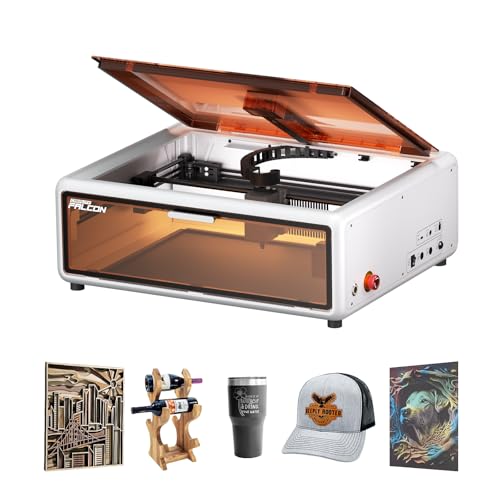
Creality Falcon A1 10W Enclosed Laser
Best for: Safe indoor engraving of wood and non-reflective metal
- Laser Power
- 80W (10,000mW listed in note)
- Working Area
- 381 x 305 mm
- Engraving Speed
- 600 mm/s
- Form Factor
- Fully Enclosed (Class 1)
- Compatible Material
- Wood, Metal
- Features
- Enclosure, Air Assist, Camera
View on Amazon: Creality Falcon A1 10W Enclosed Laser Affiliate link
The Creality Falcon A1 is a 10W enclosed laser engraver with a 381 x 305mm working area. It features a CoreXY motion system for speeds up to 600mm/s and includes an HD camera for precise alignment. The Class 1 enclosure filters radiation and blocks noise. You can use Falcon Design Space or LightBurn. It is ready to use out of the box with pre-set parameters for various materials.
Pros
- 10W laser power for engraving wood and metal
- CoreXY motion system reaches 600mm/s speed
- Class 1 enclosed design with auto-lock
- Pre-calibrated HD camera for full-frame view
- Compatible with LightBurn and LaserGRBL software
Cons
- Prohibited from engraving highly reflective materials
- Does not support cutting acrylic
- Incompatible with 500 x 500mm honeycomb panels
Good fit if
- You want a Class 1 enclosed machine for safe indoor use
- You need fast engraving speeds up to 600mm/s
- You prefer pre-set parameters to skip trial runs
Skip if
- You plan to cut acrylic sheets
- You need to engrave mirror-finished metals
- You require a 500 x 500mm honeycomb panel
Verdict: The Creality Falcon A1 10W Enclosed Laser fits users who need a safe, fast, and enclosed machine for non-reflective materials. It is not suitable for acrylic cutting or reflective metal engraving.
Specifications side by side
| Spec | Creality Falcon A1 10W Enclosed Laser |
|---|---|
| Laser Power | 80W (10,000mW listed in note) |
| Working Area | 381 x 305 mm |
| Engraving Speed | 600 mm/s |
| Form Factor | Fully Enclosed (Class 1) |
| Compatible Material | Wood, Metal |
| Features | Enclosure, Air Assist, Camera |
| Dimensions | 26 × 19.7 × 9.84 inches |
| Color | White |
| Model | Creality Falcon A1 |
Frequently asked questions
Can the Creality Falcon A1 engrave reflective metals?
No, it cannot. The product listing explicitly states that the machine is not suitable for engraving highly reflective metals. You should avoid materials like mirror-finished metals or mirrored acrylic. This laser is designed specifically for non-reflective surfaces to ensure safe and effective operation.
What is the working area size?
The working area measures 381 by 305mm. This provides sufficient space for small crafts and detailed projects. The external dimensions are 26 inches in length, 19.7 inches in width, and 9.84 inches in height, allowing it to fit on standard workbenches.
Does this machine include an enclosure?
Yes, it comes with an enclosed design. The enclosure filters 99% of laser radiation, enhancing safety for indoor use. It also features an air assist system and a camera, which help with precision and material handling during engraving tasks.
Can I cut acrylic with this laser?
No, you cannot cut acrylic. The listing notes that it cannot cut acrylic fully. While it handles thin wood well, acrylic cutting is not supported. You should use this machine for engraving wood and non-reflective metals only.
Is assembly required before use?
No complex assembly is needed. The listing states the unit is ready to use straight out of the box. It comes with pre-set optimal parameters for engraving, allowing you to begin projects immediately without trial and error or extensive setup.
What materials are compatible with this device?
It is compatible with wood and non-reflective metal. The 10W laser power handles most non-metal engraving tasks efficiently. You can use it for crafts and small projects involving these materials, but you must avoid highly reflective surfaces to prevent damage.