AlgoLaser Pixi 5W Laser Engraver Review: Specs, Pros and Cons
As an Amazon Associate we earn from qualifying purchases. Links on this page are affiliate links.
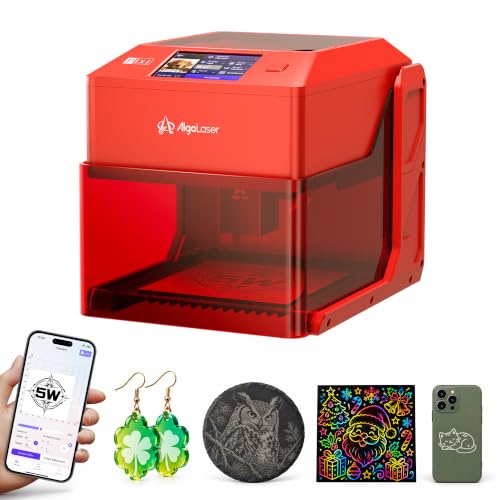
This algolaser pixi 5w laser engraver review focuses on a compact, standalone unit for hobbyists. It features a 5W laser and a 100 x 100 mm working area. The machine includes a 3.5-inch touchscreen, allowing you to operate it without a computer. You can type, draw, or select from over 300 built-in designs directly on the device. Its small footprint, measuring roughly 10.2 x 8.27 inches, fits easily on a counter. This setup simplifies the process for those who want to engrave wood, leather, or dark acrylic without complex software preparation.
What stands out
- 5W laser power for detailed engraving and light cutting
- 3.5-inch smart touchscreen with AlgoOS for standalone operation
- 100 x 100 mm working area for small projects
- Supports six height settings up to 134 mm for taller objects
- Compatible with LightBurn and LaserGRBL for advanced computer control
Who it fits
Good fit for
This unit suits DIY makers who value simplicity and portability. The standalone touchscreen operation is ideal for users who do not want to set up a dedicated computer station. Crafters who need to personalize items like bookmarks, ornaments, or gift tags will appreciate the quick setup. The ability to raise the base allows you to engrave on taller objects like wine glasses or small bottles. It is also good for those who want to switch between simple touchscreen tasks and more complex computer-controlled designs using LightBurn.
Who should skip it
You should look elsewhere if you need a large working area. The 100 x 100 mm space is too small for bigger projects or batch production. If you require deep cutting through thick materials, the 5W power may be insufficient for consistent results. Users who prefer a large, built-in display for detailed visual feedback might find the 3.5-inch screen limiting. Additionally, if you need industrial-grade durability for heavy daily use, this lightweight, compact unit is not designed for that workload.
Verdict: The AlgoLaser Pixi offers a straightforward, computer-free entry point into laser engraving for small-scale personalization. Its compact size and touchscreen interface make it a convenient tool for hobbyists and crafters.
AlgoLaser Pixi 5W Key Specs Explained
Laser Power: 5W
This power level handles detailed engraving on wood, leather, and dark acrylic. It also supports light cutting for small projects like ornaments. You get fine results for lettering and line art. Higher power units cut thicker materials faster. This spec suits hobbyists who prioritize precision over heavy-duty industrial cutting tasks.
Working Area: 100 x 100 mm
The engraving field measures 100 by 100 millimeters. This size fits standard gift tags, small coasters, and nameplates. You can position larger items outside the frame and use height settings to engrave them. This compact area keeps the machine portable while still handling most personalization needs for everyday crafters.
Software Compatibility: AlgoOS, LightBurn, LaserGRBL
AlgoOS runs on the built-in touchscreen for standalone operation without a computer. LightBurn and LaserGRBL allow you to prepare complex designs on a PC. This mix gives you flexibility for simple tasks on the go or advanced work at a desk. You are not locked into one software ecosystem for your projects.
Weight: 6.61 pounds
The unit weighs approximately 3 kilograms, making it easy to lift and move. You can place it on a counter or store it in a cabinet when not in use. This light weight supports portability for craft stalls or temporary setups. It does not require a heavy-duty workbench for stable operation.
Design and Build Quality
The listing describes the AlgoLaser Pixi 5W as a compact unit measuring 10.2 x 8.27 x 7.48 inches. It weighs 6.61 pounds. This small footprint allows you to place it on a counter or cabinet top. You can move it easily for weekend projects or craft stalls. The machine arrives assembled, so you do not need to build a frame before starting. You can also remove the base to engrave taller objects up to 134 mm on a flat surface. The working area remains 100 x 100 mm regardless of this adjustment.
Controls are handled by a 3.5-inch smart touchscreen. You type, draw, and engrave directly on the device without a computer. AlgoOS lets you use AlgoType for text and AlgoSketch for motifs. You access 300+ built-in designs for inspiration. The listing notes this standalone operation fits users who want to skip file preparation on a PC. You can drag designs into position and check previews instantly.
The finish comes in Red 5 or Red 10 options. The laser spot size is 0.03 x 0.07 mm. This supports fine lettering and line art. You can combine detailed engraving with light cutting on wood, leather, and dark acrylic. The compact design means you do not need a dedicated workbench. You simply bring it out when needed. The layout prioritizes ease of use for DIY makers who value space efficiency. You get a portable tool that fits small environments while offering basic cutting capabilities.
Setup And Everyday Use
The listing states that the AlgoLaser Pixi arrives fully assembled. You do not need to build a frame before starting your first project. This setup process is straightforward and saves time. You can place the unit on a counter or cabinet top immediately. The compact dimensions allow for easy storage or transport to craft stalls.
For daily operation, the machine relies on its 3.5-inch touchscreen. You can use AlgoOS to type text, draw motifs, or select from over 300 built-in designs. The interface includes AlgoType for letters and numbers, and AlgoSketch for drawing. You can drag designs into position and preview them directly on the screen. This allows you to engrave bookmarks or tags without preparing files on a computer.
You can also remove the base to engrave taller objects up to 134 mm high. The 100 x 100 mm working area remains constant, but you can position the machine on larger surfaces. For more complex artwork, the specs note compatibility with LightBurn and LaserGRBL software. This lets you prepare detailed files on a PC and send them to the device. The 5W laser with a 0.03 x 0.07 mm spot size supports fine lettering and line art. You can combine cutting and engraving on wood, leather, and dark acrylic. This flexibility suits hobbyists who want to personalize items or create small ornaments without a dedicated workbench.
Before you buy this unit
You should verify that your workspace has adequate ventilation. The 5W laser produces fumes when engraving wood or leather. Keep the 100 x 100 mm working area clear of obstructions. If you plan to use LightBurn or LaserGRBL, ensure your computer meets the software requirements. You may need additional materials like dark acrylic or thick leather for light cutting tasks. The unit arrives assembled, so you can start quickly. Regularly clean the lens to maintain the 0.03 x 0.07 mm spot size. Compare this model to other options in Laser Engravers & Cutters based on your need for standalone operation. This unit suits those who want simplicity without a dedicated PC. Check if you need a larger engraving area for bigger projects. The height settings allow for taller objects, but the footprint remains small. Consider if the touchscreen interface meets your workflow preferences.
Check before you buy
- Verify ventilation for fume removal during wood or leather use
- Check computer specs if you plan to use LightBurn
- Ensure your workspace has a stable, flat surface
- Confirm you need a 100 x 100 mm working area
The product at a glance
AlgoLaser Pixi 5W Compact Laser Engraver
Best for: small DIY projects and portable crafting
- Laser Power
- 5W
- Working Area
- 100 x 100 mm
- Software Compatibility
- AlgoOS, LightBurn, LaserGRBL
- Compatible Material
- Wood, Acrylic, Leather
- Features
- Touchscreen
- Target Audience
- DIY, Beginners, Small Business
View on Amazon: AlgoLaser Pixi 5W Compact Laser Engraver Affiliate link
The AlgoLaser Pixi 5W is a compact engraver with a 100 x 100 mm working area and 5W laser power. It features a 3.5-inch touchscreen for standalone operation, allowing you to type, draw, and engrave without a computer. The unit includes LightBurn and LaserGRBL compatibility for more complex projects. At 6.61 pounds, it is portable enough for craft stalls. This model suits hobbyists who want a small footprint for wood, leather, and acrylic projects.
Pros
- 5W laser power for engraving and light cutting
- 3.5-inch touchscreen for standalone use
- Compatible with LightBurn and LaserGRBL
- Assembled on arrival with no frame to build
Cons
- Small 100 x 100 mm working area
- Limited to 5W laser power
- Only two color options available
Good fit if
- You need a compact machine for small blanks
- You want to engrave without connecting a computer
- You require a portable unit for craft fairs
Skip if
- You need to engrave large surfaces
- You require high-power cutting for thick materials
- You prefer a larger working area
Verdict: AlgoLaser Pixi 5W Touchscreen Engraver is a practical choice for hobbyists who value portability and standalone touchscreen operation for small, detailed projects. It fits users who need a compact tool for personalizing ornaments and tags rather than large-scale production.
Specifications side by side
| Spec | AlgoLaser Pixi 5W Compact Laser Engraver |
|---|---|
| Laser Power | 5W |
| Working Area | 100 x 100 mm |
| Software Compatibility | AlgoOS, LightBurn, LaserGRBL |
| Compatible Material | Wood, Acrylic, Leather |
| Features | Touchscreen |
| Target Audience | DIY, Beginners, Small Business |
| Form Factor | Desktop |
| Dimensions | 10.2 × 8.27 × 7.48 inches |
| Weight | 6.61 pounds |
| Color | Red 5 |
| Model | Pixi red |
Frequently asked questions
Can the AlgoLaser Pixi 5W engrave without a computer?
Yes, it operates standalone. The unit features a 3.5-inch touchscreen interface. You can type text and select designs directly on the device. This allows you to work without connecting to a PC or laptop. It is ideal for quick, simple projects where you do not want to set up software.
What is the maximum size of material the Pixi can handle?
The working area is 100 x 100 mm. This limits you to small items like tags, ornaments, and coasters. The compact footprint measures 10.2 x 8.27 x 7.48 inches. You cannot engrave large boards or sheets. It is designed specifically for detailed work on small surfaces.
Is the AlgoLaser Pixi 5W portable?
It is designed for portability. The unit weighs only 6.61 pounds. You can easily move it between counters or store it in a cabinet. Its small dimensions fit into tight spaces. It is not meant for heavy industrial use but serves well for hobbyists who need a mobile tool.
What materials can this 5W laser engrave?
The 5W power level handles detailed engraving on wood, leather, and dark acrylic. You can also perform light cutting on thin materials. It supports fine results for lettering and line art. Thicker materials or hard metals are not suitable for this specific power output.
Does the AlgoLaser Pixi come assembled?
Yes, the listing states it arrives fully assembled. You do not need to build a frame before starting. This saves setup time. You can place the unit on a surface and begin working immediately. It is ready for use right out of the box.
Who is the AlgoLaser Pixi best for?
It is best for hobbyists and DIYers. You should choose this if you value portability and standalone operation. It fits users who need a compact tool for personalizing small items. It is not ideal for large-scale production or industrial environments due to its small working area.