AlgoLaser Beginner Laser Engraver Review: Specs, Pros and Cons
As an Amazon Associate we earn from qualifying purchases. Links on this page are affiliate links.
This algolaser beginner laser engraver review covers the AlgoLaser Pixi, a compact, enclosed machine designed for light-duty personalization. It features a 3W laser module for fine detail work on materials like wood, leather, and paper. The unit stands out with a 3.5-inch smart touchscreen that allows standalone operation without a computer. You can also connect via WiFi, USB-C, or an app for more complex designs. This setup targets hobbyists and educators who need a safe, Class 1 enclosed system for home or classroom use. The integrated AlgoOS system simplifies the workflow for new users.
What stands out
- 3W laser module for fine detail engraving on paper, wood, and leather
- 3.5-inch smart touchscreen with AlgoOS for standalone operation
- Class 1 fully enclosed safety system with auto-pause lid
- Connectivity options include WiFi, USB-C, and mobile app
Who it fits
Good fit for
This machine suits beginners, DIY creators, and educators who want a simple, safe engraving solution. The enclosed Class 1 design makes it ideal for home studios or classrooms where safety is a priority. You will appreciate the standalone touchscreen if you want to create quick projects without setting up a computer. It is also well-suited for personalizing gifts, crafts, and classroom materials using the included templates and guided tutorials.
Who should skip it
You should look at another option if you need high-power engraving or cutting capabilities. The 3W laser is designed for light-duty surface engraving and may struggle with thick materials or deep cuts. If you require extensive connectivity beyond WiFi and USB-C, this model may feel limited. Additionally, rotary accessories for cylindrical items are sold separately, so factor that into your setup if you plan to engrave round objects.
Verdict: The AlgoLaser Pixi is a safe, user-friendly choice for beginners who prioritize ease of use and compact design. It delivers fine detail engraving for light-duty projects without requiring a computer.
Key specs explained for Pixi
Laser Power: 3W
This power level is designed for light-duty engraving and fine detail work. You can produce clean lines, small text, and intricate patterns on materials like paper, cardboard, wood, leather, felt, cork, bamboo, and fabric. It is not suitable for deep cutting or heavy industrial use. Adjustable power and speed settings allow you to make multiple light passes for more controlled results. This makes it ideal for personalization tasks rather than rapid production or thick material removal.
Form Factor: Fully Enclosed (Class 1)
The machine is fully enclosed with a Class 1 safety rating, meaning it is safe for home, classroom, and workshop operation without requiring protective eyewear. It includes an auto-pause safety lid, password lock, real-time alerts, and a built-in rear exhaust fan. While the enclosure contains the laser beam, external ventilation is still recommended when engraving materials that produce smoke or odors, such as wood, leather, or coated surfaces. This design prioritizes user safety and ease of use.
Software Compatibility: AlgoOS, App
You do not need a computer to operate this device. You can create designs directly on the 3.5-inch smart touchscreen using the AlgoOS system. Alternatively, you can upload designs through the companion app via WiFi or USB-C. The system supports common file formats including SVG, PNG, JPG, and PDF. Built-in drawing tools, text editing, guided tutorials, presets, and over 160 templates make it accessible for beginners, educators, and hobbyists who want a streamlined, standalone workflow.
Target Audience: Beginners
This unit is specifically designed for users new to laser engraving. It eliminates the complexity of traditional software by offering a touchscreen interface and guided tutorials. The enclosed design and safety features make it suitable for home studios, classrooms, and craft rooms. It is ideal for DIY creators and educators who want to personalize items like wooden tags, keychains, labels, and greeting cards without a steep learning curve or extensive technical knowledge.
Design and build of Pixi
The listing describes the AlgoLaser Pixi as a fully enclosed Class 1 machine. This design choice prioritizes safety by containing the laser beam and any resulting fumes. You can operate it in home studios, classrooms, or small workshops without the same safety concerns as open-frame units. The enclosure also features an auto-pause safety lid and a password lock. A built-in rear exhaust fan is included to help manage smoke, though external ventilation is still recommended for materials like wood or leather.
According to the listing, the unit is compact and portable. It is designed to fit easily into tight spaces such as craft rooms or desks. The control layout centers on a 3.5-inch smart touchscreen. This allows you to create and adjust designs directly on the device without needing a computer. You can use the AlgoOS system for standalone operation or connect via WiFi, USB-C, or an app. This flexibility supports both quick offline projects and more complex workflows involving Windows or Mac computers.
The finish and materials are not detailed in the provided data, so you should check the physical product for surface texture and durability. The red color is listed as a standard option. The overall build suggests a focus on ease of use for beginners and hobbyists. The enclosed structure and simple interface make it suitable for light-duty engraving tasks. You can use it for personalizing items like keychains, tags, and greeting cards. The design supports various file formats, including SVG and PNG, which streamlines the process of importing your own designs.
Setup and everyday use
You do not need a computer to operate this machine. The 3.5-inch smart touchscreen runs AlgoOS, allowing you to create designs directly on the device. This standalone capability simplifies setup for beginners who want to avoid complex software installations. You can also upload files via WiFi, USB-C, or a companion app. The system supports common formats like SVG, PNG, JPG, and PDF, which streamlines the workflow for importing existing artwork. Daily use involves adjusting power and speed settings to control engraving depth and precision. The enclosed Class 1 design includes an auto-pause safety lid that stops the laser when opened. A password lock and real-time alerts add layers of security for home or classroom environments. A built-in rear exhaust fan helps manage smoke, though external ventilation is recommended for materials like wood or leather. The compact footprint fits easily in small workspaces, craft rooms, or classrooms. You can personalize items such as wooden tags, leather goods, paper crafts, and keychains without needing a dedicated studio. Rotary accessories are available for cylindrical objects, but they are sold separately. The interface includes built-in drawing tools, text editing features, and over 160 templates. Guided tutorials and presets help new users understand the process quickly. You can switch between offline touchscreen mode and connected device mode depending on your project needs. This flexibility makes the Pixi suitable for educators, hobbyists, and DIY creators who value simplicity and direct control over their engraving tasks.
Before you buy Pixi
You should verify material compatibility before starting. This 3W laser handles paper, cardboard, wood, leather, felt, cork, bamboo, and fabric. It does not cut thick metals or acrylics. Check that your designs fit the working area. The listing notes rotary accessories for cylindrical items are sold separately. You will need external ventilation for wood, leather, or coated materials to manage smoke and odors. The machine runs on AlgoOS via the 3.5-inch touchscreen, but also supports SVG, PNG, JPG, and PDF files through WiFi, USB-C, or the App. Keep the workspace clean to maintain optical clarity. This compact, enclosed unit suits beginners, educators, and hobbyists who want a standalone tool. It fits alongside larger, open-frame cutters in the Laser Engravers & Cutters category by offering a safer, simpler entry point for light-duty personalization.
Check before you buy
- Confirm your materials are compatible with 3W engraving.
- Set up external ventilation for wood or leather.
- Check if you need the separate rotary accessory.
- Ensure your workspace fits the compact enclosed design.
- Verify file formats like SVG or PNG work with your workflow.
The product at a glance
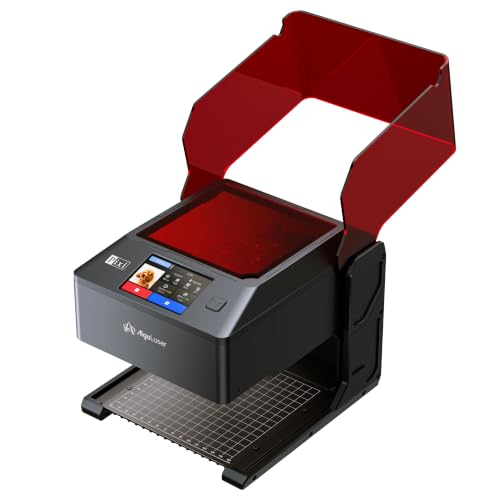
AlgoLaser Pixi 3W Enclosed Laser Engraver
Best for: Beginners seeking safe, standalone touchscreen operation
- Laser Power
- 3W
- Software Compatibility
- AlgoOS
- Form Factor
- Fully Enclosed (Class 1)
- Features
- Touchscreen
- Target Audience
- Beginners
- Dimensions
- 1 × 1 × 1 inches
View on Amazon: AlgoLaser Pixi 3W Enclosed Laser Engraver Affiliate link
The AlgoLaser Pixi is a Class 1 enclosed laser engraver with a 3W module. It features a 3.5-inch touchscreen running AlgoOS, allowing standalone operation without a computer. You can also connect via WiFi, USB-C, or an app. The compact design suits home studios and classrooms. It handles light-duty engraving on paper, wood, leather, and fabric. This system is built for beginners who want a safe, enclosed workflow with guided tutorials and presets.
Pros
- Class 1 fully enclosed safety system with auto-pause lid
- 3.5-inch touchscreen for standalone operation without a computer
- 3W laser module for fine detail engraving
- Supports SVG, PNG, JPG, and PDF file formats
Cons
- 3W laser power limits depth and speed on thick materials
- Rotary accessories for cylindrical items are sold separately
- External ventilation is recommended for smoke and odors
Good fit if
- You want a safe, enclosed machine for home or classroom use
- You prefer operating directly from a touchscreen without a computer
- You are a beginner needing guided tutorials and presets
Skip if
- You need high-speed cutting of thick wood or acrylic
- You require a large work area for big projects
- You want rotary engraving included in the base price
Verdict: AlgoLaser Pixi 3W Beginner Engraver is a safe, standalone option for beginners who value enclosed safety and touchscreen convenience over raw power. It fits users who prioritize ease of use and compact design for light-duty personalization tasks.
Specifications side by side
| Spec | AlgoLaser Pixi 3W Enclosed Laser Engraver |
|---|---|
| Laser Power | 3W |
| Software Compatibility | AlgoOS |
| Form Factor | Fully Enclosed (Class 1) |
| Features | Touchscreen |
| Target Audience | Beginners |
| Dimensions | 1 × 1 × 1 inches |
| Color | BLACK-3W |
| Model | PIXI |
Frequently asked questions
Is the AlgoLaser Pixi safe for home use?
Yes, the Pixi is a Class 1 enclosed laser engraver. The fully enclosed design contains the laser beam and fumes, making it suitable for home studios or classrooms. This safety feature allows you to operate the machine without requiring a dedicated ventilation setup or separate exhaust system.
Can I use the Pixi without a computer?
Yes, the Pixi operates as a standalone device. It features a 3.5-inch smart touchscreen running AlgoOS, which lets you create and send designs directly to the machine. You do not need to install complex software on a PC or Mac to start engraving your projects.
What materials can the 3W laser engrave?
The 3W laser module handles light-duty materials effectively. You can engrave paper, cardboard, wood, leather, felt, cork, bamboo, and fabric. This power level is ideal for fine detail work, small text, and intricate patterns on these non-metallic surfaces.
Does the Pixi cut thick materials?
No, the 3W power is not designed for cutting thick items. It is optimized for engraving fine details on thin materials. You should not expect it to cut through thick metals or heavy acrylics. It is best suited for surface personalization tasks.
Is the AlgoLaser Pixi good for beginners?
Yes, it is specifically targeted at beginners. The enclosed safety design and touchscreen interface simplify operation. You get a standalone experience that avoids complex software installations, making it a convenient choice for users who prioritize ease of use and compact design for light-duty tasks.
What is the working area size?
The listing specifies dimensions of 1 inch in width, height, and length. These measurements define the physical footprint or internal working space constraints. You should verify if this area accommodates your specific project sizes before purchasing, as it is quite compact.