ACMER or Creality? Laser Engravers Compared in 2026
As an Amazon Associate we earn from qualifying purchases. Links on this page are affiliate links.
The ACMER vs creality laser engraver debate centers on portability versus power. Both machines offer diode laser technology and support LightBurn and LaserGRBL software for flexible workflow management. The ACMER S1 prioritizes a compact, preassembled design for beginners who need a small footprint. In contrast, the Creality Falcon emphasizes higher output power and a larger working area for more ambitious projects. You should evaluate the specs below to decide which fits your workspace and material needs.
Key differences
| Aspect | ACMER S1 6W Portable Laser Engraver | Creality Falcon 10W Laser Engraver |
|---|---|---|
| Laser Output Power | 6000mW | 10W |
| Working Area | 130x130mm | 17" x 16" |
| Positioning Accuracy | 0.01mm | 0.007 inches |
| Assembly Required | 99% preassembled | 10-20 minutes |
| Data Transfer | not listed | Wi-Fi, USB, SD card |
Which one should you choose?
Choose ACMER S1 6W Portable Laser Engraver if
- You need a compact engraver that fits on a small desk.
- You want a machine that is 99% preassembled for immediate use.
- You primarily work with thin materials like wood and acrylic.
Choose Creality Falcon 10W Laser Engraver if
- You require higher cutting power for thicker basswood or black acrylic.
- You need a larger working area for bigger projects.
- You prefer transferring files via Wi-Fi or SD card.
Verdict: The ACMER S1 is the better choice for hobbyists who value a small footprint and quick setup. The Creality Falcon suits users who need more power and a larger canvas for diverse materials. Your decision depends on whether you prioritize compact convenience or raw cutting capability.
ACMER vs Creality Laser Specs
laser power
The ACMER S1 delivers 6000mW of laser power, which translates to a 6W output. This is sufficient for detailed engraving and cutting thin materials like plywood and acrylic. The Creality Falcon offers a significantly higher 10W output power. It has a machine power of 72W, allowing it to cut through 5mm basswood or 3mm black acrylic in a single pass. If you need to cut thicker materials quickly, the Creality Falcon provides more raw power. The ACMER S1 is better suited for finer, slower work on thinner substrates. Higher wattage generally means faster cutting speeds on denser woods.
working area
Size matters when you plan to engrave larger projects. The ACMER S1 features a compact working area of 130x130mm. This small footprint makes it ideal for small crafts, jewelry, or detailed personalization tasks. The Creality Falcon has a much larger working area, listed as 17 inches by 16 inches. This substantial space allows you to engrave larger boards, multiple items at once, or bigger artistic pieces. If you frequently work with large sheets of wood or acrylic, the Creality Falcon is the clear choice. The ACMER S1 is limited to small-scale projects due to its compact design.
portability
Transport and storage are key factors for mobile users. The ACMER S1 is built from industrial-grade aluminum alloy and weighs only 2kg. Its compact machine size of 250x250x162mm makes it easy to carry and store in small spaces. It arrives 99% preassembled, requiring just one minute to install the laser head. The Creality Falcon is heavier, weighing 7.05 pounds, and has larger dimensions of 24.9 inches in width. While it is robust, it is less portable than the ACMER S1. If you need to move your engraver between locations or keep it in a small home office, the ACMER S1 is more convenient.
precision
Accuracy determines the quality of your engravings. The ACMER S1 boasts a repeatable positioning accuracy of 0.01mm. It uses a 2mm focal length and a 455±5nm wavelength for ultra-fine detail. The Creality Falcon highlights a super fine spot focus of 0.06x0.06mm. Its repositioning accuracy is less than 0.007 inches. Both machines offer high precision suitable for detailed work. The ACMER S1 focuses on tight mechanical repeatability, while the Creality Falcon emphasizes a small focal spot size. For most users, both will produce sharp, clear results. This round is a tie as both excel in their respective precision metrics.
software
Both machines support popular third-party software like LightBurn and LaserGRBL, ensuring compatibility with Windows, macOS, and Linux. The ACMER S1 includes its own ACMER Studio software with built-in AI tools to turn text or photos into designs. This adds a layer of ease for beginners who want quick results. The Creality Falcon supports data transfer via Wi-Fi, USB, and SD cards, offering flexible connectivity options. It also features a one-button management system for ease of use. While both offer robust software ecosystems, the ACMER S1 provides unique AI design features, whereas the Creality Falcon offers versatile file transfer methods.
Which ACMER or Creality fits your needs
Beginners needing compact, preassembled setup
The ACMER S1 arrives 99% preassembled with a one-minute laser head installation. Its compact 130x130mm working area fits small spaces. The included ACMER Studio software features AI design tools for easy text-to-image conversion. You can also use LightBurn or LaserGRBL. This machine suits those wanting a lightweight, portable unit that requires minimal technical knowledge to start creating immediately.
Users cutting thicker wood and acrylic
The Creality Falcon provides 10W output power, enabling it to cut 5mm basswood or 3mm black acrylic in a single pass. Its larger 17x16 inch working area handles bigger projects. The machine features a steel shaft wheel guide rail for precise movement. If you need to slice through thicker materials or require a larger workspace for DIY crafts, this higher power output is essential for your workflow.
Those requiring large format engraving
The Creality Falcon offers a spacious 17x16 inch working area, significantly larger than the ACMER S1's 130x130mm zone. This allows you to engrave or cut larger sheets of wood, acrylic, or leather without resizing designs. The 0.06mm high-precision laser spot ensures fine detail even on large surfaces. If your projects exceed the small footprint of portable units, this larger format is the practical choice.
The products compared
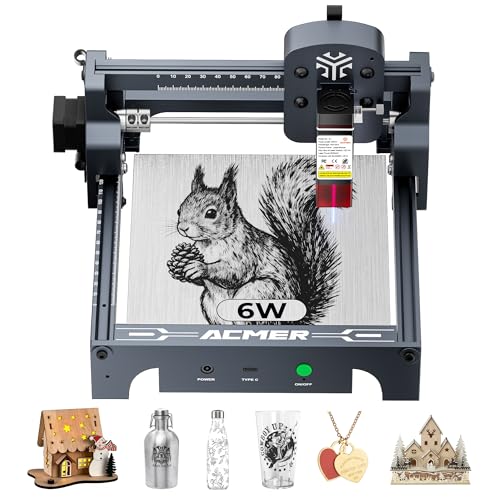
ACMER S1 6W Portable Laser Engraver
Best for: Small detailed engraving and portable hobby use
- Laser Type
- Diode
- Laser Power
- 6000mW
- Working Area
- 130 x 130mm
- Engraving Speed
- 10,000mm/min
- Software Compatibility
- ACMER studio, LightBurn, LaserGRBL
- Compatible Material
- Wood, Acrylic, Silver
View on Amazon: ACMER S1 6W Portable Laser Engraver Affiliate link
The ACMER S1 is a compact diode laser engraver with 6000mW output power and a 130x130mm working area. It reaches engraving speeds up to 10,000mm/min with 0.01mm positioning accuracy. The unit arrives 99% preassembled, requiring only one-minute laser head installation. It supports ACMER Studio, LightBurn, and LaserGRBL software. This machine suits beginners and hobbyists who need a portable, lightweight device for detailed engraving on wood and acrylic.
Pros
- 6000mW diode laser power for cutting thin materials
- 99% preassembled for quick one-minute setup
- Lightweight 2kg aluminum alloy construction
- Supports LightBurn and LaserGRBL software
Cons
- Small 130x130mm working area limits project size
- No mention of WiFi or wireless connectivity
- No built-in air assist system listed
Good fit if
- You need a lightweight machine for small craft projects
- You want a preassembled unit for immediate use
- You prefer desktop engraving with LightBurn software
Skip if
- You require a large working area for big items
- You need high-speed industrial production capabilities
- You want a machine with wireless connectivity
Verdict: The ACMER S1 6W Diode Laser Engraver fits hobbyists who prioritize portability and quick setup for small detailed projects. It is not suitable for large-scale production or big workpieces.

Creality Falcon 10W Laser Engraver
Best for: Mid-depth cutting and wireless DIY engraving
- Laser Power
- 10W
- Working Area
- 17" x 16"
- Engraving Speed
- Up to 10000mm/m
- Software Compatibility
- LightBurn, LaserGRBL
- Cutting Capacity
- 5mm basswood, 3mm black acrylic
- Compatible Material
- Wood, Metal, Acrylic, Leather, Paper
View on Amazon: Creality Falcon 10W Laser Engraver Affiliate link
This Creality desktop laser delivers 10W of optical output across a 17-by-16-inch work area. It reaches speeds up to 10000 mm/min with a 0.06 by 0.06 mm focal spot, cutting 5 mm basswood in a single pass. You can connect through Wi-Fi, USB, or an SD card, making it a capable tool for your DIY cutting projects.
Pros
- 10W optical output cuts 5mm basswood and 3mm black acrylic in one pass
- Spacious 17 x 16-inch working area
- Fine 0.06 x 0.06mm spot size for detailed lines
- Flexible connectivity via Wi-Fi, USB cable, and SD card
Cons
- Basic configuration lacks an air assist pump and rotary roller
- Acrylic cutting is specified only for dark or black material up to 3mm
Good fit if
- You need 10W cutting capability to slice 5mm wood in one pass.
- You want standalone operation using Wi-Fi or an SD card.
- You require a wide 17 x 16-inch working envelope.
Skip if
- You need bundled air assist or rotary hardware in the box.
- You routinely cut wood thicker than 5mm.
Verdict: Creality 10W Laser Engraver fits makers needing single-pass cutting on 5mm boards along with wireless and offline SD card control.
Specifications side by side
| Spec | ACMER S1 6W Portable Laser Engraver | Creality Falcon 10W Laser Engraver |
|---|---|---|
| Laser Type | Diode | not stated |
| Laser Power | 6000mW | 10W |
| Working Area | 130 x 130mm | 17" x 16" |
| Engraving Speed | 10,000mm/min | Up to 10000mm/m |
| Software Compatibility | ACMER studio, LightBurn, LaserGRBL | LightBurn, LaserGRBL |
| Cutting Capacity | not stated | 5mm basswood, 3mm black acrylic |
| Compatible Material | Wood, Acrylic, Silver | Wood, Metal, Acrylic, Leather, Paper |
| Target Audience | DIY | not stated |
| Form Factor | Desktop | Desktop |
| Dimensions | not stated | 22.4 × 24.9 × 7.79 inches |
| Weight | not stated | 7.05 pounds |
| Size | 6000mW | Falcon-10W Basic |
| Color | Silver, White-6 | Falcon-10W Basic |
| Model | not stated | CR-Laser Falcon 10W |
Frequently asked questions
Can the ACMER S1 engrave metal?
No, the ACMER S1 cannot engrave bare metal. Its compatible materials are listed as wood, acrylic, and silver. You must use a coating or specific metal marking paste for non-ferrous metals. It is designed for detailed engraving on organic and plastic materials rather than direct metal marking.
What is the working area size of the Creality Falcon?
The Creality Falcon has a working area defined by its frame dimensions of 24.9 inches in width and 22.4 inches in length. The height clearance is 7.79 inches. This provides a large workspace suitable for mid-depth cutting and larger projects compared to smaller desktop units.
Is the Creality Falcon heavy to move?
The Creality Falcon weighs 7.05 pounds. This weight makes it stable during operation but requires a sturdy surface. It is not designed for frequent portability like the ACMER S1. You should place it on a dedicated workbench for best results and safety during extended use sessions.
Does the ACMER S1 support wireless connectivity?
The provided data does not list wireless features for the ACMER S1. It is described as a portable unit with quick setup. You likely need to use wired connections or local software for operation. Check the manual for specific connection methods, as wireless capability is not mentioned in its specs.
Can the Creality Falcon cut 5mm wood in one pass?
Yes, the Creality Falcon is suitable for single-pass cutting on 5mm boards. Its 10W laser power provides the necessary energy for this task. This makes it ideal for makers who need to cut through thicker materials quickly without multiple passes, enhancing efficiency for DIY projects.
What materials can the Creality Falcon process?
The Creality Falcon supports wood, metal, acrylic, leather, glass, and paper. This wide compatibility allows for diverse projects. You can engrave or cut various organic and synthetic materials. Ensure you follow safety guidelines for each material type, especially when working with plastics or metals that may emit fumes.