ACMER vs Carverall Laser Engravers: Which Brand Fits You?
As an Amazon Associate we earn from qualifying purchases. Links on this page are affiliate links.
When comparing ACMER vs carverall laser engraver options, you face two distinct 6W diode machines. Both offer AI-assisted design software and compatibility with LightBurn. The main difference lies in the workspace. ACMER provides a compact 130x130mm area, while Carverall offers a spacious A4-sized bed. This choice affects what projects you can fit on the table.
Key differences
| Aspect | ACMER S1 6W Portable Laser Engraver | Carverall 6W Desktop Laser Engraver |
|---|---|---|
| Laser Power | 6000mW | 6W (6000mW) |
| Working Area | 130x130mm | 11.8×7.9 inches (A4) |
| Engraving Speed | up to 10,000mm/min | 15,000mm/min |
| Form Factor | not listed | Class 1 |
| Cutting Capacity | not listed | 8mm plywood, 5mm black acrylic |
Which one should you choose?
Choose ACMER S1 6W Portable Laser Engraver if
- You need a lightweight, portable unit for small, detailed crafts.
- You prefer a machine that arrives 99% preassembled for quick start.
- You want a compact footprint that fits easily in tight spaces.
Choose Carverall 6W Desktop Laser Engraver if
- You require a larger A4 working area for bigger projects.
- You want faster engraving speeds up to 15,000mm/min.
- You need Class 1 safety rating and mobile app control.
Verdict: Choose the ACMER S1 if you prioritize portability and rapid setup for small-scale projects. Pick the Carverall K15 Pro if you need a larger workspace, faster speeds, and enhanced safety features for more extensive work.
ACMER vs Carverall Key Specs
Working Area
The workspace size defines what you can fit under the lens. The ACMER S1 offers a 130x130mm area. This compact footprint suits small items like jewelry tags or detailed coasters. The Carverall K15 Pro provides a significantly larger 11.8x7.9-inch bed, which equals an A4 sheet. This generous space handles wooden signs, larger leather projects, and multiple small items at once. You can also use heightening columns on the Carverall for taller objects like gift boxes. If you need to engrave wide designs without splitting files, the Carverall gives you more room to work.
Engraving Speed
Speed matters when you have multiple orders or want to finish jobs quickly. The ACMER S1 reaches up to 10,000mm/min. This is a solid pace for standard engraving tasks and detailed work. The Carverall K15 Pro pushes further, reaching 15,000mm/min. This 50% increase allows you to slash job times significantly. Faster movement means you can process more items in less time. Both machines maintain high precision, but the Carverall’s higher speed gives you better throughput for daily projects or small business workflows.
Cutting Capacity
Cutting through thicker materials requires power and time. The Carverall K15 Pro explicitly handles 8mm plywood and 5mm black acrylic with multiple passes. This data shows you can cut thicker wood and specific acrylic types directly. The ACMER S1 lists cutting thin plywood, MDF, and acrylic but does not provide specific thickness limits in the specs. You must infer its limits from the 6000mW power. If you regularly cut thicker wood or specific acrylics, the Carverall provides clear performance benchmarks for those materials.
Portability
You might move your machine between rooms or take it to markets. The ACMER S1 weighs just 2kg. Its compact dimensions of 250x250x162mm make it easy to carry and store. The Carverall K15 Pro is a desktop unit designed to fit under a desk or in a cabinet. It includes heightening columns and a larger bed, which adds bulk and weight. While the Carverall is stable for daily use, the ACMER S1 is clearly the lighter, more portable option for users who need to transport their engraver frequently.
Software Options
Both brands provide free software with AI design tools. The ACMER S1 uses ACMER Studio and supports LightBurn and LaserGRBL. It works with NC, DXF, BMP, JPG, and PNG files. The Carverall K15 Pro uses CutLabX, also compatible with LightBurn and LaserGRBL. A key difference is the Carverall’s mobile app control and TF card support for offline jobs. You can control it via phone or load files without a PC. The ACMER relies on computer connection. If you want mobile control or offline printing, the Carverall offers more flexibility.
Form Factor
Safety and enclosure type affect where you can place the machine. The Carverall K15 Pro is listed as Class 1. This usually means it has an enclosed design that contains laser light, allowing safer operation in shared spaces. The ACMER S1 is listed as Class 4. This high-power classification requires strict safety precautions, often necessitating an enclosure or dedicated workspace to protect your eyes and skin. If you want a machine that fits safely on a desk without extra housing, the Carverall’s Class 1 rating is a significant advantage.
Which laser engraver fits your needs?
Creators needing large A4 workspace
The Carverall K15 Pro features a spacious 11.8x7.9-inch A4 working area. This allows you to engrave larger items like wooden signs or skateboards without repositioning. The 15,000mm/min speed helps you complete these bigger jobs faster than the smaller ACMER model.
Users marking bare metals
The Carverall system supports an optional 1W IR head for bare metal marking. This expands your capabilities beyond wood and acrylic. The ACMER S1 data does not mention this upgrade path. If you need to mark stainless steel or aluminum, Carverall offers this flexibility.
Portability and compact storage seekers
The ACMER S1 is a lightweight 2kg unit with a 130x130mm footprint. Its small size makes it easy to carry and store in tight spaces. If you travel or have limited desk space, this compact, preassembled design fits your workflow better than the larger desktop Carverall.
The products compared
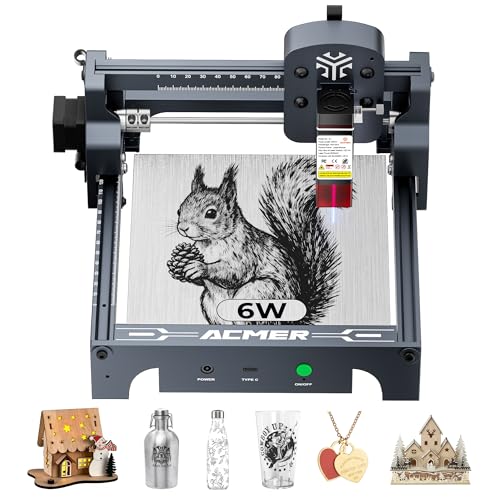
ACMER S1 6W Portable Laser Engraver
Best for: small detailed engraving projects
- Laser Type
- Diode
- Laser Power
- 6000mW
- Working Area
- 130 x 130mm
- Engraving Speed
- 10,000mm/min
- Software Compatibility
- ACMER studio, LightBurn, LaserGRBL
- Compatible Material
- Wood, Acrylic, Silver
View on Amazon: ACMER S1 6W Portable Laser Engraver Affiliate link
The ACMER S1 is a 6000mW diode laser engraver with a 130x130mm working area. It reaches 10,000mm/min engraving speed and offers 0.01mm positioning accuracy. The machine arrives 99% preassembled for quick setup. It supports ACMER Studio, LightBurn, and LaserGRBL software. This compact unit suits beginners and hobbyists who need reliable performance for detailed wood and acrylic projects without complex installation.
Pros
- 6000mW diode laser power for cutting thin materials
- 10,000mm/min engraving speed for efficient workflow
- 0.01mm repeatable positioning accuracy for fine detail
- 99% preassembled with 1-minute laser head installation
- Compatible with LightBurn and LaserGRBL software
Cons
- Small 130x130mm working area limits large projects
- No mention of mobile app control in specifications
- Class 4 laser requires strict safety precautions
Good fit if
- You need a compact machine for small desk projects
- You want a preassembled unit to start quickly
- You prefer using LightBurn or LaserGRBL software
Skip if
- You require a large working area for big items
- You need mobile app control for remote operation
- You want to engrave thick hardwood or metal
Verdict: ACMER S1 6W Laser Engraver fits hobbyists who need a small, fast, and easy-to-setup machine for detailed work on wood and acrylic.

Carverall 6W Desktop Laser Engraver
Best for: Beginners needing compact A4 engraving
- Laser Type
- Diode
- Laser Power
- 6W
- Working Area
- A4
- Engraving Speed
- 15,000 mm/min
- Software Compatibility
- CutLabX, LightBurn, LaserGRBL
- Form Factor
- Class 1
View on Amazon: Carverall 6W Desktop Laser Engraver Affiliate link
The Carverall K15 Pro is a Class 1 diode laser with 6W power. It offers a 11.8×7.9-inch A4 work area and engraves at 15,000mm/min. You can cut 8mm plywood and 5mm black acrylic. It supports CutLabX, LightBurn, and LaserGRBL. This compact machine suits beginners who want app control and simple setup without bulky wiring.
Pros
- 6W diode laser handles 8mm plywood and 5mm black acrylic
- 11.8×7.9-inch A4 work area fits under desks
- Engraving speed reaches 15,000mm/min
- Compatible with LightBurn and LaserGRBL software
- One-touch focus pin eliminates guesswork
Cons
- 6W power limits depth compared to higher wattage models
- A4 work area is smaller than 16x16 inch options
- Requires separate IR head for bare metal marking
Good fit if
- You need a compact machine that fits under a desk
- You want app control via CutLabX for easy design
- You are a beginner seeking simple 5-minute assembly
Skip if
- You require cutting thicker materials than 8mm plywood
- You need to engrave large items beyond A4 size
- You want bare metal marking without buying an add-on head
Verdict: Carverall K15 Pro 6W Laser Engraver is a compact, app-controlled option for beginners who prioritize ease of use and desk-friendly size over raw cutting power.
Specifications side by side
| Spec | ACMER S1 6W Portable Laser Engraver | Carverall 6W Desktop Laser Engraver |
|---|---|---|
| Laser Type | Diode | Diode |
| Laser Power | 6000mW | 6W |
| Working Area | 130 x 130mm | A4 |
| Engraving Speed | 10,000mm/min | 15,000 mm/min |
| Software Compatibility | ACMER studio, LightBurn, LaserGRBL | CutLabX, LightBurn, LaserGRBL |
| Form Factor | not stated | Class 1 |
| Cutting Capacity | not stated | 8 mm plywood, 5 mm black acrylic |
| Compatible Material | Wood, Acrylic, Silver | Wood, Metal, Acrylic, Leather, Paper |
| Target Audience | DIY | DIY, Beginners, Small Business |
| Dimensions | not stated | 1 × 1 × 1 inches |
| Size | 6000mW | 6W |
| Color | Silver, White-6 | Gray |
| Model | not stated | K15 Pro |
Frequently asked questions
Is ACMER S1 good for small detailed projects?
Yes, the ACMER S1 is ideal for small detailed work. It features a 6W laser power and a compact 130x130mm workspace. This size suits jewelry tags or intricate coasters. The machine is portable and easy to set up. It works well with wood and acrylic for precise results.
Does Carverall K15 Pro support metal engraving?
Yes, the Carverall K15 Pro supports metal engraving. Its compatible materials list includes wood, metal, acrylic, leather, and paper. This versatility makes it suitable for various DIY projects. The 6W laser handles these surfaces effectively. It is a good choice if you need to mark metal items.
Which machine has a larger working area?
The Carverall K15 Pro has the larger working area. It offers an A4-sized bed, allowing you to engrave bigger items without repositioning. The ACMER S1 provides a smaller 130x130mm area. Choose Carverall if you need space for signs or skateboards. ACMER is better for tiny, detailed pieces.
Can I use LightBurn with both brands?
Yes, both machines are compatible with LightBurn. The ACMER S1 and Carverall K15 Pro support this popular software. You also get AI-assisted design tools with both. This compatibility lets you use familiar workflows. You are not locked into proprietary software for either brand.
Is ACMER S1 suitable for beginners?
The ACMER S1 fits hobbyists who want a simple setup. It is portable and fast for detailed work. However, Carverall is often better for total beginners. Its app control and larger A4 bed offer more ease of use. ACMER is great if you already know basic engraving.
What materials does Carverall K15 Pro handle?
The Carverall K15 Pro handles wood, metal, acrylic, leather, and paper. This wide range suits small businesses and DIYers. The 6W laser power works across these diverse materials. You can engrave on various surfaces without changing equipment. It is a versatile option for mixed material projects.
Which engraver is more portable?
The ACMER S1 is designed for portability. It is a compact unit suitable for hobbyists who move their gear. The Carverall K15 Pro is a desktop machine. While small, it is larger due to its A4 bed. Choose ACMER if you need to transport the laser frequently.
Does Carverall K15 Pro have app control?
Yes, the Carverall K15 Pro features app control. This makes it user-friendly for beginners. You can manage engraving tasks easily from a device. The ACMER S1 focuses on speed and detail. Carverall prioritizes ease of use through its software integration.