ACMER S1 6W Portable Laser Engraver vs ACMER S2 7W Laser Engraver: Spec Comparison
As an Amazon Associate we earn from qualifying purchases. Links on this page are affiliate links.
When comparing the acmer s1 6w portable laser engraver vs s2 7w laser engraver, you see two machines built for similar workflows. Both use diode lasers and support LightBurn. They share the same 10,000 mm/min speed and include AI design tools. The main difference lies in power and workspace. The S1 offers a compact 130x130mm area, while the S2 provides a much larger 300x300mm platform. You need to decide if portability or cutting depth matters more to you.
Key differences
| Aspect | ACMER S1 6W Portable Laser Engraver | ACMER S2 7W Laser Engraver |
|---|---|---|
| Laser Power | 6W (6000mW) | 7W (7000mW) |
| Working Area | 130x130mm | 300x300mm |
| Cutting Capacity | not listed | 13mm wood, 6mm acrylic |
| Safety Features | not listed | Anti-UV shield, motion-detection auto-pause |
| Weight | 2kg | not listed |
Which one should you choose?
Choose ACMER S1 6W Portable Laser Engraver if
- You need a lightweight, portable unit for small detailed projects.
- You prefer a machine that arrives 99% preassembled for quick setup.
- You have limited desk space and only need a 130x130mm area.
Choose ACMER S2 7W Laser Engraver if
- You want to cut thicker wood or acrylic in a single pass.
- You need a larger 300x300mm workspace for bigger signs or gifts.
- You value built-in safety features like motion-detection auto-pause.
Verdict: Choose the S1 if you prioritize portability and a compact footprint for small, detailed work. The S2 is better for users who need a larger workspace and higher power for cutting thicker materials. Both machines offer identical engraving speeds and software compatibility.
ACMER S1 vs S2 Spec Breakdown
laser power
The ACMER S2 offers 7W of true laser output, while the ACMER S1 provides 6W (6000mW). Both machines share a 48W total system output, which powers the laser and control electronics. The S2’s higher wattage allows for deeper cuts in a single pass. You can cut up to 13mm paulownia wood or 6mm black acrylic with the S2. The S1 handles thinner materials like plywood and acrylic but may require multiple passes for thicker wood. If your projects involve dense materials or frequent cutting, the extra wattage on the S2 provides a clear speed advantage. For light engraving on thin substrates, the 6W on the S1 is sufficient.
working area
The ACMER S2 features a spacious 300 × 300 mm working area. This larger platform allows you to engrave signs, decorations, and gifts without constantly repositioning your material. The ACMER S1 has a compact 130x130mm working area. This smaller footprint is optimized for home use and fits easily on smaller desks. You can still create detailed patterns and small gifts on the S1. However, the S2 gives you more room for larger projects. If you plan to make multiple items at once or work on bigger surfaces, the S2’s larger bed is more practical. The S1 is better if space is limited.
precision
Both machines achieve 0.01mm repeatable positioning accuracy. The ACMER S1 uses a 2mm focal length to achieve ultra-fine accuracy. The ACMER S2 uses an ultra-fine 0.08 × 0.08 mm laser spot. This spot size helps create sharper details, cleaner edges, and more consistent results on small text and detailed patterns. Both support engraving speeds up to 10,000mm/min. You get high precision on both models. The S2’s smaller spot size may offer slightly better detail on intricate designs. The S1’s focal length is also optimized for fine accuracy. For most users, both machines deliver excellent detail.
software compatibility
Both the ACMER S1 and ACMER S2 support the same software ecosystem. You can use the free ACMER studio software on your computer. Both machines also work with LightBurn and LaserGRBL. This compatibility extends to macOS, Windows, and Linux operating systems. You can import NC, DXF, BMP, JPG, and PNG files. Both models include built-in AI design tools to turn text prompts or photos into engraving designs. The software experience is identical for both products. You do not need to learn new workflows if you switch between them. Both support multi-core processors for controlling multiple units.
safety features
The ACMER S2 includes specific safety features not mentioned for the S1. It comes with an anti-UV protective shield and laser safety goggles. It also has motion-detection auto-pause to reduce accidental laser exposure. These features make the S2 more suitable for home workshops and classrooms. The ACMER S1 has Class 4 laser certification and IEC 60825-1 compliance. It also offers 24/7 customer support. While both are safe when used correctly, the S2 provides physical safety accessories and automated pause functions. If you are concerned about accidental exposure, the S2’s built-in safety tools offer extra protection.
portability
The ACMER S1 is designed for portability. It weighs 2kg and has a compact machine size of 250×250×162mm. It is built from industrial-grade aluminum alloy, making it lightweight and durable. You can easily carry and store it. The ACMER S2 is larger due to its bigger working area. Its dimensions are not explicitly listed, but the 300x300mm bed implies a larger footprint. The S1 is better if you need to move your engraver frequently. The S2 is more suited for a dedicated workspace. If you travel or have limited desk space, the S1’s small size is a major advantage.
Which ACMER model fits your needs
Users needing large format projects
The ACMER S2 features a 300 x 300 mm working area. This is significantly larger than the S1’s 130 x 130 mm space. You can engrave signs or decorations without repositioning materials. The S2 also cuts up to 13 mm wood. The 7W laser output provides more power for deeper cuts. This makes it ideal for larger or thicker materials.
Users prioritizing portability and compact size
The ACMER S1 is built from industrial-grade aluminum alloy and weighs only 2 kg. Its compact dimensions of 250 x 250 x 162 mm make it easy to carry. It arrives 99% preassembled for quick setup. The smaller 130 x 130 mm working area suits home desks. This lightweight design allows you to store it easily when not in use.
Users valuing enhanced safety features
The ACMER S2 includes an anti-UV protective shield and safety goggles. It also has motion-detection auto-pause to reduce accidental exposure. These built-in safety features make it suitable for home workshops or classrooms. The S1 lacks these specific safety mentions in its data. The S2’s design prioritizes safer operation during engraving and cutting tasks.
The products compared
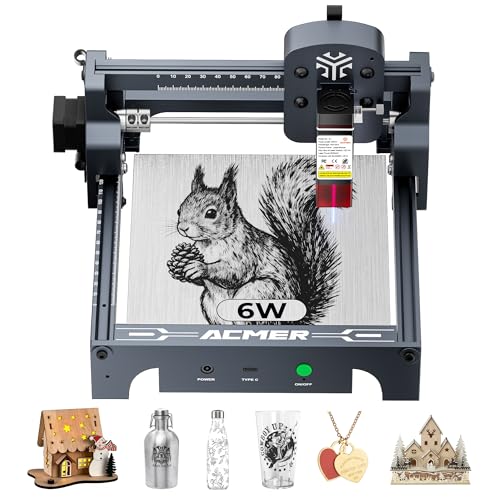
ACMER S1 6W Portable Laser Engraver
Best for: Small-scale desktop engraving and portability
- Laser Type
- Diode
- Laser Power
- 6000mW
- Working Area
- 130 x 130mm
- Engraving Speed
- 10,000mm/min
- Software Compatibility
- ACMER studio, LightBurn, LaserGRBL
- Compatible Material
- Wood, Acrylic, Silver
View on Amazon: ACMER S1 6W Portable Laser Engraver Affiliate link
The ACMER S1 is a 6000mW diode laser engraver with a 130x130mm working area. It reaches 10,000mm/min engraving speeds and offers 0.01mm positioning accuracy. This compact, 2kg unit arrives 99% preassembled for quick setup. It supports LightBurn and ACMER Studio software. The machine suits beginners and hobbyists needing a lightweight tool for detailed wood and acrylic projects.
Pros
- 6000mW diode laser power for cutting and engraving
- 130x130mm working area in a compact 2kg frame
- 10,000mm/min engraving speed with 0.01mm accuracy
- 99% preassembled for one-minute laser head installation
Cons
- 130x130mm working area is smaller than the 7W S2 model
- 6000mW power is lower than the competing 7000mW option
- No mention of mobile app or remote control support
Good fit if
- You need a lightweight engraver for small desktop spaces
- You want a machine that is 99% preassembled
- You require precise engraving on wood and acrylic
Skip if
- You need a larger working area than 130x130mm
- You prefer higher laser power than 6000mW
- You require a machine with built-in app control
Verdict: ACMER S1 6W Portable Laser is a practical entry-level choice for users prioritizing portability and ease of setup over raw power or large work envelopes. It fits hobbyists who value quick assembly and precise, small-scale detailing.

ACMER S2 7W Laser Engraver
Best for: Detailed engraving and thicker material cutting
- Laser Power
- 7W (7000 mW)
- Working Area
- 300 x 300 mm
- Engraving Speed
- Up to 10,000 mm/min
- Software Compatibility
- Acmerstudio, LightBurn, LaserGRBL
- Cutting Capacity
- 13 mm wood, 6 mm black acrylic
- Target Audience
- DIY, Small Business
View on Amazon: ACMER S2 7W Laser Engraver Affiliate link
The ACMER S2 7W Laser Engraver offers 7000mW power for cutting up to 13 mm wood and 6 mm acrylic. It features a 300 x 300 mm working area and engraving speeds up to 10,000 mm/min. You get 0.01 mm precision with a 0.08 x 0.08 mm laser spot. The system supports Acmerstudio, LightBurn, and LaserGRBL software. It includes safety shields and goggles for home or studio use.
Pros
- 7W laser output cuts thicker materials
- 300 x 300 mm large working area
- 0.01 mm engraving precision
- Up to 10,000 mm/min speed
Cons
- Heavier build than portable S1 model
- Requires computer for software control
- No built-in display for settings
Good fit if
- You need to cut up to 13 mm wood
- You want a large 300 x 300 mm workspace
- You prefer desktop software like LightBurn
Skip if
- You need a compact portable unit
- You want to engrave cylindrical items without buying a rotary module
- You require wireless connectivity
Verdict: ACMER S2 7W Laser Engraver fits users who need higher power and a larger bed for detailed work. It suits those ready to manage software on a desktop rather than using a portable device.
Specifications side by side
| Spec | ACMER S1 6W Portable Laser Engraver | ACMER S2 7W Laser Engraver |
|---|---|---|
| Laser Type | Diode | not stated |
| Laser Power | 6000mW | 7W (7000 mW) |
| Working Area | 130 x 130mm | 300 x 300 mm |
| Engraving Speed | 10,000mm/min | Up to 10,000 mm/min |
| Software Compatibility | ACMER studio, LightBurn, LaserGRBL | Acmerstudio, LightBurn, LaserGRBL |
| Cutting Capacity | not stated | 13 mm wood, 6 mm black acrylic |
| Compatible Material | Wood, Acrylic, Silver | not stated |
| Target Audience | DIY | DIY, Small Business |
| Form Factor | Desktop | not stated |
| Application | not stated | Tumblers |
| Dimensions | not stated | 1 × 1 × 1 inches |
| Size | 6000mW | Black, Orange |
| Color | Silver, White-6 | Black,orange |
| Model | not stated | S2 7W |
Frequently asked questions
Which ACMER laser engraver is better for portability?
The ACMER S1 is the better choice for portability. It is designed as a portable unit, making it suitable for users who value ease of setup and compact storage. The S2 is positioned as a desktop machine, which implies it is less mobile. If you need to move your engraver frequently, the S1’s form factor is more practical for small-scale desktop engraving.
Can the ACMER S1 engrave silver?
Yes, the ACMER S1 supports engraving on silver. Its listed compatible materials include wood, acrylic, and silver. This makes it a versatile option for hobbyists who want to create detailed jewelry or small metal accents alongside their wooden or plastic projects. The 6W power is sufficient for these specific material types.
Does the ACMER S2 have a larger working area than the S1?
Yes, the ACMER S2 offers a significantly larger working area. It features a 300 x 300 mm bed, whereas the S1 provides only a 130 x 130 mm space. This difference allows you to engrave larger signs or decorations on the S2 without needing to reposition materials during the process.
Is the ACMER S2 better for cutting thicker materials?
The ACMER S2 is better suited for cutting thicker materials due to its higher laser power. It offers 7W of true laser output compared to the S1’s 6W. This extra power enables more effective cutting performance on denser or thicker substrates, making it ideal for users who need detailed engraving and deeper cuts.
Are both ACMER models compatible with LightBurn software?
Yes, both the ACMER S1 and S2 are compatible with LightBurn software. This shared feature allows you to use the same design and control interface for either machine. It ensures a consistent workflow regardless of which model you choose, supporting both portable and desktop setups with the same digital tools.
What is the difference in laser power between the S1 and S2?
The ACMER S2 has 1W more laser power than the S1. The S2 provides 7W (7000mW) of output, while the S1 provides 6W (6000mW). Both machines share a 48W total system output, which powers the laser and control electronics. The S2’s higher wattage allows for slightly more aggressive engraving and cutting capabilities.
Which ACMER engraver is best for small-scale desktop projects?
The ACMER S1 is best for small-scale desktop projects. Its 130 x 130 mm working area fits well on standard desks and is ideal for precise, small-scale detailing. It is a practical entry-level choice for users who prioritize portability and ease of setup over raw power or large work envelopes.